RAID Mukesh N Tekwani www.elphinstonecollege.ac.in RAID
What is RAID? RAID –  R edundant  A rray of  I ndependent  D isks
Motivation for RAID Just as additional memory in form of cache, can improve system performance,  in the same way  additional disks  can also improve system performance In RAID, we use an  array  of disks. These disks operate  independently   Since there are many disks, multiple I/O requests can be handled in parallel if the data required is on separate disks A single I/O operation can be handled in parallel if the data required is distributed across multiple disks
Benefits of RAID Data loss can be very dangerous for an organisation RAID technology prevents data loss due to disk failure RAID technology can be implemented in hardware or software Servers make use of RAID technology
RAID Technology There are 7 levels RAID schemes. These are called RAID 0, RAID 1, … RAID 6 The  common characteristic  in all these levels is: A  set  of physical disk drives. The operating system views these separate disks as a  single logical disk . Data is distributed across the physical drives of the array. Redundant disk capacity is used to store parity information. Parity information can help in recovering data in case of disk failure
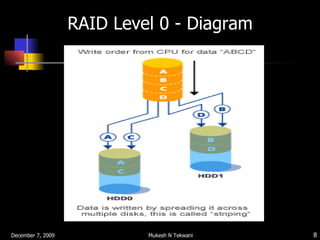
RAID Level 0 - Characteristics RAID level 0 divides data into block units and writes them across a number of disks.  As data is placed across multiple disks, it is also called “ data stripping ” The advantage of distributing data over disks is that if two different I/O requests are pending for two different blocks of data, then there is a possibility that the requested blocks are on different disks
RAID Level 0 There is  no parity checking  of data. So if data in one drive gets corrupted then all the data would be lost. Thus RAID 0 does  not  support  data   recovery Spanning  is another term that is used with  RAID level 0 because the logical disk will span all the physical drives RAID 0 implementation requires  minimum 2 disks
RAID Level 0 - Diagram
RAID Level 0 - Advantages  Advantage of RAID level 0 is that it increases speed.  Throughput (speed) is increased because : Multiple data requests probably not on same disk Disks seek in parallel A set of data is likely to be striped across multiple disks Implementation is easy No overhead of parity calculation
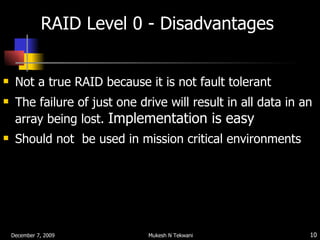
RAID Level 0 - Disadvantages  Not a true RAID because it is not fault tolerant  The failure of just one drive will result in all data in an array being lost.  Implementation is easy Should not  be used in mission critical environments
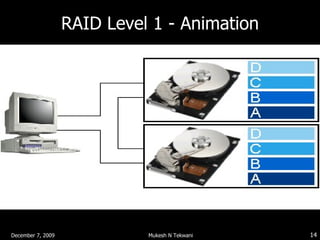
RAID Level 1 - Characteristics This level is called " mirroring " as it copies data onto two disk drives simultaneously.  As same data is placed on multiple disks, it is also called “ data mirroring ” The automatic duplication of the data means there is little likelihood of data loss or system downtime.
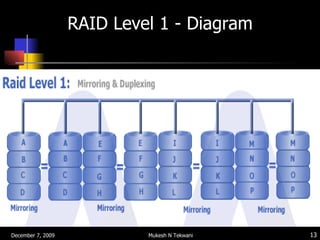
RAID Level 1 Data stripping is used as in RAID 0, but each logical strip is mapped to two separate physical drives Thus every disk in the array has a mirror disk that contains the same data Data can be read from either disk but is written on both disks
RAID Level 1 - Diagram
RAID Level 1 - Animation
RAID Level 1 - Characteristics  A read request can be executed by either of the two disks A write request means that both the disks must be updated. This can be done in parallel There is no overhead of storing parity information Recovery from failure is simple. If one drive fails we just have to access data from the second drive
RAID Level 1 - Advantages  Main advantage is RAID 1 provides fault tolerance. If one disk fails, the other automatically takes over.  So continuous operation is maintained. RAID 1 is used to store  systems software (such as drivers, operating systems, compilers, etc) and other highly critical files.
RAID Level 1 - Disadvantages  Main disadvantage is cost. Since data is duplicated, storage costs increase.
RAID Level 2  In RAID 2 mechanism, all disks participate in the execution of every I/O request. The spindles of individual disk drives are synchronized so that each disk head is in the same position on each disk at any given time. Data stripping is used. Error correcting code is also calculated and stored with data Not implemented in practice due to high costs and overheads
RAID Level 3  Data is divided into byte units and written across multiple disk drives. Parity information is stored for each disk section and written to a dedicated parity drive. All disks can be accessed in parallel  Data can be transferred in bulk. Thus high speed data transmission is possible
RAID Level 3  In case of drive failure, the parity drive is accessed and data is reconstructed from the remaining devices. Once the failed drive is replaced, the missing data can be restored on the new drive  RAID 3 can provide very high data transfer rates
RAID Level 3
RAID Level 3  Parity Disk
Important Questions on RAID  What is the motivation for using RAID? What common characteristics are shared by all RAID levels? Explain RAID level 0, 1, 2, and 3. Explain the term  striped  data. How is redundancy achieved in a RAID system?
Thank you !!!

RAID

  • 1.
    RAID Mukesh NTekwani www.elphinstonecollege.ac.in RAID
  • 2.
    What is RAID?RAID – R edundant A rray of I ndependent D isks
  • 3.
    Motivation for RAIDJust as additional memory in form of cache, can improve system performance, in the same way additional disks can also improve system performance In RAID, we use an array of disks. These disks operate independently Since there are many disks, multiple I/O requests can be handled in parallel if the data required is on separate disks A single I/O operation can be handled in parallel if the data required is distributed across multiple disks
  • 4.
    Benefits of RAIDData loss can be very dangerous for an organisation RAID technology prevents data loss due to disk failure RAID technology can be implemented in hardware or software Servers make use of RAID technology
  • 5.
    RAID Technology Thereare 7 levels RAID schemes. These are called RAID 0, RAID 1, … RAID 6 The common characteristic in all these levels is: A set of physical disk drives. The operating system views these separate disks as a single logical disk . Data is distributed across the physical drives of the array. Redundant disk capacity is used to store parity information. Parity information can help in recovering data in case of disk failure
  • 6.
    RAID Level 0- Characteristics RAID level 0 divides data into block units and writes them across a number of disks. As data is placed across multiple disks, it is also called “ data stripping ” The advantage of distributing data over disks is that if two different I/O requests are pending for two different blocks of data, then there is a possibility that the requested blocks are on different disks
  • 7.
    RAID Level 0There is no parity checking of data. So if data in one drive gets corrupted then all the data would be lost. Thus RAID 0 does not support data recovery Spanning is another term that is used with RAID level 0 because the logical disk will span all the physical drives RAID 0 implementation requires minimum 2 disks
  • 8.
    RAID Level 0- Diagram
  • 9.
    RAID Level 0- Advantages Advantage of RAID level 0 is that it increases speed. Throughput (speed) is increased because : Multiple data requests probably not on same disk Disks seek in parallel A set of data is likely to be striped across multiple disks Implementation is easy No overhead of parity calculation
  • 10.
    RAID Level 0- Disadvantages Not a true RAID because it is not fault tolerant The failure of just one drive will result in all data in an array being lost. Implementation is easy Should not be used in mission critical environments
  • 11.
    RAID Level 1- Characteristics This level is called " mirroring " as it copies data onto two disk drives simultaneously. As same data is placed on multiple disks, it is also called “ data mirroring ” The automatic duplication of the data means there is little likelihood of data loss or system downtime.
  • 12.
    RAID Level 1Data stripping is used as in RAID 0, but each logical strip is mapped to two separate physical drives Thus every disk in the array has a mirror disk that contains the same data Data can be read from either disk but is written on both disks
  • 13.
    RAID Level 1- Diagram
  • 14.
    RAID Level 1- Animation
  • 15.
    RAID Level 1- Characteristics A read request can be executed by either of the two disks A write request means that both the disks must be updated. This can be done in parallel There is no overhead of storing parity information Recovery from failure is simple. If one drive fails we just have to access data from the second drive
  • 16.
    RAID Level 1- Advantages Main advantage is RAID 1 provides fault tolerance. If one disk fails, the other automatically takes over. So continuous operation is maintained. RAID 1 is used to store systems software (such as drivers, operating systems, compilers, etc) and other highly critical files.
  • 17.
    RAID Level 1- Disadvantages Main disadvantage is cost. Since data is duplicated, storage costs increase.
  • 18.
    RAID Level 2 In RAID 2 mechanism, all disks participate in the execution of every I/O request. The spindles of individual disk drives are synchronized so that each disk head is in the same position on each disk at any given time. Data stripping is used. Error correcting code is also calculated and stored with data Not implemented in practice due to high costs and overheads
  • 19.
    RAID Level 3 Data is divided into byte units and written across multiple disk drives. Parity information is stored for each disk section and written to a dedicated parity drive. All disks can be accessed in parallel Data can be transferred in bulk. Thus high speed data transmission is possible
  • 20.
    RAID Level 3 In case of drive failure, the parity drive is accessed and data is reconstructed from the remaining devices. Once the failed drive is replaced, the missing data can be restored on the new drive RAID 3 can provide very high data transfer rates
  • 21.
  • 22.
    RAID Level 3 Parity Disk
  • 23.
    Important Questions onRAID What is the motivation for using RAID? What common characteristics are shared by all RAID levels? Explain RAID level 0, 1, 2, and 3. Explain the term striped data. How is redundancy achieved in a RAID system?
  • 24.