Group 8
Redundant Array of Independent Disks
RAID
Từ Hạo Thiên
20110031
C
3
B
2
01
02
03
Group 8
D
4
04
What is RAID
General Explain About RAID
Requirements
What you need to run RAID?
RAID types
RAID 0, 1, 5, 10, …
01
02
03
TABLE OF CONTENTS
Comparsion
Pros and Cons between RAIDs
04
Redundant Array of Independent Disks (RAID).
RAID was used as a hedge because it allowed
data to be written to multiple hard disks at the
same time. Later, RAID has had many variations
that also allow to significantly increase the speed
of accessing data from the hard disk.
What is RAID
– RAID should only work with hard drives of equal capacity.
– Using RAID will consume more drives than usual, but in return, the data
will be more secure.
– RAID can be used for any operating system, from Window 98, window
2000, window XP, Window 10, window server 2016, MAC OS X, Linux…etc.
- RAID characteristics: fault – tolerance, performance and capacity.
About RAID
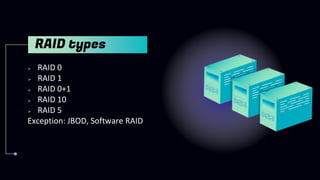
 RAID 0
 RAID 1
 RAID 0+1
 RAID 10
 RAID 5
Exception: JBOD, Software RAID
RAID types
RAID 0
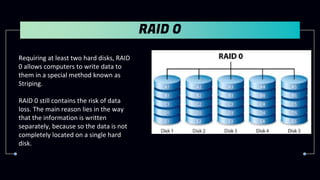
Requiring at least two hard disks, RAID
0 allows computers to write data to
them in a special method known as
Striping.
RAID 0 still contains the risk of data
loss. The main reason lies in the way
that the information is written
separately, because so the data is not
completely located on a single hard
disk.
RAID 1
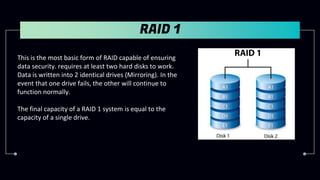
This is the most basic form of RAID capable of ensuring
data security. requires at least two hard disks to work.
Data is written into 2 identical drives (Mirroring). In the
event that one drive fails, the other will continue to
function normally.
The final capacity of a RAID 1 system is equal to the
capacity of a single drive.
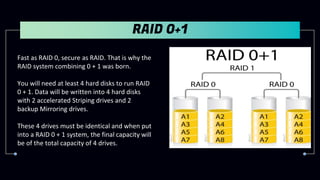
RAID 0+1
Fast as RAID 0, secure as RAID. That is why the
RAID system combining 0 + 1 was born.
You will need at least 4 hard disks to run RAID
0 + 1. Data will be written into 4 hard disks
with 2 accelerated Striping drives and 2
backup Mirroring drives.
These 4 drives must be identical and when put
into a RAID 0 + 1 system, the final capacity will
be of the total capacity of 4 drives.
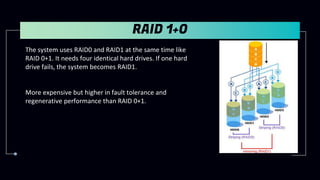
RAID 1+0
The system uses RAID0 and RAID1 at the same time like
RAID 0+1. It needs four identical hard drives. If one hard
drive fails, the system becomes RAID1.
More expensive but higher in fault tolerance and
regenerative performance than RAID 0+1.
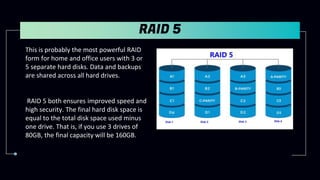
RAID 5
This is probably the most powerful RAID
form for home and office users with 3 or
5 separate hard disks. Data and backups
are shared across all hard drives.
RAID 5 both ensures improved speed and
high security. The final hard disk space is
equal to the total disk space used minus
one drive. That is, if you use 3 drives of
80GB, the final capacity will be 160GB.
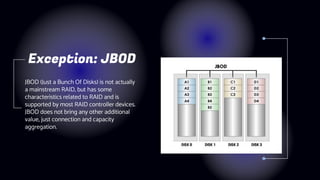
JBOD (Just a Bunch Of Disks) is not actually
a mainstream RAID, but has some
characteristics related to RAID and is
supported by most RAID controller devices.
JBOD does not bring any other additional
value, just connection and capacity
aggregation.
Exception: JBOD
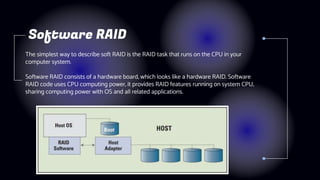
The simplest way to describe soft RAID is the RAID task that runs on the CPU in your
computer system.
Software RAID consists of a hardware board, which looks like a hardware RAID. Software
RAID code uses CPU computing power, it provides RAID features running on system CPU,
sharing computing power with OS and all related applications.
Software RAID
RAID
Requirements
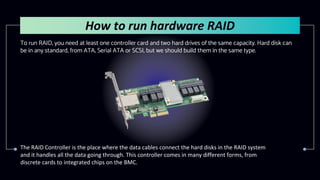
To run RAID, you need at least one controller card and two hard drives of the same capacity. Hard disk can
be in any standard, from ATA, Serial ATA or SCSI, but we should build them in the same type.
How to run hardware RAID
The RAID Controller is the place where the data cables connect the hard disks in the RAID system
and it handles all the data going through. This controller comes in many different forms, from
discrete cards to integrated chips on the BMC.
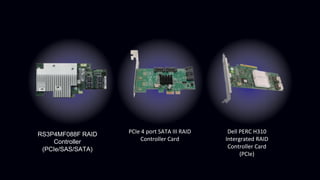
RS3P4MF088F RAID
Controller
(PCIe/SAS/SATA)
PCIe 4 port SATA III RAID
Controller Card
Dell PERC H310
Intergrated RAID
Controller Card
(PCIe)
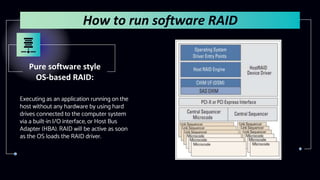
Pure software style
OS-based RAID:
Executing as an application running on the
host without any hardware by using hard
drives connected to the computer system
via a built-in I/O interface, or Host Bus
Adapter (HBA). RAID will be active as soon
as the OS loads the RAID driver.
How to run software RAID
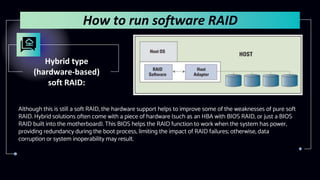
Hybrid type
(hardware-based)
soft RAID:
Although this is still a soft RAID, the hardware support helps to improve some of the weaknesses of pure soft
RAID. Hybrid solutions often come with a piece of hardware (such as an HBA with BIOS RAID, or just a BIOS
RAID built into the motherboard). This BIOS helps the RAID function to work when the system has power,
providing redundancy during the boot process, limiting the impact of RAID failures; otherwise, data
corruption or system inoperability may result.
How to run software RAID
Integrated hard RAID solution based on RAID-on-
Chip (ROC) technology:
For the ROC solution, the RAID processor need the memory controller, the host interface,
the I/O interface to connect the hard drive, and sometimes the memory, all inside a
single chip. This chip is integrated into the motherboard and provides hardware RAID
functionality at a greatly reduced cost (only a dedicated ASIC chip is required).
Advantages and disadvantages of hard RAID based on ROC technology:
- Advantages: Protection when boot, host-independent RAID application, protect data
from viruses, offloading RAID tasks from host, having its own GUI and software,…
- Disavantages: Limited flexibility & mobility,
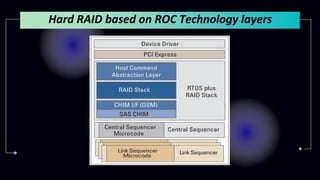
Hard RAID based on ROC Technology layers
Comparison
Pure software
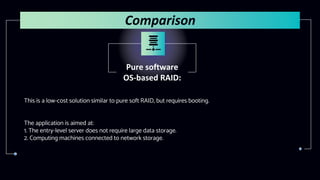
OS-based RAID:
This is a low-cost solution similar to pure soft RAID, but requires booting.
The application is aimed at:
1. The entry-level server does not require large data storage.
2. Computing machines connected to network storage.
Comparison
Hybrid software
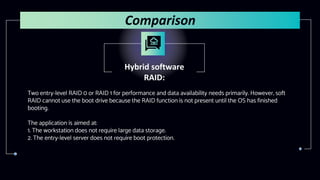
RAID:
Two entry-level RAID 0 or RAID 1 for performance and data availability needs primarily. However, soft
RAID cannot use the boot drive because the RAID function is not present until the OS has finished
booting.
The application is aimed at:
1. The workstation does not require large data storage.
2. The entry-level server does not require boot protection.
Comparison
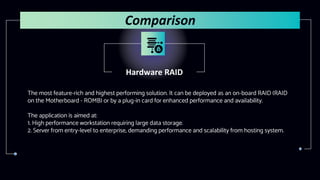
Hardware RAID
The most feature-rich and highest performing solution. It can be deployed as an on-board RAID (RAID
on the Motherboard - ROMB) or by a plug-in card for enhanced performance and availability.
The application is aimed at:
1. High performance workstation requiring large data storage.
2. Server from entry-level to enterprise, demanding performance and scalability from hosting system.
Comparison
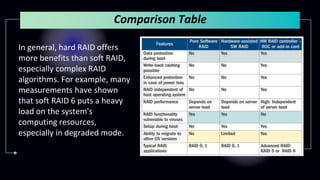
Comparison Table
In general, hard RAID offers
more benefits than soft RAID,
especially complex RAID
algorithms. For example, many
measurements have shown
that soft RAID 6 puts a heavy
load on the system's
computing resources,
especially in degraded mode.
Do you have any questions?
This is the end
Thanks for watching!

RAID CAAL

  • 1.
    Group 8 Redundant Arrayof Independent Disks RAID
  • 2.
  • 3.
    What is RAID GeneralExplain About RAID Requirements What you need to run RAID? RAID types RAID 0, 1, 5, 10, … 01 02 03 TABLE OF CONTENTS Comparsion Pros and Cons between RAIDs 04
  • 4.
    Redundant Array ofIndependent Disks (RAID). RAID was used as a hedge because it allowed data to be written to multiple hard disks at the same time. Later, RAID has had many variations that also allow to significantly increase the speed of accessing data from the hard disk. What is RAID
  • 5.
    – RAID shouldonly work with hard drives of equal capacity. – Using RAID will consume more drives than usual, but in return, the data will be more secure. – RAID can be used for any operating system, from Window 98, window 2000, window XP, Window 10, window server 2016, MAC OS X, Linux…etc. - RAID characteristics: fault – tolerance, performance and capacity. About RAID
  • 6.
     RAID 0 RAID 1  RAID 0+1  RAID 10  RAID 5 Exception: JBOD, Software RAID RAID types
  • 7.
    RAID 0 Requiring atleast two hard disks, RAID 0 allows computers to write data to them in a special method known as Striping. RAID 0 still contains the risk of data loss. The main reason lies in the way that the information is written separately, because so the data is not completely located on a single hard disk.
  • 8.
    RAID 1 This isthe most basic form of RAID capable of ensuring data security. requires at least two hard disks to work. Data is written into 2 identical drives (Mirroring). In the event that one drive fails, the other will continue to function normally. The final capacity of a RAID 1 system is equal to the capacity of a single drive.
  • 9.
    RAID 0+1 Fast asRAID 0, secure as RAID. That is why the RAID system combining 0 + 1 was born. You will need at least 4 hard disks to run RAID 0 + 1. Data will be written into 4 hard disks with 2 accelerated Striping drives and 2 backup Mirroring drives. These 4 drives must be identical and when put into a RAID 0 + 1 system, the final capacity will be of the total capacity of 4 drives.
  • 10.
    RAID 1+0 The systemuses RAID0 and RAID1 at the same time like RAID 0+1. It needs four identical hard drives. If one hard drive fails, the system becomes RAID1. More expensive but higher in fault tolerance and regenerative performance than RAID 0+1.
  • 11.
    RAID 5 This isprobably the most powerful RAID form for home and office users with 3 or 5 separate hard disks. Data and backups are shared across all hard drives. RAID 5 both ensures improved speed and high security. The final hard disk space is equal to the total disk space used minus one drive. That is, if you use 3 drives of 80GB, the final capacity will be 160GB.
  • 12.
    JBOD (Just aBunch Of Disks) is not actually a mainstream RAID, but has some characteristics related to RAID and is supported by most RAID controller devices. JBOD does not bring any other additional value, just connection and capacity aggregation. Exception: JBOD
  • 13.
    The simplest wayto describe soft RAID is the RAID task that runs on the CPU in your computer system. Software RAID consists of a hardware board, which looks like a hardware RAID. Software RAID code uses CPU computing power, it provides RAID features running on system CPU, sharing computing power with OS and all related applications. Software RAID
  • 14.
  • 15.
    To run RAID,you need at least one controller card and two hard drives of the same capacity. Hard disk can be in any standard, from ATA, Serial ATA or SCSI, but we should build them in the same type. How to run hardware RAID The RAID Controller is the place where the data cables connect the hard disks in the RAID system and it handles all the data going through. This controller comes in many different forms, from discrete cards to integrated chips on the BMC.
  • 16.
    RS3P4MF088F RAID Controller (PCIe/SAS/SATA) PCIe 4port SATA III RAID Controller Card Dell PERC H310 Intergrated RAID Controller Card (PCIe)
  • 17.
    Pure software style OS-basedRAID: Executing as an application running on the host without any hardware by using hard drives connected to the computer system via a built-in I/O interface, or Host Bus Adapter (HBA). RAID will be active as soon as the OS loads the RAID driver. How to run software RAID
  • 18.
    Hybrid type (hardware-based) soft RAID: Althoughthis is still a soft RAID, the hardware support helps to improve some of the weaknesses of pure soft RAID. Hybrid solutions often come with a piece of hardware (such as an HBA with BIOS RAID, or just a BIOS RAID built into the motherboard). This BIOS helps the RAID function to work when the system has power, providing redundancy during the boot process, limiting the impact of RAID failures; otherwise, data corruption or system inoperability may result. How to run software RAID
  • 19.
    Integrated hard RAIDsolution based on RAID-on- Chip (ROC) technology: For the ROC solution, the RAID processor need the memory controller, the host interface, the I/O interface to connect the hard drive, and sometimes the memory, all inside a single chip. This chip is integrated into the motherboard and provides hardware RAID functionality at a greatly reduced cost (only a dedicated ASIC chip is required). Advantages and disadvantages of hard RAID based on ROC technology: - Advantages: Protection when boot, host-independent RAID application, protect data from viruses, offloading RAID tasks from host, having its own GUI and software,… - Disavantages: Limited flexibility & mobility,
  • 20.
    Hard RAID basedon ROC Technology layers
  • 21.
  • 22.
    Pure software OS-based RAID: Thisis a low-cost solution similar to pure soft RAID, but requires booting. The application is aimed at: 1. The entry-level server does not require large data storage. 2. Computing machines connected to network storage. Comparison
  • 23.
    Hybrid software RAID: Two entry-levelRAID 0 or RAID 1 for performance and data availability needs primarily. However, soft RAID cannot use the boot drive because the RAID function is not present until the OS has finished booting. The application is aimed at: 1. The workstation does not require large data storage. 2. The entry-level server does not require boot protection. Comparison
  • 24.
    Hardware RAID The mostfeature-rich and highest performing solution. It can be deployed as an on-board RAID (RAID on the Motherboard - ROMB) or by a plug-in card for enhanced performance and availability. The application is aimed at: 1. High performance workstation requiring large data storage. 2. Server from entry-level to enterprise, demanding performance and scalability from hosting system. Comparison
  • 25.
    Comparison Table In general,hard RAID offers more benefits than soft RAID, especially complex RAID algorithms. For example, many measurements have shown that soft RAID 6 puts a heavy load on the system's computing resources, especially in degraded mode.
  • 26.
    Do you haveany questions? This is the end Thanks for watching!