PRESENTED BY : SEMINAR GUIDE :
ISTIAQ AHMED MOHAMMED MUJEER ULLA
8TH SEM ISE ASST PROFESSOR
1HK09IS018 DEPT. OF ISE
HKBKCE HKBKCE
PRESENTATION OUTLINE:
~WHAT IS DATA PROTECTION?
~WHAT IS RAID?
~WHY RAID
~RAID ARRAY COMPONENTS
~RAID IMPLEMENTATION
~RAID LEVELS
~STRIPING AND MIRRORING
~TYPES OF RAID
~RAID COMPARISON
~ADVANTAGES
~DISADVANTAGES
~CONCLUSION
WHAT IS DATA PROTECTION?
 Backing up all your important data that is very important
 DFFERENT WAYS TO PROTECT DATA
 Applications can always be reinstalled, but your data is the most important thing on
your computer or network.
 Here's a look at the ways you can protect that data.
 Save as you work
 Make a backup
 Never open email attachments by habit
 Never trust disks from other people
 Update your software
WHAT IS RAID?
 RAID : Redundant Array of Independent Disks
 The RAID is a storage technology that combines
multiple disk drive components into a logical unit for
the purposes of data redundancy and performance
improvement.
The term "RAID" was first used by David Patterson,
Garth A. Gibson, and Randy Katz at the University of
California, Berkeley in 1987
RAID Array Components
RAID
Controller
Hard Disks
Logical
Array
Physical
Array
RAID Array
Host
RAID Array Components
 RAID array is an enclosure that contains a number of HDDs
and the supporting hardware and software to implement
RAID
 HDDs inside a RAID array are usually contained in smaller
sub-enclosures called as physical arrays, which hold a fixed
number of HDDs, and may also include other supporting
hardware, such as power supplies.
 A subset of disks within a RAID array can be grouped to form
logical associations called logical arrays, also known as a
RAID set or a RAID group. Logical arrays are comprised of
logical volumes (LV)
Why RAID
 Performance limitation of disk drive
 An individual drive has a certain life expectancy
 Measured in MTBF (Mean Time Between Failure)
 RAID was introduced to mitigate this problem
 RAID allows to store the same data redundantly (in
multiple paces) in a balanced way to improve overall
storage performance.
 RAID provides:
 Increase capacity, Higher availability ,Increased
performance
RAID Implementations
 Hardware (usually a specialized disk controller card)
 Controls all drives attached to it
 Implemented on host or an array
 Array(s) appear to host operating system as a regular disk drive
 Provided with administrative software
 Software
 Runs as part of the operating system
 Host based
 Performance is dependent on CPU workload
 Does not support all RAID levels
RAID Levels
 0 Striped array with no fault tolerance
 1 Disk mirroring
 Nested RAID (i.e., 1 + 0, 0 + 1, etc.)
 3 Parallel access array with dedicated parity disk
 4 Striped array with independent disks and a
dedicated parity disk
 5 Striped array with independent disks and distributed
parity
 6 Striped array with independent disks and dual
distributed parity
Striping
 Striping is the process of dividing a body of data into
blocks and spreading the data blocks across
several partitions on several hard disks
Mirroring
• Mirroring is a technique whereby data is stored on two
different HDDs, yielding two copies of data
RAID 0(Striping)
 Data is distributed across the HDDs in the RAID set.
 Allows multiple data to be read or written
simultaneously, and therefore improves performance.
 Does not provide data protection and availability in
the event of disk failures.
RAID 0
1
9
5
2
10
6
3
11
7
0
Host
RAID
Controller
RAID 1(Mirroring)
 Data is stored on two different HDDs, yielding two copies
of the same data.
 Provides availability.
 In the event of HDD failure, access to data is still available
from the surviving HDD.
 When the failed disk is replaced with a new one, data is
automatically copied from the surviving disk to the new
disk.
 Done automatically by RAID the controller.
 Disadvantage: The amount of storage capacity is twice the
amount of data stored.
 Mirroring is NOT the same as doing backup!
- 14
RAID 1 – Disk Mirroring
RAID
Controller
Block 1 Block 1Block 1Block 0 Block 0Block 0
Host
Nested RAID
 Combines the performance benefits of RAID 0 with
the redundancy benefit of RAID 1
 RAID require an even number of disks, the minimum
being four
 RAID 1+0 is also known as RAID 10 (Ten) or RAID 1/0.
Similarly, RAID 0+1 is also known as RAID 01 or RAID
0/1
 RAID 1+0 performs well for workloads that use small,
random, write-intensive I/O
Nested RAID Contd:
 Applications that benefit from RAID 1+0 include
the following:
 High transaction rate Online Transaction Processing
(OLTP)
Large messaging installations
 Database applications that require high I/O rate,
random access, and high availability
 RAID 1+0 and RAID 0+1 are not same, Under normal
conditions, RAID levels 1+0 and 0+1 offer identical
benefits, but rebuild operations in the case of disk
failure differ between the two
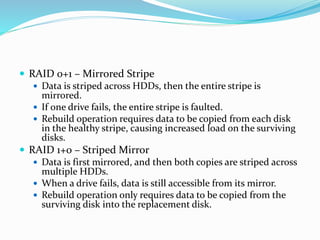
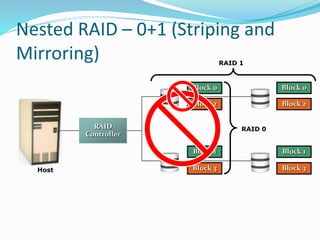
 RAID 0+1 – Mirrored Stripe
 Data is striped across HDDs, then the entire stripe is
mirrored.
 If one drive fails, the entire stripe is faulted.
 Rebuild operation requires data to be copied from each disk
in the healthy stripe, causing increased load on the surviving
disks.
 RAID 1+0 – Striped Mirror
 Data is first mirrored, and then both copies are striped across
multiple HDDs.
 When a drive fails, data is still accessible from its mirror.
 Rebuild operation only requires data to be copied from the
surviving disk into the replacement disk.
Nested RAID – 0+1 (Striping and
Mirroring)
Block 3
Block 2
Block 1
Host
RAID 0
Block 0
Block 3Block 2Block 1Block 0
RAID 1
RAID
Controller
Nested RAID – 0+1 (Striping and
Mirroring)
RAID
Controller
Block 3
Block 2
Block 1
RAID 0
Block 0
RAID 1
Block 3
Block 2
Block 1
Block 0
Block 3
Block 2
Block 1
Block 0
Host
Host
Nested RAID – 1+0 (Mirroring and
Striping)
Block 3
Block 3
Block 1
RAID 1Block 0Block 0
Block 1
RAID 0
Block 2Block 2
RAID
Controller
RAID Redundancy: Parity
Parity Disk
1
9
5
3
11
7
0
0 1 2 3
4 5 6 7
4
6
1
7
18
Host
RAID
Controller
Parity calculation 4 + 6 + 1 + 7 = 18
The middle drive fails:
4 + 6 + ? + 7 = 18
? = 18 – 4 – 6 – 7
? = 1
?
Parity RAID
 Parity is a method of protecting striped data from HDD
failure without the cost of mirroring
 Additional HDD is added to the stripe width to hold parity,
a mathematical construct that allows re-creation of the
missing data
 Parity is a redundancy check that ensures full protection of
data without maintaining a full set of duplicate data
 Parity information can be stored on separate, dedicated
HDDs or distributed across all the drives in a RAID set
 parity calculation is a bitwise XOR operation
 Calculation of parity is a function of the RAID controller
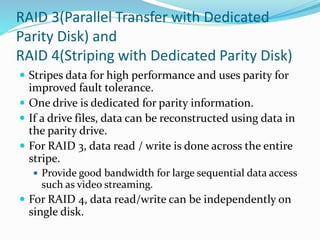
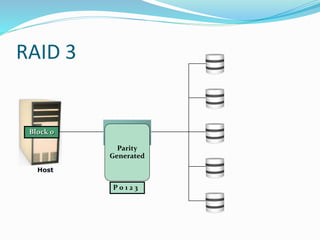
RAID 3(Parallel Transfer with Dedicated
Parity Disk) and
RAID 4(Striping with Dedicated Parity Disk)
 Stripes data for high performance and uses parity for
improved fault tolerance.
 One drive is dedicated for parity information.
 If a drive files, data can be reconstructed using data in
the parity drive.
 For RAID 3, data read / write is done across the entire
stripe.
 Provide good bandwidth for large sequential data access
such as video streaming.
 For RAID 4, data read/write can be independently on
single disk.
Host
RAID
Controller
Block 1
Block 2
Block 3
P 0 1 2 3
Block 0Block 3Block 2Block 1Block 0
Parity
Generated
RAID 3
RAID 5 and RAID 6
 RAID 5 is similar to RAID 4, except that the parity is
distributed across all disks instead of stored on a dedicated
disk.
 This overcomes the write bottleneck on the parity disk.
 RAID 6 is similar to RAID 5, except that it includes a
second parity element to allow survival in the event of two
disk failures.
 The probability for this to happen increases and the number
of drives in the array increases.
 Calculates both horizontal parity (as in RAID 5) and diagonal
parity.
 Has more write penalty than in RAID 5.
 Rebuild operation may take longer than on RAID 5.
Host
Block 0
P 0 1 2 3
Block 7
RAID
Controller
P 0 1 2 3
Block 0Block 4Block 0
Block 1
Block 5
Block 2
Block 6
Block 3
Parity
Generated
Block 0
P 0 1 2 3
Block 4
P 4 5 6 7P 4 5 6 7
Block 4
P 4 5 6 7
Block 4
Parity
Generated
RAID 5
RAID Comparison
 ADVANTAGES OF RAID
 Increases the performance and reliability of the system
 Increases capacity and higher availability
 The RAID increases the parity check
 Disk stripping
 The mirroring is the complete duplication of the data
 DISADVANTAGES OF RAID
 Needs to be written the drivers for a Network Operating
System(NOS)
 It is very much difficult for an administrator to configure the
RAID system
 The system should support the RAID drives
 Along with the disadvantages also the RAID system offers a lot
of growth and stability and the advantages override these
things.
 Hence RAID is still the most widely used server even along
with the above mentioned disadvantages.
Conclusion
 Skillful combining of standard components and
additional software can make the disk subsystem as a
whole significantly more high performance and more
fault-tolerant than its individual components.
 This is how the data Protection works by using the
concepts of RAID Levels
References
 Storage Networks Explained by ulf Topper.
 Storage Area Networks Complete Reference.
 www.emc.com
THANK YOU

SEMINAR

  • 1.
    PRESENTED BY :SEMINAR GUIDE : ISTIAQ AHMED MOHAMMED MUJEER ULLA 8TH SEM ISE ASST PROFESSOR 1HK09IS018 DEPT. OF ISE HKBKCE HKBKCE
  • 2.
    PRESENTATION OUTLINE: ~WHAT ISDATA PROTECTION? ~WHAT IS RAID? ~WHY RAID ~RAID ARRAY COMPONENTS ~RAID IMPLEMENTATION ~RAID LEVELS ~STRIPING AND MIRRORING ~TYPES OF RAID ~RAID COMPARISON ~ADVANTAGES ~DISADVANTAGES ~CONCLUSION
  • 3.
    WHAT IS DATAPROTECTION?  Backing up all your important data that is very important  DFFERENT WAYS TO PROTECT DATA  Applications can always be reinstalled, but your data is the most important thing on your computer or network.  Here's a look at the ways you can protect that data.  Save as you work  Make a backup  Never open email attachments by habit  Never trust disks from other people  Update your software
  • 4.
    WHAT IS RAID? RAID : Redundant Array of Independent Disks  The RAID is a storage technology that combines multiple disk drive components into a logical unit for the purposes of data redundancy and performance improvement. The term "RAID" was first used by David Patterson, Garth A. Gibson, and Randy Katz at the University of California, Berkeley in 1987
  • 5.
    RAID Array Components RAID Controller HardDisks Logical Array Physical Array RAID Array Host
  • 6.
    RAID Array Components RAID array is an enclosure that contains a number of HDDs and the supporting hardware and software to implement RAID  HDDs inside a RAID array are usually contained in smaller sub-enclosures called as physical arrays, which hold a fixed number of HDDs, and may also include other supporting hardware, such as power supplies.  A subset of disks within a RAID array can be grouped to form logical associations called logical arrays, also known as a RAID set or a RAID group. Logical arrays are comprised of logical volumes (LV)
  • 7.
    Why RAID  Performancelimitation of disk drive  An individual drive has a certain life expectancy  Measured in MTBF (Mean Time Between Failure)  RAID was introduced to mitigate this problem  RAID allows to store the same data redundantly (in multiple paces) in a balanced way to improve overall storage performance.  RAID provides:  Increase capacity, Higher availability ,Increased performance
  • 8.
    RAID Implementations  Hardware(usually a specialized disk controller card)  Controls all drives attached to it  Implemented on host or an array  Array(s) appear to host operating system as a regular disk drive  Provided with administrative software  Software  Runs as part of the operating system  Host based  Performance is dependent on CPU workload  Does not support all RAID levels
  • 9.
    RAID Levels  0Striped array with no fault tolerance  1 Disk mirroring  Nested RAID (i.e., 1 + 0, 0 + 1, etc.)  3 Parallel access array with dedicated parity disk  4 Striped array with independent disks and a dedicated parity disk  5 Striped array with independent disks and distributed parity  6 Striped array with independent disks and dual distributed parity
  • 10.
    Striping  Striping isthe process of dividing a body of data into blocks and spreading the data blocks across several partitions on several hard disks Mirroring • Mirroring is a technique whereby data is stored on two different HDDs, yielding two copies of data
  • 11.
    RAID 0(Striping)  Datais distributed across the HDDs in the RAID set.  Allows multiple data to be read or written simultaneously, and therefore improves performance.  Does not provide data protection and availability in the event of disk failures.
  • 12.
  • 13.
    RAID 1(Mirroring)  Datais stored on two different HDDs, yielding two copies of the same data.  Provides availability.  In the event of HDD failure, access to data is still available from the surviving HDD.  When the failed disk is replaced with a new one, data is automatically copied from the surviving disk to the new disk.  Done automatically by RAID the controller.  Disadvantage: The amount of storage capacity is twice the amount of data stored.  Mirroring is NOT the same as doing backup!
  • 14.
    - 14 RAID 1– Disk Mirroring RAID Controller Block 1 Block 1Block 1Block 0 Block 0Block 0 Host
  • 15.
    Nested RAID  Combinesthe performance benefits of RAID 0 with the redundancy benefit of RAID 1  RAID require an even number of disks, the minimum being four  RAID 1+0 is also known as RAID 10 (Ten) or RAID 1/0. Similarly, RAID 0+1 is also known as RAID 01 or RAID 0/1  RAID 1+0 performs well for workloads that use small, random, write-intensive I/O
  • 16.
    Nested RAID Contd: Applications that benefit from RAID 1+0 include the following:  High transaction rate Online Transaction Processing (OLTP) Large messaging installations  Database applications that require high I/O rate, random access, and high availability  RAID 1+0 and RAID 0+1 are not same, Under normal conditions, RAID levels 1+0 and 0+1 offer identical benefits, but rebuild operations in the case of disk failure differ between the two
  • 17.
     RAID 0+1– Mirrored Stripe  Data is striped across HDDs, then the entire stripe is mirrored.  If one drive fails, the entire stripe is faulted.  Rebuild operation requires data to be copied from each disk in the healthy stripe, causing increased load on the surviving disks.  RAID 1+0 – Striped Mirror  Data is first mirrored, and then both copies are striped across multiple HDDs.  When a drive fails, data is still accessible from its mirror.  Rebuild operation only requires data to be copied from the surviving disk into the replacement disk.
  • 18.
    Nested RAID –0+1 (Striping and Mirroring) Block 3 Block 2 Block 1 Host RAID 0 Block 0 Block 3Block 2Block 1Block 0 RAID 1 RAID Controller
  • 19.
    Nested RAID –0+1 (Striping and Mirroring) RAID Controller Block 3 Block 2 Block 1 RAID 0 Block 0 RAID 1 Block 3 Block 2 Block 1 Block 0 Block 3 Block 2 Block 1 Block 0 Host
  • 20.
    Host Nested RAID –1+0 (Mirroring and Striping) Block 3 Block 3 Block 1 RAID 1Block 0Block 0 Block 1 RAID 0 Block 2Block 2 RAID Controller
  • 21.
    RAID Redundancy: Parity ParityDisk 1 9 5 3 11 7 0 0 1 2 3 4 5 6 7 4 6 1 7 18 Host RAID Controller Parity calculation 4 + 6 + 1 + 7 = 18 The middle drive fails: 4 + 6 + ? + 7 = 18 ? = 18 – 4 – 6 – 7 ? = 1 ?
  • 22.
    Parity RAID  Parityis a method of protecting striped data from HDD failure without the cost of mirroring  Additional HDD is added to the stripe width to hold parity, a mathematical construct that allows re-creation of the missing data  Parity is a redundancy check that ensures full protection of data without maintaining a full set of duplicate data  Parity information can be stored on separate, dedicated HDDs or distributed across all the drives in a RAID set  parity calculation is a bitwise XOR operation  Calculation of parity is a function of the RAID controller
  • 23.
    RAID 3(Parallel Transferwith Dedicated Parity Disk) and RAID 4(Striping with Dedicated Parity Disk)  Stripes data for high performance and uses parity for improved fault tolerance.  One drive is dedicated for parity information.  If a drive files, data can be reconstructed using data in the parity drive.  For RAID 3, data read / write is done across the entire stripe.  Provide good bandwidth for large sequential data access such as video streaming.  For RAID 4, data read/write can be independently on single disk.
  • 24.
    Host RAID Controller Block 1 Block 2 Block3 P 0 1 2 3 Block 0Block 3Block 2Block 1Block 0 Parity Generated RAID 3
  • 25.
    RAID 5 andRAID 6  RAID 5 is similar to RAID 4, except that the parity is distributed across all disks instead of stored on a dedicated disk.  This overcomes the write bottleneck on the parity disk.  RAID 6 is similar to RAID 5, except that it includes a second parity element to allow survival in the event of two disk failures.  The probability for this to happen increases and the number of drives in the array increases.  Calculates both horizontal parity (as in RAID 5) and diagonal parity.  Has more write penalty than in RAID 5.  Rebuild operation may take longer than on RAID 5.
  • 26.
    Host Block 0 P 01 2 3 Block 7 RAID Controller P 0 1 2 3 Block 0Block 4Block 0 Block 1 Block 5 Block 2 Block 6 Block 3 Parity Generated Block 0 P 0 1 2 3 Block 4 P 4 5 6 7P 4 5 6 7 Block 4 P 4 5 6 7 Block 4 Parity Generated RAID 5
  • 27.
  • 28.
     ADVANTAGES OFRAID  Increases the performance and reliability of the system  Increases capacity and higher availability  The RAID increases the parity check  Disk stripping  The mirroring is the complete duplication of the data
  • 29.
     DISADVANTAGES OFRAID  Needs to be written the drivers for a Network Operating System(NOS)  It is very much difficult for an administrator to configure the RAID system  The system should support the RAID drives  Along with the disadvantages also the RAID system offers a lot of growth and stability and the advantages override these things.  Hence RAID is still the most widely used server even along with the above mentioned disadvantages.
  • 30.
    Conclusion  Skillful combiningof standard components and additional software can make the disk subsystem as a whole significantly more high performance and more fault-tolerant than its individual components.  This is how the data Protection works by using the concepts of RAID Levels
  • 31.
    References  Storage NetworksExplained by ulf Topper.  Storage Area Networks Complete Reference.  www.emc.com
  • 32.