Department of Avionics Engineering
AE-3452
Modern Control Systems
Experiment No.2
Provided MATLAB functions, convert the State Space Model into a
classical control system and vice versa
Prepared for
By:
Name:
ID:
Section:
Semester:
Total Marks: ________________
Obtained Marks: _____________
Signature: __________________
Date: _____________________
Provided MATLAB functions, convert the State Space Model into a
classical control system and vice versa
Objective:
To transform the system model from transfer function to state space, and vice versa on MATLAB
Theory:
Given a transfer function of the form:
MATALB can be used to obtain a state-space representation of the transfer function with the following
command
It is important to note that the state space representation is not unique, i.e. there are many state-space
representations for the same system. The MATLAB command gives just one possible state-space
equation.
Example: Consider the transfer function
A possible state-space representation for this system is:
For the example transfer function, MATLAB produces the following state-space representation:
With the following program to get the matrices:
>> num = [0 0 1 0];
>> den = [1 14 56 160];
>> [A, B, C, D] = tf2ss(num, den)
State Space to Transfer Function
To obtain the transfer function from state-space equations, use the following MATLAB code
where num_in must be specified for systems with more than one input. For example, if there is only one
input, then num_in = 1, if there are two inputs then num_in = 2, etc. For systems with only one input,
then the following code is allowed
Example. Given the state-space equations:
MATLAB produces the following system transfer function:
The MATLAB implementation of this is given by the following code:
>> A = [0 1 0; 0 0 1; -5 -25 -5];
>> B = [0; 25; -120];
>> C = [1 0 0];
>> D = [0];
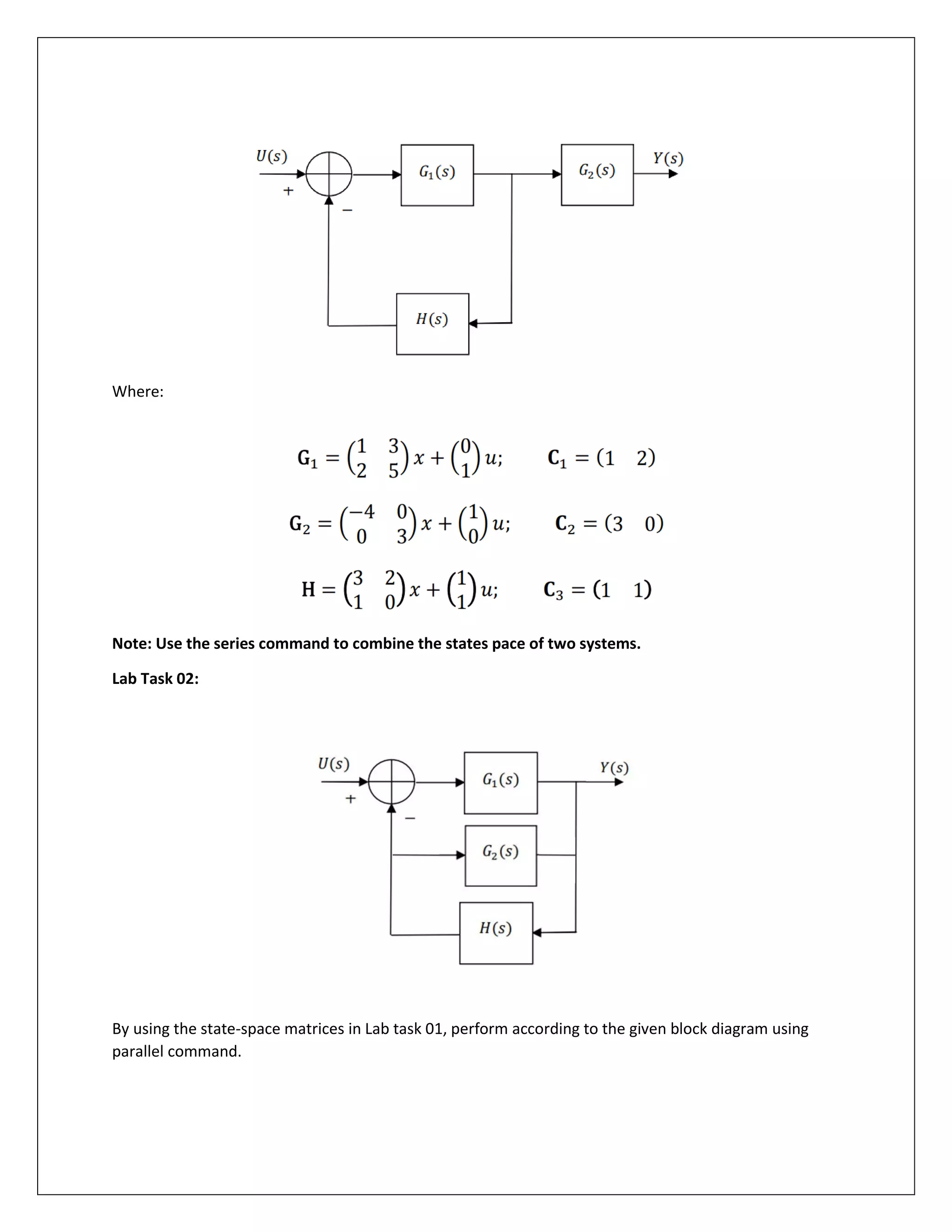
Lab Task 01: Using MATLAB, obtain the transfer function for the control system in the figure below:
Where:
Note: Use the series command to combine the states pace of two systems.
Lab Task 02:
By using the state-space matrices in Lab task 01, perform according to the given block diagram using
parallel command.

Provided MATLAB functions, convert the State Space Model into a classical control system and vice versa

  • 1.
    Department of AvionicsEngineering AE-3452 Modern Control Systems Experiment No.2 Provided MATLAB functions, convert the State Space Model into a classical control system and vice versa Prepared for By: Name: ID: Section: Semester: Total Marks: ________________ Obtained Marks: _____________ Signature: __________________ Date: _____________________
  • 2.
    Provided MATLAB functions,convert the State Space Model into a classical control system and vice versa Objective: To transform the system model from transfer function to state space, and vice versa on MATLAB Theory: Given a transfer function of the form: MATALB can be used to obtain a state-space representation of the transfer function with the following command It is important to note that the state space representation is not unique, i.e. there are many state-space representations for the same system. The MATLAB command gives just one possible state-space equation. Example: Consider the transfer function A possible state-space representation for this system is: For the example transfer function, MATLAB produces the following state-space representation: With the following program to get the matrices:
  • 3.
    >> num =[0 0 1 0]; >> den = [1 14 56 160]; >> [A, B, C, D] = tf2ss(num, den) State Space to Transfer Function To obtain the transfer function from state-space equations, use the following MATLAB code where num_in must be specified for systems with more than one input. For example, if there is only one input, then num_in = 1, if there are two inputs then num_in = 2, etc. For systems with only one input, then the following code is allowed Example. Given the state-space equations: MATLAB produces the following system transfer function: The MATLAB implementation of this is given by the following code: >> A = [0 1 0; 0 0 1; -5 -25 -5]; >> B = [0; 25; -120]; >> C = [1 0 0]; >> D = [0]; Lab Task 01: Using MATLAB, obtain the transfer function for the control system in the figure below:
  • 4.
    Where: Note: Use theseries command to combine the states pace of two systems. Lab Task 02: By using the state-space matrices in Lab task 01, perform according to the given block diagram using parallel command.