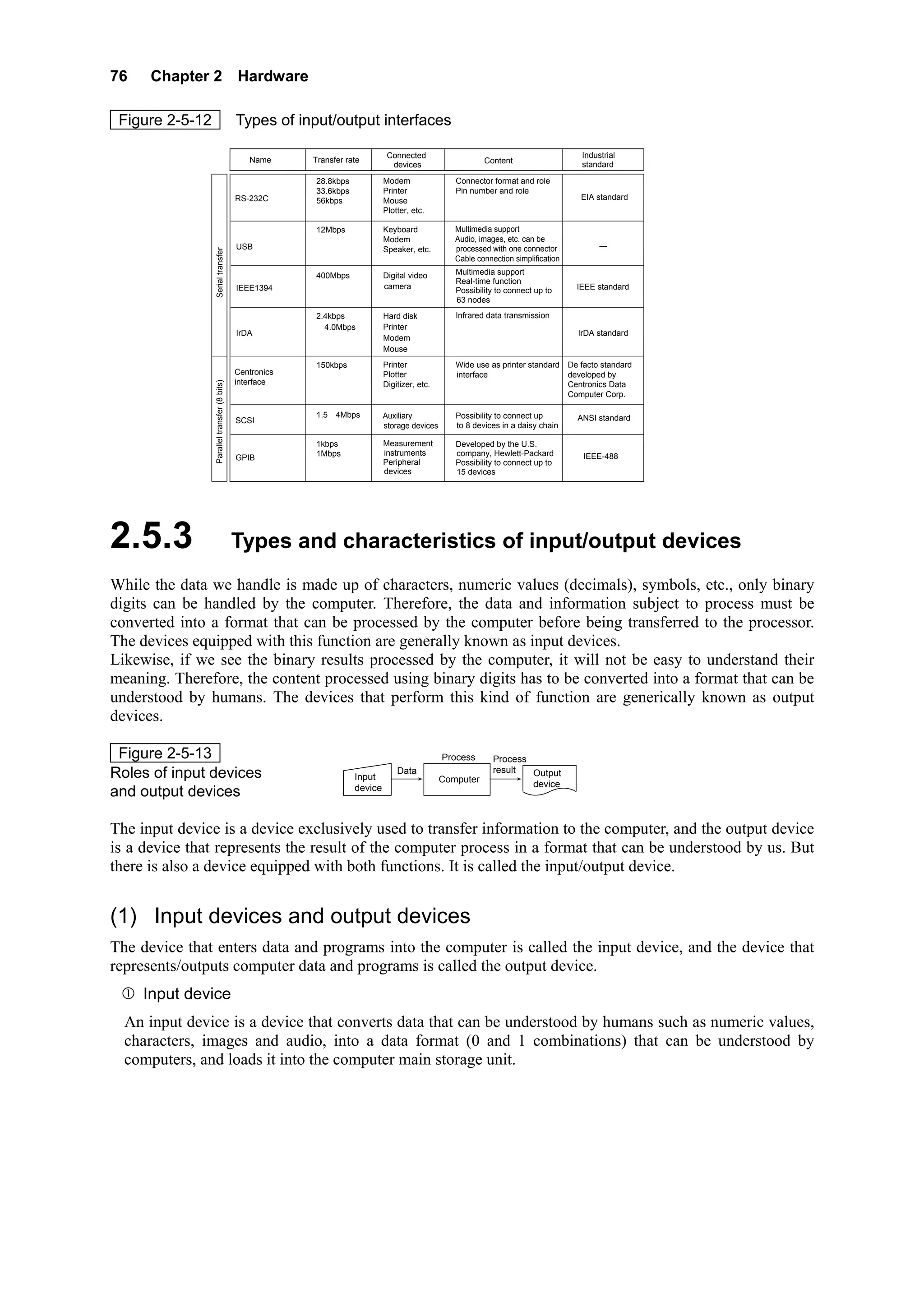
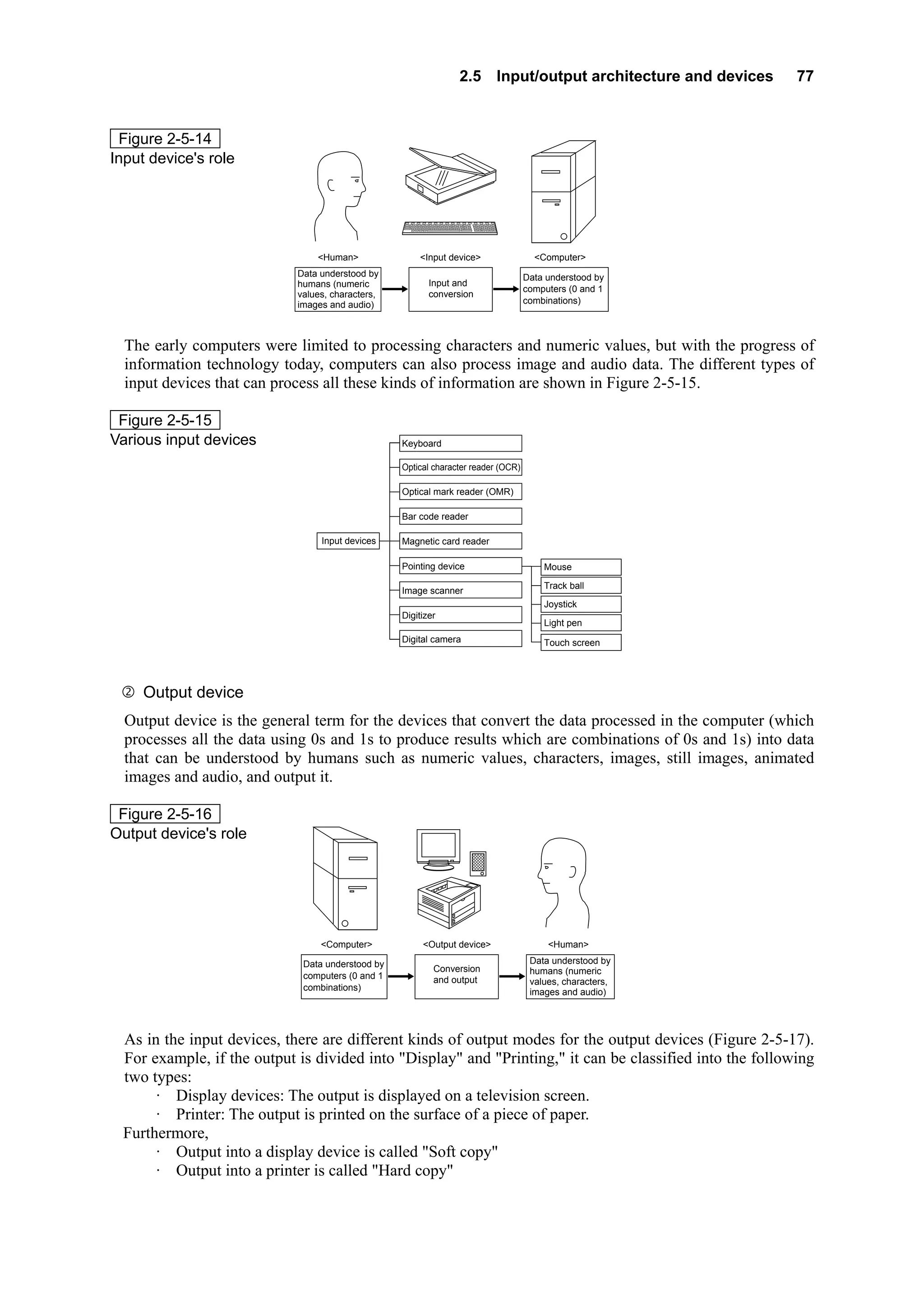
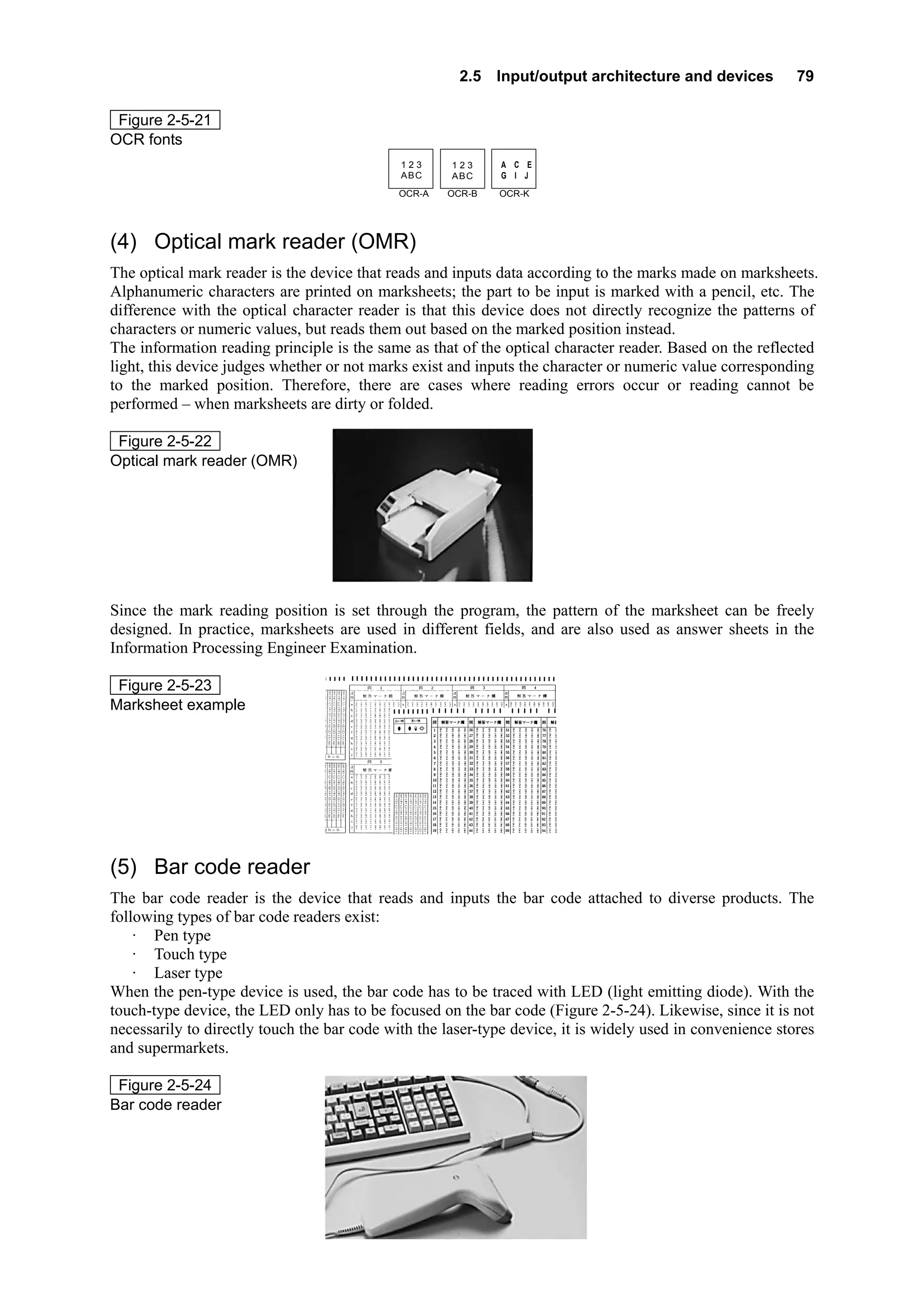
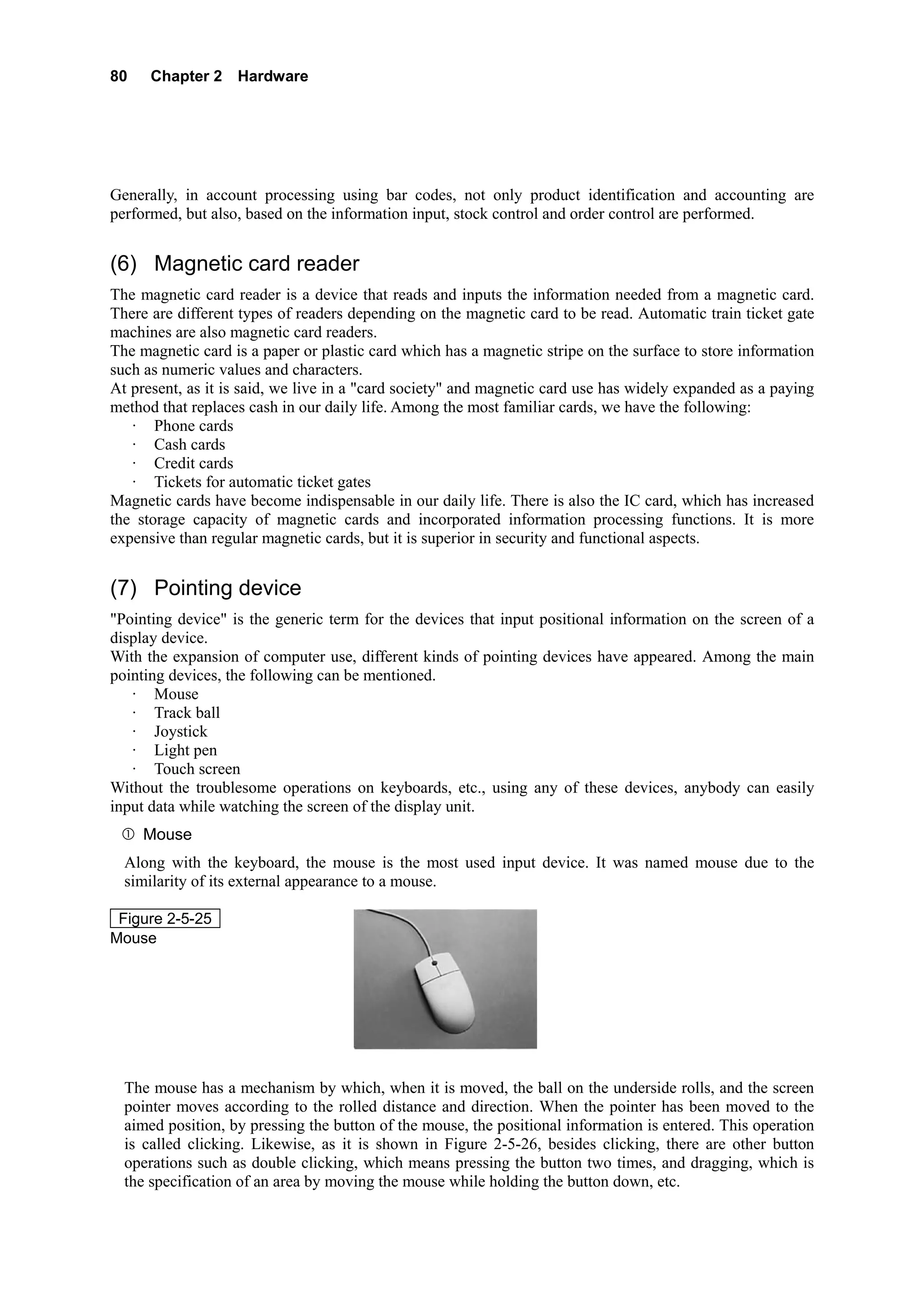
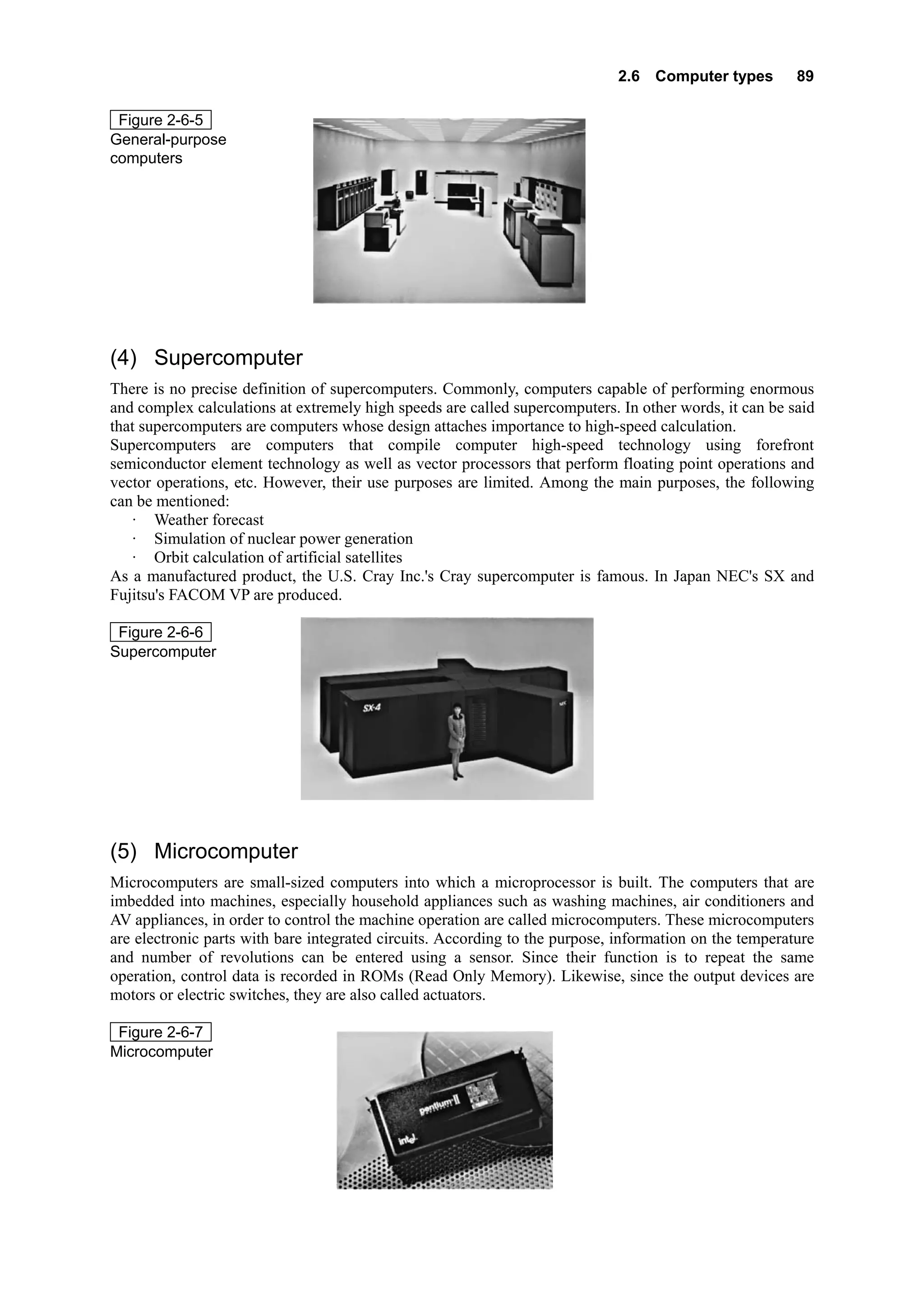
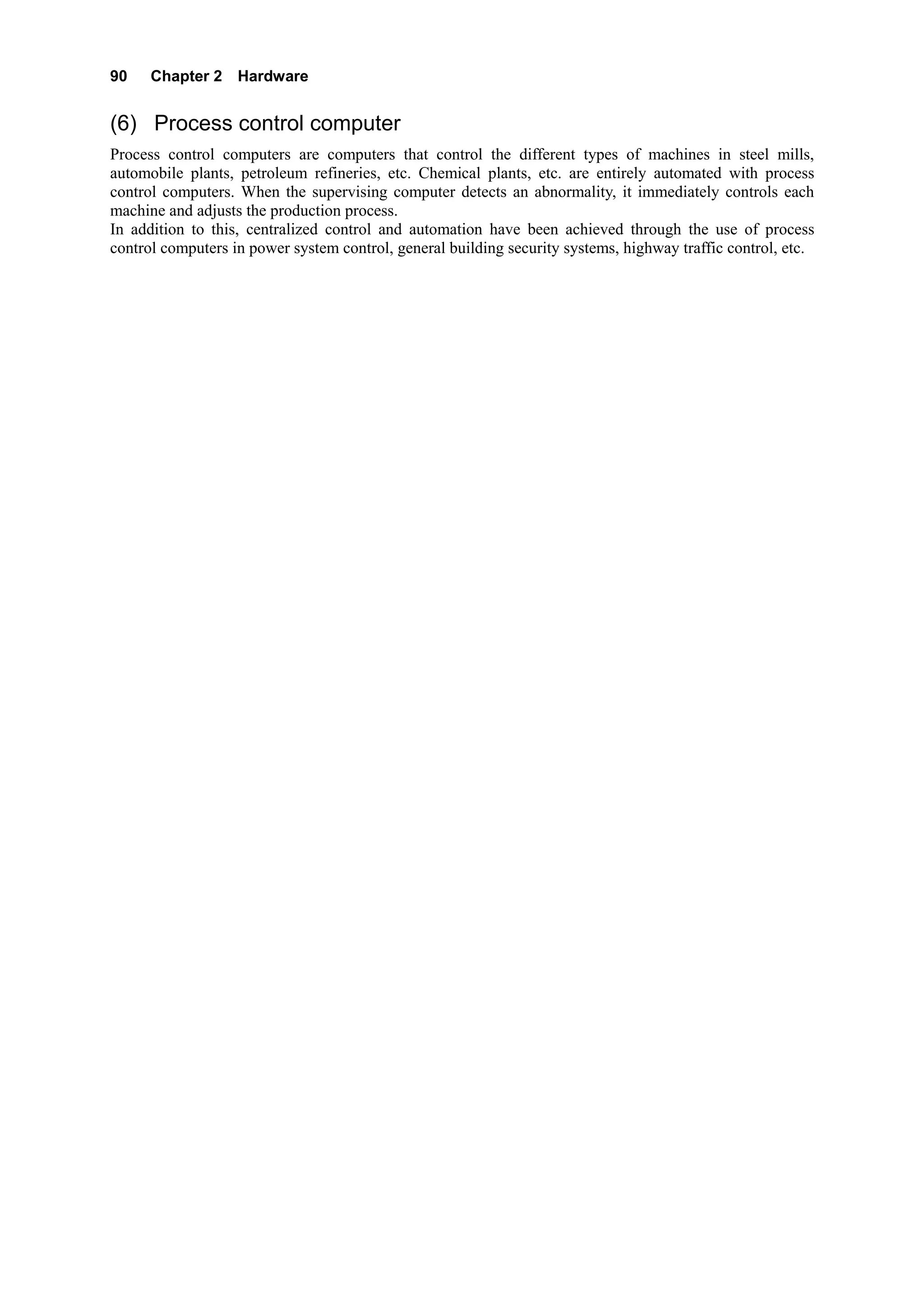
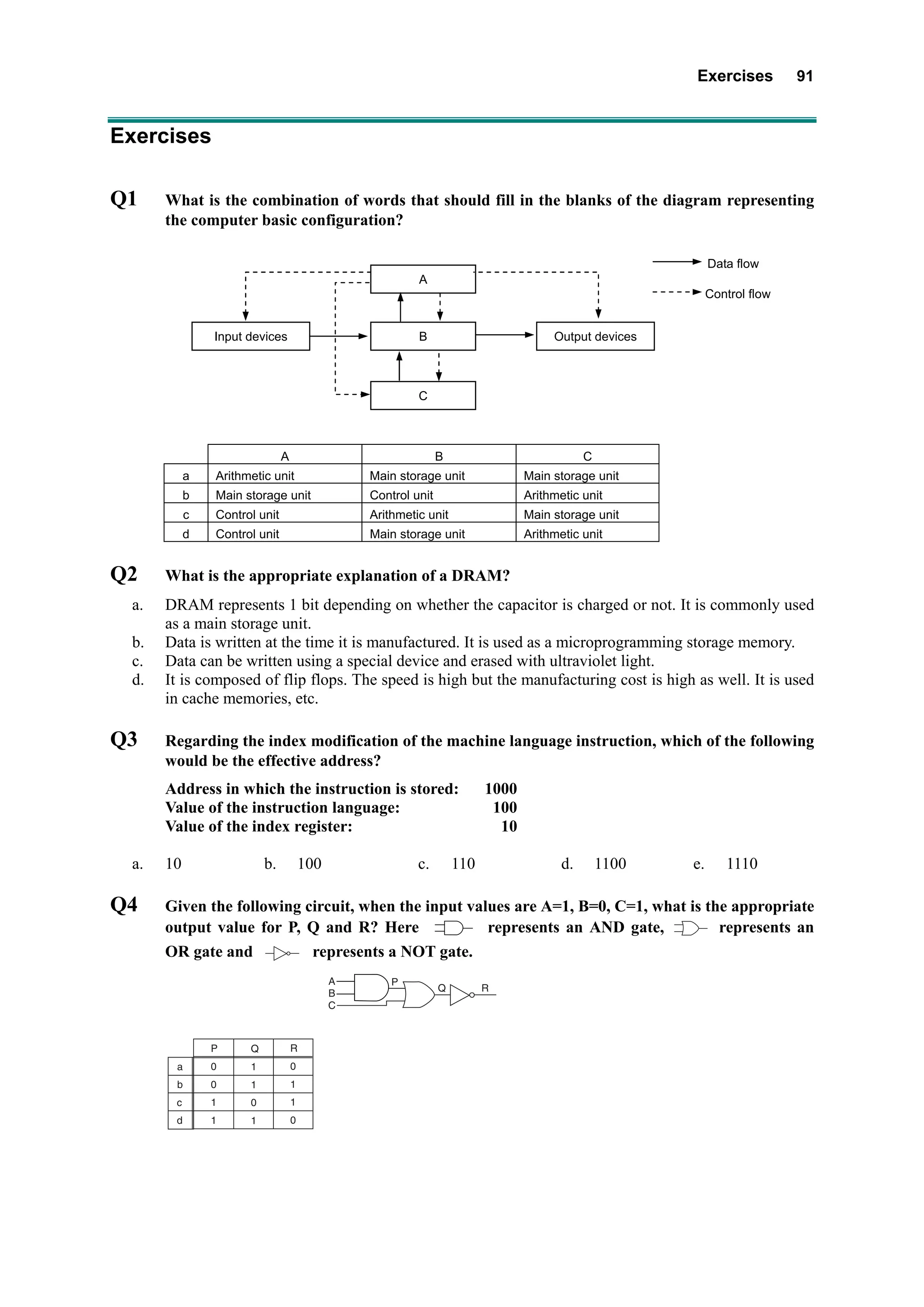
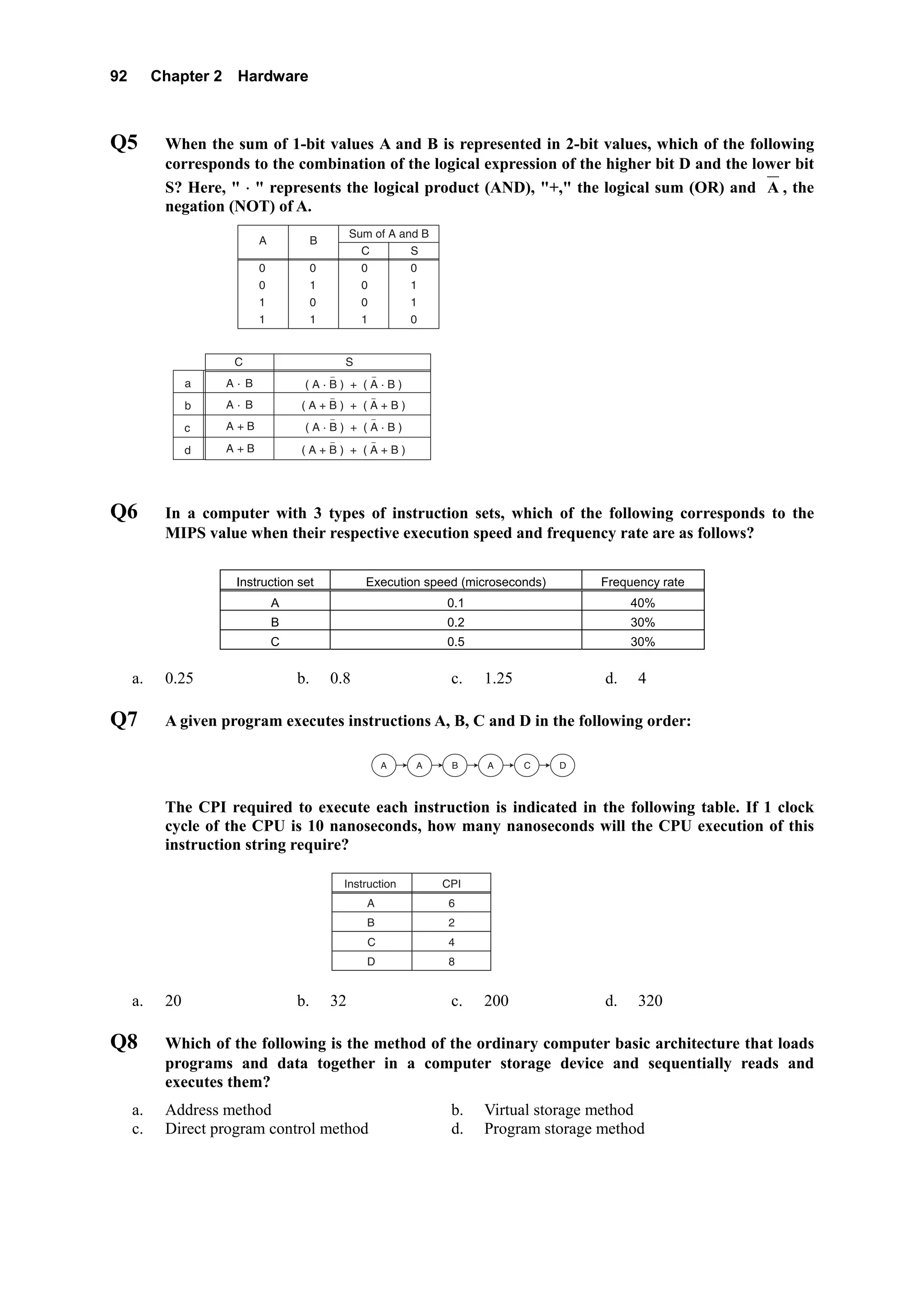
2   Hardware


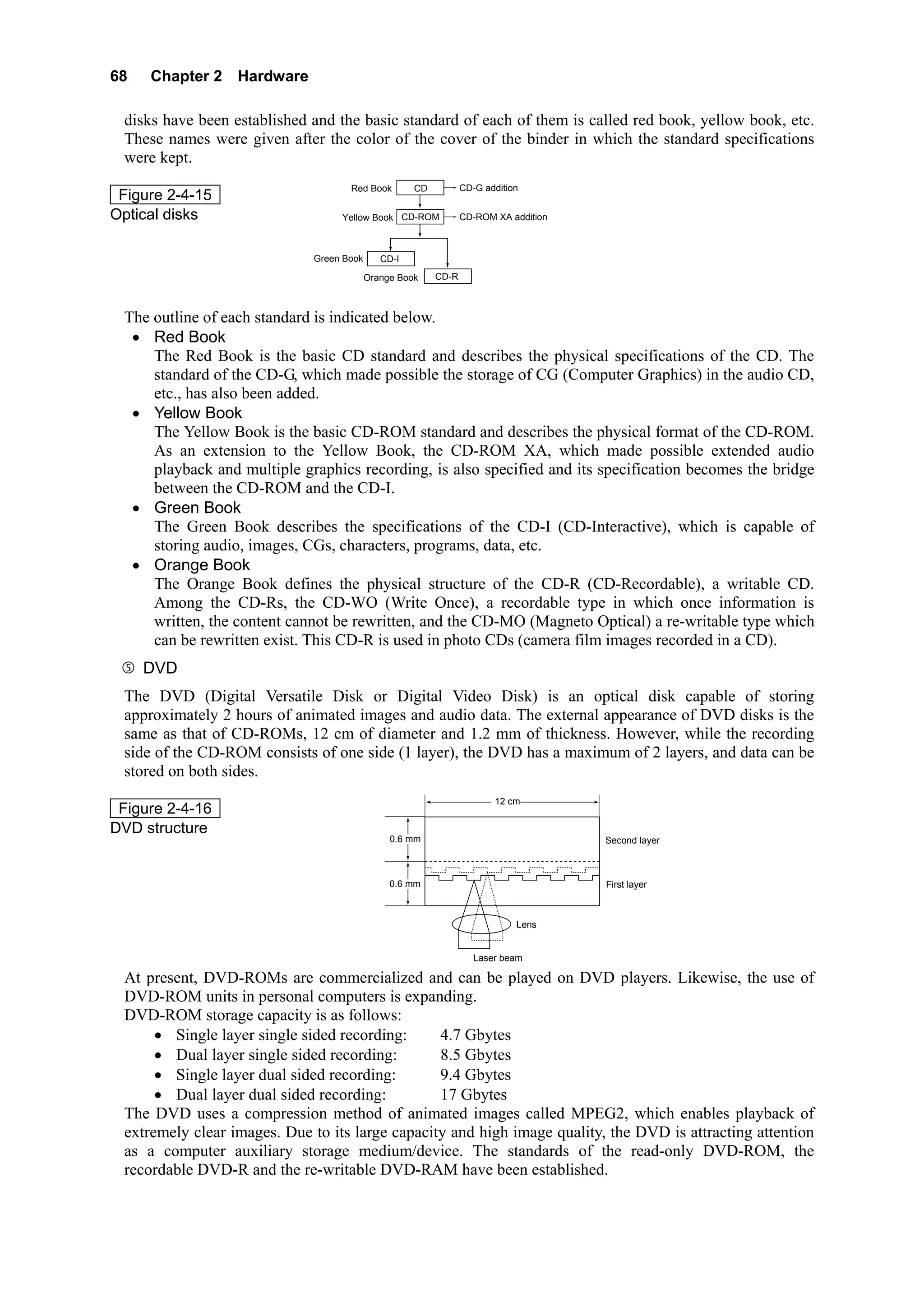
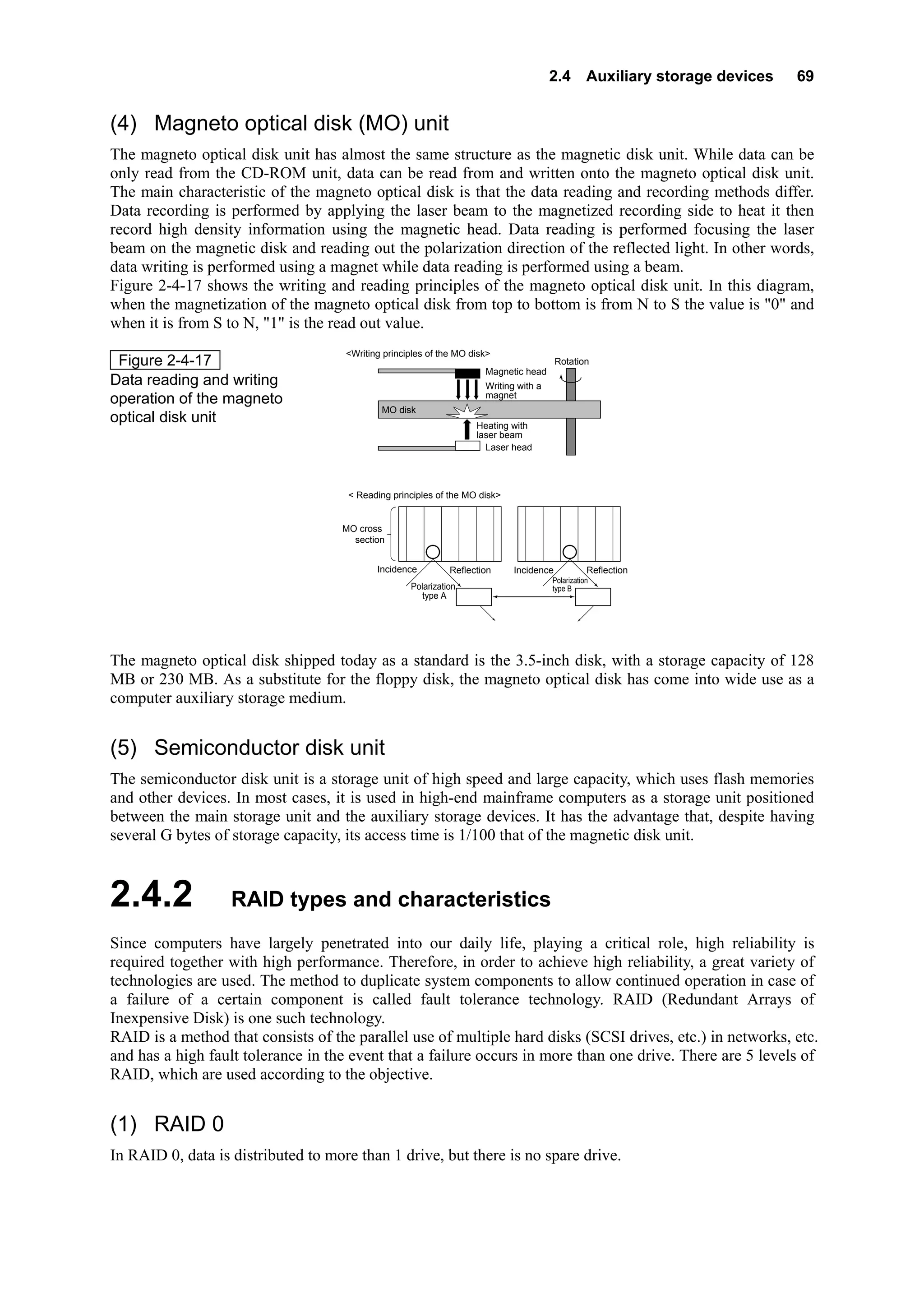
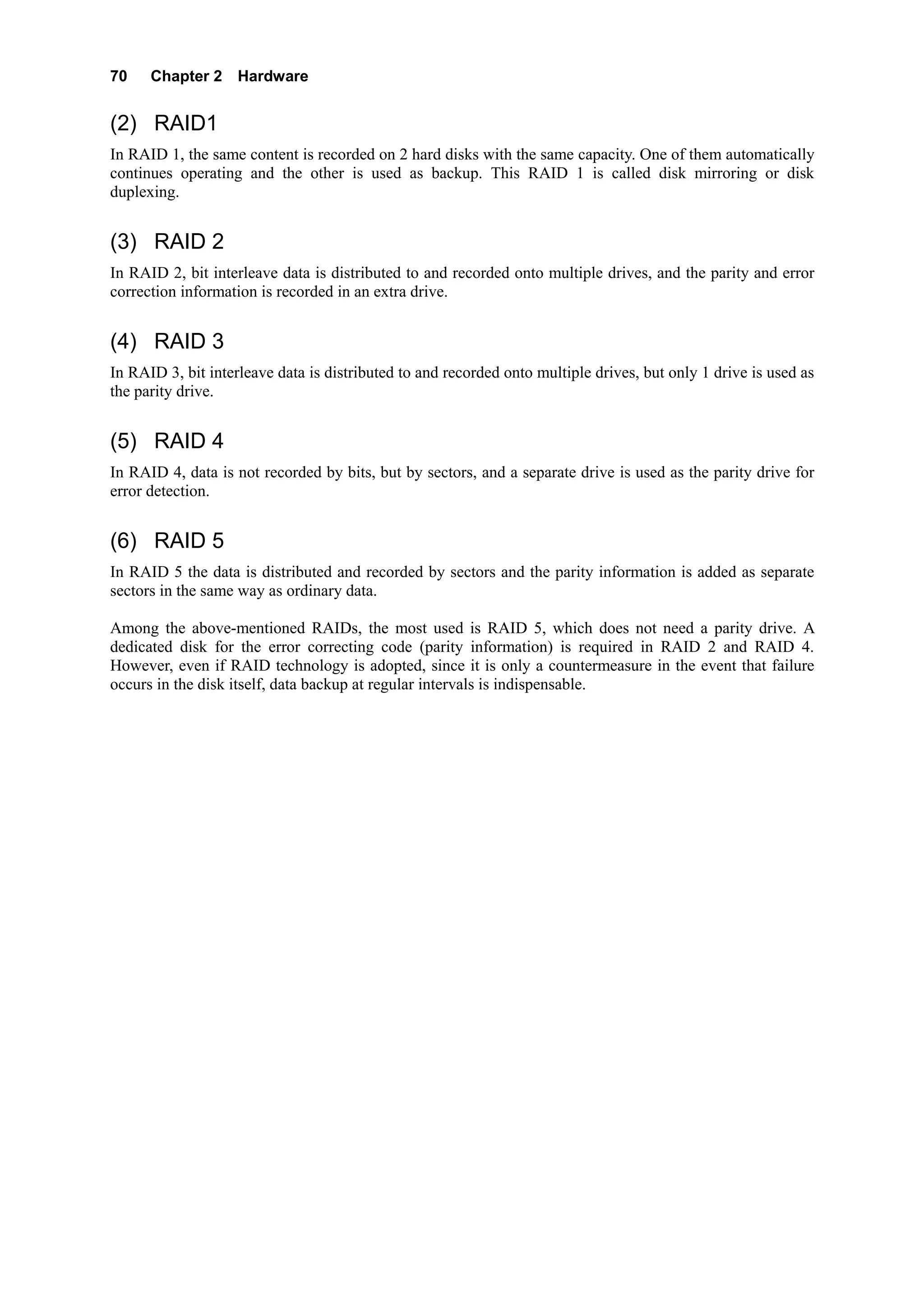
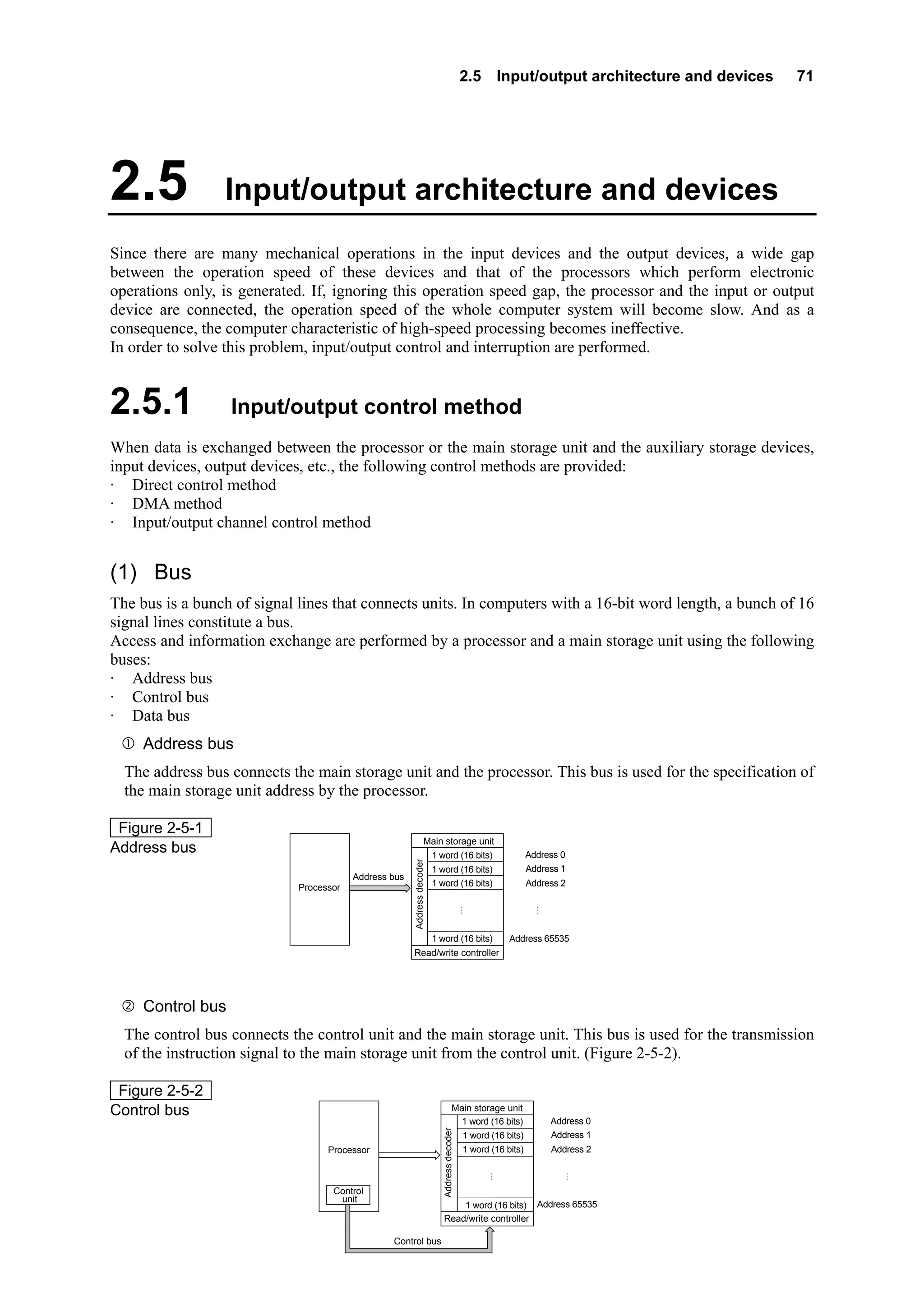
          Chapter Objectives
          Among computer related technology, the progress of hardware
          technology is particularly remarkable.
          In this chapter, the learning objective is to understand the
          mechanism and functions of each of the five main units that are
          basic to computer hardware. To:

             Understand the roles and functions of the computer's five
             main units,
             Understand the basic operations and the registers used to
             read, decode and execute the instructions and data stored in
             the main storage unit by the processor (processing unit),
             which is composed of the control unit and the arithmetic
             unit,
             Understand the basic approach and configuration circuits of
             the arithmetic unit that performs arithmetic operations and
             logical operations,
             Understand the mechanism and functions of the main
             storage unit and the auxiliary storage devices used to store
             data, and know their types and characteristics,
             Understand the types and mechanism of the input/output
             units as well as the input/output control system and the
             input/output interface,
             Understand computer types and characteristics.
2.1 Information element   33


Introduction

The functions of the hardware composing a computer can be divided broadly into the following five
categories:
· Input
· Storage
· Operation
· Control
· Output
The following are the units that implement the above-mentioned functions:
· Input unit: This unit inputs the data and programs for computer processing. It is equivalent to the human
  eyes and ears.
· Storage unit: This unit stores the input data and programs. It is equivalent to the memory section of the
  human brain.
· Arithmetic unit: This unit conducts calculation and decision on the stored data according to the
  instructions of the program. It is equivalent to the thinking section of the human brain.
· Control unit: This unit controls the input unit, storage unit, arithmetic unit and the output unit. It is
  equivalent to the human central nervous system.
· Output unit: This unit outputs the results of computer processing in a format that can be understood by
  humans. It is equivalent to the human hands and mouth.
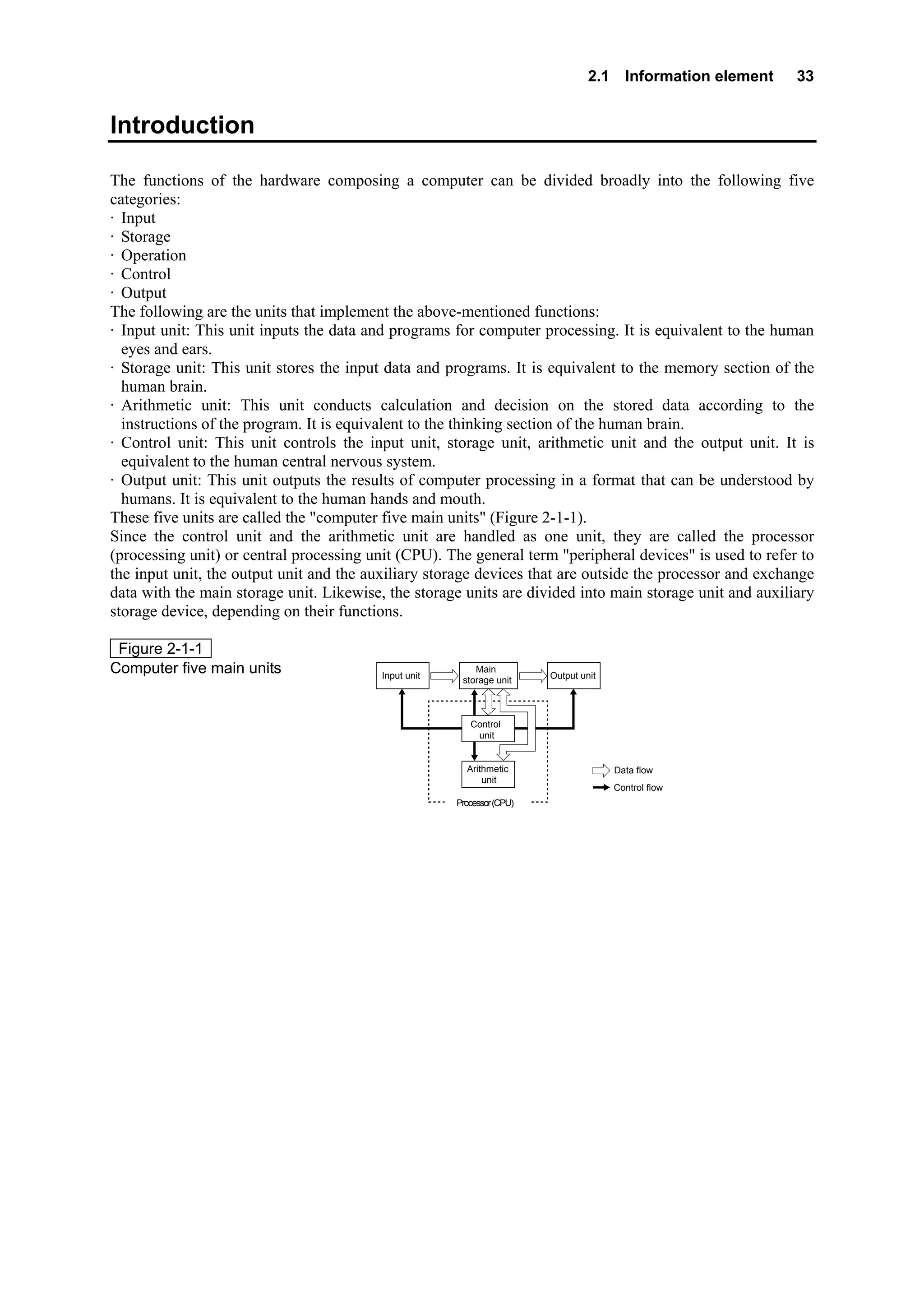
These five units are called the "computer five main units" (Figure 2-1-1).
Since the control unit and the arithmetic unit are handled as one unit, they are called the processor
(processing unit) or central processing unit (CPU). The general term "peripheral devices" is used to refer to
the input unit, the output unit and the auxiliary storage devices that are outside the processor and exchange
data with the main storage unit. Likewise, the storage units are divided into main storage unit and auxiliary
storage device, depending on their functions.

 Figure 2-1-1
Computer five main units                  Input unit
                                                           Main
                                                                         Output unit
                                                        storage unit


                                                          Control
                                                           unit


                                                         Arithmetic                    Data flow
                                                             unit
                                                                                       Control flow
                                                       Processor (CPU)
34    Chapter 2 Hardware


2.1               Information element

2.1.1                Integrated circuit
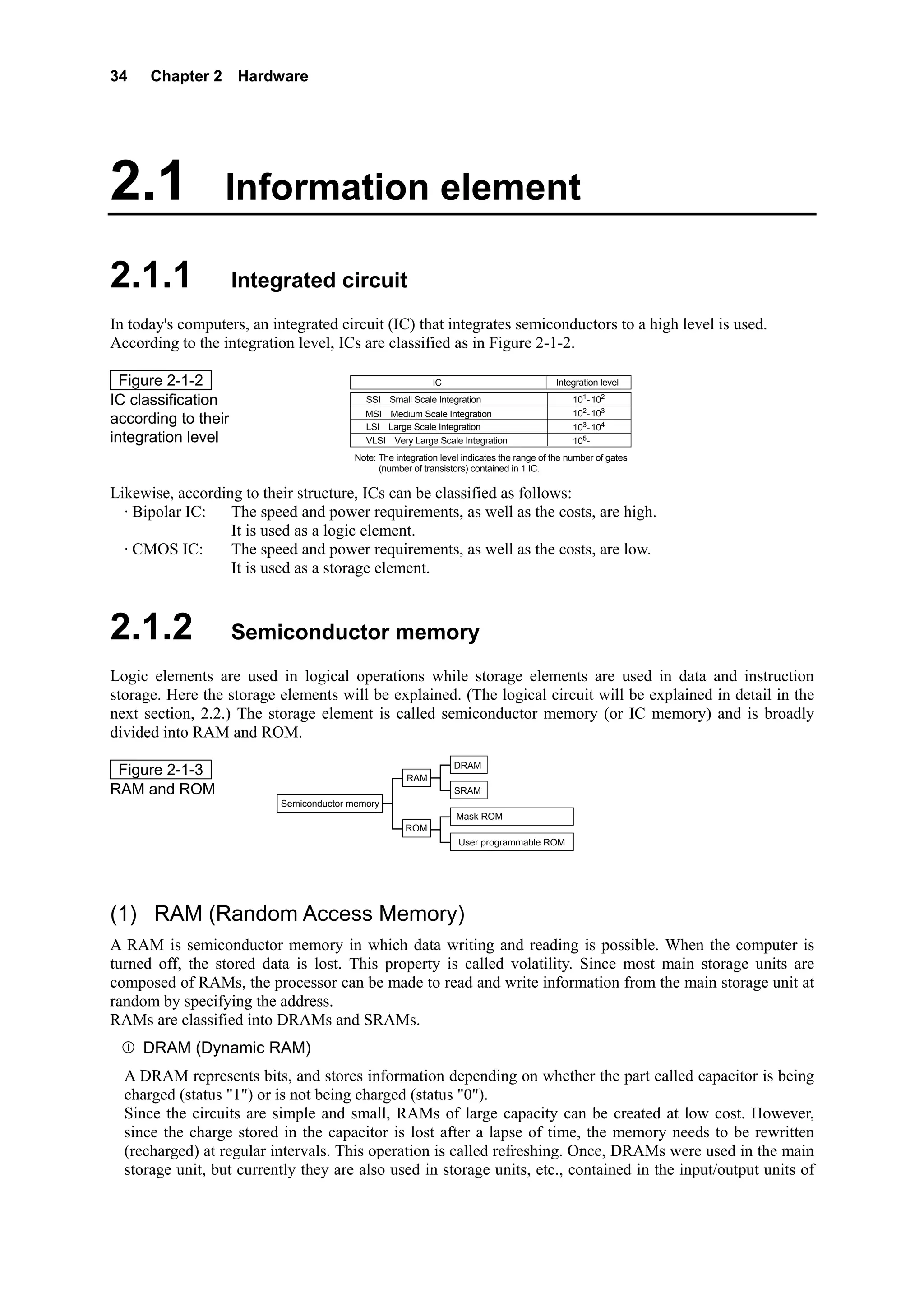
In today's computers, an integrated circuit (IC) that integrates semiconductors to a high level is used.
According to the integration level, ICs are classified as in Figure 2-1-2.

  Figure 2-1-2                                               IC                             Integration level

IC classification                           SSI(Small Scale Integration)                        101-102
                                            MSI(Medium Scale Integration)                       102-103
according to their                          LSI(Large Scale Integration)                        103-104
integration level                           VLSI(Very Large Scale Integration)                  105-
                                         Note: The integration level indicates the range of the number of gates
                                               (number of transistors) contained in 1 IC.

Likewise, according to their structure, ICs can be classified as follows:
  · Bipolar IC:   The speed and power requirements, as well as the costs, are high.
                  It is used as a logic element.
  · CMOS IC:      The speed and power requirements, as well as the costs, are low.
                  It is used as a storage element.


2.1.2                Semiconductor memory
Logic elements are used in logical operations while storage elements are used in data and instruction
storage. Here the storage elements will be explained. (The logical circuit will be explained in detail in the
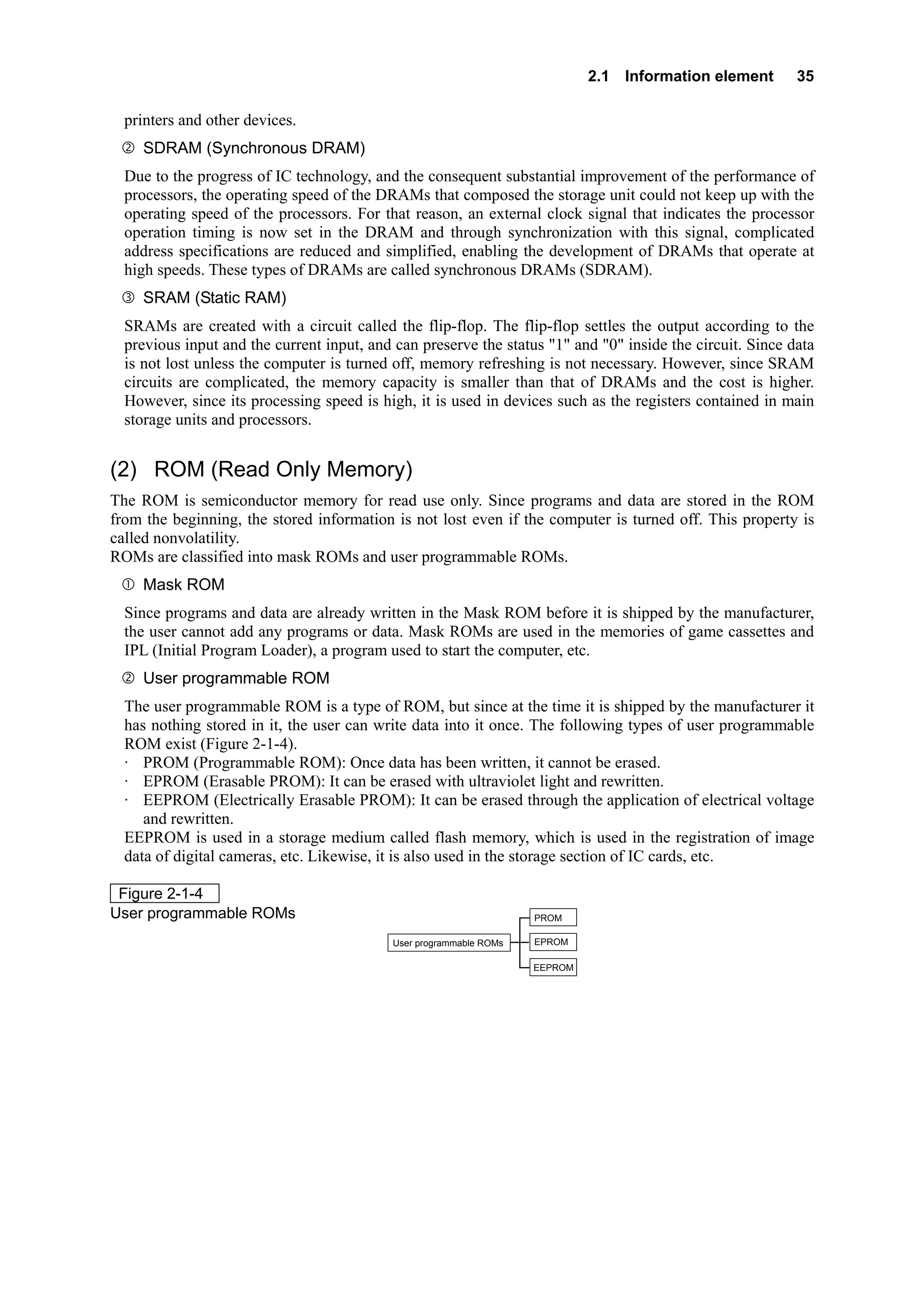
next section, 2.2.) The storage element is called semiconductor memory (or IC memory) and is broadly
divided into RAM and ROM.
                                                                  DRAM
 Figure 2-1-3                                         RAM
RAM and ROM                                                       SRAM
                           Semiconductor memory
                                                                   Mask ROM
                                                      ROM
                                                                   User programmable ROM


(1) RAM (Random Access Memory)
A RAM is semiconductor memory in which data writing and reading is possible. When the computer is
turned off, the stored data is lost. This property is called volatility. Since most main storage units are
composed of RAMs, the processor can be made to read and write information from the main storage unit at
random by specifying the address.
RAMs are classified into DRAMs and SRAMs.
     DRAM (Dynamic RAM)
  A DRAM represents bits, and stores information depending on whether the part called capacitor is being
  charged (status "1") or is not being charged (status "0").
  Since the circuits are simple and small, RAMs of large capacity can be created at low cost. However,
  since the charge stored in the capacitor is lost after a lapse of time, the memory needs to be rewritten
  (recharged) at regular intervals. This operation is called refreshing. Once, DRAMs were used in the main
  storage unit, but currently they are also used in storage units, etc., contained in the input/output units of
2.1 Information element      35

  printers and other devices.
     SDRAM (Synchronous DRAM)
  Due to the progress of IC technology, and the consequent substantial improvement of the performance of
  processors, the operating speed of the DRAMs that composed the storage unit could not keep up with the
  operating speed of the processors. For that reason, an external clock signal that indicates the processor
  operation timing is now set in the DRAM and through synchronization with this signal, complicated
  address specifications are reduced and simplified, enabling the development of DRAMs that operate at
  high speeds. These types of DRAMs are called synchronous DRAMs (SDRAM).
     SRAM (Static RAM)
  SRAMs are created with a circuit called the flip-flop. The flip-flop settles the output according to the
  previous input and the current input, and can preserve the status "1" and "0" inside the circuit. Since data
  is not lost unless the computer is turned off, memory refreshing is not necessary. However, since SRAM
  circuits are complicated, the memory capacity is smaller than that of DRAMs and the cost is higher.
  However, since its processing speed is high, it is used in devices such as the registers contained in main
  storage units and processors.


(2) ROM (Read Only Memory)
The ROM is semiconductor memory for read use only. Since programs and data are stored in the ROM
from the beginning, the stored information is not lost even if the computer is turned off. This property is
called nonvolatility.
ROMs are classified into mask ROMs and user programmable ROMs.
     Mask ROM
  Since programs and data are already written in the Mask ROM before it is shipped by the manufacturer,
  the user cannot add any programs or data. Mask ROMs are used in the memories of game cassettes and
  IPL (Initial Program Loader), a program used to start the computer, etc.
     User programmable ROM
  The user programmable ROM is a type of ROM, but since at the time it is shipped by the manufacturer it
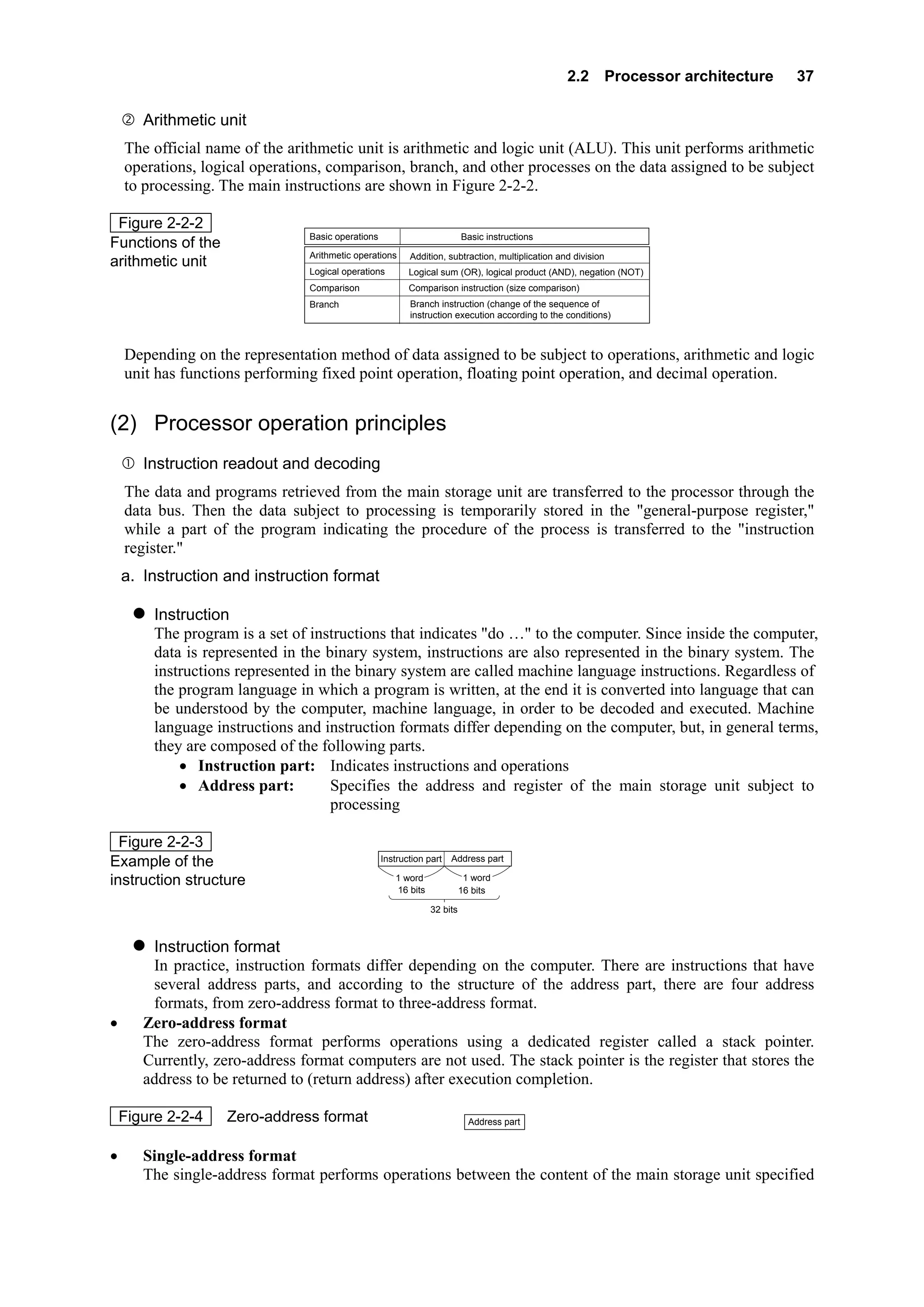
  has nothing stored in it, the user can write data into it once. The following types of user programmable
  ROM exist (Figure 2-1-4).
  · PROM (Programmable ROM): Once data has been written, it cannot be erased.
  · EPROM (Erasable PROM): It can be erased with ultraviolet light and rewritten.
  · EEPROM (Electrically Erasable PROM): It can be erased through the application of electrical voltage
     and rewritten.
  EEPROM is used in a storage medium called flash memory, which is used in the registration of image
  data of digital cameras, etc. Likewise, it is also used in the storage section of IC cards, etc.

 Figure 2-1-4
User programmable ROMs                                               PROM

                                            User programmable ROMs   EPROM

                                                                     EEPROM
36    Chapter 2 Hardware


2.2              Processor architecture

2.2.1               Processor structure and operation principles

(1) Processor structure
Among the five main units that compose a computer, the control unit and the arithmetic unit are handled as
one unit and are called processor (processing unit). The processor is also called central processing unit
(CPU), and as the backbone of the computer, it plays the important roles indicated below.
     Control unit
  The control unit is the unit that controls all the operations of the computer. It retrieves, decodes and
  executes, one by one, in order, the instructions stored in the main storage unit.
  The following are the main functions of the control unit:
  · Retrieval of the instructions stored in the main storage unit
  · Decoding of the retrieved instructions using the instruction decoder
  · According to the decoding, transmission of the specifications required for the execution of the
     instructions to each unit
  Through the repetition of these operations, the control unit controls each unit, and implements the
  functions of each of the units as a computer system. The system by which instructions are executed in
  this way, one by one, is called the sequential control system. The design of this sequential control system
  and the stored program system (Please refer to main storage unit in 2.3.1) was based on the concepts of
  John von Neumann. Computers of this kind are called Neumann computers.
  In Figure 2-2-1, as an example to explain the mechanism of the sequential control system, the process of
  the "addition of the contents of address 100 and the contents of address 101 and the storage of the result
  in address 102" is represented.

 Figure 2-2-1                         <Processor>                <Main storage unit>
                                                                                  ① Retrieve the contents of address 100
Mechanism of the                        Control unit                Address 100
                                                   ①                Address 101
sequential control system
                                      Arithmetic unit               Address 102
                                                                         ⋮
                                     Address 100


                                      Control unit                  Address 100   ② Retrieve the contents of address 101

                                                   ②                Address 101

                                     Arithmetic unit                Address 102
                                                                         ⋮
                                    Address 100    Address 101


                                        Control unit                              ③ Add the contents of address 100
                                                                                    to the contents of address 101
                                                   ③
                                      Arithmetic unit
                                    Address 100 + Address 101


                                       Control unit                 Address 100   ④ Store the addition result in address 102

                                                   ④                Address 101

                                      Arithmetic unit               Address 102
                                                                         ⋮
                                         Addition result
2.2 Processor architecture   37

       Arithmetic unit
    The official name of the arithmetic unit is arithmetic and logic unit (ALU). This unit performs arithmetic
    operations, logical operations, comparison, branch, and other processes on the data assigned to be subject
    to processing. The main instructions are shown in Figure 2-2-2.

 Figure 2-2-2
                                Basic operations                          Basic instructions
Functions of the
                                Arithmetic operations     Addition, subtraction, multiplication and division
arithmetic unit
                                Logical operations        Logical sum (OR), logical product (AND), negation (NOT)
                                Comparison                Comparison instruction (size comparison)
                                Branch                    Branch instruction (change of the sequence of
                                                          instruction execution according to the conditions)


    Depending on the representation method of data assigned to be subject to operations, arithmetic and logic
    unit has functions performing fixed point operation, floating point operation, and decimal operation.


(2) Processor operation principles
       Instruction readout and decoding
    The data and programs retrieved from the main storage unit are transferred to the processor through the
    data bus. Then the data subject to processing is temporarily stored in the "general-purpose register,"
    while a part of the program indicating the procedure of the process is transferred to the "instruction
    register."
    a. Instruction and instruction format

         Instruction
         The program is a set of instructions that indicates "do …" to the computer. Since inside the computer,
         data is represented in the binary system, instructions are also represented in the binary system. The
         instructions represented in the binary system are called machine language instructions. Regardless of
         the program language in which a program is written, at the end it is converted into language that can
         be understood by the computer, machine language, in order to be decoded and executed. Machine
         language instructions and instruction formats differ depending on the computer, but, in general terms,
         they are composed of the following parts.
             • Instruction part: Indicates instructions and operations
             • Address part:         Specifies the address and register of the main storage unit subject to
                                     processing

  Figure 2-2-3
                                                                      Address part
Example of the                                     Instruction part

instruction structure                                 1 word               1 word
                                                      16 bits             16 bits

                                                                32 bits


        Instruction format
        In practice, instruction formats differ depending on the computer. There are instructions that have
        several address parts, and according to the structure of the address part, there are four address
        formats, from zero-address format to three-address format.
•      Zero-address format
       The zero-address format performs operations using a dedicated register called a stack pointer.
       Currently, zero-address format computers are not used. The stack pointer is the register that stores the
       address to be returned to (return address) after execution completion.

    Figure 2-2-4    Zero-address format                                     Address part


•      Single-address format
       The single-address format performs operations between the content of the main storage unit specified
38      Chapter 2 Hardware

       in the address and the accumulator data (Figure 2-2-5). The accumulator stores operation values and
       operation results. There are cases where general-purpose registers are also used as accumulators.

    Figure 2-2-5    Single-address format                                             Instruction part                      Address part


•      Two-address format
       The two-address format specifies two addresses and uses the address data specified on the main
       storage unit.
                                                                                Instruction part                  Address part                    Address part
    Figure 2-2-6    Two-address format

•      Three-address format
       The three-address format specifies two addresses to be used for the operation, and the address where
       the operation result is to be stored.

 Figure 2-2-7                                                 Instruction part         Address part                            Address part          Address part
Three-address format
    b. Instruction readout
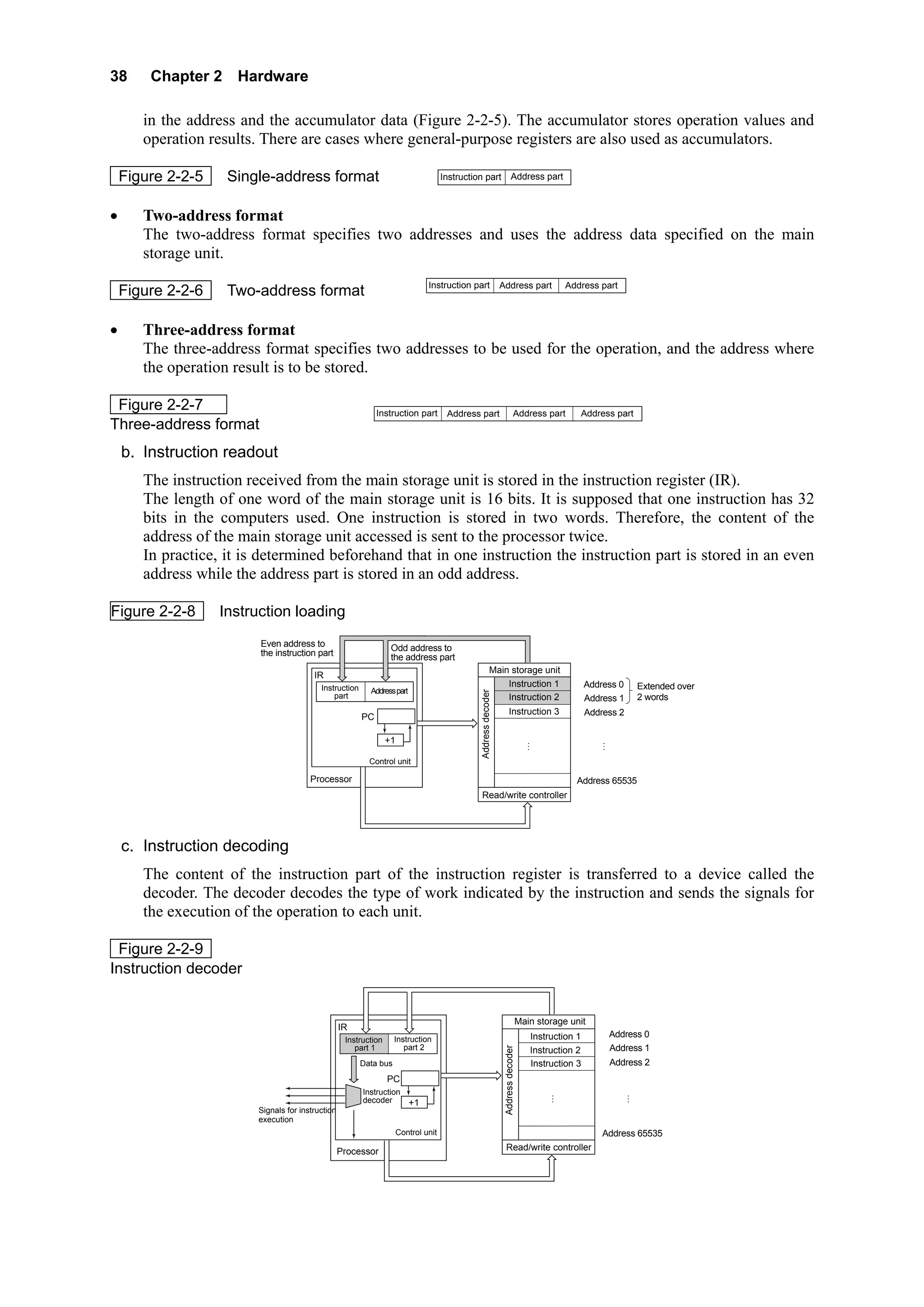
       The instruction received from the main storage unit is stored in the instruction register (IR).
       The length of one word of the main storage unit is 16 bits. It is supposed that one instruction has 32
       bits in the computers used. One instruction is stored in two words. Therefore, the content of the
       address of the main storage unit accessed is sent to the processor twice.
       In practice, it is determined beforehand that in one instruction the instruction part is stored in an even
       address while the address part is stored in an odd address.

Figure 2-2-8       Instruction loading
                         Even address to                           Odd address to
                         the instruction part                      the address part
                                                                                                            Main storage unit
                                         IR
                                           Instruction                                                          Instruction 1                           Address 0        Extended over
                                                           Address part
                                                                                                Address decoder


                                               part                                                             Instruction 2                           Address 1        2 words
                                                                                                                        Instruction 3                   Address 2
                                                         PC

                                                                  +1                                                                     ⋮                   ⋮

                                                           Control unit

                                        Processor                                                                                                   Address 65535
                                                                                                Read/write controller


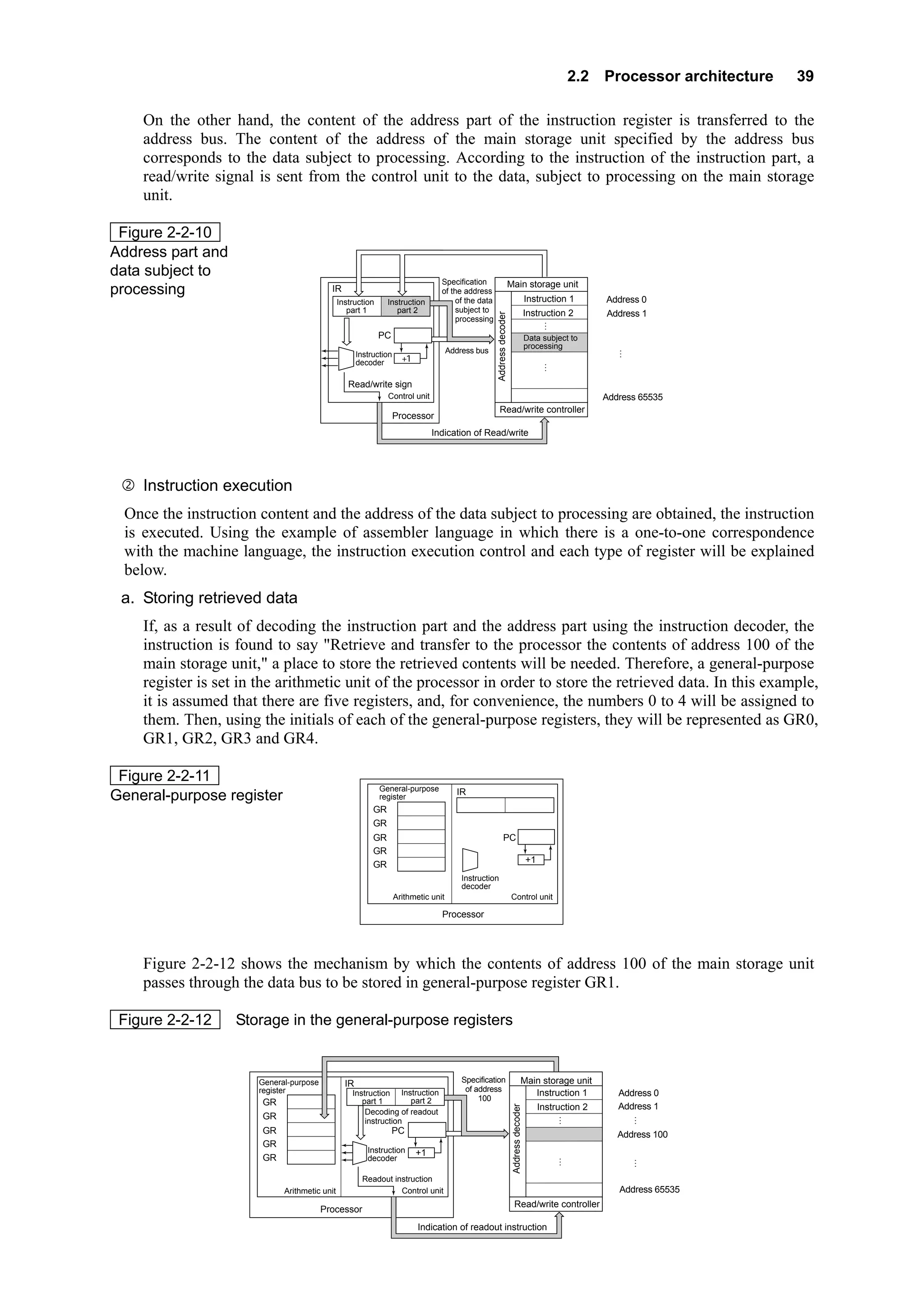
    c. Instruction decoding
       The content of the instruction part of the instruction register is transferred to a device called the
       decoder. The decoder decodes the type of work indicated by the instruction and sends the signals for
       the execution of the operation to each unit.

 Figure 2-2-9
Instruction decoder


                                                                                                                                     Main storage unit
                                                   IR
                                                                                                                                        Instruction 1            Address 0
                                                    Instruction     Instruction
                                                       part 1          part 2                                                                                    Address 1
                                                                                                                   Address decoder


                                                                                                                                        Instruction 2
                                                         Data bus                                                                       Instruction 3            Address 2
                                                                  PC
                                                         Instruction                                                                          ⋮                      ⋮
                                                         decoder          +1
                         Signals for instruction
                         execution
                                                                       Control unit                                                                         Address 65535
                                                   Processor                                                        Read/write controller
2.2 Processor architecture   39

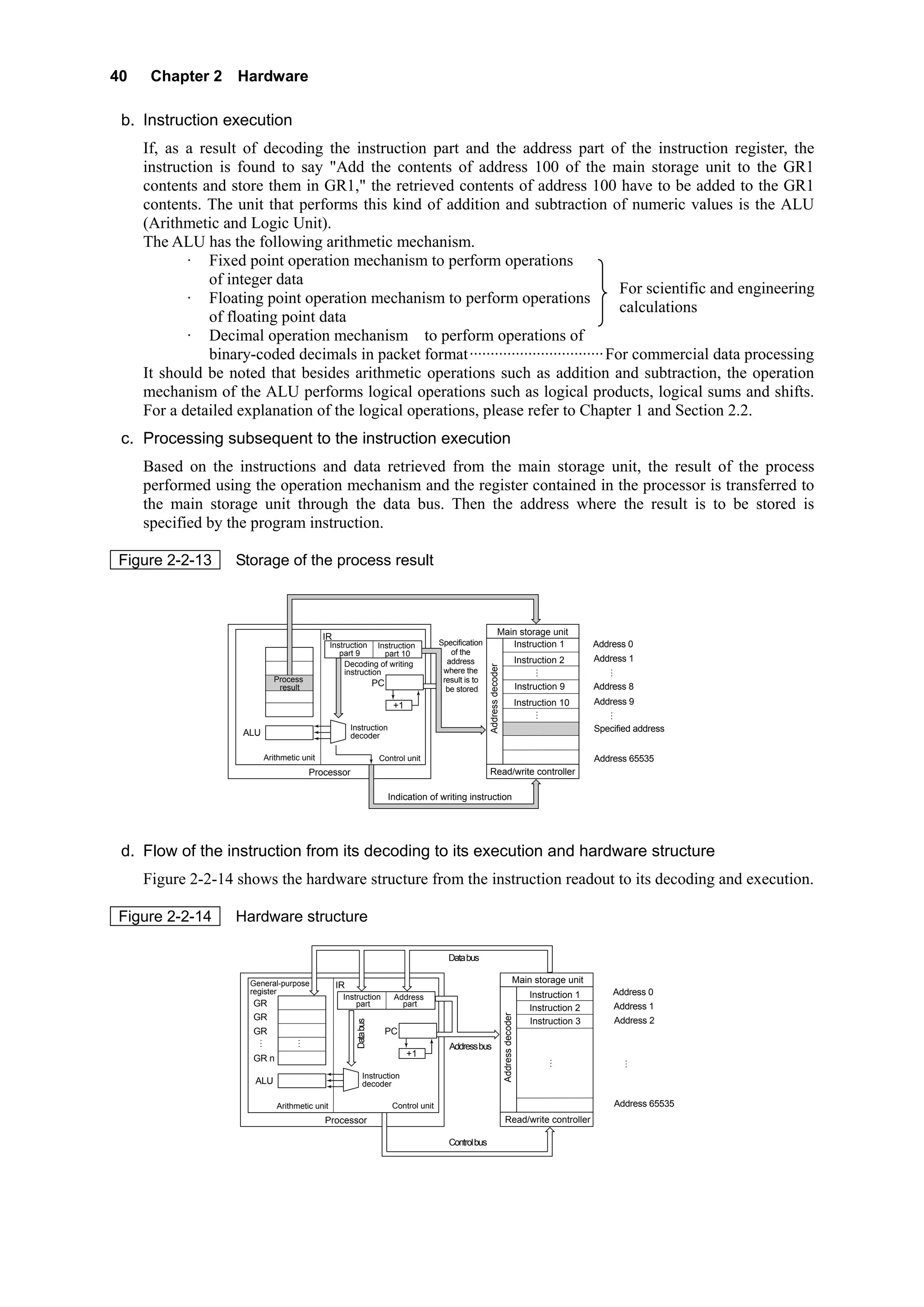
    On the other hand, the content of the address part of the instruction register is transferred to the
    address bus. The content of the address of the main storage unit specified by the address bus
    corresponds to the data subject to processing. According to the instruction of the instruction part, a
    read/write signal is sent from the control unit to the data, subject to processing on the main storage
    unit.

 Figure 2-2-10
Address part and
data subject to
                                                                                 Specification                        Main storage unit
processing                                IR                                     of the address
                                                                                                                                         Instruction 1
                                              Instruction     Instruction             of the data                                                             Address 0
                                                 part 1          part 2               subject to                                         Instruction 2        Address 1


                                                                                                    Address decoder
                                                                                      processing                                               ⋮
                                                            PC                                                                           Data subject to
                                                                                                                                         processing               ⋮
                                                     Instruction                     Address bus
                                                     decoder         +1                                                                         ⋮

                                                 Read/write sign
                                                              Control unit                                                                                    Address 65535
                                                                                                       Read/write controller
                                                                   Processor
                                                                               Indication of Read/write


    Instruction execution
 Once the instruction content and the address of the data subject to processing are obtained, the instruction
 is executed. Using the example of assembler language in which there is a one-to-one correspondence
 with the machine language, the instruction execution control and each type of register will be explained
 below.
 a. Storing retrieved data
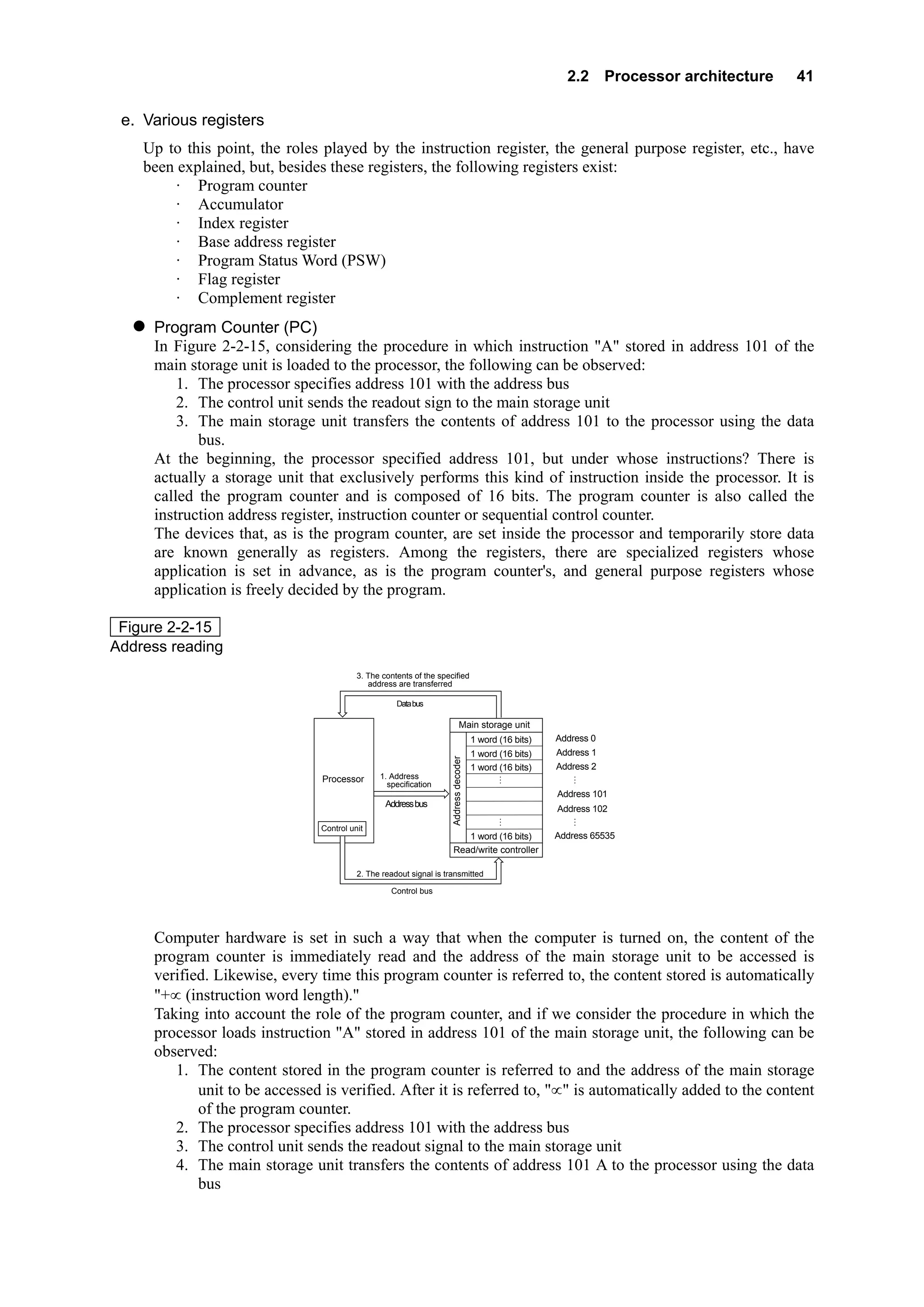
    If, as a result of decoding the instruction part and the address part using the instruction decoder, the
    instruction is found to say "Retrieve and transfer to the processor the contents of address 100 of the
    main storage unit," a place to store the retrieved contents will be needed. Therefore, a general-purpose
    register is set in the arithmetic unit of the processor in order to store the retrieved data. In this example,
    it is assumed that there are five registers, and, for convenience, the numbers 0 to 4 will be assigned to
    them. Then, using the initials of each of the general-purpose registers, they will be represented as GR0,
    GR1, GR2, GR3 and GR4.

 Figure 2-2-11
                                                            General-purpose            IR
General-purpose register                                    register
                                                          GR0
                                                          GR1
                                                          GR2                                               PC
                                                          GR3
                                                                                                                                         +1
                                                          GR4
                                                                                         Instruction
                                                                                         decoder
                                                                   Arithmetic unit                                    Control unit

                                                                                 Processor


    Figure 2-2-12 shows the mechanism by which the contents of address 100 of the main storage unit
    passes through the data bus to be stored in general-purpose register GR1.

 Figure 2-2-12     Storage in the general-purpose registers


                      General-purpose           IR                                       Specification                              Main storage unit
                      register                                                            of address                                   Instruction 1
                                                  Instruction Instruction                                                                                        Address 0
                                                     part 1       part 2                      100
                       GR0                                                                                                                                       Address 1
                                                                                                                                              Instruction 2
                                                                                                                       Address decoder


                                                      Decoding of readout                                                                            ⋮               ⋮
                       GR1                            instruction
                       GR2                                       PC                                                                                              Address 100
                       GR3
                                                        Instruction       +1
                       GR4                              decoder                                                                                     ⋮                 ⋮

                                                      Readout instruction
                            Arithmetic unit                     Control unit                                                                                     Address 65535
                                                                                                                         Read/write controller
                                        Processor
                                                                          Indication of readout instruction
40    Chapter 2 Hardware

 b. Instruction execution
     If, as a result of decoding the instruction part and the address part of the instruction register, the
     instruction is found to say "Add the contents of address 100 of the main storage unit to the GR1
     contents and store them in GR1," the retrieved contents of address 100 have to be added to the GR1
     contents. The unit that performs this kind of addition and subtraction of numeric values is the ALU
     (Arithmetic and Logic Unit).
     The ALU has the following arithmetic mechanism.
            · Fixed point operation mechanism to perform operations
                of integer data
                                                                                         For scientific and engineering
            · Floating point operation mechanism to perform operations
                                                                                         calculations
                of floating point data
            · Decimal operation mechanism to perform operations of
                binary-coded decimals in packet format································ For commercial data processing
     It should be noted that besides arithmetic operations such as addition and subtraction, the operation
     mechanism of the ALU performs logical operations such as logical products, logical sums and shifts.
     For a detailed explanation of the logical operations, please refer to Chapter 1 and Section 2.2.
 c. Processing subsequent to the instruction execution
     Based on the instructions and data retrieved from the main storage unit, the result of the process
     performed using the operation mechanism and the register contained in the processor is transferred to
     the main storage unit through the data bus. Then the address where the result is to be stored is
     specified by the program instruction.

Figure 2-2-13       Storage of the process result


                                                                                                                    Main storage unit
                                             IR
                                                Instruction Instruction                  Specification                 Instruction 1                            Address 0
                                                   part 9        part 10                    of the
                                                                                           address                                           Instruction 2      Address 1
                                                     Decoding of writing                                                                            ⋮               ⋮
                                                                                                         Address decoder


                                                     instruction                          where the
                              Process                                                     result is to
                               result                               PC                                                                       Instruction 9      Address 8
                                                                                           be stored

                                                                          +1                                                                 Instruction 10     Address 9
                                                                                                                                                    ⋮               ⋮
                                                       Instruction                                                                                              Specified address
                     ALU                               decoder

                           Arithmetic unit                           Control unit                                                                               Address 65535
                                          Processor                                                      Read/write controller

                                                                         Indication of writing instruction


 d. Flow of the instruction from its decoding to its execution and hardware structure
     Figure 2-2-14 shows the hardware structure from the instruction readout to its decoding and execution.

Figure 2-2-14       Hardware structure

                                                                                           Data bus

                       General-purpose                                                                                                  Main storage unit
                                                  IR
                       register                                                                                                                 Instruction 1       Address 0
                                                   Instruction            Address
                       GR0                             part                 part
                                                                                                                                                Instruction 2       Address 1
                                                                                                                           Address decoder


                       GR1                                                                                                                      Instruction 3       Address 2
                                                         Data bus


                       GR2                                               PC
                         ⋮            ⋮
                                                                                            Address bus
                                                                               +1                                                                      ⋮                ⋮
                       GR n
                                                             Instruction
                        ALU                                  decoder

                              Arithmetic unit                             Control unit                                                                              Address 65535
                                             Processor                                                                      Read/write controller

                                                                                           Control bus
2.2 Processor architecture   41

 e. Various registers
    Up to this point, the roles played by the instruction register, the general purpose register, etc., have
    been explained, but, besides these registers, the following registers exist:
         · Program counter
         · Accumulator
         · Index register
         · Base address register
         · Program Status Word (PSW)
         · Flag register
         · Complement register
     Program Counter (PC)
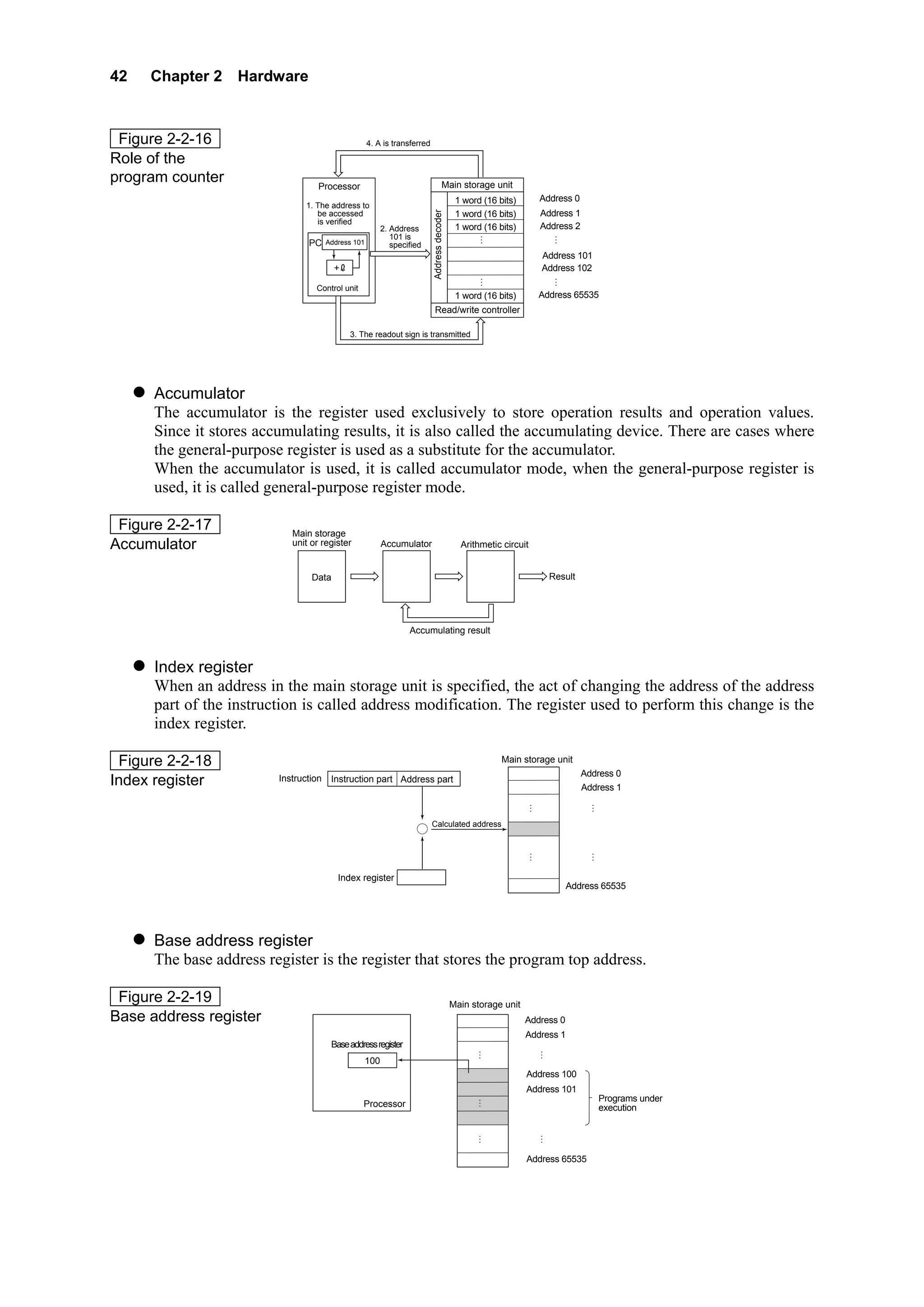
     In Figure 2-2-15, considering the procedure in which instruction "A" stored in address 101 of the
     main storage unit is loaded to the processor, the following can be observed:
         1. The processor specifies address 101 with the address bus
         2. The control unit sends the readout sign to the main storage unit
         3. The main storage unit transfers the contents of address 101 to the processor using the data
            bus.
     At the beginning, the processor specified address 101, but under whose instructions? There is
     actually a storage unit that exclusively performs this kind of instruction inside the processor. It is
     called the program counter and is composed of 16 bits. The program counter is also called the
     instruction address register, instruction counter or sequential control counter.
     The devices that, as is the program counter, are set inside the processor and temporarily store data
     are known generally as registers. Among the registers, there are specialized registers whose
     application is set in advance, as is the program counter's, and general purpose registers whose
     application is freely decided by the program.

 Figure 2-2-15
Address reading
                                         3. The contents of the specified
                                            address are transferred

                                                    Data bus

                                                                   Main storage unit
                                                                   ⋮               ⋮
                                                                     1 word (16 bits) Address 0
                                                                     1 word (16 bits) Address 1
                                                                    Address decoder


                                                                   1 word (16 bits) Address 2
                                               1. Address          ⋮             ⋮
                               Processor
                                                 specification
                                                                                      A     Address 101
                                                 Address bus                          B     Address 102

                               Control unit
                                                                       1 word (16 bits)     Address 65535
                                                                    Read/write controller

                                         2. The readout signal is transmitted

                                                  Control bus


     Computer hardware is set in such a way that when the computer is turned on, the content of the
     program counter is immediately read and the address of the main storage unit to be accessed is
     verified. Likewise, every time this program counter is referred to, the content stored is automatically
     "+∝ (instruction word length)."
     Taking into account the role of the program counter, and if we consider the procedure in which the
     processor loads instruction "A" stored in address 101 of the main storage unit, the following can be
     observed:
        1. The content stored in the program counter is referred to and the address of the main storage
            unit to be accessed is verified. After it is referred to, "∝" is automatically added to the content
            of the program counter.
        2. The processor specifies address 101 with the address bus
        3. The control unit sends the readout signal to the main storage unit
        4. The main storage unit transfers the contents of address 101 A to the processor using the data
            bus
42   Chapter 2 Hardware


 Figure 2-2-16                                       4. A is transferred

Role of the
program counter                    Processor                               Main storage unit
                                                                           ⋮              ⋮
                                                                             1 word (16 bits) Address 0
                                1. The address to


                                                                           Address decoder
                                   be accessed                               1 word (16 bits) Address 1
                                   is verified
                                                           2. Address        1 word (16 bits) Address 2
                                                              101 is       ⋮              ⋮
                                PC     Address 101            specified
                                                                                                   A                   Address 101
                                         +                                                         B                   Address 102

                                  Control unit
                                                                                             1 word (16 bits)          Address 65535
                                                                            Read/write controller

                                             3. The readout sign is transmitted


      Accumulator
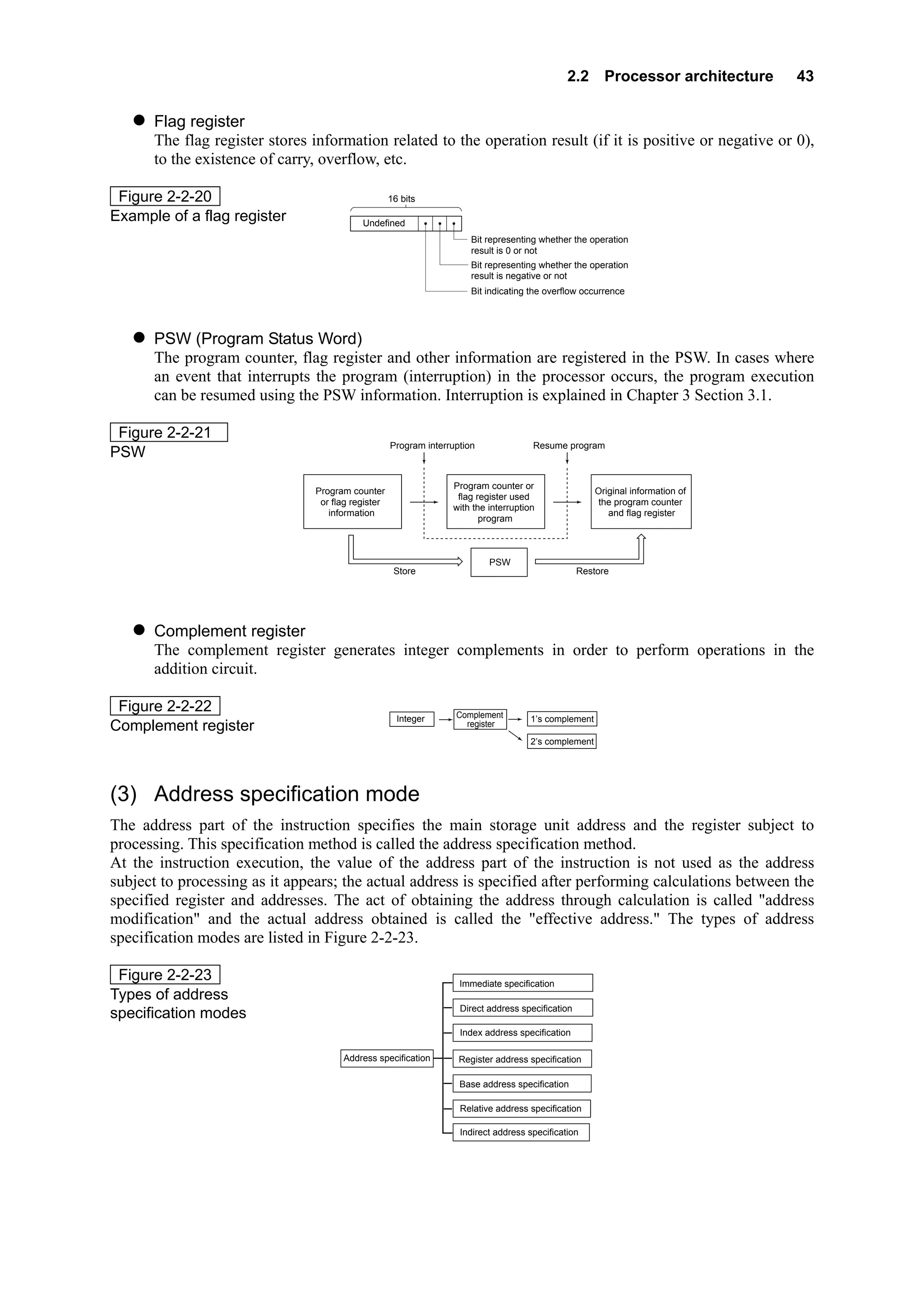
      The accumulator is the register used exclusively to store operation results and operation values.
      Since it stores accumulating results, it is also called the accumulating device. There are cases where
      the general-purpose register is used as a substitute for the accumulator.
      When the accumulator is used, it is called accumulator mode, when the general-purpose register is
      used, it is called general-purpose register mode.

 Figure 2-2-17              Main storage
Accumulator                 unit or register               Accumulator                        Arithmetic circuit


                                 Data                                                                                       Result


                                                                   Accumulating result


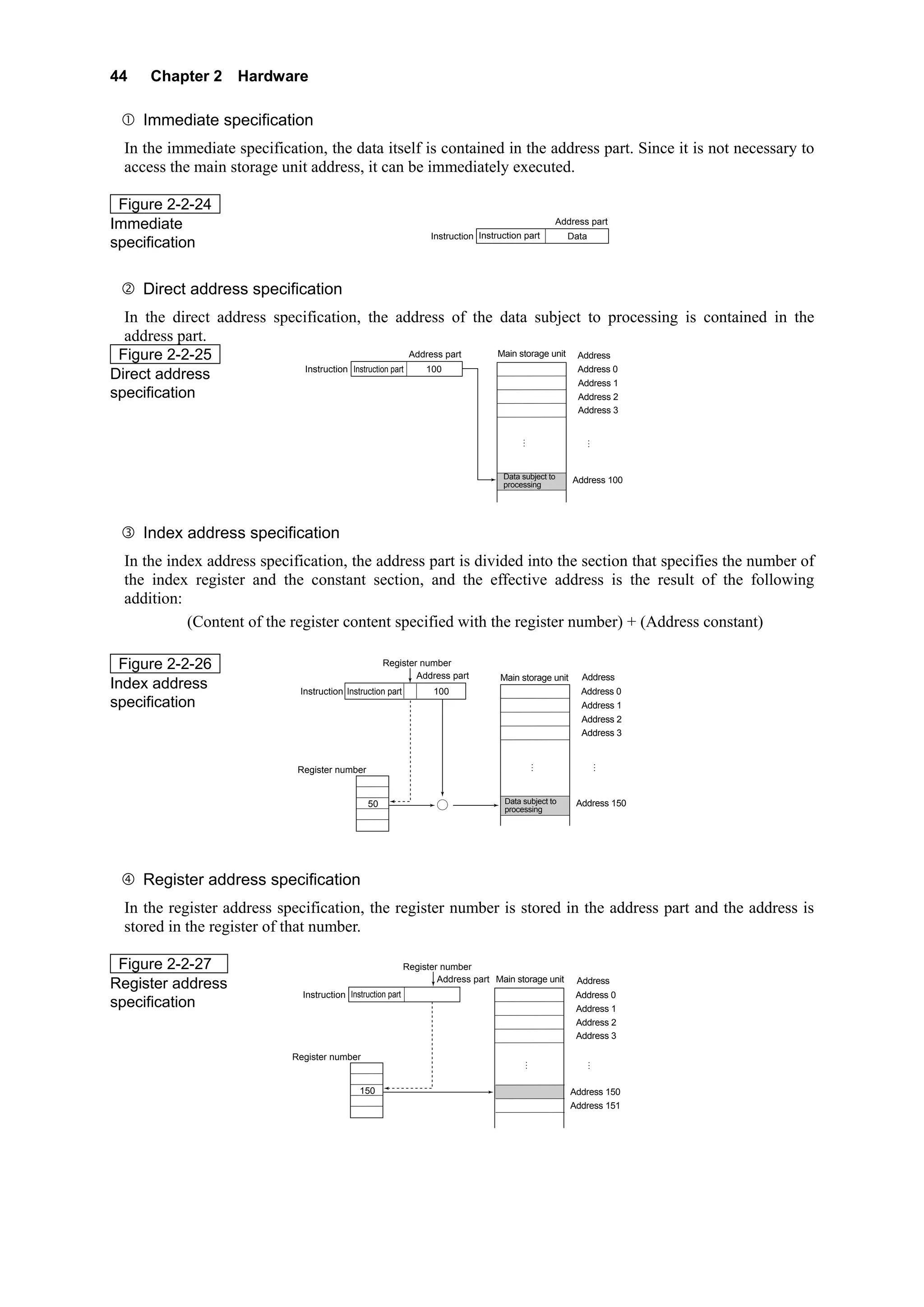
      Index register
      When an address in the main storage unit is specified, the act of changing the address of the address
      part of the instruction is called address modification. The register used to perform this change is the
      index register.

 Figure 2-2-18                                                                                           Main storage unit
                                                                                                                                     Address 0
Index register           Instruction    Instruction part Address part
                                                                                                                                     Address 1
                                                                                                                   ⋮                    ⋮

                                                                           Calculated address
                                                                     +

                                                                                                                   ⋮                    ⋮

                                          Index register
                                                                                                                               Address 65535


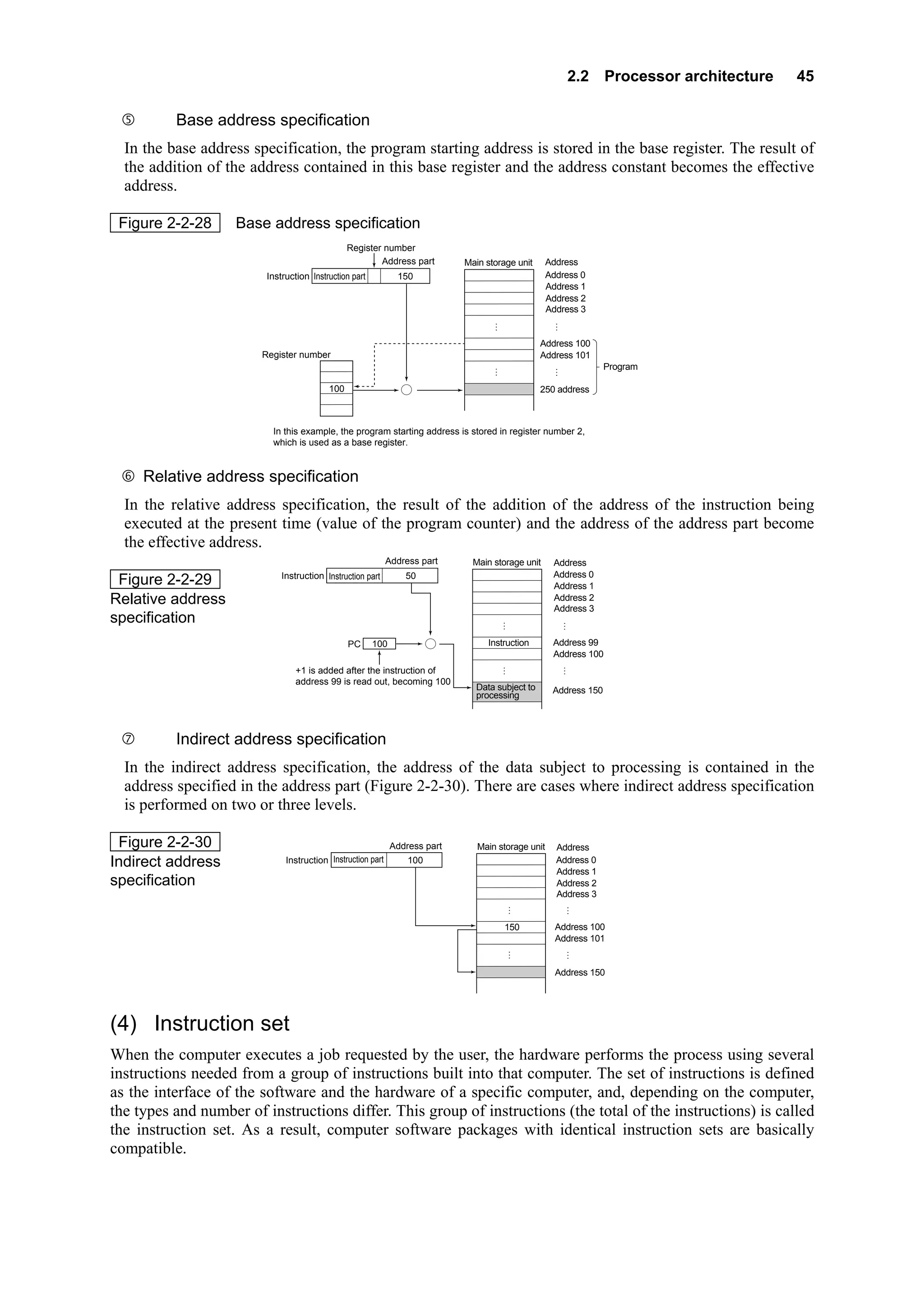
      Base address register
      The base address register is the register that stores the program top address.

 Figure 2-2-19                                                            ⋮
                                                                          Main storage unit
Base address register                                                                                           Address 0
                                                                                                                Address 1
                                        Base address register             ⋮                                             ⋮
                                                     100
                                                                                                                Address 100
                                                                                                                Address 101
                                                                                                                                            Programs under
                                                 Processor                                                                                  execution

                                                                                                    ⋮                   ⋮

                                                                                                                Address 65535
2.2 Processor architecture        43

      Flag register
      The flag register stores information related to the operation result (if it is positive or negative or 0),
      to the existence of carry, overflow, etc.

 Figure 2-2-20                                      16 bits

Example of a flag register                 Undefined
                                                                       Bit representing whether the operation
                                                                       result is 0 or not
                                                                       Bit representing whether the operation
                                                                       result is negative or not
                                                                       Bit indicating the overflow occurrence


      PSW (Program Status Word)
      The program counter, flag register and other information are registered in the PSW. In cases where
      an event that interrupts the program (interruption) in the processor occurs, the program execution
      can be resumed using the PSW information. Interruption is explained in Chapter 3 Section 3.1.

 Figure 2-2-21
                                                    Program interruption              Resume program
PSW

                                                                  Program counter or
                                Program counter                                                        Original information of
                                                                   flag register used
                                 or flag register                                                      the program counter
                                                                  with the interruption
                                   information                                                            and flag register
                                                                         program


                                                                           PSW
                                                     Store                                         Restore


      Complement register
      The complement register generates integer complements in order to perform operations in the
      addition circuit.

 Figure 2-2-22                                                     Complement
                                                      Integer                         1’s complement
Complement register                                                  register
                                                                                      2’s complement


(3) Address specification mode
The address part of the instruction specifies the main storage unit address and the register subject to
processing. This specification method is called the address specification method.
At the instruction execution, the value of the address part of the instruction is not used as the address
subject to processing as it appears; the actual address is specified after performing calculations between the
specified register and addresses. The act of obtaining the address through calculation is called "address
modification" and the actual address obtained is called the "effective address." The types of address
specification modes are listed in Figure 2-2-23.

 Figure 2-2-23                                                      Immediate specification
Types of address
                                                                    Direct address specification
specification modes
                                                                    Index address specification

                                      Address specification         Register address specification

                                                                    Base address specification

                                                                    Relative address specification

                                                                    Indirect address specification
44    Chapter 2 Hardware

     Immediate specification
  In the immediate specification, the data itself is contained in the address part. Since it is not necessary to
  access the main storage unit address, it can be immediately executed.

 Figure 2-2-24
Immediate                                                                                              Address part
                                                                   Instruction Instruction part          Data
specification


     Direct address specification
  In the direct address specification, the address of the data subject to processing is contained in the
  address part.
 Figure 2-2-25                                            Address part Main storage unit Address
                             Instruction Instruction part    100                         Address 0
Direct address                                                                           Address 1
specification                                                                            Address 2
                                                                                                            Address 3

                                                                                           ⋮                    ⋮


                                                                                     Data subject to      Address 100
                                                                                     processing


     Index address specification
  In the index address specification, the address part is divided into the section that specifies the number of
  the index register and the constant section, and the effective address is the result of the following
  addition:
            (Content of the register content specified with the register number) + (Address constant)

 Figure 2-2-26                                      Register number
                                                            Address part            Main storage unit        Address
Index address                 Instruction Instruction part 2        100                                     Address 0
specification                                                                                                Address 1
                                                                                                             Address 2
                                                                                                             Address 3


                                                                                                   ⋮                    ⋮
                             Register number
                                        0
                                        1
                                        2    50                                      Data subject to       Address 150
                                                                      +              processing
                                        3
                                        4


     Register address specification
  In the register address specification, the register number is stored in the address part and the address is
  stored in the register of that number.

 Figure 2-2-27                                               Register number
                                                                     Address part Main storage unit        Address
Register address
                              Instruction Instruction part        2                                        Address 0
specification                                                                                              Address 1
                                                                                                           Address 2
                                                                                                           Address 3

                            Register number                                                    ⋮                    ⋮
                                       0
                                       1
                                       2 150                                                              Address 150
                                       3                                                                  Address 151
                                       4
2.2 Processor architecture   45

          Base address specification
  In the base address specification, the program starting address is stored in the base register. The result of
  the addition of the address contained in this base register and the address constant becomes the effective
  address.

 Figure 2-2-28      Base address specification
                                               Register number
                                                       Address part         Main storage unit                Address
                         Instruction Instruction part 2        150                                           Address 0
                                                                                                             Address 1
                                                                                                             Address 2
                                                                                                             Address 3
                                                                                        ⋮                       ⋮

                                                                                                            Address 100
                        Register number                                                                     Address 101
                                   0                                                ⋮                           ⋮           Program
                                   1
                                   2 100                        +                                           250 address
                                   3
                                   4

                          In this example, the program starting address is stored in register number 2,
                          which is used as a base register.


     Relative address specification
  In the relative address specification, the result of the addition of the address of the instruction being
  executed at the present time (value of the program counter) and the address of the address part become
  the effective address.
                                                             Address part     Main storage unit               Address
                            Instruction Instruction part         50                                           Address 0
 Figure 2-2-29                                                                                                Address 1
Relative address                                                                                              Address 2
                                                                                                              Address 3
specification                                                                                   ⋮                ⋮

                                               PC     100               +        Instruction                  Address 99
                                                                                                              Address 100
                                                                                            ⋮                    ⋮
                                +1 is added after the instruction of
                                address 99 is read out, becoming 100
                                                                              Data subject to                 Address 150
                                                                              processing


          Indirect address specification
  In the indirect address specification, the address of the data subject to processing is contained in the
  address specified in the address part (Figure 2-2-30). There are cases where indirect address specification
  is performed on two or three levels.

 Figure 2-2-30                                               Address part      Main storage unit               Address
Indirect address              Instruction Instruction part        100                                          Address 0
                                                                                                               Address 1
specification                                                                                                  Address 2
                                                                                                               Address 3
                                                                                                    ⋮             ⋮

                                                                                            150                Address 100
                                                                                                               Address 101
                                                                                                        ⋮         ⋮

                                                                                                               Address 150


(4) Instruction set
When the computer executes a job requested by the user, the hardware performs the process using several
instructions needed from a group of instructions built into that computer. The set of instructions is defined
as the interface of the software and the hardware of a specific computer, and, depending on the computer,
the types and number of instructions differ. This group of instructions (the total of the instructions) is called
the instruction set. As a result, computer software packages with identical instruction sets are basically
compatible.
46    Chapter 2 Hardware


(5) Execution control of the instruction
The execution of a program consists of the repetition of the readout of the instruction from the main storage
unit, and the decoding and execution of that instruction by the control unit. If we arrange the operations
performed by the processor during program execution, we can divide them as follows:
· Instruction readout
· Instruction execution
     Instruction cycle and execution cycle
  The series of operations consisting of the readout of the instruction stored in the main storage unit, its
  storage in the instruction register contained in the processor, and the instruction decoding using the
  instruction decoder, is called the instruction cycle. Likewise, the series of operations consisting of the
  reading out of the data subject to processing from the main storage unit, and writing and executing the
  instruction, is called the execution cycle.
 a. Instruction cycle
     The instruction cycle consists of the following two consecutive operations:
           · According to the value of the program counter, the instruction to be executed is read out
               from the address of the main storage unit, where it was stored, to be stored in the instruction
               register.
           · The instruction part of the instruction register is decoded using the instruction decoder, and
               the address of the data subject to processing is calculated based on the address part of the
               instruction register.
     The instruction cycle is also called I cycle, and it is also called F (fetch) cycle.
 b. Execution cycle
     The execution cycle consists of the following two consecutive operations:
           · If the decoded instruction is a readout instruction, the data subject to processing is read out
               from the specified address of the main storage unit; if it is a writing instruction, data is
               written in the specified address of the main storage unit.
           · In the case of readout instructions, the read out data is used to perform the operation
               process.
     Taking the initial of execution, the execution cycle is also called E cycle.
 c. Instruction cycle and execution cycle operations
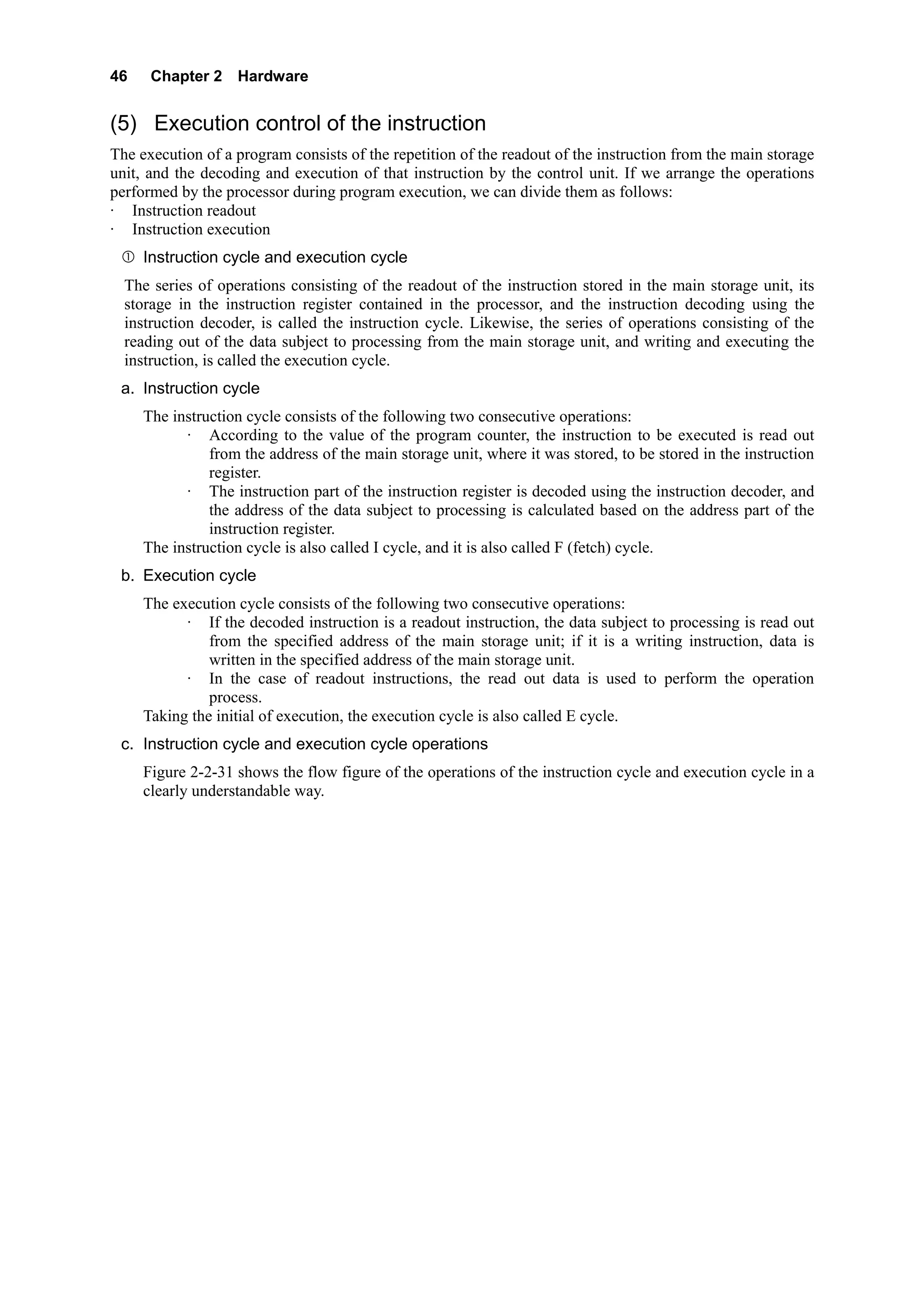
     Figure 2-2-31 shows the flow figure of the operations of the instruction cycle and execution cycle in a
     clearly understandable way.
2.2 Processor architecture   47

 Figure 2-2-31     Flow figure of the operations of the instruction cycle and execution cycle

                                                                                   Start


                                                                None        Instruction to be
                                                                               executed?

                                                                                      Exists


                              Instruction cycle
                                                      According to the value of the program counter, the instruction
                                                      is retrieved from the specified address of the main storage unit


                                                      The read out instruction is stored in the instruction part and


                                                                                                                            Repetition
                                                      address part of the instruction register


                                                      The instruction part of the instruction register is decoded.
                                                      The address of the data to be processed is calculated based
                                                      on the address part of the instruction register


                                                  Loading instruction                                 Writing instruction
                                                                           Type of the decoded
                                                                               instruction?
                              Execution cycle


                                                   The data is loaded from the              The data is written in the
                                                   specified address                        specified address

                                                   Operation process of the
                                                   fetched data


                                                                        Program counter update


                                                                                   End

                     Note: There are cases where the program counter update is performed immediately after the instruction
                           readout, and there are cases where it is performed after the instruction execution is completed.


     The processor reads out, in order, the program instructions stored in the main storage unit and
     executes the program by repeating the instruction cycle and the execution cycle.


(6) Hardwired-logic control and microprogramming control
The instructions set in the computer are executed using logical circuits composed of several logic elements.
In other words, logical circuits are the result of hardwiring among the logic elements; for that reason they
are called hardwired-logic control system or wiring logic control system. Since the different instructions are
implemented by the hardware, they have the advantage that the operation speed is fast. Opposite to this
system, there is one that executes the instructions with the firmware.
As computer performance improves, instructions with more complicated functions become feasible. The
higher the function level of the instructions, the more complicated the control procedure becomes.
Therefore, instead of executing the instructions with hardware of complicated wiring, an execution method
using easily modifiable firmware was designed. This method is called the microprogramming control
system. Compared to the hardwired-logic control system, the operation speed of the microprogramming
control system is slow, but the hardware is simpler and corrections (debugging) are easily performed. The
microprogram, which is a string of patterns that determine whether the logic gate is to be on or off, is stored
in a special memory called control storage inside the control unit. Instructions are followed by reading out
the microprogram sequentially.


2.2.2 Speed performance enhancement in Processor
There are two types of architectures regarding instruction execution. There are
•    sequential architecture
•    speculative architecture
Another name for pre-fetched control is pipeline. RISC is an example of a processor that uses pipeline
processing.


(1) Pipeline processing
48     Chapter 2 Hardware

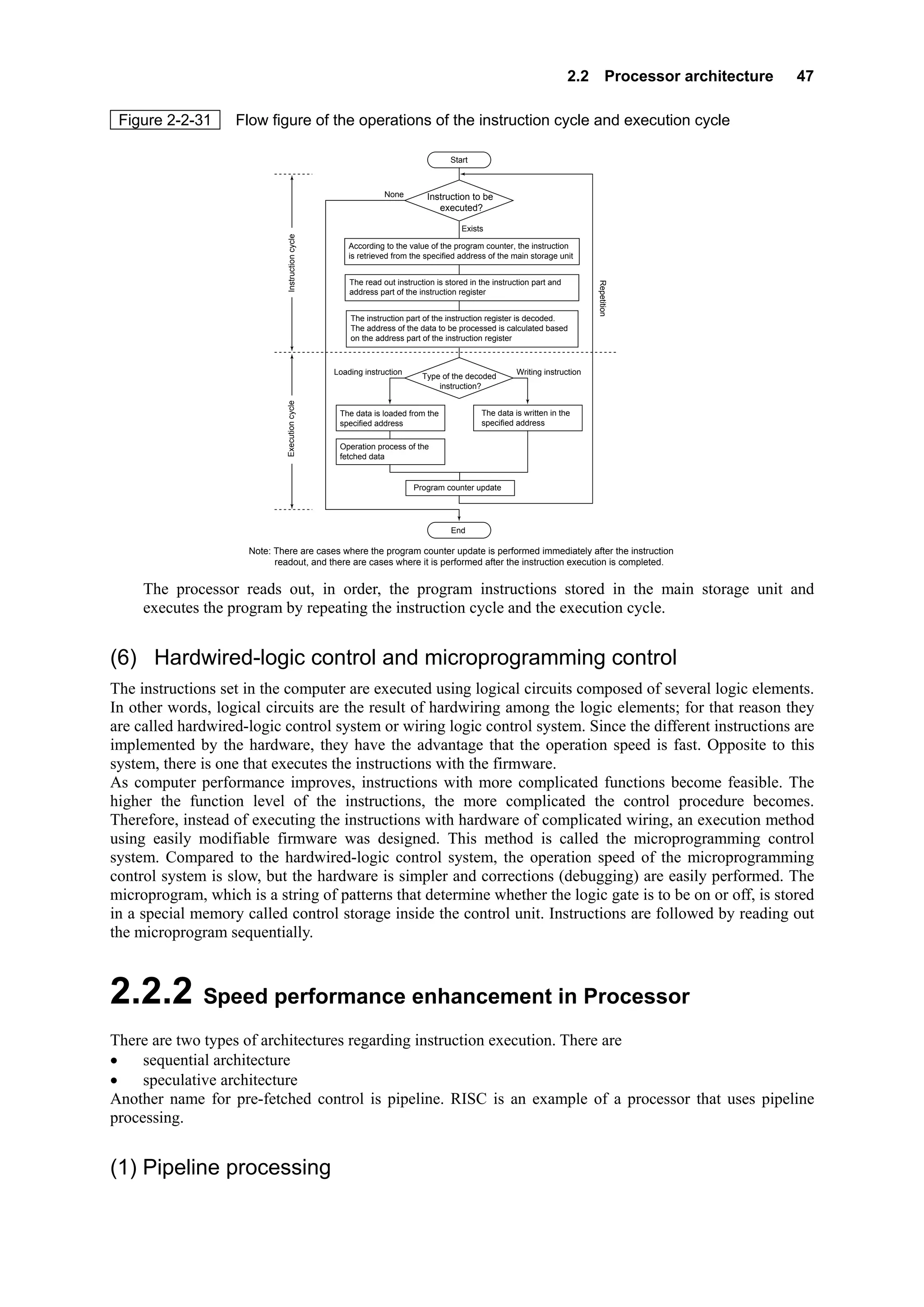
Sequential architecture is the process of reading, decoding and execution of the instruction till it is finished
before another instruction is fetched.
Program execution steps are
Instruction cycle : The instruction is read from the main storage unit
Instruction cycle : The instruction is decoded and the address calculated
Execution cycle : The reading and writing of the main storage unit is done
Execution cycle : The actions specified by the instruction is executed :

Figure 2-2-32         Serial control processing
                                                                   Time
Instruction 1     1        2       3      4

                                Instruction 2   1     2     3       4

                                                          Instruction 3   1    2

Instruction cycle     and execution cycle         accesses the main storage unit. Instruction cycle and
execution is executed within the processor.
The processor is idle when the instruction cycle and execution cycle are executing. Conversely, when
instruction cycle and execution are executing, no access to the main storage unit is done.
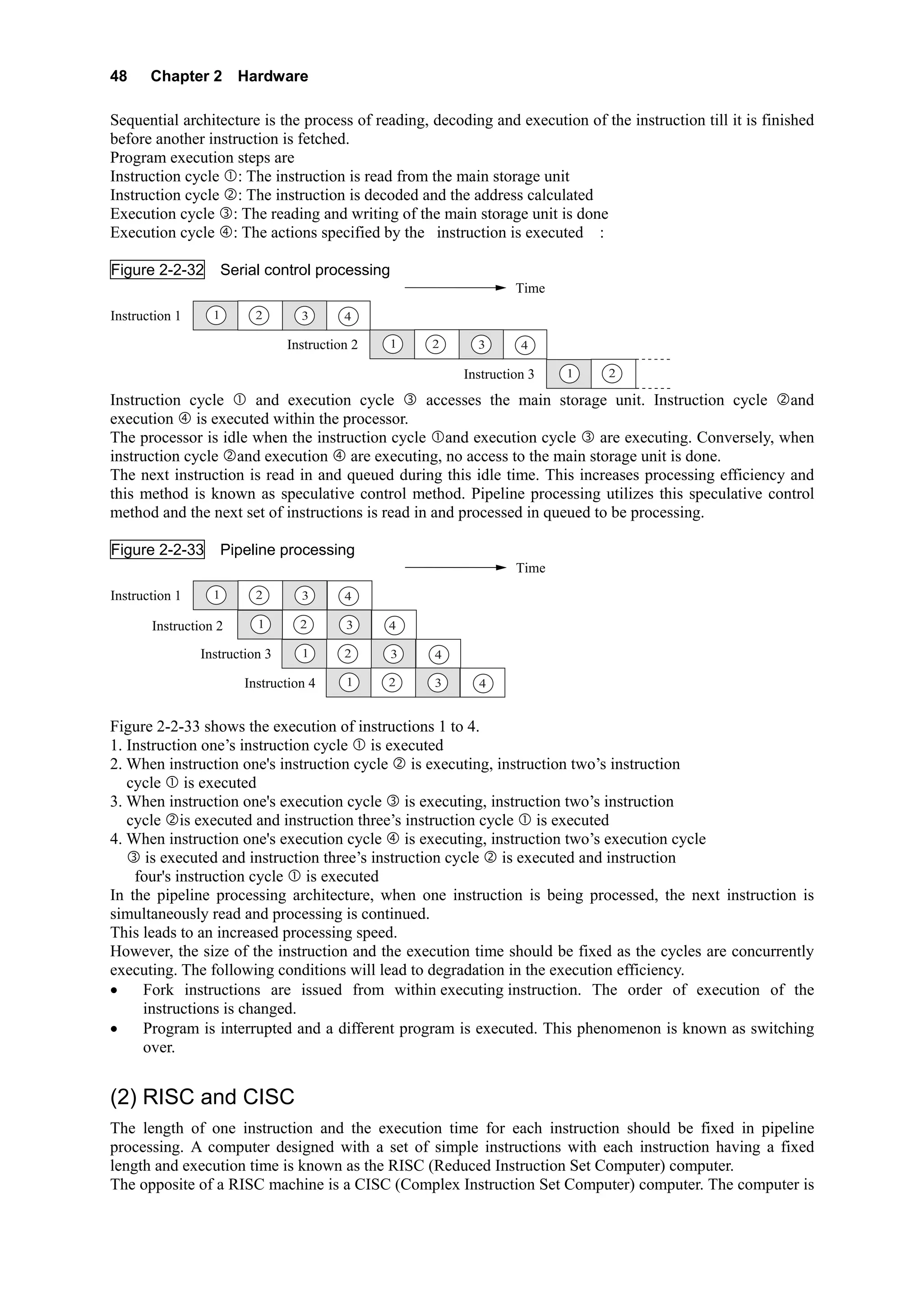
The next instruction is read in and queued during this idle time. This increases processing efficiency and
this method is known as speculative control method. Pipeline processing utilizes this speculative control
method and the next set of instructions is read in and processed in queued to be processing.

Figure 2-2-33         Pipeline processing
                                                                   Time
Instruction 1     1        2       3      4

       Instruction 2       1       2      3     4

                Instruction 3      1      2       3   4

                         Instruction 4    1     2     3     4


Figure 2-2-33 shows the execution of instructions 1 to 4.
1. Instruction one’s instruction cycle is executed
2. When instruction one's instruction cycle is executing, instruction two’s instruction
   cycle is executed
3. When instruction one's execution cycle is executing, instruction two’s instruction
   cycle is executed and instruction three’s instruction cycle is executed
4. When instruction one's execution cycle is executing, instruction two’s execution cycle
      is executed and instruction three’s instruction cycle is executed and instruction
    four's instruction cycle is executed
In the pipeline processing architecture, when one instruction is being processed, the next instruction is
simultaneously read and processing is continued.
This leads to an increased processing speed.
However, the size of the instruction and the execution time should be fixed as the cycles are concurrently
executing. The following conditions will lead to degradation in the execution efficiency.
•    Fork instructions are issued from within executing instruction. The order of execution of the
     instructions is changed.
•    Program is interrupted and a different program is executed. This phenomenon is known as switching
     over.


(2) RISC and CISC
The length of one instruction and the execution time for each instruction should be fixed in pipeline
processing. A computer designed with a set of simple instructions with each instruction having a fixed
length and execution time is known as the RISC (Reduced Instruction Set Computer) computer.
The opposite of a RISC machine is a CISC (Complex Instruction Set Computer) computer. The computer is
2.2 Processor architecture      49

designed with sets of complex instructions

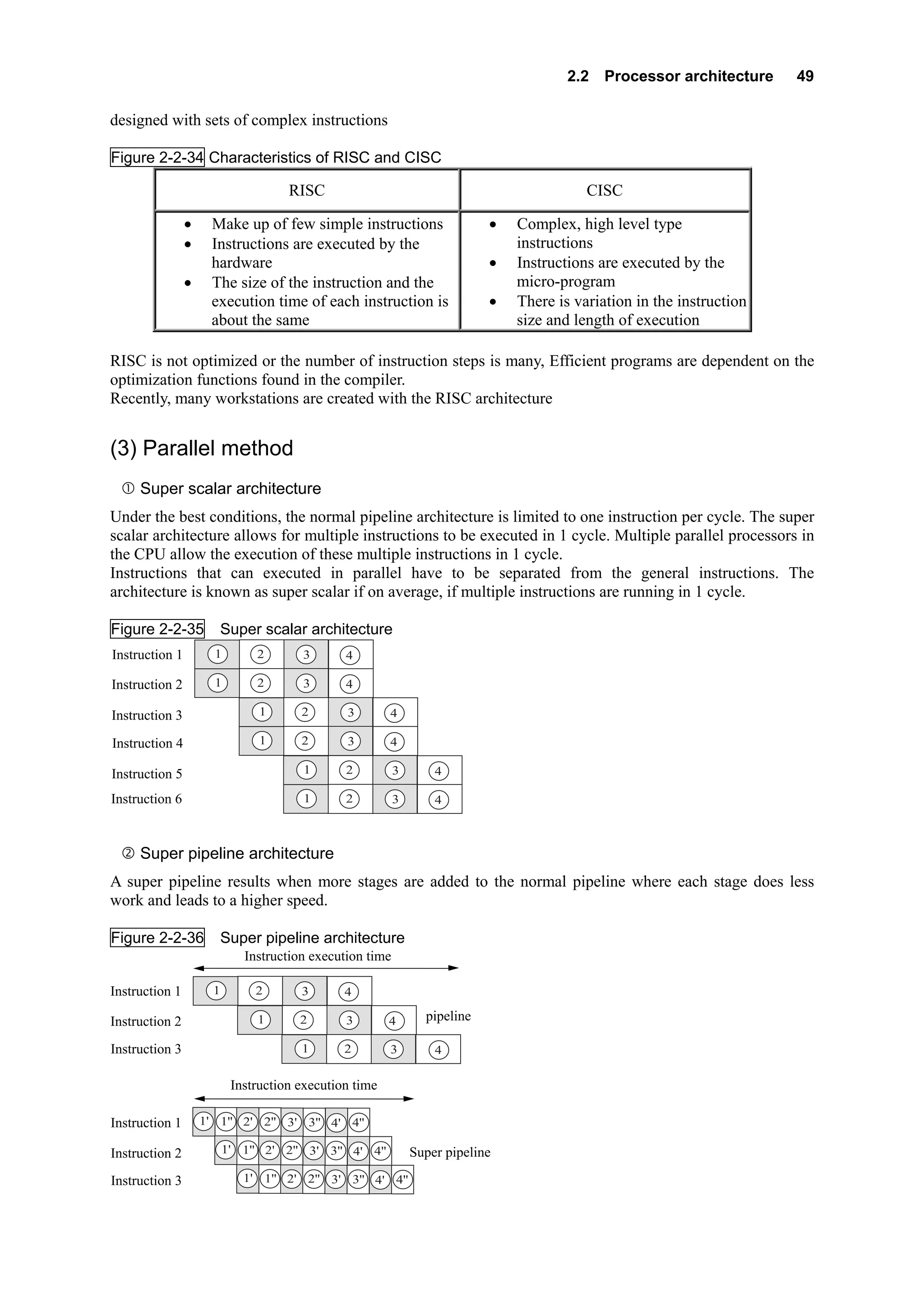
Figure 2-2-34 Characteristics of RISC and CISC

                                     RISC                                                 CISC

                •     Make up of few simple instructions                   •   Complex, high level type
                •     Instructions are executed by the                         instructions
                      hardware                                             •   Instructions are executed by the
                •     The size of the instruction and the                      micro-program
                      execution time of each instruction is                •   There is variation in the instruction
                      about the same                                           size and length of execution

RISC is not optimized or the number of instruction steps is many, Efficient programs are dependent on the
optimization functions found in the compiler.
Recently, many workstations are created with the RISC architecture


(3) Parallel method
     Super scalar architecture
Under the best conditions, the normal pipeline architecture is limited to one instruction per cycle. The super
scalar architecture allows for multiple instructions to be executed in 1 cycle. Multiple parallel processors in
the CPU allow the execution of these multiple instructions in 1 cycle.
Instructions that can executed in parallel have to be separated from the general instructions. The
architecture is known as super scalar if on average, if multiple instructions are running in 1 cycle.

Figure 2-2-35          Super scalar architecture
Instruction 1         1        2       3       4

Instruction 2         1        2       3       4

Instruction 3                   1      2       3        4

Instruction 4                   1      2       3        4

Instruction 5                          1       2          3       4

Instruction 6                          1       2          3       4


     Super pipeline architecture
A super pipeline results when more stages are added to the normal pipeline where each stage does less
work and leads to a higher speed.

Figure 2-2-36             Super pipeline architecture
                             Instruction execution time

Instruction 1         1        2       3       4

Instruction 2                  1       2       3        4       pipeline

Instruction 3                          1       2        3         4

                           Instruction execution time

Instruction 1       1' 1'' 2' 2'' 3' 3'' 4' 4''

Instruction 2             1' 1'' 2' 2'' 3' 3'' 4' 4''         Super pipeline

Instruction 3                1' 1'' 2' 2'' 3' 3'' 4' 4''
50     Chapter 2 Hardware


In this architecture, the next instruction starts to be executed before the end of the current instruction. The
processing volume is higher than the normal pipeline which means the instructions have a high
dependency.
The compiler's sequencing of instructions and the design of a easily processed instruction set is
important to ensure a smooth flow of the pipeline
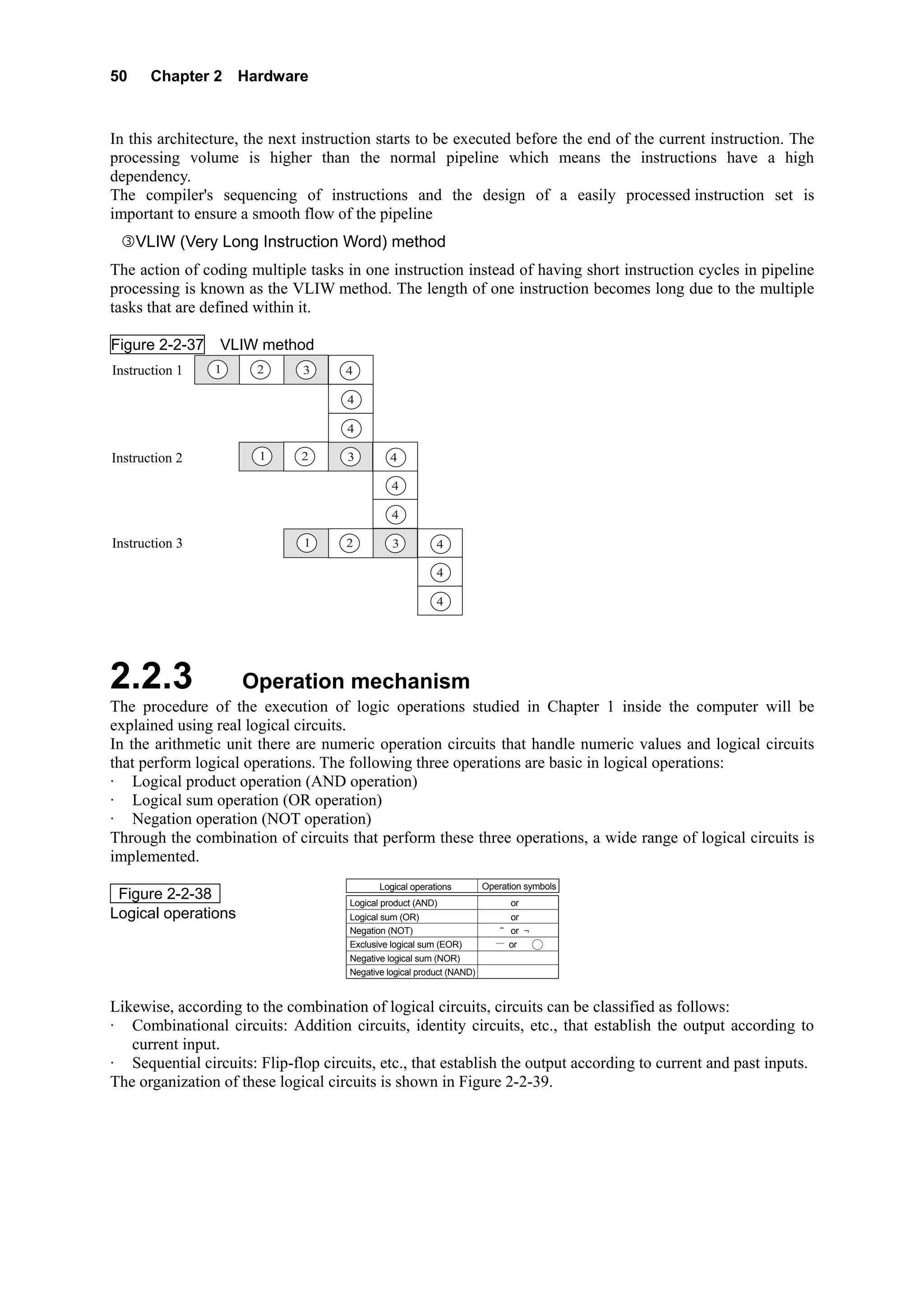
     VLIW (Very Long Instruction Word) method
The action of coding multiple tasks in one instruction instead of having short instruction cycles in pipeline
processing is known as the VLIW method. The length of one instruction becomes long due to the multiple
tasks that are defined within it.

Figure 2-2-37    VLIW method
Instruction 1   1      2      3      4

                                     4

                                     4

Instruction 2          1      2      3         4

                                                4

                                                4

Instruction 3                 1      2          3          4

                                                           4

                                                           4


2.2.3                Operation mechanism
The procedure of the execution of logic operations studied in Chapter 1 inside the computer will be
explained using real logical circuits.
In the arithmetic unit there are numeric operation circuits that handle numeric values and logical circuits
that perform logical operations. The following three operations are basic in logical operations:
· Logical product operation (AND operation)
· Logical sum operation (OR operation)
· Negation operation (NOT operation)
Through the combination of circuits that perform these three operations, a wide range of logical circuits is
implemented.
                                             Logical operations         Operation symbols
 Figure 2-2-38                        Logical product (AND)                ∧ or ・
Logical operations                    Logical sum (OR)                     ∨ or +
                                      Negation (NOT)                        ̄ or ¬
                                      Exclusive logical sum (EOR)          ∨ or   +
                                      Negative logical sum (NOR)
                                      Negative logical product (NAND)


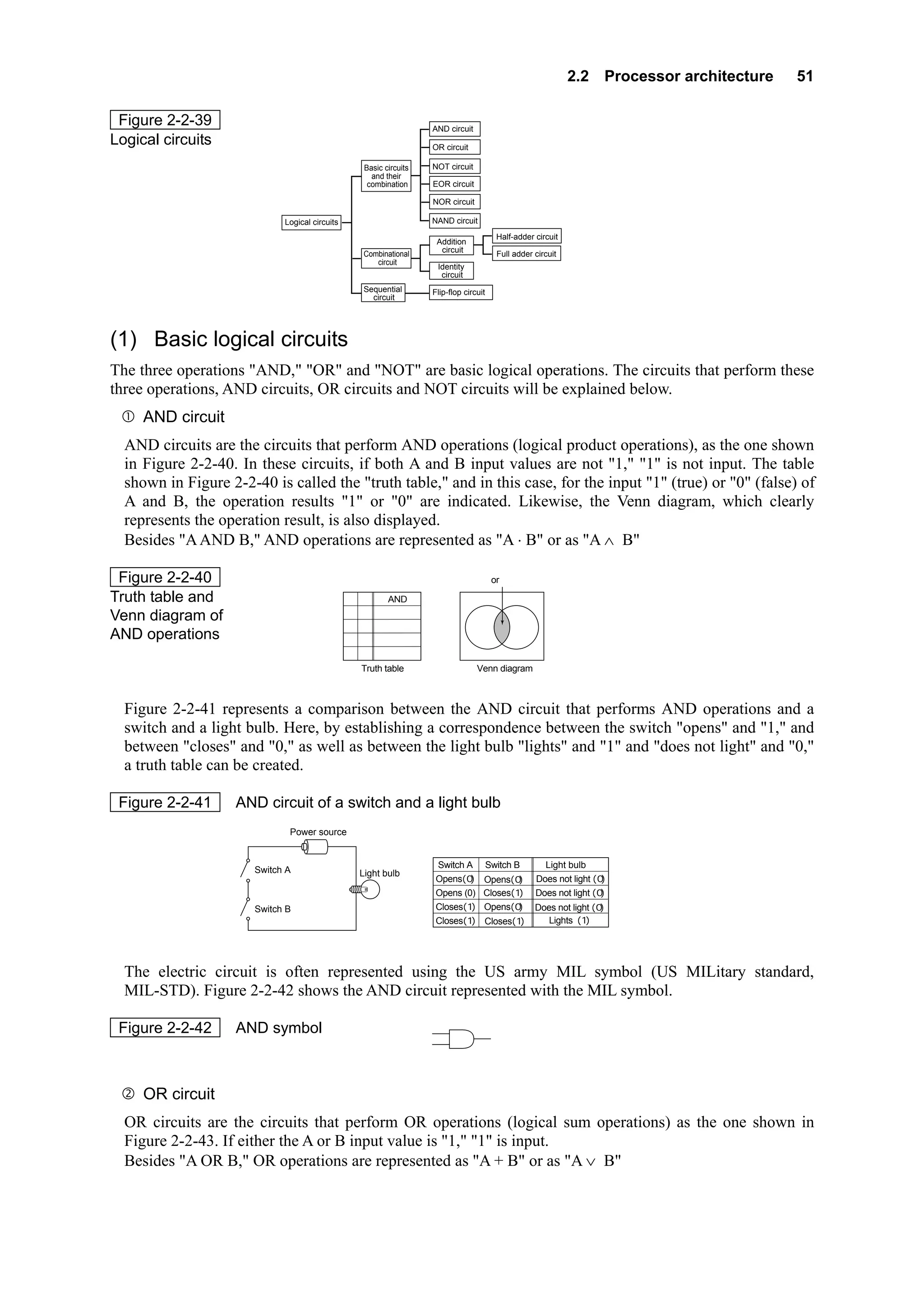
Likewise, according to the combination of logical circuits, circuits can be classified as follows:
· Combinational circuits: Addition circuits, identity circuits, etc., that establish the output according to
   current input.
· Sequential circuits: Flip-flop circuits, etc., that establish the output according to current and past inputs.
The organization of these logical circuits is shown in Figure 2-2-39.
2.2 Processor architecture   51

 Figure 2-2-39                                                            AND circuit
Logical circuits                                                          OR circuit

                                                     Basic circuits       NOT circuit
                                                       and their
                                                      combination         EOR circuit

                                                                          NOR circuit

                             Logical circuits                             NAND circuit
                                                                                                Half-adder circuit
                                                                           Addition
                                                                            circuit
                                                     Combinational                              Full adder circuit
                                                        circuit
                                                                           Identity
                                                                            circuit
                                                    Sequential            Flip-flop circuit
                                                      circuit


(1) Basic logical circuits
The three operations "AND," "OR" and "NOT" are basic logical operations. The circuits that perform these
three operations, AND circuits, OR circuits and NOT circuits will be explained below.
     AND circuit
  AND circuits are the circuits that perform AND operations (logical product operations), as the one shown
  in Figure 2-2-40. In these circuits, if both A and B input values are not "1," "1" is not input. The table
  shown in Figure 2-2-40 is called the "truth table," and in this case, for the input "1" (true) or "0" (false) of
  A and B, the operation results "1" or "0" are indicated. Likewise, the Venn diagram, which clearly
  represents the operation result, is also displayed.
  Besides "A AND B," AND operations are represented as "A ⋅ B" or as "A ∧ B"

 Figure 2-2-40                                                                    A∧B
                                                                                    (or A・B)

Truth table and                                 A   B A AND B
Venn diagram of                                 0   0    0
                                                0   1    0                              A                B
AND operations                                  1   0    0
                                                1   1    1
                                                    Truth table                         Venn diagram


  Figure 2-2-41 represents a comparison between the AND circuit that performs AND operations and a
  switch and a light bulb. Here, by establishing a correspondence between the switch "opens" and "1," and
  between "closes" and "0," as well as between the light bulb "lights" and "1" and "does not light" and "0,"
  a truth table can be created.

 Figure 2-2-41      AND circuit of a switch and a light bulb
                              Power source


                                                                           Switch A           Switch B         Light bulb
                       Switch A                     Light bulb
                                                                           Opens(0)       Opens(0)           Does not light (0)
                                                                           Opens (0)      Closes(1)          Does not light (0)
                       Switch B                                            Closes(1)      Opens(0)           Does not light (0)
                                                                           Closes(1)        Closes(1)           Lights (1)


  The electric circuit is often represented using the US army MIL symbol (US MILitary standard,
  MIL-STD). Figure 2-2-42 shows the AND circuit represented with the MIL symbol.

 Figure 2-2-42      AND symbol                                        A
                                                                                               Y
                                                                      B


     OR circuit
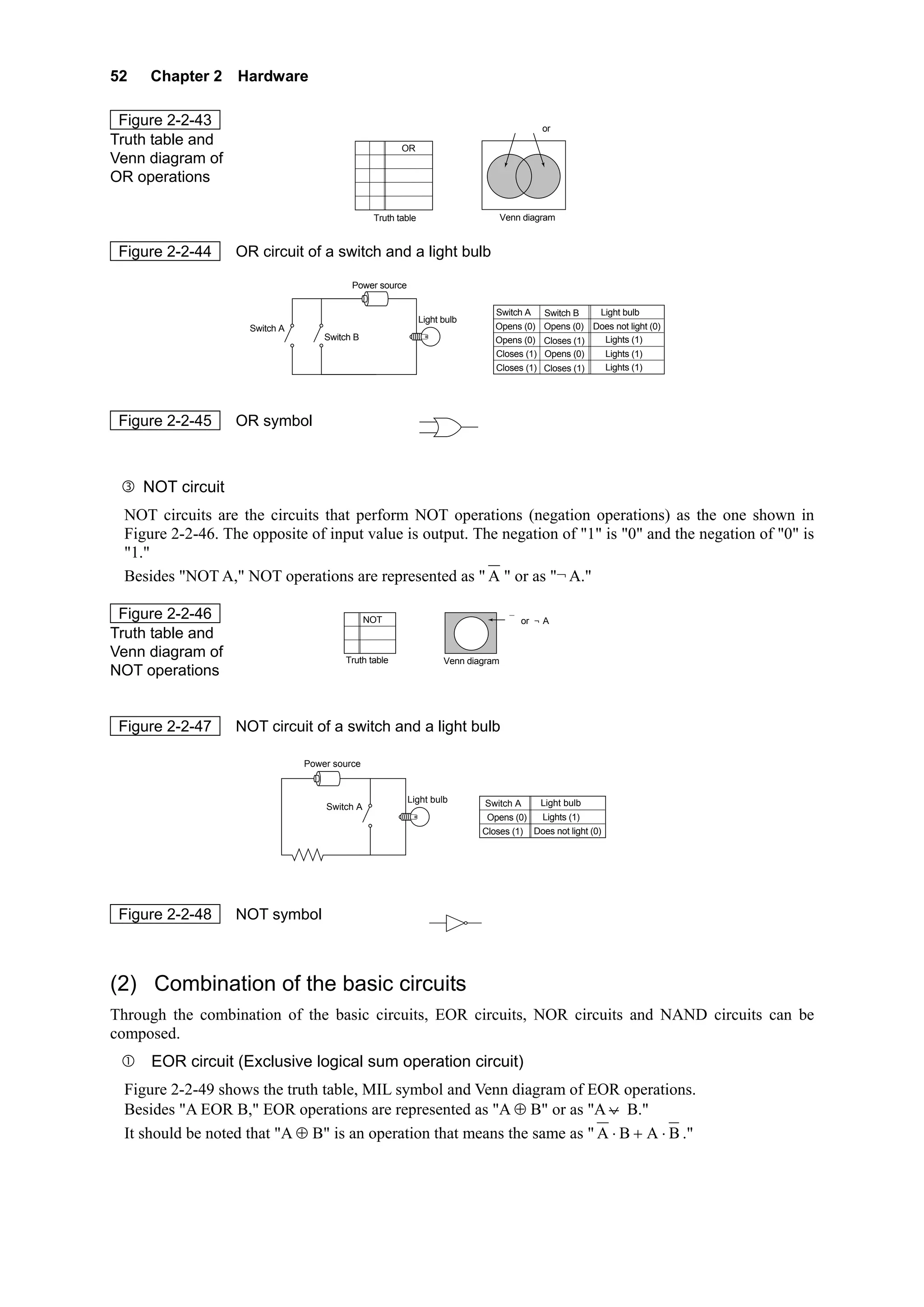
  OR circuits are the circuits that perform OR operations (logical sum operations) as the one shown in
  Figure 2-2-43. If either the A or B input value is "1," "1" is input.
  Besides "A OR B," OR operations are represented as "A + B" or as "A ∨ B"
52    Chapter 2 Hardware

 Figure 2-2-43                                                                        A∨B(or A+B)
Truth table and                            A B A OR B
Venn diagram of                            0 0   0
OR operations                              0 1        1                           A         B
                                           1 0        1
                                           1 1        1
                                               Truth table                        Venn diagram


 Figure 2-2-44     OR circuit of a switch and a light bulb

                                          Power source

                                                                                  Switch A Switch B     Light bulb
                                                             Light bulb
                     Switch A                                                     Opens (0) Opens (0) Does not light (0)
                                    Switch B                                      Opens (0) Closes (1)   Lights (1)
                                                                                  Closes (1) Opens (0)   Lights (1)
                                                                                  Closes (1) Closes (1)  Lights (1)


 Figure 2-2-45     OR symbol                             A
                                                                              Y
                                                         B


     NOT circuit
 NOT circuits are the circuits that perform NOT operations (negation operations) as the one shown in
 Figure 2-2-46. The opposite of input value is output. The negation of "1" is "0" and the negation of "0" is
 "1."
 Besides "NOT A," NOT operations are represented as " A " or as "¬ A."

 Figure 2-2-46                          A NOT A                                       A
                                                                                      (or ¬A)
Truth table and                         0      1                          A
                                        1      0
Venn diagram of                         Truth table                Venn diagram
NOT operations


 Figure 2-2-47     NOT circuit of a switch and a light bulb

                                Power source


                                                         Light bulb           Switch A    Light bulb
                                    Switch A
                                                                               Opens (0)  Lights (1)
                                                                              Closes (1) Does not light (0)


 Figure 2-2-48     NOT symbol                                A                Y


(2) Combination of the basic circuits
Through the combination of the basic circuits, EOR circuits, NOR circuits and NAND circuits can be
composed.
      EOR circuit (Exclusive logical sum operation circuit)
 Figure 2-2-49 shows the truth table, MIL symbol and Venn diagram of EOR operations.
 Besides "A EOR B," EOR operations are represented as "A ⊕ B" or as "A ∨ B."
 It should be noted that "A ⊕ B" is an operation that means the same as " A ⋅ B + A ⋅ B ."
2.2 Processor architecture   53

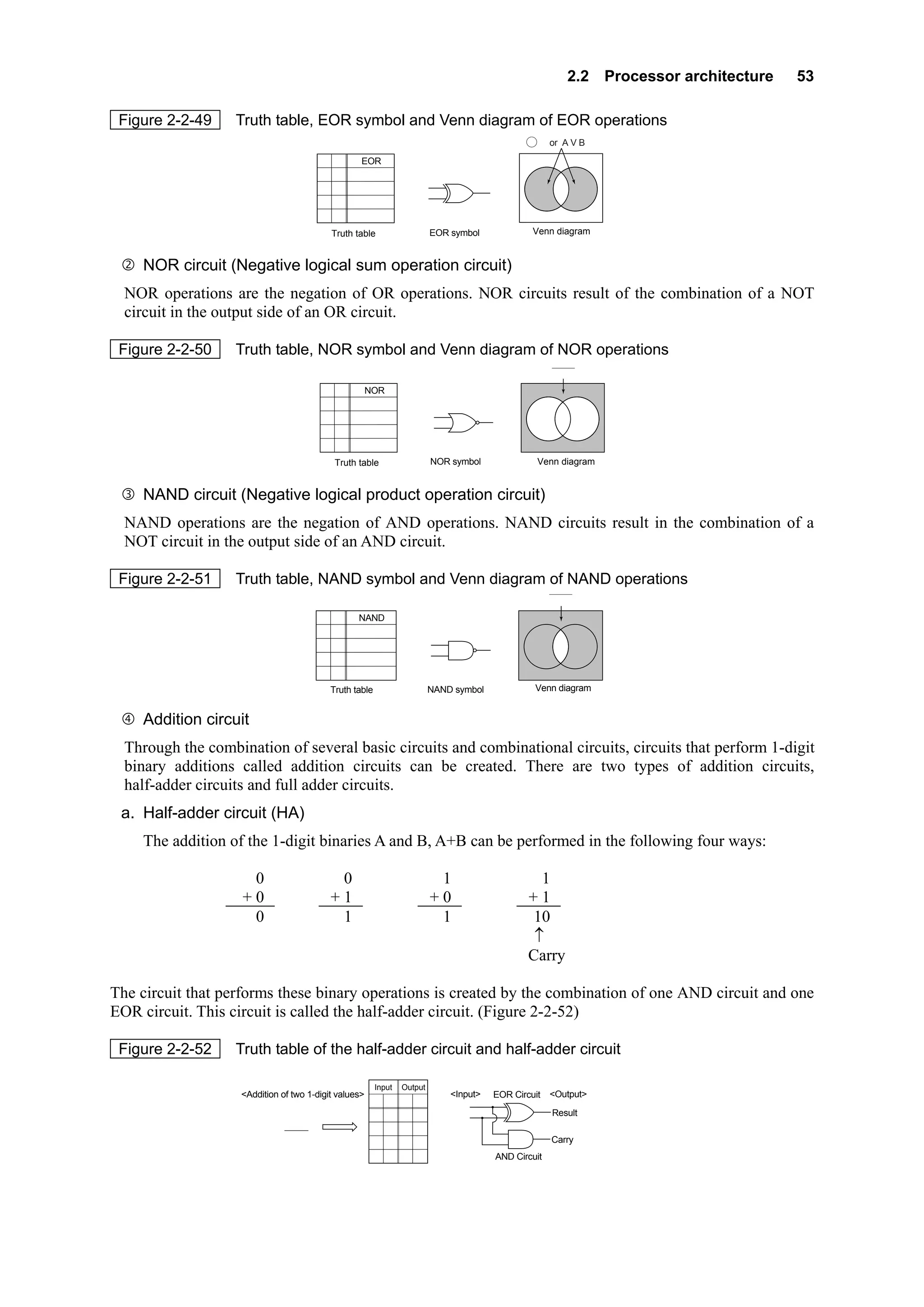
 Figure 2-2-49     Truth table, EOR symbol and Venn diagram of EOR operations
                                                                                               + (or A V B)
                                                                                              A B

                                        A B A EOR B
                                        0 0    0
                                        0 1            1              A                           A          B
                                                                                         Y
                                        1 0            1              B
                                        1 1            0
                                            Truth table                    EOR symbol             Venn diagram


    NOR circuit (Negative logical sum operation circuit)
  NOR operations are the negation of OR operations. NOR circuits result of the combination of a NOT
  circuit in the output side of an OR circuit.

 Figure 2-2-50     Truth table, NOR symbol and Venn diagram of NOR operations
                                                                                                       A∨B
                                         A B A NOR B
                                         0 0    1
                                         0 1           0               A                          A          B
                                                                                         Y
                                         1 0           0               B
                                         1 1           0
                                             Truth table                   NOR symbol              Venn diagram


    NAND circuit (Negative logical product operation circuit)
  NAND operations are the negation of AND operations. NAND circuits result in the combination of a
  NOT circuit in the output side of an AND circuit.

 Figure 2-2-51     Truth table, NAND symbol and Venn diagram of NAND operations
                                                                                                       A∧B
                                        A   B A NAND B
                                        0   0    1
                                        0   1    1                    A                           A          B
                                                                                         Y
                                        1   0    1                    B
                                        1   1    0
                                            Truth table                    NAND symbol            Venn diagram


    Addition circuit
  Through the combination of several basic circuits and combinational circuits, circuits that perform 1-digit
  binary additions called addition circuits can be created. There are two types of addition circuits,
  half-adder circuits and full adder circuits.
 a. Half-adder circuit (HA)
    The addition of the 1-digit binaries A and B, A+B can be performed in the following four ways:

                     0                       0                              1                      1
                    +0                      +1                             +0                    +1
                     0                       1                              1                     10
                                                                                                  ↑
                                                                                                 Carry

The circuit that performs these binary operations is created by the combination of one AND circuit and one
EOR circuit. This circuit is called the half-adder circuit. (Figure 2-2-52)

 Figure 2-2-52     Truth table of the half-adder circuit and half-adder circuit

                                                          Input   Output
                    <Addition of two 1-digit values>                           <Input>   EOR Circuit   <Output>
                                                       a b c d
                                                                                 a
                                 a                     0 0 0 0                                         Result d
                                                                                 b
                                +b
                                                       0 1 0 1
                                cd                                                                     Carry c
                                                       1 0 0 1
                                                       1 1 1 0                           AND Circuit
54    Chapter 2 Hardware

 b. Full adder circuit (FA)
     The addition of the 1-digit binaries A, B and C, A+B+C can be performed in the following eight ways:

              0               0                    0                  0                      1                1                   1        1
              0               0                    1                  1                      0                0                   1        1
             +0              +1                   +0                 +1                     +0               +1                  +0       +1
              0               1                    1                 10                      1               10                  10       11

The circuit that performs these binary operations is created by the combination of two half-adder circuits
and one OR circuit. This circuit is called the full adder circuit.

 Figure 2-2-53        Truth table of the full adder circuit and full adder circuit

                                                          Input     Output
                                                         c a b e d
                                                          ′                  <Input>
                    <Addition of three 1-digit values>                                                                        <Output>
                                                         0 0 0 0 0
                                                                               a       Half-adder   Half-adder                 Result d
                        Carry from the                   0 0 1 0 1
                                                                               c′        circuit      circuit
                        lower column  c  ′               0 1 0 0 1
                                        a                0 1 1 1 0
                                       +b                                                                                      Carry e
                                                         1 0 0 0 1
                                       ed                                      b                                 OR Circuit
                                                         1 0 1 1 0
                                                         1 1 0 1 0
                                                         1 1 1 1 1


(3) Sequential circuit
The sequential circuit is a circuit in which the output is established according to the current input and the
status preserved (past input). The sequential circuit, whose status changes with time, is composed of a
flip-flop circuit and is used in registers, etc.

 Figure 2-2-54                                                       NOR Circuit

Flip-flop circuit
                                                            Input                  Output


                                                                     NOR Circuit


2.2.4 Multi-processor
Multi-processor systems are introduced to improve the performance and reliability of the system. Multiple
processors in parallel with each processor having a dedicated function. When failure occurs, the processor
will do a switch and the remaining processors will distribute the load among themselves.


(1) Symmetric Multi-processor
Symmetric multi-processors systems are systems where the memory is shared among all the processors
executing the same OS. Competition for the use of memory among the processors since the memory is
common to all. The means a large number of processors cannot be connected.
Message passing distributed memory multi processor systems are systems where each processor has its
own private block of memory. A high speed input output port is used to transfer the data between the
different blocks.


(2) Array processor
High speed scientific computing is done with array processors which using pipeline processing.
Large scale or dedicated mathematical processors
2.2 Processor architecture          55

The sub units’ acts are in a queue passing the result to the next unit after it has finished its part. This is
known as vector processing. Most supercomputers utilized this method of high speed computing.


(3) Parallel
Multiple processors cooperate with multiple tasks being performed to execute one job.
SISD (Single Instruction Single Data Stream)
 One instruction stream operating on a single data element and is not parallel
SIMD (Single Instruction Multiple Data Stream)
 Each instruction may operate on more than one data element and is synchronous.
Parallel SIMD
The same instruction is executed by all processors operating on different sets of data.
MIMD (Multiple Instruction Multiple Data Stream)
 Each processor has its own instruction stream acts on its own data stream independent of the other
processors


2.2.5               Processor performance
The performance of the processor, which can be considered as the central nervous system of the units that
compose the computer system, is measured using the number of instructions that can be executed in a unit
of time as an index. These indexes are indicated below.


(1) MIPS
MIPS is an acronym of Million Instructions Per Second, and indicates in million units the number of
instructions that can be executed in one second. In other words, a 1 MIPS processor is a processor that can
execute one million instructions per second. Basically, the larger the number of instructions that can be
executed, the higher the value. The term MIPS is mainly used to indicate the performance of processors of
high-end mainframe computers. However, it is meaningless to use this index to compare processors of
different types of machines that execute different instruction contents.


(2) Clock
In order to set the pace in which the micro-instructions, which are basic operations, are executed, the
processor has a clock inside. A quartz crystal oscillator that pulses in regular intervals when electrical
current passes through is used in this clock. The time taken for this oscillator to pulse once (one cycle) is
called clock. The basic operations of the processor are performed according to this clock. The number of
clocks varies according to the instruction.
The clock reciprocal number is called clock frequency. Clock frequency is used as an index to measure the
performance of a personal computer.

 Example Performance of a processor with a clock frequency of 500 MHz
    500 MHz = 500 × 106 Hz = 500,000,000 Hz (times/second);      500 hundred million pulses per
    second

         1
                  = 2 × 10-9 = 2 nano (seconds/times);             1 pulse for every 2 nanoseconds
     0.5 × 10 9


(3) CPI (Cycles Per Instruction)
A CPI is the number of clocks required to execute one instruction. This index indirectly indicates the
execution time of one instruction.
56    Chapter 2 Hardware


2.3              Memory architecture

2.3.1               Memory types
The storage function, which is the most important characteristic of the computer, is made possible by the
storage units. According to the application, the storage units are divided into main storage unit and
auxiliary storage devices.

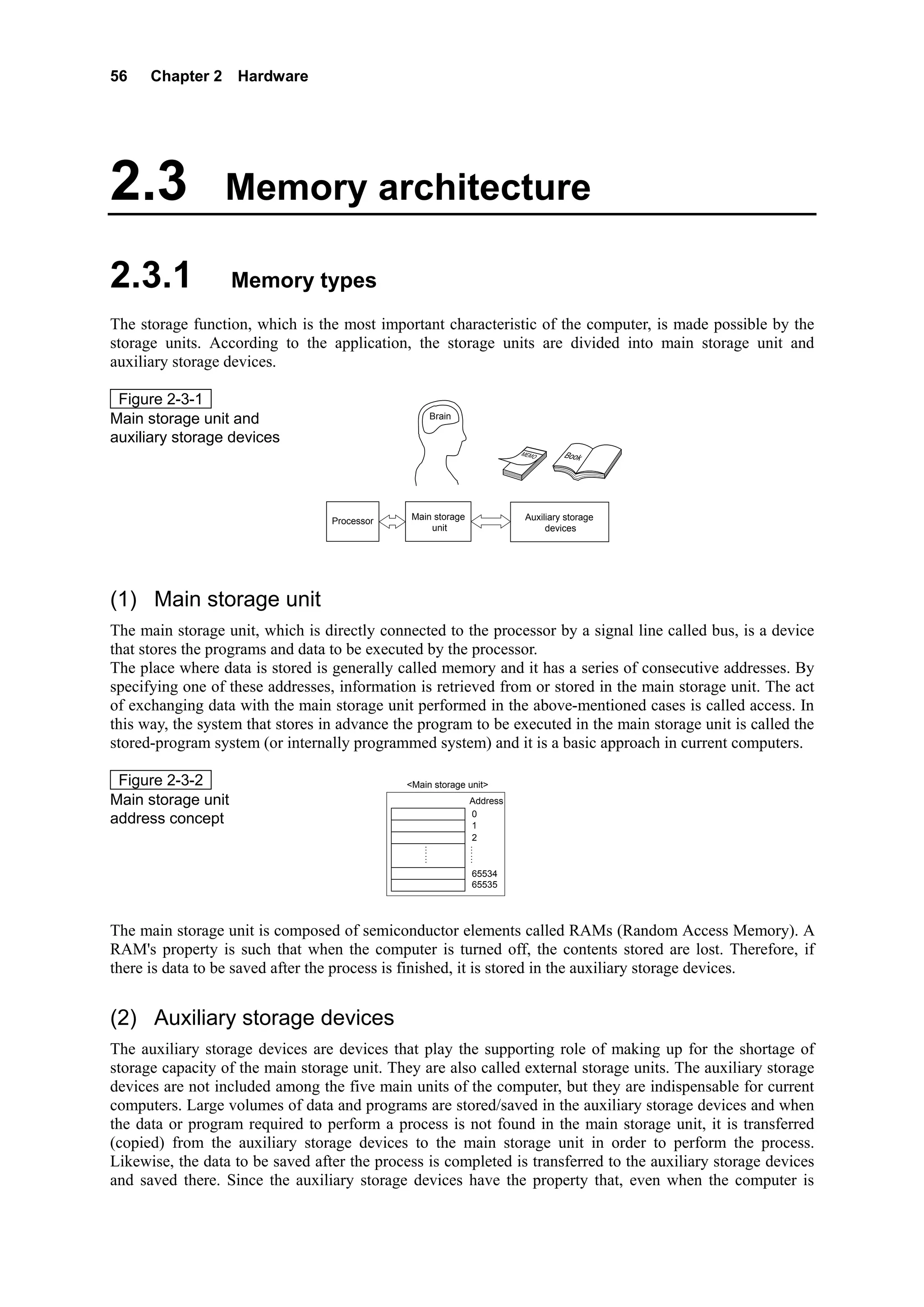
 Figure 2-3-1
Main storage unit and                                  Brain

auxiliary storage devices
                                                                         MEMO      Book


                                  Processor    Main storage               Auxiliary storage
                                                   unit                        devices


(1) Main storage unit
The main storage unit, which is directly connected to the processor by a signal line called bus, is a device
that stores the programs and data to be executed by the processor.
The place where data is stored is generally called memory and it has a series of consecutive addresses. By
specifying one of these addresses, information is retrieved from or stored in the main storage unit. The act
of exchanging data with the main storage unit performed in the above-mentioned cases is called access. In
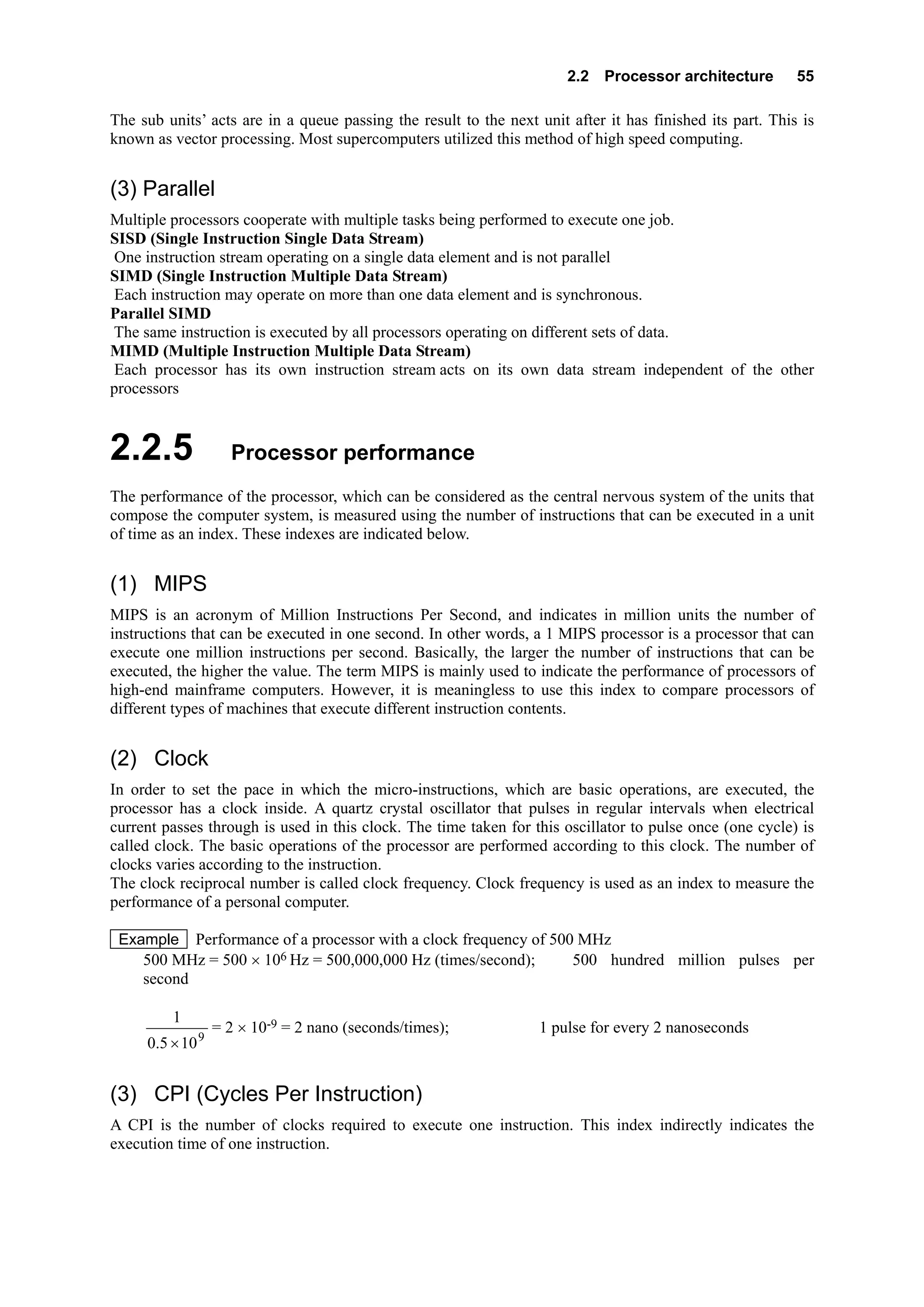
this way, the system that stores in advance the program to be executed in the main storage unit is called the
stored-program system (or internally programmed system) and it is a basic approach in current computers.

 Figure 2-3-2                                 <Main storage unit>
Main storage unit                                              Address
                                                               0
address concept                                                1
                                                               2
                                                   ⋮            ⋮
                                                   ⋮              ⋮

                                                               65534
                                                               65535


The main storage unit is composed of semiconductor elements called RAMs (Random Access Memory). A
RAM's property is such that when the computer is turned off, the contents stored are lost. Therefore, if
there is data to be saved after the process is finished, it is stored in the auxiliary storage devices.


(2) Auxiliary storage devices
The auxiliary storage devices are devices that play the supporting role of making up for the shortage of
storage capacity of the main storage unit. They are also called external storage units. The auxiliary storage
devices are not included among the five main units of the computer, but they are indispensable for current
computers. Large volumes of data and programs are stored/saved in the auxiliary storage devices and when
the data or program required to perform a process is not found in the main storage unit, it is transferred
(copied) from the auxiliary storage devices to the main storage unit in order to perform the process.
Likewise, the data to be saved after the process is completed is transferred to the auxiliary storage devices
and saved there. Since the auxiliary storage devices have the property that, even when the computer is
2.3 Memory architecture    57

turned off, the contents stored are not lost, they can be used as input/output units of large volumes of data.
· The following are the main auxiliary storage devices.
· Magnetic tape unit
· Magnetic disk unit
· Floppy disk unit (Flexible disk unit)
· Optical disk unit
· Magneto-optical disk unit


2.3.2              Memory capacity and performance

(1) Memory hierarchical structure
The computer memory is composed of the register inside the processor, the main storage unit, the auxiliary
storage devices, etc. The storage capacity and the processing speed of each of these devices differ. As is
shown in Figure 2-3-3, the access speed is as follows:
  (High speed) Register inside the processor > Main storage unit > Auxiliary storage devices (Low speed)
This access speed difference is absorbed by a device called the buffer.

 Figure 2-3-3     Memory hierarchical structure

                                      [Access speed]                                                 [Storage capacity]


                                                1 to 10 nanoseconds      Register        100 bytes


                                          1 to 100 nanoseconds        Cache memory              100 k bytes


                               Hundreds of nanoseconds               Main storage unit             10 to 100M bytes


                               100 microseconds                                                            100M bytes
                                                                        Disk cache
                                 to 10 milliseconds                                                           to 1G byte


                     Hundreds of milliseconds         Magnetic disk unit, magnetic tape unit,                   Over tens of M bytes
                      to hundreds of seconds          optical disk unit, magneto-optical disk unit, etc.          to 100G bytes


(2) Access time
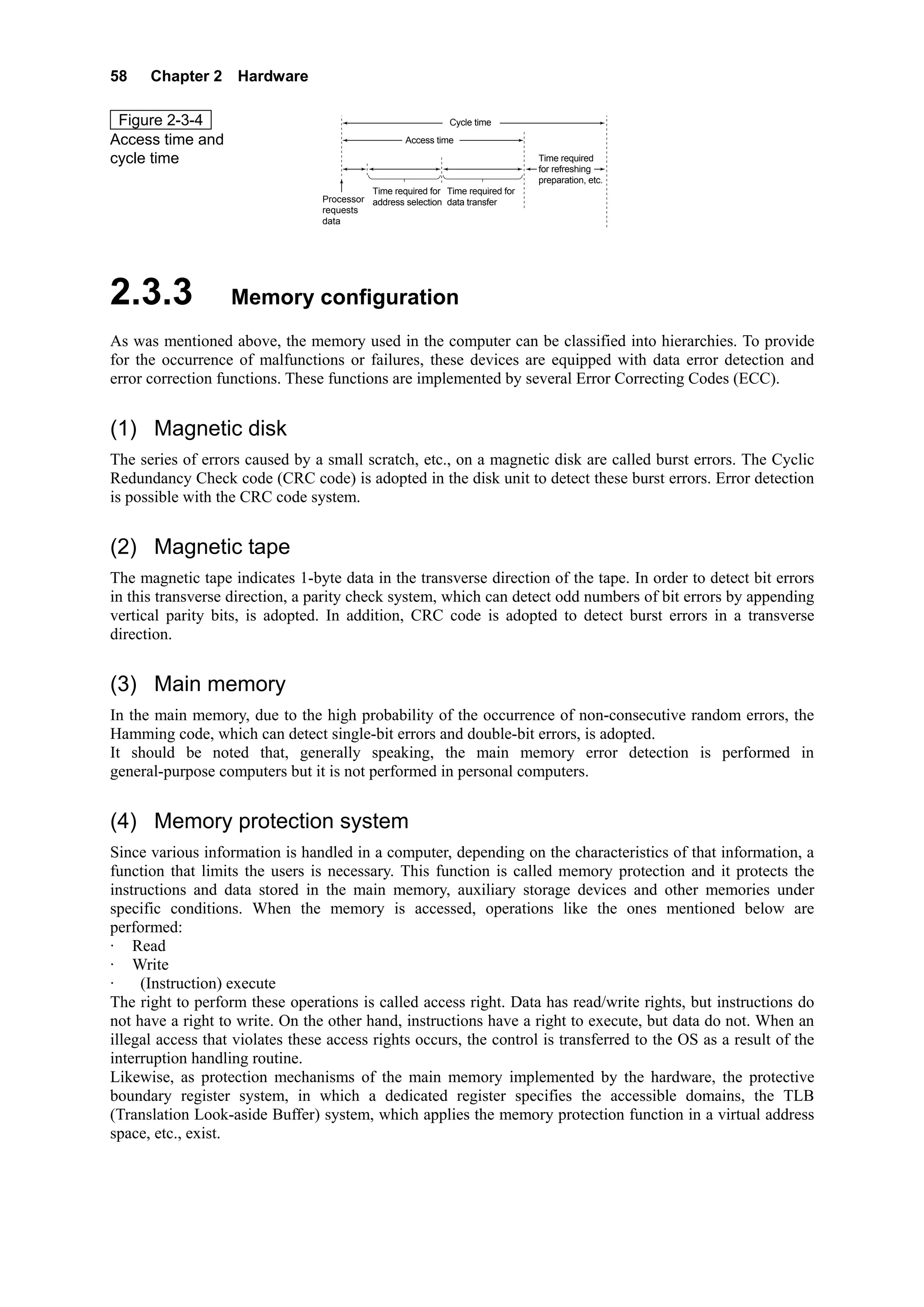
The access time and cycle time indicate the operation speed of the storage units.
The access time is the time elapsed from when the processor sends the read/write instruction to the storage
unit until the data delivery/acceptance is completed.
For the processor to access the main storage unit data, the following three stages are necessary:
            The time during which the processor requests the data readout
            The time during which the processor selects the main storage unit address with the address bus
            The time during which the data of the selected address is transferred through the data bus.
In other words, + + represent the time elapsed from when the data access request is sent until the data
transfer is completed. This lapse of time is called the access time.


(3) Cycle time
Among the storage elements of the storage unit, when data is to be stored in the capacitor, there are some
whose memory fades with time, as the DRAM. In this case, the refreshing operation that rewrites data at
regular intervals becomes necessary. For that reason, after the data transfer is completed, a preparation time
in order to receive the next request becomes necessary. The lapse of time that includes the point up to this
preparation is called cycle time.
58    Chapter 2 Hardware

 Figure 2-3-4                                                 Cycle time

Access time and                                     Access time

cycle time                             ①           ②                 ③           Time required
                                                                                 for refreshing
                                                                                 preparation, etc.
                                           Time required for Time required for
                                 Processor address selection data transfer
                                 requests
                                 data


2.3.3              Memory configuration
As was mentioned above, the memory used in the computer can be classified into hierarchies. To provide
for the occurrence of malfunctions or failures, these devices are equipped with data error detection and
error correction functions. These functions are implemented by several Error Correcting Codes (ECC).


(1) Magnetic disk
The series of errors caused by a small scratch, etc., on a magnetic disk are called burst errors. The Cyclic
Redundancy Check code (CRC code) is adopted in the disk unit to detect these burst errors. Error detection
is possible with the CRC code system.


(2) Magnetic tape
The magnetic tape indicates 1-byte data in the transverse direction of the tape. In order to detect bit errors
in this transverse direction, a parity check system, which can detect odd numbers of bit errors by appending
vertical parity bits, is adopted. In addition, CRC code is adopted to detect burst errors in a transverse
direction.


(3) Main memory
In the main memory, due to the high probability of the occurrence of non-consecutive random errors, the
Hamming code, which can detect single-bit errors and double-bit errors, is adopted.
It should be noted that, generally speaking, the main memory error detection is performed in
general-purpose computers but it is not performed in personal computers.


(4) Memory protection system
Since various information is handled in a computer, depending on the characteristics of that information, a
function that limits the users is necessary. This function is called memory protection and it protects the
instructions and data stored in the main memory, auxiliary storage devices and other memories under
specific conditions. When the memory is accessed, operations like the ones mentioned below are
performed:
· Read
· Write
·    (Instruction) execute
The right to perform these operations is called access right. Data has read/write rights, but instructions do
not have a right to write. On the other hand, instructions have a right to execute, but data do not. When an
illegal access that violates these access rights occurs, the control is transferred to the OS as a result of the
interruption handling routine.
Likewise, as protection mechanisms of the main memory implemented by the hardware, the protective
boundary register system, in which a dedicated register specifies the accessible domains, the TLB
(Translation Look-aside Buffer) system, which applies the memory protection function in a virtual address
space, etc., exist.
2.4 Auxiliary storage devices   59


2.4                 Auxiliary storage devices

2.4.1               Types and characteristics of auxiliary storage devices
As was mentioned above, computer storage units are divided as follows:
· Main storage unit
· Auxiliary storage devices
The main storage unit is equivalent to the human brain, while auxiliary storage devices are equivalent to
notebooks and texts. Auxiliary storage devices are devices that store and save programs and data while they
are not being executed. Likewise, as when one reads a text and writes down the necessary information, or
when one writes in a letter the things to be transmitted to another person, these auxiliary storage devices
also play the role of input devices and output devices.
There are two types of auxiliary storage device: devices that store data magnetically, as the magnetic tape
unit, the magnetic disk unit, the floppy disk unit (flexible disk unit), and the magneto-optical disk unit, and
devices that store data optically as the optical disk unit (Figure 2-4-1).
The main storage unit stores programs and data to be used by the processor for instruction execution, but it
has a big problem: stored content is lost when the computer is turned off. On the other hand, compared to
the main storage unit, the operating speed of auxiliary storage devices is low, but they can store a large
volume of data and, even if the computer is turned off, the stored data is retained semi-permanently.
It should be noted that besides these devices, there is also a semiconductor disk unit that is, for example,
the flash memory used as an auxiliary storage unit in digital cameras and notebook personal computers.
This unit is composed of semiconductor(s) (EEPROM(s)), it does not operate mechanically, and it
electrically performs data reading/writing processes at high speed. However, since it cannot store large
volumes of data, it is used as the storage unit of small devices with low power requirements.
Here, the operation principles and characteristics of the typical auxiliary storage devices will be explained.

 Figure 2-4-1
                                                        Magnetic tape     Magnetic tape unit
Diverse auxiliary
storage devices                                                           Magnetic disk unit
                                                        Magnetic disk
                                                                          Floppy disk unit
                                                                          (Flexible disk unit)
                            Auxiliary storage devices
                                                        Magneto-optical   Magneto-optical disk unit
                                                             disk

                                                                          Optical disk unit
                                                                          (CD-ROM unit)
                                                        Optical disk
                                                                          DVD unit


(1) Magnetic disk unit
Magnetic disk unit is devices that store data using magnetic disks. It is the auxiliary storage device most
widely used in today's computer systems. Magnetic disks for personal computers or workstations are also
called fixed disks or hard disks but the mechanism is the same.

 Figure 2-4-2
Magnetic disk unit
60    Chapter 2 Hardware


     Magnetic disk
 a. Track
     The magnetic disk is a circle-shaped magnetic body in which data is recorded along rings called tracks.
     There are several tracks concentrically set on the magnetic disk. The length of the outer tracks and that
     of the inner tracks differ, because of the difference of the storage capacity, the volume of data stored is
     the same in every track. (Figure 2-4-3).
                                                    Outer side track
 Figure 2-4-3                                       Inner side track
                                                                        Same storage capacity

Data recording side
of the magnetic disk
                                                    Storage density: High

                                                    Storage density: Low


     The storage density of the disk is based on the average track length and the storage capacity of the
     magnetic disk is determined by the number of tracks and the storage density of one disk.

 b. Cylinder
     In a magnetic disk unit, which is composed of multiple magnetic disks, the group of tracks with the
     same radius on each of the disks is set as one data storage area. This storage area is called a cylinder.
     When data is stored in a cylinder, if, for example, the data cannot be completely stored on track 0 of
     cylinder 1, it can be stored on track 1, track 2, etc. of the same cylinder. Therefore, since data access
     can be performed without moving the access arm (that is, the magnetic head), it is extremely efficient.
     To put it in another way, the cylinder is a group of tracks that can be read and written by multiple
     magnetic heads if the access arm of the magnetic disk unit is fixed.

 Figure 2-4-4                                                                 Cylinder 2
Tracks and cylinders                                                   Cylinder 1
                                                                 Cylinder 0
                                Tracks
                                   0
                                   1
                                   2
                                         ⋮

                                               ⋮


 c. Storage capacity
     The storage capacity of the magnetic disk can be determined as follows:
     Storage capacity of 1 track × Track number of 1 cylinder × Cylinder number of the magnetic disk

      Example
       Given a magnetic disk with the following specifications, the storage capacity of this magnetic disk
       is calculated:
      [Magnetic disk specifications]
         • Cylinder number:                    800 cylinders
         • Track number/cylinder number: 19 tracks
         • Storage capacity/track:             20,000 bytes
       The storage capacity per cylinder is as follows:
             20,000 bytes/track × 19 tracks/cylinder = 380,000 bytes/cylinder = 380 kB (kilo bytes)
       Since the number of cylinders on this disk is 800, the storage capacity of the magnetic disk is as
       follows:
2.4 Auxiliary storage devices          61

         380 kB/cylinder × 800 cylinders = 304,000 kB = 304 MB (Mega bytes)
  An example of the calculation of storage capacity when blocking is performed is shown below.

    Example
     Given a magnetic disk with the following specifications, the number of cylinders required when 80
     thousand records of 200 bytes each are stored in a sequential access file of 10 records/block per
     magnetic disk is calculated. It should be noted that block recording cannot be extended over
     multiple tracks.
    [Magnetic disk specifications]
       • Cylinder number:                 400 cylinders
       • Track number/cylinder number: 19 tracks
       • Storage capacity/tracks:         20,000 bytes
       • Inter-block gap (IBG):           120 bytes

      1. First, the number of blocks of the whole file is calculated.
         Since the number of records is 80,000 and the blocking factor is 10, the number of blocks is
         determined as follows:
         80,000 records ÷ 10 records/block = 8,000 blocks
      2. The length of 1 block, including the inter-block gap is calculated.
         200 bytes/record × 10 records/block + 120 bytes/block = 2,120 bytes/block
      3. The number of blocks that can be recorded in 1 track is calculated.
         20,000 bytes/track ÷ 2,120 bytes/block = 9.43… blocks/track
         Since a block cannot be recorded across multiple tracks, the decimals are omitted, and the
         number of blocks that can be recorded in 1 track becomes 9 blocks/track.
      4. The number of tracks required for the whole file is calculated.
         8,000 blocks ÷ 9 blocks/track =888.88… tracks
         Rounding it up to the next whole number, it becomes 889 tracks.
      5. The number of cylinders required to record the whole file is
         889 tracks ÷ 19 tracks/cylinder = 46.78…cylinders
         Rounding it up to the next whole number, it becomes 47 cylinders.
  Magnetic disk unit structure and operation principles
The magnetic disk unit has multiple magnetic disks, which it rotates at high speeds in order to record data
along concentric tracks. On each recording side, an access arm with a magnetic head moves forward and
backward to reach the track position where data is to be read or recorded.
Compared to the sequential access of the magnetic tape unit, in which access can only be performed in
order from the beginning, in the magnetic disk unit, besides sequential access, direct access to the desired
recording position can also be performed. Auxiliary storage devices in which this direct access can be
performed are called direct access storage devices (DASD).
62    Chapter 2 Hardware


Figure 2-4-5     Structure of the magnetic disk unit
                                             Recording of the character code of A
                                   Parity bit       001000001


                                                                                Track

                                                                           Direction of
                                                                             rotation


                                                                                                                  Magnetic disk


                                                     Reading/writing head
                                                                                Rotation axis


                                        Access
                                           arm                                                                  Magnetic
                                                                                                                disk
                                                            ⋮                                   ⋮


                                                                         Driving motor                         Metal plate

                                        The whole access arm                      Magnetic
                                        moves horizontally                        coating


 a. Variable type and sector type
     By recording method, magnetic disk unit is classified into "Variable type" and "Sector type."
      Variable type
      In the variable type unit, data reading and writing is performed on a block basis, as in the magnetic
      tape. A block is a group of data called a record and there is an IBG between blocks. In the unit, there
      is no gap between data (or IBG). Reading and writing of any number of bytes can be started from
      any track position.
      Sector type
      In the sector type unit, one track is divided into approximately 20 small units called sectors. Data
      reading and writing is performed on a sector basis. The reading/writing position is specified with the
      sector number of the selected track.

Figure 2-4-6     Variable type and sector type
                 <Variable type>
                                                 Block                             Block                            Block


                                  IBG    Record Record Record      IBG   Record Record Record        IBG     Record Record Record   IBG    …
                                           1      2      3                 4      5      6                     7      8      9


                                                                      1 Track


                                                                            Data
                                        Data A              Data B                         Data D                      …
                                                                             C

                                                                                    IBG

                  <Sector type>
                                         1 Sector                    1 Sector                       1 Sector                  1 Sector


                                                            Data                                                       Data
                                   Data A                                                           Data C
                                                             B                                                          D

                                                    Free                   Free                                                     Free


     Generally, the variable type is used in magnetic disks, and the sector type is used in floppy disks and
     hard disks.
2.4 Auxiliary storage devices   63

 b. Parity check
    When data is recorded on a magnetic disk, data is written on the track bit by bit using the magnetic
    head. The same method is used to read data. When this process is performed, as in the magnetic tape,
    in order to detect reading or writing errors, a parity bit (1 bit) is appended to perform the parity check.
 c. Defragmentation
    In personal computer hard disks, data is stored and deleted repeatedly. Since it is improbable that all
    the data to be stored will have the same size, a small volume of data can be stored after a big volume
    of data is deleted, or vice versa. As a consequence, there would be free sectors scattered about and a
    drop in access efficiency. This status is called fragmentation; in order to solve it, a function called
    defragmentation is implemented in the OS.
    Magnetic disk unit performance
 The performance of the magnetic disk unit is measured according to access time and storage capacity.
 Since the storage capacity was already explained in ①, here, the access time significance and the
 calculation method will be explained.
 a. Access time
    Access is the generic term for the act of reading specific data from the magnetic disk and writing it on
    a specific cylinder or track. Access time is calculated through the addition of the following:
           · Seek time
           · Search time
           · Data transfer time
      Seek time
      In order to access the target data, the magnetic head has to be moved to the position of the track
      where the target data is stored. The time it takes to move the magnetic head is called seek time.

 Figure 2-4-7
Seek time                                                         Seek time


                                                     Movement      Magnetic head


                                                Rotation axis


      Since seek time differs depending on the distance between the position of the target track and the
      current position of the magnetic head, an average value is used as the actual seek time. This value is
      called average seek time.
      Search time
      The search time is the lapse of time until the target data reaches the magnetic head position. (Figure
      2-4-8).
                                                                Search time
 Figure 2-4-8
Search time                                    Movement


                                                                    Magnetic head


                                              Rotation axis


      As with average seek time, depending on the data position, there are cases where the search time is 0,
      as well as cases where there is a wait of 1 revolution. Therefore, 1/2 revolution of the magnetic disk
      is used as the search time. This value is called average search time.
64     Chapter 2 Hardware

        Data transfer time
        The time elapsed between when the magnetic head data access starts and when the transfer is
        completed is called data transfer time.

  Therefore, the time elapsed between when the magnetic disk unit starts the data access and when the data
  transfer is completed, that is, the access time, is calculated as follows:
  Seek time + Search time + Data transfer time
  Strictly speaking, as in the above-mentioned formula, the time elapsed between when the access request
  occurs and the magnetic disk unit starts operating is the access time.
       Access time of the magnetic disk unit = Average seek time + Average search time +
                                                  Data transfer time

     Example
      Given a magnetic disk unit with the following specifications, the access time of this magnetic disk
      when a record of 9,000 bytes is processed is calculated.
     [Magnetic disk unit specifications]
         · Capacity per track:                15,000 bytes
         · Magnetic disk rotation speed:      3,000 revolutions/minute
         · Average seek time:                 20 milliseconds

      1. First, the average search time is calculated.
         Since the rotation speed of the magnetic disk is 3,000 revolutions/minute, through the following
         operation,
         3,000 revolutions/minute ÷ 60 seconds/minute = 50 revolutions/second,
         it is determined that the magnetic disk makes 50 revolutions per second. Therefore, the time
         required to make 1 revolution is as follows:
         1 revolution ÷ 50 revolutions/second = 0.02 seconds/revolution = 20 milliseconds
         Since the average search time is the time required to make 1/2 revolution, it is as follows:
         20 milliseconds ÷ 2 = 10 milliseconds
      2. Since in 1 revolution, the information contained in 1 track passes through the magnetic head,
         considering that the disk makes 50 revolutions per second, the data transfer speed is as follows:
         Data transfer speed = 50 tracks/second × 15,000 bytes/track = 750 × 103 bytes/second
         Based on this data transfer speed, the time to transfer 9,000 bytes of data can be calculated as
         follows.
         (9 × 103 bytes) ÷ (750 × 103 bytes/second) = 0.012 seconds = 12 milliseconds
      3. Therefore, the access time is as follows:
         Average seek time + Average search time + Data transfer time
               = 20 milliseconds + 10 milliseconds + 12 milliseconds = 42 milliseconds


(2) Floppy disk unit
The floppy disk unit is also called a flexible disk unit. In floppy disk units data random access is possible,
and, since the floppy disk itself, which is a storage medium, is low-priced and easy to carry about, its use
has widely spread. As an auxiliary storage device of personal computers, it is the most ordinarily used
device.

 Figure 2-4-9                         <Floppy disk (0 side)>                              <Floppy disk (1 side)>

Floppy disk                                  Head window
                                                                         Shutter
                                                                                                 Head window
                            Second standard notch
(Flexible disk)
                                                                       Notch
                                                                      First standard
                                                                      notch
                                                                           Case
                                                                    Hub operative notch

                                                                       Label area
                                                                      Write-protect
                                                                          notch
                                                 3.5 inches
                                   (There are also disks of 5 inches and 8 inches)
2.4 Auxiliary storage devices   65

The recording method of the floppy disk is the sector method, and as it is shown in Figure 2-4-10; the track
is divided into sectors, and the data is recorded on a sector basis.

 Figure 2-4-10
Data recording side
of the floppy disk
                                                                         Tracks


                                               Sector


     Floppy disk
 a. Types
  Among floppy disks, there are magnetic disks that measure 8 inches, 5 inches and 3.5 inches, but, the
  most common disks today are 3.5 inch-disks, while 8- and 5-inch disks are almost never used. There are
  also the following 2 types of 3.5-inch floppy disks, depending on the storage density.
     · 3.5 inch 2 HD (double side High Density)
         Storage capacity: 1.2 to 1.4 megabytes (MB)
     · 3.5 inch 2 DD (double side Double Density)
         Storage capacity: 640 to 730 kilobytes (kB)

 Figure 2-4-11                                                           1.4MB    1.2MB
Example of the specifications              Sides available for use           2        2
of a floppy disk (2HD)                     Track number/side               80        77
                                           Sector number/track             18         8
                                           Storage capacity (B)/sector    512     1,024


Likewise, there is a floppy disk whose storage capacity is 120MB (UHD) and a disk called Zip whose
storage capacity is 100MB. Both of them are compatible with the 3.5-inch disk (2DD/2HD), but they have
not come into wide use.
 b. Storage capacity
     The calculation of the access time of floppy disk units is the same as that for magnetic disk units.
     Therefore, here, the storage capacity of the sector method will be explained.
     As was shown in Figure 2-4-11, among floppy disks, the sides available for use, the number of tracks
     per side, the number of sectors per track, etc. differ.
     The storage capacity of a floppy disk is calculated using the following values:
     Storage capacity per sector × Number of sectors per track × Number of tracks per side ×
                                    Number of sides (One side or both sides)

 Example
  Given a floppy disk with the following specifications, the storage capacity is calculated.
  [Specification of a floppy disk unit]
     • Sides available for use:         2 sides
     • Track number/side:               80 tracks
     • Sector number/track:             9 sectors
     • Storage capacity/sector:         1,024 bytes

   The storage capacity of 1 track is as follows:
      1,024 bytes/sector × 9 sectors/track = 9,216 bytes/track
   Therefore, the storage capacity of 1 side is as follows:
      9,216 bytes/track × 80 tracks = 737,280 bytes ≤ 737kB
   And, since the sides available for use of the floppy disk are 2 (sides), the following is the storage
   capacity:
66     Chapter 2 Hardware

       737kB × 2 = 1,474kB
     Approximately 1.474MB
      Floppy disk unit structure and operation mechanism
  Basically, the floppy disk unit has the same structure as the magnetic disk unit. However, only 1 floppy
  disk is used and the sector method, in which the track is divided into sectors, is the recording method.
  The number of tracks and the division of the sectors depends on the operating system used. Therefore,
  when the user uses a floppy disk, it has to be initialized in the format specified by the operating system.
  This process is called formatting.
  When the floppy disk cartridge is installed in the floppy disk unit, the disk contained in the cartridge
  rotates. The magnetic head directly traces the magnetic disk surface of the disk and, in order to read/write
  information, the data access time is longer than that of the magnetic disk unit and the magnetic tape unit.

 Figure 2-4-12       Floppy disk structure
                  <Cross section of the disk and the hub>   < Cut cross section of the floppy disk>

                                   Central notch                                 Case
                     1 side

                     0 side                Hub                                        Hub
                                                              Disk


(3) Optical disk (CD, DVD) unit
Besides the magnetic disk unit, the magnetic tape unit and the floppy disk unit, there are various other
kinds of auxiliary storage devices. Optical disk units, magneto-optical disk units, DVD units, etc. are used
to store/save image processing data of extremely large volume or as storage devices of large volume
packaged software. These devices can store large volumes of data through a mechanism that reads out
information using light reflection.
In addition to floppy disk units and hard disk units, as auxiliary storage devices, today's standard personal
computer systems are also equipped with CD-ROM units. The role played by the CD-ROM as a medium to
supply software packages to the general marketplace, and as a multimedia storage medium, is extremely
important.
      Optical disk
  The surface of the optical disk is covered with a hard plastic that makes it resistant to scratches and dust.
  Furthermore, since a laser beam is used to read out data, the head does not touch the recording surface
  directly, so no friction is caused. Among optical disks, CD-ROM use in particular is expanding rapidly.

 Figure 2-4-13
CD-ROM unit


  Among optical disks, there is the music CD (Compact Disc), the CD-G (CD-Graphic) for image data, the
  CD-I (CD-Interactive) for interactive applications, the CD-R (CD-Recordable), etc. And, as a computer
  storage medium, the CD-ROM (CD-Read Only Memory) is widely used.
  Furthermore, as an optical disk that supports the multimedia era, the DVD, which has great capacity and
  high image quality and is capable of storing animated images and audio, exists.
  Here, the CD-ROM and the DVD specifically, will be explained.
      CD-ROM
  The CD used as a computer storage medium is the CD-ROM. The external appearance, diameter,
  thickness, etc. of the CD-ROM is the same as that of a CD (diameter: 12 cm, thickness: 1.2 mm, single
2.4 Auxiliary storage devices   67

disk diameter: 8 cm), but the error correction function, file system, logical format, etc. differ. Since the
CD-ROM logical format uses the international industrial standard ISO 9660, it has high compatibility.
However, since the CD-ROM is a read-only disk, data can be read out but cannot be written.
a. Structure
   The CD-ROM, which is a disc-shaped storage medium, does not have a concentric-track structure as
   does the magnetic disk or floppy disk. Tracks of continuous sectors are connected in a spiral as in
   vinyl records and the data is stored from the inner side to the outer side. Figure 2-4-14 shows a
   magnification of the data recording surface of the CD-ROM.

Figure 2-4-14        CD-ROM data recording surface

                                       Reading                                               Sector 1      Sector 0
                                       laser beam
                                                           Pit
                Transparent                         Land                              Sector 2
                protective coating
                Disk into which pits
                have been pressed                                       Data layer

                       Pressed surface coated                           Label layer                     Sector 4
                           with aluminum
                                                                                         Sector 3
                                                    Information is recorded
                                                    as a row of pits

   The CD-ROM stores "0" and "1" information using the pits and lands of the data recording layer. In
   order to read out data, a laser beam is applied and the optical head reads out the changes in intensity of
   the reflected light.
b. Storage capacity
   By creating a master disk with a negative replica of these pits and lands and pressing it against plastic
   disks, a large quantity of CD-ROMs can be replicated at high speed and low cost.
   1 CD-ROM (12 cm) has a storage capacity of approximately 600MB, which makes it an indispensable
   storage medium to process the enormous volume of information of multimedia data.
   CD-ROM unit structure and performance
a. Structure
   Basically the structure of the CD-ROM unit is the same as that of the magnetic disk unit. The
   difference is that data is not read out using a magnetic head, but an optical head that detects the laser
   beams.
b. Performance
   The CD-ROM unit performance is measured according to the head seek time and the data transfer
   rate.
    Seek time
    The CD-ROM seek time is extremely slow compared to that of the magnetic disk unit. While the
    seek time of the magnetic disk unit is measured in tens of milliseconds, it is measured in hundreds of
    milliseconds in the CD-ROM unit. This is due to the use of a heavy lens in the read head and to the
    CD-ROM structure (the data storage format uses a spiral track as in a vinyl record).
    Transfer rate
    The data transfer rate is expressed in numeric values that represent how much data can be transferred
    in comparison with audio CDs. The audio CD player can read out approximately 150k bytes of data
    in 1 second, which is an extremely low rate compared to computer processing speed. Therefore,
    units with transfer speeds 2 times or 3 times as fast as the transfer rate for audio CDs began to be
    developed and today the transfer rate has reached levels of 10 times and 20 times as fast.
   Optical disk specifications
The optical disk, which was born from the audio CD and is widely used as a computer storage medium,
has multiple variations that make the best use of its high storage capacity, portability, mass production
through press replication processing, and other advantages. The standard specifications of these optical
68   Chapter 2 Hardware

 disks have been established and the basic standard of each of them is called red book, yellow book, etc.
 These names were given after the color of the cover of the binder in which the standard specifications
 were kept.
                                    Red Book        CD          CD-G addition
 Figure 2-4-15
Optical disks                     Yellow Book CD-ROM            CD-ROM XA addition


                             Green Book      CD-I

                                          Orange Book    CD-R


 The outline of each standard is indicated below.
  • Red Book
     The Red Book is the basic CD standard and describes the physical specifications of the CD. The
     standard of the CD-G, which made possible the storage of CG (Computer Graphics) in the audio CD,
     etc., has also been added.
  • Yellow Book
     The Yellow Book is the basic CD-ROM standard and describes the physical format of the CD-ROM.
     As an extension to the Yellow Book, the CD-ROM XA, which made possible extended audio
     playback and multiple graphics recording, is also specified and its specification becomes the bridge
     between the CD-ROM and the CD-I.
  • Green Book
     The Green Book describes the specifications of the CD-I (CD-Interactive), which is capable of
     storing audio, images, CGs, characters, programs, data, etc.
  • Orange Book
     The Orange Book defines the physical structure of the CD-R (CD-Recordable), a writable CD.
     Among the CD-Rs, the CD-WO (Write Once), a recordable type in which once information is
     written, the content cannot be rewritten, and the CD-MO (Magneto Optical) a re-writable type which
     can be rewritten exist. This CD-R is used in photo CDs (camera film images recorded in a CD).
     DVD
 The DVD (Digital Versatile Disk or Digital Video Disk) is an optical disk capable of storing
 approximately 2 hours of animated images and audio data. The external appearance of DVD disks is the
 same as that of CD-ROMs, 12 cm of diameter and 1.2 mm of thickness. However, while the recording
 side of the CD-ROM consists of one side (1 layer), the DVD has a maximum of 2 layers, and data can be
 stored on both sides.
                                                                       12 cm
 Figure 2-4-16
DVD structure
                                               0.6 mm                                Second layer


                                               0.6 mm                                First layer


                                                                            Lens


                                                                   Laser beam

 At present, DVD-ROMs are commercialized and can be played on DVD players. Likewise, the use of
 DVD-ROM units in personal computers is expanding.
 DVD-ROM storage capacity is as follows:
      • Single layer single sided recording:     4.7 Gbytes
      • Dual layer single sided recording:       8.5 Gbytes
      • Single layer dual sided recording:       9.4 Gbytes
      • Dual layer dual sided recording:         17 Gbytes
 The DVD uses a compression method of animated images called MPEG2, which enables playback of
 extremely clear images. Due to its large capacity and high image quality, the DVD is attracting attention
 as a computer auxiliary storage medium/device. The standards of the read-only DVD-ROM, the
 recordable DVD-R and the re-writable DVD-RAM have been established.
2.4 Auxiliary storage devices   69


(4) Magneto optical disk (MO) unit
The magneto optical disk unit has almost the same structure as the magnetic disk unit. While data can be
only read from the CD-ROM unit, data can be read from and written onto the magneto optical disk unit.
The main characteristic of the magneto optical disk is that the data reading and recording methods differ.
Data recording is performed by applying the laser beam to the magnetized recording side to heat it then
record high density information using the magnetic head. Data reading is performed focusing the laser
beam on the magnetic disk and reading out the polarization direction of the reflected light. In other words,
data writing is performed using a magnet while data reading is performed using a beam.
Figure 2-4-17 shows the writing and reading principles of the magneto optical disk unit. In this diagram,
when the magnetization of the magneto optical disk from top to bottom is from N to S the value is "0" and
when it is from S to N, "1" is the read out value.
                                     <Writing principles of the MO disk>
 Figure 2-4-17                                                                                                       Rotation
                                                                                               Magnetic head
Data reading and writing                                                                       Writing with a
                                                                                               magnet
operation of the magneto
                                                    MO disk
optical disk unit                                                                          Heating with
                                                                                           laser beam
                                                                                             Laser head


                                     < Reading principles of the MO disk>
                                                     N         S         N         N         S               N   S        N     N   S
                                                                                                                                     
                                    MO cross             0         1         0         0         1           0   1        0     0   1
                                       section                                                                                       
                                                             S         N         S         S         N       S   N        S     S   N

                                                  Incidence                     Reflection               Incidence              Reflection
                                                                                                                     Polarization
                                                                Polarization                                         type B
                                                                  type A


                                                                                                   1                      0


The magneto optical disk shipped today as a standard is the 3.5-inch disk, with a storage capacity of 128
MB or 230 MB. As a substitute for the floppy disk, the magneto optical disk has come into wide use as a
computer auxiliary storage medium.


(5) Semiconductor disk unit
The semiconductor disk unit is a storage unit of high speed and large capacity, which uses flash memories
and other devices. In most cases, it is used in high-end mainframe computers as a storage unit positioned
between the main storage unit and the auxiliary storage devices. It has the advantage that, despite having
several G bytes of storage capacity, its access time is 1/100 that of the magnetic disk unit.


2.4.2              RAID types and characteristics
Since computers have largely penetrated into our daily life, playing a critical role, high reliability is
required together with high performance. Therefore, in order to achieve high reliability, a great variety of
technologies are used. The method to duplicate system components to allow continued operation in case of
a failure of a certain component is called fault tolerance technology. RAID (Redundant Arrays of
Inexpensive Disk) is one such technology.
RAID is a method that consists of the parallel use of multiple hard disks (SCSI drives, etc.) in networks, etc.
and has a high fault tolerance in the event that a failure occurs in more than one drive. There are 5 levels of
RAID, which are used according to the objective.


(1) RAID 0
In RAID 0, data is distributed to more than 1 drive, but there is no spare drive.
70    Chapter 2 Hardware


(2) RAID1
In RAID 1, the same content is recorded on 2 hard disks with the same capacity. One of them automatically
continues operating and the other is used as backup. This RAID 1 is called disk mirroring or disk
duplexing.


(3) RAID 2
In RAID 2, bit interleave data is distributed to and recorded onto multiple drives, and the parity and error
correction information is recorded in an extra drive.


(4) RAID 3
In RAID 3, bit interleave data is distributed to and recorded onto multiple drives, but only 1 drive is used as
the parity drive.


(5) RAID 4
In RAID 4, data is not recorded by bits, but by sectors, and a separate drive is used as the parity drive for
error detection.


(6) RAID 5
In RAID 5 the data is distributed and recorded by sectors and the parity information is added as separate
sectors in the same way as ordinary data.

Among the above-mentioned RAIDs, the most used is RAID 5, which does not need a parity drive. A
dedicated disk for the error correcting code (parity information) is required in RAID 2 and RAID 4.
However, even if RAID technology is adopted, since it is only a countermeasure in the event that failure
occurs in the disk itself, data backup at regular intervals is indispensable.
2.5 Input/output architecture and devices   71


2.5              Input/output architecture and devices
Since there are many mechanical operations in the input devices and the output devices, a wide gap
between the operation speed of these devices and that of the processors which perform electronic
operations only, is generated. If, ignoring this operation speed gap, the processor and the input or output
device are connected, the operation speed of the whole computer system will become slow. And as a
consequence, the computer characteristic of high-speed processing becomes ineffective.
In order to solve this problem, input/output control and interruption are performed.


2.5.1              Input/output control method
When data is exchanged between the processor or the main storage unit and the auxiliary storage devices,
input devices, output devices, etc., the following control methods are provided:
· Direct control method
· DMA method
· Input/output channel control method


(1) Bus
The bus is a bunch of signal lines that connects units. In computers with a 16-bit word length, a bunch of 16
signal lines constitute a bus.
Access and information exchange are performed by a processor and a main storage unit using the following
buses:
· Address bus
· Control bus
· Data bus
     Address bus
  The address bus connects the main storage unit and the processor. This bus is used for the specification of
  the main storage unit address by the processor.

 Figure 2-5-1
                                                                   Main storage unit
Address bus                                                         1 word (16 bits)                             Address 0
                                                       Address decoder


                                                                         1 word (16 bits)                        Address 1
                                         Address bus
                             Processor                                   1 word (16 bits)                        Address 2

                                                                                              ⋮                     ⋮


                                                                         1 word (16 bits)                 Address 65535
                                                       Read/write controller


     Control bus
  The control bus connects the control unit and the main storage unit. This bus is used for the transmission
  of the instruction signal to the main storage unit from the control unit. (Figure 2-5-2).

 Figure 2-5-2
Control bus                                                                             Main storage unit
                                                                                          1 word (16 bits)              Address 0
                                                                            Address decoder


                                                                                              1 word (16 bits)          Address 1
                                   Processor                                                  1 word (16 bits)          Address 2

                                                                                                      ⋮                      ⋮

                                    Control
                                     unit
                                                                                1 word (16 bits) Address 65535
                                                                            Read/write controller

                                                 Control bus
72    Chapter 2 Hardware


     Data bus
  The data bus connects the main storage unit and the processor and is used to exchange data. Only this bus
  is used to exchange data between the main storage unit and the processor in both directions.

 Figure 2-5-3                                          Data bus


                                                                             Main storage unit
                                                                               1 word (16 bits)        Address 0


                                                                Address decoder
                                                                                  1 word (16 bits)     Address 1
                                Processor                                         1 word (16 bits)      Address 2

                                                                                          ⋮                ⋮

                                 Control
                                  unit                                                               Address 65535
                                                                    1 word (16 bits)
                                                                Read/write controller


(2) Direct control method
The direct control method is the method by which the processor directly controls the input/output
operations of the peripheral devices, and the data exchange is performed through the processor.
The structure of this method is simple, but it has a big drawback, which is that the processor cannot proceed
to perform the next operation until the input/output operation is completed. For that reason, since processor
efficiency is low, this method is not so widely used.

 Figure 2-5-4
                             Processor           Main storage                        Peripheral devices
                                                     unit


                                           Data flow
                                           Control flow


(3) DMA (Direct Memory Access) method
When a request signal is issued from an input device, output device or any a peripheral device such as an
input device or output device, the connections between the processor and the main memory unit and
between the processor and the peripheral device are set to the high impedance status and data transfer is
performed between the main memory unit and the peripheral device. During this input/output process, the
processor performs other processes, and it is not involved in the input/output process at all. This control
method is called DMA method and is widely used as the input/output control system of personal
computers.

 Figure 2-5-5                            High impedance       Data transfer
DMA method                      Processor          Main storage
                                                        unit
                                                                        Peripheral devices


                                                          DMA request

                                             Data flow
                                             Control flow
2.5 Input/output architecture and devices           73


2.5.2              Input/output interfaces
An interface is an agreement for the connection of multiple devices and for the operation of these devices
by humans. Among these, the interface related to the data input/output is called input/output interface.
The input/output control method explained above in Section 2.5.1 would not function correctly if the
input/output interface were not established.
According to the transfer method, the input/output interface is divided as follows:
· Serial interface
· Parallel interface


(1) Serial interface
The interface that supports serial data exchange between the computer and the input device/output device is
called the serial interface. The serial transfer is the transfer method conducted by lining up data of 8-bit or
16-bit processing units in one row and transferring one bit at a time (Figure 2-5-6). The data transfer rate is
slower than that of the parallel interface, but it has the advantage that only one transmission channel is
required. Since during a serial transfer there is no signal delay, long-distance transfers can also be
performed.
The following serial interfaces are widely used:
· RS-232C (Recommended Standard-232C)
· USB (Universal Serial Bus)
 Figure 2-5-6                 0
                                1
Serial transfer                   0
                             0
                             1
                             1
                             0
                             0
                                  00110010
                           Data
                                                          Serial interface cable


     RS-232C
  The RS-232C is an interface that connects the computer, and the modem that converts digital signals into
  analog signals, or vice versa (Figure 2-5-7). This interface was standardized by EIA (Electronic
  Industries Association) and the physical connector format, pin number, pin role, etc. are strictly
  established.
  <Characteristics>
               · Transfer units: the start bit that indicates the start of 1-byte data: 1 bit, the top bit that
                 indicates the end: 1 bit, the parity bit used for error detection: 1 bit. A total of 11 bits.
               · Data exchange can be performed bi-directionally.
               · The mainstreams in transfer rates are 28.8 kbps and 33.6 kbps.
               · Besides the modem, it is widely used to connect image scanners, mice and other
                 peripheral devices and personal computers.
               · Data flow is bi-directional.

 Figure 2-5-7                                   Data flowing in
                                                both directions Modem
RS-232C interface
connection example

                                                            Mouse


     USB
  The USB is a new interface standard by which, besides the keyboard, modem and other peripheral
  devices, audio signals, image data and other input/output device data can be processed indistinctly with
  one connector (Figure 2-5-8). According to the USB specification, when a peripheral device supported by
  the USB is connected, the personal computer automatically is configured. The connection of cables has
74    Chapter 2 Hardware

  also been simplified and its use as an input/output interface for multimedia systems is attracting attention.

 Figure 2-5-8
USB interface                                                Modem

connection example
                                                             Keyboard


                                                             Audio equipment


     IEEE1394
  IEEE1394 is a serial interface used to send animated image data in real time. Since real time transfer is
  supported, animated images can be smoothly represented. Therefore, IEEE1394 is used as a multimedia
  interface supporting connections such as those between digital video cameras and personal computers.
  The maximum data transfer rate is 400 Mbps and a connection of a maximum of 63 nodes can be
  performed.
     IrDA (Infrared Data Association)
  The IrDA is an interface for wireless (infrared) data transmission. It has the advantage that, since
  connection cables are not used, layout modifications inside the office can be easily performed. There are
  several IrDa versions, and the transmission speed ranges between 2.4 kbps and 4.0 Mbps. These versions
  are equipped in PDA (Personal Digital Assistants) and notebook-type personal computers.


(2) Parallel interface
In parallel interfaces, instead of transferring data in sequence, 1 bit at a time, as in serial interfaces, data is
transferred in parallel using 8 or 16 cables (Figure 2-5-9). Compared to serial interfaces, the data transfer
rate in parallel interfaces is high. However, since multiple transmission channels are required, the
transmission channel maintenance cost becomes high.
The following parallel interfaces are widely used:
· Centronics interface
· SCSI (Small Computer Systems Interface)
· GPIB (General Purpose Interface Bus)

 Figure 2-5-9                     0             0
                                  1             1
Parallel transfer                 0             0
                                  0             0
                                  1             1
                                  1             1
                                  0             0
                                  0             0

                                                    Parallel interface cables


     Centronics interface
  The Centronics interface is a printer interface developed by the U.S. company, Centronics Data
  Computer (Figure 2-5-10).
  It is not an interface formally standardized by an international industrial standard organization, but, since
  it has been adopted by a very large number of manufacturers as the interface to connect printers and
  personal computers, in practice, the Centronics interface has become the (de facto standard printer
  interface).
  <Characteristics>
                · 8-bit parallel transfer is possible.
                · Limited to one-direction data transfer.
                · Limited to peer-to-peer connections.
                · The transfer rate is 150 kbps

 Figure 2-5-10
                                                     Data flowing in
                                                     one direction


                                                                                Printer
2.5 Input/output architecture and devices     75

Centronics interface
connection example


    SCSI
  The SCSI was approved as a personal computer standard interface by ANSI (American National
  Standards Institute).
  <Characteristics>
              · 8-bit parallel transfers can be performed bi-directionally.
              · The transfer rate ranges between 1.5 and 4 Mbps but the transfer rate of SCSI-2, an
                   extensive enhancement of SCSI, is 20 Mbps.
              · Up to 8 auxiliary storage devices, such as the hard disk unit and the CD-ROM unit, can
                   be connected one after another. This is called daisy chain. An ID (a number to
                   distinguish the devices) is assigned to the connected devices and a resistor, called a
                   terminator, that indicates the termination, is attached (Figure 2-5-11).
              · The pin number is 50 (or 25).
              · The data flow is bi-directional.

 Figure 2-5-11    SCSI connection example (daisy chain)

                                                 Data flowing in both directions

                                                                                             Terminator


                                Hard-disk unit    CD-ROM unit                      MO unit

                                                   Maximum of 8 units


    GPIB
  The GPIB was originally approved as a standard interface to connect microcomputers and measurement
  instruments, but it is currently an interface with a wide range of uses that connects the microcomputer
  and its peripheral devices.
  This interface was standardized as IEEE-488 by the U.S. Institute of Electrical and Electronics Engineers
  (IEEE).
  <Characteristics>
                · 8-bit parallel transfers are possible.
                · It is composed of 24 signal lines.
                · The transmission distance is within 20 m.
                · The data transfer rate ranges between 1 kbps and 1 Mbps
                · Connection of up to 15 devices is possible.
  Figure 2-5-12 synthesizes the above-mentioned input/output interfaces.
76    Chapter 2 Hardware

 Figure 2-5-12                                Types of input/output interfaces

                                                                                Connected                                             Industrial
                                                 Name       Transfer rate                                 Content
                                                                                 devices                                              standard

                                                           ・28.8kbps        ・Modem              ・Connector format and role
                                                           ・33.6kbps        ・Printer            ・Pin number and role
                                              RS-232C      ・56kbps          ・Mouse                                                    EIA standard
                                                                            ・Plotter, etc.

                                                           ・12Mbps          ・Keyboard           ・Multimedia support
                                                                            ・Modem              ・Audio, images, etc. can be
                                              USB                           ・Speaker, etc.       processed with one connector              ―
                 Serial transfer


                                                                                                ・Cable connection simplification

                                                           ・400Mbps         ・Digital video      ・Multimedia support
                                                                                                ・Real-time function
                                              IEEE1394                       camera             ・Possibility to connect up to        IEEE standard
                                                                                                 63 nodes

                                                           ・2.4kbps         ・Hard disk          ・Infrared data transmission
                                                            ∼4.0Mbps        ・Printer
                                              IrDA                                                                                   IrDA standard
                                                                            ・Modem
                                                                            ・Mouse
                                                           ・150kbps         ・Printer            ・Wide use as printer standard      De facto standard
                                              Centronics                    ・Plotter             interface                         developed by
                                              interface
                 Parallel transfer (8 bits)


                                                                            ・Digitizer, etc.                                       Centronics Data
                                                                                                                                   Computer Corp.

                                                           ・1.5∼4Mbps       ・Auxiliary          ・Possibility to connect up           ANSI standard
                                              SCSI
                                                                             storage devices     to 8 devices in a daisy chain

                                                           ・1kbps∼          ・Measurement        ・Developed by the U.S.
                                                            1Mbps            instruments         company, Hewlett-Packard              IEEE-488
                                              GPIB
                                                                            ・Peripheral         ・Possibility to connect up to
                                                                             devices             15 devices


2.5.3                                         Types and characteristics of input/output devices
While the data we handle is made up of characters, numeric values (decimals), symbols, etc., only binary
digits can be handled by the computer. Therefore, the data and information subject to process must be
converted into a format that can be processed by the computer before being transferred to the processor.
The devices equipped with this function are generally known as input devices.
Likewise, if we see the binary results processed by the computer, it will not be easy to understand their
meaning. Therefore, the content processed using binary digits has to be converted into a format that can be
understood by humans. The devices that perform this kind of function are generically known as output
devices.

 Figure 2-5-13                                                                                 Process      Process
                                                                                                            result
Roles of input devices                                                 Input
                                                                                  Data
                                                                                               Computer
                                                                                                                    Output
                                                                       device                                       device
and output devices

The input device is a device exclusively used to transfer information to the computer, and the output device
is a device that represents the result of the computer process in a format that can be understood by us. But
there is also a device equipped with both functions. It is called the input/output device.


(1) Input devices and output devices
The device that enters data and programs into the computer is called the input device, and the device that
represents/outputs computer data and programs is called the output device.
     Input device
  An input device is a device that converts data that can be understood by humans such as numeric values,
  characters, images and audio, into a data format (0 and 1 combinations) that can be understood by
  computers, and loads it into the computer main storage unit.
2.5 Input/output architecture and devices   77


 Figure 2-5-14
Input device's role


                                <Human>               <Input device>                 <Computer>
                            Data understood by                                     Data understood by
                            humans (numeric              Input and
                                                                                   computers (0 and 1
                            values, characters,          conversion
                            images and audio)                                      combinations)


  The early computers were limited to processing characters and numeric values, but with the progress of
  information technology today, computers can also process image and audio data. The different types of
  input devices that can process all these kinds of information are shown in Figure 2-5-15.

 Figure 2-5-15
Various input devices                             Keyboard

                                                  Optical character reader (OCR)

                                                  Optical mark reader (OMR)

                                                  Bar code reader

                                 Input devices    Magnetic card reader

                                                  Pointing device                      Mouse

                                                                                       Track ball
                                                  Image scanner
                                                                                       Joystick
                                                  Digitizer
                                                                                       Light pen
                                                  Digital camera                       Touch screen


     Output device
  Output device is the general term for the devices that convert the data processed in the computer (which
  processes all the data using 0s and 1s to produce results which are combinations of 0s and 1s) into data
  that can be understood by humans such as numeric values, characters, images, still images, animated
  images and audio, and output it.

 Figure 2-5-16
Output device's role


                                 <Computer>            <Output device>                  <Human>

                             Data understood by                                     Data understood by
                                                          Conversion                humans (numeric
                             computers (0 and 1           and output                values, characters,
                             combinations)                                          images and audio)


 As in the input devices, there are different kinds of output modes for the output devices (Figure 2-5-17).
 For example, if the output is divided into "Display" and "Printing," it can be classified into the following
 two types:
      · Display devices: The output is displayed on a television screen.
      · Printer: The output is printed on the surface of a piece of paper.
 Furthermore,
      · Output into a display device is called "Soft copy"
      · Output into a printer is called "Hard copy"
78    Chapter 2 Hardware


 Figure 2-5-17
Various output devices                                 Display devices
                                                                                   CRT displays
                                                                                   Liquid crystal displays
                                                                                   Impact printers
                               Output devices          Printer
                                                                                   Non-impact printers

                                                       Plotter


(2) Keyboard
The keyboard, which is the input device we find most familiar, inputs the code corresponding to the key of
the character or symbol we press in the processing unit. A keyboard layout is specified by a JIS (Japanese
Industrial Standard). However, in order to improve the efficiency of Japanese input, some word processor
manufacturers have developed unique keyboard layouts of their own.

 Figure 2-5-18
Keyboard


Figure 2-5-19 shows the correct finger position to be assumed to press the keys. Once one gets used to it, it
becomes easy to press the correct keys without looking at the keyboard. This typing method is called touch
typing.

                                         Left hand                          Right hand
 Figure 2-5-19
                             Little Ring Middle                                   Middle Ring     Little
Touch typing                 finger finger finger   Index finger   Index finger   finger finger   finger

                              Q W E R T Y U I O P
                                A S D F G H J K L ;

                                   Z X C V B N M  , . /


(3) Optical character reader (OCR)
The optical character reader is a device that, based on the intensity of the reflected light, reads out
characters and symbols and inputs them (Figure 2-5-20).

 Figure 2-5-20
Optical character reader (OCR)


At the beginning, the optical character reader could only read easily identifiable special printed characters
and JIS OCR fonts (Figure 2-5-21). However, at present, the character pattern recognition has improved
and even handwritten characters can be recognized.
2.5 Input/output architecture and devices           79

 Figure 2-5-21
OCR fonts
                                             123     123     A C E
                                             ABC     ABC     G I J
                                             OCR-A   OCR-B   OCR-K


(4) Optical mark reader (OMR)
The optical mark reader is the device that reads and inputs data according to the marks made on marksheets.
Alphanumeric characters are printed on marksheets; the part to be input is marked with a pencil, etc. The
difference with the optical character reader is that this device does not directly recognize the patterns of
characters or numeric values, but reads them out based on the marked position instead.
The information reading principle is the same as that of the optical character reader. Based on the reflected
light, this device judges whether or not marks exist and inputs the character or numeric value corresponding
to the marked position. Therefore, there are cases where reading errors occur or reading cannot be
performed – when marksheets are dirty or folded.

 Figure 2-5-22
Optical mark reader (OMR)


Since the mark reading position is set through the program, the pattern of the marksheet can be freely
designed. In practice, marksheets are used in different fields, and are also used as answer sheets in the
Information Processing Engineer Examination.

 Figure 2-5-23
Marksheet example


(5) Bar code reader
The bar code reader is the device that reads and inputs the bar code attached to diverse products. The
following types of bar code readers exist:
    · Pen type
    · Touch type
    · Laser type
When the pen-type device is used, the bar code has to be traced with LED (light emitting diode). With the
touch-type device, the LED only has to be focused on the bar code (Figure 2-5-24). Likewise, since it is not
necessarily to directly touch the bar code with the laser-type device, it is widely used in convenience stores
and supermarkets.

 Figure 2-5-24
Bar code reader
80    Chapter 2 Hardware


Generally, in account processing using bar codes, not only product identification and accounting are
performed, but also, based on the information input, stock control and order control are performed.


(6) Magnetic card reader
The magnetic card reader is a device that reads and inputs the information needed from a magnetic card.
There are different types of readers depending on the magnetic card to be read. Automatic train ticket gate
machines are also magnetic card readers.
The magnetic card is a paper or plastic card which has a magnetic stripe on the surface to store information
such as numeric values and characters.
At present, as it is said, we live in a "card society" and magnetic card use has widely expanded as a paying
method that replaces cash in our daily life. Among the most familiar cards, we have the following:
   · Phone cards
   · Cash cards
   · Credit cards
   · Tickets for automatic ticket gates
Magnetic cards have become indispensable in our daily life. There is also the IC card, which has increased
the storage capacity of magnetic cards and incorporated information processing functions. It is more
expensive than regular magnetic cards, but it is superior in security and functional aspects.


(7) Pointing device
"Pointing device" is the generic term for the devices that input positional information on the screen of a
display device.
With the expansion of computer use, different kinds of pointing devices have appeared. Among the main
pointing devices, the following can be mentioned.
   · Mouse
   · Track ball
   · Joystick
   · Light pen
   · Touch screen
Without the troublesome operations on keyboards, etc., using any of these devices, anybody can easily
input data while watching the screen of the display unit.
     Mouse
  Along with the keyboard, the mouse is the most used input device. It was named mouse due to the
  similarity of its external appearance to a mouse.

 Figure 2-5-25
Mouse


  The mouse has a mechanism by which, when it is moved, the ball on the underside rolls, and the screen
  pointer moves according to the rolled distance and direction. When the pointer has been moved to the
  aimed position, by pressing the button of the mouse, the positional information is entered. This operation
  is called clicking. Likewise, as it is shown in Figure 2-5-26, besides clicking, there are other button
  operations such as double clicking, which means pressing the button two times, and dragging, which is
  the specification of an area by moving the mouse while holding the button down, etc.
2.5 Input/output architecture and devices   81


 Figure 2-5-26              … Pointer
Mouse operations
                                    Press once … click                Lift finger off the button … drop
and pointer                Button
                                    Press twice … double-click


                                             Move while pressing
                                             the button … drag


 The biggest characteristic of the mouse is that, unlike the keyboard, it does not input data directly to the
 computer; instead, by pointing at the icons and windows indicating the operation locations which appear
 on the screen, it indicates and inputs operations to the computer. In other words, the mouse supports the
 GUI (graphical user interface) environment.
    Track ball
 The principle is the same as that of the mouse, but, since the track ball is moved directly with the fingers,
 it does not require the moving space needed by the mouse. For that reason, it is often equipped in lap-top
 and notebook personal computers.

 Figure 2-5-27
Track ball


    Joystick
 With the joystick, the stick is moved back and forth as well as to the right and left, and the pointer moves
 according to the direction and the angle in which the stick is moved. It can perform the same operations
 as the mouse, but, since indications have to be performed with buttons, etc. besides the stick, it is not so
 easy to handle as the mouse, which can be manipulated with one hand. For that reason, joysticks are
 widely used for game software manipulation.

 Figure 2-5-28
Joystick


    Light pen
 The light pen is a device that inputs the coordinate information by pointing and tracing on the screen of
 the display device directly.
 Since the optical sensor at the point of the light pen detects the position of the information on the screen
 and inputs it, the responsiveness is high.
 As the uses of the light pen, data entry on palm top personal computers entry, and the entry of
 handwritten characters into a word process can be mentioned.
82    Chapter 2 Hardware

 Figure 2-5-29
Light pen


     Touch screen
  The touch screen, which is also called a touch panel, takes advantage of the static electricity that passes
  through the human body. By directly touching with the finger the screen of the display device, the
  positional information is entered. In this mechanism, a transparent panel is attached to the screen surface,
  and the sensor on the panel senses changes in the voltage and detects the touched position.
  Due to the dimensions of the area touched with the finger, detailed manipulations and instructions can not
  be performed, but since it can be easily manipulated by anybody, it is widely used in the automatic teller
  machines (ATMs) of banks, automatic ticket vending machines at train stations, reception/information at
  hospitals, etc.

 Figure 2-5-30
Touch screen


(8) Image scanner
The image scanner is a device that reads and inputs figure and picture data from a sheet of paper with the
same principle as a fax. The mechanism consists of decomposing a figure or image into a dot image,
composed of small dots, and focussing light on it of order to load the intensity of the light reflected as
electronic codes into the computer.
The devise which moves the reading mechanism over a fixed piece of paper is usually called the image
sensor.

 Figure 2-5-31
Image scanner


(9) Digitizer
The digitizer is a device that, by tracing a plane panel figure with a pen or cursor, detects the coordinates
position and, based on this consecutive coordinate information, inputs the figure. This device is used by the
2.5 Input/output architecture and devices       83

CAD (Computer Aided Design) application, in which the input of figures of high precision is required.
Small-sized devices are sometimes called tablets for making a distinction.

 Figure 2-5-32
Digitizer


(10) Digital camera
The digital camera is a camera that can input the picture taken to the computer as data. While optical
cameras record images through the chemical change of the sensitized material of the film surface, digital
cameras, using the image sensor of a semiconductor element called CCD (Charge Coupled Device),
convert optical pictures into digital data and record this data as image files.
A semiconductor memory called flash memory is widely used as the storage medium.

 Figure 2-5-33
Optical camera and                  <Optical camera>             <Digital camera>
                                                       Film                         CCD
digital camera
mechanism


(11) Display device
In ordinary computer systems, operations are conducted verifying on the spot the input data and process
results displayed on the screen. The display device is one of the devices which are indispensable for human
use of computers. Displays are roughly divided into the following two types:
   · Character displays: Capable of displaying characters only.
   · Graphics displays: Capable of displaying characters and graphics.
Likewise, according to the colors that can be displayed, displays are divided as follows:
   · Black and white displays
   · Color displays, etc.
At present, color graphics displays are the standard. Furthermore, according to the structure of the display
screen, display devices can be classified as follows:
   · CRT displays
   · Liquid crystal displays
Here, CRT displays and liquid crystal displays will be explained.
     CRT display
  The display device that has the same structure as the television, and uses the cathode-ray tube, is called
  CRT (cathode-ray tube) display.
84    Chapter 2 Hardware

 Figure 2-5-34
CRT display


 a. Mechanism
     As it is shown in Figure 2-5-35, in the CRT display, when struck by the electron beam, the fluorescent
     screen emits light, which is displayed on the screen.

 Figure 2-5-35
CRT structure
                                              Electron beam


                               Electron gun                      Fluorescent screen
                                           Deflection yoke
                                           (electromagnet)


Color display is generally used in CRT displays. Color images are represented by striking the dots that
contain the "three primary colors of light," R, G and B (Red, green and blue) with the electron beam.

 Figure 2-5-36                                           1
                                                R       R      R
Color screen diagram                           G B     G B    G B
magnification                                 R         R      R
                                           1 G B       G B    G B

                                                R       R      R
                                               G B     G B    G B


     Besides the above mentioned, the screen display is equipped with an important function called the
     screen saver. In the CRT display, when the same screen is displayed for a long period of time, the
     image of that screen is burnt into the fluorescent screen of the cathode-ray tube. In order to prevent
     this, an animated image is displayed on the screen. This software is called screen saver.
 b. Resolution
     The screen size is represented by the diagonal length of the screen. According to this, there are screens
     of 15 inches, 17 inches, 21 inches, etc.
     The screen resolution is represented by the value of the number of dots which can be represented in 1
     screen (width × height), and resolutions of 640 × 480, 800 × 600, 1024 × 768, 1280 × 1024, etc. Today,
     as a result of the expansion of multimedia, 1280 × 1024 resolution has become a de facto standard due
     to its capacity to process high image quality. Likewise, the CRT display called multi scan monitor, in
     which the resolution can be switched according to necessity, is expanding.
     Liquid crystal display
  The liquid crystal display is a display device widely used in the display screen of calculators, etc. (Figure
  2-5-37). The liquid crystal material used has the property of aligning in one direction when voltage is
  applied, changing from non-transparent to transparent. The liquid crystal display takes advantage of this
  property, and by controlling whether or not light passes through it with the voltage applied, the
  appropriate display is produced.
  Currently, the majority of liquid crystal displays are also color displays that use R, G, B color filters.
  Unlike CRT displays that require a specific depth, liquid crystal displays are thin, and moreover, have
  low power requirements. Due to these reasons, they are widely used in lap top and notebook personal
  computers.
2.5 Input/output architecture and devices           85


 Figure 2-5-37
Liquid crystal display


  The following two types of liquid crystal display exist:
 a. Passive matrix type
     The system in which multiple liquid crystal pixels are controlled by one semiconductor is called the
     passive matrix type. This system is adopted by the STN (super twisted nematic) liquid crystal display.
     Currently, the DSTN (Dual scan STN) liquid crystal display, which divides the liquid crystal panel
     into upper and lower sides enabling double scanning, is expanding.
 b. Active matrix type
     The system in which one liquid crystal pixel is controlled by one semiconductor is called the active
     matrix type. This system is adopted by the TFT (Thin Film Transistor) liquid crystal display. The TFT
     liquid crystal display uses a transistor as a switch to apply voltage. The screen contrast, response speed,
     viewing angle, etc. are dramatically superior to the STN liquid crystal display. However, due to the
     complex structure, the production cost is high.


(12) Printer
The printer is the oldest computer output device and, today, it is much more widely used.
There are many types of printers. According to the printing methods, printers are classified as follows:
   · Impact printers: Print by mechanically hitting pre-formed characters against an ink ribbon.
   · Non-impact printers: Print using heat, ink, laser, etc.
Likewise, according to the printing unit, printers are classified as follows:
   · Serial printers: Print 1 character at a time, as typewriters.
   · Line printers: Print 1 line at a time.
   · Page printers: Print 1 page at a time.
Here, among the different types of printers, the printers indicated below will be explained:

                                   Dot impact printer              Impact printer
                                   Thermal transfer printer
         Serial printer
                                   Thermal printer
                                                                   Non-impact printer
                                   Ink-jet printer
         Page printer              Laser printer
         Line printer              Line printer                    Impact printer


     Dot impact printer
  The dot impact printer is the printer that prints by striking a head against an ink ribbon, which, in turn,
  hits the paper. Alphanumeric characters are sets of dots, and since printing is performed by striking a
  head containing multiple small pins, dot impact printers are noisy. This is a drawback: however, they are
  convenient for performing multiple printing at once using carbon copies.
  Compared to thermal transfer printers, etc., the quality of the printed characters is not so good. The
  density of the dots composing a character (width × height) determines the print resolution. The number of
  dots forming one character varies from 9 × 7, 16 × 16, 24 × 24. The higher these values, the better the
  resolution of the printed characters. Likewise, the characters that can be printed vary. Only alphanumeric
  characters can be printed with a 9 × 7 resolution, while kanji can also be printed with 16 × 16 and 24 × 24
  resolution.
86    Chapter 2 Hardware


 Figure 2-5-38
Dot impact printer


          Thermal transfer printer
  The thermal transfer printer is a printer in which the print head heats and melts the ink of the ink ribbon
  to print the dot-composed character on normal paper. Since this printer uses a non-impact method, the
  noise level is lower than that of dot impact printers.
  On the other hand, the thermal printer uses thermal paper as printer paper. Since thermal paper fades with
  time, it is not suitable for long-term conservation. Furthermore, the fact that the running cost becomes
  high due to the high price of thermal paper is a drawback.
     Ink-jet printer
  The ink-jet printer is a printer in which, according to the form of the dot-composed character, tiny ink
  nozzles in the print head squirt ink onto the paper. Color ink of 3 colors "Cyan: C, Magenta: M and
  Yellow: Y) or 4 colors" "3 colors + Black: K" are used in color printing. Today, the use of color ink-jet
  printers as personal computer printers has expanded.

 Figure 2-5-39
Ink-jet printer


     Laser printers
  The laser printer is a page printer that, using toner (powder ink), creates the printing image of one page
  on the photoreceptive drum and transfers it to the paper through the application of laser beams.
  The printing principle is the same as that of copy machines, and the character size, space between the
  lines, etc. can be selected freely. Figures, images, etc. can also be printed and, print quality as well as
  printing speed are high. For that reason, it is the mainstream printer for business use.

 Figure 2-5-40
Laser printer
2.6 Computer types         87


2.6              Computer types
Computers used in a great variety of fields will be explained below.


(1) Personal computer
As the name implies, personal computers are computers that were developed for personal use, commonly
called PCs for short. Based on their external appearance, different types of personal computers have
multiplied. These personal computers can be classified as follows:
    · Desk-top type, which can be placed on a desk (Figure 2-6-1)
    · Lap-top type, which can be placed on one's lap
    · Notebook type, the size of A4 or B5 paper, thin and light (Figure 2-6-2)
Likewise, expansion of the palm-top type (Figure 2-6-3) ultra small-sized personal computers which can be
held in one's palm, is starting.
On the other hand, according to the place where they are set up, and the main use purpose, computers can
be classified as follows:
    · Home:                      Used as word processors and to play games as home and hobby computers.
    · Enterprise:                Word processor, spreadsheet software and database software are used for
                                 business.
                                 Used in software development.
    · School and enterprise: Used in CAI (Computer Aided Instruction) application for education.
Likewise, considering the use mode, up to now, the stand-alone system was used in most computers, but
recently, the network system in which personal computers are connected by communication lines is
becoming the mainstream.

 Figure 2-6-1
Desk-top type


 Figure 2-6-2
Notebook type
88    Chapter 2 Hardware

 Figure 2-6-3
Palm-top type


(2) Workstation
Due to the expansion of use of personal computers, enterprises are adopting the system of one computer per
person. However, personal computers lack the capacity to perform technological calculation processing,
software development, etc. In order to solve this problem, computers called engineering workstations
(EWS) were created. Compared to personal computers, workstations are capable of performing high quality
image processing, etc. with high speed (Figure 2-6-4).
The main applications of these workstations are listed below:
   · Research and development fields:
      High-speed processing of complex scientific and engineering calculations.
   · Product design/manufacturing fields:
      Used in CAD (Computer Aided Design), CAM (Computer Aided Manufacturing), etc. application.
   · Software development field:
      Use of CASE tools (Computer Aided Software Engineering tool), etc.
   · Communication network field:
      Used as client machines or server machines in distributed processing systems.

 Figure 2-6-4
Workstation


(3) General-purpose computer
The general-purpose computer is a computer which, literally, can be used for multiple purposes, capable of
performing both office work as well as scientific and engineering calculations. Since it is the mainframe of
a great number of computers used in an enterprise, it is also called mainframe (Figure 2-6-5).
The computers that conduct enterprise core business system processing, an automatic ticketing processing,
bank services, etc. are all general-purpose computers.
Since most general-purpose computers are large sized, due to the high heat generation, it is necessary to
install them in an air-conditioned room called a computer room.
2.6 Computer types          89

 Figure 2-6-5
General-purpose
computers


(4) Supercomputer
There is no precise definition of supercomputers. Commonly, computers capable of performing enormous
and complex calculations at extremely high speeds are called supercomputers. In other words, it can be said
that supercomputers are computers whose design attaches importance to high-speed calculation.
Supercomputers are computers that compile computer high-speed technology using forefront
semiconductor element technology as well as vector processors that perform floating point operations and
vector operations, etc. However, their use purposes are limited. Among the main purposes, the following
can be mentioned:
   · Weather forecast
   · Simulation of nuclear power generation
   · Orbit calculation of artificial satellites
As a manufactured product, the U.S. Cray Inc.'s Cray supercomputer is famous. In Japan NEC's SX and
Fujitsu's FACOM VP are produced.

 Figure 2-6-6
Supercomputer


(5) Microcomputer
Microcomputers are small-sized computers into which a microprocessor is built. The computers that are
imbedded into machines, especially household appliances such as washing machines, air conditioners and
AV appliances, in order to control the machine operation are called microcomputers. These microcomputers
are electronic parts with bare integrated circuits. According to the purpose, information on the temperature
and number of revolutions can be entered using a sensor. Since their function is to repeat the same
operation, control data is recorded in ROMs (Read Only Memory). Likewise, since the output devices are
motors or electric switches, they are also called actuators.

 Figure 2-6-7
Microcomputer
90    Chapter 2 Hardware


(6) Process control computer
Process control computers are computers that control the different types of machines in steel mills,
automobile plants, petroleum refineries, etc. Chemical plants, etc. are entirely automated with process
control computers. When the supervising computer detects an abnormality, it immediately controls each
machine and adjusts the production process.
In addition to this, centralized control and automation have been achieved through the use of process
control computers in power system control, general building security systems, highway traffic control, etc.
Exercises           91


Exercises

Q1    What is the combination of words that should fill in the blanks of the diagram representing
      the computer basic configuration?

                                                                                                            Data flow
                                                         A
                                                                                                            Control flow


               Input devices                             B                           Output devices


                                                         C


                              A                                B                            C
           a   Arithmetic unit                  Main storage unit               Main storage unit
           b   Main storage unit                Control unit                    Arithmetic unit
           c   Control unit                     Arithmetic unit                 Main storage unit
           d   Control unit                     Main storage unit               Arithmetic unit


Q2    What is the appropriate explanation of a DRAM?
 a.   DRAM represents 1 bit depending on whether the capacitor is charged or not. It is commonly used
      as a main storage unit.
 b.   Data is written at the time it is manufactured. It is used as a microprogramming storage memory.
 c.   Data can be written using a special device and erased with ultraviolet light.
 d.   It is composed of flip flops. The speed is high but the manufacturing cost is high as well. It is used
      in cache memories, etc.

Q3    Regarding the index modification of the machine language instruction, which of the following
      would be the effective address?
      Address in which the instruction is stored:                        1000
      Value of the instruction language:                                  100
      Value of the index register:                                         10

 a.   10                 b.           100                c.        110                 d.       1100   e.      1110

Q4    Given the following circuit, when the input values are A=1, B=0, C=1, what is the appropriate
      output value for P, Q and R? Here              represents an AND gate,          represents an
      OR gate and          represents a NOT gate.
                                            A       P
                                                               Q         R
                                            B
                                            C


               P     Q            R
       a       0     1            0
       b       0     1            1
       c       1     0            1
       d       1     1            0
92        Chapter 2 Hardware


Q5         When the sum of 1-bit values A and B is represented in 2-bit values, which of the following
           corresponds to the combination of the logical expression of the higher bit D and the lower bit
           S? Here, " ⋅ " represents the logical product (AND), "+," the logical sum (OR) and A , the
           negation (NOT) of A.
                                                 Sum of A and B
                           A            B
                                                   C        S
                           0            0          0        0
                           0            1          0        1
                           1            0          0        1
                           1            1          1        0


                     C                        S
                a   A· B            (A·B) + (A·B)
                b   A· B           (A+B) + (A+B)
                c   A+B             (A·B) + (A·B)

                d   A+B            (A+B) + (A+B)


Q6         In a computer with 3 types of instruction sets, which of the following corresponds to the
           MIPS value when their respective execution speed and frequency rate are as follows?

                     Instruction set               Execution speed (microseconds)       Frequency rate
                               A                                  0.1                        40%
                               B                                  0.2                        30%
                               C                                  0.5                        30%


     a.    0.25                    b.       0.8                    c.   1.25            d.    4

Q7         A given program executes instructions A, B, C and D in the following order:

                                                        A   A      B    A      C    D


           The CPI required to execute each instruction is indicated in the following table. If 1 clock
           cycle of the CPU is 10 nanoseconds, how many nanoseconds will the CPU execution of this
           instruction string require?

                                              Instruction         CPI
                                                    A             6
                                                    B             2
                                                    C             4
                                                    D             8


     a.    20                      b.       32                     c.   200             d.    320

Q8         Which of the following is the method of the ordinary computer basic architecture that loads
           programs and data together in a computer storage device and sequentially reads and
           executes them?
     a.    Address method                                          b.   Virtual storage method
     c.    Direct program control method                           d.   Program storage method
Exercises   93


Q9    Given the following magnetic disk unit specifications and conditions of the data subject to
      storage, how many tracks does the necessary area have when the blocking factor is 20? Here,
      the area is assigned by track and the file organization is sequential.
                     Magnetic disk unit specifications
                        Storage capacity per track                                        25,200 Bytes
                        Inter-block gap                                                      500 Bytes

                     Conditions of the data subject to storage
                        Record length                    200 Bytes
                        Number of records             10,000 Records


 a.   80                        b.      83                             c.      89                        d.       100

Q10   The following diagram represents the access time of the magnetic disk unit. Which is the A, B,
      C and D correct combination?
                                                                      Access time

                                                         A              B
                                                                                      D
                                                                  C


                                        The reading/writing           The reading/      The reading/
                                        instruction is given by       writing operation writing operation
                                        the control unit              starts            is completed


                                A                             B                            C                           D
                a   Seek time                    Search time                   Latency                      Data transfer time
                b   Seek time                    Latency                       Search time                  Data transfer time
                c   Latency                      Seek time                     Data transfer time           Search time
                d   Latency                      Data transfer time            Seek time                    Search time


Q11   Given the magnetic disk unit with the following performance, what is the average access time
      in milliseconds required to read the 2,000-byte-length-block data recorded in this magnetic
      disk?
                                                         Magnetic disk unit performance
                                        Storage capacity per track (bytes)                     20,000
                                        Revolution speed (revolution/minute)                    3,000
                                        Average seek time (milliseconds)                            20


 a.   30                        b.      31                             c.      32                        d.       42

Q12   Regarding the optical disk characteristics, which of the following descriptions is correct?
 a.   CD-ROMs have large storage capacity, but since high-level technology is required for their
      manufacture, compared to magnetic disks, the cost is higher for the same amount of information.
 b.   In the magneto optical disk, which is one of the rewritable storage media, data is recorded by
      changing the medium magnetization direction.
 c.   In the recordable optical disk, in which data is recorded by making microscopic holes in the
      medium, data can be rewritten as many times as required.
 d.   Since the access mechanism of magneto optical disks is very similar to that of magnetic disks, the
      average access time is also of the same level.
 e.   Since magneto optical disks are susceptible to heat, light and dust, compared to magnetic disks, the
      magneto optical disk's durability is lower.
94        Chapter 2 Hardware


Q13        Which of the following is the most appropriate explanation of mirroring, which is one of the
           methods used to improve the magnetic disk unit reliability?
     a.    By giving a mirror-like finish to the disk surface the resistance at the time the disk rotates is
           reduced.
     b.    The data block and the parity block are stripped and stored across multiple disks.
     c.    Besides the disks that record the data, another disk for parity recording is used.
     d.    Identical data is recorded simultaneously in separate disks.

Q14        Which is a feasible combination of interfaces for connecting the peripheral devices indicated
           below? Here ATA/ATAPI-4 represents the interface that is normally called IDE.
                        Hard disk,
                                                     Modem                  Keyboard
                        CD-ROM
              a   ATA / ATAPI-4            GPIB                      SCSI
              b   GPIB                     SCSI                      RS-232C
              c   SCSI                     RS-232C                   USB
              d   USB                      IrDA                      ATA / ATAPI-4


Q15        If an image, whose height and width in pixels is 480 dots and 640 dots, respectively, is
           represented in 256 types of colors: approximately how many kilo bytes would be required in
           order to save this data in a storage device? It should be noted that no compression process is
           performed.
     a.    170              b.       310             c.   480                  d.      9,840      e.   78,650

Q16        Which of the following printers uses a heating element to melt the ink of the ink ribbon and
           is capable of printing on normal paper?
     a.    Ink-jet printer                                      b.     Thermal printer
     c.    Dot impact printer                                   d.     Thermal transfer printer
     e.    Laser printer

Processor architecture

  • 1.
    2 Hardware Chapter Objectives Among computer related technology, the progress of hardware technology is particularly remarkable. In this chapter, the learning objective is to understand the mechanism and functions of each of the five main units that are basic to computer hardware. To: Understand the roles and functions of the computer's five main units, Understand the basic operations and the registers used to read, decode and execute the instructions and data stored in the main storage unit by the processor (processing unit), which is composed of the control unit and the arithmetic unit, Understand the basic approach and configuration circuits of the arithmetic unit that performs arithmetic operations and logical operations, Understand the mechanism and functions of the main storage unit and the auxiliary storage devices used to store data, and know their types and characteristics, Understand the types and mechanism of the input/output units as well as the input/output control system and the input/output interface, Understand computer types and characteristics.
  • 2.
    2.1 Information element 33 Introduction The functions of the hardware composing a computer can be divided broadly into the following five categories: · Input · Storage · Operation · Control · Output The following are the units that implement the above-mentioned functions: · Input unit: This unit inputs the data and programs for computer processing. It is equivalent to the human eyes and ears. · Storage unit: This unit stores the input data and programs. It is equivalent to the memory section of the human brain. · Arithmetic unit: This unit conducts calculation and decision on the stored data according to the instructions of the program. It is equivalent to the thinking section of the human brain. · Control unit: This unit controls the input unit, storage unit, arithmetic unit and the output unit. It is equivalent to the human central nervous system. · Output unit: This unit outputs the results of computer processing in a format that can be understood by humans. It is equivalent to the human hands and mouth. These five units are called the "computer five main units" (Figure 2-1-1). Since the control unit and the arithmetic unit are handled as one unit, they are called the processor (processing unit) or central processing unit (CPU). The general term "peripheral devices" is used to refer to the input unit, the output unit and the auxiliary storage devices that are outside the processor and exchange data with the main storage unit. Likewise, the storage units are divided into main storage unit and auxiliary storage device, depending on their functions. Figure 2-1-1 Computer five main units Input unit Main Output unit storage unit Control unit Arithmetic Data flow unit Control flow Processor (CPU)
  • 3.
    34 Chapter 2 Hardware 2.1 Information element 2.1.1 Integrated circuit In today's computers, an integrated circuit (IC) that integrates semiconductors to a high level is used. According to the integration level, ICs are classified as in Figure 2-1-2. Figure 2-1-2 IC Integration level IC classification SSI(Small Scale Integration) 101-102 MSI(Medium Scale Integration) 102-103 according to their LSI(Large Scale Integration) 103-104 integration level VLSI(Very Large Scale Integration) 105- Note: The integration level indicates the range of the number of gates (number of transistors) contained in 1 IC. Likewise, according to their structure, ICs can be classified as follows: · Bipolar IC: The speed and power requirements, as well as the costs, are high. It is used as a logic element. · CMOS IC: The speed and power requirements, as well as the costs, are low. It is used as a storage element. 2.1.2 Semiconductor memory Logic elements are used in logical operations while storage elements are used in data and instruction storage. Here the storage elements will be explained. (The logical circuit will be explained in detail in the next section, 2.2.) The storage element is called semiconductor memory (or IC memory) and is broadly divided into RAM and ROM. DRAM Figure 2-1-3 RAM RAM and ROM SRAM Semiconductor memory Mask ROM ROM User programmable ROM (1) RAM (Random Access Memory) A RAM is semiconductor memory in which data writing and reading is possible. When the computer is turned off, the stored data is lost. This property is called volatility. Since most main storage units are composed of RAMs, the processor can be made to read and write information from the main storage unit at random by specifying the address. RAMs are classified into DRAMs and SRAMs. DRAM (Dynamic RAM) A DRAM represents bits, and stores information depending on whether the part called capacitor is being charged (status "1") or is not being charged (status "0"). Since the circuits are simple and small, RAMs of large capacity can be created at low cost. However, since the charge stored in the capacitor is lost after a lapse of time, the memory needs to be rewritten (recharged) at regular intervals. This operation is called refreshing. Once, DRAMs were used in the main storage unit, but currently they are also used in storage units, etc., contained in the input/output units of
  • 4.
    2.1 Information element 35 printers and other devices. SDRAM (Synchronous DRAM) Due to the progress of IC technology, and the consequent substantial improvement of the performance of processors, the operating speed of the DRAMs that composed the storage unit could not keep up with the operating speed of the processors. For that reason, an external clock signal that indicates the processor operation timing is now set in the DRAM and through synchronization with this signal, complicated address specifications are reduced and simplified, enabling the development of DRAMs that operate at high speeds. These types of DRAMs are called synchronous DRAMs (SDRAM). SRAM (Static RAM) SRAMs are created with a circuit called the flip-flop. The flip-flop settles the output according to the previous input and the current input, and can preserve the status "1" and "0" inside the circuit. Since data is not lost unless the computer is turned off, memory refreshing is not necessary. However, since SRAM circuits are complicated, the memory capacity is smaller than that of DRAMs and the cost is higher. However, since its processing speed is high, it is used in devices such as the registers contained in main storage units and processors. (2) ROM (Read Only Memory) The ROM is semiconductor memory for read use only. Since programs and data are stored in the ROM from the beginning, the stored information is not lost even if the computer is turned off. This property is called nonvolatility. ROMs are classified into mask ROMs and user programmable ROMs. Mask ROM Since programs and data are already written in the Mask ROM before it is shipped by the manufacturer, the user cannot add any programs or data. Mask ROMs are used in the memories of game cassettes and IPL (Initial Program Loader), a program used to start the computer, etc. User programmable ROM The user programmable ROM is a type of ROM, but since at the time it is shipped by the manufacturer it has nothing stored in it, the user can write data into it once. The following types of user programmable ROM exist (Figure 2-1-4). · PROM (Programmable ROM): Once data has been written, it cannot be erased. · EPROM (Erasable PROM): It can be erased with ultraviolet light and rewritten. · EEPROM (Electrically Erasable PROM): It can be erased through the application of electrical voltage and rewritten. EEPROM is used in a storage medium called flash memory, which is used in the registration of image data of digital cameras, etc. Likewise, it is also used in the storage section of IC cards, etc. Figure 2-1-4 User programmable ROMs PROM User programmable ROMs EPROM EEPROM
  • 5.
    36 Chapter 2 Hardware 2.2 Processor architecture 2.2.1 Processor structure and operation principles (1) Processor structure Among the five main units that compose a computer, the control unit and the arithmetic unit are handled as one unit and are called processor (processing unit). The processor is also called central processing unit (CPU), and as the backbone of the computer, it plays the important roles indicated below. Control unit The control unit is the unit that controls all the operations of the computer. It retrieves, decodes and executes, one by one, in order, the instructions stored in the main storage unit. The following are the main functions of the control unit: · Retrieval of the instructions stored in the main storage unit · Decoding of the retrieved instructions using the instruction decoder · According to the decoding, transmission of the specifications required for the execution of the instructions to each unit Through the repetition of these operations, the control unit controls each unit, and implements the functions of each of the units as a computer system. The system by which instructions are executed in this way, one by one, is called the sequential control system. The design of this sequential control system and the stored program system (Please refer to main storage unit in 2.3.1) was based on the concepts of John von Neumann. Computers of this kind are called Neumann computers. In Figure 2-2-1, as an example to explain the mechanism of the sequential control system, the process of the "addition of the contents of address 100 and the contents of address 101 and the storage of the result in address 102" is represented. Figure 2-2-1 <Processor> <Main storage unit> ① Retrieve the contents of address 100 Mechanism of the Control unit Address 100 ① Address 101 sequential control system Arithmetic unit Address 102 ⋮ Address 100 Control unit Address 100 ② Retrieve the contents of address 101 ② Address 101 Arithmetic unit Address 102 ⋮ Address 100 Address 101 Control unit ③ Add the contents of address 100 to the contents of address 101 ③ Arithmetic unit Address 100 + Address 101 Control unit Address 100 ④ Store the addition result in address 102 ④ Address 101 Arithmetic unit Address 102 ⋮ Addition result
  • 6.
    2.2 Processor architecture 37 Arithmetic unit The official name of the arithmetic unit is arithmetic and logic unit (ALU). This unit performs arithmetic operations, logical operations, comparison, branch, and other processes on the data assigned to be subject to processing. The main instructions are shown in Figure 2-2-2. Figure 2-2-2 Basic operations Basic instructions Functions of the Arithmetic operations Addition, subtraction, multiplication and division arithmetic unit Logical operations Logical sum (OR), logical product (AND), negation (NOT) Comparison Comparison instruction (size comparison) Branch Branch instruction (change of the sequence of instruction execution according to the conditions) Depending on the representation method of data assigned to be subject to operations, arithmetic and logic unit has functions performing fixed point operation, floating point operation, and decimal operation. (2) Processor operation principles Instruction readout and decoding The data and programs retrieved from the main storage unit are transferred to the processor through the data bus. Then the data subject to processing is temporarily stored in the "general-purpose register," while a part of the program indicating the procedure of the process is transferred to the "instruction register." a. Instruction and instruction format Instruction The program is a set of instructions that indicates "do …" to the computer. Since inside the computer, data is represented in the binary system, instructions are also represented in the binary system. The instructions represented in the binary system are called machine language instructions. Regardless of the program language in which a program is written, at the end it is converted into language that can be understood by the computer, machine language, in order to be decoded and executed. Machine language instructions and instruction formats differ depending on the computer, but, in general terms, they are composed of the following parts. • Instruction part: Indicates instructions and operations • Address part: Specifies the address and register of the main storage unit subject to processing Figure 2-2-3 Address part Example of the Instruction part instruction structure 1 word 1 word 16 bits 16 bits 32 bits Instruction format In practice, instruction formats differ depending on the computer. There are instructions that have several address parts, and according to the structure of the address part, there are four address formats, from zero-address format to three-address format. • Zero-address format The zero-address format performs operations using a dedicated register called a stack pointer. Currently, zero-address format computers are not used. The stack pointer is the register that stores the address to be returned to (return address) after execution completion. Figure 2-2-4 Zero-address format Address part • Single-address format The single-address format performs operations between the content of the main storage unit specified
  • 7.
    38 Chapter 2 Hardware in the address and the accumulator data (Figure 2-2-5). The accumulator stores operation values and operation results. There are cases where general-purpose registers are also used as accumulators. Figure 2-2-5 Single-address format Instruction part Address part • Two-address format The two-address format specifies two addresses and uses the address data specified on the main storage unit. Instruction part Address part Address part Figure 2-2-6 Two-address format • Three-address format The three-address format specifies two addresses to be used for the operation, and the address where the operation result is to be stored. Figure 2-2-7 Instruction part Address part Address part Address part Three-address format b. Instruction readout The instruction received from the main storage unit is stored in the instruction register (IR). The length of one word of the main storage unit is 16 bits. It is supposed that one instruction has 32 bits in the computers used. One instruction is stored in two words. Therefore, the content of the address of the main storage unit accessed is sent to the processor twice. In practice, it is determined beforehand that in one instruction the instruction part is stored in an even address while the address part is stored in an odd address. Figure 2-2-8 Instruction loading Even address to Odd address to the instruction part the address part Main storage unit IR Instruction Instruction 1 Address 0 Extended over Address part Address decoder part Instruction 2 Address 1 2 words Instruction 3 Address 2 PC +1 ⋮ ⋮ Control unit Processor Address 65535 Read/write controller c. Instruction decoding The content of the instruction part of the instruction register is transferred to a device called the decoder. The decoder decodes the type of work indicated by the instruction and sends the signals for the execution of the operation to each unit. Figure 2-2-9 Instruction decoder Main storage unit IR Instruction 1 Address 0 Instruction Instruction part 1 part 2 Address 1 Address decoder Instruction 2 Data bus Instruction 3 Address 2 PC Instruction ⋮ ⋮ decoder +1 Signals for instruction execution Control unit Address 65535 Processor Read/write controller
  • 8.
    2.2 Processor architecture 39 On the other hand, the content of the address part of the instruction register is transferred to the address bus. The content of the address of the main storage unit specified by the address bus corresponds to the data subject to processing. According to the instruction of the instruction part, a read/write signal is sent from the control unit to the data, subject to processing on the main storage unit. Figure 2-2-10 Address part and data subject to Specification Main storage unit processing IR of the address Instruction 1 Instruction Instruction of the data Address 0 part 1 part 2 subject to Instruction 2 Address 1 Address decoder processing ⋮ PC Data subject to processing ⋮ Instruction Address bus decoder +1 ⋮ Read/write sign Control unit Address 65535 Read/write controller Processor Indication of Read/write Instruction execution Once the instruction content and the address of the data subject to processing are obtained, the instruction is executed. Using the example of assembler language in which there is a one-to-one correspondence with the machine language, the instruction execution control and each type of register will be explained below. a. Storing retrieved data If, as a result of decoding the instruction part and the address part using the instruction decoder, the instruction is found to say "Retrieve and transfer to the processor the contents of address 100 of the main storage unit," a place to store the retrieved contents will be needed. Therefore, a general-purpose register is set in the arithmetic unit of the processor in order to store the retrieved data. In this example, it is assumed that there are five registers, and, for convenience, the numbers 0 to 4 will be assigned to them. Then, using the initials of each of the general-purpose registers, they will be represented as GR0, GR1, GR2, GR3 and GR4. Figure 2-2-11 General-purpose IR General-purpose register register GR0 GR1 GR2 PC GR3 +1 GR4 Instruction decoder Arithmetic unit Control unit Processor Figure 2-2-12 shows the mechanism by which the contents of address 100 of the main storage unit passes through the data bus to be stored in general-purpose register GR1. Figure 2-2-12 Storage in the general-purpose registers General-purpose IR Specification Main storage unit register of address Instruction 1 Instruction Instruction Address 0 part 1 part 2 100 GR0 Address 1 Instruction 2 Address decoder Decoding of readout ⋮ ⋮ GR1 instruction GR2 PC Address 100 GR3 Instruction +1 GR4 decoder ⋮ ⋮ Readout instruction Arithmetic unit Control unit Address 65535 Read/write controller Processor Indication of readout instruction
  • 9.
    40 Chapter 2 Hardware b. Instruction execution If, as a result of decoding the instruction part and the address part of the instruction register, the instruction is found to say "Add the contents of address 100 of the main storage unit to the GR1 contents and store them in GR1," the retrieved contents of address 100 have to be added to the GR1 contents. The unit that performs this kind of addition and subtraction of numeric values is the ALU (Arithmetic and Logic Unit). The ALU has the following arithmetic mechanism. · Fixed point operation mechanism to perform operations of integer data For scientific and engineering · Floating point operation mechanism to perform operations calculations of floating point data · Decimal operation mechanism to perform operations of binary-coded decimals in packet format································ For commercial data processing It should be noted that besides arithmetic operations such as addition and subtraction, the operation mechanism of the ALU performs logical operations such as logical products, logical sums and shifts. For a detailed explanation of the logical operations, please refer to Chapter 1 and Section 2.2. c. Processing subsequent to the instruction execution Based on the instructions and data retrieved from the main storage unit, the result of the process performed using the operation mechanism and the register contained in the processor is transferred to the main storage unit through the data bus. Then the address where the result is to be stored is specified by the program instruction. Figure 2-2-13 Storage of the process result Main storage unit IR Instruction Instruction Specification Instruction 1 Address 0 part 9 part 10 of the address Instruction 2 Address 1 Decoding of writing ⋮ ⋮ Address decoder instruction where the Process result is to result PC Instruction 9 Address 8 be stored +1 Instruction 10 Address 9 ⋮ ⋮ Instruction Specified address ALU decoder Arithmetic unit Control unit Address 65535 Processor Read/write controller Indication of writing instruction d. Flow of the instruction from its decoding to its execution and hardware structure Figure 2-2-14 shows the hardware structure from the instruction readout to its decoding and execution. Figure 2-2-14 Hardware structure Data bus General-purpose Main storage unit IR register Instruction 1 Address 0 Instruction Address GR0 part part Instruction 2 Address 1 Address decoder GR1 Instruction 3 Address 2 Data bus GR2 PC ⋮ ⋮ Address bus +1 ⋮ ⋮ GR n Instruction ALU decoder Arithmetic unit Control unit Address 65535 Processor Read/write controller Control bus
  • 10.
    2.2 Processor architecture 41 e. Various registers Up to this point, the roles played by the instruction register, the general purpose register, etc., have been explained, but, besides these registers, the following registers exist: · Program counter · Accumulator · Index register · Base address register · Program Status Word (PSW) · Flag register · Complement register Program Counter (PC) In Figure 2-2-15, considering the procedure in which instruction "A" stored in address 101 of the main storage unit is loaded to the processor, the following can be observed: 1. The processor specifies address 101 with the address bus 2. The control unit sends the readout sign to the main storage unit 3. The main storage unit transfers the contents of address 101 to the processor using the data bus. At the beginning, the processor specified address 101, but under whose instructions? There is actually a storage unit that exclusively performs this kind of instruction inside the processor. It is called the program counter and is composed of 16 bits. The program counter is also called the instruction address register, instruction counter or sequential control counter. The devices that, as is the program counter, are set inside the processor and temporarily store data are known generally as registers. Among the registers, there are specialized registers whose application is set in advance, as is the program counter's, and general purpose registers whose application is freely decided by the program. Figure 2-2-15 Address reading 3. The contents of the specified address are transferred Data bus Main storage unit ⋮ ⋮ 1 word (16 bits) Address 0 1 word (16 bits) Address 1 Address decoder 1 word (16 bits) Address 2 1. Address ⋮ ⋮ Processor specification A Address 101 Address bus B Address 102 Control unit 1 word (16 bits) Address 65535 Read/write controller 2. The readout signal is transmitted Control bus Computer hardware is set in such a way that when the computer is turned on, the content of the program counter is immediately read and the address of the main storage unit to be accessed is verified. Likewise, every time this program counter is referred to, the content stored is automatically "+∝ (instruction word length)." Taking into account the role of the program counter, and if we consider the procedure in which the processor loads instruction "A" stored in address 101 of the main storage unit, the following can be observed: 1. The content stored in the program counter is referred to and the address of the main storage unit to be accessed is verified. After it is referred to, "∝" is automatically added to the content of the program counter. 2. The processor specifies address 101 with the address bus 3. The control unit sends the readout signal to the main storage unit 4. The main storage unit transfers the contents of address 101 A to the processor using the data bus
  • 11.
    42 Chapter 2 Hardware Figure 2-2-16 4. A is transferred Role of the program counter Processor Main storage unit ⋮ ⋮ 1 word (16 bits) Address 0 1. The address to Address decoder be accessed 1 word (16 bits) Address 1 is verified 2. Address 1 word (16 bits) Address 2 101 is ⋮ ⋮ PC Address 101 specified A Address 101 + B Address 102 Control unit 1 word (16 bits) Address 65535 Read/write controller 3. The readout sign is transmitted Accumulator The accumulator is the register used exclusively to store operation results and operation values. Since it stores accumulating results, it is also called the accumulating device. There are cases where the general-purpose register is used as a substitute for the accumulator. When the accumulator is used, it is called accumulator mode, when the general-purpose register is used, it is called general-purpose register mode. Figure 2-2-17 Main storage Accumulator unit or register Accumulator Arithmetic circuit Data Result Accumulating result Index register When an address in the main storage unit is specified, the act of changing the address of the address part of the instruction is called address modification. The register used to perform this change is the index register. Figure 2-2-18 Main storage unit Address 0 Index register Instruction Instruction part Address part Address 1 ⋮ ⋮ Calculated address + ⋮ ⋮ Index register Address 65535 Base address register The base address register is the register that stores the program top address. Figure 2-2-19 ⋮ Main storage unit Base address register Address 0 Address 1 Base address register ⋮ ⋮ 100 Address 100 Address 101 Programs under Processor execution ⋮ ⋮ Address 65535
  • 12.
    2.2 Processor architecture 43 Flag register The flag register stores information related to the operation result (if it is positive or negative or 0), to the existence of carry, overflow, etc. Figure 2-2-20 16 bits Example of a flag register Undefined Bit representing whether the operation result is 0 or not Bit representing whether the operation result is negative or not Bit indicating the overflow occurrence PSW (Program Status Word) The program counter, flag register and other information are registered in the PSW. In cases where an event that interrupts the program (interruption) in the processor occurs, the program execution can be resumed using the PSW information. Interruption is explained in Chapter 3 Section 3.1. Figure 2-2-21 Program interruption Resume program PSW Program counter or Program counter Original information of flag register used or flag register the program counter with the interruption information and flag register program PSW Store Restore Complement register The complement register generates integer complements in order to perform operations in the addition circuit. Figure 2-2-22 Complement Integer 1’s complement Complement register register 2’s complement (3) Address specification mode The address part of the instruction specifies the main storage unit address and the register subject to processing. This specification method is called the address specification method. At the instruction execution, the value of the address part of the instruction is not used as the address subject to processing as it appears; the actual address is specified after performing calculations between the specified register and addresses. The act of obtaining the address through calculation is called "address modification" and the actual address obtained is called the "effective address." The types of address specification modes are listed in Figure 2-2-23. Figure 2-2-23 Immediate specification Types of address Direct address specification specification modes Index address specification Address specification Register address specification Base address specification Relative address specification Indirect address specification
  • 13.
    44 Chapter 2 Hardware Immediate specification In the immediate specification, the data itself is contained in the address part. Since it is not necessary to access the main storage unit address, it can be immediately executed. Figure 2-2-24 Immediate Address part Instruction Instruction part Data specification Direct address specification In the direct address specification, the address of the data subject to processing is contained in the address part. Figure 2-2-25 Address part Main storage unit Address Instruction Instruction part 100 Address 0 Direct address Address 1 specification Address 2 Address 3 ⋮ ⋮ Data subject to Address 100 processing Index address specification In the index address specification, the address part is divided into the section that specifies the number of the index register and the constant section, and the effective address is the result of the following addition: (Content of the register content specified with the register number) + (Address constant) Figure 2-2-26 Register number Address part Main storage unit Address Index address Instruction Instruction part 2 100 Address 0 specification Address 1 Address 2 Address 3 ⋮ ⋮ Register number 0 1 2 50 Data subject to Address 150 + processing 3 4 Register address specification In the register address specification, the register number is stored in the address part and the address is stored in the register of that number. Figure 2-2-27 Register number Address part Main storage unit Address Register address Instruction Instruction part 2 Address 0 specification Address 1 Address 2 Address 3 Register number ⋮ ⋮ 0 1 2 150 Address 150 3 Address 151 4
  • 14.
    2.2 Processor architecture 45 Base address specification In the base address specification, the program starting address is stored in the base register. The result of the addition of the address contained in this base register and the address constant becomes the effective address. Figure 2-2-28 Base address specification Register number Address part Main storage unit Address Instruction Instruction part 2 150 Address 0 Address 1 Address 2 Address 3 ⋮ ⋮ Address 100 Register number Address 101 0 ⋮ ⋮ Program 1 2 100 + 250 address 3 4 In this example, the program starting address is stored in register number 2, which is used as a base register. Relative address specification In the relative address specification, the result of the addition of the address of the instruction being executed at the present time (value of the program counter) and the address of the address part become the effective address. Address part Main storage unit Address Instruction Instruction part 50 Address 0 Figure 2-2-29 Address 1 Relative address Address 2 Address 3 specification ⋮ ⋮ PC 100 + Instruction Address 99 Address 100 ⋮ ⋮ +1 is added after the instruction of address 99 is read out, becoming 100 Data subject to Address 150 processing Indirect address specification In the indirect address specification, the address of the data subject to processing is contained in the address specified in the address part (Figure 2-2-30). There are cases where indirect address specification is performed on two or three levels. Figure 2-2-30 Address part Main storage unit Address Indirect address Instruction Instruction part 100 Address 0 Address 1 specification Address 2 Address 3 ⋮ ⋮ 150 Address 100 Address 101 ⋮ ⋮ Address 150 (4) Instruction set When the computer executes a job requested by the user, the hardware performs the process using several instructions needed from a group of instructions built into that computer. The set of instructions is defined as the interface of the software and the hardware of a specific computer, and, depending on the computer, the types and number of instructions differ. This group of instructions (the total of the instructions) is called the instruction set. As a result, computer software packages with identical instruction sets are basically compatible.
  • 15.
    46 Chapter 2 Hardware (5) Execution control of the instruction The execution of a program consists of the repetition of the readout of the instruction from the main storage unit, and the decoding and execution of that instruction by the control unit. If we arrange the operations performed by the processor during program execution, we can divide them as follows: · Instruction readout · Instruction execution Instruction cycle and execution cycle The series of operations consisting of the readout of the instruction stored in the main storage unit, its storage in the instruction register contained in the processor, and the instruction decoding using the instruction decoder, is called the instruction cycle. Likewise, the series of operations consisting of the reading out of the data subject to processing from the main storage unit, and writing and executing the instruction, is called the execution cycle. a. Instruction cycle The instruction cycle consists of the following two consecutive operations: · According to the value of the program counter, the instruction to be executed is read out from the address of the main storage unit, where it was stored, to be stored in the instruction register. · The instruction part of the instruction register is decoded using the instruction decoder, and the address of the data subject to processing is calculated based on the address part of the instruction register. The instruction cycle is also called I cycle, and it is also called F (fetch) cycle. b. Execution cycle The execution cycle consists of the following two consecutive operations: · If the decoded instruction is a readout instruction, the data subject to processing is read out from the specified address of the main storage unit; if it is a writing instruction, data is written in the specified address of the main storage unit. · In the case of readout instructions, the read out data is used to perform the operation process. Taking the initial of execution, the execution cycle is also called E cycle. c. Instruction cycle and execution cycle operations Figure 2-2-31 shows the flow figure of the operations of the instruction cycle and execution cycle in a clearly understandable way.
  • 16.
    2.2 Processor architecture 47 Figure 2-2-31 Flow figure of the operations of the instruction cycle and execution cycle Start None Instruction to be executed? Exists Instruction cycle According to the value of the program counter, the instruction is retrieved from the specified address of the main storage unit The read out instruction is stored in the instruction part and Repetition address part of the instruction register The instruction part of the instruction register is decoded. The address of the data to be processed is calculated based on the address part of the instruction register Loading instruction Writing instruction Type of the decoded instruction? Execution cycle The data is loaded from the The data is written in the specified address specified address Operation process of the fetched data Program counter update End Note: There are cases where the program counter update is performed immediately after the instruction readout, and there are cases where it is performed after the instruction execution is completed. The processor reads out, in order, the program instructions stored in the main storage unit and executes the program by repeating the instruction cycle and the execution cycle. (6) Hardwired-logic control and microprogramming control The instructions set in the computer are executed using logical circuits composed of several logic elements. In other words, logical circuits are the result of hardwiring among the logic elements; for that reason they are called hardwired-logic control system or wiring logic control system. Since the different instructions are implemented by the hardware, they have the advantage that the operation speed is fast. Opposite to this system, there is one that executes the instructions with the firmware. As computer performance improves, instructions with more complicated functions become feasible. The higher the function level of the instructions, the more complicated the control procedure becomes. Therefore, instead of executing the instructions with hardware of complicated wiring, an execution method using easily modifiable firmware was designed. This method is called the microprogramming control system. Compared to the hardwired-logic control system, the operation speed of the microprogramming control system is slow, but the hardware is simpler and corrections (debugging) are easily performed. The microprogram, which is a string of patterns that determine whether the logic gate is to be on or off, is stored in a special memory called control storage inside the control unit. Instructions are followed by reading out the microprogram sequentially. 2.2.2 Speed performance enhancement in Processor There are two types of architectures regarding instruction execution. There are • sequential architecture • speculative architecture Another name for pre-fetched control is pipeline. RISC is an example of a processor that uses pipeline processing. (1) Pipeline processing
  • 17.
    48 Chapter 2 Hardware Sequential architecture is the process of reading, decoding and execution of the instruction till it is finished before another instruction is fetched. Program execution steps are Instruction cycle : The instruction is read from the main storage unit Instruction cycle : The instruction is decoded and the address calculated Execution cycle : The reading and writing of the main storage unit is done Execution cycle : The actions specified by the instruction is executed : Figure 2-2-32 Serial control processing Time Instruction 1 1 2 3 4 Instruction 2 1 2 3 4 Instruction 3 1 2 Instruction cycle and execution cycle accesses the main storage unit. Instruction cycle and execution is executed within the processor. The processor is idle when the instruction cycle and execution cycle are executing. Conversely, when instruction cycle and execution are executing, no access to the main storage unit is done. The next instruction is read in and queued during this idle time. This increases processing efficiency and this method is known as speculative control method. Pipeline processing utilizes this speculative control method and the next set of instructions is read in and processed in queued to be processing. Figure 2-2-33 Pipeline processing Time Instruction 1 1 2 3 4 Instruction 2 1 2 3 4 Instruction 3 1 2 3 4 Instruction 4 1 2 3 4 Figure 2-2-33 shows the execution of instructions 1 to 4. 1. Instruction one’s instruction cycle is executed 2. When instruction one's instruction cycle is executing, instruction two’s instruction cycle is executed 3. When instruction one's execution cycle is executing, instruction two’s instruction cycle is executed and instruction three’s instruction cycle is executed 4. When instruction one's execution cycle is executing, instruction two’s execution cycle is executed and instruction three’s instruction cycle is executed and instruction four's instruction cycle is executed In the pipeline processing architecture, when one instruction is being processed, the next instruction is simultaneously read and processing is continued. This leads to an increased processing speed. However, the size of the instruction and the execution time should be fixed as the cycles are concurrently executing. The following conditions will lead to degradation in the execution efficiency. • Fork instructions are issued from within executing instruction. The order of execution of the instructions is changed. • Program is interrupted and a different program is executed. This phenomenon is known as switching over. (2) RISC and CISC The length of one instruction and the execution time for each instruction should be fixed in pipeline processing. A computer designed with a set of simple instructions with each instruction having a fixed length and execution time is known as the RISC (Reduced Instruction Set Computer) computer. The opposite of a RISC machine is a CISC (Complex Instruction Set Computer) computer. The computer is
  • 18.
    2.2 Processor architecture 49 designed with sets of complex instructions Figure 2-2-34 Characteristics of RISC and CISC RISC CISC • Make up of few simple instructions • Complex, high level type • Instructions are executed by the instructions hardware • Instructions are executed by the • The size of the instruction and the micro-program execution time of each instruction is • There is variation in the instruction about the same size and length of execution RISC is not optimized or the number of instruction steps is many, Efficient programs are dependent on the optimization functions found in the compiler. Recently, many workstations are created with the RISC architecture (3) Parallel method Super scalar architecture Under the best conditions, the normal pipeline architecture is limited to one instruction per cycle. The super scalar architecture allows for multiple instructions to be executed in 1 cycle. Multiple parallel processors in the CPU allow the execution of these multiple instructions in 1 cycle. Instructions that can executed in parallel have to be separated from the general instructions. The architecture is known as super scalar if on average, if multiple instructions are running in 1 cycle. Figure 2-2-35 Super scalar architecture Instruction 1 1 2 3 4 Instruction 2 1 2 3 4 Instruction 3 1 2 3 4 Instruction 4 1 2 3 4 Instruction 5 1 2 3 4 Instruction 6 1 2 3 4 Super pipeline architecture A super pipeline results when more stages are added to the normal pipeline where each stage does less work and leads to a higher speed. Figure 2-2-36 Super pipeline architecture Instruction execution time Instruction 1 1 2 3 4 Instruction 2 1 2 3 4 pipeline Instruction 3 1 2 3 4 Instruction execution time Instruction 1 1' 1'' 2' 2'' 3' 3'' 4' 4'' Instruction 2 1' 1'' 2' 2'' 3' 3'' 4' 4'' Super pipeline Instruction 3 1' 1'' 2' 2'' 3' 3'' 4' 4''
  • 19.
    50 Chapter 2 Hardware In this architecture, the next instruction starts to be executed before the end of the current instruction. The processing volume is higher than the normal pipeline which means the instructions have a high dependency. The compiler's sequencing of instructions and the design of a easily processed instruction set is important to ensure a smooth flow of the pipeline VLIW (Very Long Instruction Word) method The action of coding multiple tasks in one instruction instead of having short instruction cycles in pipeline processing is known as the VLIW method. The length of one instruction becomes long due to the multiple tasks that are defined within it. Figure 2-2-37 VLIW method Instruction 1 1 2 3 4 4 4 Instruction 2 1 2 3 4 4 4 Instruction 3 1 2 3 4 4 4 2.2.3 Operation mechanism The procedure of the execution of logic operations studied in Chapter 1 inside the computer will be explained using real logical circuits. In the arithmetic unit there are numeric operation circuits that handle numeric values and logical circuits that perform logical operations. The following three operations are basic in logical operations: · Logical product operation (AND operation) · Logical sum operation (OR operation) · Negation operation (NOT operation) Through the combination of circuits that perform these three operations, a wide range of logical circuits is implemented. Logical operations Operation symbols Figure 2-2-38 Logical product (AND) ∧ or ・ Logical operations Logical sum (OR) ∨ or + Negation (NOT)  ̄ or ¬ Exclusive logical sum (EOR) ∨ or + Negative logical sum (NOR) Negative logical product (NAND) Likewise, according to the combination of logical circuits, circuits can be classified as follows: · Combinational circuits: Addition circuits, identity circuits, etc., that establish the output according to current input. · Sequential circuits: Flip-flop circuits, etc., that establish the output according to current and past inputs. The organization of these logical circuits is shown in Figure 2-2-39.
  • 20.
    2.2 Processor architecture 51 Figure 2-2-39 AND circuit Logical circuits OR circuit Basic circuits NOT circuit and their combination EOR circuit NOR circuit Logical circuits NAND circuit Half-adder circuit Addition circuit Combinational Full adder circuit circuit Identity circuit Sequential Flip-flop circuit circuit (1) Basic logical circuits The three operations "AND," "OR" and "NOT" are basic logical operations. The circuits that perform these three operations, AND circuits, OR circuits and NOT circuits will be explained below. AND circuit AND circuits are the circuits that perform AND operations (logical product operations), as the one shown in Figure 2-2-40. In these circuits, if both A and B input values are not "1," "1" is not input. The table shown in Figure 2-2-40 is called the "truth table," and in this case, for the input "1" (true) or "0" (false) of A and B, the operation results "1" or "0" are indicated. Likewise, the Venn diagram, which clearly represents the operation result, is also displayed. Besides "A AND B," AND operations are represented as "A ⋅ B" or as "A ∧ B" Figure 2-2-40 A∧B (or A・B) Truth table and A B A AND B Venn diagram of 0 0 0 0 1 0 A B AND operations 1 0 0 1 1 1 Truth table Venn diagram Figure 2-2-41 represents a comparison between the AND circuit that performs AND operations and a switch and a light bulb. Here, by establishing a correspondence between the switch "opens" and "1," and between "closes" and "0," as well as between the light bulb "lights" and "1" and "does not light" and "0," a truth table can be created. Figure 2-2-41 AND circuit of a switch and a light bulb Power source Switch A Switch B Light bulb Switch A Light bulb Opens(0) Opens(0) Does not light (0) Opens (0) Closes(1) Does not light (0) Switch B Closes(1) Opens(0) Does not light (0) Closes(1) Closes(1) Lights (1) The electric circuit is often represented using the US army MIL symbol (US MILitary standard, MIL-STD). Figure 2-2-42 shows the AND circuit represented with the MIL symbol. Figure 2-2-42 AND symbol A Y B OR circuit OR circuits are the circuits that perform OR operations (logical sum operations) as the one shown in Figure 2-2-43. If either the A or B input value is "1," "1" is input. Besides "A OR B," OR operations are represented as "A + B" or as "A ∨ B"
  • 21.
    52 Chapter 2 Hardware Figure 2-2-43 A∨B(or A+B) Truth table and A B A OR B Venn diagram of 0 0 0 OR operations 0 1 1 A B 1 0 1 1 1 1 Truth table Venn diagram Figure 2-2-44 OR circuit of a switch and a light bulb Power source Switch A Switch B Light bulb Light bulb Switch A Opens (0) Opens (0) Does not light (0) Switch B Opens (0) Closes (1) Lights (1) Closes (1) Opens (0) Lights (1) Closes (1) Closes (1) Lights (1) Figure 2-2-45 OR symbol A Y B NOT circuit NOT circuits are the circuits that perform NOT operations (negation operations) as the one shown in Figure 2-2-46. The opposite of input value is output. The negation of "1" is "0" and the negation of "0" is "1." Besides "NOT A," NOT operations are represented as " A " or as "¬ A." Figure 2-2-46 A NOT A A (or ¬A) Truth table and 0 1 A 1 0 Venn diagram of Truth table Venn diagram NOT operations Figure 2-2-47 NOT circuit of a switch and a light bulb Power source Light bulb Switch A Light bulb Switch A Opens (0) Lights (1) Closes (1) Does not light (0) Figure 2-2-48 NOT symbol A Y (2) Combination of the basic circuits Through the combination of the basic circuits, EOR circuits, NOR circuits and NAND circuits can be composed. EOR circuit (Exclusive logical sum operation circuit) Figure 2-2-49 shows the truth table, MIL symbol and Venn diagram of EOR operations. Besides "A EOR B," EOR operations are represented as "A ⊕ B" or as "A ∨ B." It should be noted that "A ⊕ B" is an operation that means the same as " A ⋅ B + A ⋅ B ."
  • 22.
    2.2 Processor architecture 53 Figure 2-2-49 Truth table, EOR symbol and Venn diagram of EOR operations + (or A V B) A B A B A EOR B 0 0 0 0 1 1 A A B Y 1 0 1 B 1 1 0 Truth table EOR symbol Venn diagram NOR circuit (Negative logical sum operation circuit) NOR operations are the negation of OR operations. NOR circuits result of the combination of a NOT circuit in the output side of an OR circuit. Figure 2-2-50 Truth table, NOR symbol and Venn diagram of NOR operations A∨B A B A NOR B 0 0 1 0 1 0 A A B Y 1 0 0 B 1 1 0 Truth table NOR symbol Venn diagram NAND circuit (Negative logical product operation circuit) NAND operations are the negation of AND operations. NAND circuits result in the combination of a NOT circuit in the output side of an AND circuit. Figure 2-2-51 Truth table, NAND symbol and Venn diagram of NAND operations A∧B A B A NAND B 0 0 1 0 1 1 A A B Y 1 0 1 B 1 1 0 Truth table NAND symbol Venn diagram Addition circuit Through the combination of several basic circuits and combinational circuits, circuits that perform 1-digit binary additions called addition circuits can be created. There are two types of addition circuits, half-adder circuits and full adder circuits. a. Half-adder circuit (HA) The addition of the 1-digit binaries A and B, A+B can be performed in the following four ways: 0 0 1 1 +0 +1 +0 +1 0 1 1 10 ↑ Carry The circuit that performs these binary operations is created by the combination of one AND circuit and one EOR circuit. This circuit is called the half-adder circuit. (Figure 2-2-52) Figure 2-2-52 Truth table of the half-adder circuit and half-adder circuit Input Output <Addition of two 1-digit values> <Input> EOR Circuit <Output> a b c d a  a 0 0 0 0 Result d b +b 0 1 0 1 cd Carry c 1 0 0 1 1 1 1 0 AND Circuit
  • 23.
    54 Chapter 2 Hardware b. Full adder circuit (FA) The addition of the 1-digit binaries A, B and C, A+B+C can be performed in the following eight ways: 0 0 0 0 1 1 1 1 0 0 1 1 0 0 1 1 +0 +1 +0 +1 +0 +1 +0 +1 0 1 1 10 1 10 10 11 The circuit that performs these binary operations is created by the combination of two half-adder circuits and one OR circuit. This circuit is called the full adder circuit. Figure 2-2-53 Truth table of the full adder circuit and full adder circuit Input Output c a b e d ′ <Input> <Addition of three 1-digit values> <Output> 0 0 0 0 0 a Half-adder Half-adder Result d Carry from the 0 0 1 0 1 c′ circuit circuit lower column  c ′ 0 1 0 0 1  a 0 1 1 1 0 +b Carry e 1 0 0 0 1 ed b OR Circuit 1 0 1 1 0 1 1 0 1 0 1 1 1 1 1 (3) Sequential circuit The sequential circuit is a circuit in which the output is established according to the current input and the status preserved (past input). The sequential circuit, whose status changes with time, is composed of a flip-flop circuit and is used in registers, etc. Figure 2-2-54 NOR Circuit Flip-flop circuit Input Output NOR Circuit 2.2.4 Multi-processor Multi-processor systems are introduced to improve the performance and reliability of the system. Multiple processors in parallel with each processor having a dedicated function. When failure occurs, the processor will do a switch and the remaining processors will distribute the load among themselves. (1) Symmetric Multi-processor Symmetric multi-processors systems are systems where the memory is shared among all the processors executing the same OS. Competition for the use of memory among the processors since the memory is common to all. The means a large number of processors cannot be connected. Message passing distributed memory multi processor systems are systems where each processor has its own private block of memory. A high speed input output port is used to transfer the data between the different blocks. (2) Array processor High speed scientific computing is done with array processors which using pipeline processing. Large scale or dedicated mathematical processors
  • 24.
    2.2 Processor architecture 55 The sub units’ acts are in a queue passing the result to the next unit after it has finished its part. This is known as vector processing. Most supercomputers utilized this method of high speed computing. (3) Parallel Multiple processors cooperate with multiple tasks being performed to execute one job. SISD (Single Instruction Single Data Stream) One instruction stream operating on a single data element and is not parallel SIMD (Single Instruction Multiple Data Stream) Each instruction may operate on more than one data element and is synchronous. Parallel SIMD The same instruction is executed by all processors operating on different sets of data. MIMD (Multiple Instruction Multiple Data Stream) Each processor has its own instruction stream acts on its own data stream independent of the other processors 2.2.5 Processor performance The performance of the processor, which can be considered as the central nervous system of the units that compose the computer system, is measured using the number of instructions that can be executed in a unit of time as an index. These indexes are indicated below. (1) MIPS MIPS is an acronym of Million Instructions Per Second, and indicates in million units the number of instructions that can be executed in one second. In other words, a 1 MIPS processor is a processor that can execute one million instructions per second. Basically, the larger the number of instructions that can be executed, the higher the value. The term MIPS is mainly used to indicate the performance of processors of high-end mainframe computers. However, it is meaningless to use this index to compare processors of different types of machines that execute different instruction contents. (2) Clock In order to set the pace in which the micro-instructions, which are basic operations, are executed, the processor has a clock inside. A quartz crystal oscillator that pulses in regular intervals when electrical current passes through is used in this clock. The time taken for this oscillator to pulse once (one cycle) is called clock. The basic operations of the processor are performed according to this clock. The number of clocks varies according to the instruction. The clock reciprocal number is called clock frequency. Clock frequency is used as an index to measure the performance of a personal computer. Example Performance of a processor with a clock frequency of 500 MHz 500 MHz = 500 × 106 Hz = 500,000,000 Hz (times/second); 500 hundred million pulses per second 1 = 2 × 10-9 = 2 nano (seconds/times); 1 pulse for every 2 nanoseconds 0.5 × 10 9 (3) CPI (Cycles Per Instruction) A CPI is the number of clocks required to execute one instruction. This index indirectly indicates the execution time of one instruction.
  • 25.
    56 Chapter 2 Hardware 2.3 Memory architecture 2.3.1 Memory types The storage function, which is the most important characteristic of the computer, is made possible by the storage units. According to the application, the storage units are divided into main storage unit and auxiliary storage devices. Figure 2-3-1 Main storage unit and Brain auxiliary storage devices MEMO Book Processor Main storage Auxiliary storage unit devices (1) Main storage unit The main storage unit, which is directly connected to the processor by a signal line called bus, is a device that stores the programs and data to be executed by the processor. The place where data is stored is generally called memory and it has a series of consecutive addresses. By specifying one of these addresses, information is retrieved from or stored in the main storage unit. The act of exchanging data with the main storage unit performed in the above-mentioned cases is called access. In this way, the system that stores in advance the program to be executed in the main storage unit is called the stored-program system (or internally programmed system) and it is a basic approach in current computers. Figure 2-3-2 <Main storage unit> Main storage unit Address 0 address concept 1 2 ⋮ ⋮ ⋮ ⋮ 65534 65535 The main storage unit is composed of semiconductor elements called RAMs (Random Access Memory). A RAM's property is such that when the computer is turned off, the contents stored are lost. Therefore, if there is data to be saved after the process is finished, it is stored in the auxiliary storage devices. (2) Auxiliary storage devices The auxiliary storage devices are devices that play the supporting role of making up for the shortage of storage capacity of the main storage unit. They are also called external storage units. The auxiliary storage devices are not included among the five main units of the computer, but they are indispensable for current computers. Large volumes of data and programs are stored/saved in the auxiliary storage devices and when the data or program required to perform a process is not found in the main storage unit, it is transferred (copied) from the auxiliary storage devices to the main storage unit in order to perform the process. Likewise, the data to be saved after the process is completed is transferred to the auxiliary storage devices and saved there. Since the auxiliary storage devices have the property that, even when the computer is
  • 26.
    2.3 Memory architecture 57 turned off, the contents stored are not lost, they can be used as input/output units of large volumes of data. · The following are the main auxiliary storage devices. · Magnetic tape unit · Magnetic disk unit · Floppy disk unit (Flexible disk unit) · Optical disk unit · Magneto-optical disk unit 2.3.2 Memory capacity and performance (1) Memory hierarchical structure The computer memory is composed of the register inside the processor, the main storage unit, the auxiliary storage devices, etc. The storage capacity and the processing speed of each of these devices differ. As is shown in Figure 2-3-3, the access speed is as follows: (High speed) Register inside the processor > Main storage unit > Auxiliary storage devices (Low speed) This access speed difference is absorbed by a device called the buffer. Figure 2-3-3 Memory hierarchical structure [Access speed] [Storage capacity] 1 to 10 nanoseconds Register 100 bytes 1 to 100 nanoseconds Cache memory 100 k bytes Hundreds of nanoseconds Main storage unit 10 to 100M bytes 100 microseconds 100M bytes Disk cache to 10 milliseconds to 1G byte Hundreds of milliseconds Magnetic disk unit, magnetic tape unit, Over tens of M bytes to hundreds of seconds optical disk unit, magneto-optical disk unit, etc. to 100G bytes (2) Access time The access time and cycle time indicate the operation speed of the storage units. The access time is the time elapsed from when the processor sends the read/write instruction to the storage unit until the data delivery/acceptance is completed. For the processor to access the main storage unit data, the following three stages are necessary: The time during which the processor requests the data readout The time during which the processor selects the main storage unit address with the address bus The time during which the data of the selected address is transferred through the data bus. In other words, + + represent the time elapsed from when the data access request is sent until the data transfer is completed. This lapse of time is called the access time. (3) Cycle time Among the storage elements of the storage unit, when data is to be stored in the capacitor, there are some whose memory fades with time, as the DRAM. In this case, the refreshing operation that rewrites data at regular intervals becomes necessary. For that reason, after the data transfer is completed, a preparation time in order to receive the next request becomes necessary. The lapse of time that includes the point up to this preparation is called cycle time.
  • 27.
    58 Chapter 2 Hardware Figure 2-3-4 Cycle time Access time and Access time cycle time ① ② ③ Time required for refreshing preparation, etc. Time required for Time required for Processor address selection data transfer requests data 2.3.3 Memory configuration As was mentioned above, the memory used in the computer can be classified into hierarchies. To provide for the occurrence of malfunctions or failures, these devices are equipped with data error detection and error correction functions. These functions are implemented by several Error Correcting Codes (ECC). (1) Magnetic disk The series of errors caused by a small scratch, etc., on a magnetic disk are called burst errors. The Cyclic Redundancy Check code (CRC code) is adopted in the disk unit to detect these burst errors. Error detection is possible with the CRC code system. (2) Magnetic tape The magnetic tape indicates 1-byte data in the transverse direction of the tape. In order to detect bit errors in this transverse direction, a parity check system, which can detect odd numbers of bit errors by appending vertical parity bits, is adopted. In addition, CRC code is adopted to detect burst errors in a transverse direction. (3) Main memory In the main memory, due to the high probability of the occurrence of non-consecutive random errors, the Hamming code, which can detect single-bit errors and double-bit errors, is adopted. It should be noted that, generally speaking, the main memory error detection is performed in general-purpose computers but it is not performed in personal computers. (4) Memory protection system Since various information is handled in a computer, depending on the characteristics of that information, a function that limits the users is necessary. This function is called memory protection and it protects the instructions and data stored in the main memory, auxiliary storage devices and other memories under specific conditions. When the memory is accessed, operations like the ones mentioned below are performed: · Read · Write · (Instruction) execute The right to perform these operations is called access right. Data has read/write rights, but instructions do not have a right to write. On the other hand, instructions have a right to execute, but data do not. When an illegal access that violates these access rights occurs, the control is transferred to the OS as a result of the interruption handling routine. Likewise, as protection mechanisms of the main memory implemented by the hardware, the protective boundary register system, in which a dedicated register specifies the accessible domains, the TLB (Translation Look-aside Buffer) system, which applies the memory protection function in a virtual address space, etc., exist.
  • 28.
    2.4 Auxiliary storagedevices 59 2.4 Auxiliary storage devices 2.4.1 Types and characteristics of auxiliary storage devices As was mentioned above, computer storage units are divided as follows: · Main storage unit · Auxiliary storage devices The main storage unit is equivalent to the human brain, while auxiliary storage devices are equivalent to notebooks and texts. Auxiliary storage devices are devices that store and save programs and data while they are not being executed. Likewise, as when one reads a text and writes down the necessary information, or when one writes in a letter the things to be transmitted to another person, these auxiliary storage devices also play the role of input devices and output devices. There are two types of auxiliary storage device: devices that store data magnetically, as the magnetic tape unit, the magnetic disk unit, the floppy disk unit (flexible disk unit), and the magneto-optical disk unit, and devices that store data optically as the optical disk unit (Figure 2-4-1). The main storage unit stores programs and data to be used by the processor for instruction execution, but it has a big problem: stored content is lost when the computer is turned off. On the other hand, compared to the main storage unit, the operating speed of auxiliary storage devices is low, but they can store a large volume of data and, even if the computer is turned off, the stored data is retained semi-permanently. It should be noted that besides these devices, there is also a semiconductor disk unit that is, for example, the flash memory used as an auxiliary storage unit in digital cameras and notebook personal computers. This unit is composed of semiconductor(s) (EEPROM(s)), it does not operate mechanically, and it electrically performs data reading/writing processes at high speed. However, since it cannot store large volumes of data, it is used as the storage unit of small devices with low power requirements. Here, the operation principles and characteristics of the typical auxiliary storage devices will be explained. Figure 2-4-1 Magnetic tape Magnetic tape unit Diverse auxiliary storage devices Magnetic disk unit Magnetic disk Floppy disk unit (Flexible disk unit) Auxiliary storage devices Magneto-optical Magneto-optical disk unit disk Optical disk unit (CD-ROM unit) Optical disk DVD unit (1) Magnetic disk unit Magnetic disk unit is devices that store data using magnetic disks. It is the auxiliary storage device most widely used in today's computer systems. Magnetic disks for personal computers or workstations are also called fixed disks or hard disks but the mechanism is the same. Figure 2-4-2 Magnetic disk unit
  • 29.
    60 Chapter 2 Hardware Magnetic disk a. Track The magnetic disk is a circle-shaped magnetic body in which data is recorded along rings called tracks. There are several tracks concentrically set on the magnetic disk. The length of the outer tracks and that of the inner tracks differ, because of the difference of the storage capacity, the volume of data stored is the same in every track. (Figure 2-4-3). Outer side track Figure 2-4-3 Inner side track Same storage capacity Data recording side of the magnetic disk Storage density: High Storage density: Low The storage density of the disk is based on the average track length and the storage capacity of the magnetic disk is determined by the number of tracks and the storage density of one disk. b. Cylinder In a magnetic disk unit, which is composed of multiple magnetic disks, the group of tracks with the same radius on each of the disks is set as one data storage area. This storage area is called a cylinder. When data is stored in a cylinder, if, for example, the data cannot be completely stored on track 0 of cylinder 1, it can be stored on track 1, track 2, etc. of the same cylinder. Therefore, since data access can be performed without moving the access arm (that is, the magnetic head), it is extremely efficient. To put it in another way, the cylinder is a group of tracks that can be read and written by multiple magnetic heads if the access arm of the magnetic disk unit is fixed. Figure 2-4-4 Cylinder 2 Tracks and cylinders Cylinder 1 Cylinder 0 Tracks 0 1 2 ⋮ ⋮ c. Storage capacity The storage capacity of the magnetic disk can be determined as follows: Storage capacity of 1 track × Track number of 1 cylinder × Cylinder number of the magnetic disk Example Given a magnetic disk with the following specifications, the storage capacity of this magnetic disk is calculated: [Magnetic disk specifications] • Cylinder number: 800 cylinders • Track number/cylinder number: 19 tracks • Storage capacity/track: 20,000 bytes The storage capacity per cylinder is as follows: 20,000 bytes/track × 19 tracks/cylinder = 380,000 bytes/cylinder = 380 kB (kilo bytes) Since the number of cylinders on this disk is 800, the storage capacity of the magnetic disk is as follows:
  • 30.
    2.4 Auxiliary storagedevices 61 380 kB/cylinder × 800 cylinders = 304,000 kB = 304 MB (Mega bytes) An example of the calculation of storage capacity when blocking is performed is shown below. Example Given a magnetic disk with the following specifications, the number of cylinders required when 80 thousand records of 200 bytes each are stored in a sequential access file of 10 records/block per magnetic disk is calculated. It should be noted that block recording cannot be extended over multiple tracks. [Magnetic disk specifications] • Cylinder number: 400 cylinders • Track number/cylinder number: 19 tracks • Storage capacity/tracks: 20,000 bytes • Inter-block gap (IBG): 120 bytes 1. First, the number of blocks of the whole file is calculated. Since the number of records is 80,000 and the blocking factor is 10, the number of blocks is determined as follows: 80,000 records ÷ 10 records/block = 8,000 blocks 2. The length of 1 block, including the inter-block gap is calculated. 200 bytes/record × 10 records/block + 120 bytes/block = 2,120 bytes/block 3. The number of blocks that can be recorded in 1 track is calculated. 20,000 bytes/track ÷ 2,120 bytes/block = 9.43… blocks/track Since a block cannot be recorded across multiple tracks, the decimals are omitted, and the number of blocks that can be recorded in 1 track becomes 9 blocks/track. 4. The number of tracks required for the whole file is calculated. 8,000 blocks ÷ 9 blocks/track =888.88… tracks Rounding it up to the next whole number, it becomes 889 tracks. 5. The number of cylinders required to record the whole file is 889 tracks ÷ 19 tracks/cylinder = 46.78…cylinders Rounding it up to the next whole number, it becomes 47 cylinders. Magnetic disk unit structure and operation principles The magnetic disk unit has multiple magnetic disks, which it rotates at high speeds in order to record data along concentric tracks. On each recording side, an access arm with a magnetic head moves forward and backward to reach the track position where data is to be read or recorded. Compared to the sequential access of the magnetic tape unit, in which access can only be performed in order from the beginning, in the magnetic disk unit, besides sequential access, direct access to the desired recording position can also be performed. Auxiliary storage devices in which this direct access can be performed are called direct access storage devices (DASD).
  • 31.
    62 Chapter 2 Hardware Figure 2-4-5 Structure of the magnetic disk unit Recording of the character code of A Parity bit 001000001 Track Direction of rotation Magnetic disk Reading/writing head Rotation axis Access arm Magnetic disk ⋮ ⋮ Driving motor Metal plate The whole access arm Magnetic moves horizontally coating a. Variable type and sector type By recording method, magnetic disk unit is classified into "Variable type" and "Sector type." Variable type In the variable type unit, data reading and writing is performed on a block basis, as in the magnetic tape. A block is a group of data called a record and there is an IBG between blocks. In the unit, there is no gap between data (or IBG). Reading and writing of any number of bytes can be started from any track position. Sector type In the sector type unit, one track is divided into approximately 20 small units called sectors. Data reading and writing is performed on a sector basis. The reading/writing position is specified with the sector number of the selected track. Figure 2-4-6 Variable type and sector type <Variable type> Block Block Block IBG Record Record Record IBG Record Record Record IBG Record Record Record IBG … 1 2 3 4 5 6 7 8 9 1 Track Data Data A Data B Data D …  C IBG <Sector type> 1 Sector 1 Sector 1 Sector 1 Sector Data Data Data A Data C  B D Free Free Free Generally, the variable type is used in magnetic disks, and the sector type is used in floppy disks and hard disks.
  • 32.
    2.4 Auxiliary storagedevices 63 b. Parity check When data is recorded on a magnetic disk, data is written on the track bit by bit using the magnetic head. The same method is used to read data. When this process is performed, as in the magnetic tape, in order to detect reading or writing errors, a parity bit (1 bit) is appended to perform the parity check. c. Defragmentation In personal computer hard disks, data is stored and deleted repeatedly. Since it is improbable that all the data to be stored will have the same size, a small volume of data can be stored after a big volume of data is deleted, or vice versa. As a consequence, there would be free sectors scattered about and a drop in access efficiency. This status is called fragmentation; in order to solve it, a function called defragmentation is implemented in the OS. Magnetic disk unit performance The performance of the magnetic disk unit is measured according to access time and storage capacity. Since the storage capacity was already explained in ①, here, the access time significance and the calculation method will be explained. a. Access time Access is the generic term for the act of reading specific data from the magnetic disk and writing it on a specific cylinder or track. Access time is calculated through the addition of the following: · Seek time · Search time · Data transfer time Seek time In order to access the target data, the magnetic head has to be moved to the position of the track where the target data is stored. The time it takes to move the magnetic head is called seek time. Figure 2-4-7 Seek time Seek time Movement Magnetic head Rotation axis Since seek time differs depending on the distance between the position of the target track and the current position of the magnetic head, an average value is used as the actual seek time. This value is called average seek time. Search time The search time is the lapse of time until the target data reaches the magnetic head position. (Figure 2-4-8). Search time Figure 2-4-8 Search time Movement Magnetic head Rotation axis As with average seek time, depending on the data position, there are cases where the search time is 0, as well as cases where there is a wait of 1 revolution. Therefore, 1/2 revolution of the magnetic disk is used as the search time. This value is called average search time.
  • 33.
    64 Chapter 2 Hardware Data transfer time The time elapsed between when the magnetic head data access starts and when the transfer is completed is called data transfer time. Therefore, the time elapsed between when the magnetic disk unit starts the data access and when the data transfer is completed, that is, the access time, is calculated as follows: Seek time + Search time + Data transfer time Strictly speaking, as in the above-mentioned formula, the time elapsed between when the access request occurs and the magnetic disk unit starts operating is the access time. Access time of the magnetic disk unit = Average seek time + Average search time + Data transfer time Example Given a magnetic disk unit with the following specifications, the access time of this magnetic disk when a record of 9,000 bytes is processed is calculated. [Magnetic disk unit specifications] · Capacity per track: 15,000 bytes · Magnetic disk rotation speed: 3,000 revolutions/minute · Average seek time: 20 milliseconds 1. First, the average search time is calculated. Since the rotation speed of the magnetic disk is 3,000 revolutions/minute, through the following operation, 3,000 revolutions/minute ÷ 60 seconds/minute = 50 revolutions/second, it is determined that the magnetic disk makes 50 revolutions per second. Therefore, the time required to make 1 revolution is as follows: 1 revolution ÷ 50 revolutions/second = 0.02 seconds/revolution = 20 milliseconds Since the average search time is the time required to make 1/2 revolution, it is as follows: 20 milliseconds ÷ 2 = 10 milliseconds 2. Since in 1 revolution, the information contained in 1 track passes through the magnetic head, considering that the disk makes 50 revolutions per second, the data transfer speed is as follows: Data transfer speed = 50 tracks/second × 15,000 bytes/track = 750 × 103 bytes/second Based on this data transfer speed, the time to transfer 9,000 bytes of data can be calculated as follows. (9 × 103 bytes) ÷ (750 × 103 bytes/second) = 0.012 seconds = 12 milliseconds 3. Therefore, the access time is as follows: Average seek time + Average search time + Data transfer time = 20 milliseconds + 10 milliseconds + 12 milliseconds = 42 milliseconds (2) Floppy disk unit The floppy disk unit is also called a flexible disk unit. In floppy disk units data random access is possible, and, since the floppy disk itself, which is a storage medium, is low-priced and easy to carry about, its use has widely spread. As an auxiliary storage device of personal computers, it is the most ordinarily used device. Figure 2-4-9 <Floppy disk (0 side)> <Floppy disk (1 side)> Floppy disk Head window Shutter Head window Second standard notch (Flexible disk) Notch First standard notch Case Hub operative notch Label area Write-protect notch 3.5 inches (There are also disks of 5 inches and 8 inches)
  • 34.
    2.4 Auxiliary storagedevices 65 The recording method of the floppy disk is the sector method, and as it is shown in Figure 2-4-10; the track is divided into sectors, and the data is recorded on a sector basis. Figure 2-4-10 Data recording side of the floppy disk Tracks Sector Floppy disk a. Types Among floppy disks, there are magnetic disks that measure 8 inches, 5 inches and 3.5 inches, but, the most common disks today are 3.5 inch-disks, while 8- and 5-inch disks are almost never used. There are also the following 2 types of 3.5-inch floppy disks, depending on the storage density. · 3.5 inch 2 HD (double side High Density) Storage capacity: 1.2 to 1.4 megabytes (MB) · 3.5 inch 2 DD (double side Double Density) Storage capacity: 640 to 730 kilobytes (kB) Figure 2-4-11 1.4MB 1.2MB Example of the specifications Sides available for use 2 2 of a floppy disk (2HD) Track number/side 80 77 Sector number/track 18 8 Storage capacity (B)/sector 512 1,024 Likewise, there is a floppy disk whose storage capacity is 120MB (UHD) and a disk called Zip whose storage capacity is 100MB. Both of them are compatible with the 3.5-inch disk (2DD/2HD), but they have not come into wide use. b. Storage capacity The calculation of the access time of floppy disk units is the same as that for magnetic disk units. Therefore, here, the storage capacity of the sector method will be explained. As was shown in Figure 2-4-11, among floppy disks, the sides available for use, the number of tracks per side, the number of sectors per track, etc. differ. The storage capacity of a floppy disk is calculated using the following values: Storage capacity per sector × Number of sectors per track × Number of tracks per side × Number of sides (One side or both sides) Example Given a floppy disk with the following specifications, the storage capacity is calculated. [Specification of a floppy disk unit] • Sides available for use: 2 sides • Track number/side: 80 tracks • Sector number/track: 9 sectors • Storage capacity/sector: 1,024 bytes The storage capacity of 1 track is as follows: 1,024 bytes/sector × 9 sectors/track = 9,216 bytes/track Therefore, the storage capacity of 1 side is as follows: 9,216 bytes/track × 80 tracks = 737,280 bytes ≤ 737kB And, since the sides available for use of the floppy disk are 2 (sides), the following is the storage capacity:
  • 35.
    66 Chapter 2 Hardware 737kB × 2 = 1,474kB Approximately 1.474MB Floppy disk unit structure and operation mechanism Basically, the floppy disk unit has the same structure as the magnetic disk unit. However, only 1 floppy disk is used and the sector method, in which the track is divided into sectors, is the recording method. The number of tracks and the division of the sectors depends on the operating system used. Therefore, when the user uses a floppy disk, it has to be initialized in the format specified by the operating system. This process is called formatting. When the floppy disk cartridge is installed in the floppy disk unit, the disk contained in the cartridge rotates. The magnetic head directly traces the magnetic disk surface of the disk and, in order to read/write information, the data access time is longer than that of the magnetic disk unit and the magnetic tape unit. Figure 2-4-12 Floppy disk structure <Cross section of the disk and the hub> < Cut cross section of the floppy disk> Central notch Case 1 side 0 side Hub Hub Disk (3) Optical disk (CD, DVD) unit Besides the magnetic disk unit, the magnetic tape unit and the floppy disk unit, there are various other kinds of auxiliary storage devices. Optical disk units, magneto-optical disk units, DVD units, etc. are used to store/save image processing data of extremely large volume or as storage devices of large volume packaged software. These devices can store large volumes of data through a mechanism that reads out information using light reflection. In addition to floppy disk units and hard disk units, as auxiliary storage devices, today's standard personal computer systems are also equipped with CD-ROM units. The role played by the CD-ROM as a medium to supply software packages to the general marketplace, and as a multimedia storage medium, is extremely important. Optical disk The surface of the optical disk is covered with a hard plastic that makes it resistant to scratches and dust. Furthermore, since a laser beam is used to read out data, the head does not touch the recording surface directly, so no friction is caused. Among optical disks, CD-ROM use in particular is expanding rapidly. Figure 2-4-13 CD-ROM unit Among optical disks, there is the music CD (Compact Disc), the CD-G (CD-Graphic) for image data, the CD-I (CD-Interactive) for interactive applications, the CD-R (CD-Recordable), etc. And, as a computer storage medium, the CD-ROM (CD-Read Only Memory) is widely used. Furthermore, as an optical disk that supports the multimedia era, the DVD, which has great capacity and high image quality and is capable of storing animated images and audio, exists. Here, the CD-ROM and the DVD specifically, will be explained. CD-ROM The CD used as a computer storage medium is the CD-ROM. The external appearance, diameter, thickness, etc. of the CD-ROM is the same as that of a CD (diameter: 12 cm, thickness: 1.2 mm, single
  • 36.
    2.4 Auxiliary storagedevices 67 disk diameter: 8 cm), but the error correction function, file system, logical format, etc. differ. Since the CD-ROM logical format uses the international industrial standard ISO 9660, it has high compatibility. However, since the CD-ROM is a read-only disk, data can be read out but cannot be written. a. Structure The CD-ROM, which is a disc-shaped storage medium, does not have a concentric-track structure as does the magnetic disk or floppy disk. Tracks of continuous sectors are connected in a spiral as in vinyl records and the data is stored from the inner side to the outer side. Figure 2-4-14 shows a magnification of the data recording surface of the CD-ROM. Figure 2-4-14 CD-ROM data recording surface Reading Sector 1 Sector 0 laser beam Pit Transparent Land Sector 2 protective coating Disk into which pits have been pressed Data layer Pressed surface coated Label layer Sector 4 with aluminum Sector 3 Information is recorded as a row of pits The CD-ROM stores "0" and "1" information using the pits and lands of the data recording layer. In order to read out data, a laser beam is applied and the optical head reads out the changes in intensity of the reflected light. b. Storage capacity By creating a master disk with a negative replica of these pits and lands and pressing it against plastic disks, a large quantity of CD-ROMs can be replicated at high speed and low cost. 1 CD-ROM (12 cm) has a storage capacity of approximately 600MB, which makes it an indispensable storage medium to process the enormous volume of information of multimedia data. CD-ROM unit structure and performance a. Structure Basically the structure of the CD-ROM unit is the same as that of the magnetic disk unit. The difference is that data is not read out using a magnetic head, but an optical head that detects the laser beams. b. Performance The CD-ROM unit performance is measured according to the head seek time and the data transfer rate. Seek time The CD-ROM seek time is extremely slow compared to that of the magnetic disk unit. While the seek time of the magnetic disk unit is measured in tens of milliseconds, it is measured in hundreds of milliseconds in the CD-ROM unit. This is due to the use of a heavy lens in the read head and to the CD-ROM structure (the data storage format uses a spiral track as in a vinyl record). Transfer rate The data transfer rate is expressed in numeric values that represent how much data can be transferred in comparison with audio CDs. The audio CD player can read out approximately 150k bytes of data in 1 second, which is an extremely low rate compared to computer processing speed. Therefore, units with transfer speeds 2 times or 3 times as fast as the transfer rate for audio CDs began to be developed and today the transfer rate has reached levels of 10 times and 20 times as fast. Optical disk specifications The optical disk, which was born from the audio CD and is widely used as a computer storage medium, has multiple variations that make the best use of its high storage capacity, portability, mass production through press replication processing, and other advantages. The standard specifications of these optical
  • 37.
    68 Chapter 2 Hardware disks have been established and the basic standard of each of them is called red book, yellow book, etc. These names were given after the color of the cover of the binder in which the standard specifications were kept. Red Book CD CD-G addition Figure 2-4-15 Optical disks Yellow Book CD-ROM CD-ROM XA addition Green Book CD-I Orange Book CD-R The outline of each standard is indicated below. • Red Book The Red Book is the basic CD standard and describes the physical specifications of the CD. The standard of the CD-G, which made possible the storage of CG (Computer Graphics) in the audio CD, etc., has also been added. • Yellow Book The Yellow Book is the basic CD-ROM standard and describes the physical format of the CD-ROM. As an extension to the Yellow Book, the CD-ROM XA, which made possible extended audio playback and multiple graphics recording, is also specified and its specification becomes the bridge between the CD-ROM and the CD-I. • Green Book The Green Book describes the specifications of the CD-I (CD-Interactive), which is capable of storing audio, images, CGs, characters, programs, data, etc. • Orange Book The Orange Book defines the physical structure of the CD-R (CD-Recordable), a writable CD. Among the CD-Rs, the CD-WO (Write Once), a recordable type in which once information is written, the content cannot be rewritten, and the CD-MO (Magneto Optical) a re-writable type which can be rewritten exist. This CD-R is used in photo CDs (camera film images recorded in a CD). DVD The DVD (Digital Versatile Disk or Digital Video Disk) is an optical disk capable of storing approximately 2 hours of animated images and audio data. The external appearance of DVD disks is the same as that of CD-ROMs, 12 cm of diameter and 1.2 mm of thickness. However, while the recording side of the CD-ROM consists of one side (1 layer), the DVD has a maximum of 2 layers, and data can be stored on both sides. 12 cm Figure 2-4-16 DVD structure 0.6 mm Second layer 0.6 mm First layer Lens Laser beam At present, DVD-ROMs are commercialized and can be played on DVD players. Likewise, the use of DVD-ROM units in personal computers is expanding. DVD-ROM storage capacity is as follows: • Single layer single sided recording: 4.7 Gbytes • Dual layer single sided recording: 8.5 Gbytes • Single layer dual sided recording: 9.4 Gbytes • Dual layer dual sided recording: 17 Gbytes The DVD uses a compression method of animated images called MPEG2, which enables playback of extremely clear images. Due to its large capacity and high image quality, the DVD is attracting attention as a computer auxiliary storage medium/device. The standards of the read-only DVD-ROM, the recordable DVD-R and the re-writable DVD-RAM have been established.
  • 38.
    2.4 Auxiliary storagedevices 69 (4) Magneto optical disk (MO) unit The magneto optical disk unit has almost the same structure as the magnetic disk unit. While data can be only read from the CD-ROM unit, data can be read from and written onto the magneto optical disk unit. The main characteristic of the magneto optical disk is that the data reading and recording methods differ. Data recording is performed by applying the laser beam to the magnetized recording side to heat it then record high density information using the magnetic head. Data reading is performed focusing the laser beam on the magnetic disk and reading out the polarization direction of the reflected light. In other words, data writing is performed using a magnet while data reading is performed using a beam. Figure 2-4-17 shows the writing and reading principles of the magneto optical disk unit. In this diagram, when the magnetization of the magneto optical disk from top to bottom is from N to S the value is "0" and when it is from S to N, "1" is the read out value. <Writing principles of the MO disk> Figure 2-4-17 Rotation Magnetic head Data reading and writing Writing with a magnet operation of the magneto MO disk optical disk unit Heating with laser beam Laser head < Reading principles of the MO disk> N S N N S N S N N S                     MO cross 0 1 0 0 1 0 1 0 0 1 section                     S N S S N S N S S N Incidence Reflection Incidence Reflection Polarization Polarization type B type A 1 0 The magneto optical disk shipped today as a standard is the 3.5-inch disk, with a storage capacity of 128 MB or 230 MB. As a substitute for the floppy disk, the magneto optical disk has come into wide use as a computer auxiliary storage medium. (5) Semiconductor disk unit The semiconductor disk unit is a storage unit of high speed and large capacity, which uses flash memories and other devices. In most cases, it is used in high-end mainframe computers as a storage unit positioned between the main storage unit and the auxiliary storage devices. It has the advantage that, despite having several G bytes of storage capacity, its access time is 1/100 that of the magnetic disk unit. 2.4.2 RAID types and characteristics Since computers have largely penetrated into our daily life, playing a critical role, high reliability is required together with high performance. Therefore, in order to achieve high reliability, a great variety of technologies are used. The method to duplicate system components to allow continued operation in case of a failure of a certain component is called fault tolerance technology. RAID (Redundant Arrays of Inexpensive Disk) is one such technology. RAID is a method that consists of the parallel use of multiple hard disks (SCSI drives, etc.) in networks, etc. and has a high fault tolerance in the event that a failure occurs in more than one drive. There are 5 levels of RAID, which are used according to the objective. (1) RAID 0 In RAID 0, data is distributed to more than 1 drive, but there is no spare drive.
  • 39.
    70 Chapter 2 Hardware (2) RAID1 In RAID 1, the same content is recorded on 2 hard disks with the same capacity. One of them automatically continues operating and the other is used as backup. This RAID 1 is called disk mirroring or disk duplexing. (3) RAID 2 In RAID 2, bit interleave data is distributed to and recorded onto multiple drives, and the parity and error correction information is recorded in an extra drive. (4) RAID 3 In RAID 3, bit interleave data is distributed to and recorded onto multiple drives, but only 1 drive is used as the parity drive. (5) RAID 4 In RAID 4, data is not recorded by bits, but by sectors, and a separate drive is used as the parity drive for error detection. (6) RAID 5 In RAID 5 the data is distributed and recorded by sectors and the parity information is added as separate sectors in the same way as ordinary data. Among the above-mentioned RAIDs, the most used is RAID 5, which does not need a parity drive. A dedicated disk for the error correcting code (parity information) is required in RAID 2 and RAID 4. However, even if RAID technology is adopted, since it is only a countermeasure in the event that failure occurs in the disk itself, data backup at regular intervals is indispensable.
  • 40.
    2.5 Input/output architectureand devices 71 2.5 Input/output architecture and devices Since there are many mechanical operations in the input devices and the output devices, a wide gap between the operation speed of these devices and that of the processors which perform electronic operations only, is generated. If, ignoring this operation speed gap, the processor and the input or output device are connected, the operation speed of the whole computer system will become slow. And as a consequence, the computer characteristic of high-speed processing becomes ineffective. In order to solve this problem, input/output control and interruption are performed. 2.5.1 Input/output control method When data is exchanged between the processor or the main storage unit and the auxiliary storage devices, input devices, output devices, etc., the following control methods are provided: · Direct control method · DMA method · Input/output channel control method (1) Bus The bus is a bunch of signal lines that connects units. In computers with a 16-bit word length, a bunch of 16 signal lines constitute a bus. Access and information exchange are performed by a processor and a main storage unit using the following buses: · Address bus · Control bus · Data bus Address bus The address bus connects the main storage unit and the processor. This bus is used for the specification of the main storage unit address by the processor. Figure 2-5-1 Main storage unit Address bus 1 word (16 bits) Address 0 Address decoder 1 word (16 bits) Address 1 Address bus Processor 1 word (16 bits) Address 2 ⋮ ⋮ 1 word (16 bits) Address 65535 Read/write controller Control bus The control bus connects the control unit and the main storage unit. This bus is used for the transmission of the instruction signal to the main storage unit from the control unit. (Figure 2-5-2). Figure 2-5-2 Control bus Main storage unit 1 word (16 bits) Address 0 Address decoder 1 word (16 bits) Address 1 Processor 1 word (16 bits) Address 2 ⋮ ⋮ Control unit 1 word (16 bits) Address 65535 Read/write controller Control bus
  • 41.
    72 Chapter 2 Hardware Data bus The data bus connects the main storage unit and the processor and is used to exchange data. Only this bus is used to exchange data between the main storage unit and the processor in both directions. Figure 2-5-3 Data bus Main storage unit 1 word (16 bits) Address 0 Address decoder 1 word (16 bits) Address 1 Processor 1 word (16 bits) Address 2 ⋮ ⋮ Control unit Address 65535 1 word (16 bits) Read/write controller (2) Direct control method The direct control method is the method by which the processor directly controls the input/output operations of the peripheral devices, and the data exchange is performed through the processor. The structure of this method is simple, but it has a big drawback, which is that the processor cannot proceed to perform the next operation until the input/output operation is completed. For that reason, since processor efficiency is low, this method is not so widely used. Figure 2-5-4 Processor Main storage Peripheral devices unit Data flow Control flow (3) DMA (Direct Memory Access) method When a request signal is issued from an input device, output device or any a peripheral device such as an input device or output device, the connections between the processor and the main memory unit and between the processor and the peripheral device are set to the high impedance status and data transfer is performed between the main memory unit and the peripheral device. During this input/output process, the processor performs other processes, and it is not involved in the input/output process at all. This control method is called DMA method and is widely used as the input/output control system of personal computers. Figure 2-5-5 High impedance Data transfer DMA method Processor Main storage unit Peripheral devices DMA request Data flow Control flow
  • 42.
    2.5 Input/output architectureand devices 73 2.5.2 Input/output interfaces An interface is an agreement for the connection of multiple devices and for the operation of these devices by humans. Among these, the interface related to the data input/output is called input/output interface. The input/output control method explained above in Section 2.5.1 would not function correctly if the input/output interface were not established. According to the transfer method, the input/output interface is divided as follows: · Serial interface · Parallel interface (1) Serial interface The interface that supports serial data exchange between the computer and the input device/output device is called the serial interface. The serial transfer is the transfer method conducted by lining up data of 8-bit or 16-bit processing units in one row and transferring one bit at a time (Figure 2-5-6). The data transfer rate is slower than that of the parallel interface, but it has the advantage that only one transmission channel is required. Since during a serial transfer there is no signal delay, long-distance transfers can also be performed. The following serial interfaces are widely used: · RS-232C (Recommended Standard-232C) · USB (Universal Serial Bus) Figure 2-5-6 0 1 Serial transfer 0 0 1 1 0 0 00110010 Data Serial interface cable RS-232C The RS-232C is an interface that connects the computer, and the modem that converts digital signals into analog signals, or vice versa (Figure 2-5-7). This interface was standardized by EIA (Electronic Industries Association) and the physical connector format, pin number, pin role, etc. are strictly established. <Characteristics> · Transfer units: the start bit that indicates the start of 1-byte data: 1 bit, the top bit that indicates the end: 1 bit, the parity bit used for error detection: 1 bit. A total of 11 bits. · Data exchange can be performed bi-directionally. · The mainstreams in transfer rates are 28.8 kbps and 33.6 kbps. · Besides the modem, it is widely used to connect image scanners, mice and other peripheral devices and personal computers. · Data flow is bi-directional. Figure 2-5-7 Data flowing in both directions Modem RS-232C interface connection example Mouse USB The USB is a new interface standard by which, besides the keyboard, modem and other peripheral devices, audio signals, image data and other input/output device data can be processed indistinctly with one connector (Figure 2-5-8). According to the USB specification, when a peripheral device supported by the USB is connected, the personal computer automatically is configured. The connection of cables has
  • 43.
    74 Chapter 2 Hardware also been simplified and its use as an input/output interface for multimedia systems is attracting attention. Figure 2-5-8 USB interface Modem connection example Keyboard Audio equipment IEEE1394 IEEE1394 is a serial interface used to send animated image data in real time. Since real time transfer is supported, animated images can be smoothly represented. Therefore, IEEE1394 is used as a multimedia interface supporting connections such as those between digital video cameras and personal computers. The maximum data transfer rate is 400 Mbps and a connection of a maximum of 63 nodes can be performed. IrDA (Infrared Data Association) The IrDA is an interface for wireless (infrared) data transmission. It has the advantage that, since connection cables are not used, layout modifications inside the office can be easily performed. There are several IrDa versions, and the transmission speed ranges between 2.4 kbps and 4.0 Mbps. These versions are equipped in PDA (Personal Digital Assistants) and notebook-type personal computers. (2) Parallel interface In parallel interfaces, instead of transferring data in sequence, 1 bit at a time, as in serial interfaces, data is transferred in parallel using 8 or 16 cables (Figure 2-5-9). Compared to serial interfaces, the data transfer rate in parallel interfaces is high. However, since multiple transmission channels are required, the transmission channel maintenance cost becomes high. The following parallel interfaces are widely used: · Centronics interface · SCSI (Small Computer Systems Interface) · GPIB (General Purpose Interface Bus) Figure 2-5-9 0 0 1 1 Parallel transfer 0 0 0 0 1 1 1 1 0 0 0 0 Parallel interface cables Centronics interface The Centronics interface is a printer interface developed by the U.S. company, Centronics Data Computer (Figure 2-5-10). It is not an interface formally standardized by an international industrial standard organization, but, since it has been adopted by a very large number of manufacturers as the interface to connect printers and personal computers, in practice, the Centronics interface has become the (de facto standard printer interface). <Characteristics> · 8-bit parallel transfer is possible. · Limited to one-direction data transfer. · Limited to peer-to-peer connections. · The transfer rate is 150 kbps Figure 2-5-10 Data flowing in one direction Printer
  • 44.
    2.5 Input/output architectureand devices 75 Centronics interface connection example SCSI The SCSI was approved as a personal computer standard interface by ANSI (American National Standards Institute). <Characteristics> · 8-bit parallel transfers can be performed bi-directionally. · The transfer rate ranges between 1.5 and 4 Mbps but the transfer rate of SCSI-2, an extensive enhancement of SCSI, is 20 Mbps. · Up to 8 auxiliary storage devices, such as the hard disk unit and the CD-ROM unit, can be connected one after another. This is called daisy chain. An ID (a number to distinguish the devices) is assigned to the connected devices and a resistor, called a terminator, that indicates the termination, is attached (Figure 2-5-11). · The pin number is 50 (or 25). · The data flow is bi-directional. Figure 2-5-11 SCSI connection example (daisy chain) Data flowing in both directions Terminator Hard-disk unit CD-ROM unit MO unit Maximum of 8 units GPIB The GPIB was originally approved as a standard interface to connect microcomputers and measurement instruments, but it is currently an interface with a wide range of uses that connects the microcomputer and its peripheral devices. This interface was standardized as IEEE-488 by the U.S. Institute of Electrical and Electronics Engineers (IEEE). <Characteristics> · 8-bit parallel transfers are possible. · It is composed of 24 signal lines. · The transmission distance is within 20 m. · The data transfer rate ranges between 1 kbps and 1 Mbps · Connection of up to 15 devices is possible. Figure 2-5-12 synthesizes the above-mentioned input/output interfaces.
  • 45.
    76 Chapter 2 Hardware Figure 2-5-12 Types of input/output interfaces Connected Industrial Name Transfer rate Content devices standard ・28.8kbps ・Modem ・Connector format and role ・33.6kbps ・Printer ・Pin number and role RS-232C ・56kbps ・Mouse EIA standard ・Plotter, etc. ・12Mbps ・Keyboard ・Multimedia support ・Modem ・Audio, images, etc. can be USB ・Speaker, etc. processed with one connector ― Serial transfer ・Cable connection simplification ・400Mbps ・Digital video ・Multimedia support ・Real-time function IEEE1394 camera ・Possibility to connect up to IEEE standard 63 nodes ・2.4kbps ・Hard disk ・Infrared data transmission  ∼4.0Mbps ・Printer IrDA IrDA standard ・Modem ・Mouse ・150kbps ・Printer ・Wide use as printer standard De facto standard Centronics ・Plotter interface developed by interface Parallel transfer (8 bits) ・Digitizer, etc. Centronics Data Computer Corp. ・1.5∼4Mbps ・Auxiliary ・Possibility to connect up ANSI standard SCSI storage devices to 8 devices in a daisy chain ・1kbps∼ ・Measurement ・Developed by the U.S.  1Mbps instruments company, Hewlett-Packard IEEE-488 GPIB ・Peripheral ・Possibility to connect up to devices 15 devices 2.5.3 Types and characteristics of input/output devices While the data we handle is made up of characters, numeric values (decimals), symbols, etc., only binary digits can be handled by the computer. Therefore, the data and information subject to process must be converted into a format that can be processed by the computer before being transferred to the processor. The devices equipped with this function are generally known as input devices. Likewise, if we see the binary results processed by the computer, it will not be easy to understand their meaning. Therefore, the content processed using binary digits has to be converted into a format that can be understood by humans. The devices that perform this kind of function are generically known as output devices. Figure 2-5-13 Process Process result Roles of input devices Input Data Computer Output device device and output devices The input device is a device exclusively used to transfer information to the computer, and the output device is a device that represents the result of the computer process in a format that can be understood by us. But there is also a device equipped with both functions. It is called the input/output device. (1) Input devices and output devices The device that enters data and programs into the computer is called the input device, and the device that represents/outputs computer data and programs is called the output device. Input device An input device is a device that converts data that can be understood by humans such as numeric values, characters, images and audio, into a data format (0 and 1 combinations) that can be understood by computers, and loads it into the computer main storage unit.
  • 46.
    2.5 Input/output architectureand devices 77 Figure 2-5-14 Input device's role <Human> <Input device> <Computer> Data understood by Data understood by humans (numeric Input and computers (0 and 1 values, characters, conversion images and audio) combinations) The early computers were limited to processing characters and numeric values, but with the progress of information technology today, computers can also process image and audio data. The different types of input devices that can process all these kinds of information are shown in Figure 2-5-15. Figure 2-5-15 Various input devices Keyboard Optical character reader (OCR) Optical mark reader (OMR) Bar code reader Input devices Magnetic card reader Pointing device Mouse Track ball Image scanner Joystick Digitizer Light pen Digital camera Touch screen Output device Output device is the general term for the devices that convert the data processed in the computer (which processes all the data using 0s and 1s to produce results which are combinations of 0s and 1s) into data that can be understood by humans such as numeric values, characters, images, still images, animated images and audio, and output it. Figure 2-5-16 Output device's role <Computer> <Output device> <Human> Data understood by Data understood by Conversion humans (numeric computers (0 and 1 and output values, characters, combinations) images and audio) As in the input devices, there are different kinds of output modes for the output devices (Figure 2-5-17). For example, if the output is divided into "Display" and "Printing," it can be classified into the following two types: · Display devices: The output is displayed on a television screen. · Printer: The output is printed on the surface of a piece of paper. Furthermore, · Output into a display device is called "Soft copy" · Output into a printer is called "Hard copy"
  • 47.
    78 Chapter 2 Hardware Figure 2-5-17 Various output devices Display devices CRT displays Liquid crystal displays Impact printers Output devices Printer Non-impact printers Plotter (2) Keyboard The keyboard, which is the input device we find most familiar, inputs the code corresponding to the key of the character or symbol we press in the processing unit. A keyboard layout is specified by a JIS (Japanese Industrial Standard). However, in order to improve the efficiency of Japanese input, some word processor manufacturers have developed unique keyboard layouts of their own. Figure 2-5-18 Keyboard Figure 2-5-19 shows the correct finger position to be assumed to press the keys. Once one gets used to it, it becomes easy to press the correct keys without looking at the keyboard. This typing method is called touch typing. Left hand Right hand Figure 2-5-19 Little Ring Middle Middle Ring Little Touch typing finger finger finger Index finger Index finger finger finger finger Q W E R T Y U I O P A S D F G H J K L ; Z X C V B N M  , . / (3) Optical character reader (OCR) The optical character reader is a device that, based on the intensity of the reflected light, reads out characters and symbols and inputs them (Figure 2-5-20). Figure 2-5-20 Optical character reader (OCR) At the beginning, the optical character reader could only read easily identifiable special printed characters and JIS OCR fonts (Figure 2-5-21). However, at present, the character pattern recognition has improved and even handwritten characters can be recognized.
  • 48.
    2.5 Input/output architectureand devices 79 Figure 2-5-21 OCR fonts 123 123 A C E ABC ABC G I J OCR-A OCR-B OCR-K (4) Optical mark reader (OMR) The optical mark reader is the device that reads and inputs data according to the marks made on marksheets. Alphanumeric characters are printed on marksheets; the part to be input is marked with a pencil, etc. The difference with the optical character reader is that this device does not directly recognize the patterns of characters or numeric values, but reads them out based on the marked position instead. The information reading principle is the same as that of the optical character reader. Based on the reflected light, this device judges whether or not marks exist and inputs the character or numeric value corresponding to the marked position. Therefore, there are cases where reading errors occur or reading cannot be performed – when marksheets are dirty or folded. Figure 2-5-22 Optical mark reader (OMR) Since the mark reading position is set through the program, the pattern of the marksheet can be freely designed. In practice, marksheets are used in different fields, and are also used as answer sheets in the Information Processing Engineer Examination. Figure 2-5-23 Marksheet example (5) Bar code reader The bar code reader is the device that reads and inputs the bar code attached to diverse products. The following types of bar code readers exist: · Pen type · Touch type · Laser type When the pen-type device is used, the bar code has to be traced with LED (light emitting diode). With the touch-type device, the LED only has to be focused on the bar code (Figure 2-5-24). Likewise, since it is not necessarily to directly touch the bar code with the laser-type device, it is widely used in convenience stores and supermarkets. Figure 2-5-24 Bar code reader
  • 49.
    80 Chapter 2 Hardware Generally, in account processing using bar codes, not only product identification and accounting are performed, but also, based on the information input, stock control and order control are performed. (6) Magnetic card reader The magnetic card reader is a device that reads and inputs the information needed from a magnetic card. There are different types of readers depending on the magnetic card to be read. Automatic train ticket gate machines are also magnetic card readers. The magnetic card is a paper or plastic card which has a magnetic stripe on the surface to store information such as numeric values and characters. At present, as it is said, we live in a "card society" and magnetic card use has widely expanded as a paying method that replaces cash in our daily life. Among the most familiar cards, we have the following: · Phone cards · Cash cards · Credit cards · Tickets for automatic ticket gates Magnetic cards have become indispensable in our daily life. There is also the IC card, which has increased the storage capacity of magnetic cards and incorporated information processing functions. It is more expensive than regular magnetic cards, but it is superior in security and functional aspects. (7) Pointing device "Pointing device" is the generic term for the devices that input positional information on the screen of a display device. With the expansion of computer use, different kinds of pointing devices have appeared. Among the main pointing devices, the following can be mentioned. · Mouse · Track ball · Joystick · Light pen · Touch screen Without the troublesome operations on keyboards, etc., using any of these devices, anybody can easily input data while watching the screen of the display unit. Mouse Along with the keyboard, the mouse is the most used input device. It was named mouse due to the similarity of its external appearance to a mouse. Figure 2-5-25 Mouse The mouse has a mechanism by which, when it is moved, the ball on the underside rolls, and the screen pointer moves according to the rolled distance and direction. When the pointer has been moved to the aimed position, by pressing the button of the mouse, the positional information is entered. This operation is called clicking. Likewise, as it is shown in Figure 2-5-26, besides clicking, there are other button operations such as double clicking, which means pressing the button two times, and dragging, which is the specification of an area by moving the mouse while holding the button down, etc.
  • 50.
    2.5 Input/output architectureand devices 81 Figure 2-5-26 … Pointer Mouse operations Press once … click Lift finger off the button … drop and pointer Button Press twice … double-click Move while pressing the button … drag The biggest characteristic of the mouse is that, unlike the keyboard, it does not input data directly to the computer; instead, by pointing at the icons and windows indicating the operation locations which appear on the screen, it indicates and inputs operations to the computer. In other words, the mouse supports the GUI (graphical user interface) environment. Track ball The principle is the same as that of the mouse, but, since the track ball is moved directly with the fingers, it does not require the moving space needed by the mouse. For that reason, it is often equipped in lap-top and notebook personal computers. Figure 2-5-27 Track ball Joystick With the joystick, the stick is moved back and forth as well as to the right and left, and the pointer moves according to the direction and the angle in which the stick is moved. It can perform the same operations as the mouse, but, since indications have to be performed with buttons, etc. besides the stick, it is not so easy to handle as the mouse, which can be manipulated with one hand. For that reason, joysticks are widely used for game software manipulation. Figure 2-5-28 Joystick Light pen The light pen is a device that inputs the coordinate information by pointing and tracing on the screen of the display device directly. Since the optical sensor at the point of the light pen detects the position of the information on the screen and inputs it, the responsiveness is high. As the uses of the light pen, data entry on palm top personal computers entry, and the entry of handwritten characters into a word process can be mentioned.
  • 51.
    82 Chapter 2 Hardware Figure 2-5-29 Light pen Touch screen The touch screen, which is also called a touch panel, takes advantage of the static electricity that passes through the human body. By directly touching with the finger the screen of the display device, the positional information is entered. In this mechanism, a transparent panel is attached to the screen surface, and the sensor on the panel senses changes in the voltage and detects the touched position. Due to the dimensions of the area touched with the finger, detailed manipulations and instructions can not be performed, but since it can be easily manipulated by anybody, it is widely used in the automatic teller machines (ATMs) of banks, automatic ticket vending machines at train stations, reception/information at hospitals, etc. Figure 2-5-30 Touch screen (8) Image scanner The image scanner is a device that reads and inputs figure and picture data from a sheet of paper with the same principle as a fax. The mechanism consists of decomposing a figure or image into a dot image, composed of small dots, and focussing light on it of order to load the intensity of the light reflected as electronic codes into the computer. The devise which moves the reading mechanism over a fixed piece of paper is usually called the image sensor. Figure 2-5-31 Image scanner (9) Digitizer The digitizer is a device that, by tracing a plane panel figure with a pen or cursor, detects the coordinates position and, based on this consecutive coordinate information, inputs the figure. This device is used by the
  • 52.
    2.5 Input/output architectureand devices 83 CAD (Computer Aided Design) application, in which the input of figures of high precision is required. Small-sized devices are sometimes called tablets for making a distinction. Figure 2-5-32 Digitizer (10) Digital camera The digital camera is a camera that can input the picture taken to the computer as data. While optical cameras record images through the chemical change of the sensitized material of the film surface, digital cameras, using the image sensor of a semiconductor element called CCD (Charge Coupled Device), convert optical pictures into digital data and record this data as image files. A semiconductor memory called flash memory is widely used as the storage medium. Figure 2-5-33 Optical camera and <Optical camera> <Digital camera> Film CCD digital camera mechanism (11) Display device In ordinary computer systems, operations are conducted verifying on the spot the input data and process results displayed on the screen. The display device is one of the devices which are indispensable for human use of computers. Displays are roughly divided into the following two types: · Character displays: Capable of displaying characters only. · Graphics displays: Capable of displaying characters and graphics. Likewise, according to the colors that can be displayed, displays are divided as follows: · Black and white displays · Color displays, etc. At present, color graphics displays are the standard. Furthermore, according to the structure of the display screen, display devices can be classified as follows: · CRT displays · Liquid crystal displays Here, CRT displays and liquid crystal displays will be explained. CRT display The display device that has the same structure as the television, and uses the cathode-ray tube, is called CRT (cathode-ray tube) display.
  • 53.
    84 Chapter 2 Hardware Figure 2-5-34 CRT display a. Mechanism As it is shown in Figure 2-5-35, in the CRT display, when struck by the electron beam, the fluorescent screen emits light, which is displayed on the screen. Figure 2-5-35 CRT structure Electron beam Electron gun  Fluorescent screen Deflection yoke (electromagnet) Color display is generally used in CRT displays. Color images are represented by striking the dots that contain the "three primary colors of light," R, G and B (Red, green and blue) with the electron beam. Figure 2-5-36 1 R R R Color screen diagram G B G B G B magnification R R R 1 G B G B G B R R R G B G B G B Besides the above mentioned, the screen display is equipped with an important function called the screen saver. In the CRT display, when the same screen is displayed for a long period of time, the image of that screen is burnt into the fluorescent screen of the cathode-ray tube. In order to prevent this, an animated image is displayed on the screen. This software is called screen saver. b. Resolution The screen size is represented by the diagonal length of the screen. According to this, there are screens of 15 inches, 17 inches, 21 inches, etc. The screen resolution is represented by the value of the number of dots which can be represented in 1 screen (width × height), and resolutions of 640 × 480, 800 × 600, 1024 × 768, 1280 × 1024, etc. Today, as a result of the expansion of multimedia, 1280 × 1024 resolution has become a de facto standard due to its capacity to process high image quality. Likewise, the CRT display called multi scan monitor, in which the resolution can be switched according to necessity, is expanding. Liquid crystal display The liquid crystal display is a display device widely used in the display screen of calculators, etc. (Figure 2-5-37). The liquid crystal material used has the property of aligning in one direction when voltage is applied, changing from non-transparent to transparent. The liquid crystal display takes advantage of this property, and by controlling whether or not light passes through it with the voltage applied, the appropriate display is produced. Currently, the majority of liquid crystal displays are also color displays that use R, G, B color filters. Unlike CRT displays that require a specific depth, liquid crystal displays are thin, and moreover, have low power requirements. Due to these reasons, they are widely used in lap top and notebook personal computers.
  • 54.
    2.5 Input/output architectureand devices 85 Figure 2-5-37 Liquid crystal display The following two types of liquid crystal display exist: a. Passive matrix type The system in which multiple liquid crystal pixels are controlled by one semiconductor is called the passive matrix type. This system is adopted by the STN (super twisted nematic) liquid crystal display. Currently, the DSTN (Dual scan STN) liquid crystal display, which divides the liquid crystal panel into upper and lower sides enabling double scanning, is expanding. b. Active matrix type The system in which one liquid crystal pixel is controlled by one semiconductor is called the active matrix type. This system is adopted by the TFT (Thin Film Transistor) liquid crystal display. The TFT liquid crystal display uses a transistor as a switch to apply voltage. The screen contrast, response speed, viewing angle, etc. are dramatically superior to the STN liquid crystal display. However, due to the complex structure, the production cost is high. (12) Printer The printer is the oldest computer output device and, today, it is much more widely used. There are many types of printers. According to the printing methods, printers are classified as follows: · Impact printers: Print by mechanically hitting pre-formed characters against an ink ribbon. · Non-impact printers: Print using heat, ink, laser, etc. Likewise, according to the printing unit, printers are classified as follows: · Serial printers: Print 1 character at a time, as typewriters. · Line printers: Print 1 line at a time. · Page printers: Print 1 page at a time. Here, among the different types of printers, the printers indicated below will be explained: Dot impact printer Impact printer Thermal transfer printer Serial printer Thermal printer Non-impact printer Ink-jet printer Page printer Laser printer Line printer Line printer Impact printer Dot impact printer The dot impact printer is the printer that prints by striking a head against an ink ribbon, which, in turn, hits the paper. Alphanumeric characters are sets of dots, and since printing is performed by striking a head containing multiple small pins, dot impact printers are noisy. This is a drawback: however, they are convenient for performing multiple printing at once using carbon copies. Compared to thermal transfer printers, etc., the quality of the printed characters is not so good. The density of the dots composing a character (width × height) determines the print resolution. The number of dots forming one character varies from 9 × 7, 16 × 16, 24 × 24. The higher these values, the better the resolution of the printed characters. Likewise, the characters that can be printed vary. Only alphanumeric characters can be printed with a 9 × 7 resolution, while kanji can also be printed with 16 × 16 and 24 × 24 resolution.
  • 55.
    86 Chapter 2 Hardware Figure 2-5-38 Dot impact printer Thermal transfer printer The thermal transfer printer is a printer in which the print head heats and melts the ink of the ink ribbon to print the dot-composed character on normal paper. Since this printer uses a non-impact method, the noise level is lower than that of dot impact printers. On the other hand, the thermal printer uses thermal paper as printer paper. Since thermal paper fades with time, it is not suitable for long-term conservation. Furthermore, the fact that the running cost becomes high due to the high price of thermal paper is a drawback. Ink-jet printer The ink-jet printer is a printer in which, according to the form of the dot-composed character, tiny ink nozzles in the print head squirt ink onto the paper. Color ink of 3 colors "Cyan: C, Magenta: M and Yellow: Y) or 4 colors" "3 colors + Black: K" are used in color printing. Today, the use of color ink-jet printers as personal computer printers has expanded. Figure 2-5-39 Ink-jet printer Laser printers The laser printer is a page printer that, using toner (powder ink), creates the printing image of one page on the photoreceptive drum and transfers it to the paper through the application of laser beams. The printing principle is the same as that of copy machines, and the character size, space between the lines, etc. can be selected freely. Figures, images, etc. can also be printed and, print quality as well as printing speed are high. For that reason, it is the mainstream printer for business use. Figure 2-5-40 Laser printer
  • 56.
    2.6 Computer types 87 2.6 Computer types Computers used in a great variety of fields will be explained below. (1) Personal computer As the name implies, personal computers are computers that were developed for personal use, commonly called PCs for short. Based on their external appearance, different types of personal computers have multiplied. These personal computers can be classified as follows: · Desk-top type, which can be placed on a desk (Figure 2-6-1) · Lap-top type, which can be placed on one's lap · Notebook type, the size of A4 or B5 paper, thin and light (Figure 2-6-2) Likewise, expansion of the palm-top type (Figure 2-6-3) ultra small-sized personal computers which can be held in one's palm, is starting. On the other hand, according to the place where they are set up, and the main use purpose, computers can be classified as follows: · Home: Used as word processors and to play games as home and hobby computers. · Enterprise: Word processor, spreadsheet software and database software are used for business. Used in software development. · School and enterprise: Used in CAI (Computer Aided Instruction) application for education. Likewise, considering the use mode, up to now, the stand-alone system was used in most computers, but recently, the network system in which personal computers are connected by communication lines is becoming the mainstream. Figure 2-6-1 Desk-top type Figure 2-6-2 Notebook type
  • 57.
    88 Chapter 2 Hardware Figure 2-6-3 Palm-top type (2) Workstation Due to the expansion of use of personal computers, enterprises are adopting the system of one computer per person. However, personal computers lack the capacity to perform technological calculation processing, software development, etc. In order to solve this problem, computers called engineering workstations (EWS) were created. Compared to personal computers, workstations are capable of performing high quality image processing, etc. with high speed (Figure 2-6-4). The main applications of these workstations are listed below: · Research and development fields: High-speed processing of complex scientific and engineering calculations. · Product design/manufacturing fields: Used in CAD (Computer Aided Design), CAM (Computer Aided Manufacturing), etc. application. · Software development field: Use of CASE tools (Computer Aided Software Engineering tool), etc. · Communication network field: Used as client machines or server machines in distributed processing systems. Figure 2-6-4 Workstation (3) General-purpose computer The general-purpose computer is a computer which, literally, can be used for multiple purposes, capable of performing both office work as well as scientific and engineering calculations. Since it is the mainframe of a great number of computers used in an enterprise, it is also called mainframe (Figure 2-6-5). The computers that conduct enterprise core business system processing, an automatic ticketing processing, bank services, etc. are all general-purpose computers. Since most general-purpose computers are large sized, due to the high heat generation, it is necessary to install them in an air-conditioned room called a computer room.
  • 58.
    2.6 Computer types 89 Figure 2-6-5 General-purpose computers (4) Supercomputer There is no precise definition of supercomputers. Commonly, computers capable of performing enormous and complex calculations at extremely high speeds are called supercomputers. In other words, it can be said that supercomputers are computers whose design attaches importance to high-speed calculation. Supercomputers are computers that compile computer high-speed technology using forefront semiconductor element technology as well as vector processors that perform floating point operations and vector operations, etc. However, their use purposes are limited. Among the main purposes, the following can be mentioned: · Weather forecast · Simulation of nuclear power generation · Orbit calculation of artificial satellites As a manufactured product, the U.S. Cray Inc.'s Cray supercomputer is famous. In Japan NEC's SX and Fujitsu's FACOM VP are produced. Figure 2-6-6 Supercomputer (5) Microcomputer Microcomputers are small-sized computers into which a microprocessor is built. The computers that are imbedded into machines, especially household appliances such as washing machines, air conditioners and AV appliances, in order to control the machine operation are called microcomputers. These microcomputers are electronic parts with bare integrated circuits. According to the purpose, information on the temperature and number of revolutions can be entered using a sensor. Since their function is to repeat the same operation, control data is recorded in ROMs (Read Only Memory). Likewise, since the output devices are motors or electric switches, they are also called actuators. Figure 2-6-7 Microcomputer
  • 59.
    90 Chapter 2 Hardware (6) Process control computer Process control computers are computers that control the different types of machines in steel mills, automobile plants, petroleum refineries, etc. Chemical plants, etc. are entirely automated with process control computers. When the supervising computer detects an abnormality, it immediately controls each machine and adjusts the production process. In addition to this, centralized control and automation have been achieved through the use of process control computers in power system control, general building security systems, highway traffic control, etc.
  • 60.
    Exercises 91 Exercises Q1 What is the combination of words that should fill in the blanks of the diagram representing the computer basic configuration? Data flow A Control flow Input devices B Output devices C A B C a Arithmetic unit Main storage unit Main storage unit b Main storage unit Control unit Arithmetic unit c Control unit Arithmetic unit Main storage unit d Control unit Main storage unit Arithmetic unit Q2 What is the appropriate explanation of a DRAM? a. DRAM represents 1 bit depending on whether the capacitor is charged or not. It is commonly used as a main storage unit. b. Data is written at the time it is manufactured. It is used as a microprogramming storage memory. c. Data can be written using a special device and erased with ultraviolet light. d. It is composed of flip flops. The speed is high but the manufacturing cost is high as well. It is used in cache memories, etc. Q3 Regarding the index modification of the machine language instruction, which of the following would be the effective address? Address in which the instruction is stored: 1000 Value of the instruction language: 100 Value of the index register: 10 a. 10 b. 100 c. 110 d. 1100 e. 1110 Q4 Given the following circuit, when the input values are A=1, B=0, C=1, what is the appropriate output value for P, Q and R? Here represents an AND gate, represents an OR gate and represents a NOT gate. A P Q R B C P Q R a 0 1 0 b 0 1 1 c 1 0 1 d 1 1 0
  • 61.
    92 Chapter 2 Hardware Q5 When the sum of 1-bit values A and B is represented in 2-bit values, which of the following corresponds to the combination of the logical expression of the higher bit D and the lower bit S? Here, " ⋅ " represents the logical product (AND), "+," the logical sum (OR) and A , the negation (NOT) of A. Sum of A and B A B C S 0 0 0 0 0 1 0 1 1 0 0 1 1 1 1 0 C S a A· B (A·B) + (A·B) b A· B (A+B) + (A+B) c A+B (A·B) + (A·B) d A+B (A+B) + (A+B) Q6 In a computer with 3 types of instruction sets, which of the following corresponds to the MIPS value when their respective execution speed and frequency rate are as follows? Instruction set Execution speed (microseconds) Frequency rate A 0.1 40% B 0.2 30% C 0.5 30% a. 0.25 b. 0.8 c. 1.25 d. 4 Q7 A given program executes instructions A, B, C and D in the following order: A A B A C D The CPI required to execute each instruction is indicated in the following table. If 1 clock cycle of the CPU is 10 nanoseconds, how many nanoseconds will the CPU execution of this instruction string require? Instruction CPI A 6 B 2 C 4 D 8 a. 20 b. 32 c. 200 d. 320 Q8 Which of the following is the method of the ordinary computer basic architecture that loads programs and data together in a computer storage device and sequentially reads and executes them? a. Address method b. Virtual storage method c. Direct program control method d. Program storage method
  • 62.
    Exercises 93 Q9 Given the following magnetic disk unit specifications and conditions of the data subject to storage, how many tracks does the necessary area have when the blocking factor is 20? Here, the area is assigned by track and the file organization is sequential. Magnetic disk unit specifications Storage capacity per track 25,200 Bytes Inter-block gap 500 Bytes Conditions of the data subject to storage Record length 200 Bytes Number of records 10,000 Records a. 80 b. 83 c. 89 d. 100 Q10 The following diagram represents the access time of the magnetic disk unit. Which is the A, B, C and D correct combination? Access time A B D C The reading/writing The reading/ The reading/ instruction is given by writing operation writing operation the control unit starts is completed A B C D a Seek time Search time Latency Data transfer time b Seek time Latency Search time Data transfer time c Latency Seek time Data transfer time Search time d Latency Data transfer time Seek time Search time Q11 Given the magnetic disk unit with the following performance, what is the average access time in milliseconds required to read the 2,000-byte-length-block data recorded in this magnetic disk? Magnetic disk unit performance Storage capacity per track (bytes) 20,000 Revolution speed (revolution/minute) 3,000 Average seek time (milliseconds) 20 a. 30 b. 31 c. 32 d. 42 Q12 Regarding the optical disk characteristics, which of the following descriptions is correct? a. CD-ROMs have large storage capacity, but since high-level technology is required for their manufacture, compared to magnetic disks, the cost is higher for the same amount of information. b. In the magneto optical disk, which is one of the rewritable storage media, data is recorded by changing the medium magnetization direction. c. In the recordable optical disk, in which data is recorded by making microscopic holes in the medium, data can be rewritten as many times as required. d. Since the access mechanism of magneto optical disks is very similar to that of magnetic disks, the average access time is also of the same level. e. Since magneto optical disks are susceptible to heat, light and dust, compared to magnetic disks, the magneto optical disk's durability is lower.
  • 63.
    94 Chapter 2 Hardware Q13 Which of the following is the most appropriate explanation of mirroring, which is one of the methods used to improve the magnetic disk unit reliability? a. By giving a mirror-like finish to the disk surface the resistance at the time the disk rotates is reduced. b. The data block and the parity block are stripped and stored across multiple disks. c. Besides the disks that record the data, another disk for parity recording is used. d. Identical data is recorded simultaneously in separate disks. Q14 Which is a feasible combination of interfaces for connecting the peripheral devices indicated below? Here ATA/ATAPI-4 represents the interface that is normally called IDE. Hard disk, Modem Keyboard CD-ROM a ATA / ATAPI-4 GPIB SCSI b GPIB SCSI RS-232C c SCSI RS-232C USB d USB IrDA ATA / ATAPI-4 Q15 If an image, whose height and width in pixels is 480 dots and 640 dots, respectively, is represented in 256 types of colors: approximately how many kilo bytes would be required in order to save this data in a storage device? It should be noted that no compression process is performed. a. 170 b. 310 c. 480 d. 9,840 e. 78,650 Q16 Which of the following printers uses a heating element to melt the ink of the ink ribbon and is capable of printing on normal paper? a. Ink-jet printer b. Thermal printer c. Dot impact printer d. Thermal transfer printer e. Laser printer