COMPUTER SYSTEM
OVERVIEW
INTRODUCTION
What is a computer?
A computer is an electronic device that can be programmed to accept input data, process
the data according to the user’s need and export the result that would be output.
A computer system combines hardware and software to process data, converting input
into meaningful form.
Hardware: The physical electronic components of a computer are called hardware.
Example: Keyboard, CPU, monitor, printer etc.
Software: These are the recorded instructions and programs that govern the working of a
computer.
Basic computer Organization
Computer organization refers to the logical structure of a computer describing how its
components are connected: how they effect one another’s functioning and contribute to
the overall performance of the computer.
Computers, follow the ā€˜IPOā€˜ principle i.e., Input → Process → Output.
So, the computer organization is also like this these are component (s) dedicated to
obtaining input in different forms, component(s)dedicated to performing processing parts
and component(s) to produce output in different forms.
Input Unit
Since a computer operates on electricity, it can understand only the language of electricity
i.e., either ON or OFF or high voltage or low voltage. That means a computer can understand
two stages ON/OFF or High/Low voltage or the binary language that uses just two symbols: 1
for ON and 0 for OFF.
Computer input also consists of data and instructions,
Example – If we give the computer to add
5 + 5, then;
Data: it is 5 and 5
Instruction: Addition
Example – If we give the computer input as
print ā€œHello Worldā€
Data: ā€œHello Worldā€
Instruction: Print
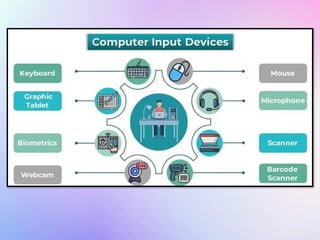
Some common input devices are:
Keyboard: A keyboard is a typewriter-like device that is used to type in letters, digits and
commands.
Mouse: The mouse is a pointing device with either a roller on its base or some laser
mechanism. Mouse controls the movement of pointer (also called the mouse pointer) on the
screen.
Microphone(Mic): We can send sound input to a computer through a special input device
called a microphone or mic in short. A mic converts the sound received into a computer’s
format, which is called digitized sound or digital audio. A mic can work if your computer has a
special hardware known as a sound card
Output Unit
An output unit, also known as an output device, is any hardware component that displays or
presents information processed by a computer to the user or another system. These devices
convert electronically generated information into a human-readable format, such as text,
graphics, audio, or video
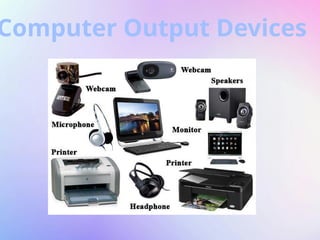
Some common output devices are:
Monitor: It displays information. The pictures on a monitor are made up of thousands of
pixels.
Printers: Printers are the devices that deliver information using printed characters on paper.
Speakers: Speakers receive sound in the form of electric current from the sound card and
convert it into an audible format for users.
Computer Output Devices
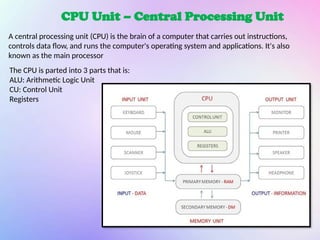
CPU Unit – Central Processing Unit
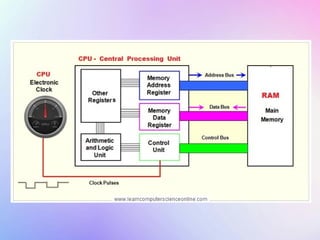
A central processing unit (CPU) is the brain of a computer that carries out instructions,
controls data flow, and runs the computer's operating system and applications. It's also
known as the main processor
The CPU is parted into 3 parts that is:
ALU: Arithmetic Logic Unit
CU: Control Unit
Registers
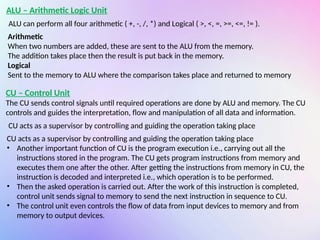
ALU – Arithmetic Logic Unit
ALU can perform all four arithmetic ( +, -, /, *) and Logical ( >, <, =, >=, <=, != ).
Arithmetic
When two numbers are added, these are sent to the ALU from the memory.
The addition takes place then the result is put back in the memory.
Logical
Sent to the memory to ALU where the comparison takes place and returned to memory
CU – Control Unit
The CU sends control signals until required operations are done by ALU and memory. The CU
controls and guides the interpretation, flow and manipulation of all data and information.
CU acts as a supervisor by controlling and guiding the operation taking place
• Another important function of CU is the program execution i.e., carrying out all the
instructions stored in the program. The CU gets program instructions from memory and
executes them one after the other. After getting the instructions from memory in CU, the
instruction is decoded and interpreted i.e., which operation is to be performed.
• Then the asked operation is carried out. After the work of this instruction is completed,
control unit sends signal to memory to send the next instruction in sequence to CU.
• The control unit even controls the flow of data from input devices to memory and from
memory to output devices.
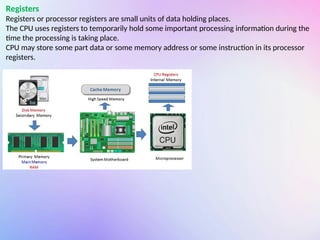
Registers
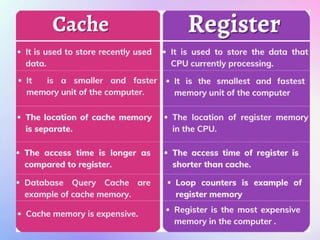
Registers or processor registers are small units of data holding places.
The CPU uses registers to temporarily hold some important processing information during the
time the processing is taking place.
CPU may store some part data or some memory address or some instruction in its processor
registers.
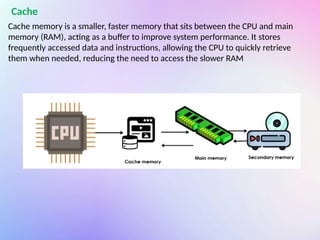
Cache memory is a smaller, faster memory that sits between the CPU and main
memory (RAM), acting as a buffer to improve system performance. It stores
frequently accessed data and instructions, allowing the CPU to quickly retrieve
them when needed, reducing the need to access the slower RAM
Cache
Memory (Main/Primary)
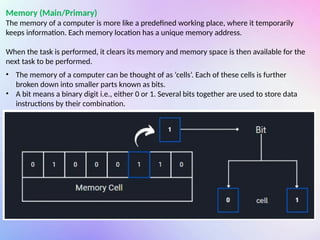
The memory of a computer is more like a predefined working place, where it temporarily
keeps information. Each memory location has a unique memory address.
When the task is performed, it clears its memory and memory space is then available for the
next task to be performed.
• The memory of a computer can be thought of as ā€˜cells’. Each of these cells is further
broken down into smaller parts known as bits.
• A bit means a binary digit i.e., either 0 or 1. Several bits together are used to store data
instructions by their combination.
• A bit is an elementary unit of memory. Eight bits together form a byte.
• One byte is the smallest unit which can represent a data item or a character.
• Other units of memory are KB, MB, GB, TB.
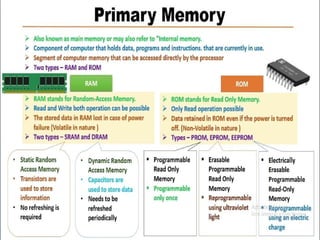
RAM – Random Access Memory
RAM allows information transfer from any random location, but its main drawback is that it
loses all data when power is lost due to its volatile nature.
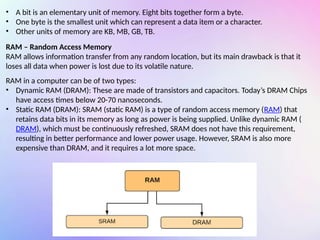
RAM in a computer can be of two types:
• Dynamic RAM (DRAM): These are made of transistors and capacitors. Today’s DRAM Chips
have access times below 20-70 nanoseconds.
• Static RAM (DRAM): SRAM (static RAM) is a type of random access memory (RAM) that
retains data bits in its memory as long as power is being supplied. Unlike dynamic RAM (
DRAM), which must be continuously refreshed, SRAM does not have this requirement,
resulting in better performance and lower power usage. However, SRAM is also more
expensive than DRAM, and it requires a lot more space.
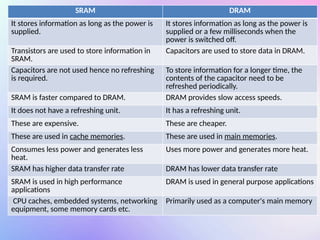
SRAM DRAM
It stores information as long as the power is
supplied.
It stores information as long as the power is
supplied or a few milliseconds when the
power is switched off.
Transistors are used to store information in
SRAM.
Capacitors are used to store data in DRAM.
Capacitors are not used hence no refreshing
is required.
To store information for a longer time, the
contents of the capacitor need to be
refreshed periodically.
SRAM is faster compared to DRAM. DRAM provides slow access speeds.
It does not have a refreshing unit. It has a refreshing unit.
These are expensive. These are cheaper.
These are used in cache memories. These are used in main memories.
Consumes less power and generates less
heat.
Uses more power and generates more heat.
SRAM has higher data transfer rate DRAM has lower data transfer rate
SRAM is used in high performance
applications
DRAM is used in general purpose applications
CPU caches, embedded systems, networking
equipment, some memory cards etc.
Primarily used as a computer's main memory
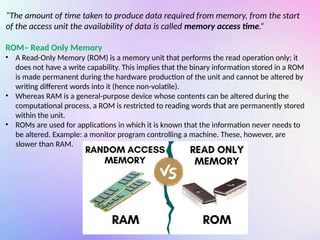
ā€œThe amount of time taken to produce data required from memory, from the start
of the access unit the availability of data is called memory access time.ā€
ROM– Read Only Memory
• A Read-Only Memory (ROM) is a memory unit that performs the read operation only; it
does not have a write capability. This implies that the binary information stored in a ROM
is made permanent during the hardware production of the unit and cannot be altered by
writing different words into it (hence non-volatile).
• Whereas RAM is a general-purpose device whose contents can be altered during the
computational process, a ROM is restricted to reading words that are permanently stored
within the unit.
• ROMs are used for applications in which it is known that the information never needs to
be altered. Example: a monitor program controlling a machine. These, however, are
slower than RAM.
• PROM (Programmable ROM): Also called OTP (One Time Programmable). PROM is a
user-programmable memory in which information is burnt using special equipment
called a ROM burner.
• EPROM (Erasable Programmable ROM): In EPROM, one can program the memory chip
(through various mechanisms e.g., UV radiation) and erase it many times as needed. The
UV-EPROM can take up to 20 minutes to erase EPROM contents.
• EEPROM (Electrically Erasable Programmable ROM): In EEPROM, the EPROM is erased
electrically which is faster. Also, with EEPROM, selective bytes can be erased, unlike UV-
EPROM which erases fully.
• Flash EEPROM: It is like EEPROM but is very fast comparatively (the erasure of the entire
contents takes less than a second). Also, it erases fully and not selectively.
• Mask ROM: Mask ROM is a kind of ROM in which the IC manufacturer programs the
contents. It is not a user-programmable ROM.
Storage Unit
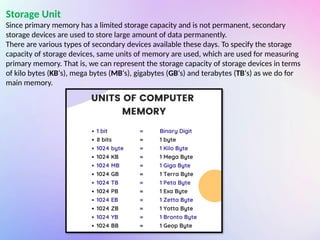
Since primary memory has a limited storage capacity and is not permanent, secondary
storage devices are used to store large amount of data permanently.
There are various types of secondary devices available these days. To specify the storage
capacity of storage devices, same units of memory are used, which are used for measuring
primary memory. That is, we can represent the storage capacity of storage devices in terms
of kilo bytes (KBā€˜s), mega bytes (MBā€˜s), gigabytes (GBā€˜s) and terabytes (TBā€˜s) as we do for
main memory.
Secondary Memory /Storage Devices
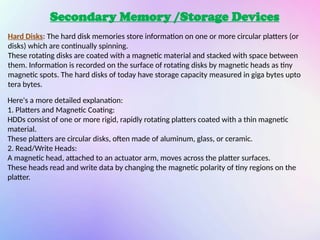
Hard Disks: The hard disk memories store information on one or more circular platters (or
disks) which are continually spinning.
These rotating disks are coated with a magnetic material and stacked with space between
them. Information is recorded on the surface of rotating disks by magnetic heads as tiny
magnetic spots. The hard disks of today have storage capacity measured in giga bytes upto
tera bytes.
Here's a more detailed explanation:
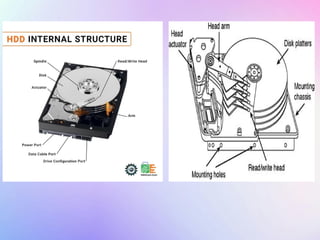
1. Platters and Magnetic Coating:
HDDs consist of one or more rigid, rapidly rotating platters coated with a thin magnetic
material.
These platters are circular disks, often made of aluminum, glass, or ceramic.
2. Read/Write Heads:
A magnetic head, attached to an actuator arm, moves across the platter surfaces.
These heads read and write data by changing the magnetic polarity of tiny regions on the
platter.
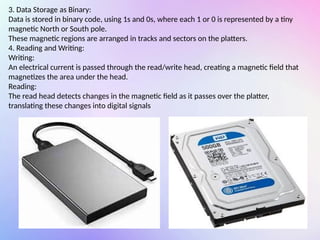
3. Data Storage as Binary:
Data is stored in binary code, using 1s and 0s, where each 1 or 0 is represented by a tiny
magnetic North or South pole.
These magnetic regions are arranged in tracks and sectors on the platters.
4. Reading and Writing:
Writing:
An electrical current is passed through the read/write head, creating a magnetic field that
magnetizes the area under the head.
Reading:
The read head detects changes in the magnetic field as it passes over the platter,
translating these changes into digital signals
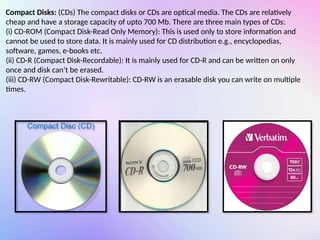
Compact Disks: (CDs) The compact disks or CDs are optical media. The CDs are relatively
cheap and have a storage capacity of upto 700 Mb. There are three main types of CDs:
(i) CD-ROM (Compact Disk-Read Only Memory): This is used only to store information and
cannot be used to store data. It is mainly used for CD distribution e.g., encyclopedias,
software, games, e-books etc.
(ii) CD-R (Compact Disk-Recordable): It is mainly used for CD-R and can be written on only
once and disk can’t be erased.
(iii) CD-RW (Compact Disk-Rewritable): CD-RW is an erasable disk you can write on multiple
times.
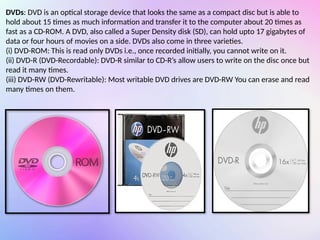
DVDs: DVD is an optical storage device that looks the same as a compact disc but is able to
hold about 15 times as much information and transfer it to the computer about 20 times as
fast as a CD-ROM. A DVD, also called a Super Density disk (SD), can hold upto 17 gigabytes of
data or four hours of movies on a side. DVDs also come in three varieties.
(i) DVD-ROM: This is read only DVDs i.e., once recorded initially, you cannot write on it.
(ii) DVD-R (DVD-Recordable): DVD-R similar to CD-R’s allow users to write on the disc once but
read it many times.
(iii) DVD-RW (DVD-Rewritable): Most writable DVD drives are DVD-RW You can erase and read
many times on them.
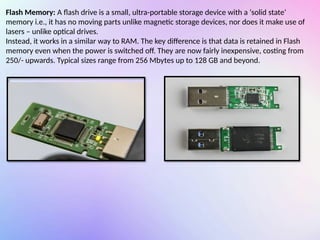
Flash Memory: A flash drive is a small, ultra-portable storage device with a ā€˜solid stateā€˜
memory i.e., it has no moving parts unlike magnetic storage devices, nor does it make use of
lasers – unlike optical drives.
Instead, it works in a similar way to RAM. The key difference is that data is retained in Flash
memory even when the power is switched off. They are now fairly inexpensive, costing from
250/- upwards. Typical sizes range from 256 Mbytes up to 128 GB and beyond.
System Bus
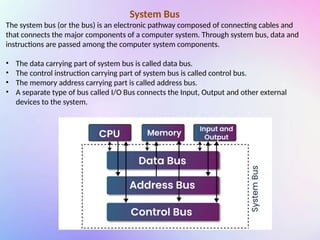
The system bus (or the bus) is an electronic pathway composed of connecting cables and
that connects the major components of a computer system. Through system bus, data and
instructions are passed among the computer system components.
• The data carrying part of system bus is called data bus.
• The control instruction carrying part of system bus is called control bus.
• The memory address carrying part is called address bus.
• A separate type of bus called I/O Bus connects the Input, Output and other external
devices to the system.
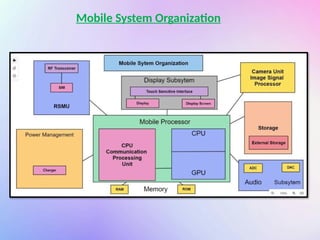
Mobile System Organization
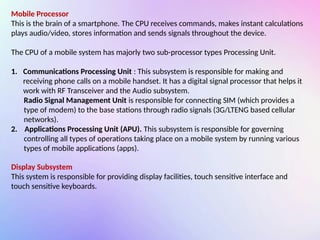
Mobile Processor
This is the brain of a smartphone. The CPU receives commands, makes instant calculations
plays audio/video, stores information and sends signals throughout the device.
The CPU of a mobile system has majorly two sub-processor types Processing Unit.
1. Communications Processing Unit : This subsystem is responsible for making and
receiving phone calls on a mobile handset. It has a digital signal processor that helps it
work with RF Transceiver and the Audio subsystem.
Radio Signal Management Unit is responsible for connecting SIM (which provides a
type of modem) to the base stations through radio signals (3G/LTENG based cellular
networks).
2. Applications Processing Unit (APU). This subsystem is responsible for governing
controlling all types of operations taking place on a mobile system by running various
types of mobile applications (apps).
Display Subsystem
This system is responsible for providing display facilities, touch sensitive interface and
touch sensitive keyboards.
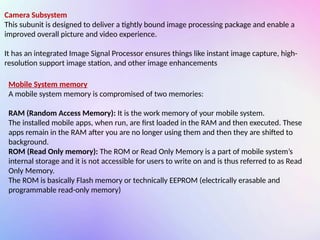
Camera Subsystem
This subunit is designed to deliver a tightly bound image processing package and enable a
improved overall picture and video experience.
It has an integrated Image Signal Processor ensures things like instant image capture, high-
resolution support image station, and other image enhancements
Mobile System memory
A mobile system memory is compromised of two memories:
RAM (Random Access Memory): It is the work memory of your mobile system.
The installed mobile apps, when run, are first loaded in the RAM and then executed. These
apps remain in the RAM after you are no longer using them and then they are shifted to
background.
ROM (Read Only memory): The ROM or Read Only Memory is a part of mobile system’s
internal storage and it is not accessible for users to write on and is thus referred to as Read
Only Memory.
The ROM is basically Flash memory or technically EEPROM (electrically erasable and
programmable read-only memory)
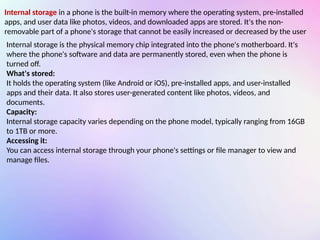
Internal storage in a phone is the built-in memory where the operating system, pre-installed
apps, and user data like photos, videos, and downloaded apps are stored. It's the non-
removable part of a phone's storage that cannot be easily increased or decreased by the user
Internal storage is the physical memory chip integrated into the phone's motherboard. It's
where the phone's software and data are permanently stored, even when the phone is
turned off.
What's stored:
It holds the operating system (like Android or iOS), pre-installed apps, and user-installed
apps and their data. It also stores user-generated content like photos, videos, and
documents.
Capacity:
Internal storage capacity varies depending on the phone model, typically ranging from 16GB
to 1TB or more.
Accessing it:
You can access internal storage through your phone's settings or file manager to view and
manage files.
Battery – Power Management System
This subsystem is responsible for providing power to a mobile system. The mobile systems
work on limited power provided through an attached battery unit.
This subsystem has a battery management system that works with a battery charger and a
battery unit, and provides power to the mobile system in required form.
System Software
Instructions are provided to the computer through software. The software that controls
internal computer operations (viz. reading data from input devices, transmitting processed
information to the output devices, checking system components, converting
data/instructions to computer understandable form etc.) is known as system software. The
system software can further be classified into two categories:
1. Operating System
2. Language Processor
An operating system (OS) is essential computer software that manages and controls
hardware and software resources. It acts as a bridge between the user and the computer's
hardware, allowing users to interact with the system and execute programs. The OS provides
a user-friendly interface and manages tasks like memory management, file storage, and
peripheral device control.
Operating System
Resource Management:
The OS allocates resources like CPU time, memory, and storage to running programs and
applications.
User Interface:
It provides a way for users to interact with the computer, typically through a graphical
interface or command-line interface.
File Management:
The OS handles file storage, organization, and retrieval.
Peripheral Control:
It manages communication with and control of devices like printers, keyboards, and mice.
Kernel:
The core of the OS, responsible for low-level system functions and resource management.
Networking:
The OS facilitates communication between computers and devices on a network
Language Processors
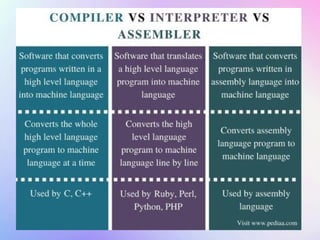
A special type of computer software that can translate the source code into an object code
or machine code.
Source code: refers to the program-code written by a programmer in a High Level
programming Language (HLL) such as in C, Java, C+ etc.
Object code: refers to a code usually in machine language or binary code, a language that
computer can understand easily and run on hardware.
There are three types of language processors:
Assembler : This language processor converts the program written in assembly language
into machine language.
Interpreter : An interpreter is a type of system software that translates and executes
instructions written in a computer program line-by-line, unit by unit etc.
Compiler : A Compiler is another type of system software that translates and executes
computer program in one go.
Application Software
These are the programs written by programmers to enable computer to perform a specific
task such as processing words, inventory control, handling calculations and figures, medical
accounting, financial accounting, result preparation, railway reservation, billing etc.
This type of software pertains to one specific application
example: a software that can perform railway reservation functions cannot prepare result for
a school.
Application software can further be subdivided into four categories:
• Packages
• Utilities
• Customized Software
• Developer Tools
Packages
As applications may be numerous (from thousands to millions of them), it is not feasible to
design software for each one of them. Rather some general software are designed that may
be used by individual users in the manner it suits their needs and requirements. Such
general-application software are known as packages. Some major and most common
categories of general application software (packages) are:
• Word Processing Software
• Spreadsheets
• Desktop Publishing Software
• Graphics, multimedia & presentation applications.
• Database Management Systems
Utilities
Utilities are those application programs that assist the computer by performing
housekeeping functions like backing up disk or scanning / viruses or arranging cleaning
information etc.
These are those useful software that ensure smooth functioning of the computer.
Some of the important utilities are mentioned below:
Text editor: Creating, and editing text files.
Backup Utilities: Utility program facilitates the backing-up of disk. Back-up means
duplicating the disk information so that in case of any damage or data-less, thus backed up
data may be used.
Compression Utility: This utility program facilitates compression of files. Large files can be
compressed so that they take less storage area.
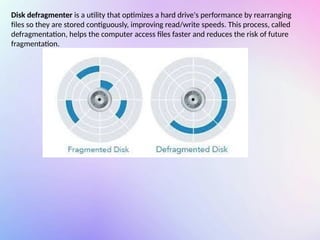
Disk defragmenter is a utility that optimizes a hard drive's performance by rearranging
files so they are stored contiguously, improving read/write speeds. This process, called
defragmentation, helps the computer access files faster and reduces the risk of future
fragmentation.
Antivirus Software: This utility program ensures virus-free work environment.
A computer virus is a malicious computer program that disrupts normal functioning of a
computer.
An antivirus software scans your disk for viruses and removes them, if any virus is found.
Moreover, some antivirus software remains present in memory all the time so that they can
detect the viruses (as soon as they occur) and counterattack them.
COMPUTER SYSTEM OVERVIEW- A BREIF INTRODUCTION.pptx

  • 1.
  • 2.
    INTRODUCTION What is acomputer? A computer is an electronic device that can be programmed to accept input data, process the data according to the user’s need and export the result that would be output. A computer system combines hardware and software to process data, converting input into meaningful form. Hardware: The physical electronic components of a computer are called hardware. Example: Keyboard, CPU, monitor, printer etc. Software: These are the recorded instructions and programs that govern the working of a computer. Basic computer Organization Computer organization refers to the logical structure of a computer describing how its components are connected: how they effect one another’s functioning and contribute to the overall performance of the computer. Computers, follow the ā€˜IPOā€˜ principle i.e., Input → Process → Output. So, the computer organization is also like this these are component (s) dedicated to obtaining input in different forms, component(s)dedicated to performing processing parts and component(s) to produce output in different forms.
  • 3.
    Input Unit Since acomputer operates on electricity, it can understand only the language of electricity i.e., either ON or OFF or high voltage or low voltage. That means a computer can understand two stages ON/OFF or High/Low voltage or the binary language that uses just two symbols: 1 for ON and 0 for OFF. Computer input also consists of data and instructions, Example – If we give the computer to add 5 + 5, then; Data: it is 5 and 5 Instruction: Addition Example – If we give the computer input as print ā€œHello Worldā€ Data: ā€œHello Worldā€ Instruction: Print Some common input devices are: Keyboard: A keyboard is a typewriter-like device that is used to type in letters, digits and commands. Mouse: The mouse is a pointing device with either a roller on its base or some laser mechanism. Mouse controls the movement of pointer (also called the mouse pointer) on the screen. Microphone(Mic): We can send sound input to a computer through a special input device called a microphone or mic in short. A mic converts the sound received into a computer’s format, which is called digitized sound or digital audio. A mic can work if your computer has a special hardware known as a sound card
  • 5.
    Output Unit An outputunit, also known as an output device, is any hardware component that displays or presents information processed by a computer to the user or another system. These devices convert electronically generated information into a human-readable format, such as text, graphics, audio, or video Some common output devices are: Monitor: It displays information. The pictures on a monitor are made up of thousands of pixels. Printers: Printers are the devices that deliver information using printed characters on paper. Speakers: Speakers receive sound in the form of electric current from the sound card and convert it into an audible format for users.
  • 6.
  • 7.
    CPU Unit –Central Processing Unit A central processing unit (CPU) is the brain of a computer that carries out instructions, controls data flow, and runs the computer's operating system and applications. It's also known as the main processor The CPU is parted into 3 parts that is: ALU: Arithmetic Logic Unit CU: Control Unit Registers
  • 8.
    ALU – ArithmeticLogic Unit ALU can perform all four arithmetic ( +, -, /, *) and Logical ( >, <, =, >=, <=, != ). Arithmetic When two numbers are added, these are sent to the ALU from the memory. The addition takes place then the result is put back in the memory. Logical Sent to the memory to ALU where the comparison takes place and returned to memory CU – Control Unit The CU sends control signals until required operations are done by ALU and memory. The CU controls and guides the interpretation, flow and manipulation of all data and information. CU acts as a supervisor by controlling and guiding the operation taking place CU acts as a supervisor by controlling and guiding the operation taking place • Another important function of CU is the program execution i.e., carrying out all the instructions stored in the program. The CU gets program instructions from memory and executes them one after the other. After getting the instructions from memory in CU, the instruction is decoded and interpreted i.e., which operation is to be performed. • Then the asked operation is carried out. After the work of this instruction is completed, control unit sends signal to memory to send the next instruction in sequence to CU. • The control unit even controls the flow of data from input devices to memory and from memory to output devices.
  • 9.
    Registers Registers or processorregisters are small units of data holding places. The CPU uses registers to temporarily hold some important processing information during the time the processing is taking place. CPU may store some part data or some memory address or some instruction in its processor registers.
  • 10.
    Cache memory isa smaller, faster memory that sits between the CPU and main memory (RAM), acting as a buffer to improve system performance. It stores frequently accessed data and instructions, allowing the CPU to quickly retrieve them when needed, reducing the need to access the slower RAM Cache
  • 12.
    Memory (Main/Primary) The memoryof a computer is more like a predefined working place, where it temporarily keeps information. Each memory location has a unique memory address. When the task is performed, it clears its memory and memory space is then available for the next task to be performed. • The memory of a computer can be thought of as ā€˜cells’. Each of these cells is further broken down into smaller parts known as bits. • A bit means a binary digit i.e., either 0 or 1. Several bits together are used to store data instructions by their combination.
  • 13.
    • A bitis an elementary unit of memory. Eight bits together form a byte. • One byte is the smallest unit which can represent a data item or a character. • Other units of memory are KB, MB, GB, TB. RAM – Random Access Memory RAM allows information transfer from any random location, but its main drawback is that it loses all data when power is lost due to its volatile nature. RAM in a computer can be of two types: • Dynamic RAM (DRAM): These are made of transistors and capacitors. Today’s DRAM Chips have access times below 20-70 nanoseconds. • Static RAM (DRAM): SRAM (static RAM) is a type of random access memory (RAM) that retains data bits in its memory as long as power is being supplied. Unlike dynamic RAM ( DRAM), which must be continuously refreshed, SRAM does not have this requirement, resulting in better performance and lower power usage. However, SRAM is also more expensive than DRAM, and it requires a lot more space.
  • 14.
    SRAM DRAM It storesinformation as long as the power is supplied. It stores information as long as the power is supplied or a few milliseconds when the power is switched off. Transistors are used to store information in SRAM. Capacitors are used to store data in DRAM. Capacitors are not used hence no refreshing is required. To store information for a longer time, the contents of the capacitor need to be refreshed periodically. SRAM is faster compared to DRAM. DRAM provides slow access speeds. It does not have a refreshing unit. It has a refreshing unit. These are expensive. These are cheaper. These are used in cache memories. These are used in main memories. Consumes less power and generates less heat. Uses more power and generates more heat. SRAM has higher data transfer rate DRAM has lower data transfer rate SRAM is used in high performance applications DRAM is used in general purpose applications CPU caches, embedded systems, networking equipment, some memory cards etc. Primarily used as a computer's main memory
  • 15.
    ā€œThe amount oftime taken to produce data required from memory, from the start of the access unit the availability of data is called memory access time.ā€ ROM– Read Only Memory • A Read-Only Memory (ROM) is a memory unit that performs the read operation only; it does not have a write capability. This implies that the binary information stored in a ROM is made permanent during the hardware production of the unit and cannot be altered by writing different words into it (hence non-volatile). • Whereas RAM is a general-purpose device whose contents can be altered during the computational process, a ROM is restricted to reading words that are permanently stored within the unit. • ROMs are used for applications in which it is known that the information never needs to be altered. Example: a monitor program controlling a machine. These, however, are slower than RAM.
  • 16.
    • PROM (ProgrammableROM): Also called OTP (One Time Programmable). PROM is a user-programmable memory in which information is burnt using special equipment called a ROM burner. • EPROM (Erasable Programmable ROM): In EPROM, one can program the memory chip (through various mechanisms e.g., UV radiation) and erase it many times as needed. The UV-EPROM can take up to 20 minutes to erase EPROM contents. • EEPROM (Electrically Erasable Programmable ROM): In EEPROM, the EPROM is erased electrically which is faster. Also, with EEPROM, selective bytes can be erased, unlike UV- EPROM which erases fully. • Flash EEPROM: It is like EEPROM but is very fast comparatively (the erasure of the entire contents takes less than a second). Also, it erases fully and not selectively. • Mask ROM: Mask ROM is a kind of ROM in which the IC manufacturer programs the contents. It is not a user-programmable ROM.
  • 18.
    Storage Unit Since primarymemory has a limited storage capacity and is not permanent, secondary storage devices are used to store large amount of data permanently. There are various types of secondary devices available these days. To specify the storage capacity of storage devices, same units of memory are used, which are used for measuring primary memory. That is, we can represent the storage capacity of storage devices in terms of kilo bytes (KBā€˜s), mega bytes (MBā€˜s), gigabytes (GBā€˜s) and terabytes (TBā€˜s) as we do for main memory.
  • 19.
    Secondary Memory /StorageDevices Hard Disks: The hard disk memories store information on one or more circular platters (or disks) which are continually spinning. These rotating disks are coated with a magnetic material and stacked with space between them. Information is recorded on the surface of rotating disks by magnetic heads as tiny magnetic spots. The hard disks of today have storage capacity measured in giga bytes upto tera bytes. Here's a more detailed explanation: 1. Platters and Magnetic Coating: HDDs consist of one or more rigid, rapidly rotating platters coated with a thin magnetic material. These platters are circular disks, often made of aluminum, glass, or ceramic. 2. Read/Write Heads: A magnetic head, attached to an actuator arm, moves across the platter surfaces. These heads read and write data by changing the magnetic polarity of tiny regions on the platter.
  • 20.
    3. Data Storageas Binary: Data is stored in binary code, using 1s and 0s, where each 1 or 0 is represented by a tiny magnetic North or South pole. These magnetic regions are arranged in tracks and sectors on the platters. 4. Reading and Writing: Writing: An electrical current is passed through the read/write head, creating a magnetic field that magnetizes the area under the head. Reading: The read head detects changes in the magnetic field as it passes over the platter, translating these changes into digital signals
  • 22.
    Compact Disks: (CDs)The compact disks or CDs are optical media. The CDs are relatively cheap and have a storage capacity of upto 700 Mb. There are three main types of CDs: (i) CD-ROM (Compact Disk-Read Only Memory): This is used only to store information and cannot be used to store data. It is mainly used for CD distribution e.g., encyclopedias, software, games, e-books etc. (ii) CD-R (Compact Disk-Recordable): It is mainly used for CD-R and can be written on only once and disk can’t be erased. (iii) CD-RW (Compact Disk-Rewritable): CD-RW is an erasable disk you can write on multiple times.
  • 23.
    DVDs: DVD isan optical storage device that looks the same as a compact disc but is able to hold about 15 times as much information and transfer it to the computer about 20 times as fast as a CD-ROM. A DVD, also called a Super Density disk (SD), can hold upto 17 gigabytes of data or four hours of movies on a side. DVDs also come in three varieties. (i) DVD-ROM: This is read only DVDs i.e., once recorded initially, you cannot write on it. (ii) DVD-R (DVD-Recordable): DVD-R similar to CD-R’s allow users to write on the disc once but read it many times. (iii) DVD-RW (DVD-Rewritable): Most writable DVD drives are DVD-RW You can erase and read many times on them.
  • 24.
    Flash Memory: Aflash drive is a small, ultra-portable storage device with a ā€˜solid stateā€˜ memory i.e., it has no moving parts unlike magnetic storage devices, nor does it make use of lasers – unlike optical drives. Instead, it works in a similar way to RAM. The key difference is that data is retained in Flash memory even when the power is switched off. They are now fairly inexpensive, costing from 250/- upwards. Typical sizes range from 256 Mbytes up to 128 GB and beyond.
  • 25.
    System Bus The systembus (or the bus) is an electronic pathway composed of connecting cables and that connects the major components of a computer system. Through system bus, data and instructions are passed among the computer system components. • The data carrying part of system bus is called data bus. • The control instruction carrying part of system bus is called control bus. • The memory address carrying part is called address bus. • A separate type of bus called I/O Bus connects the Input, Output and other external devices to the system.
  • 27.
  • 28.
    Mobile Processor This isthe brain of a smartphone. The CPU receives commands, makes instant calculations plays audio/video, stores information and sends signals throughout the device. The CPU of a mobile system has majorly two sub-processor types Processing Unit. 1. Communications Processing Unit : This subsystem is responsible for making and receiving phone calls on a mobile handset. It has a digital signal processor that helps it work with RF Transceiver and the Audio subsystem. Radio Signal Management Unit is responsible for connecting SIM (which provides a type of modem) to the base stations through radio signals (3G/LTENG based cellular networks). 2. Applications Processing Unit (APU). This subsystem is responsible for governing controlling all types of operations taking place on a mobile system by running various types of mobile applications (apps). Display Subsystem This system is responsible for providing display facilities, touch sensitive interface and touch sensitive keyboards.
  • 29.
    Camera Subsystem This subunitis designed to deliver a tightly bound image processing package and enable a improved overall picture and video experience. It has an integrated Image Signal Processor ensures things like instant image capture, high- resolution support image station, and other image enhancements Mobile System memory A mobile system memory is compromised of two memories: RAM (Random Access Memory): It is the work memory of your mobile system. The installed mobile apps, when run, are first loaded in the RAM and then executed. These apps remain in the RAM after you are no longer using them and then they are shifted to background. ROM (Read Only memory): The ROM or Read Only Memory is a part of mobile system’s internal storage and it is not accessible for users to write on and is thus referred to as Read Only Memory. The ROM is basically Flash memory or technically EEPROM (electrically erasable and programmable read-only memory)
  • 30.
    Internal storage ina phone is the built-in memory where the operating system, pre-installed apps, and user data like photos, videos, and downloaded apps are stored. It's the non- removable part of a phone's storage that cannot be easily increased or decreased by the user Internal storage is the physical memory chip integrated into the phone's motherboard. It's where the phone's software and data are permanently stored, even when the phone is turned off. What's stored: It holds the operating system (like Android or iOS), pre-installed apps, and user-installed apps and their data. It also stores user-generated content like photos, videos, and documents. Capacity: Internal storage capacity varies depending on the phone model, typically ranging from 16GB to 1TB or more. Accessing it: You can access internal storage through your phone's settings or file manager to view and manage files.
  • 31.
    Battery – PowerManagement System This subsystem is responsible for providing power to a mobile system. The mobile systems work on limited power provided through an attached battery unit. This subsystem has a battery management system that works with a battery charger and a battery unit, and provides power to the mobile system in required form. System Software Instructions are provided to the computer through software. The software that controls internal computer operations (viz. reading data from input devices, transmitting processed information to the output devices, checking system components, converting data/instructions to computer understandable form etc.) is known as system software. The system software can further be classified into two categories: 1. Operating System 2. Language Processor
  • 32.
    An operating system(OS) is essential computer software that manages and controls hardware and software resources. It acts as a bridge between the user and the computer's hardware, allowing users to interact with the system and execute programs. The OS provides a user-friendly interface and manages tasks like memory management, file storage, and peripheral device control. Operating System Resource Management: The OS allocates resources like CPU time, memory, and storage to running programs and applications. User Interface: It provides a way for users to interact with the computer, typically through a graphical interface or command-line interface. File Management: The OS handles file storage, organization, and retrieval. Peripheral Control: It manages communication with and control of devices like printers, keyboards, and mice. Kernel: The core of the OS, responsible for low-level system functions and resource management. Networking: The OS facilitates communication between computers and devices on a network
  • 33.
    Language Processors A specialtype of computer software that can translate the source code into an object code or machine code. Source code: refers to the program-code written by a programmer in a High Level programming Language (HLL) such as in C, Java, C+ etc. Object code: refers to a code usually in machine language or binary code, a language that computer can understand easily and run on hardware. There are three types of language processors: Assembler : This language processor converts the program written in assembly language into machine language. Interpreter : An interpreter is a type of system software that translates and executes instructions written in a computer program line-by-line, unit by unit etc. Compiler : A Compiler is another type of system software that translates and executes computer program in one go.
  • 35.
    Application Software These arethe programs written by programmers to enable computer to perform a specific task such as processing words, inventory control, handling calculations and figures, medical accounting, financial accounting, result preparation, railway reservation, billing etc. This type of software pertains to one specific application example: a software that can perform railway reservation functions cannot prepare result for a school. Application software can further be subdivided into four categories: • Packages • Utilities • Customized Software • Developer Tools
  • 36.
    Packages As applications maybe numerous (from thousands to millions of them), it is not feasible to design software for each one of them. Rather some general software are designed that may be used by individual users in the manner it suits their needs and requirements. Such general-application software are known as packages. Some major and most common categories of general application software (packages) are: • Word Processing Software • Spreadsheets • Desktop Publishing Software • Graphics, multimedia & presentation applications. • Database Management Systems
  • 37.
    Utilities Utilities are thoseapplication programs that assist the computer by performing housekeeping functions like backing up disk or scanning / viruses or arranging cleaning information etc. These are those useful software that ensure smooth functioning of the computer. Some of the important utilities are mentioned below: Text editor: Creating, and editing text files. Backup Utilities: Utility program facilitates the backing-up of disk. Back-up means duplicating the disk information so that in case of any damage or data-less, thus backed up data may be used. Compression Utility: This utility program facilitates compression of files. Large files can be compressed so that they take less storage area.
  • 38.
    Disk defragmenter isa utility that optimizes a hard drive's performance by rearranging files so they are stored contiguously, improving read/write speeds. This process, called defragmentation, helps the computer access files faster and reduces the risk of future fragmentation.
  • 39.
    Antivirus Software: Thisutility program ensures virus-free work environment. A computer virus is a malicious computer program that disrupts normal functioning of a computer. An antivirus software scans your disk for viruses and removes them, if any virus is found. Moreover, some antivirus software remains present in memory all the time so that they can detect the viruses (as soon as they occur) and counterattack them.