Process Control DaemonFor Embedded Linux PlatformsSpeaker: Hai Shalomrt-embedded.com/pcd
Background review: What were the reasons that led to the development of PCD.PCD project review: Features and high level overview of the project.Live demonstration.Q & A.Agenda
Does your product have a process controller?Does your product automatically recover after a crash?Do you think your product’s boot time is fast enough?Are you using methods other than printf  to debug a crashed application?Are you familiar with all the processes which are running in your product and their dependencies?Some questions
Most of you probably answered “No” to at least one question.People who answered “Yes” to all questions are probably using PCD already!Let’s review some facts about Embedded Linux based products…What were your answers?
Done by scripts (rcS, rc.*). These are great, but might be:Not optimal for embedded / not deterministic:
Limited ways to synchronize depended processes(delay).
Limited ways to verify successful start of a process
No error checking (usually).
No formal way to define dependencies.

Difficult to start processes in parallel.
Not trivial to understand, maintain and extend:
Require additional shell scripting expertise.
Tend to be long and unreadable.
Plenty of commented code, old remarks, different code styles.System start up
Done by scripts (rcS, rc.*). These are great, but might be:Not optimal for embedded / not deterministic:
Limited ways to synchronize depended processes (delay).
Limited ways to verify successful start of a process
No error checking (usually).
No formal way to define dependencies.
Difficult to start processes in parallel.
Not trivial to understand, maintain and extend:
Require additional shell scripting expertise.
Tend to be long and unreadable.
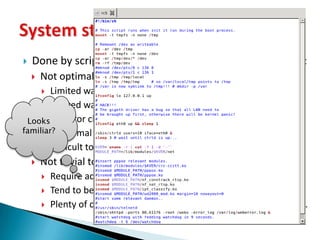
Plenty of commented code, old remarks, different code styles.System start upLooks familiar?
A crashed program just terminates, usually after printing “Segmentation Fault”.Now what?
Where is the debug information?
Kernel crashes are assumed to be handled by the system’s watchdog.Signal Handlers not always implemented correctly.Unsafe to use printf, and many other functions.The system remains unstable and unusable. End user must power-cycle (again?).Crash handling and recovery
A crashed program just terminates, usually after printing “Segmentation Fault”.Now what?
Where is the debug information?
Kernel crashes are assumed to be handled by the system’s watchdog.Signal Handlers not always implemented correctly.Unsafe to use printf, and many other functions.The system remains unstable and unusable. End user must power-cycle (again?).Crash handling and recovery
No central management entity.init is the parent of all processes.Must know process’ pid in order to signal or kill.Each process must manage his own children.Child process inherits his father’s priority.
Parents must retrieve child’sexit status, or else we end upwith Zombies…Process management
A customer reports a crash in the field or in his lab tests:There is no standard method for generating and collecting remote debug information.
When a process abnormally terminates, all its information goes away and no log is saved.
You might be on the next flight to the customer’s lab.Field/Remote debugging
A great (and free) solution: PCDWhat is PCD?
What is PCD?PCD – Process Control Daemon, is an open source, light-weight system level process manager for Embedded-Linux based products (consumer electronics, network devices, etc).The PCD provides a complementary service for any Embedded Linux driven product. Designed and implemented by Hai Shalom during employment at Texas Instruments for Next-Gen Puma5 Cable chipset.Released to open source as part of his M.Sc. Degree research.PCD is a proven solution that already drives millions of devices in the world.
System startup: PCD starts up the system in an efficient, synchronized and deterministic manner.Process management: a centralized entity that controls and monitors all processes, and provides API to manage them. System recovery: Configurable per process recovery action is taken in case of a crash.Debug information: PCD provides a detailed crash log in case of a program error.PCD Features in high-level
How does it work?What are the advantages of products with PCD?
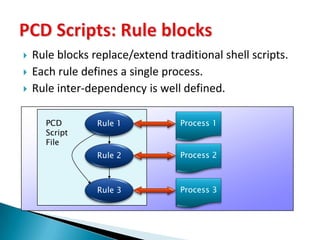
Rule blocks replace/extend traditional shell scripts.Each rule defines a single process.Rule inter-dependency is well defined.PCD Scripts: Rule blocksProcess 1Rule 1PCDScriptFileProcess 2Rule 2Process 3Rule 3
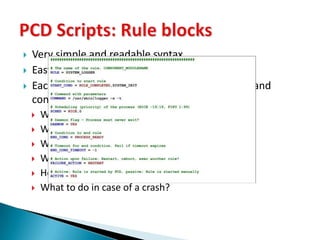
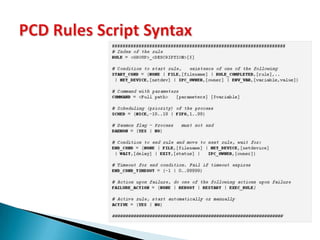
Very simple and readable syntax.Easy to extend and maintain.Each Rule block is based on the same template and contains the following details:What is the process name and parameters?
When to start it (depends on event…)?
What is the required priority?
What is the completion event?
How much time to wait for it to complete?
What to do in case of a crash?PCD Scripts: Rule blocks
Very simple and readable syntax.Easy to extend and maintain.Each Rule block is based on the same template and contains the following details:What is the process name and parameters?
When to start it (depends on event…)?
What is the required priority?

Process control daemon

  • 1.
    Process Control DaemonForEmbedded Linux PlatformsSpeaker: Hai Shalomrt-embedded.com/pcd
  • 2.
    Background review: Whatwere the reasons that led to the development of PCD.PCD project review: Features and high level overview of the project.Live demonstration.Q & A.Agenda
  • 3.
    Does your producthave a process controller?Does your product automatically recover after a crash?Do you think your product’s boot time is fast enough?Are you using methods other than printf to debug a crashed application?Are you familiar with all the processes which are running in your product and their dependencies?Some questions
  • 4.
    Most of youprobably answered “No” to at least one question.People who answered “Yes” to all questions are probably using PCD already!Let’s review some facts about Embedded Linux based products…What were your answers?
  • 5.
    Done by scripts(rcS, rc.*). These are great, but might be:Not optimal for embedded / not deterministic:
  • 6.
    Limited ways tosynchronize depended processes(delay).
  • 7.
    Limited ways toverify successful start of a process
  • 8.
  • 9.
    No formal wayto define dependencies.

  • 10.
    Difficult to startprocesses in parallel.
  • 11.
    Not trivial tounderstand, maintain and extend:
  • 12.
    Require additional shellscripting expertise.
  • 13.
    Tend to belong and unreadable.
  • 14.
    Plenty of commentedcode, old remarks, different code styles.System start up
  • 15.
    Done by scripts(rcS, rc.*). These are great, but might be:Not optimal for embedded / not deterministic:
  • 16.
    Limited ways tosynchronize depended processes (delay).
  • 17.
    Limited ways toverify successful start of a process
  • 18.
  • 19.
    No formal wayto define dependencies.
  • 20.
    Difficult to startprocesses in parallel.
  • 21.
    Not trivial tounderstand, maintain and extend:
  • 22.
    Require additional shellscripting expertise.
  • 23.
    Tend to belong and unreadable.
  • 24.
    Plenty of commentedcode, old remarks, different code styles.System start upLooks familiar?
  • 25.
    A crashed programjust terminates, usually after printing “Segmentation Fault”.Now what?
  • 26.
    Where is thedebug information?
  • 27.
    Kernel crashes areassumed to be handled by the system’s watchdog.Signal Handlers not always implemented correctly.Unsafe to use printf, and many other functions.The system remains unstable and unusable. End user must power-cycle (again?).Crash handling and recovery
  • 28.
    A crashed programjust terminates, usually after printing “Segmentation Fault”.Now what?
  • 29.
    Where is thedebug information?
  • 30.
    Kernel crashes areassumed to be handled by the system’s watchdog.Signal Handlers not always implemented correctly.Unsafe to use printf, and many other functions.The system remains unstable and unusable. End user must power-cycle (again?).Crash handling and recovery
  • 31.
    No central managemententity.init is the parent of all processes.Must know process’ pid in order to signal or kill.Each process must manage his own children.Child process inherits his father’s priority.
  • 32.
    Parents must retrievechild’sexit status, or else we end upwith Zombies…Process management
  • 33.
    A customer reportsa crash in the field or in his lab tests:There is no standard method for generating and collecting remote debug information.
  • 34.
    When a processabnormally terminates, all its information goes away and no log is saved.
  • 35.
    You might beon the next flight to the customer’s lab.Field/Remote debugging
  • 36.
    A great (andfree) solution: PCDWhat is PCD?
  • 37.
    What is PCD?PCD– Process Control Daemon, is an open source, light-weight system level process manager for Embedded-Linux based products (consumer electronics, network devices, etc).The PCD provides a complementary service for any Embedded Linux driven product. Designed and implemented by Hai Shalom during employment at Texas Instruments for Next-Gen Puma5 Cable chipset.Released to open source as part of his M.Sc. Degree research.PCD is a proven solution that already drives millions of devices in the world.
  • 38.
    System startup: PCDstarts up the system in an efficient, synchronized and deterministic manner.Process management: a centralized entity that controls and monitors all processes, and provides API to manage them. System recovery: Configurable per process recovery action is taken in case of a crash.Debug information: PCD provides a detailed crash log in case of a program error.PCD Features in high-level
  • 39.
    How does itwork?What are the advantages of products with PCD?
  • 40.
    Rule blocks replace/extendtraditional shell scripts.Each rule defines a single process.Rule inter-dependency is well defined.PCD Scripts: Rule blocksProcess 1Rule 1PCDScriptFileProcess 2Rule 2Process 3Rule 3
  • 41.
    Very simple andreadable syntax.Easy to extend and maintain.Each Rule block is based on the same template and contains the following details:What is the process name and parameters?
  • 42.
    When to startit (depends on event…)?
  • 43.
    What is therequired priority?
  • 44.
    What is thecompletion event?
  • 45.
    How much timeto wait for it to complete?
  • 46.
    What to doin case of a crash?PCD Scripts: Rule blocks
  • 47.
    Very simple andreadable syntax.Easy to extend and maintain.Each Rule block is based on the same template and contains the following details:What is the process name and parameters?
  • 48.
    When to startit (depends on event…)?
  • 49.
    What is therequired priority?
  • 50.
    What is thecompletion event?
  • 51.
    How much timeto wait for it to complete?
  • 52.
    What to doin case of a crash?PCD Scripts: Rule blocks
  • 53.
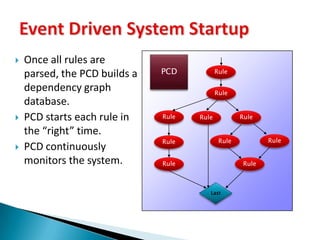
    Event Driven SystemStartupOnce all rules are parsed, the PCD builds a dependency graph database.PCD starts each rule in the “right” time.PCD continuously monitors the system.PCDRuleRuleRuleRuleRuleRuleRuleRuleRuleRuleLast
  • 54.
    Right time when a Start eventoccurred:Another rule or set of rules have completed successfully, or;
  • 55.
    A resource hasbeen created (Network device, file).Completion event when the attached process:Has exited with the correct status, or;
  • 56.
    Sent a “Processready” event to the PCD, or;
  • 57.
  • 58.
    Was running fora specified amount of time, or;
  • 59.
  • 60.
    A Completion eventof one rule could be the Start event of another rule.Event Driven System Startup
  • 61.
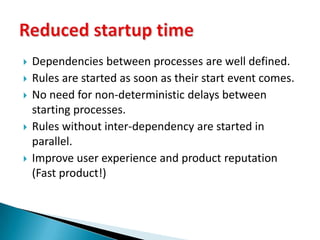
    Dependencies between processesare well defined.Rules are started as soon as their start event comes.No need for non-deterministic delays between starting processes.Rules without inter-dependency are started in parallel.Improve user experience and product reputation (Fast product!)Reduced startup time
  • 62.
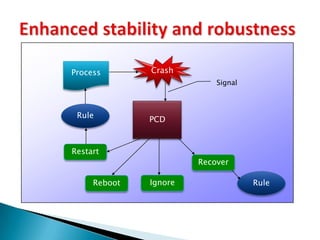
    Enhanced stability androbustnessCrashProcessSignalPCDRuleRestartRecoverRuleIgnoreReboot
  • 63.
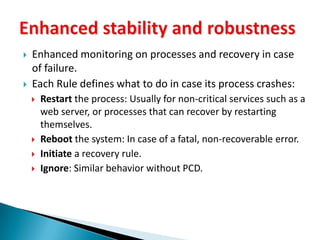
    Enhanced stability androbustnessEnhanced monitoring on processes and recovery in case of failure.Each Rule defines what to do in case its process crashes:Restart the process: Usually for non-critical services such as a web server, or processes that can recover by restarting themselves.
  • 64.
    Reboot the system:In case of a fatal, non-recoverable error.
  • 65.
  • 66.
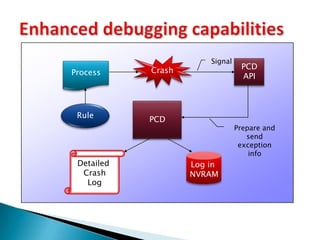
    Ignore: Similar behaviorwithout PCD.Enhanced debugging capabilitiesCrashSignalPCDAPIProcessPCDRulePrepare and send exception infoDetailed CrashLogLog in NVRAM
  • 67.
    Enhanced debugging capabilitiesThePCD exception handlers will catch and handle any fault exception (Signals).The PCD will provide useful debug information.The information speeds up the error fixing cycle and improves product robustness.Error logs are saved in non-volatile memoryCan be used for offline analysis after a validation cycle in the lab.
  • 68.
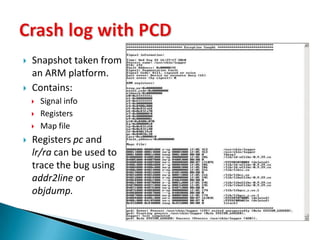
    Can be usedfor post-mortem analysis of units from the field.Snapshot taken from an ARM platform.Contains:Signal info
  • 69.
  • 70.
  • 71.
    Registers pc andlr/ra can be used to trace the bug using addr2line or objdump.Crash log with PCD
  • 72.
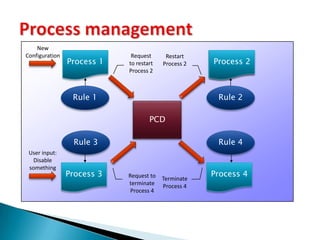
    Process managementNew ConfigurationRequestto restart Process 2Process 1Process 2Process 2Restart Process 2Rule 1Rule 2PCDRule 4Rule 3User input: Disable somethingProcess 3Process 4Request to terminateProcess 4TerminateProcess 4
  • 73.
    Process management withPCD API:Start or terminate a process.
  • 74.
    Send a “processready” event.
  • 75.
  • 76.
  • 77.
    Reboot the system(with logged a reason).The PCD API is available by linking with the PCD library.Process management
  • 78.
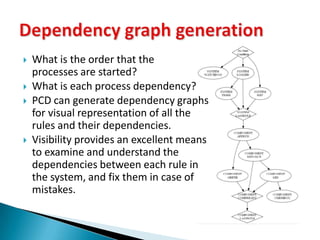
    What is theorder that the processes are started?What is each process dependency?PCDcan generate dependency graphs for visual representation of all the rules and their dependencies.Visibility provides an excellent means to examine and understand the dependencies between each rule in the system, and fix them in case of mistakes.Dependency graph generation
  • 79.
    PCD is architectureagnostic, except for the crash log code that displays register details.Up to date, the following platforms are supported:ARM (primary development target).
  • 80.
  • 81.
  • 82.
  • 83.
    For other platforms,the crash log will not include register details.
  • 84.
    Last two architecturesallow running a PCD driven system in any development PC running Linux.Supported architectures
  • 85.
    PCD is alight-weight process controller for embedded platforms.Here are its modest memory requirements:PCD Code: 28KB
  • 86.
  • 87.
  • 88.
    PCD Stack (Watermark): 84KB(Typical).Memory Requirements
  • 89.
    The PCD Projectis an Open-Source project.The PCD project is licensed under the GNU Lesser General Public License version 2.1, as published by the Free Software Foundation.Its license allows linking proprietary software without any license contamination.To view a copy of this license, visithttp://www.gnu.org/licenses/lgpl-2.1.html#SEC1Licensing
  • 90.
    PCD contribution toproduct successPCD improved the Puma5 products in various aspects:Startup time: The system boots much more quickly comparing to scripts (15 seconds faster).
  • 91.
    Robustness, availability: Dueto the recovery actions, the system is more available and user experience is better.
  • 92.
    Quality: Detailed crashlogs pointed out bugs, reduced fix time, enabled remote and offline analysis.
  • 93.
    Customers found itvery useful:
  • 94.
    Added new ruleblocks with their own modifications.PCD Home page (Hai’s Real-Time Embedded blog): http://www.rt-embedded.com/pcdProject management and source code at SourceForge: http://sourceforge.net/projects/pcd/PCD Documentation and user guides (Yes! There is some): http://www.rt-embedded.com/blog/pcd-process-control-daemon/pcd-documentation/PCD support forum: http://sourceforge.net/projects/pcd/supportNew software engineers are welcomed to join the project and contribute.PCD Resources
  • 95.
  • 96.
  • 97.
    System startup: PCDstarts up the system in an efficient, synchronized and deterministic manner.Process management: a centralized entity that controls and monitors all processes, and provides API to manage them. System recovery: Configurable per process recovery action is taken in case of a crash.Debug information: PCD provides a detailed crash log in case of a program error.PCD can make your product a better product!PCD Features in high-level
  • 98.
  • 99.
  • 100.
    PCD High leveltechnical info
  • 101.
    The PCD APIprovides an easy interface to request various services from the PCD:Start or terminate a process.Send a “process ready” event.Signal a process.Register to PCD default exception handlers.Reboot the system (with logged a reason).The PCD API is available by linking with the PCD library.Standard API for PCD services
  • 102.
    PCD Exception handlerEveryprogram can register to PCD’s exception handlers.The PCD performs as a “crash daemon” which listens on a dedicated socket.The exception handler collects debug information and sends it to the PCD using only “Safe functions”.The PCD formats the data, displays it on the console and logs it in the non-volatile storage.
  • 103.
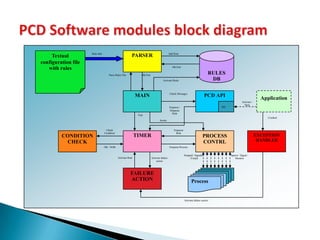
    The PCD designfeatures various loosely coupled software modules:Main: Performs the initializations and the main loop.Rule Parser: Reads and parses the textual rules.Rules DB: Stores all the rules as binary records.Process: Starts, stops and monitors the processesTimer: Provides the ticks for the pcd.Condition check: Checks if a condition is satisfied.Failure action: Performs failure/recovery actions.Exception: Implements the detailed exception handlers.API: The PCD API interface (As a separate library).PCD Software modules
  • 104.
    PCD Software modulesblock diagramPARSERRULESDBTextual configuration file with rulesAdd RuleRule InfoOK/FailParse Rules FileOK/FailActivate RulesMAINPCDAPICheck MessagesApplicationActivate /StopIPCEnqueue /DequeueRuleTickCrashedIterateCheckConditionEnqueueRuleTIMERPROCESS CONTRLCONDITIONCHECKEXCEPTION HANDLEROK / NOKEnqueue ProcessSpawn / Signal /MonitorStopped / Signaled / ExitedActivate failure actionActivate RuleFAILUREACTIONProcessActivate failure action
  • 105.
    A textual file,similar to shell script syntax.Contains a list of “Rule Blocks”. A Rule block is defined per process.Scripts can be extended by including other scripts.dividing dedicated scripts per each logical or functional sub-system in the system.PCD Rules Script
  • 106.
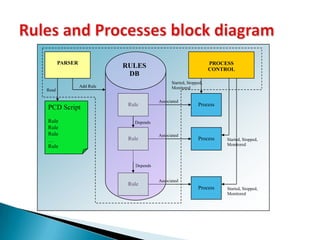
    Rules and Processesblock diagramPROCESS CONTROLPARSERRULESDBStarted, Stopped, MonitoredAdd RuleReadRuleProcessAssociatedPCD ScriptRuleRuleRule…RuleDependsRuleProcessAssociatedStarted, Stopped, MonitoredDependsRuleProcessAssociatedStarted, Stopped, Monitored
  • 107.
  • 108.
    The PCD providesa parser which provides an easy way to verify that your PCD scripts do not contain syntax errors, similarly to compilation process.The parser allows to fix the configuration files on the host, without the need to run them on the target, and rebuilding an image in case of an error.Syntax Checking
  • 109.
    No purchase costsor royalty fees.Source code is fully available.High quality code due to extensive exposure.LGPL allows linking proprietary code with PCD.Continuous development and bug fixes.Need a new feature?Either request it in the project tracker systemOr join the PCD community and develop it, so other could also enjoy your productivity.PCD - Open Source Benefits
  • 110.
    Support more platforms.Watchdog/Keepalive mechanism.Kernel monitoring agent/module.Rule enhancements:AffinityResource limitation (CPU, Heap, Stack, Fork Bombs..)Current working directoryOthers…PCD – Wish list (Future Features)