RTAI
&

Earliest Deadline First
Real-Time Operative Systems M
Stefano Bragaglia
stefano.bragaglia@unibo.it
Overview
Introduction
—  RTAI: Real-Time Application Interface

—  1996: feasibility study to abandon DOS in favour of
the Linux kernel

—  1999: first working release on Linux kernel 2.2
—  2001: further extended to run several kernels
together
Overview
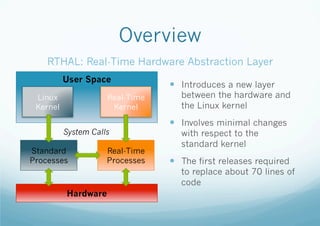
RTHAL: Real-Time Hardware Abstraction Layer
User Space
Linux
Kernel

Real-Time
Kernel
System Calls

Standard
Processes

Real-Time
Processes

—  Introduces a new layer

between the hardware and
the Linux kernel

—  Involves minimal changes
with respect to the
standard kernel

—  The first releases required

to replace about 70 lines of
code

Hardware
Overview
RTHAL: Real-Time Hardware Abstraction Layer
User Space
Linux
Kernel

Real-Time
Kernel
System Calls

Standard
Processes

Real-Time
Processes

—  Critical data and t-functions
held in a single place

—  Interrupts, system calls,

timers are easier to capture

—  Native operations are replaced
by operations on dynamic
RTHAL pointers

—  When RTAI is on, they lead to
the real-time kernel
structures, otherwise to the
original ones

Hardware
Linux can not enable/disable interruptions anymore!
Overview
RTHAL: Real-Time Hardware Abstraction Layer
User Space
Linux
Kernel

Real-Time
Kernel

—  RTHAL does not provide

real-time services, it only
intercept system calls

—  Calls are redirected towards
System Calls
Standard
Processes

Real-Time
Processes

structures referenced by
RTHAL

—  Hardware only accessed by
real-time functions, hence
Linux run as a low priority
process

Hardware
RTAI is a kernel module which does not require to be loaded at boot: can be enabled at will!
Overview
ADEOS: Adaptive Domain Environment for Operating Systems
User Space
Linux
Kernel

Real-Time
Kernel
System Calls

Standard
Processes

Real-Time
Processes

—  RTHAL further improved into
ADEOS

—  Hierarchy of operative systems
divided in layers

—  A flexible environment to share

hardware among several
(instances of) operative systems

—  A micro-kernel handles the

communication between the
different domains

—  Chains of responsibility

Hardware
RTAI is a kernel module which does not require to be loaded at boot: can be enabled at will!
Architecture
ADEOS: Adaptive Domain Environment for Operating
Systems
User Space

User Space

User Space

Linux Kernel

Linux Kernel

Linux Kernel

Standard
Processes

Real-Time Processes

Standard
Processes

I/O

Scheduler
Real-Time Kernel
SW Interrupts

HW Interrupts
RTHAL / ADEOS

Interrupts

Hardware

SW Interrupts

I/O
RTAI Inter-Process
Communication
—  Real-time FIFOs
— 

Basic mechanism to asynchronously exchange data between RT and user space
processes

—  Shared Memory
— 

Shares memory areas between RT and user space processes

—  Messages
— 

Allows to send messages both asynchronously and synchronously (RPC) among RT
processes

—  Mailboxes
— 

Send/receive messages of any size (ordered by priority, arrival time, etc.) between RT
and user space processes

—  Semaphores
— 

A process synchronisation method when accessing shared resources which avoids
unsupervised priority inversions
RTAI Inter-Process
Communication
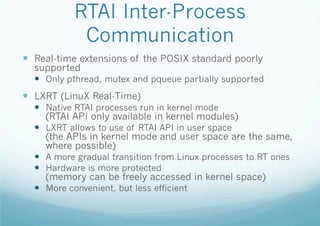
—  Real-time extensions of the POSIX standard poorly

supported
—  Only pthread, mutex and pqueue partially supported

—  LXRT (LinuX Real-Time)
—  Native RTAI processes run in kernel mode
(RTAI API only available in kernel modules)
—  LXRT allows to use of RTAI API in user space
(the APIs in kernel mode and user space are the same,
where possible)
—  A more gradual transition from Linux processes to RT ones
—  Hardware is more protected
(memory can be freely accessed in kernel space)
—  More convenient, but less efficient
Module
setup

Real-time
part

Declarative
part

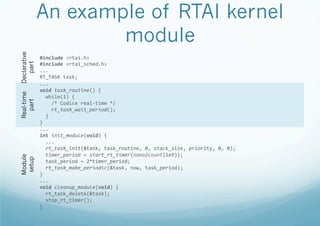
An example of RTAI kernel
module
#include	
  <rtai.h>	
  	
  
#include	
  <rtai_sched.h>	
  	
  
...	
  	
  
RT_TASK	
  task;	
  	
  
...	
  	
  
void	
  task_routine()	
  {	


  while(1)	
  {	


  /*	
  Codice	
  real-­‐time	
  */	


  rt_task_wait_period();	


  }	
  
}	
  
...	
  
int	
  init_module(void)	
  {	


  ...	


  rt_task_init(&task,	
  task_routine,	
  0,	
  stack_size,	
  priority,	
  0,	
  0);	


  timer_period	
  =	
  start_rt_timer(nano2count(1e9));	


  task_period	
  =	
  2*timer_period;	


  rt_task_make_periodic(&task,	
  now,	
  task_period);	
  	
  
}	
  
...	
  
void	
  cleanup_module(void)	
  {	


  rt_task_delete(&task);	


  stop_rt_timer();	
  	
  
}	
  
Process
termination

Real-time
part

Process
initialisation

Decl.
part

An example of RTAI LXRT
process
#include	
  <rtai_lxrt.h>	
  
	
  ...	
  	
  
int	
  main(void)	
  {	


  RT_TASK	
  *task;	


  ...	


  sched_setscheduler(0,	
  SCHED_FIFO,	
  &priorita);	


  mlockall(MCL_CURRENT	
  |	
  MCL_FUTURE);	


  task	
  =	
  rt_task_init(nam2num("Name"),	
  priority,	
  stack_size,	
  0);	


  timer_period	
  =	
  start_rt_timer(nano2count(1e9));	


  task_period	
  =	
  2*timer_period;	


  ...	


  rt_make_hard_real_time();	


  rt_task_make_periodic(task,	
  now,	
  task_period);	


  while(1)	
  {	


  /*	
  Real-­‐time	
  code	
  */	


  rt_task_wait_period();	


  }	


  rt_make_soft_real_time();	


  rt_task_delete(task);	


  return	
  0;	
  	
  
}	
  
RT Scheduling: EDF
RTAI Scheduling
—  RTAI supports various scheduling policies
—  Priority-driven (native; process priorities are assigned
manually):
—  FIFO: First-In-First-Out
—  RR: Round Robin
—  More advanced solutions:
—  RM: Rate Monotonic
—  EDF: Earliest Deadline First
Priority-driven Scheduling
Policies
FIFO – same priority
Proc1:	
  started	
  
Proc1:	
  iteration	
  1	
  
Proc1:	
  iteration	
  2	
  
Proc1:	
  iteration	
  3	
  
Proc1:	
  iteration	
  4	
  
Proc1:	
  terminated	
  
Proc2:	
  started	
  
Proc2:	
  iteration	
  1	
  
Proc2:	
  iteration	
  2	
  
Proc2:	
  iteration	
  3	
  
Proc2:	
  terminated	
  
Proc3:	
  started	
  
Proc3:	
  iteration	
  1	
  
Proc3:	
  iteration	
  2	
  
Proc3:	
  terminated	


FIFO – specific priorities RR – same priority
Proc3:	
  started	
  
Proc1:	
  started	
  
Proc3:	
  iteration	
  1	
  
Proc2:	
  started	
  
Proc3:	
  iteration	
  2	
  
Proc3:	
  started	
  
Proc3:	
  terminated	
  
Proc1:	
  iteration	
  1	
  
Proc1:	
  started	
  
Proc2:	
  iteration	
  1	
  
Proc1:	
  iteration	
  1	
  
Proc3:	
  iteration	
  1	
  
Proc1:	
  iteration	
  2	
  
Proc1:	
  iteration	
  2	
  
Proc1:	
  iteration	
  3	
  
Proc2:	
  iteration	
  2	
  
Proc1:	
  iteration	
  4	
  
Proc3:	
  iteration	
  2	
  
Proc1:	
  terminated	
  
Proc1:	
  iteration	
  3	
  
Proc2:	
  started	
  
Proc2:	
  iteration	
  3	
  
Proc2:	
  iteration	
  1	
  
Proc1:	
  iteration	
  4	
  
Proc2:	
  iteration	
  2	
  
Proc1:	
  terminated	
  
Proc2:	
  iteration	
  3	
  
Proc2:	
  terminated	
  
Proc2:	
  terminated	
  
Proc3:	
  terminated	


Other Scheduling Policies
RM – Rate Monotonic

EDF – Earliest Deadline
First

—  Can be easily implemented

—  Can be similarly implemented

—  Process priority is inferred

—  Priority is given to the process

from FIFO scheduling

from the frequency of its
activation

—  RTAI functions:
—  rt_task_make_periodic(…)
finds priority of available
processes from their period

—  void	
  rt_spv_RMS(<cpu>)

sets priority of processes on
given CPU by their frequency

from FIFO scheduling

that is ready and has to
complete first

—  RTAI functions:
— 

void	
  rt_task_set_resume_	
  
end_times(<resume>,<end>) sets

the absolute resume and
deadline of the process;
rescheduled on resume;
periodicity with neg values
Other Scheduling Policies
RM – rate monotonic scheduling
Proc	
  HF:	
  started	
  
Proc	
  HF:	
  terminated	
  
Proc	
  LF:	
  started	
  
Proc	
  LF:	
  terminated	
  
Proc	
  HF:	
  started	
  
Proc	
  HF:	
  terminated	
  
Proc	
  HF:	
  started	
  
Proc	
  HF:	
  terminated	
  
Proc	
  LF:	
  started	
  
Proc	
  HF:	
  started	
  	
  <preemption!>	
  
Proc	
  HF:	
  terminated	
  
Proc	
  LF:	
  terminated	
  
Proc	
  HF:	
  started	
  
Proc	
  HF:	
  terminated	
  
Proc	
  LF:	
  started	
  
Proc	
  LF:	
  terminated	


EDF – earliest deadline first scheduling
Proc	
  1:	
  started	
  
Proc	
  1:	
  terminated	
  
Proc	
  2:	
  started	
  	
  	
  <preemption!>	
  
Proc	
  1:	
  started	
  	
  <desp.	
  prior.>	
  
Proc	
  1:	
  terminated	
  
Proc	
  1:	
  started	
  
Proc	
  1:	
  terminated	
  
Proc	
  2:	
  terminated	
  
Proc	
  1:	
  started	
  
Proc	
  1:	
  terminated	
  
Proc	
  2:	
  started	
  
Proc	
  1:	
  started	
  
Proc	
  1:	
  terminated	
  
Proc	
  1:	
  started	
  
Proc	
  1:	
  terminated	
  
Proc	
  2:	
  terminated	


EDF – Earliest Deadline First
—  Optimal scheduling algorithm on preemptive
uniprocessors

—  100% utilisation bound with processes whose
deadline is equal to their period
—  EDF guarantees that all the processes meet their

deadlines if CPU utilisation is not more than 100%

—  No fault signal (ASAP execution policy)
—  Missed deadlines are handled by the user
EDF – Earliest Deadline First
—  Create the RT processes with priorities (discarded later)
—  rt_task_init(&task1,	
  task_execution,	
  "1",	
  10000,	
  LOW_PR,	
  0,	
  0);	
  	
  
—  rt_task_init(&task2,	
  task_execution,	
  "2",	
  10000,	
  HIGH_PR,	
  0,	
  
0);	


—  Make the RT processes periodic (period useless)
—  rt_task_make_periodic(&task1,	
  now	
  +	
  ...,	
  PERIOD_1);	
  	
  
—  rt_task_make_periodic(&task2,	
  now	
  +	
  ...,	
  PERIOD_2);	


—  Set activation and deadline per process
—  rt_task_set_resume_end_times(now	
  +	
  ...,	
  -­‐REL_DEADL_1);	
  	
  
—  rt_task_set_resume_end_times(now	
  +	
  ...,	
  -­‐REL_DEADL_2);	


—  Reset activation and deadline on completion
—  rt_task_set_resume_end_times(-­‐PERIOD_n,-­‐REL_DEADL_n);	
  	
  
EDF – Earliest Deadline First (LXRT)
— 

Create a child process
— 

— 

Create a real-time “agent” for each process
— 
— 

— 

rt_make_hard_real_time();	
  

rt_task_make_periodic(task1,	
  now	
  +	
  ...,	
  PERIOD_1);	
  	
  
rt_task_make_periodic(task2,	
  now	
  +	
  ...,	
  PERIOD_2);	


Set activation and deadline per process
— 
— 

— 

rt_task_init(nam2num(“Task2”),	
  HIGH_PR,	
  0,	
  0);	


Make the processes periodic
— 
— 

— 

rt_task_init(nam2num(“Task1”),	
  LOW_PR,	
  0,	
  0);	


Start real-time mode
— 

— 

fork();	
  

rt_task_set_resume_end_times(now	
  +	
  ...,	
  -­‐REL_DEADL_1);	
  	
  
rt_task_set_resume_end_times(now	
  +	
  ...,	
  -­‐REL_DEADL_2);	


Reset activation and deadline on completion
— 

rt_task_set_resume_end_times(-­‐PERIOD_n,-­‐REL_DEADL_n);	
  
Installing and Using RTAI
Installing RTAI
1.  Install Linux (any common distro will do)
—  Ubuntu, Fedora, Mandrake, Slackware, Gentoo…

2.  Download the source code of a vanilla kernel
—  http://www.kernel.org

3.  Download a compatible RTAI version
—  http://www.rtai.org (match the kernel version!)

4.  Patch the kernel source code
— 

cd	
  sources	
  &&	
  patch	
  –p1	
  <	
  ../rtai/…/file.patch	
  
Installing RTAI
5.  Configure the kernel (default .config as reference)
— 

cp	
  /boot/config-­‐current_version	
  .config	
  

— 

make	
  menuconfig	
  

6.  Set the code maturity level
— 

Code	
  maturity	
  level	
  -­‐-­‐>	
  Promptfordevelopmentand/or	
  incomplete	
  drivers	
  -­‐-­‐>	
  YES	
  

— 
— 

Loadable	
  module	
  support	
  -­‐-­‐>	
  Enable	
  loadable	
  module	
  support	
  -­‐-­‐>	
  YES	


— 

Processor	
  type	
  and	
  features	
  -­‐-­‐>	
  Preemptible	
  kernel	
  -­‐-­‐>	
  NO	


— 

Processor	
  type	
  and	
  features	
  -­‐-­‐>	
  Use	
  register	
  arguments	
  -­‐-­‐>	
  NO	
  

— 

Processor	
  type	
  and	
  features	
  -­‐-­‐>	
  Interrupt	
  pipeline	
  (IPIPE)	
  -­‐-­‐>	
  YES	
  

— 

File	
  systems	
  -­‐-­‐>	
  Pseudo	
  filesystems	
  -­‐-­‐>	
  /proc	
  file	
  system	
  support	
  -­‐-­‐>	
  YES	


Module	
  versioning	
  support	
  -­‐-­‐>	
  NO	
  
Installing RTAI
7.  Compile and install the kernel
—  make	
  
—  make	
  modules_install	
  
— 
— 
— 
— 

mkinitrd	
  /boot/initrd-­‐versione_kernel.img	
  vesione_kernel	
  	
  
cparch/i386/boot/bzImage/boot/vmlinuz-­‐versione_kernel	
  	
  
cp	
  System.map	
  /boot/System.map-­‐versione_kernel	
  	
  
ln	
  –s	
  /boot/System.map-­‐versione_kernel	
  /boot/System.map	


8.  Add entry to the bootloader config file
—  vi	
  /boot/grub/menu.lst	
  

9.  Reboot into the new kernel
Installing RTAI
10. Configure and install RTAI
—  cd	
  /rtai/	
  
—  make	
  menuconfig	
  
—  Machine --> Number of CPUs = 1
—  General à Installation directory = /path/to/
patched_kernel/

11. Reboot
12. Test
—  cd	
  /rtai/testsuite/user/latency	
  
—  ./run	
  
Using RTAI
—  Write your own module
—  See example

—  Compile it
—  Makefiles are a convenient solution

—  Verify that only 1 CPU is enabled
—  sudo	
  nano	
  /etc/default/grub	
  	
  
—  GRUB_CMDLINE_LINUX=“maxcpus=1”

—  Put it into execution…
Using RTAI
—  Put it into execution
—  Load a RTAI module to kernel:
sudo	
  insmod	
  /usr/realtime/modules/<module>.ko	
  
—  Unload a RTAI module from kernel:
sudo	
  rmmod	
  <module>	


—  “Debug” it
—  See the output of the real-time subsystem:
dmesg	
  
—  It prints errors messages as well as the outcome of calls to
printntk(…) and rt_printk(…)
—  If other modules are required (rtai_hal.ko, rtai_shm.ko,
rtai_sched.ko, etc.), you have to load them first!

RTAI - Earliest Deadline First

  • 1.
    RTAI & Earliest Deadline First Real-TimeOperative Systems M Stefano Bragaglia stefano.bragaglia@unibo.it
  • 2.
  • 3.
    Introduction —  RTAI: Real-TimeApplication Interface —  1996: feasibility study to abandon DOS in favour of the Linux kernel —  1999: first working release on Linux kernel 2.2 —  2001: further extended to run several kernels together
  • 4.
    Overview RTHAL: Real-Time HardwareAbstraction Layer User Space Linux Kernel Real-Time Kernel System Calls Standard Processes Real-Time Processes —  Introduces a new layer between the hardware and the Linux kernel —  Involves minimal changes with respect to the standard kernel —  The first releases required to replace about 70 lines of code Hardware
  • 5.
    Overview RTHAL: Real-Time HardwareAbstraction Layer User Space Linux Kernel Real-Time Kernel System Calls Standard Processes Real-Time Processes —  Critical data and t-functions held in a single place —  Interrupts, system calls, timers are easier to capture —  Native operations are replaced by operations on dynamic RTHAL pointers —  When RTAI is on, they lead to the real-time kernel structures, otherwise to the original ones Hardware Linux can not enable/disable interruptions anymore!
  • 6.
    Overview RTHAL: Real-Time HardwareAbstraction Layer User Space Linux Kernel Real-Time Kernel —  RTHAL does not provide real-time services, it only intercept system calls —  Calls are redirected towards System Calls Standard Processes Real-Time Processes structures referenced by RTHAL —  Hardware only accessed by real-time functions, hence Linux run as a low priority process Hardware RTAI is a kernel module which does not require to be loaded at boot: can be enabled at will!
  • 7.
    Overview ADEOS: Adaptive DomainEnvironment for Operating Systems User Space Linux Kernel Real-Time Kernel System Calls Standard Processes Real-Time Processes —  RTHAL further improved into ADEOS —  Hierarchy of operative systems divided in layers —  A flexible environment to share hardware among several (instances of) operative systems —  A micro-kernel handles the communication between the different domains —  Chains of responsibility Hardware RTAI is a kernel module which does not require to be loaded at boot: can be enabled at will!
  • 8.
    Architecture ADEOS: Adaptive DomainEnvironment for Operating Systems User Space User Space User Space Linux Kernel Linux Kernel Linux Kernel Standard Processes Real-Time Processes Standard Processes I/O Scheduler Real-Time Kernel SW Interrupts HW Interrupts RTHAL / ADEOS Interrupts Hardware SW Interrupts I/O
  • 9.
    RTAI Inter-Process Communication —  Real-timeFIFOs —  Basic mechanism to asynchronously exchange data between RT and user space processes —  Shared Memory —  Shares memory areas between RT and user space processes —  Messages —  Allows to send messages both asynchronously and synchronously (RPC) among RT processes —  Mailboxes —  Send/receive messages of any size (ordered by priority, arrival time, etc.) between RT and user space processes —  Semaphores —  A process synchronisation method when accessing shared resources which avoids unsupervised priority inversions
  • 10.
    RTAI Inter-Process Communication —  Real-timeextensions of the POSIX standard poorly supported —  Only pthread, mutex and pqueue partially supported —  LXRT (LinuX Real-Time) —  Native RTAI processes run in kernel mode (RTAI API only available in kernel modules) —  LXRT allows to use of RTAI API in user space (the APIs in kernel mode and user space are the same, where possible) —  A more gradual transition from Linux processes to RT ones —  Hardware is more protected (memory can be freely accessed in kernel space) —  More convenient, but less efficient
  • 11.
    Module setup Real-time part Declarative part An example ofRTAI kernel module #include  <rtai.h>     #include  <rtai_sched.h>     ...     RT_TASK  task;     ...     void  task_routine()  {        while(1)  {            /*  Codice  real-­‐time  */            rt_task_wait_period();      }   }   ...   int  init_module(void)  {        ...      rt_task_init(&task,  task_routine,  0,  stack_size,  priority,  0,  0);        timer_period  =  start_rt_timer(nano2count(1e9));        task_period  =  2*timer_period;        rt_task_make_periodic(&task,  now,  task_period);     }   ...   void  cleanup_module(void)  {        rt_task_delete(&task);        stop_rt_timer();     }  
  • 12.
    Process termination Real-time part Process initialisation Decl. part An example ofRTAI LXRT process #include  <rtai_lxrt.h>    ...     int  main(void)  {        RT_TASK  *task;      ...      sched_setscheduler(0,  SCHED_FIFO,  &priorita);        mlockall(MCL_CURRENT  |  MCL_FUTURE);      task  =  rt_task_init(nam2num("Name"),  priority,  stack_size,  0);        timer_period  =  start_rt_timer(nano2count(1e9));        task_period  =  2*timer_period;      ...      rt_make_hard_real_time();        rt_task_make_periodic(task,  now,  task_period);        while(1)  {            /*  Real-­‐time  code  */          rt_task_wait_period();      }        rt_make_soft_real_time();        rt_task_delete(task);        return  0;     }  
  • 13.
  • 14.
    RTAI Scheduling —  RTAIsupports various scheduling policies —  Priority-driven (native; process priorities are assigned manually): —  FIFO: First-In-First-Out —  RR: Round Robin —  More advanced solutions: —  RM: Rate Monotonic —  EDF: Earliest Deadline First
  • 15.
    Priority-driven Scheduling Policies FIFO –same priority Proc1:  started   Proc1:  iteration  1   Proc1:  iteration  2   Proc1:  iteration  3   Proc1:  iteration  4   Proc1:  terminated   Proc2:  started   Proc2:  iteration  1   Proc2:  iteration  2   Proc2:  iteration  3   Proc2:  terminated   Proc3:  started   Proc3:  iteration  1   Proc3:  iteration  2   Proc3:  terminated     FIFO – specific priorities RR – same priority Proc3:  started   Proc1:  started   Proc3:  iteration  1   Proc2:  started   Proc3:  iteration  2   Proc3:  started   Proc3:  terminated   Proc1:  iteration  1   Proc1:  started   Proc2:  iteration  1   Proc1:  iteration  1   Proc3:  iteration  1   Proc1:  iteration  2   Proc1:  iteration  2   Proc1:  iteration  3   Proc2:  iteration  2   Proc1:  iteration  4   Proc3:  iteration  2   Proc1:  terminated   Proc1:  iteration  3   Proc2:  started   Proc2:  iteration  3   Proc2:  iteration  1   Proc1:  iteration  4   Proc2:  iteration  2   Proc1:  terminated   Proc2:  iteration  3   Proc2:  terminated   Proc2:  terminated   Proc3:  terminated      
  • 16.
    Other Scheduling Policies RM– Rate Monotonic EDF – Earliest Deadline First —  Can be easily implemented —  Can be similarly implemented —  Process priority is inferred —  Priority is given to the process from FIFO scheduling from the frequency of its activation —  RTAI functions: —  rt_task_make_periodic(…) finds priority of available processes from their period —  void  rt_spv_RMS(<cpu>) sets priority of processes on given CPU by their frequency from FIFO scheduling that is ready and has to complete first —  RTAI functions: —  void  rt_task_set_resume_   end_times(<resume>,<end>) sets the absolute resume and deadline of the process; rescheduled on resume; periodicity with neg values
  • 17.
    Other Scheduling Policies RM– rate monotonic scheduling Proc  HF:  started   Proc  HF:  terminated   Proc  LF:  started   Proc  LF:  terminated   Proc  HF:  started   Proc  HF:  terminated   Proc  HF:  started   Proc  HF:  terminated   Proc  LF:  started   Proc  HF:  started    <preemption!>   Proc  HF:  terminated   Proc  LF:  terminated   Proc  HF:  started   Proc  HF:  terminated   Proc  LF:  started   Proc  LF:  terminated     EDF – earliest deadline first scheduling Proc  1:  started   Proc  1:  terminated   Proc  2:  started      <preemption!>   Proc  1:  started    <desp.  prior.>   Proc  1:  terminated   Proc  1:  started   Proc  1:  terminated   Proc  2:  terminated   Proc  1:  started   Proc  1:  terminated   Proc  2:  started   Proc  1:  started   Proc  1:  terminated   Proc  1:  started   Proc  1:  terminated   Proc  2:  terminated    
  • 18.
    EDF – EarliestDeadline First —  Optimal scheduling algorithm on preemptive uniprocessors —  100% utilisation bound with processes whose deadline is equal to their period —  EDF guarantees that all the processes meet their deadlines if CPU utilisation is not more than 100% —  No fault signal (ASAP execution policy) —  Missed deadlines are handled by the user
  • 19.
    EDF – EarliestDeadline First —  Create the RT processes with priorities (discarded later) —  rt_task_init(&task1,  task_execution,  "1",  10000,  LOW_PR,  0,  0);     —  rt_task_init(&task2,  task_execution,  "2",  10000,  HIGH_PR,  0,   0);     —  Make the RT processes periodic (period useless) —  rt_task_make_periodic(&task1,  now  +  ...,  PERIOD_1);     —  rt_task_make_periodic(&task2,  now  +  ...,  PERIOD_2);     —  Set activation and deadline per process —  rt_task_set_resume_end_times(now  +  ...,  -­‐REL_DEADL_1);     —  rt_task_set_resume_end_times(now  +  ...,  -­‐REL_DEADL_2);     —  Reset activation and deadline on completion —  rt_task_set_resume_end_times(-­‐PERIOD_n,-­‐REL_DEADL_n);    
  • 20.
    EDF – EarliestDeadline First (LXRT) —  Create a child process —  —  Create a real-time “agent” for each process —  —  —  rt_make_hard_real_time();   rt_task_make_periodic(task1,  now  +  ...,  PERIOD_1);     rt_task_make_periodic(task2,  now  +  ...,  PERIOD_2);     Set activation and deadline per process —  —  —  rt_task_init(nam2num(“Task2”),  HIGH_PR,  0,  0);     Make the processes periodic —  —  —  rt_task_init(nam2num(“Task1”),  LOW_PR,  0,  0);     Start real-time mode —  —  fork();   rt_task_set_resume_end_times(now  +  ...,  -­‐REL_DEADL_1);     rt_task_set_resume_end_times(now  +  ...,  -­‐REL_DEADL_2);     Reset activation and deadline on completion —  rt_task_set_resume_end_times(-­‐PERIOD_n,-­‐REL_DEADL_n);  
  • 21.
  • 22.
    Installing RTAI 1.  InstallLinux (any common distro will do) —  Ubuntu, Fedora, Mandrake, Slackware, Gentoo… 2.  Download the source code of a vanilla kernel —  http://www.kernel.org 3.  Download a compatible RTAI version —  http://www.rtai.org (match the kernel version!) 4.  Patch the kernel source code —  cd  sources  &&  patch  –p1  <  ../rtai/…/file.patch  
  • 23.
    Installing RTAI 5.  Configurethe kernel (default .config as reference) —  cp  /boot/config-­‐current_version  .config   —  make  menuconfig   6.  Set the code maturity level —  Code  maturity  level  -­‐-­‐>  Promptfordevelopmentand/or  incomplete  drivers  -­‐-­‐>  YES   —  —  Loadable  module  support  -­‐-­‐>  Enable  loadable  module  support  -­‐-­‐>  YES     —  Processor  type  and  features  -­‐-­‐>  Preemptible  kernel  -­‐-­‐>  NO     —  Processor  type  and  features  -­‐-­‐>  Use  register  arguments  -­‐-­‐>  NO   —  Processor  type  and  features  -­‐-­‐>  Interrupt  pipeline  (IPIPE)  -­‐-­‐>  YES   —  File  systems  -­‐-­‐>  Pseudo  filesystems  -­‐-­‐>  /proc  file  system  support  -­‐-­‐>  YES     Module  versioning  support  -­‐-­‐>  NO  
  • 24.
    Installing RTAI 7.  Compileand install the kernel —  make   —  make  modules_install   —  —  —  —  mkinitrd  /boot/initrd-­‐versione_kernel.img  vesione_kernel     cparch/i386/boot/bzImage/boot/vmlinuz-­‐versione_kernel     cp  System.map  /boot/System.map-­‐versione_kernel     ln  –s  /boot/System.map-­‐versione_kernel  /boot/System.map     8.  Add entry to the bootloader config file —  vi  /boot/grub/menu.lst   9.  Reboot into the new kernel
  • 25.
    Installing RTAI 10. Configure andinstall RTAI —  cd  /rtai/   —  make  menuconfig   —  Machine --> Number of CPUs = 1 —  General à Installation directory = /path/to/ patched_kernel/ 11. Reboot 12. Test —  cd  /rtai/testsuite/user/latency   —  ./run  
  • 26.
    Using RTAI —  Writeyour own module —  See example —  Compile it —  Makefiles are a convenient solution —  Verify that only 1 CPU is enabled —  sudo  nano  /etc/default/grub     —  GRUB_CMDLINE_LINUX=“maxcpus=1” —  Put it into execution…
  • 27.
    Using RTAI —  Putit into execution —  Load a RTAI module to kernel: sudo  insmod  /usr/realtime/modules/<module>.ko   —  Unload a RTAI module from kernel: sudo  rmmod  <module>     —  “Debug” it —  See the output of the real-time subsystem: dmesg   —  It prints errors messages as well as the outcome of calls to printntk(…) and rt_printk(…) —  If other modules are required (rtai_hal.ko, rtai_shm.ko, rtai_sched.ko, etc.), you have to load them first!