Practical Malware Analysis
Ch 8: Debugging
Rev. 9-11-18
Disassemblers v. Debuggers
• A disassembler like IDA Pro shows the state
of the program just before execution
begins
• Debuggers show
– Every memory location
– Register
– Argument to every function
• At any point during processing
– And let you change them
Two Debuggers
• Ollydbg
– Most popular for malware analysis
– User-mode debugging only
– IDA Pro has a built-in debugger, but it's not as
easy to use or powerful as Ollydbg
• Windbg
– Supports kernel-mode debugging
Source-Level v. Assembly-Level
Debuggers
• Source-level debugger
– Usually built into development platform
– Can set breakpoints (which stop at lines of code)
– Can step through program one line at a time
• Assembly-level debuggers (low-level)
– Operate on assembly code rather than source code
– Malware analysts are usually forced to use them,
because they don't have source code
Windows Crashes
• When an app
crashes,
Windows may
offer to open it
in a debugger
• Usually it uses
Windbg
• Links Ch 8c, 8d
Kernel v. User-Mode
Debugging
User Mode Debugging
• Debugger runs on the same system as the
code being analyzed
• Debugging a single executable
• Separated from other executables by the
OS
Kernel Mode Debugging
The Old Way
• Requires two computers, because there is only
one kernel per computer
• If the kernel is at a breakpoint, the system
stops
• One computer runs the code being debugged
• Other computer runs the debugger
• OS must be configured to allow kernel
debugging
• Two machines must be connected
Windows 7
Advanced
Boot Options
• Press F8
during
startup
• "Debugging
Mode"
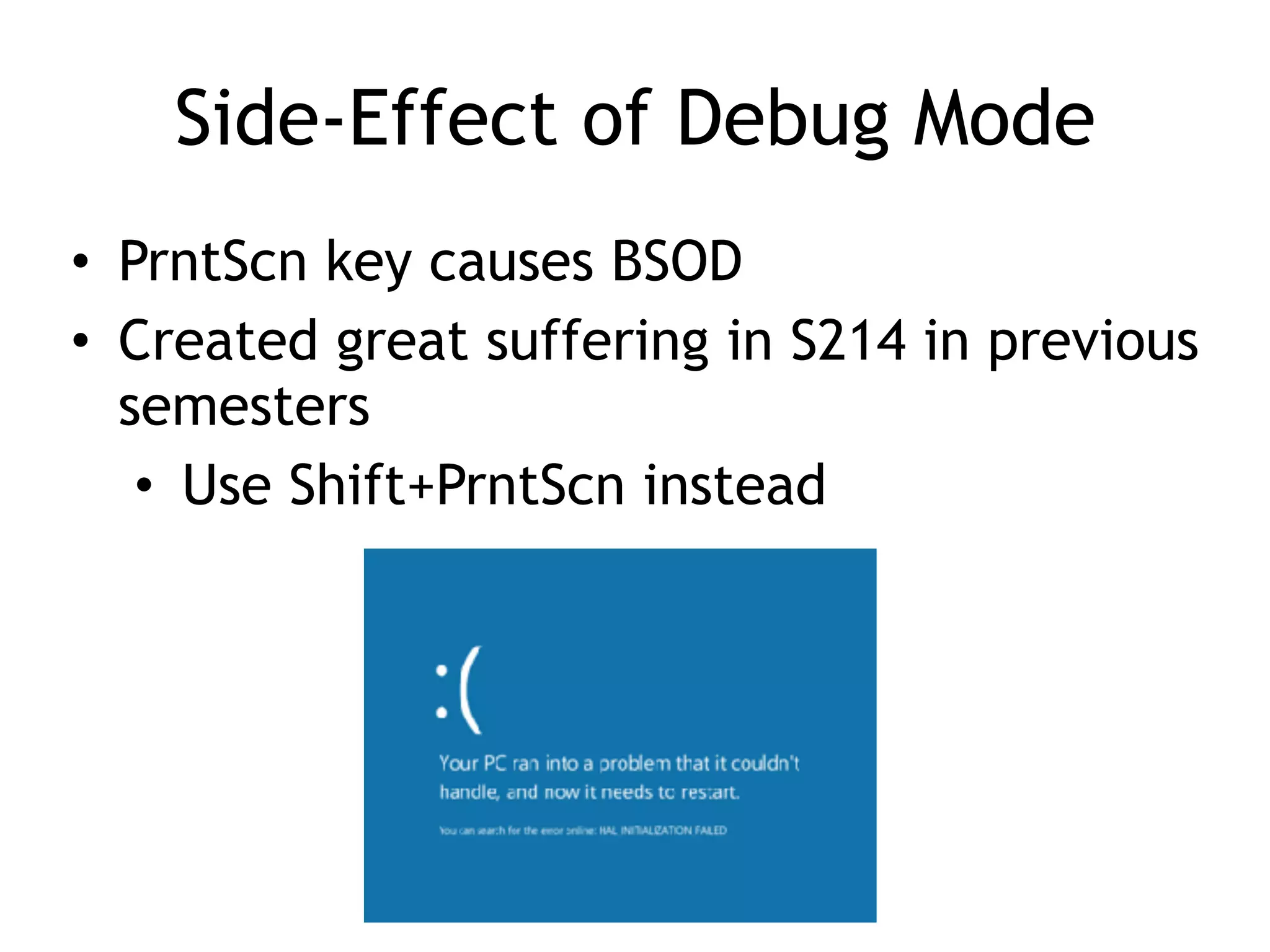
Side-Effect of Debug Mode
• PrntScn key causes BSOD
• Created great suffering in S214 in previous
semesters
• Use Shift+PrntScn instead
Kernel Mode Debugging
The New Way
• Mark Russinovich's Livekd tool allows you
to debug the kernel with only one
computer!
• MUCH easier :)
• Tool has some limitations (Link Ch 8e)
12
How Livekd Works
• Link Ch 8f
Good Intro to OllyDbg
• Link Ch 8a
Using a Debugger
Two Ways
• Start the program with the debugger
– It stops running immediately prior to the
execution of its entry point
• Attach a debugger to a program that is
already running
– All its threads are paused
– Useful to debug a process that is affected by
malware
Single-Stepping
• Simple, but slow
• Don't get bogged down in details
Example
• This code
decodes the
string with XOR
Stepping-over v. Stepping-Into
• Single step executes one instruction
• Step-over call instructions
– Completes the call and returns without pausing
– Decreases the amount of code you need to analyze
– Might miss important functionality, especially if
the function never returns
• Step-into a call
– Moves into the function and stops at its first
command
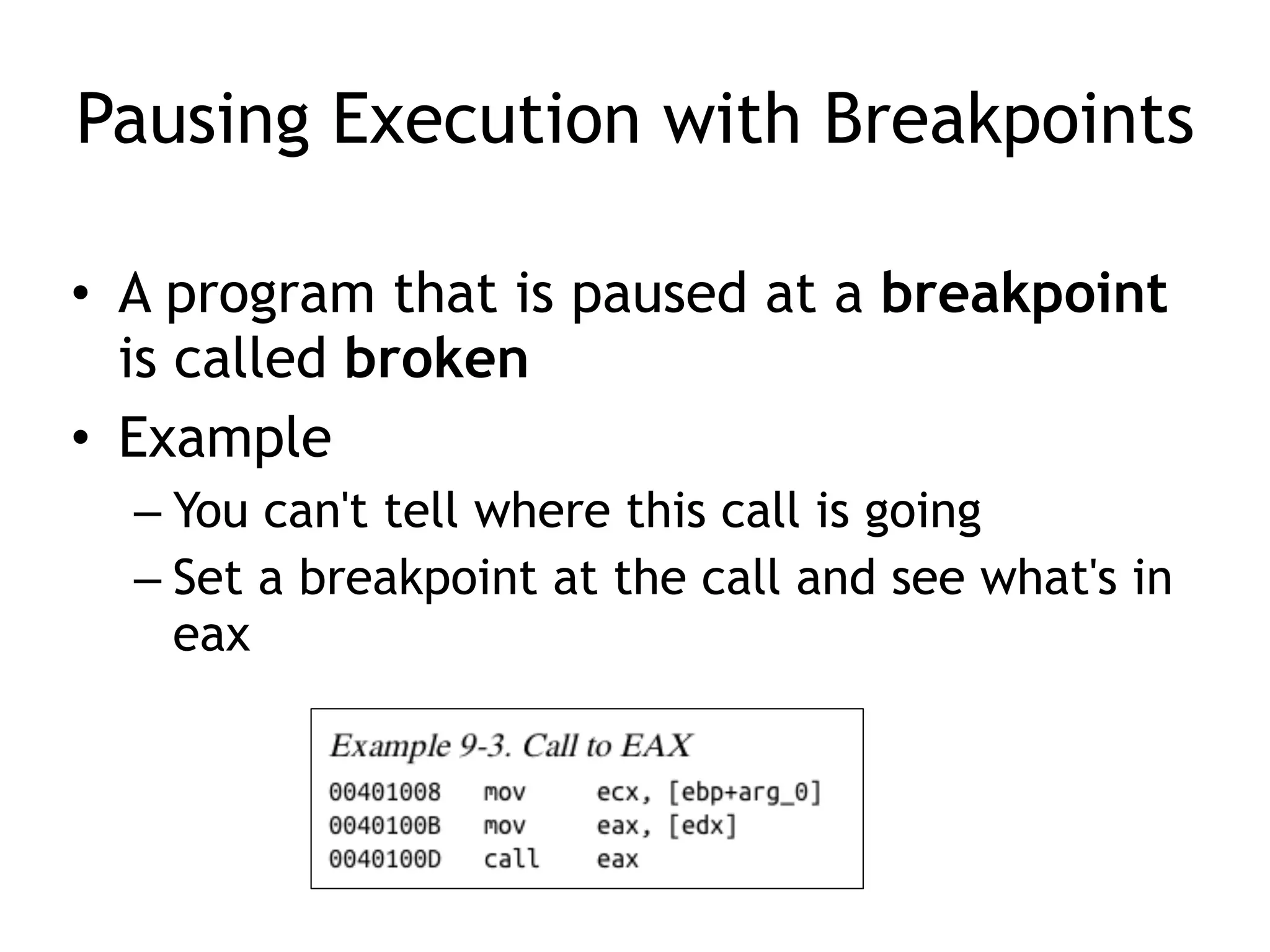
Pausing Execution with Breakpoints
• A program that is paused at a breakpoint
is called broken
• Example
– You can't tell where this call is going
– Set a breakpoint at the call and see what's in
eax
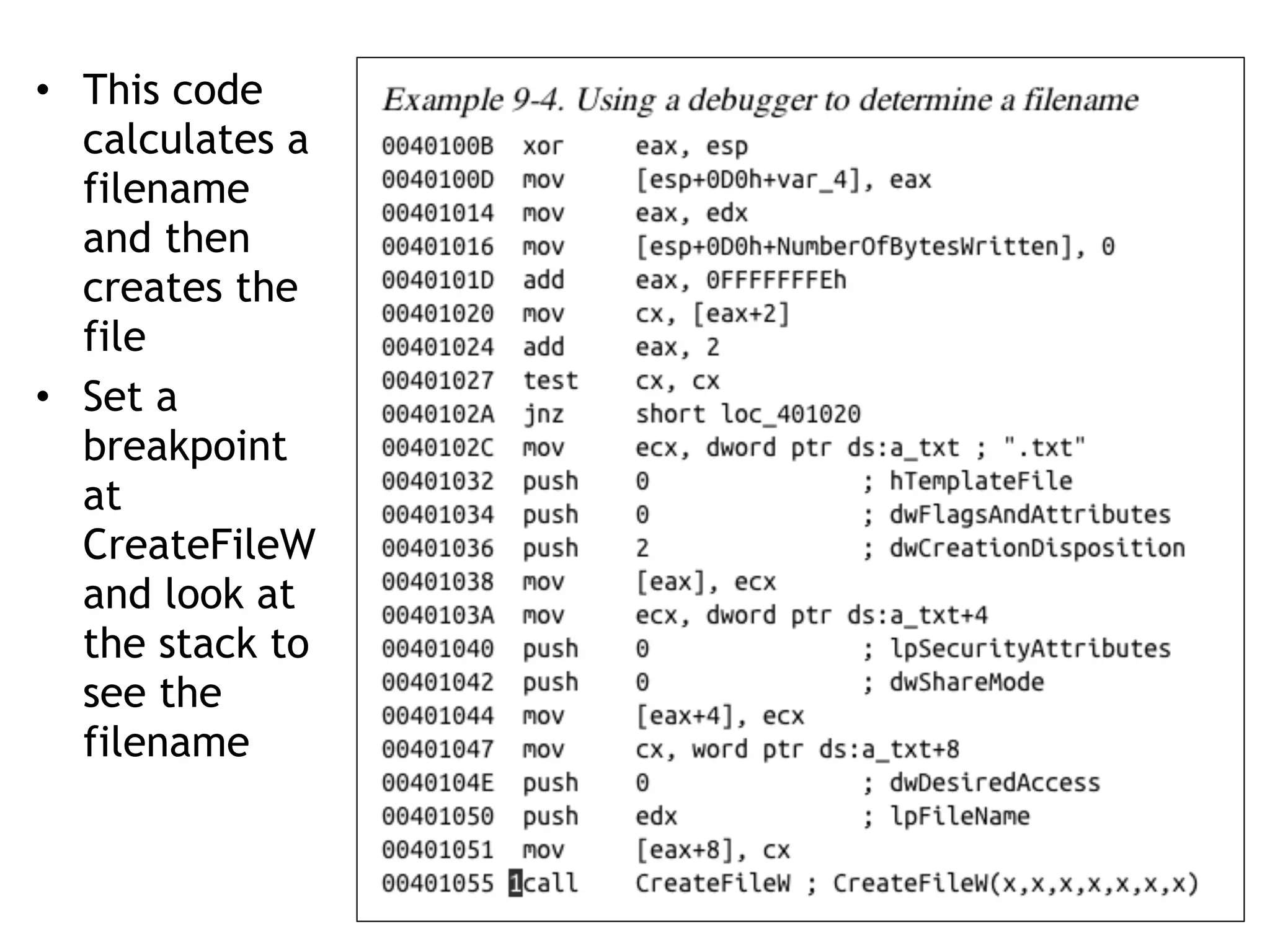
• This code
calculates a
filename
and then
creates the
file
• Set a
breakpoint
at
CreateFileW
and look at
the stack to
see the
filename
WinDbg
Encrypted Data
• Suppose malware sends encrypted
network data
• Set a breakpoint before the data is
encrypted and view it
OllyDbg
Types of Breakpoints
• Software execution
• Hardware execution
• Conditional
Software Execution Breakpoints
• The default option for most debuggers
• Debugger overwrites the first byte of the
instruction with 0xCC
– The instruction for INT 3
– An interrupt designed for use with debuggers
– When the breakpoint is executed, the OS
generates an exception and transfers control
to the debugger
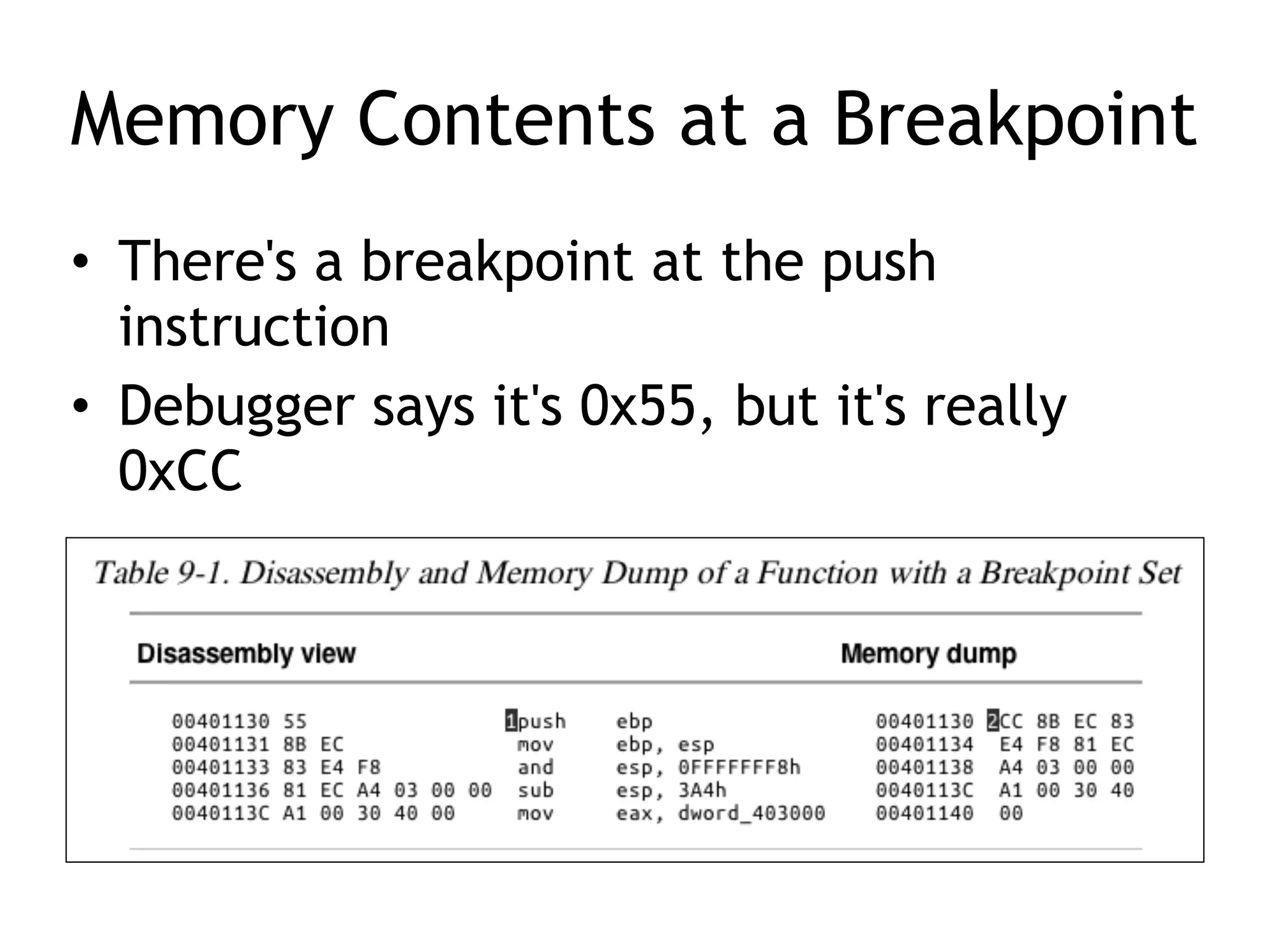
Memory Contents at a Breakpoint
• There's a breakpoint at the push
instruction
• Debugger says it's 0x55, but it's really
0xCC
When Software Execution Breakpoints
Fail
• If the 0xCC byte is changed during code
execution, the breakpoint won't occur
• If other code reads the memory
containing the breakpoint, it will read
0xCC instead of the original byte
• Code that verifies integrity will notice the
discrepancy
Hardware Execution Breakpoints
• Uses four hardware Debug Registers
– DR0 through DR3 – addresses of breakpoints
– DR7 stores control information
• The address to stop at is in a register
• Can break on access or execution
– Can set to break on read, write, or both
• No change in code bytes
Hardware Execution Breakpoints
• Running code can change the DR registers,
to interfere with debuggers
• General Detect flag in DR7
– Causes a breakpoint prior to any mov
instruction that would change the contents of
a Debug Register
– Does not detect other instructions, however
Conditional Breakpoints
• Breaks only if a condition is true
– Ex: Set a breakpoint on the GetProcAddress
function
– Only if parameter being passed in is
RegSetValue
• Implemented as software breakpoints
– The debugger always receives the break
– If the condition is not met, it resumes
execution without alerting the user
Conditional Breakpoints
• Conditional breakpoints take much longer
than ordinary instructions
• A conditional breakpoint on a frequently-
accessed instruction can slow a program
down
• Sometimes so much that it never finishes
Exceptions
Exceptions
• Used by debuggers to gain control of a
running program
• Breakpoints generate exceptions
• Exceptions are also caused by
– Invalid memory access
– Division by zero
– Other conditions
First- and Second-Chance Exceptions
• When a exception occurs while a
debugger is attached
– The program stops executing
– The debugger is given first chance at control
– Debugger can either handle the exception, or
pass it on to the program
– If it's passed on, the program's exception
handler takes it
Second Chance
• If the application doesn't handle the
exception
• The debugger is given a second chance to
handle it
– This means the program would have crashed if
the debugger were not attached
• In malware analysis, first-chance exceptions
can usually be ignored
• Second-chance exceptions cannot be ignored
– They usually mean that the malware doesn't like
the environment in which it is running
Common Exceptions
• INT 3 (Software breakpoint)
• Single-stepping in a debugger is implemented
as an exception
– If the trap flag in the flags register is set,
– The processor executes one instruction and then
generates an exception
• Memory-access violation exception
– Code tries to access a location that it cannot
access, either because the address is invalid or
because of access-control protections
Common Exceptions
• Violating Privilege Rules
– Attempt to execute privileged instruction
with outside privileged mode
– In other words, attempt to execute a kernel
mode instruction in user mode
– Or, attempt to execute Ring 0 instruction
from Ring 3
List of Exceptions
• Link Ch 8b
Modifying Execution with a
Debugger
Skipping a Function
• You can change control flags, the
instruction pointer, or the code itself
• You could avoid a function call by setting
a breakpoint where at the call, and then
changing the instruction pointer to the
instruction after it
– This may cause the program to crash or
malfunction, or course
Testing a Function
• You could run a function directly, without
waiting for the main code to use it
– You will have to set the parameters
– This destroys a program's stack
– The program won't run properly when the
function completes
Modifying Program Execution
in Practice
Example (A Real Virus)
• Operation depends on language setting of
a computer
– Simplified Chinese
• Uninstalls itself & does no harm
– English
• Display pop-up "Your luck's no good"
– Japanese or Indonesian
• Overwrite the hard drive with random data
Break at 1; Change Return Value
CNIT 126: 8: Debugging

CNIT 126: 8: Debugging

  • 1.
    Practical Malware Analysis Ch8: Debugging Rev. 9-11-18
  • 2.
    Disassemblers v. Debuggers •A disassembler like IDA Pro shows the state of the program just before execution begins • Debuggers show – Every memory location – Register – Argument to every function • At any point during processing – And let you change them
  • 3.
    Two Debuggers • Ollydbg –Most popular for malware analysis – User-mode debugging only – IDA Pro has a built-in debugger, but it's not as easy to use or powerful as Ollydbg • Windbg – Supports kernel-mode debugging
  • 4.
    Source-Level v. Assembly-Level Debuggers •Source-level debugger – Usually built into development platform – Can set breakpoints (which stop at lines of code) – Can step through program one line at a time • Assembly-level debuggers (low-level) – Operate on assembly code rather than source code – Malware analysts are usually forced to use them, because they don't have source code
  • 5.
    Windows Crashes • Whenan app crashes, Windows may offer to open it in a debugger • Usually it uses Windbg • Links Ch 8c, 8d
  • 6.
  • 7.
    User Mode Debugging •Debugger runs on the same system as the code being analyzed • Debugging a single executable • Separated from other executables by the OS
  • 8.
    Kernel Mode Debugging TheOld Way • Requires two computers, because there is only one kernel per computer • If the kernel is at a breakpoint, the system stops • One computer runs the code being debugged • Other computer runs the debugger • OS must be configured to allow kernel debugging • Two machines must be connected
  • 9.
    Windows 7 Advanced Boot Options •Press F8 during startup • "Debugging Mode"
  • 10.
    Side-Effect of DebugMode • PrntScn key causes BSOD • Created great suffering in S214 in previous semesters • Use Shift+PrntScn instead
  • 11.
    Kernel Mode Debugging TheNew Way • Mark Russinovich's Livekd tool allows you to debug the kernel with only one computer! • MUCH easier :) • Tool has some limitations (Link Ch 8e)
  • 12.
  • 13.
    Good Intro toOllyDbg • Link Ch 8a
  • 15.
  • 16.
    Two Ways • Startthe program with the debugger – It stops running immediately prior to the execution of its entry point • Attach a debugger to a program that is already running – All its threads are paused – Useful to debug a process that is affected by malware
  • 17.
    Single-Stepping • Simple, butslow • Don't get bogged down in details
  • 18.
    Example • This code decodesthe string with XOR
  • 19.
    Stepping-over v. Stepping-Into •Single step executes one instruction • Step-over call instructions – Completes the call and returns without pausing – Decreases the amount of code you need to analyze – Might miss important functionality, especially if the function never returns • Step-into a call – Moves into the function and stops at its first command
  • 20.
    Pausing Execution withBreakpoints • A program that is paused at a breakpoint is called broken • Example – You can't tell where this call is going – Set a breakpoint at the call and see what's in eax
  • 21.
    • This code calculatesa filename and then creates the file • Set a breakpoint at CreateFileW and look at the stack to see the filename
  • 22.
  • 23.
    Encrypted Data • Supposemalware sends encrypted network data • Set a breakpoint before the data is encrypted and view it
  • 25.
  • 26.
    Types of Breakpoints •Software execution • Hardware execution • Conditional
  • 27.
    Software Execution Breakpoints •The default option for most debuggers • Debugger overwrites the first byte of the instruction with 0xCC – The instruction for INT 3 – An interrupt designed for use with debuggers – When the breakpoint is executed, the OS generates an exception and transfers control to the debugger
  • 28.
    Memory Contents ata Breakpoint • There's a breakpoint at the push instruction • Debugger says it's 0x55, but it's really 0xCC
  • 29.
    When Software ExecutionBreakpoints Fail • If the 0xCC byte is changed during code execution, the breakpoint won't occur • If other code reads the memory containing the breakpoint, it will read 0xCC instead of the original byte • Code that verifies integrity will notice the discrepancy
  • 30.
    Hardware Execution Breakpoints •Uses four hardware Debug Registers – DR0 through DR3 – addresses of breakpoints – DR7 stores control information • The address to stop at is in a register • Can break on access or execution – Can set to break on read, write, or both • No change in code bytes
  • 31.
    Hardware Execution Breakpoints •Running code can change the DR registers, to interfere with debuggers • General Detect flag in DR7 – Causes a breakpoint prior to any mov instruction that would change the contents of a Debug Register – Does not detect other instructions, however
  • 32.
    Conditional Breakpoints • Breaksonly if a condition is true – Ex: Set a breakpoint on the GetProcAddress function – Only if parameter being passed in is RegSetValue • Implemented as software breakpoints – The debugger always receives the break – If the condition is not met, it resumes execution without alerting the user
  • 33.
    Conditional Breakpoints • Conditionalbreakpoints take much longer than ordinary instructions • A conditional breakpoint on a frequently- accessed instruction can slow a program down • Sometimes so much that it never finishes
  • 35.
  • 36.
    Exceptions • Used bydebuggers to gain control of a running program • Breakpoints generate exceptions • Exceptions are also caused by – Invalid memory access – Division by zero – Other conditions
  • 37.
    First- and Second-ChanceExceptions • When a exception occurs while a debugger is attached – The program stops executing – The debugger is given first chance at control – Debugger can either handle the exception, or pass it on to the program – If it's passed on, the program's exception handler takes it
  • 38.
    Second Chance • Ifthe application doesn't handle the exception • The debugger is given a second chance to handle it – This means the program would have crashed if the debugger were not attached • In malware analysis, first-chance exceptions can usually be ignored • Second-chance exceptions cannot be ignored – They usually mean that the malware doesn't like the environment in which it is running
  • 39.
    Common Exceptions • INT3 (Software breakpoint) • Single-stepping in a debugger is implemented as an exception – If the trap flag in the flags register is set, – The processor executes one instruction and then generates an exception • Memory-access violation exception – Code tries to access a location that it cannot access, either because the address is invalid or because of access-control protections
  • 40.
    Common Exceptions • ViolatingPrivilege Rules – Attempt to execute privileged instruction with outside privileged mode – In other words, attempt to execute a kernel mode instruction in user mode – Or, attempt to execute Ring 0 instruction from Ring 3
  • 41.
  • 42.
  • 43.
    Skipping a Function •You can change control flags, the instruction pointer, or the code itself • You could avoid a function call by setting a breakpoint where at the call, and then changing the instruction pointer to the instruction after it – This may cause the program to crash or malfunction, or course
  • 44.
    Testing a Function •You could run a function directly, without waiting for the main code to use it – You will have to set the parameters – This destroys a program's stack – The program won't run properly when the function completes
  • 45.
  • 46.
    Example (A RealVirus) • Operation depends on language setting of a computer – Simplified Chinese • Uninstalls itself & does no harm – English • Display pop-up "Your luck's no good" – Japanese or Indonesian • Overwrite the hard drive with random data
  • 47.
    Break at 1;Change Return Value