


Perl Memory Use
  Tim Bunce @ YAPC::Asia 2012


                                1
ありがとう


        2
撃たないで!
私はテーブルです!


            3
Scope of the talk...

✦   Not really "profiling"
✦   No VM, page mapping, MMU, TLB, threads etc
✦   Linux focus
✦   Almost no copy-on-write
✦   No cats


                                                 4
Goals

✦   Understand Process Memory
✦   Identify key issues
✦   Show useful tools
✦   Demonstrate new software


                                  5
Ouch!
             $ perl some_script.pl
             Out of memory!
             $

             $ perl some_script.pl
             Killed.
             $

             $ perl some_script.pl
             $
             Someone shouts: "Hey! My process has been killed!"

             $ perl some_script.pl
             [...later...] "Umm, what's taking so long?"


                                                                  6

Have you experienced one of these?
Process Memory
 工場出荷時のメモリイメージ


                 7
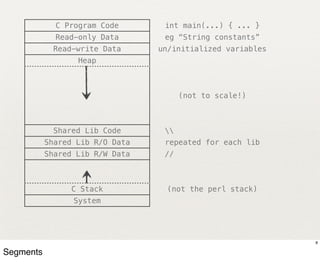
C Program Code       int main(...) { ... }
             Read-only Data       eg “String constants”
            Read-write Data      un/initialized variables
                  Heap


                                       (not to scale!)


            Shared Lib Code       
           Shared Lib R/O Data    repeated for each lib
           Shared Lib R/W Data    //


                C Stack           (not the perl stack)
                 System


                                                            8

Segments
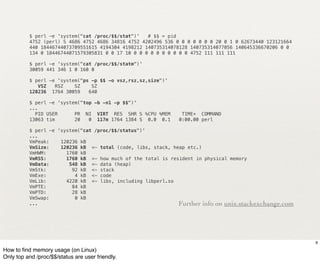
$ perl -e 'system("cat /proc/$$/stat")'   # $$ = pid
          4752 (perl) S 4686 4752 4686 34816 4752 4202496 536 0 0 0 0 0 0 0 20 0 1 0 62673440 123121664
          440 18446744073709551615 4194304 4198212 140735314078128 140735314077056 140645336670206 0 0
          134 0 18446744071579305831 0 0 17 10 0 0 0 0 0 0 0 0 0 0 4752 111 111 111

          $ perl -e 'system("cat /proc/$$/statm")'
          30059 441 346 1 0 160 0

          $ perl -e 'system("ps -p $$ -o vsz,rsz,sz,size")'
             VSZ   RSZ    SZ    SZ
          120236 1764 30059    640

          $ perl -e 'system("top -b -n1 -p $$")'
          ...
            PID USER      PR NI VIRT RES SHR S %CPU %MEM       TIME+ COMMAND
          13063 tim       20   0 117m 1764 1384 S 0.0 0.1     0:00.00 perl

          $ perl -e 'system("cat /proc/$$/status")'
          ...
          VmPeak:!   120236 kB
          VmSize:!   120236 kB <- total (code, libs, stack, heap etc.)
          VmHWM:!      1760 kB
          VmRSS:!      1760 kB <- how much of the total is resident in physical memory
          VmData:!      548 kB <- data (heap)
          VmStk:!        92 kB <- stack
          VmExe:!         4 kB <- code
          VmLib:!      4220 kB <- libs, including libperl.so
          VmPTE:!        84 kB
          VmPTD:!        28 kB
          VmSwap:!        0 kB
          ...                                                 Further info on unix.stackexchange.com


                                                                                                          9

How to find memory usage (on Linux)
Only top and /proc/$$/status are user friendly.
$ perl -e 'system("cat /proc/$$/maps")'
           address                   perms ... pathname
           00400000-00401000         r-xp ...   /.../perl-5.NN.N/bin/perl
           00601000-00602000         rw-p ...   /.../perl-5.NN.N/bin/perl

           0087f000-008c1000                 rw-p ...      [heap]


           7f858cba1000-7f8592a32000 r--p ...              /usr/lib/locale/locale-archive-rpm

           7f8592c94000-7f8592e1a000         r-xp   ...    /lib64/libc-2.12.so
           7f8592e1a000-7f859301a000         ---p   ...    /lib64/libc-2.12.so
           7f859301a000-7f859301e000         r--p   ...    /lib64/libc-2.12.so
           7f859301e000-7f859301f000         rw-p   ...    /lib64/libc-2.12.so
           7f859301f000-7f8593024000         rw-p   ...

           ...other libs...

           7f8593d1b000-7f8593e7c000         r-xp   ...    /.../lib/5.NN.N/x86_64-linux/CORE/libperl.so
           7f8593e7c000-7f859407c000         ---p   ...    /.../lib/5.NN.N/x86_64-linux/CORE/libperl.so
           7f859407c000-7f8594085000         rw-p   ...    /.../lib/5.NN.N/x86_64-linux/CORE/libperl.so
           7f85942a6000-7f85942a7000         rw-p   ...


           7fff61284000-7fff6129a000 rw-p ...              [stack]

           7fff613fe000-7fff61400000 r-xp ...   [vdso]
           ffffffffff600000-ffffffffff601000 r-xp ... [vsyscall]


                                                                                                          10
/proc/$$/maps has more detail. One line per ‘segment’.
Permissions indicate code (x) vs read-only data (r) vs writable-data/stack/heap (rw).
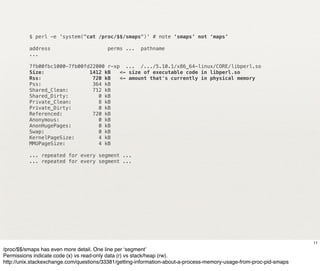
$ perl -e 'system("cat /proc/$$/smaps")' # note ‘smaps’ not ‘maps’

          address                        perms ...    pathname
          ...

          7fb00fbc1000-7fb00fd22000 r-xp ... /.../5.10.1/x86_64-linux/CORE/libperl.so
          Size:               1412 kB   <- size of executable code in libperl.so
          Rss:                 720 kB   <- amount that's currently in physical memory
          Pss:                 364 kB
          Shared_Clean:        712 kB
          Shared_Dirty:          0 kB
          Private_Clean:         8 kB
          Private_Dirty:         0 kB
          Referenced:          720 kB
          Anonymous:             0 kB
          AnonHugePages:         0 kB
          Swap:                  0 kB
          KernelPageSize:        4 kB
          MMUPageSize:           4 kB

          ... repeated for every segment ...
          ... repeated for every segment ...


                                                                                                                     11
/proc/$$/smaps has even more detail. One line per ‘segment’
Permissions indicate code (x) vs read-only data (r) vs stack/heap (rw).
http://unix.stackexchange.com/questions/33381/getting-information-about-a-process-memory-usage-from-proc-pid-smaps
Memory Pages
   思い出のシート


               12
Memory Pages
✦   Process view:
     ✦   Single large memory space. Simple.
✦   Operating System view:
     ✦   Memory is divided into pages
     ✦   Pages are loaded to physical memory on demand
     ✦   Mapping can change without the process knowing


                                                          13
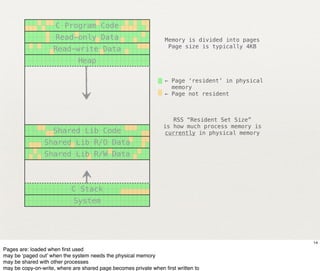
C Program Code
                     Read-only Data                               Memory is divided into pages
                                                                   Page size is typically 4KB
                    Read-write Data
                              Heap

                                                                 ← Page ‘resident’ in physical
                                                                   memory
                                                                 ← Page not resident


                                                                    RSS “Resident Set Size”
                                                                 is how much process memory is
                    Shared Lib Code                              currently in physical memory
                Shared Lib R/O Data
                Shared Lib R/W Data


                           C Stack
                            System


                                                                                                 14
Pages are: loaded when first used
may be ‘paged out’ when the system needs the physical memory
may be shared with other processes
may be copy-on-write, where are shared page becomes private when first written to
Key Point

          ✦     Don’t use Resident Set Size (RSS)
                  ✦     It can shrink even while the process size grows.
          ✦     Heap size or Total memory size is a good indicator.


                                                                           15
Be careful to understand what you’re actually
measuring.
Modules


          16
Low-Level Modules

✦   BSD::Resource - getrusage() system call (limited on Linux)
✦   BSD::Process - Only works on BSD, not Linux
✦   Proc::ProcessTable - Interesting but buggy
✦   Linux::Smaps - very detailed, but only works on Linux
✦   GTop - Perl interface to libgtop, better but external dependency


                                                                       17
Higher-Level Modules
✦   Memory::Usage
     ✦   Reads /proc/$pid/statm. Reports changes on demand.
✦   Dash::Leak
     ✦   Uses BSD::Process. Reports changes on demand.
✦   Devel::MemoryTrace::Light
     ✦   Uses GTop or BSD::Process. Automatically prints a message when
         memory use grows, pointing to a particular line number.
     ✦   Defaults to tracking Resident Set Size!


                                                                          18
Other Modules
✦   Devel::Plumber - memory leak finder for C programs

     ✦   Uses GDB to walk internal glibc heap structures. Can work on either a live
         process or a core file. Treats the C heap of the program under test as a
         collection of non-overlapping blocks, and classifies them into one of four states.

✦   Devel::Memalyzer - Base framework for analyzing program memory usage

     ✦   Runs and monitors a subprocess via plugins that read /proc smaps and status at
         regular intervals.

✦   Memchmark - Check memory consumption

     ✦   Memchmark forks a new process to run the sub and then monitors its memory
         usage every 100ms (approx.) recording the maximum amount used.


                                                                                             19
The Heap
ランダムなものの順不同の杭


                20
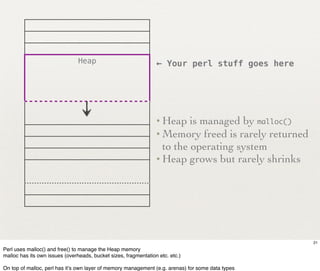
Heap                             ← Your perl stuff goes here


                                                                 • Heap   is managed by malloc()
                                                                 • Memory freed is rarely returned
                                                                   to the operating system
                                                                 • Heap grows but rarely shrinks


                                                                                                     21
Perl uses malloc() and free() to manage the Heap memory
malloc has its own issues (overheads, bucket sizes, fragmentation etc. etc.)

On top of malloc, perl has it’s own layer of memory management (e.g. arenas) for some data types
Your Data
メモリのあなたの貴重なパーツの内側


                    22
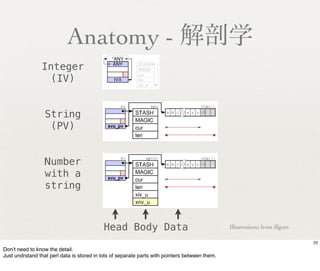
Anatomy - 解剖学
                Integer
                  (IV)


                  String
                   (PV)


                  Number
                  with a
                  string


                                           Head Body Data                                       Illustrations from illguts

                                                                                                                             23
Don’t need to know the detail.
Just undrstand that perl data is stored in lots of separate parts with pointers between them.
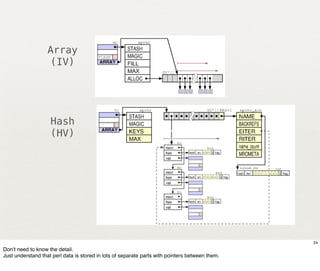
Array
                   (IV)


                    Hash
                    (HV)


                                                                                                 24
Don’t need to know the detail.
Just understand that perl data is stored in lots of separate parts with pointers between them.
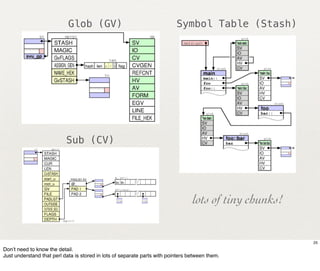
Glob (GV)                                      Symbol Table (Stash)


                           Sub (CV)


                                                                                  lots of tiny chunks!


                                                                                                         25
Don’t need to know the detail.
Just understand that perl data is stored in lots of separate parts with pointers between them.
Notes

        ✦    Heads and Bodies are allocated from ‘arenas’ managed by perl
        ✦    All variable length data storage comes from malloc
        ✦    Memory “cost” will be higher than the sum of the sizes.


                                                                                  26

Arenas are efficient, with low overhead and no fragmentation.
But arena space for a given data type is never freed or used for anything else.
Malloc has higher overheads.
Arenas
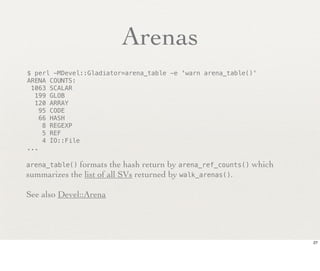
$ perl -MDevel::Gladiator=arena_table -e 'warn arena_table()'
ARENA COUNTS:
 1063 SCALAR
  199 GLOB
  120 ARRAY
    95 CODE
    66 HASH
     8 REGEXP
     5 REF
     4 IO::File
...

arena_table()formats the hash return by arena_ref_counts() which
summarizes the list of all SVs returned by walk_arenas().

See also Devel::Arena


                                                                   27
Devel::Peek
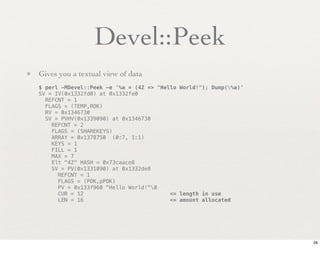
• Gives you a textual view of data
   $ perl -MDevel::Peek -e '%a = (42 => "Hello World!"); Dump(%a)'
   SV = IV(0x1332fd0) at 0x1332fe0
     REFCNT = 1
     FLAGS = (TEMP,ROK)
     RV = 0x1346730
     SV = PVHV(0x1339090) at 0x1346730
       REFCNT = 2
       FLAGS = (SHAREKEYS)
       ARRAY = 0x1378750 (0:7, 1:1)
       KEYS = 1
       FILL = 1
       MAX = 7
       Elt "42" HASH = 0x73caace8
       SV = PV(0x1331090) at 0x1332de8
         REFCNT = 1
         FLAGS = (POK,pPOK)
         PV = 0x133f960 "Hello World!"0
         CUR = 12                           <= length in use
         LEN = 16                           <= amount allocated


                                                                      28
Devel::Size
         • Gives you a measure of the size of a data structure
              $ perl -MDevel::Size=total_size -le 'print total_size( 0 )'
              24

              $ perl -MDevel::Size=total_size -le 'print total_size( [] )'
              64

              $ perl -MDevel::Size=total_size -le 'print total_size( {} )'
              120

              $ perl -MDevel::Size=total_size -le 'print total_size( [ 1..100 ] )'
              3264

         • Is very fast, and accurate for most simple data types.
         • Has limitations and bugs, but is the best tool we have.


                                                                                     29
Makes somewhat arbitrary decisions about what to include for non-data types
Doesn't or can't accurately measure subs, forms, regexes, and IOs.
Can't measure 'everything' (total_size(%main::) is the best v0.77 can do)
Devel::Size 0.77
   perl -MDevel::Size=total_size -we '
     sub foo { my $var = "#" x 2**20; foo($_[0]-1) if $_[0]; 1 }
     system("grep VmData /proc/$$/status");
     printf "%d kBn", total_size(&foo)/1024;
     foo(50);
     system("grep VmData /proc/$$/status");
     printf "%d kBn", total_size(&foo)/1024;
   '

   VmData:!      796 kB
   7 kB
   VmData:!   105652 kB
   8 kB

• VmData grew by ~100MB, we expected ~50MB, extra copy of value.
• Devel::Size 0.77 doesn't measure what's in sub pads (lexicals).


                                                                    30
Devel::Size 0.77 + hacks
    perl -MDevel::Size=total_size -we '
      sub foo { my $var = "#" x 2**20; foo($_[0]-1) if $_[0];1 }
      system("grep VmData /proc/$$/status");
      printf "%d kBn", total_size(&foo)/1024;
      foo(50);
      system("grep VmData /proc/$$/status");
      printf "%d kBn", total_size(&foo)/1024;
    '

    VmData:!    796 kB
    293 kB
    VmData:! 105656 kB
    104759 kB

• Now does include the pad variables.
• But note the 293 kB initial value - it's measuring too much. Work in progress.


                                                                                   31
Devel::Size 0.77 + hacks
$ report='printf "total_size %6d kBn", total_size(%main::)/1024;
system("grep VmData /proc/$$/status")'

$ perl          -MDevel::Size=total_size -we “$report”
total_size     290 kB
VmData:        800 kB

$ perl -MMoose -MDevel::Size=total_size -we “$report”
total_size   9474 kB!   [ 9474-290 = + 9184 kB ]
VmData:     11824 kB!   [ 11824-800 = +11024 kB ]

What accounts for the 1840 kB difference in the increases?
    -Arenas and other perl-internals aren't included
    -Limitations of Devel::Size measuring subs and regexs
    -Malloc heap buckets and fragmentation


                                                                     32
Malloc and
The Heap

             33
“Malloc and
 The Heap”

              34
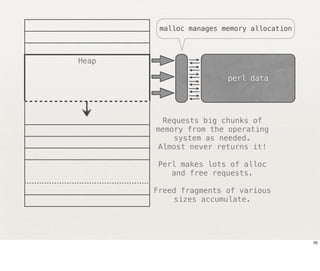
malloc manages memory allocation


Heap

                        perl data


        Requests big chunks of
       memory from the operating
           system as needed.
       Almost never returns it!

       Perl makes lots of alloc
          and free requests.

       Freed fragments of various
           sizes accumulate.


                                           35
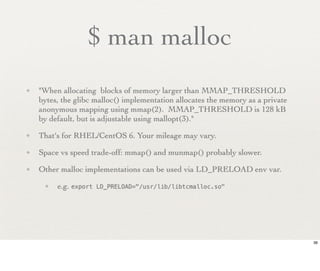
$ man malloc
✦   "When allocating blocks of memory larger than MMAP_THRESHOLD
    bytes, the glibc malloc() implementation allocates the memory as a private
    anonymous mapping using mmap(2). MMAP_THRESHOLD is 128 kB
    by default, but is adjustable using mallopt(3)."
✦   That's for RHEL/CentOS 6. Your mileage may vary.
✦   Space vs speed trade-off: mmap() and munmap() probably slower.
✦   Other malloc implementations can be used via LD_PRELOAD env var.
     ✦   e.g. export   LD_PRELOAD="/usr/lib/libtcmalloc.so"


                                                                                 36
PERL_DEBUG_MSTATS*


          * Requires a perl configured to use it's own malloc (-Dusemymalloc)

          $ PERL_DEBUG_MSTATS=1 perl -MMoose -MDevel::Size=total_size -we "$report"
          total_size    9474 kB!   [ 9474-290 = + 9184 kB ]
          VmData:      11824 kB!   [ 11824-800 = +11024 kB ]
          Memory allocation statistics after execution:     (buckets 8(8)..69624(65536)
             429248 free:   225   125    69    25    18   1    3     6   0 6 1 23 0 0
          !            0     9    26    10
            6302120 used:   795 14226 2955 3230 2190 1759 425       112 30 862 11 2 1 2
          !            0 1606 8920 4865
          Total sbrk(): 6803456/1487:-13. Odd ends: pad+heads+chain+tail: 2048+70040+0+0

          • There's 419 kB ("429248 free") is sitting in unused malloc buckets.
             • See perldebguts and Devel::Peek docs for details. Also Devel::Mallinfo.
          • Note Devel::Size total_size() says 9474 kB but malloc says only 6154 kb allocated!


                                                                                                 37
by pgfs
Key Notes
✦   Perl uses malloc to manage heap memory
✦   Malloc uses sized buckets and free lists etc.
✦   Malloc has overheads
✦   Freed chunks of various sizes accumulate
✦   Large allocations may use mmap()/munmap()
✦   Your malloc maybe tunable
✦   Try different malloc implementations


                                                    38
Alternative Malloc

✦   perl -V:usemymalloc
✦   system vs internal vs jemalloc vs others
✦   show jemalloc and tcmalloc


                                               39
Memory Profiling
 あなたの思い出の形状は何ですか


                   40
What?

✦   Track memory size over time?
✦   See where memory is allocated and freed?
✦   Experiments with Devel::NYTProf
✦   Turned out to not seem useful


                                               41
Space in Hiding
✦   Perl tends to consume extra memory to save time
✦   This can lead to surprises, for example:
     ✦   sub foo {
             my $var = "X" x 10_000_000;
         }
         foo();      # ~20MB still used after return!

     ✦   sub bar{
             my $var = "X" x 10_000_000;
             bar($_[0]-1) if $_[0]; # recurse
         }
         bar(50);    # ~1GB still used after return!


                                                        42
My Plan
私の多くのクレイジーなアイデア


                  43
The Plan
          ✦    Extend Devel::Size
          ✦    Add a C-level callback hook
          ✦    Add some kind of "data path name" for the callback to use
          ✦    Add a function to Devel::Size to return the size of everything
          ✦    Stream the data to disk
          ✦    Write tools to visualize the data
          ✦    Add multi-phase scan
                1. scan symbol tables, skip where ref count > 1
                2. process the skipped items
                3. scan arenas for other values (e.g. leaks)
          ✦    Write tool to compare two sets of data


                                                                                44
perl_size() - try to get as close to VmData value as possible.
The Status
✓ Add a C-level callback hook
✓ Add some kind of "data path name" for the callback to use
✓ Add a function to Devel::Size to return the size of everything.
✓ Stream the data to disk
✓ Write tools to visualize the data


    • Will become a separate distribution
    • “Devel::SizeMeGraph”?
    • Source repo available by Sunday
    • Ready to demonstrate


                                                                    45
Demonstration
私は、ライブデモをしようとするばかだ


                     46
Questions?
あなたの心に何がありますか?


 Tim.Bunce@pobox.com
 http://blog.timbunce.org
        @timbunce

                            47

Perl Memory Use 201209

  • 1.
    Perl Memory Use Tim Bunce @ YAPC::Asia 2012 1
  • 2.
  • 3.
  • 4.
    Scope of thetalk... ✦ Not really "profiling" ✦ No VM, page mapping, MMU, TLB, threads etc ✦ Linux focus ✦ Almost no copy-on-write ✦ No cats 4
  • 5.
    Goals ✦ Understand Process Memory ✦ Identify key issues ✦ Show useful tools ✦ Demonstrate new software 5
  • 6.
    Ouch! $ perl some_script.pl Out of memory! $ $ perl some_script.pl Killed. $ $ perl some_script.pl $ Someone shouts: "Hey! My process has been killed!" $ perl some_script.pl [...later...] "Umm, what's taking so long?" 6 Have you experienced one of these?
  • 7.
  • 8.
    C Program Code int main(...) { ... } Read-only Data eg “String constants” Read-write Data un/initialized variables Heap (not to scale!) Shared Lib Code Shared Lib R/O Data repeated for each lib Shared Lib R/W Data // C Stack (not the perl stack) System 8 Segments
  • 9.
    $ perl -e'system("cat /proc/$$/stat")' # $$ = pid 4752 (perl) S 4686 4752 4686 34816 4752 4202496 536 0 0 0 0 0 0 0 20 0 1 0 62673440 123121664 440 18446744073709551615 4194304 4198212 140735314078128 140735314077056 140645336670206 0 0 134 0 18446744071579305831 0 0 17 10 0 0 0 0 0 0 0 0 0 0 4752 111 111 111 $ perl -e 'system("cat /proc/$$/statm")' 30059 441 346 1 0 160 0 $ perl -e 'system("ps -p $$ -o vsz,rsz,sz,size")' VSZ RSZ SZ SZ 120236 1764 30059 640 $ perl -e 'system("top -b -n1 -p $$")' ... PID USER PR NI VIRT RES SHR S %CPU %MEM TIME+ COMMAND 13063 tim 20 0 117m 1764 1384 S 0.0 0.1 0:00.00 perl $ perl -e 'system("cat /proc/$$/status")' ... VmPeak:! 120236 kB VmSize:! 120236 kB <- total (code, libs, stack, heap etc.) VmHWM:! 1760 kB VmRSS:! 1760 kB <- how much of the total is resident in physical memory VmData:! 548 kB <- data (heap) VmStk:! 92 kB <- stack VmExe:! 4 kB <- code VmLib:! 4220 kB <- libs, including libperl.so VmPTE:! 84 kB VmPTD:! 28 kB VmSwap:! 0 kB ... Further info on unix.stackexchange.com 9 How to find memory usage (on Linux) Only top and /proc/$$/status are user friendly.
  • 10.
    $ perl -e'system("cat /proc/$$/maps")' address perms ... pathname 00400000-00401000 r-xp ... /.../perl-5.NN.N/bin/perl 00601000-00602000 rw-p ... /.../perl-5.NN.N/bin/perl 0087f000-008c1000 rw-p ... [heap] 7f858cba1000-7f8592a32000 r--p ... /usr/lib/locale/locale-archive-rpm 7f8592c94000-7f8592e1a000 r-xp ... /lib64/libc-2.12.so 7f8592e1a000-7f859301a000 ---p ... /lib64/libc-2.12.so 7f859301a000-7f859301e000 r--p ... /lib64/libc-2.12.so 7f859301e000-7f859301f000 rw-p ... /lib64/libc-2.12.so 7f859301f000-7f8593024000 rw-p ... ...other libs... 7f8593d1b000-7f8593e7c000 r-xp ... /.../lib/5.NN.N/x86_64-linux/CORE/libperl.so 7f8593e7c000-7f859407c000 ---p ... /.../lib/5.NN.N/x86_64-linux/CORE/libperl.so 7f859407c000-7f8594085000 rw-p ... /.../lib/5.NN.N/x86_64-linux/CORE/libperl.so 7f85942a6000-7f85942a7000 rw-p ... 7fff61284000-7fff6129a000 rw-p ... [stack] 7fff613fe000-7fff61400000 r-xp ... [vdso] ffffffffff600000-ffffffffff601000 r-xp ... [vsyscall] 10 /proc/$$/maps has more detail. One line per ‘segment’. Permissions indicate code (x) vs read-only data (r) vs writable-data/stack/heap (rw).
  • 11.
    $ perl -e'system("cat /proc/$$/smaps")' # note ‘smaps’ not ‘maps’ address perms ... pathname ... 7fb00fbc1000-7fb00fd22000 r-xp ... /.../5.10.1/x86_64-linux/CORE/libperl.so Size: 1412 kB <- size of executable code in libperl.so Rss: 720 kB <- amount that's currently in physical memory Pss: 364 kB Shared_Clean: 712 kB Shared_Dirty: 0 kB Private_Clean: 8 kB Private_Dirty: 0 kB Referenced: 720 kB Anonymous: 0 kB AnonHugePages: 0 kB Swap: 0 kB KernelPageSize: 4 kB MMUPageSize: 4 kB ... repeated for every segment ... ... repeated for every segment ... 11 /proc/$$/smaps has even more detail. One line per ‘segment’ Permissions indicate code (x) vs read-only data (r) vs stack/heap (rw). http://unix.stackexchange.com/questions/33381/getting-information-about-a-process-memory-usage-from-proc-pid-smaps
  • 12.
    Memory Pages 思い出のシート 12
  • 13.
    Memory Pages ✦ Process view: ✦ Single large memory space. Simple. ✦ Operating System view: ✦ Memory is divided into pages ✦ Pages are loaded to physical memory on demand ✦ Mapping can change without the process knowing 13
  • 14.
    C Program Code Read-only Data Memory is divided into pages Page size is typically 4KB Read-write Data Heap ← Page ‘resident’ in physical memory ← Page not resident RSS “Resident Set Size” is how much process memory is Shared Lib Code currently in physical memory Shared Lib R/O Data Shared Lib R/W Data C Stack System 14 Pages are: loaded when first used may be ‘paged out’ when the system needs the physical memory may be shared with other processes may be copy-on-write, where are shared page becomes private when first written to
  • 15.
    Key Point ✦ Don’t use Resident Set Size (RSS) ✦ It can shrink even while the process size grows. ✦ Heap size or Total memory size is a good indicator. 15 Be careful to understand what you’re actually measuring.
  • 16.
  • 17.
    Low-Level Modules ✦ BSD::Resource - getrusage() system call (limited on Linux) ✦ BSD::Process - Only works on BSD, not Linux ✦ Proc::ProcessTable - Interesting but buggy ✦ Linux::Smaps - very detailed, but only works on Linux ✦ GTop - Perl interface to libgtop, better but external dependency 17
  • 18.
    Higher-Level Modules ✦ Memory::Usage ✦ Reads /proc/$pid/statm. Reports changes on demand. ✦ Dash::Leak ✦ Uses BSD::Process. Reports changes on demand. ✦ Devel::MemoryTrace::Light ✦ Uses GTop or BSD::Process. Automatically prints a message when memory use grows, pointing to a particular line number. ✦ Defaults to tracking Resident Set Size! 18
  • 19.
    Other Modules ✦ Devel::Plumber - memory leak finder for C programs ✦ Uses GDB to walk internal glibc heap structures. Can work on either a live process or a core file. Treats the C heap of the program under test as a collection of non-overlapping blocks, and classifies them into one of four states. ✦ Devel::Memalyzer - Base framework for analyzing program memory usage ✦ Runs and monitors a subprocess via plugins that read /proc smaps and status at regular intervals. ✦ Memchmark - Check memory consumption ✦ Memchmark forks a new process to run the sub and then monitors its memory usage every 100ms (approx.) recording the maximum amount used. 19
  • 20.
  • 21.
    Heap ← Your perl stuff goes here • Heap is managed by malloc() • Memory freed is rarely returned to the operating system • Heap grows but rarely shrinks 21 Perl uses malloc() and free() to manage the Heap memory malloc has its own issues (overheads, bucket sizes, fragmentation etc. etc.) On top of malloc, perl has it’s own layer of memory management (e.g. arenas) for some data types
  • 22.
  • 23.
    Anatomy - 解剖学 Integer (IV) String (PV) Number with a string Head Body Data Illustrations from illguts 23 Don’t need to know the detail. Just undrstand that perl data is stored in lots of separate parts with pointers between them.
  • 24.
    Array (IV) Hash (HV) 24 Don’t need to know the detail. Just understand that perl data is stored in lots of separate parts with pointers between them.
  • 25.
    Glob (GV) Symbol Table (Stash) Sub (CV) lots of tiny chunks! 25 Don’t need to know the detail. Just understand that perl data is stored in lots of separate parts with pointers between them.
  • 26.
    Notes ✦ Heads and Bodies are allocated from ‘arenas’ managed by perl ✦ All variable length data storage comes from malloc ✦ Memory “cost” will be higher than the sum of the sizes. 26 Arenas are efficient, with low overhead and no fragmentation. But arena space for a given data type is never freed or used for anything else. Malloc has higher overheads.
  • 27.
    Arenas $ perl -MDevel::Gladiator=arena_table-e 'warn arena_table()' ARENA COUNTS: 1063 SCALAR 199 GLOB 120 ARRAY 95 CODE 66 HASH 8 REGEXP 5 REF 4 IO::File ... arena_table()formats the hash return by arena_ref_counts() which summarizes the list of all SVs returned by walk_arenas(). See also Devel::Arena 27
  • 28.
    Devel::Peek • Gives youa textual view of data $ perl -MDevel::Peek -e '%a = (42 => "Hello World!"); Dump(%a)' SV = IV(0x1332fd0) at 0x1332fe0 REFCNT = 1 FLAGS = (TEMP,ROK) RV = 0x1346730 SV = PVHV(0x1339090) at 0x1346730 REFCNT = 2 FLAGS = (SHAREKEYS) ARRAY = 0x1378750 (0:7, 1:1) KEYS = 1 FILL = 1 MAX = 7 Elt "42" HASH = 0x73caace8 SV = PV(0x1331090) at 0x1332de8 REFCNT = 1 FLAGS = (POK,pPOK) PV = 0x133f960 "Hello World!"0 CUR = 12 <= length in use LEN = 16 <= amount allocated 28
  • 29.
    Devel::Size • Gives you a measure of the size of a data structure $ perl -MDevel::Size=total_size -le 'print total_size( 0 )' 24 $ perl -MDevel::Size=total_size -le 'print total_size( [] )' 64 $ perl -MDevel::Size=total_size -le 'print total_size( {} )' 120 $ perl -MDevel::Size=total_size -le 'print total_size( [ 1..100 ] )' 3264 • Is very fast, and accurate for most simple data types. • Has limitations and bugs, but is the best tool we have. 29 Makes somewhat arbitrary decisions about what to include for non-data types Doesn't or can't accurately measure subs, forms, regexes, and IOs. Can't measure 'everything' (total_size(%main::) is the best v0.77 can do)
  • 30.
    Devel::Size 0.77 perl -MDevel::Size=total_size -we ' sub foo { my $var = "#" x 2**20; foo($_[0]-1) if $_[0]; 1 } system("grep VmData /proc/$$/status"); printf "%d kBn", total_size(&foo)/1024; foo(50); system("grep VmData /proc/$$/status"); printf "%d kBn", total_size(&foo)/1024; ' VmData:! 796 kB 7 kB VmData:! 105652 kB 8 kB • VmData grew by ~100MB, we expected ~50MB, extra copy of value. • Devel::Size 0.77 doesn't measure what's in sub pads (lexicals). 30
  • 31.
    Devel::Size 0.77 +hacks perl -MDevel::Size=total_size -we ' sub foo { my $var = "#" x 2**20; foo($_[0]-1) if $_[0];1 } system("grep VmData /proc/$$/status"); printf "%d kBn", total_size(&foo)/1024; foo(50); system("grep VmData /proc/$$/status"); printf "%d kBn", total_size(&foo)/1024; ' VmData:! 796 kB 293 kB VmData:! 105656 kB 104759 kB • Now does include the pad variables. • But note the 293 kB initial value - it's measuring too much. Work in progress. 31
  • 32.
    Devel::Size 0.77 +hacks $ report='printf "total_size %6d kBn", total_size(%main::)/1024; system("grep VmData /proc/$$/status")' $ perl -MDevel::Size=total_size -we “$report” total_size 290 kB VmData: 800 kB $ perl -MMoose -MDevel::Size=total_size -we “$report” total_size 9474 kB! [ 9474-290 = + 9184 kB ] VmData: 11824 kB! [ 11824-800 = +11024 kB ] What accounts for the 1840 kB difference in the increases? -Arenas and other perl-internals aren't included -Limitations of Devel::Size measuring subs and regexs -Malloc heap buckets and fragmentation 32
  • 33.
  • 34.
  • 35.
    malloc manages memoryallocation Heap perl data Requests big chunks of memory from the operating system as needed. Almost never returns it! Perl makes lots of alloc and free requests. Freed fragments of various sizes accumulate. 35
  • 36.
    $ man malloc ✦ "When allocating blocks of memory larger than MMAP_THRESHOLD bytes, the glibc malloc() implementation allocates the memory as a private anonymous mapping using mmap(2). MMAP_THRESHOLD is 128 kB by default, but is adjustable using mallopt(3)." ✦ That's for RHEL/CentOS 6. Your mileage may vary. ✦ Space vs speed trade-off: mmap() and munmap() probably slower. ✦ Other malloc implementations can be used via LD_PRELOAD env var. ✦ e.g. export LD_PRELOAD="/usr/lib/libtcmalloc.so" 36
  • 37.
    PERL_DEBUG_MSTATS* * Requires a perl configured to use it's own malloc (-Dusemymalloc) $ PERL_DEBUG_MSTATS=1 perl -MMoose -MDevel::Size=total_size -we "$report" total_size 9474 kB! [ 9474-290 = + 9184 kB ] VmData: 11824 kB! [ 11824-800 = +11024 kB ] Memory allocation statistics after execution: (buckets 8(8)..69624(65536) 429248 free: 225 125 69 25 18 1 3 6 0 6 1 23 0 0 ! 0 9 26 10 6302120 used: 795 14226 2955 3230 2190 1759 425 112 30 862 11 2 1 2 ! 0 1606 8920 4865 Total sbrk(): 6803456/1487:-13. Odd ends: pad+heads+chain+tail: 2048+70040+0+0 • There's 419 kB ("429248 free") is sitting in unused malloc buckets. • See perldebguts and Devel::Peek docs for details. Also Devel::Mallinfo. • Note Devel::Size total_size() says 9474 kB but malloc says only 6154 kb allocated! 37 by pgfs
  • 38.
    Key Notes ✦ Perl uses malloc to manage heap memory ✦ Malloc uses sized buckets and free lists etc. ✦ Malloc has overheads ✦ Freed chunks of various sizes accumulate ✦ Large allocations may use mmap()/munmap() ✦ Your malloc maybe tunable ✦ Try different malloc implementations 38
  • 39.
    Alternative Malloc ✦ perl -V:usemymalloc ✦ system vs internal vs jemalloc vs others ✦ show jemalloc and tcmalloc 39
  • 40.
  • 41.
    What? ✦ Track memory size over time? ✦ See where memory is allocated and freed? ✦ Experiments with Devel::NYTProf ✦ Turned out to not seem useful 41
  • 42.
    Space in Hiding ✦ Perl tends to consume extra memory to save time ✦ This can lead to surprises, for example: ✦ sub foo { my $var = "X" x 10_000_000; } foo(); # ~20MB still used after return! ✦ sub bar{ my $var = "X" x 10_000_000; bar($_[0]-1) if $_[0]; # recurse } bar(50); # ~1GB still used after return! 42
  • 43.
  • 44.
    The Plan ✦ Extend Devel::Size ✦ Add a C-level callback hook ✦ Add some kind of "data path name" for the callback to use ✦ Add a function to Devel::Size to return the size of everything ✦ Stream the data to disk ✦ Write tools to visualize the data ✦ Add multi-phase scan 1. scan symbol tables, skip where ref count > 1 2. process the skipped items 3. scan arenas for other values (e.g. leaks) ✦ Write tool to compare two sets of data 44 perl_size() - try to get as close to VmData value as possible.
  • 45.
    The Status ✓ Adda C-level callback hook ✓ Add some kind of "data path name" for the callback to use ✓ Add a function to Devel::Size to return the size of everything. ✓ Stream the data to disk ✓ Write tools to visualize the data • Will become a separate distribution • “Devel::SizeMeGraph”? • Source repo available by Sunday • Ready to demonstrate 45
  • 46.
  • 47.