PROCESS MANAGEMENT
PREVIOUS VIDEO
• Introduction to operating system
• Kernel vs operating system
• Functions of operating system
• Examples of operating system and kernel
• System calls
• Interrupts
• Video Link + telegram link + form link in the description
AGENDA
• Program VS process
• Process control block
• Process states
• Process creation through fork()
• Exec(), wait() and exit() system calls
• Zombie and orphan process
INTERVIEW QUESTIONS
• Difference between a program and a process
• Which data structure is used to represent a process?
• List some important fields in Process Control Block
• What is INIT process in Linux?
• What are the different states of a process? Explain with process state
diagram.
• How will you create a new process in Linux?
• How does a parent process differ from a child process?
• Number of processes created with N fork() calls?
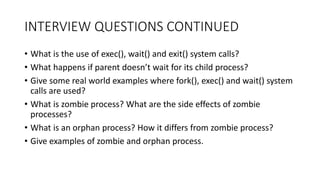
INTERVIEW QUESTIONS CONTINUED
• What is the use of exec(), wait() and exit() system calls?
• What happens if parent doesn’t wait for its child process?
• Give some real world examples where fork(), exec() and wait() system
calls are used?
• What is zombie process? What are the side effects of zombie
processes?
• What is an orphan process? How it differs from zombie process?
• Give examples of zombie and orphan process.
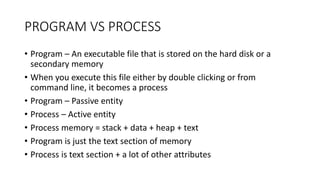
PROGRAM VS PROCESS
• Program – An executable file that is stored on the hard disk or a
secondary memory
• When you execute this file either by double clicking or from
command line, it becomes a process
• Program – Passive entity
• Process – Active entity
• Process memory = stack + data + heap + text
• Program is just the text section of memory
• Process is text section + a lot of other attributes
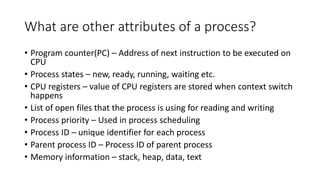
What are other attributes of a process?
• Program counter(PC) – Address of next instruction to be executed on
CPU
• Process states – new, ready, running, waiting etc.
• CPU registers – value of CPU registers are stored when context switch
happens
• List of open files that the process is using for reading and writing
• Process priority – Used in process scheduling
• Process ID – unique identifier for each process
• Parent process ID – Process ID of parent process
• Memory information – stack, heap, data, text
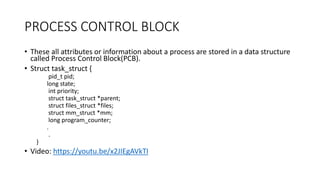
PROCESS CONTROL BLOCK
• These all attributes or information about a process are stored in a data structure
called Process Control Block(PCB).
• Struct task_struct {
pid_t pid;
long state;
int priority;
struct task_struct *parent;
struct files_struct *files;
struct mm_struct *mm;
long program_counter;
.
.
}
• Video: https://youtu.be/x2JIEgAVkTI
PROCESS STATES
• Batch operating system in old times
• Jobs were submitted in batches
• Jobs were first stored in job queue on disk
• Not all job can fit in main memory
• Selected jobs were loaded into main memory by long term scheduler
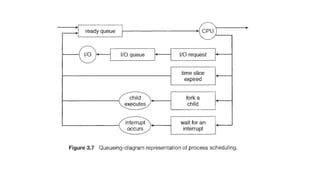
• These were kept in ready queue and scheduled by CPU scheduler or
short term scheduler
• Video: https://youtu.be/mhKr6Dnf2fA
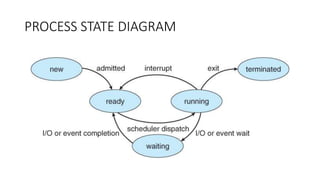
PROCESS STATE DIAGRAM
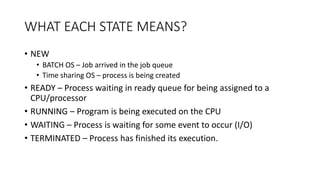
WHAT EACH STATE MEANS?
• NEW
• BATCH OS – Job arrived in the job queue
• Time sharing OS – process is being created
• READY – Process waiting in ready queue for being assigned to a
CPU/processor
• RUNNING – Program is being executed on the CPU
• WAITING – Process is waiting for some event to occur (I/O)
• TERMINATED – Process has finished its execution.
WHEN DOES TRANSITION FROM RUNNING TO
READY HAPPENS?
• A hardware interrupt happens on the CPU
• A higher priority process arrives in the ready queue (preemptive
scheduling)
• Time slice of the process expires (Round robin scheduling)
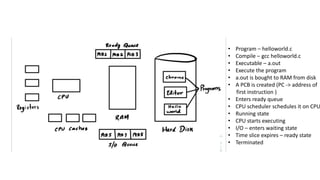
• Program – helloworld.c
• Compile – gcc helloworld.c
• Executable – a.out
• Execute the program
• a.out is bought to RAM from disk
• A PCB is created (PC -> address of
first instruction )
• Enters ready queue
• CPU scheduler schedules it on CPU
• Running state
• CPU starts executing
• I/O – enters waiting state
• Time slice expires – ready state
• Terminated
INIT PROCESS
• First process that is started during booting of the system
• PID – 1
• This process keeps on running forever until you shut down.
• All other processes are either direct or indirect children of INIT
process.
• Pstree –p command to view the process tree on linux
PROCESS CREATION USING FORK
• CreateProcess() in Windows
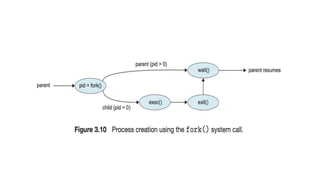
• Fork() creates a new child process that is a copy of the parent process
• In what ways the child process differs from parent?
• PID
• Parent PID
• File locks
• Process utilization info
• In what ways they are similar?
• Program counter
• Memory ( unless fork() is followed by exec() )
• CPU registers
• priority
WHAT HAPPENS AFTER FORK() IS CALLED?
• Execution – Both process starts executing from the next line after
fork()
• Memory – stack, heap, text and data segment are duplicated for the
child process.
• Copy on write is used in modern implementation of fork.
• Copy the memory only when a write is being made to a memory
page.
• In most cases, fork() is followed by exec().
• Copy on write saves expensive recopying of memory
FORK CALL RETURN VALUES
• How do you differentiate between the the parent process and the
child process?
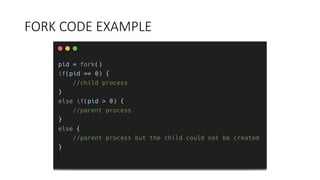
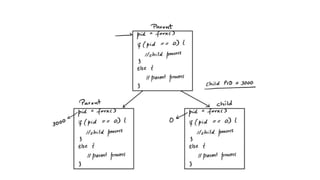
• Fork() returns PID of the child process to parent
• Fork() returns 0 to the child process
• Fork() returns -1 if there is any error
• Videos
• https://youtu.be/FXAvkNY1dGQ
• https://youtu.be/AyZeHBPKdMs
FORK CODE EXAMPLE
How may child processes?
fork();
fork();
Video: https://youtu.be/iZa2vm7A6mw
What if you want the child to run another
program?
• Shell program which helps in running different commands on
command line
• Thousands of command will be there. Is it a good idea to put all these
commands in the shell program?
• What if you want to run a program from shell that is not present in
shell program? ( Running your C program )
• The shell program typically uses fork() to create a new child process
and asks the child process to run the command.
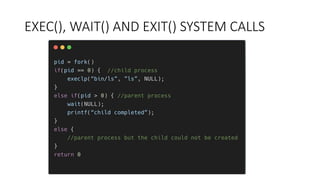
EXEC(), WAIT() AND EXIT() SYSTEM CALLS
What each system call does?
• exec() – loads a new program into the main memory and executes it.
• A process exits or terminates using exit() system call. The resources
like memory/cpu of the process are set free.
• return status statement from main function = exit(status)
• PCB of the process is still present in memory
• wait() – the parent waits for the completion of the child process.
Parent enters the wait state.
• The parent may be interested in knowing about the status of the
child.
• After getting the status, the parent asks the kernel to clean up the
PCB of child process.
What happens if the parent doesn’t wait for
the child process?
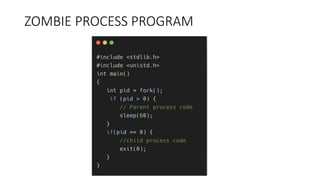
• The process control block of the child remains in the process table
evens after it has terminated using exit().
• These processes are called zombie process - process has terminated
but PCB is still there in process table.
• Once the parent terminates, these zombie process also becomes an
orphan process.
• No parent + PCB still in the process table after terminating
SIDE EFFECTS OF ZOMBIE PROCESS
while(1) {
fork();
}
• Fork bomb
• Number of PIDs is limited in the operating system. Once all PIDs are
taken by the zombie process, no new process can be created.
• Since no new process can be created, one cannot even run a
command on the command line.
• The only option to recover from a fork() bomb is to reboot the
system.
Orphan Process
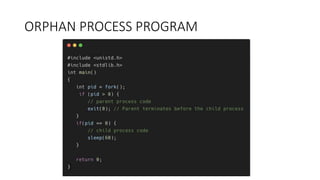
• A process which doesn’t have a parent process is called an orphan
process.
• This may happen if the parent process terminates before child
completes.
• What happens to the orphan process?
• Orphan process gets reparented and the new parent is the INIT
process in most cases.
• The new parent then waits for the child to complete and then asks
the kernel to clean the PCB.
ZOMBIE PROCESS PROGRAM
ORPHAN PROCESS PROGRAM
References
• https://shivammitra.com/operating%20system/zombie-and-orphan-
process-in-opearting-system
• Zombie and orphan process video - https://youtu.be/L3YQDUuDjoo
• https://shivammitra.com/operating%20system/fork-exec-wait-in-
operating-system/

Process management in operating system | process states | PCB | FORK() | Zombie and Orphan process

  • 1.
  • 2.
    PREVIOUS VIDEO • Introductionto operating system • Kernel vs operating system • Functions of operating system • Examples of operating system and kernel • System calls • Interrupts • Video Link + telegram link + form link in the description
  • 3.
    AGENDA • Program VSprocess • Process control block • Process states • Process creation through fork() • Exec(), wait() and exit() system calls • Zombie and orphan process
  • 4.
    INTERVIEW QUESTIONS • Differencebetween a program and a process • Which data structure is used to represent a process? • List some important fields in Process Control Block • What is INIT process in Linux? • What are the different states of a process? Explain with process state diagram. • How will you create a new process in Linux? • How does a parent process differ from a child process? • Number of processes created with N fork() calls?
  • 5.
    INTERVIEW QUESTIONS CONTINUED •What is the use of exec(), wait() and exit() system calls? • What happens if parent doesn’t wait for its child process? • Give some real world examples where fork(), exec() and wait() system calls are used? • What is zombie process? What are the side effects of zombie processes? • What is an orphan process? How it differs from zombie process? • Give examples of zombie and orphan process.
  • 6.
    PROGRAM VS PROCESS •Program – An executable file that is stored on the hard disk or a secondary memory • When you execute this file either by double clicking or from command line, it becomes a process • Program – Passive entity • Process – Active entity • Process memory = stack + data + heap + text • Program is just the text section of memory • Process is text section + a lot of other attributes
  • 7.
    What are otherattributes of a process? • Program counter(PC) – Address of next instruction to be executed on CPU • Process states – new, ready, running, waiting etc. • CPU registers – value of CPU registers are stored when context switch happens • List of open files that the process is using for reading and writing • Process priority – Used in process scheduling • Process ID – unique identifier for each process • Parent process ID – Process ID of parent process • Memory information – stack, heap, data, text
  • 8.
    PROCESS CONTROL BLOCK •These all attributes or information about a process are stored in a data structure called Process Control Block(PCB). • Struct task_struct { pid_t pid; long state; int priority; struct task_struct *parent; struct files_struct *files; struct mm_struct *mm; long program_counter; . . } • Video: https://youtu.be/x2JIEgAVkTI
  • 9.
    PROCESS STATES • Batchoperating system in old times • Jobs were submitted in batches • Jobs were first stored in job queue on disk • Not all job can fit in main memory • Selected jobs were loaded into main memory by long term scheduler • These were kept in ready queue and scheduled by CPU scheduler or short term scheduler • Video: https://youtu.be/mhKr6Dnf2fA
  • 10.
  • 11.
    WHAT EACH STATEMEANS? • NEW • BATCH OS – Job arrived in the job queue • Time sharing OS – process is being created • READY – Process waiting in ready queue for being assigned to a CPU/processor • RUNNING – Program is being executed on the CPU • WAITING – Process is waiting for some event to occur (I/O) • TERMINATED – Process has finished its execution.
  • 13.
    WHEN DOES TRANSITIONFROM RUNNING TO READY HAPPENS? • A hardware interrupt happens on the CPU • A higher priority process arrives in the ready queue (preemptive scheduling) • Time slice of the process expires (Round robin scheduling)
  • 14.
    • Program –helloworld.c • Compile – gcc helloworld.c • Executable – a.out • Execute the program • a.out is bought to RAM from disk • A PCB is created (PC -> address of first instruction ) • Enters ready queue • CPU scheduler schedules it on CPU • Running state • CPU starts executing • I/O – enters waiting state • Time slice expires – ready state • Terminated
  • 15.
    INIT PROCESS • Firstprocess that is started during booting of the system • PID – 1 • This process keeps on running forever until you shut down. • All other processes are either direct or indirect children of INIT process. • Pstree –p command to view the process tree on linux
  • 16.
    PROCESS CREATION USINGFORK • CreateProcess() in Windows • Fork() creates a new child process that is a copy of the parent process • In what ways the child process differs from parent? • PID • Parent PID • File locks • Process utilization info • In what ways they are similar? • Program counter • Memory ( unless fork() is followed by exec() ) • CPU registers • priority
  • 17.
    WHAT HAPPENS AFTERFORK() IS CALLED? • Execution – Both process starts executing from the next line after fork() • Memory – stack, heap, text and data segment are duplicated for the child process. • Copy on write is used in modern implementation of fork. • Copy the memory only when a write is being made to a memory page. • In most cases, fork() is followed by exec(). • Copy on write saves expensive recopying of memory
  • 18.
    FORK CALL RETURNVALUES • How do you differentiate between the the parent process and the child process? • Fork() returns PID of the child process to parent • Fork() returns 0 to the child process • Fork() returns -1 if there is any error • Videos • https://youtu.be/FXAvkNY1dGQ • https://youtu.be/AyZeHBPKdMs
  • 19.
  • 21.
    How may childprocesses? fork(); fork(); Video: https://youtu.be/iZa2vm7A6mw
  • 22.
    What if youwant the child to run another program? • Shell program which helps in running different commands on command line • Thousands of command will be there. Is it a good idea to put all these commands in the shell program? • What if you want to run a program from shell that is not present in shell program? ( Running your C program ) • The shell program typically uses fork() to create a new child process and asks the child process to run the command.
  • 23.
    EXEC(), WAIT() ANDEXIT() SYSTEM CALLS
  • 24.
    What each systemcall does? • exec() – loads a new program into the main memory and executes it. • A process exits or terminates using exit() system call. The resources like memory/cpu of the process are set free. • return status statement from main function = exit(status) • PCB of the process is still present in memory • wait() – the parent waits for the completion of the child process. Parent enters the wait state. • The parent may be interested in knowing about the status of the child. • After getting the status, the parent asks the kernel to clean up the PCB of child process.
  • 26.
    What happens ifthe parent doesn’t wait for the child process? • The process control block of the child remains in the process table evens after it has terminated using exit(). • These processes are called zombie process - process has terminated but PCB is still there in process table. • Once the parent terminates, these zombie process also becomes an orphan process. • No parent + PCB still in the process table after terminating
  • 27.
    SIDE EFFECTS OFZOMBIE PROCESS while(1) { fork(); } • Fork bomb • Number of PIDs is limited in the operating system. Once all PIDs are taken by the zombie process, no new process can be created. • Since no new process can be created, one cannot even run a command on the command line. • The only option to recover from a fork() bomb is to reboot the system.
  • 28.
    Orphan Process • Aprocess which doesn’t have a parent process is called an orphan process. • This may happen if the parent process terminates before child completes. • What happens to the orphan process? • Orphan process gets reparented and the new parent is the INIT process in most cases. • The new parent then waits for the child to complete and then asks the kernel to clean the PCB.
  • 29.
  • 30.
  • 31.
    References • https://shivammitra.com/operating%20system/zombie-and-orphan- process-in-opearting-system • Zombieand orphan process video - https://youtu.be/L3YQDUuDjoo • https://shivammitra.com/operating%20system/fork-exec-wait-in- operating-system/