Processes
Process Concept
• Process – a program in execution;
• A process includes:
– program counter
– stack
– data section
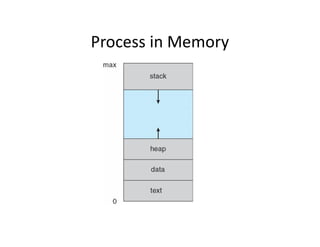
Process in Memory
Process State
• As a process executes, it changes state
– new: The process is being created
– running: Instructions are being executed
– waiting: The process is waiting for some event to
occur
– ready: The process is waiting to be assigned to a
processor
– terminated: The process has finished execution
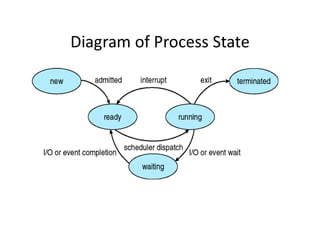
Diagram of Process State
Process Control Block (PCB)
Each process is represented in operating system by process
control block
Information associated with each process
• Process state
• Program counter: Next Instruction to be executed
• CPU registers
• CPU scheduling information: includes process priority, and
any other scheduling parameters.
• Memory-management information: : includes information
of the base and limit registers, the page tables etc.
• Accounting information: includes amount of CPU, time
limits etc.
• I/O status information: includes list of I/O devices allocated
to the process, a list of open files and so on.
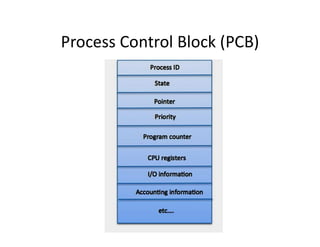
Process Control Block (PCB)
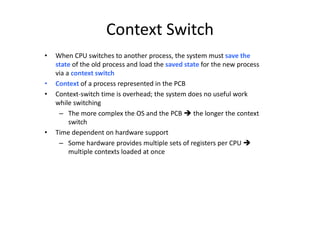
Context Switch
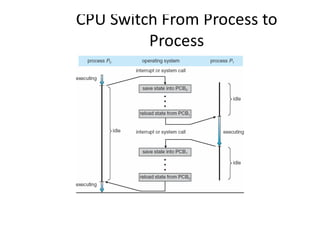
• When CPU switches to another process, the system must save the
state of the old process and load the saved state for the new process
via a context switch
• Context of a process represented in the PCB
• Context-switch time is overhead; the system does no useful work
while switching
– The more complex the OS and the PCB  the longer the context
switch
• Time dependent on hardware support
– Some hardware provides multiple sets of registers per CPU 
multiple contexts loaded at once
CPU Switch From Process to
Process
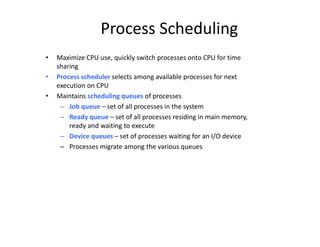
Process Scheduling
• Maximize CPU use, quickly switch processes onto CPU for time
sharing
• Process scheduler selects among available processes for next
execution on CPU
• Maintains scheduling queues of processes
– Job queue – set of all processes in the system
– Ready queue – set of all processes residing in main memory,
ready and waiting to execute
– Device queues – set of processes waiting for an I/O device
– Processes migrate among the various queues
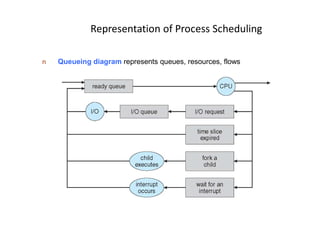
Representation of Process Scheduling
n Queueing diagram represents queues, resources, flows
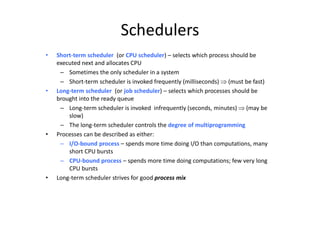
Schedulers
• Short-term scheduler (or CPU scheduler) – selects which process should be
executed next and allocates CPU
– Sometimes the only scheduler in a system
– Short-term scheduler is invoked frequently (milliseconds)  (must be fast)
• Long-term scheduler (or job scheduler) – selects which processes should be
brought into the ready queue
– Long-term scheduler is invoked infrequently (seconds, minutes)  (may be
slow)
– The long-term scheduler controls the degree of multiprogramming
• Processes can be described as either:
– I/O-bound process – spends more time doing I/O than computations, many
short CPU bursts
– CPU-bound process – spends more time doing computations; few very long
CPU bursts
• Long-term scheduler strives for good process mix
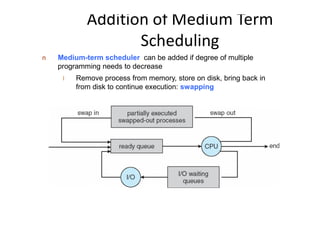
Addition of Medium Term
Scheduling
n Medium-term scheduler can be added if degree of multiple
programming needs to decrease
l Remove process from memory, store on disk, bring back in
from disk to continue execution: swapping
Operations on Processes
• System must provide mechanisms for:
– process creation,
– process termination,
Process creation
 Creation
ways a process can be created:
• Running an application.
• Created by OS to provide some service (e.g. background
printing).
• Spawned by existing process (parent/child).
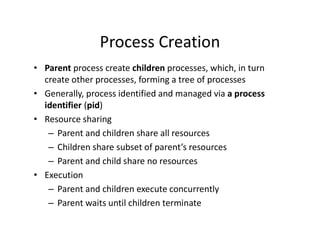
Process Creation
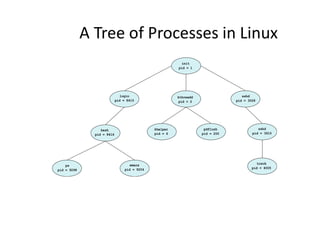
• Parent process create children processes, which, in turn
create other processes, forming a tree of processes
• Generally, process identified and managed via a process
identifier (pid)
• Resource sharing
– Parent and children share all resources
– Children share subset of parent’s resources
– Parent and child share no resources
• Execution
– Parent and children execute concurrently
– Parent waits until children terminate
A Tree of Processes in Linux
init
pid = 1
sshd
pid = 3028
login
pid = 8415
kthreadd
pid = 2
sshd
pid = 3610
pdflush
pid = 200
khelper
pid = 6
tcsch
pid = 4005
emacs
pid = 9204
bash
pid = 8416
ps
pid = 9298
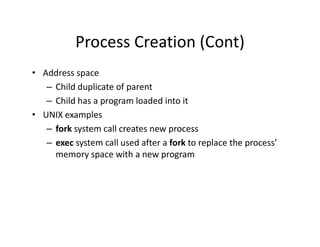
Process Creation (Cont)
• Address space
– Child duplicate of parent
– Child has a program loaded into it
• UNIX examples
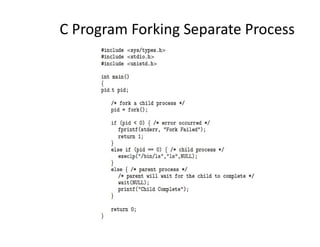
– fork system call creates new process
– exec system call used after a fork to replace the process’
memory space with a new program
C Program Forking Separate Process
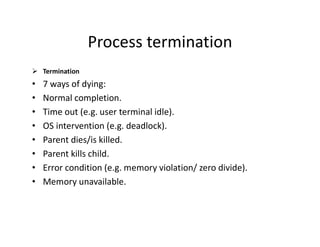
Process termination
 Termination
• 7 ways of dying:
• Normal completion.
• Time out (e.g. user terminal idle).
• OS intervention (e.g. deadlock).
• Parent dies/is killed.
• Parent kills child.
• Error condition (e.g. memory violation/ zero divide).
• Memory unavailable.
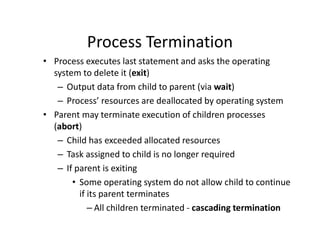
Process Termination
• Process executes last statement and asks the operating
system to delete it (exit)
– Output data from child to parent (via wait)
– Process’ resources are deallocated by operating system
• Parent may terminate execution of children processes
(abort)
– Child has exceeded allocated resources
– Task assigned to child is no longer required
– If parent is exiting
• Some operating system do not allow child to continue
if its parent terminates
– All children terminated - cascading termination

Process Management.pdf

  • 1.
  • 2.
    Process Concept • Process– a program in execution; • A process includes: – program counter – stack – data section
  • 3.
  • 4.
    Process State • Asa process executes, it changes state – new: The process is being created – running: Instructions are being executed – waiting: The process is waiting for some event to occur – ready: The process is waiting to be assigned to a processor – terminated: The process has finished execution
  • 5.
  • 6.
    Process Control Block(PCB) Each process is represented in operating system by process control block Information associated with each process • Process state • Program counter: Next Instruction to be executed • CPU registers • CPU scheduling information: includes process priority, and any other scheduling parameters. • Memory-management information: : includes information of the base and limit registers, the page tables etc. • Accounting information: includes amount of CPU, time limits etc. • I/O status information: includes list of I/O devices allocated to the process, a list of open files and so on.
  • 7.
  • 8.
    Context Switch • WhenCPU switches to another process, the system must save the state of the old process and load the saved state for the new process via a context switch • Context of a process represented in the PCB • Context-switch time is overhead; the system does no useful work while switching – The more complex the OS and the PCB  the longer the context switch • Time dependent on hardware support – Some hardware provides multiple sets of registers per CPU  multiple contexts loaded at once
  • 9.
    CPU Switch FromProcess to Process
  • 10.
    Process Scheduling • MaximizeCPU use, quickly switch processes onto CPU for time sharing • Process scheduler selects among available processes for next execution on CPU • Maintains scheduling queues of processes – Job queue – set of all processes in the system – Ready queue – set of all processes residing in main memory, ready and waiting to execute – Device queues – set of processes waiting for an I/O device – Processes migrate among the various queues
  • 11.
    Representation of ProcessScheduling n Queueing diagram represents queues, resources, flows
  • 12.
    Schedulers • Short-term scheduler(or CPU scheduler) – selects which process should be executed next and allocates CPU – Sometimes the only scheduler in a system – Short-term scheduler is invoked frequently (milliseconds)  (must be fast) • Long-term scheduler (or job scheduler) – selects which processes should be brought into the ready queue – Long-term scheduler is invoked infrequently (seconds, minutes)  (may be slow) – The long-term scheduler controls the degree of multiprogramming • Processes can be described as either: – I/O-bound process – spends more time doing I/O than computations, many short CPU bursts – CPU-bound process – spends more time doing computations; few very long CPU bursts • Long-term scheduler strives for good process mix
  • 13.
    Addition of MediumTerm Scheduling n Medium-term scheduler can be added if degree of multiple programming needs to decrease l Remove process from memory, store on disk, bring back in from disk to continue execution: swapping
  • 14.
    Operations on Processes •System must provide mechanisms for: – process creation, – process termination,
  • 15.
    Process creation  Creation waysa process can be created: • Running an application. • Created by OS to provide some service (e.g. background printing). • Spawned by existing process (parent/child).
  • 16.
    Process Creation • Parentprocess create children processes, which, in turn create other processes, forming a tree of processes • Generally, process identified and managed via a process identifier (pid) • Resource sharing – Parent and children share all resources – Children share subset of parent’s resources – Parent and child share no resources • Execution – Parent and children execute concurrently – Parent waits until children terminate
  • 17.
    A Tree ofProcesses in Linux init pid = 1 sshd pid = 3028 login pid = 8415 kthreadd pid = 2 sshd pid = 3610 pdflush pid = 200 khelper pid = 6 tcsch pid = 4005 emacs pid = 9204 bash pid = 8416 ps pid = 9298
  • 18.
    Process Creation (Cont) •Address space – Child duplicate of parent – Child has a program loaded into it • UNIX examples – fork system call creates new process – exec system call used after a fork to replace the process’ memory space with a new program
  • 19.
    C Program ForkingSeparate Process
  • 20.
    Process termination  Termination •7 ways of dying: • Normal completion. • Time out (e.g. user terminal idle). • OS intervention (e.g. deadlock). • Parent dies/is killed. • Parent kills child. • Error condition (e.g. memory violation/ zero divide). • Memory unavailable.
  • 21.
    Process Termination • Processexecutes last statement and asks the operating system to delete it (exit) – Output data from child to parent (via wait) – Process’ resources are deallocated by operating system • Parent may terminate execution of children processes (abort) – Child has exceeded allocated resources – Task assigned to child is no longer required – If parent is exiting • Some operating system do not allow child to continue if its parent terminates – All children terminated - cascading termination