Chapter 3 Processes
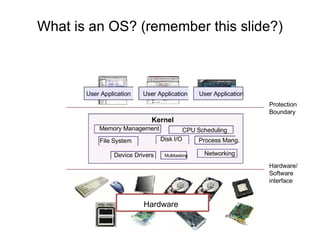
What is an OS? (remember this slide?) Memory Management Hardware CPU Scheduling User Application Protection  Boundary Hardware/ Software interface  User Application Device Drivers User Application Kernel File System Disk I/O Process Mang. Networking Multitasking
Process management This module begins a series of topics on processes, threads, and synchronization Today: processes and process management what are the OS units of ownership / execution? how are they represented inside the OS? how is the CPU scheduled across processes? what are the possible execution states of a process? and how does the system move between them?
The process The process is the OS’s abstraction for execution the unit of execution the unit of scheduling the unit of ownership the dynamic (active) execution context compared with program: static, just a bunch of bytes Process is often called a  job ,  task , or  sequential process a sequential process is a program in execution defines the instruction-at-a-time execution of a program
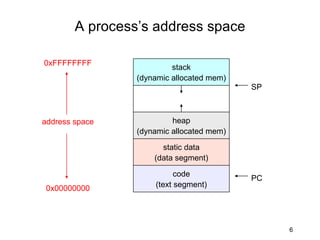
What’s in a process? A process consists of (at least): an address space the code for the running program the data for the running program an execution stack and stack pointer (SP) traces state of procedure calls made the program counter (PC), indicating the next instruction registers and their values Heap, a memory that is dynamically allocated. In other words, it’s all the stuff you need to run the program
A process’s address space 0x00000000 0xFFFFFFFF address space code (text segment) static data (data segment) heap (dynamic allocated mem) stack (dynamic allocated mem) PC SP
Process states Each process has an  execution state , which indicates what it is currently doing ready: waiting to be assigned to CPU could run, but another process has the CPU running: executing on the CPU is the process that currently controls the CPU pop quiz: how many processes can be running simultaneously? waiting: waiting for an event, e.g., I/O cannot make progress until event happens As a process executes, it moves from state to state *NIX: run  ps , STAT column shows current state which state is a process in most of the time?
States of a process running ready Waiting exception (I/O, page fault, etc.) interrupt (unscheduled) dispatch / schedule interrupt (I/O complete) You can create and destroy processes! New Terminated Exit Admitted
Listing of all processes in *nix ps au or ps aux Lists all the processes running on the system ps au  USER  PID %CPU %MEM  VSZ  RSS TTY  STAT START  TIME COMMAND bart  3039  0.0  0.2  5916 1380 pts/2  S  14:35  0:00 /bin/bash bart  3134  0.0  0.2  5388 1380 pts/3  S  14:36  0:00 /bin/bash bart  3190  0.0  0.2  6368 1360 pts/4  S  14:37  0:00 /bin/bash bart  3416  0.0  0.0  0  0 pts/2  W  15:07  0:00 [bash] PID:  Process id VSZ:  Virtual process size (code + data + stack) RSS:  Process resident size: number of KB currently in RAM TTY:  Terminal STAT:  Status: R (Runnable), S (Sleep), W (paging), Z (Zombie)...
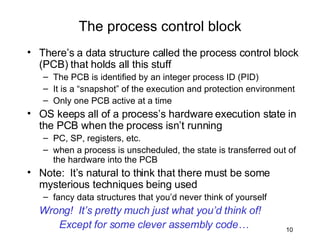
There’s a data structure called the process control block (PCB) that holds all this stuff The PCB is identified by an integer process ID (PID) It is a “snapshot” of the execution and protection environment Only one PCB active at a time OS keeps all of a process’s hardware execution state in the PCB when the process isn’t running PC, SP, registers, etc. when a process is unscheduled, the state is transferred out of the hardware into the PCB Note:  It’s natural to think that there must be some mysterious techniques being used fancy data structures that you’d never think of yourself Wrong!  It’s pretty much just what you’d think of!  Except for some clever assembly code… The process control block
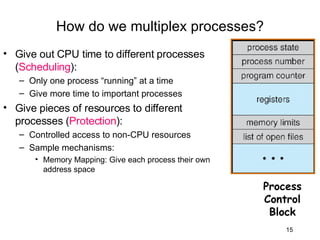
The PCB revisited The PCB is a data structure with many, many fields: process ID (PID) execution state program counter, stack pointer, registers address space info UNIX username of owner scheduling priority accounting info pointers for state queues In linux: defined in  task_struct  ( include/linux/sched.h ) over 95 fields!!! In Windows XP, 75 fields Process Control Block
PCBs and hardware state When a process is running, its hardware state is inside the CPU PC, SP, registers CPU contains current values When the OS stops running a process (puts it in the waiting state), it saves the registers’ values in the PCB when the OS puts the process in the running state, it loads the hardware registers from the values in that process’s PCB The act of switching the CPU from one process to another is called a  context switch timesharing systems may do 100s or 1000s of switches/sec. takes about 5 microseconds on today’s hardware
How do we multiplex processes?
Process Scheduling
How do we multiplex processes? Give out CPU time to different processes ( Scheduling ): Only one process “running” at a time Give more time to important processes Give pieces of resources to different processes ( Protection ): Controlled access to non-CPU resources Sample mechanisms:  Memory Mapping: Give each process their own address space Process Control Block
Scheduling queues The OS maintains a collection of queues that represent the state of all processes in the system typically one queue for each state Job queue  – set of all processes in the system Ready queue  – set of all processes residing in main memory, ready and waiting to execute Device queues  – set of processes waiting for an I/O device Processes migrate among the various queues each PCB is queued onto a state queue according to the current state of the process it represents as a process changes state, its PCB is unlinked from one queue, and linked onto another
Scheduling queues There may be many wait queues, one for each type of wait (particular device, timer, message, …) head ptr tail ptr firefox pcb emacs pcb ls pcb cat pcb firefox pcb head ptr tail ptr Device queue header Ready queue header These are PCBs!
Representation of Process Scheduling PCBs move from queue to queue as they change state Decisions about which order to remove from queues are  Scheduling  decisions
Schedulers Long-term scheduler   (or job scheduler) – selects which processes should be brought into the ready queue Short-term scheduler   (or CPU scheduler) – selects which process should be executed next and allocates CPU Short-term scheduler is invoked very frequently (milliseconds)    (must be fast) Long-term scheduler is invoked very infrequently (seconds, minutes)    (may be slow)
Schedulers (Cont.) The long-term scheduler controls the  degree of multiprogramming Processes in long-term scheduler can be described as either: I/O-bound process  – spends more time doing I/O than computations, many short CPU bursts CPU-bound process  – spends more time doing computations; few very long CPU bursts Medium-term scheduler  - removes processes to reduce multiprogramming by swapping them out.
CPU Switch From Process to Process When CPU switches to another process, the system must save the state of the old process and load the saved state for the new process Context-switch time is overhead; the system does no useful work while switching Time dependent on hardware support
Operations on Processes
Process Creation Parent process create children processes, which, in turn create other processes, forming a tree of processes Resource sharing Parent and children share all resources Children share subset of parent’s resources Parent and child share no resources Execution Parent and children execute concurrently Parent waits until children terminate
Process creation (cont.) New processes are created by existing processes creator is called the  parent created process is called the  child *NIX: do  ps , look for PPID field what creates the first process, and when? In some systems, parent defines or donates resources and privileges for its children *NIX: child inherits parent’s uid, environment, open file list, etc. UNIX examples fork  system call creates new process exec  system call used after a  fork  to replace the process’ memory space with a new program.
A tree of processes on a typical Solaris
*NIX process creation *NIX process creation through  fork()  system call creates and initializes a new PCB creates a new address space initializes new address space with a copy of the entire contents of the address space of the parent initializes kernel resources of new process with resources of parent (e.g., open files) places new PCB on the ready queue the  fork()  system call “returns twice” once into the parent, and once into the child returns the child’s PID to the parent returns 0 to the child fork()  = “clone me”
Exec vs. fork So how do we start a new program, instead of just forking the old program? the  exec()  system call! int exec(char *prog, char ** argv) exec() discards the current address space loads program ‘prog’ into the address space initializes registers, args for new program places PCB onto ready queue note: does not create a new process!
Process Termination Process executes last statement and asks the operating system to delete it ( exit ) Output data from child to parent (via  wait ) Process’ resources are deallocated by operating system Parent may terminate execution of children processes ( abort ) Child has exceeded allocated resources Task assigned to child is no longer required If parent is exiting Some operating system do not allow child to continue if its parent terminates All children terminated -  cascading termination
Process Creation
Interprocess communication Mechanism for processes to communicate and to synchronize their actions
Types of Processes Independent  process cannot affect or be affected by the execution of another process Cooperating  process can affect or be affected by the execution of another process, uses two types of IPC: Message passing. Shared memory.  Advantages of process cooperation Information sharing  (e.g. shared file) Computation speed-up (break up process into sub tasks to run faster). Modularity (dividing system functions into separate processes or threads).  Convenience (individual user may work on many tasks at the same time)
Producer-Consumer Problem Paradigm for cooperating processes,  producer  process produces information that is consumed by a  consumer  process unbounded-buffer  places no practical limit on the size of the buffer bounded-buffer  assumes that there is a fixed buffer size
Message-Passing System Message system – processes communicate with each other without resorting to shared memory space IPC facility provides two operations: send ( message ) – message size fixed or variable  receive ( message ) If  P  and  Q  wish to communicate, they need to: establish a  communication   link  between them exchange messages via send/receive Implementation of communication link physical (e.g., shared memory, hardware bus) logical (e.g., logical properties)
Communications Models
Methods of Message-Passing Direct or indirect communication Synchronous or asynchronous communication Buffering
Direct Communication Processes must name each other explicitly (symmetry): send  ( P, message ) – send a message to process P receive ( Q, message ) – receive a message from process Q Properties of communication link Links are established automatically A link is associated with exactly one pair of communicating processes Between each pair there exists exactly one link The link may be unidirectional, but is usually bi-directional
Indirect Communication Messages are directed and received from mailboxes (also referred to as ports) Each mailbox has a unique id Processes can communicate only if they share a mailbox Primitives are defined as: send ( A, message ) – send a message to mailbox A receive ( A, message ) – receive a message from mailbox A
Indirect Communication Properties of communication link Link established only if processes share a common mailbox A link may be associated with many processes Each pair of processes may share several communication links Link may be unidirectional or bi-directional Operations create a new mailbox send and receive messages through mailbox destroy a mailbox Who owns the mailbox?
Synchronization Message passing may be either blocking or non-blocking Blocking  is considered  synchronous Blocking send  has the sender block until the message is received Blocking receive  has the receiver block until a message is available Non-blocking  is considered  asynchronous Non-blocking  send has the sender send the message and continue Non-blocking  receive has the receiver receive a valid message or null
Buffering Queue of messages attached to the link; implemented in one of three ways 1. Zero capacity – 0 messages Sender must wait for receiver (rendezvous) 2. Bounded capacity – finite length of  n  messages Sender must wait if link full 3. Unbounded capacity – infinite length  Sender never waits
Conclusion
In Summary PCBs are data structures dynamically allocated inside OS memory When a process is created: OS allocates a PCB for it OS initializes PCB OS puts PCB on the correct queue As a process computes: OS moves its PCB from queue to queue When a process is terminated: PCB may hang around for a while (exit code, etc.) eventually, OS deallocates the PCB
Conclusion Schedulers choose the ready process to run Processes create other processes On exit, status returned to parent Processes communicate with each other using shared memory or message passing
References Some Slides from Gary Kimura and Mark Zbikowski , Washington university.  Text book slides

Operating System 3

  • 1.
  • 2.
    What is anOS? (remember this slide?) Memory Management Hardware CPU Scheduling User Application Protection Boundary Hardware/ Software interface User Application Device Drivers User Application Kernel File System Disk I/O Process Mang. Networking Multitasking
  • 3.
    Process management Thismodule begins a series of topics on processes, threads, and synchronization Today: processes and process management what are the OS units of ownership / execution? how are they represented inside the OS? how is the CPU scheduled across processes? what are the possible execution states of a process? and how does the system move between them?
  • 4.
    The process Theprocess is the OS’s abstraction for execution the unit of execution the unit of scheduling the unit of ownership the dynamic (active) execution context compared with program: static, just a bunch of bytes Process is often called a job , task , or sequential process a sequential process is a program in execution defines the instruction-at-a-time execution of a program
  • 5.
    What’s in aprocess? A process consists of (at least): an address space the code for the running program the data for the running program an execution stack and stack pointer (SP) traces state of procedure calls made the program counter (PC), indicating the next instruction registers and their values Heap, a memory that is dynamically allocated. In other words, it’s all the stuff you need to run the program
  • 6.
    A process’s addressspace 0x00000000 0xFFFFFFFF address space code (text segment) static data (data segment) heap (dynamic allocated mem) stack (dynamic allocated mem) PC SP
  • 7.
    Process states Eachprocess has an execution state , which indicates what it is currently doing ready: waiting to be assigned to CPU could run, but another process has the CPU running: executing on the CPU is the process that currently controls the CPU pop quiz: how many processes can be running simultaneously? waiting: waiting for an event, e.g., I/O cannot make progress until event happens As a process executes, it moves from state to state *NIX: run ps , STAT column shows current state which state is a process in most of the time?
  • 8.
    States of aprocess running ready Waiting exception (I/O, page fault, etc.) interrupt (unscheduled) dispatch / schedule interrupt (I/O complete) You can create and destroy processes! New Terminated Exit Admitted
  • 9.
    Listing of allprocesses in *nix ps au or ps aux Lists all the processes running on the system ps au USER PID %CPU %MEM VSZ RSS TTY STAT START TIME COMMAND bart 3039 0.0 0.2 5916 1380 pts/2 S 14:35 0:00 /bin/bash bart 3134 0.0 0.2 5388 1380 pts/3 S 14:36 0:00 /bin/bash bart 3190 0.0 0.2 6368 1360 pts/4 S 14:37 0:00 /bin/bash bart 3416 0.0 0.0 0 0 pts/2 W 15:07 0:00 [bash] PID: Process id VSZ: Virtual process size (code + data + stack) RSS: Process resident size: number of KB currently in RAM TTY: Terminal STAT: Status: R (Runnable), S (Sleep), W (paging), Z (Zombie)...
  • 10.
    There’s a datastructure called the process control block (PCB) that holds all this stuff The PCB is identified by an integer process ID (PID) It is a “snapshot” of the execution and protection environment Only one PCB active at a time OS keeps all of a process’s hardware execution state in the PCB when the process isn’t running PC, SP, registers, etc. when a process is unscheduled, the state is transferred out of the hardware into the PCB Note: It’s natural to think that there must be some mysterious techniques being used fancy data structures that you’d never think of yourself Wrong! It’s pretty much just what you’d think of! Except for some clever assembly code… The process control block
  • 11.
    The PCB revisitedThe PCB is a data structure with many, many fields: process ID (PID) execution state program counter, stack pointer, registers address space info UNIX username of owner scheduling priority accounting info pointers for state queues In linux: defined in task_struct ( include/linux/sched.h ) over 95 fields!!! In Windows XP, 75 fields Process Control Block
  • 12.
    PCBs and hardwarestate When a process is running, its hardware state is inside the CPU PC, SP, registers CPU contains current values When the OS stops running a process (puts it in the waiting state), it saves the registers’ values in the PCB when the OS puts the process in the running state, it loads the hardware registers from the values in that process’s PCB The act of switching the CPU from one process to another is called a context switch timesharing systems may do 100s or 1000s of switches/sec. takes about 5 microseconds on today’s hardware
  • 13.
    How do wemultiplex processes?
  • 14.
  • 15.
    How do wemultiplex processes? Give out CPU time to different processes ( Scheduling ): Only one process “running” at a time Give more time to important processes Give pieces of resources to different processes ( Protection ): Controlled access to non-CPU resources Sample mechanisms: Memory Mapping: Give each process their own address space Process Control Block
  • 16.
    Scheduling queues TheOS maintains a collection of queues that represent the state of all processes in the system typically one queue for each state Job queue – set of all processes in the system Ready queue – set of all processes residing in main memory, ready and waiting to execute Device queues – set of processes waiting for an I/O device Processes migrate among the various queues each PCB is queued onto a state queue according to the current state of the process it represents as a process changes state, its PCB is unlinked from one queue, and linked onto another
  • 17.
    Scheduling queues Theremay be many wait queues, one for each type of wait (particular device, timer, message, …) head ptr tail ptr firefox pcb emacs pcb ls pcb cat pcb firefox pcb head ptr tail ptr Device queue header Ready queue header These are PCBs!
  • 18.
    Representation of ProcessScheduling PCBs move from queue to queue as they change state Decisions about which order to remove from queues are Scheduling decisions
  • 19.
    Schedulers Long-term scheduler (or job scheduler) – selects which processes should be brought into the ready queue Short-term scheduler (or CPU scheduler) – selects which process should be executed next and allocates CPU Short-term scheduler is invoked very frequently (milliseconds)  (must be fast) Long-term scheduler is invoked very infrequently (seconds, minutes)  (may be slow)
  • 20.
    Schedulers (Cont.) Thelong-term scheduler controls the degree of multiprogramming Processes in long-term scheduler can be described as either: I/O-bound process – spends more time doing I/O than computations, many short CPU bursts CPU-bound process – spends more time doing computations; few very long CPU bursts Medium-term scheduler - removes processes to reduce multiprogramming by swapping them out.
  • 21.
    CPU Switch FromProcess to Process When CPU switches to another process, the system must save the state of the old process and load the saved state for the new process Context-switch time is overhead; the system does no useful work while switching Time dependent on hardware support
  • 22.
  • 23.
    Process Creation Parentprocess create children processes, which, in turn create other processes, forming a tree of processes Resource sharing Parent and children share all resources Children share subset of parent’s resources Parent and child share no resources Execution Parent and children execute concurrently Parent waits until children terminate
  • 24.
    Process creation (cont.)New processes are created by existing processes creator is called the parent created process is called the child *NIX: do ps , look for PPID field what creates the first process, and when? In some systems, parent defines or donates resources and privileges for its children *NIX: child inherits parent’s uid, environment, open file list, etc. UNIX examples fork system call creates new process exec system call used after a fork to replace the process’ memory space with a new program.
  • 25.
    A tree ofprocesses on a typical Solaris
  • 26.
    *NIX process creation*NIX process creation through fork() system call creates and initializes a new PCB creates a new address space initializes new address space with a copy of the entire contents of the address space of the parent initializes kernel resources of new process with resources of parent (e.g., open files) places new PCB on the ready queue the fork() system call “returns twice” once into the parent, and once into the child returns the child’s PID to the parent returns 0 to the child fork() = “clone me”
  • 27.
    Exec vs. forkSo how do we start a new program, instead of just forking the old program? the exec() system call! int exec(char *prog, char ** argv) exec() discards the current address space loads program ‘prog’ into the address space initializes registers, args for new program places PCB onto ready queue note: does not create a new process!
  • 28.
    Process Termination Processexecutes last statement and asks the operating system to delete it ( exit ) Output data from child to parent (via wait ) Process’ resources are deallocated by operating system Parent may terminate execution of children processes ( abort ) Child has exceeded allocated resources Task assigned to child is no longer required If parent is exiting Some operating system do not allow child to continue if its parent terminates All children terminated - cascading termination
  • 29.
  • 30.
    Interprocess communication Mechanismfor processes to communicate and to synchronize their actions
  • 31.
    Types of ProcessesIndependent process cannot affect or be affected by the execution of another process Cooperating process can affect or be affected by the execution of another process, uses two types of IPC: Message passing. Shared memory. Advantages of process cooperation Information sharing (e.g. shared file) Computation speed-up (break up process into sub tasks to run faster). Modularity (dividing system functions into separate processes or threads). Convenience (individual user may work on many tasks at the same time)
  • 32.
    Producer-Consumer Problem Paradigmfor cooperating processes, producer process produces information that is consumed by a consumer process unbounded-buffer places no practical limit on the size of the buffer bounded-buffer assumes that there is a fixed buffer size
  • 33.
    Message-Passing System Messagesystem – processes communicate with each other without resorting to shared memory space IPC facility provides two operations: send ( message ) – message size fixed or variable receive ( message ) If P and Q wish to communicate, they need to: establish a communication link between them exchange messages via send/receive Implementation of communication link physical (e.g., shared memory, hardware bus) logical (e.g., logical properties)
  • 34.
  • 35.
    Methods of Message-PassingDirect or indirect communication Synchronous or asynchronous communication Buffering
  • 36.
    Direct Communication Processesmust name each other explicitly (symmetry): send ( P, message ) – send a message to process P receive ( Q, message ) – receive a message from process Q Properties of communication link Links are established automatically A link is associated with exactly one pair of communicating processes Between each pair there exists exactly one link The link may be unidirectional, but is usually bi-directional
  • 37.
    Indirect Communication Messagesare directed and received from mailboxes (also referred to as ports) Each mailbox has a unique id Processes can communicate only if they share a mailbox Primitives are defined as: send ( A, message ) – send a message to mailbox A receive ( A, message ) – receive a message from mailbox A
  • 38.
    Indirect Communication Propertiesof communication link Link established only if processes share a common mailbox A link may be associated with many processes Each pair of processes may share several communication links Link may be unidirectional or bi-directional Operations create a new mailbox send and receive messages through mailbox destroy a mailbox Who owns the mailbox?
  • 39.
    Synchronization Message passingmay be either blocking or non-blocking Blocking is considered synchronous Blocking send has the sender block until the message is received Blocking receive has the receiver block until a message is available Non-blocking is considered asynchronous Non-blocking send has the sender send the message and continue Non-blocking receive has the receiver receive a valid message or null
  • 40.
    Buffering Queue ofmessages attached to the link; implemented in one of three ways 1. Zero capacity – 0 messages Sender must wait for receiver (rendezvous) 2. Bounded capacity – finite length of n messages Sender must wait if link full 3. Unbounded capacity – infinite length Sender never waits
  • 41.
  • 42.
    In Summary PCBsare data structures dynamically allocated inside OS memory When a process is created: OS allocates a PCB for it OS initializes PCB OS puts PCB on the correct queue As a process computes: OS moves its PCB from queue to queue When a process is terminated: PCB may hang around for a while (exit code, etc.) eventually, OS deallocates the PCB
  • 43.
    Conclusion Schedulers choosethe ready process to run Processes create other processes On exit, status returned to parent Processes communicate with each other using shared memory or message passing
  • 44.
    References Some Slidesfrom Gary Kimura and Mark Zbikowski , Washington university. Text book slides

Editor's Notes