ANIL ANTONY
SEMESTER 8
ELECTRONICS AND
COMMUNICATION ENGINEERING
DDoS - Introduction
 Although the Internet has made our life simpler the virtual

world is not as safe as we think it is.

 Attacks to privacy , property or data can happen at any

time to anyone
 DDoS is one such fearful attack which targets mainly those

companies or institutions which uses online services for
their customers
 Some of the infamous DDoS attacks include
 the in February 2000, Yahoo! Experienced one of the
first major DDoS flooding attacks that kept the
company’s services off the Internet for about 2 hours
incurring a significant loss in advertising revenue
 the attacks against major government news media and
financial websites in South Korea and the United
States in July 2009
 the DDoS flooding attacks on organizations such as
Mastercard.com, PayPal, Visa.com orchestrated by a
group calling themselves ”Anonymous” on December
2010,
What is DDOS ?
 The concept of DDoS can be explained using an

example as follows.
Phases in a DDoS attack
STEP 1 :
Recruiting of slave/zombie machines
e.g. : using pirated softwares , unknown links ,
untrusted sites etc.
When a computer has become a zombie it has the code to
infect other computers to which it is connected
STEP 2 :
discovering the vulnerability of the target (using
small scale attacks before the actual attack)
This is done to check whether the target has taken any
precautionary measures or not.
STEP 3 :
Sending the attack instructions to the slaves
This is usually done using IRC or Internet Relay Chats
or by other forms of communication between the attacker ie
maker of the botnet and the virus which is present in a zombie
computer.

STEP 4 :
ATTACK
On getting the instruction to attack all the zombie

computers starts sending messages simultaneously
and continuously to the target server.The server tries
to reply to all requests but after sometime server gets
overpowered and it crashes.
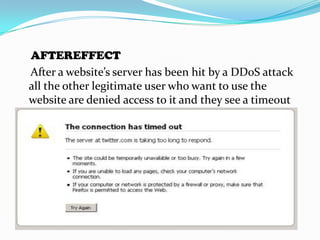
AFTEREFFECT
After a website’s server has been hit by a DDoS attack
all the other legitimate user who want to use the
website are denied access to it and they see a timeout
error as follws.
Why DDoS attacks done?
Some of the reasons for a DDoS attack are:
 Financial/economical gain
Hackers in this case are hired by one company to attack
against its opponent
 Revenge
Performed by an individual for the injustice he had
suffered
 For fun or show off
 Cyberwarfare (organised by terrorist groups or y one
country against another)
etc
TYPES OF DDOS ATTACKS
1. SMURF ATTACK
Before this we must know some basic terms.
1) Router
It is a switching device to which all the devices
in a network are connected to which has a specific
address called broadcast address.
2) Broadcast address
A broadcast address is an address at which all the
devices connected to a network are enabled to
receive packets. A message sent to a broadcast
address is typically received by all network-attached
hosts, rather than by a specific host.
2) IP address spoofing
In computer networking, IP address spoofing
or IP spoofing is the creation of Internet Protocol (IP)
packets with a fake source IP address, with the purpose
of concealing the identity of the sender for
impersonating another computing system.
3) ICMP messages
These are the messages which are send to
detect the status of a network. ICMP messages are
send to the broadcast address of a network , and after
receiving this ICMP message the devices connected to
this network sends back ICMP reply messages to the IP
address which had send them the ICMP messages.
Different phases of attack:
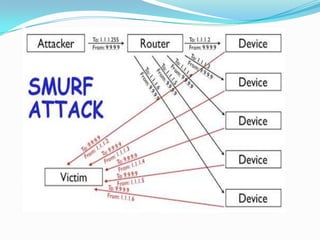
1. IP address of the victim is obtained by the attacking
computer.
2. Using this spoofed IP address the attacker sends
ICMF messages to a network’s broadcasting address.
3. All the devices in this network gets these ICMF
messages and they send back ICMF replies to the IP
address of the victim.
4. Victim get flooded with packets coming from all
these zombies and crashes.
Steps to protect against
smurf attacks
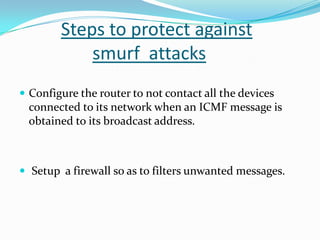
 Configure the router to not contact all the devices

connected to its network when an ICMF message is
obtained to its broadcast address.

 Setup a firewall so as to filters unwanted messages.
2. TCP SYN/ACK ATTACK
Before explaining of this attack some basic terms
should be understood.
1) TCP or Transmission Control Protocol
It is a set of rules or protocol which is needed for
sending packets from one device to another. For a
system to send data packets to another system the
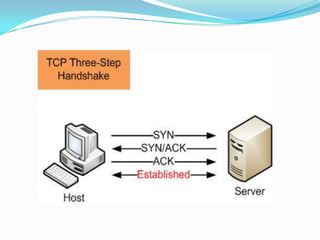
following procedure must take place initially.
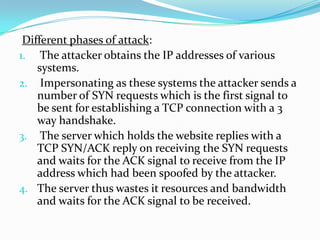
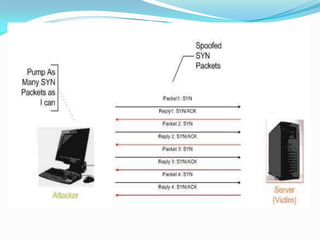
Different phases of attack:
1. The attacker obtains the IP addresses of various
systems.
2. Impersonating as these systems the attacker sends a
number of SYN requests which is the first signal to
be sent for establishing a TCP connection with a 3
way handshake.
3. The server which holds the website replies with a
TCP SYN/ACK reply on receiving the SYN requests
and waits for the ACK signal to receive from the IP
address which had been spoofed by the attacker.
4. The server thus wastes it resources and bandwidth
and waits for the ACK signal to be received.
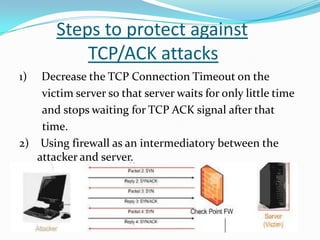
Steps to protect against
TCP/ACK attacks
1)

Decrease the TCP Connection Timeout on the
victim server so that server waits for only little time
and stops waiting for TCP ACK signal after that
time.
2) Using firewall as an intermediatory between the
attacker and server.
3. UDP FLOOD ATTACK
Basic terminology used:
1) Ports used for different applications
In a computer network any computer is identified by
its IP address. But if there are more than one
application running in a computer at the same time
for eg sending a mail and browsing the web then a
port number is assigned to each of these
applications.
eg for sending mail port number 25 is used
for browsing port number 80 is used etc….
In this way each application uses different ports and
ports used for a particular application cant be used for
any other applications.
WHAT IF A DATA PACKET TO A SYSTEM IS
SEND TO A WRONG PORT ?
If received by a wrong port, the receiving device
rejects the received message and sends back a message
called “destination unreachable” to the device which
had sent the data packet to wrong port.
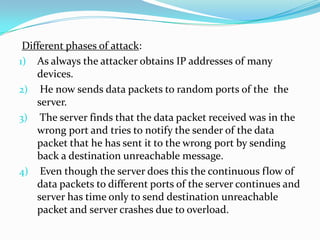
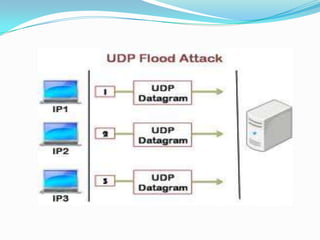
Different phases of attack:
1) As always the attacker obtains IP addresses of many
devices.
2) He now sends data packets to random ports of the the
server.
3) The server finds that the data packet received was in the
wrong port and tries to notify the sender of the data
packet that he has sent it to the wrong port by sending
back a destination unreachable message.
4) Even though the server does this the continuous flow of
data packets to different ports of the server continues and
server has time only to send destination unreachable
packet and server crashes due to overload.
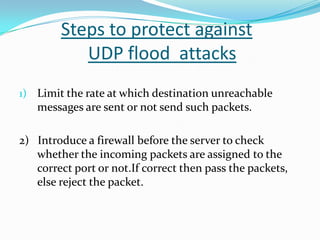
Steps to protect against
UDP flood attacks
1) Limit the rate at which destination unreachable

messages are sent or not send such packets.

2) Introduce a firewall before the server to check
whether the incoming packets are assigned to the
correct port or not.If correct then pass the packets,
else reject the packet.
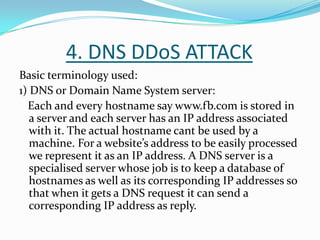
4. DNS DDoS ATTACK
Basic terminology used:
1) DNS or Domain Name System server:
Each and every hostname say www.fb.com is stored in
a server and each server has an IP address associated
with it. The actual hostname cant be used by a
machine. For a website’s address to be easily processed
we represent it as an IP address. A DNS server is a
specialised server whose job is to keep a database of
hostnames as well as its corresponding IP addresses so
that when it gets a DNS request it can send a
corresponding IP address as reply.
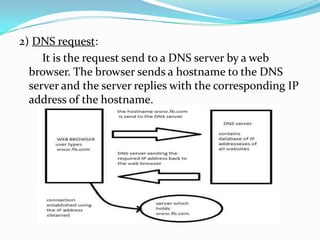
2) DNS request:
It is the request send to a DNS server by a web
browser. The browser sends a hostname to the DNS
server and the server replies with the corresponding IP
address of the hostname.
Phases in attack:
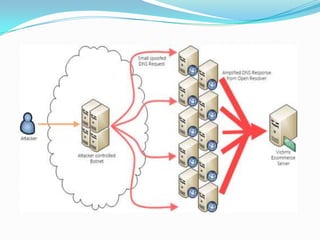
1) Attacker asks the botnets ie zombies to send DNS
queries of a site say www.whatever.com to a DNS
server and the zombies are impersonated as the
target server. Target server is the server which
attacker tries to destroy.
2) The DNS server thinks that it is the target server
which is requesting the pages and so the DNS server
sends these requested page’s IP address as reply to
the target server.
3) The target server is unaware of all these and
suddenly it starts receiving a load of DNS replies and
server crashes.
Steps to protect against
DNS DDoS attacks
1) Once you know the IP addresses of the sites which the
DNS server is sending to you continuously, it is a
simple matter to use your firewall to block traffic from
those addresses. This blocking stops further DNS
DDoS attacks.
5. PEER TO PEER ATTACKS
Basic terminology used:
1)Peer to peer(P2P) network:
A peer-to-peer (P2P) network is a type of
decentralized and distributed network architecture in
which individual devices in the network (called
"peers") act as both suppliers and consumers of
resources, in contrast to the centralized client–server
model where client nodes request access to resources
provided by central servers.
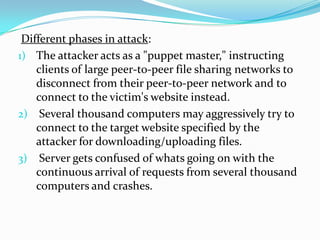
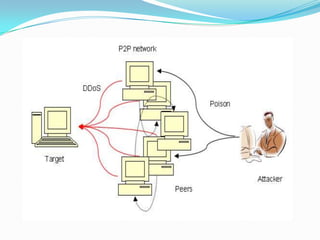
Different phases in attack:
1) The attacker acts as a "puppet master," instructing
clients of large peer-to-peer file sharing networks to
disconnect from their peer-to-peer network and to
connect to the victim's website instead.
2) Several thousand computers may aggressively try to
connect to the target website specified by the
attacker for downloading/uploading files.
3) Server gets confused of whats going on with the
continuous arrival of requests from several thousand
computers and crashes.
Steps to protect against
P2P network attacks
1) To have a semi centralised authority to track large

scale malicious P2P network activity.
2) Update the torrent clients as most of the P2P attacks
are done using those computers running old torrent
clients whose loopholes hadn't been fixed.
Future developments in DDoS
Although present developments are almost adequate
for protecting servers and websites against DDoS
attacks, newer and newer DDoS techniques are
evolving.
This puts us in a position to develop newer, efficient
and sophisticated algorithms and methods to counter
this rapidly growing threat.
THANK YOU !!!

DDoS ATTACKS

  • 1.
    ANIL ANTONY SEMESTER 8 ELECTRONICSAND COMMUNICATION ENGINEERING
  • 2.
    DDoS - Introduction Although the Internet has made our life simpler the virtual world is not as safe as we think it is.  Attacks to privacy , property or data can happen at any time to anyone  DDoS is one such fearful attack which targets mainly those companies or institutions which uses online services for their customers
  • 3.
     Some ofthe infamous DDoS attacks include  the in February 2000, Yahoo! Experienced one of the first major DDoS flooding attacks that kept the company’s services off the Internet for about 2 hours incurring a significant loss in advertising revenue  the attacks against major government news media and financial websites in South Korea and the United States in July 2009  the DDoS flooding attacks on organizations such as Mastercard.com, PayPal, Visa.com orchestrated by a group calling themselves ”Anonymous” on December 2010,
  • 4.
    What is DDOS?  The concept of DDoS can be explained using an example as follows.
  • 5.
    Phases in aDDoS attack STEP 1 : Recruiting of slave/zombie machines e.g. : using pirated softwares , unknown links , untrusted sites etc. When a computer has become a zombie it has the code to infect other computers to which it is connected STEP 2 : discovering the vulnerability of the target (using small scale attacks before the actual attack) This is done to check whether the target has taken any precautionary measures or not.
  • 6.
    STEP 3 : Sendingthe attack instructions to the slaves This is usually done using IRC or Internet Relay Chats or by other forms of communication between the attacker ie maker of the botnet and the virus which is present in a zombie computer. STEP 4 : ATTACK On getting the instruction to attack all the zombie computers starts sending messages simultaneously and continuously to the target server.The server tries to reply to all requests but after sometime server gets overpowered and it crashes.
  • 7.
    AFTEREFFECT After a website’sserver has been hit by a DDoS attack all the other legitimate user who want to use the website are denied access to it and they see a timeout error as follws.
  • 8.
    Why DDoS attacksdone? Some of the reasons for a DDoS attack are:  Financial/economical gain Hackers in this case are hired by one company to attack against its opponent  Revenge Performed by an individual for the injustice he had suffered  For fun or show off  Cyberwarfare (organised by terrorist groups or y one country against another) etc
  • 9.
  • 10.
    1. SMURF ATTACK Beforethis we must know some basic terms. 1) Router It is a switching device to which all the devices in a network are connected to which has a specific address called broadcast address. 2) Broadcast address A broadcast address is an address at which all the devices connected to a network are enabled to receive packets. A message sent to a broadcast address is typically received by all network-attached hosts, rather than by a specific host.
  • 11.
    2) IP addressspoofing In computer networking, IP address spoofing or IP spoofing is the creation of Internet Protocol (IP) packets with a fake source IP address, with the purpose of concealing the identity of the sender for impersonating another computing system. 3) ICMP messages These are the messages which are send to detect the status of a network. ICMP messages are send to the broadcast address of a network , and after receiving this ICMP message the devices connected to this network sends back ICMP reply messages to the IP address which had send them the ICMP messages.
  • 12.
    Different phases ofattack: 1. IP address of the victim is obtained by the attacking computer. 2. Using this spoofed IP address the attacker sends ICMF messages to a network’s broadcasting address. 3. All the devices in this network gets these ICMF messages and they send back ICMF replies to the IP address of the victim. 4. Victim get flooded with packets coming from all these zombies and crashes.
  • 14.
    Steps to protectagainst smurf attacks  Configure the router to not contact all the devices connected to its network when an ICMF message is obtained to its broadcast address.  Setup a firewall so as to filters unwanted messages.
  • 15.
    2. TCP SYN/ACKATTACK Before explaining of this attack some basic terms should be understood. 1) TCP or Transmission Control Protocol It is a set of rules or protocol which is needed for sending packets from one device to another. For a system to send data packets to another system the following procedure must take place initially.
  • 17.
    Different phases ofattack: 1. The attacker obtains the IP addresses of various systems. 2. Impersonating as these systems the attacker sends a number of SYN requests which is the first signal to be sent for establishing a TCP connection with a 3 way handshake. 3. The server which holds the website replies with a TCP SYN/ACK reply on receiving the SYN requests and waits for the ACK signal to receive from the IP address which had been spoofed by the attacker. 4. The server thus wastes it resources and bandwidth and waits for the ACK signal to be received.
  • 19.
    Steps to protectagainst TCP/ACK attacks 1) Decrease the TCP Connection Timeout on the victim server so that server waits for only little time and stops waiting for TCP ACK signal after that time. 2) Using firewall as an intermediatory between the attacker and server.
  • 20.
    3. UDP FLOODATTACK Basic terminology used: 1) Ports used for different applications In a computer network any computer is identified by its IP address. But if there are more than one application running in a computer at the same time for eg sending a mail and browsing the web then a port number is assigned to each of these applications. eg for sending mail port number 25 is used for browsing port number 80 is used etc….
  • 21.
    In this wayeach application uses different ports and ports used for a particular application cant be used for any other applications. WHAT IF A DATA PACKET TO A SYSTEM IS SEND TO A WRONG PORT ? If received by a wrong port, the receiving device rejects the received message and sends back a message called “destination unreachable” to the device which had sent the data packet to wrong port.
  • 22.
    Different phases ofattack: 1) As always the attacker obtains IP addresses of many devices. 2) He now sends data packets to random ports of the the server. 3) The server finds that the data packet received was in the wrong port and tries to notify the sender of the data packet that he has sent it to the wrong port by sending back a destination unreachable message. 4) Even though the server does this the continuous flow of data packets to different ports of the server continues and server has time only to send destination unreachable packet and server crashes due to overload.
  • 24.
    Steps to protectagainst UDP flood attacks 1) Limit the rate at which destination unreachable messages are sent or not send such packets. 2) Introduce a firewall before the server to check whether the incoming packets are assigned to the correct port or not.If correct then pass the packets, else reject the packet.
  • 25.
    4. DNS DDoSATTACK Basic terminology used: 1) DNS or Domain Name System server: Each and every hostname say www.fb.com is stored in a server and each server has an IP address associated with it. The actual hostname cant be used by a machine. For a website’s address to be easily processed we represent it as an IP address. A DNS server is a specialised server whose job is to keep a database of hostnames as well as its corresponding IP addresses so that when it gets a DNS request it can send a corresponding IP address as reply.
  • 26.
    2) DNS request: Itis the request send to a DNS server by a web browser. The browser sends a hostname to the DNS server and the server replies with the corresponding IP address of the hostname.
  • 27.
    Phases in attack: 1)Attacker asks the botnets ie zombies to send DNS queries of a site say www.whatever.com to a DNS server and the zombies are impersonated as the target server. Target server is the server which attacker tries to destroy. 2) The DNS server thinks that it is the target server which is requesting the pages and so the DNS server sends these requested page’s IP address as reply to the target server. 3) The target server is unaware of all these and suddenly it starts receiving a load of DNS replies and server crashes.
  • 29.
    Steps to protectagainst DNS DDoS attacks 1) Once you know the IP addresses of the sites which the DNS server is sending to you continuously, it is a simple matter to use your firewall to block traffic from those addresses. This blocking stops further DNS DDoS attacks.
  • 30.
    5. PEER TOPEER ATTACKS Basic terminology used: 1)Peer to peer(P2P) network: A peer-to-peer (P2P) network is a type of decentralized and distributed network architecture in which individual devices in the network (called "peers") act as both suppliers and consumers of resources, in contrast to the centralized client–server model where client nodes request access to resources provided by central servers.
  • 31.
    Different phases inattack: 1) The attacker acts as a "puppet master," instructing clients of large peer-to-peer file sharing networks to disconnect from their peer-to-peer network and to connect to the victim's website instead. 2) Several thousand computers may aggressively try to connect to the target website specified by the attacker for downloading/uploading files. 3) Server gets confused of whats going on with the continuous arrival of requests from several thousand computers and crashes.
  • 33.
    Steps to protectagainst P2P network attacks 1) To have a semi centralised authority to track large scale malicious P2P network activity. 2) Update the torrent clients as most of the P2P attacks are done using those computers running old torrent clients whose loopholes hadn't been fixed.
  • 34.
    Future developments inDDoS Although present developments are almost adequate for protecting servers and websites against DDoS attacks, newer and newer DDoS techniques are evolving. This puts us in a position to develop newer, efficient and sophisticated algorithms and methods to counter this rapidly growing threat.
  • 35.