
Basics on DDoS
Md. Zobair Khan
AS 58587
kzobair@gmail.com
DoS & DDoS:
DoS:
A denial of service (DoS) attack is a malicious attempt to make a server or a
network resource unavailable to users, usually by temporarily interrupting or
suspending the services of a host connected to the Internet.
(www.incapsula.com)
DDoS:
A Distributed Denial of Service (DDoS) attack is an attempt to make an online
service unavailable by overwhelming it with traffic from multiple sources.
They target a wide variety of important resources, from banks to news
websites, and present a major challenge to making sure people can publish
and access important information. (http://www.digitalattackmap.com/)
DoS & DDoS:
DoS & DDoS:
DoS & DDoS:
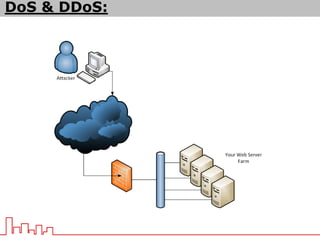
Difference:
 The difference between DoS & DDoS is the number of attacker.
 In case of DDoS, multiple number of attackers target the same victim and
attack in a co-ordinated way.
 It is more difficult to stop a DDoS attack, because lots of attackers IP will
send the attack.
DoS & DDoS:
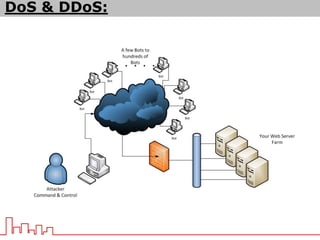
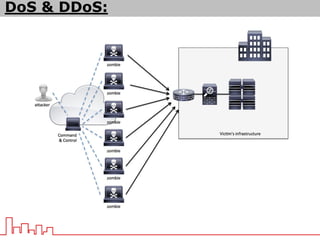
Generic Process of formulating a DDoS:
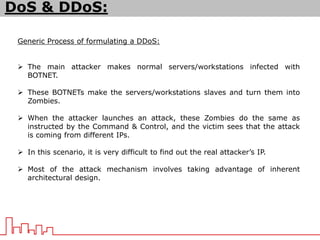
 The main attacker makes normal servers/workstations infected with
BOTNET.
 These BOTNETs make the servers/workstations slaves and turn them into
Zombies.
 When the attacker launches an attack, these Zombies do the same as
instructed by the Command & Control, and the victim sees that the attack
is coming from different IPs.
 In this scenario, it is very difficult to find out the real attacker’s IP.
 Most of the attack mechanism involves taking advantage of inherent
architectural design.
DoS & DDoS:
DDoS and its types:
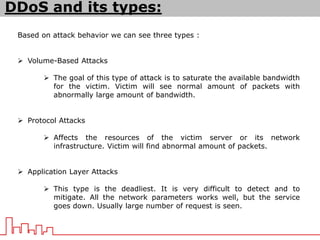
Based on attack behavior we can see three types :
 Volume-Based Attacks
 The goal of this type of attack is to saturate the available bandwidth
for the victim. Victim will see normal amount of packets with
abnormally large amount of bandwidth.
 Protocol Attacks
 Affects the resources of the victim server or its network
infrastructure. Victim will find abnormal amount of packets.
 Application Layer Attacks
 This type is the deadliest. It is very difficult to detect and to
mitigate. All the network parameters works well, but the service
goes down. Usually large number of request is seen.
DNS Reflection Attack:
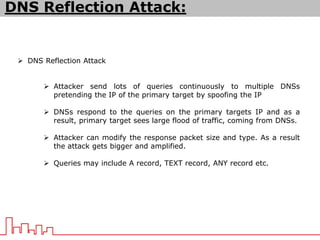
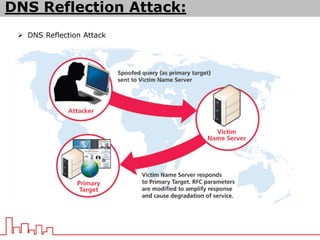
 DNS Reflection Attack
 Attacker send lots of queries continuously to multiple DNSs
pretending the IP of the primary target by spoofing the IP
 DNSs respond to the queries on the primary targets IP and as a
result, primary target sees large flood of traffic, coming from DNSs.
 Attacker can modify the response packet size and type. As a result
the attack gets bigger and amplified.
 Queries may include A record, TEXT record, ANY record etc.
 DNS Reflection Attack
DNS Reflection Attack:
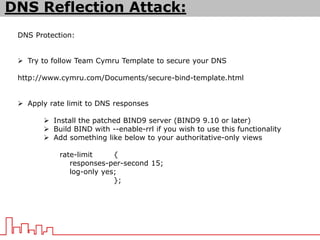
DNS Protection:
 Try to follow Team Cymru Template to secure your DNS
http://www.cymru.com/Documents/secure-bind-template.html
 Apply rate limit to DNS responses
 Install the patched BIND9 server (BIND9 9.10 or later)
 Build BIND with --enable-rrl if you wish to use this functionality
 Add something like below to your authoritative-only views
rate-limit {
responses-per-second 15;
log-only yes;
};
DNS Reflection Attack:
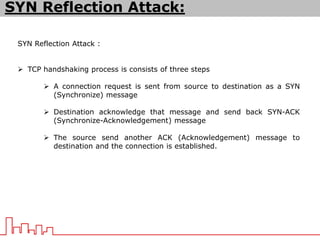
SYN Reflection Attack :
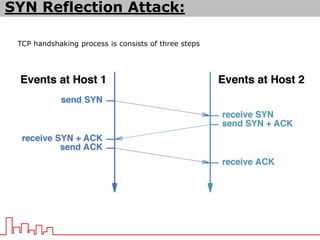
 TCP handshaking process is consists of three steps
 A connection request is sent from source to destination as a SYN
(Synchronize) message
 Destination acknowledge that message and send back SYN-ACK
(Synchronize-Acknowledgement) message
 The source send another ACK (Acknowledgement) message to
destination and the connection is established.
SYN Reflection Attack:
TCP handshaking process is consists of three steps
SYN Reflection Attack:
SYN Reflection Attack :
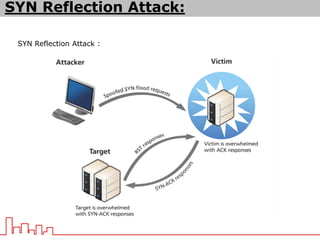
 SYN reflection attack is based on SYN flooding
 Attacker send lots of SYN messages to a victim host with a spoofed IP of
the primary target.
 Victim host becomes puzzled to send all the SYN-ACK message in return
and the primary target also send ACK message to the victim host.
 In this way both the victim host and the primary target becomes
overwhelming with messages and causes denial of service for both the
victim host and the primary target.
SYN Reflection Attack:
SYN Reflection Attack :
SYN Reflection Attack:
SYN Reflection Attack Mitigation :
 Use a firewall to protect your servers
 Use uRPF (Unicast Reverse Path Forwarding) – Not much recommended
 Go for Anti-spoofing measures such as limiting connections and enforcing
timeouts
 Use SYN Cache at your server end to destroy half-open connection after a
while
 Allow SYN cookie in your server end
SYN Reflection Attack:
SMURF Attack :
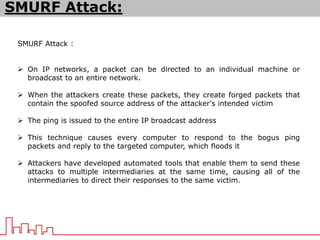
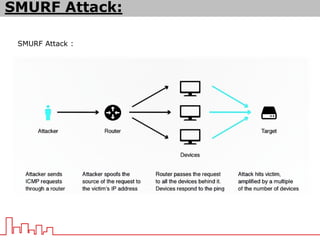
 On IP networks, a packet can be directed to an individual machine or
broadcast to an entire network.
 When the attackers create these packets, they create forged packets that
contain the spoofed source address of the attacker's intended victim
 The ping is issued to the entire IP broadcast address
 This technique causes every computer to respond to the bogus ping
packets and reply to the targeted computer, which floods it
 Attackers have developed automated tools that enable them to send these
attacks to multiple intermediaries at the same time, causing all of the
intermediaries to direct their responses to the same victim.
SMURF Attack:
SMURF Attack :
SMURF Attack:
SMURF Attack Mitigation:
 Disable ip directed broadcast in network layer where it is not needed.
 Use ICMP rate limit and priority options.
 Most of the new OS don’t accept any request or response from IP
broadcast address.
SMURF Attack:
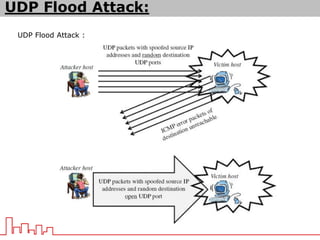
UDP Flood Attack :
 Most frequent form of DDoS attack with large volume bandwidth because
they are connectionless.
 It is easy to generate UDP message by many different scripting and
compiled languages.
 UDP floods contain messages with size bigger than the maximum transfer
unit of the infrastructure.
 Attacker sends an UDP packet to a random port on the victim system.
 When the victim system receives an UDP packet, it will determine what
application is waiting on the destination port. When it realizes that there is
no application that is waiting on the port, it will generate an ICMP packet of
destination unreachable to the forged source address.
 If enough UDP packets are delivered to ports on victim, the system will go down.
UDP Flood Attack:
UDP Flood Attack :
UDP Flood Attack:
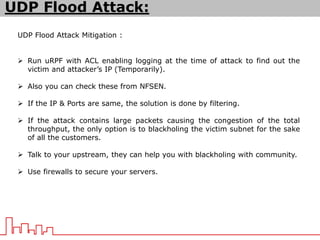
UDP Flood Attack Mitigation :
 Run uRPF with ACL enabling logging at the time of attack to find out the
victim and attacker’s IP (Temporarily).
 Also you can check these from NFSEN.
 If the IP & Ports are same, the solution is done by filtering.
 If the attack contains large packets causing the congestion of the total
throughput, the only option is to blackholing the victim subnet for the sake
of all the customers.
 Talk to your upstream, they can help you with blackholing with community.
 Use firewalls to secure your servers.
UDP Flood Attack:
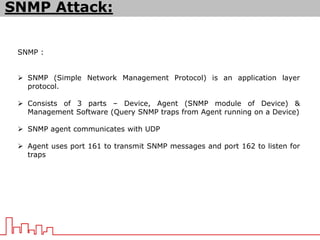
SNMP :
 SNMP (Simple Network Management Protocol) is an application layer
protocol.
 Consists of 3 parts – Device, Agent (SNMP module of Device) &
Management Software (Query SNMP traps from Agent running on a Device)
 SNMP agent communicates with UDP
 Agent uses port 161 to transmit SNMP messages and port 162 to listen for
traps
SNMP Attack:
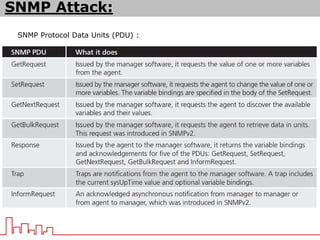
SNMP Protocol Data Units (PDU) :
SNMP Attack:
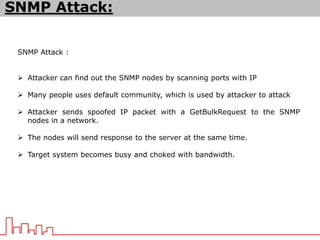
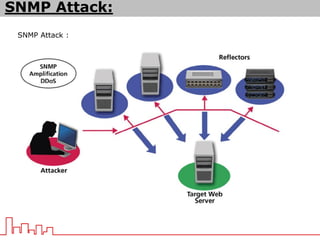
SNMP Attack :
 Attacker can find out the SNMP nodes by scanning ports with IP
 Many people uses default community, which is used by attacker to attack
 Attacker sends spoofed IP packet with a GetBulkRequest to the SNMP
nodes in a network.
 The nodes will send response to the server at the same time.
 Target system becomes busy and choked with bandwidth.
SNMP Attack:
SNMP Attack :
SNMP Attack:
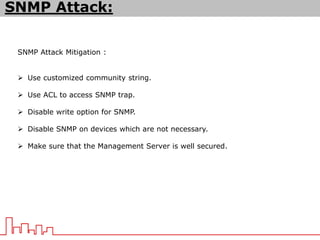
SNMP Attack Mitigation :
 Use customized community string.
 Use ACL to access SNMP trap.
 Disable write option for SNMP.
 Disable SNMP on devices which are not necessary.
 Make sure that the Management Server is well secured.
SNMP Attack:
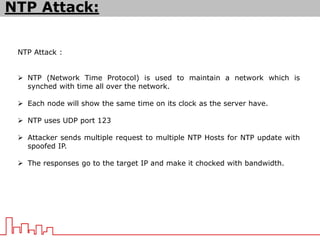
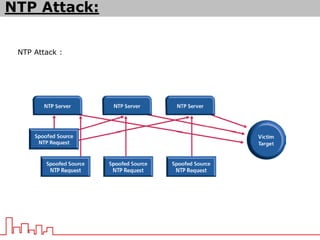
NTP Attack :
 NTP (Network Time Protocol) is used to maintain a network which is
synched with time all over the network.
 Each node will show the same time on its clock as the server have.
 NTP uses UDP port 123
 Attacker sends multiple request to multiple NTP Hosts for NTP update with
spoofed IP.
 The responses go to the target IP and make it chocked with bandwidth.
NTP Attack:
NTP Attack :
NTP Attack:
NTP Attack Mitigation :
 Don’t enable NTP if not necessary.
 Use NTP authentication and ACL.
 Team Cymru has a secure template for NTP configurations. Go for it.
http://www.team-cymru.org/secure-ntp-template.html
NTP Attack:
HTTP Get Attack :
 Attacker uses time-delayed HTTP headers to hold on to HTTP connections
and exhaust web server threads or resources.
 Attacker never send the full request. As a result, server holds ontu the
HTTP connections and keep waiting.
 All the network parameters will look like ok. But your service will be down.
 Can evade Layer 4 DDOS protection systems.
 It is a layer 7 DDoS.
HTTP Get Attack:
HTTP Get Attack Mitigation :
 Set timeout limit for HTTP headers in your servers
 There are some modules for defending this attack like mod_antiloris etc.
HTTP Get Attack:
HTTP Post Attack :
 POST request means a message body in a URL which is used to specify
information for the action user want to perform.
 The message body is encoded.
 Attacker sends HTTP requests with complete headers but incomplete
message body.
 Servers keep waiting for the rest of the message body.
 This attack can evade Layer 4 detection techniques as there is no
malformed TCP.
 Difficult to differentiate from legit connections which are slow.
HTTP Post Attack:
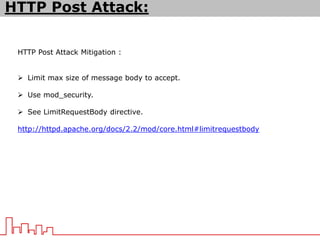
HTTP Post Attack Mitigation :
 Limit max size of message body to accept.
 Use mod_security.
 See LimitRequestBody directive.
http://httpd.apache.org/docs/2.2/mod/core.html#limitrequestbody
HTTP Post Attack:
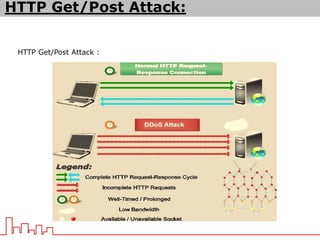
HTTP Get/Post Attack :
HTTP Get/Post Attack:
UDP Flood Attack:
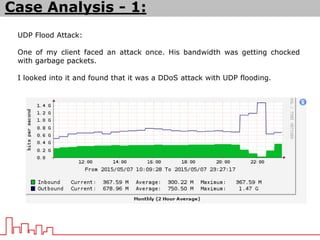
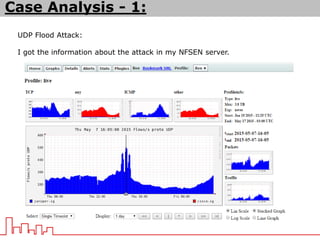
One of my client faced an attack once. His bandwidth was getting chocked
with garbage packets.
I looked into it and found that it was a DDoS attack with UDP flooding.
Case Analysis - 1:
UDP Flood Attack:
I got the information about the attack in my NFSEN server.
Case Analysis - 1:
UDP Flood Attack:
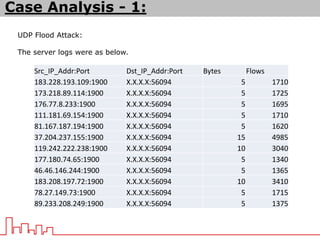
The server logs were as below.
Case Analysis - 1:
Src_IP_Addr:Port Dst_IP_Addr:Port Bytes Flows
183.228.193.109:1900 X.X.X.X:56094 5 1710
173.218.89.114:1900 X.X.X.X:56094 5 1725
176.77.8.233:1900 X.X.X.X:56094 5 1695
111.181.69.154:1900 X.X.X.X:56094 5 1710
81.167.187.194:1900 X.X.X.X:56094 5 1620
37.204.237.155:1900 X.X.X.X:56094 15 4985
119.242.222.238:1900 X.X.X.X:56094 10 3040
177.180.74.65:1900 X.X.X.X:56094 5 1340
46.46.146.244:1900 X.X.X.X:56094 5 1365
183.208.197.72:1900 X.X.X.X:56094 10 3410
78.27.149.73:1900 X.X.X.X:56094 5 1715
89.233.208.249:1900 X.X.X.X:56094 5 1375
UDP Flood Attack:
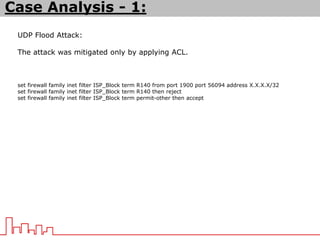
The attack was mitigated only by applying ACL.
set firewall family inet filter ISP_Block term R140 from port 1900 port 56094 address X.X.X.X/32
set firewall family inet filter ISP_Block term R140 then reject
set firewall family inet filter ISP_Block term permit-other then accept
Case Analysis - 1:
UDP Flood Attack:
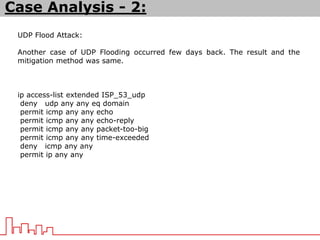
Another case of UDP Flooding occurred few days back. The result and the
mitigation method was same.
ip access-list extended ISP_53_udp
deny udp any any eq domain
permit icmp any any echo
permit icmp any any echo-reply
permit icmp any any packet-too-big
permit icmp any any time-exceeded
deny icmp any any
permit ip any any
Case Analysis - 2:
Symptoms:
 Unusual loads on servers
 Unusual traffic statistics
 CPU load increased drastically without any known reason
 Suspicious logs
 Number of request is increased
 Number of PPS is increased
TO DOs Before Attacked:
 Secure your network more efficiently. Work with your filters.
 Try to follow different security experts like different CERTs or Team Cymru.
 Choose your upstream carefully. A technically sound friendly upstream is
better than a cheap upstream.
 Keep in mind that all the attacks will not show you high bandwidth. Be
aware of application level attack.
 Make your DNS robust and secure.
 Go through LOGs regularly for any suspicious activity.
 Try to use NFSEN to collect flow from your network.
 Use Wireshark and try to understand packets.
 Use firewalls in network layer and IPTABLES for your servers.
 There are paid DDoS attack mitigation services provided by AT&T, Verisign,
Arbor Networks and Prolexic. Look for options if you can afford one.
TO DOs When Attacked:
 Keep Calm and try to understand the attack scenario.
 Look for pattern. It might be few same ports or few same IPs.
 Use filter in network layer. Mostly effective during an attack.
 Use NULL Route or Blackhole for the attacked IP blocks.
Mentors
Sumon Ahmed Sabir
Simon Sohel Baroi
Thank You … 

DDoS-bdNOG

  • 1.
    Basics on DDoS Md.Zobair Khan AS 58587 kzobair@gmail.com
  • 2.
    DoS & DDoS: DoS: Adenial of service (DoS) attack is a malicious attempt to make a server or a network resource unavailable to users, usually by temporarily interrupting or suspending the services of a host connected to the Internet. (www.incapsula.com) DDoS: A Distributed Denial of Service (DDoS) attack is an attempt to make an online service unavailable by overwhelming it with traffic from multiple sources. They target a wide variety of important resources, from banks to news websites, and present a major challenge to making sure people can publish and access important information. (http://www.digitalattackmap.com/)
  • 3.
  • 4.
  • 5.
    DoS & DDoS: Difference: The difference between DoS & DDoS is the number of attacker.  In case of DDoS, multiple number of attackers target the same victim and attack in a co-ordinated way.  It is more difficult to stop a DDoS attack, because lots of attackers IP will send the attack.
  • 6.
    DoS & DDoS: GenericProcess of formulating a DDoS:  The main attacker makes normal servers/workstations infected with BOTNET.  These BOTNETs make the servers/workstations slaves and turn them into Zombies.  When the attacker launches an attack, these Zombies do the same as instructed by the Command & Control, and the victim sees that the attack is coming from different IPs.  In this scenario, it is very difficult to find out the real attacker’s IP.  Most of the attack mechanism involves taking advantage of inherent architectural design.
  • 7.
  • 8.
    DDoS and itstypes: Based on attack behavior we can see three types :  Volume-Based Attacks  The goal of this type of attack is to saturate the available bandwidth for the victim. Victim will see normal amount of packets with abnormally large amount of bandwidth.  Protocol Attacks  Affects the resources of the victim server or its network infrastructure. Victim will find abnormal amount of packets.  Application Layer Attacks  This type is the deadliest. It is very difficult to detect and to mitigate. All the network parameters works well, but the service goes down. Usually large number of request is seen.
  • 9.
    DNS Reflection Attack: DNS Reflection Attack  Attacker send lots of queries continuously to multiple DNSs pretending the IP of the primary target by spoofing the IP  DNSs respond to the queries on the primary targets IP and as a result, primary target sees large flood of traffic, coming from DNSs.  Attacker can modify the response packet size and type. As a result the attack gets bigger and amplified.  Queries may include A record, TEXT record, ANY record etc.
  • 10.
     DNS ReflectionAttack DNS Reflection Attack:
  • 11.
    DNS Protection:  Tryto follow Team Cymru Template to secure your DNS http://www.cymru.com/Documents/secure-bind-template.html  Apply rate limit to DNS responses  Install the patched BIND9 server (BIND9 9.10 or later)  Build BIND with --enable-rrl if you wish to use this functionality  Add something like below to your authoritative-only views rate-limit { responses-per-second 15; log-only yes; }; DNS Reflection Attack:
  • 12.
    SYN Reflection Attack:  TCP handshaking process is consists of three steps  A connection request is sent from source to destination as a SYN (Synchronize) message  Destination acknowledge that message and send back SYN-ACK (Synchronize-Acknowledgement) message  The source send another ACK (Acknowledgement) message to destination and the connection is established. SYN Reflection Attack:
  • 13.
    TCP handshaking processis consists of three steps SYN Reflection Attack:
  • 14.
    SYN Reflection Attack:  SYN reflection attack is based on SYN flooding  Attacker send lots of SYN messages to a victim host with a spoofed IP of the primary target.  Victim host becomes puzzled to send all the SYN-ACK message in return and the primary target also send ACK message to the victim host.  In this way both the victim host and the primary target becomes overwhelming with messages and causes denial of service for both the victim host and the primary target. SYN Reflection Attack:
  • 15.
    SYN Reflection Attack: SYN Reflection Attack:
  • 16.
    SYN Reflection AttackMitigation :  Use a firewall to protect your servers  Use uRPF (Unicast Reverse Path Forwarding) – Not much recommended  Go for Anti-spoofing measures such as limiting connections and enforcing timeouts  Use SYN Cache at your server end to destroy half-open connection after a while  Allow SYN cookie in your server end SYN Reflection Attack:
  • 17.
    SMURF Attack : On IP networks, a packet can be directed to an individual machine or broadcast to an entire network.  When the attackers create these packets, they create forged packets that contain the spoofed source address of the attacker's intended victim  The ping is issued to the entire IP broadcast address  This technique causes every computer to respond to the bogus ping packets and reply to the targeted computer, which floods it  Attackers have developed automated tools that enable them to send these attacks to multiple intermediaries at the same time, causing all of the intermediaries to direct their responses to the same victim. SMURF Attack:
  • 18.
  • 19.
    SMURF Attack Mitigation: Disable ip directed broadcast in network layer where it is not needed.  Use ICMP rate limit and priority options.  Most of the new OS don’t accept any request or response from IP broadcast address. SMURF Attack:
  • 20.
    UDP Flood Attack:  Most frequent form of DDoS attack with large volume bandwidth because they are connectionless.  It is easy to generate UDP message by many different scripting and compiled languages.  UDP floods contain messages with size bigger than the maximum transfer unit of the infrastructure.  Attacker sends an UDP packet to a random port on the victim system.  When the victim system receives an UDP packet, it will determine what application is waiting on the destination port. When it realizes that there is no application that is waiting on the port, it will generate an ICMP packet of destination unreachable to the forged source address.  If enough UDP packets are delivered to ports on victim, the system will go down. UDP Flood Attack:
  • 21.
    UDP Flood Attack: UDP Flood Attack:
  • 22.
    UDP Flood AttackMitigation :  Run uRPF with ACL enabling logging at the time of attack to find out the victim and attacker’s IP (Temporarily).  Also you can check these from NFSEN.  If the IP & Ports are same, the solution is done by filtering.  If the attack contains large packets causing the congestion of the total throughput, the only option is to blackholing the victim subnet for the sake of all the customers.  Talk to your upstream, they can help you with blackholing with community.  Use firewalls to secure your servers. UDP Flood Attack:
  • 23.
    SNMP :  SNMP(Simple Network Management Protocol) is an application layer protocol.  Consists of 3 parts – Device, Agent (SNMP module of Device) & Management Software (Query SNMP traps from Agent running on a Device)  SNMP agent communicates with UDP  Agent uses port 161 to transmit SNMP messages and port 162 to listen for traps SNMP Attack:
  • 24.
    SNMP Protocol DataUnits (PDU) : SNMP Attack:
  • 25.
    SNMP Attack : Attacker can find out the SNMP nodes by scanning ports with IP  Many people uses default community, which is used by attacker to attack  Attacker sends spoofed IP packet with a GetBulkRequest to the SNMP nodes in a network.  The nodes will send response to the server at the same time.  Target system becomes busy and choked with bandwidth. SNMP Attack:
  • 26.
  • 27.
    SNMP Attack Mitigation:  Use customized community string.  Use ACL to access SNMP trap.  Disable write option for SNMP.  Disable SNMP on devices which are not necessary.  Make sure that the Management Server is well secured. SNMP Attack:
  • 28.
    NTP Attack : NTP (Network Time Protocol) is used to maintain a network which is synched with time all over the network.  Each node will show the same time on its clock as the server have.  NTP uses UDP port 123  Attacker sends multiple request to multiple NTP Hosts for NTP update with spoofed IP.  The responses go to the target IP and make it chocked with bandwidth. NTP Attack:
  • 29.
  • 30.
    NTP Attack Mitigation:  Don’t enable NTP if not necessary.  Use NTP authentication and ACL.  Team Cymru has a secure template for NTP configurations. Go for it. http://www.team-cymru.org/secure-ntp-template.html NTP Attack:
  • 31.
    HTTP Get Attack:  Attacker uses time-delayed HTTP headers to hold on to HTTP connections and exhaust web server threads or resources.  Attacker never send the full request. As a result, server holds ontu the HTTP connections and keep waiting.  All the network parameters will look like ok. But your service will be down.  Can evade Layer 4 DDOS protection systems.  It is a layer 7 DDoS. HTTP Get Attack:
  • 32.
    HTTP Get AttackMitigation :  Set timeout limit for HTTP headers in your servers  There are some modules for defending this attack like mod_antiloris etc. HTTP Get Attack:
  • 33.
    HTTP Post Attack:  POST request means a message body in a URL which is used to specify information for the action user want to perform.  The message body is encoded.  Attacker sends HTTP requests with complete headers but incomplete message body.  Servers keep waiting for the rest of the message body.  This attack can evade Layer 4 detection techniques as there is no malformed TCP.  Difficult to differentiate from legit connections which are slow. HTTP Post Attack:
  • 34.
    HTTP Post AttackMitigation :  Limit max size of message body to accept.  Use mod_security.  See LimitRequestBody directive. http://httpd.apache.org/docs/2.2/mod/core.html#limitrequestbody HTTP Post Attack:
  • 35.
    HTTP Get/Post Attack: HTTP Get/Post Attack:
  • 36.
    UDP Flood Attack: Oneof my client faced an attack once. His bandwidth was getting chocked with garbage packets. I looked into it and found that it was a DDoS attack with UDP flooding. Case Analysis - 1:
  • 37.
    UDP Flood Attack: Igot the information about the attack in my NFSEN server. Case Analysis - 1:
  • 38.
    UDP Flood Attack: Theserver logs were as below. Case Analysis - 1: Src_IP_Addr:Port Dst_IP_Addr:Port Bytes Flows 183.228.193.109:1900 X.X.X.X:56094 5 1710 173.218.89.114:1900 X.X.X.X:56094 5 1725 176.77.8.233:1900 X.X.X.X:56094 5 1695 111.181.69.154:1900 X.X.X.X:56094 5 1710 81.167.187.194:1900 X.X.X.X:56094 5 1620 37.204.237.155:1900 X.X.X.X:56094 15 4985 119.242.222.238:1900 X.X.X.X:56094 10 3040 177.180.74.65:1900 X.X.X.X:56094 5 1340 46.46.146.244:1900 X.X.X.X:56094 5 1365 183.208.197.72:1900 X.X.X.X:56094 10 3410 78.27.149.73:1900 X.X.X.X:56094 5 1715 89.233.208.249:1900 X.X.X.X:56094 5 1375
  • 39.
    UDP Flood Attack: Theattack was mitigated only by applying ACL. set firewall family inet filter ISP_Block term R140 from port 1900 port 56094 address X.X.X.X/32 set firewall family inet filter ISP_Block term R140 then reject set firewall family inet filter ISP_Block term permit-other then accept Case Analysis - 1:
  • 40.
    UDP Flood Attack: Anothercase of UDP Flooding occurred few days back. The result and the mitigation method was same. ip access-list extended ISP_53_udp deny udp any any eq domain permit icmp any any echo permit icmp any any echo-reply permit icmp any any packet-too-big permit icmp any any time-exceeded deny icmp any any permit ip any any Case Analysis - 2:
  • 41.
    Symptoms:  Unusual loadson servers  Unusual traffic statistics  CPU load increased drastically without any known reason  Suspicious logs  Number of request is increased  Number of PPS is increased
  • 42.
    TO DOs BeforeAttacked:  Secure your network more efficiently. Work with your filters.  Try to follow different security experts like different CERTs or Team Cymru.  Choose your upstream carefully. A technically sound friendly upstream is better than a cheap upstream.  Keep in mind that all the attacks will not show you high bandwidth. Be aware of application level attack.  Make your DNS robust and secure.  Go through LOGs regularly for any suspicious activity.  Try to use NFSEN to collect flow from your network.  Use Wireshark and try to understand packets.  Use firewalls in network layer and IPTABLES for your servers.  There are paid DDoS attack mitigation services provided by AT&T, Verisign, Arbor Networks and Prolexic. Look for options if you can afford one.
  • 43.
    TO DOs WhenAttacked:  Keep Calm and try to understand the attack scenario.  Look for pattern. It might be few same ports or few same IPs.  Use filter in network layer. Mostly effective during an attack.  Use NULL Route or Blackhole for the attacked IP blocks.
  • 44.
  • 45.