MySQL Tutorial Introduction to Database
Learning Objectives Read and write Data Definition grammar of SQL Read and write data modification statements ( INSERT, UPDATE, DELETE ) Read and write basic  SELECT FROM WHERE  queries Use aggregate functions
Introduction of MySQL MySQL is an SQL (Structured Query Language) based relational database management system (DBMS) MySQL is compatible with standard SQL MySQL is frequently used by PHP and Perl Commercial version of MySQL is also provided (including technical support)
Part1: SQL used for Data Definition Allows the specification of not only a set of relations but also information about each relation, including: The schema for each relation The domain of values associated with each attribute Integrity constraints
Domain Types in SQL Similar to data types in classical programming languages Integer (a machine-dependent finite subset of the integers) INTEGER Double-precision floating point number DOUBLE(M,D) Floating point number, with total number of digits M and number of digits following the decimal point D FLOAT(M,D) A small integer (a finite subset of  INTEGER ) SMALLINT(n) Variable length character string, with specified maximum length n VARCHAR(n) Fixed length character string, with specified length n CHAR(n) Description Type
CREATE DATABASE An SQL relation is defined using the  CREATE DATABASE  command: create database  [ database name ] Example create database   mydatabase
CREATE TABLE An SQL relation is defined using the  CREATE TABLE  command: Create   table  [ tablename ]  (A 1  T 1 ,A 2  T 2 , … A n  T n , (integrity-constraint 1 ), … , (integrity-constraint k )) Each A i  is an attribute name in the table Each T i  is the data type of values for A i Example Create   table   student ( flashlineID char(9) not null,   name varchar(30),   age integer,   department varchar(20),   primary key (flashlineID) ); Integrity constraint
DROP and ALTER TABLE The  DROP TABLE  command deletes all information about the dropped relation from the database The  ALTER TABLE  command is used to add attributes to or remove attributes from an existing relation (table): alter table   tablename   actions where actions can be one of following actions: ADD   Attribute DROP   Attribute ADD   PRIMARY KEY  ( Attribute_name 1 ,…) DROP   PRIMARY KEY
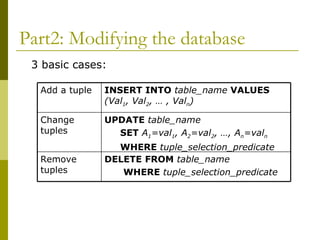
Part2: Modifying the database 3 basic cases: DELETE   FROM   table_name WHERE   tuple_selection_predicate Remove tuples UPDATE   table_name SET   A 1 =val 1 , A 2 =val 2 , …, A n =val n WHERE   tuple_selection_predicate Change tuples INSERT INTO   table_name   VALUES   (Val 1 , Val 2 , … , Val n ) Add a tuple
INSERTION Add a new tuple to  student insert   into   student values (‘999999999’,’Mike’,18,’computer science’) or equivalently insert   into   student(flashlineID,name,age,department) values (‘999999999’,’Mike’,18,’computer science’) Add a new tuple to  student  with  age  set to  null insert   into   student values (‘999999999’,’Mike’, null ,’computer science’)
UPDATE Set all department to ‘computer science’ update   student set   department =‘computer science’ In table  account(account_number, balance, branch_name, branch_city),  increase the balances of all accounts by 6% update   account set   balance=balance*1.06
DELETION Delete records of all students in the university delete   from   student Delete the students who study computer science delete   from   student where   department =‘computer science’
Part3: Basic Query Structure A typical SQL query has the form: select   A 1 , A 2 , …, A n from   table 1 , table 2 , …, table m where   P A i  represents an attribute table i  represents a table P is a constraints (condition) This query is equivalent to the relational algebra expression: Example Select   flashlineID, name   from   student Where   department =‘computer science’
The  SELECT  Clause – Duplicate tuples Unlike pure relational algebra, SQL does not automatically remove duplicate tuples from relations or query results To eliminate duplicates, insert the keyword  distinct  after  select . Example: Find the names of all students in the university, and remove duplicates select distinct   name   from   student
The  SELECT  Clause – Expressions,  as An star in the select clause denotes “all attributes” select  *  from   student An expression can be assigned a name using  as Example select   FlashlineID   as   ID from   student Note:  as  is rename clause, also can be used to rename table name select   name   as   myname from   student   as   S
The  WHERE  Clause The  WHERE  clause specifies the conditions (constraints) results satisfy  Corresponds to the selection predicate  σ Comparisons and Booleans are as follows: Comparison operator: <, <=, >,>=, =, <> Logical operators: and, or, not Example Find names of all students in computer science department with age smaller than 18 select   names from   student where   department =‘computer science’  and   age <18
Aggregate Functions Aggregate functions operate on the  multiset  of values of a attribute and return a value avg ( attribute ):  average value min ( attribute ):  minimum value max ( attribute ):  maximum value sum ( attribute ): sum of values count ( attribute ): number of values To obtain the value when duplicates are removed, insert the keyword  distinct  before attribute name: avg ( distinct   attribute )
Aggregation:  GROUP BY  clause GROUP BY  attribute operate in this sequence Groups the attribute set’s members into subsets by value Performs the aggregate separately on each subset Produces a result value for each subset Example: list each department and its number of students select   department ,  count ( distinct   name )  as   number from   student group by   department Note: if a  select  clause contains any aggregate functions, then all non-aggregated terms in the  select  clause must be used in a  group by  clause. Ex:  department  is not aggregated, so it must be in the  group by  clause.
Null Values and Aggregate The youngest student in the university select   * from   student where  age= min ( age ) Above statement ignores null amounts Result is  null  if there is no non-null amount All aggregate operations except  count(*)  ignore tuples with null values on the aggregated attributes.
Resource MySQL and GUI Client can be downloaded from http://dev.mysql.com/downloads/ The SQL script for creating database ‘bank’ can be found at  http://www.cs.kent.edu/~nruan/bank_db.sql http://www.cs.kent.edu/~nruan/bank_data.sql
Banking Example branch ( branch-name , branch-city, assets) customer ( customer-name , customer-street, customer-city) account ( account-number , branch-name, balance) loan ( loan-number , branch-name, amount) depositor ( customer-name, account-number ) borrower ( customer-name, loan-number ) employee ( employee-name, branch-name , salary)
Command for accessing MySQL Access linux server >ssh hercules.cs.kent.edu  Access MySQL >mysql –u [username] –p >password:[password]

PPT

  • 1.
  • 2.
    Learning Objectives Readand write Data Definition grammar of SQL Read and write data modification statements ( INSERT, UPDATE, DELETE ) Read and write basic SELECT FROM WHERE queries Use aggregate functions
  • 3.
    Introduction of MySQLMySQL is an SQL (Structured Query Language) based relational database management system (DBMS) MySQL is compatible with standard SQL MySQL is frequently used by PHP and Perl Commercial version of MySQL is also provided (including technical support)
  • 4.
    Part1: SQL usedfor Data Definition Allows the specification of not only a set of relations but also information about each relation, including: The schema for each relation The domain of values associated with each attribute Integrity constraints
  • 5.
    Domain Types inSQL Similar to data types in classical programming languages Integer (a machine-dependent finite subset of the integers) INTEGER Double-precision floating point number DOUBLE(M,D) Floating point number, with total number of digits M and number of digits following the decimal point D FLOAT(M,D) A small integer (a finite subset of INTEGER ) SMALLINT(n) Variable length character string, with specified maximum length n VARCHAR(n) Fixed length character string, with specified length n CHAR(n) Description Type
  • 6.
    CREATE DATABASE AnSQL relation is defined using the CREATE DATABASE command: create database [ database name ] Example create database mydatabase
  • 7.
    CREATE TABLE AnSQL relation is defined using the CREATE TABLE command: Create table [ tablename ] (A 1 T 1 ,A 2 T 2 , … A n T n , (integrity-constraint 1 ), … , (integrity-constraint k )) Each A i is an attribute name in the table Each T i is the data type of values for A i Example Create table student ( flashlineID char(9) not null, name varchar(30), age integer, department varchar(20), primary key (flashlineID) ); Integrity constraint
  • 8.
    DROP and ALTERTABLE The DROP TABLE command deletes all information about the dropped relation from the database The ALTER TABLE command is used to add attributes to or remove attributes from an existing relation (table): alter table tablename actions where actions can be one of following actions: ADD Attribute DROP Attribute ADD PRIMARY KEY ( Attribute_name 1 ,…) DROP PRIMARY KEY
  • 9.
    Part2: Modifying thedatabase 3 basic cases: DELETE FROM table_name WHERE tuple_selection_predicate Remove tuples UPDATE table_name SET A 1 =val 1 , A 2 =val 2 , …, A n =val n WHERE tuple_selection_predicate Change tuples INSERT INTO table_name VALUES (Val 1 , Val 2 , … , Val n ) Add a tuple
  • 10.
    INSERTION Add anew tuple to student insert into student values (‘999999999’,’Mike’,18,’computer science’) or equivalently insert into student(flashlineID,name,age,department) values (‘999999999’,’Mike’,18,’computer science’) Add a new tuple to student with age set to null insert into student values (‘999999999’,’Mike’, null ,’computer science’)
  • 11.
    UPDATE Set alldepartment to ‘computer science’ update student set department =‘computer science’ In table account(account_number, balance, branch_name, branch_city), increase the balances of all accounts by 6% update account set balance=balance*1.06
  • 12.
    DELETION Delete recordsof all students in the university delete from student Delete the students who study computer science delete from student where department =‘computer science’
  • 13.
    Part3: Basic QueryStructure A typical SQL query has the form: select A 1 , A 2 , …, A n from table 1 , table 2 , …, table m where P A i represents an attribute table i represents a table P is a constraints (condition) This query is equivalent to the relational algebra expression: Example Select flashlineID, name from student Where department =‘computer science’
  • 14.
    The SELECT Clause – Duplicate tuples Unlike pure relational algebra, SQL does not automatically remove duplicate tuples from relations or query results To eliminate duplicates, insert the keyword distinct after select . Example: Find the names of all students in the university, and remove duplicates select distinct name from student
  • 15.
    The SELECT Clause – Expressions, as An star in the select clause denotes “all attributes” select * from student An expression can be assigned a name using as Example select FlashlineID as ID from student Note: as is rename clause, also can be used to rename table name select name as myname from student as S
  • 16.
    The WHERE Clause The WHERE clause specifies the conditions (constraints) results satisfy Corresponds to the selection predicate σ Comparisons and Booleans are as follows: Comparison operator: <, <=, >,>=, =, <> Logical operators: and, or, not Example Find names of all students in computer science department with age smaller than 18 select names from student where department =‘computer science’ and age <18
  • 17.
    Aggregate Functions Aggregatefunctions operate on the multiset of values of a attribute and return a value avg ( attribute ): average value min ( attribute ): minimum value max ( attribute ): maximum value sum ( attribute ): sum of values count ( attribute ): number of values To obtain the value when duplicates are removed, insert the keyword distinct before attribute name: avg ( distinct attribute )
  • 18.
    Aggregation: GROUPBY clause GROUP BY attribute operate in this sequence Groups the attribute set’s members into subsets by value Performs the aggregate separately on each subset Produces a result value for each subset Example: list each department and its number of students select department , count ( distinct name ) as number from student group by department Note: if a select clause contains any aggregate functions, then all non-aggregated terms in the select clause must be used in a group by clause. Ex: department is not aggregated, so it must be in the group by clause.
  • 19.
    Null Values andAggregate The youngest student in the university select * from student where age= min ( age ) Above statement ignores null amounts Result is null if there is no non-null amount All aggregate operations except count(*) ignore tuples with null values on the aggregated attributes.
  • 20.
    Resource MySQL andGUI Client can be downloaded from http://dev.mysql.com/downloads/ The SQL script for creating database ‘bank’ can be found at http://www.cs.kent.edu/~nruan/bank_db.sql http://www.cs.kent.edu/~nruan/bank_data.sql
  • 21.
    Banking Example branch( branch-name , branch-city, assets) customer ( customer-name , customer-street, customer-city) account ( account-number , branch-name, balance) loan ( loan-number , branch-name, amount) depositor ( customer-name, account-number ) borrower ( customer-name, loan-number ) employee ( employee-name, branch-name , salary)
  • 22.
    Command for accessingMySQL Access linux server >ssh hercules.cs.kent.edu Access MySQL >mysql –u [username] –p >password:[password]