Database Management
CLASS-XII
 Database - Collected form of data
 Database (management) system - A computer based record
keeping system.
 Database softwares examples:
 MySQL (open Source)
 ORACLE Database
 MS SQL Server
 SQLite (open Source)
 MariaDB
 PostgreSQL (open Source)
INTRODUCTION
–DBMS is a software whose purpose is to store
databases, maintaining databases and using
databases.
–Its prime purpose is to perform operations on
databases and to provide data when required.
–DBMS reduces Data Redundancy.
–It improves data security.
-Inconsistency can be avoided.
– it stores data in organized and Integrated form.
–Data remains error free.
–Database follows a standard.
AIM OF DBMS
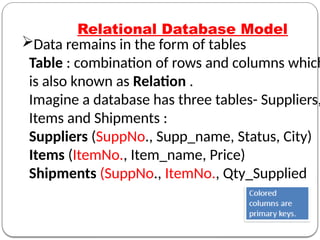
Data remains in the form of tables
Table : combination of rows and columns which
is also known as Relation .
Imagine a database has three tables- Suppliers,
Items and Shipments :
Suppliers (SuppNo., Supp_name, Status, City)
Items (ItemNo., Item_name, Price)
Shipments (SuppNo., ItemNo., Qty_Supplied
Relational Database Model
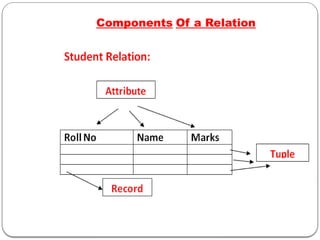
Components Of a Relation
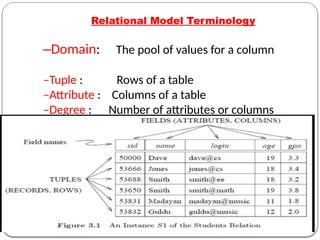
Relational Model Terminology
–Domain: The pool of values for a column
–Tuple : Rows of a table
–Attribute : Columns of a table
–Degree : Number of attributes or columns
–Cardinality : Number of tuples or rows
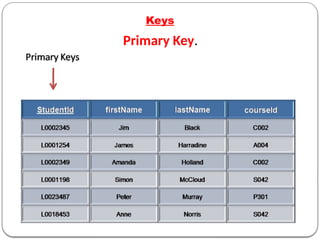
Keys
Primary Key.
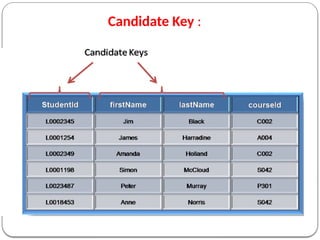
Candidate Key :
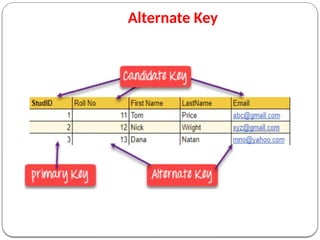
Alternate Key
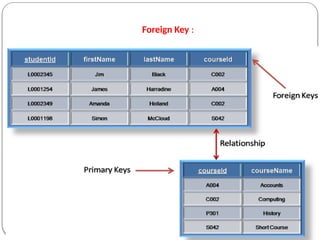
Foreign Key :
Referential Integrity
Referential Integrity: A system of rules which is used by a
DBMS to ensure that there is a valid relationship between
related tables or not.
The rules are:
1. You can't delete a record from a primary table if matching records
exist in a related table.
2. You can't change a primary key value in the primary table if that
record has related records.
3. You can't enter a value in the foreign key field of the related table
that doesn't exist in the primary key of the primary table.
4. However, you can enter a Null value in the foreign key, specifying
that the records are unrelated..
MySQL
–MySQL is an open source RDBMS which makes use of
SQL for ADDING, DELETING and MODIFYING data from
data bases.
–MySQL was developed by MySQL AB company which is
now a part of Sun Microsystems.
– SERVER : which responds to the requests of clients.
–CLIENTS : these are the programs which are attached to
database server and send requests to server.
SQL(structured Query Language)
In order to access data within the MySQL database, all
programmers and users must use SQL.
SQL is the set of commands that is recognized by all
RDBMS.
All RDBMS like Mysql,Ms Access,Oracle,and SQL server
use sql as a standard database language
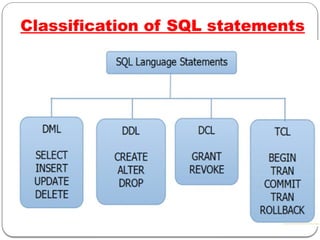
Classification of SQL statements
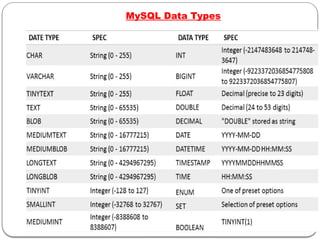
MySQL Data Types
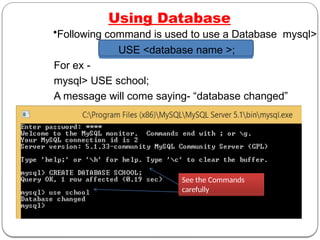
Using Database
•Following command is used to use a Database mysql>
USE <database name >;
For ex -
mysql> USE school;
A message will come saying- “database changed”
See the Commands
carefully
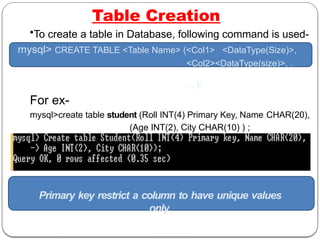
Table Creation
•To create a table in Database, following command is used-
mysql> CREATE TABLE <Table Name> (<Col1> <DataType(Size)>,
<Col2><DataType(size)>, .
. . );
For ex-
mysql>create table student (Roll INT(4) Primary Key, Name CHAR(20),
(Age INT(2), City CHAR(10) ) ;
A message will come saying- “Query OK”
Primary key restrict a column to have unique values
only.
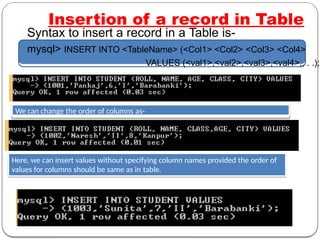
Insertion of a record in Table
Syntax to insert a record in a Table is-
mysql> INSERT INTO <TableName> (<Col1> <Col2> <Col3> <Col4>
VALUES (<val1>,<val2>,<val3>,<val4>,. . .);
We can change the order of columns as-
Here, we can insert values without specifying column names provided the order of
values for columns should be same as in table.
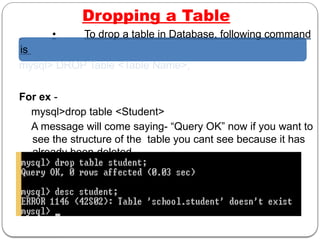
Dropping a Table
• To drop a table in Database, following command
is
mysql> DROP Table <Table Name>;
For ex -
mysql>drop table <Student>
A message will come saying- “Query OK” now if you want to
see the structure of the table you cant see because it has
already been deleted.
Modification in Table structure
• To modify structure of a table in Database,
following command is used-
mysql>ALTER TABLE <Table name> ADD/MODIFY(<Col>
<type(size)>, . . . .)
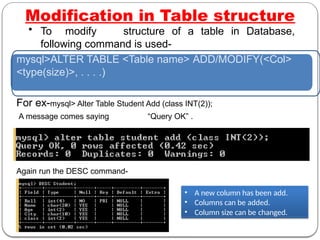
For ex-mysql> Alter Table Student Add (class INT(2));
A message comes saying “Query OK” .
Again run the DESC command-
• A new column has been add.
• Columns can be added.
• Column size can be changed.
Accessing a Table
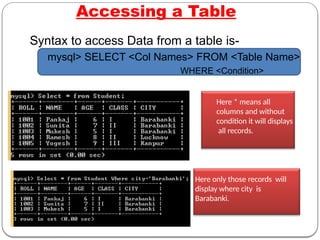
Here * means all
columns and without
condition it will displays
all records.
Here only those records will
display where city is
Barabanki.
Syntax to access Data from a table is-
mysql> SELECT <Col Names> FROM <Table Name>
WHERE <Condition>
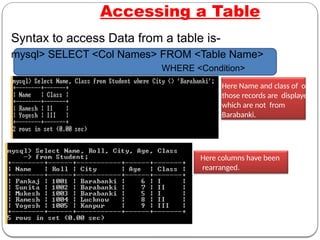
Here Name and class of only
those records are displayed
which are not from
Barabanki.
Here columns have been
rearranged.
Accessing a Table
Syntax to access Data from a table is-
mysql> SELECT <Col Names> FROM <Table Name>
WHERE <Condition>
Updating a record in Table
Syntax to update a record in a Table is-
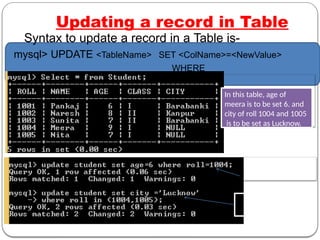
mysql> UPDATE <TableName> SET <ColName>=<NewValue>
WHERE
<Condition>
In this table, age of
meera is to be set 6. and
city of roll 1004 and 1005
is to be set as Lucknow.
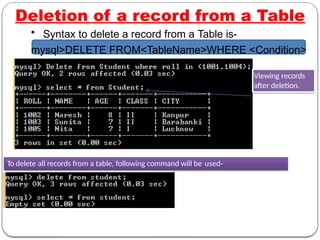
Deletion of a record from a Table
• Syntax to delete a record from a Table is-
mysql>DELETE FROM<TableName>WHERE <Condition>
To delete all records from a table, following command will be used-
Viewing records
after deletion.
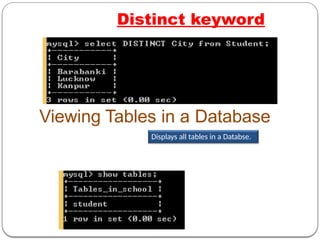
Distinct keyword
l cities in the table.
Viewing Tables in a Database
Displays all tables in a Databse.
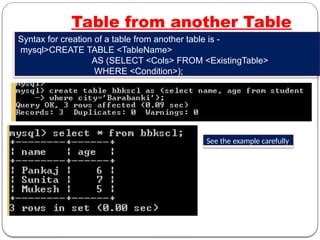
Table from another Table
See the example carefully
Syntax for creation of a table from another table is -
mysql>CREATE TABLE <TableName>
AS (SELECT <Cols> FROM <ExistingTable>
WHERE <Condition>);
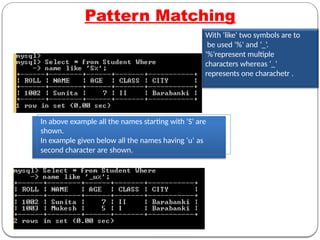
Pattern Matching
With ‘like‘ two symbols are to
be used ‘%’ and ‘_’.
‘%’represent multiple
characters whereas ‘_’
represents one charachetr .
In above example all the names starting with ‘S’ are
shown.
In example given below all the names having ‘u’ as
second character are shown.
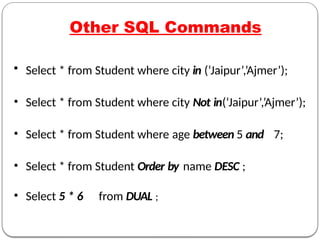
Other SQL Commands
• Select * from Student where city in (‘Jaipur’,’Ajmer’);
• Select * from Student where city Not in(‘Jaipur’,’Ajmer’);
• Select * from Student where age between 5 and 7;
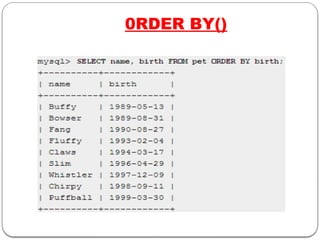
• Select * from Student Order by name DESC ;
• Select 5 * 6 from DUAL ;
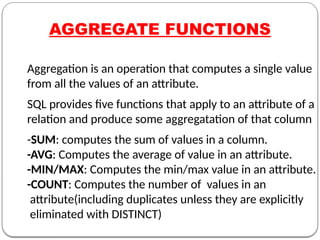
AGGREGATE FUNCTIONS
Aggregation is an operation that computes a single value
from all the values of an attribute.
SQL provides five functions that apply to an attribute of a
relation and produce some aggregatation of that column
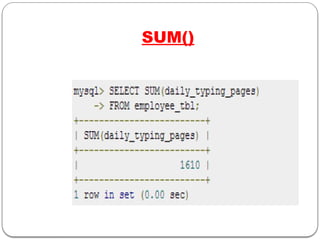
-SUM: computes the sum of values in a column.
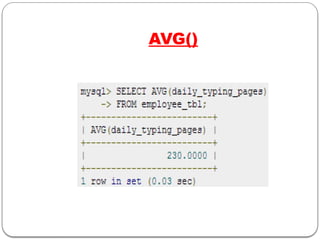
-AVG: Computes the average of value in an attribute.
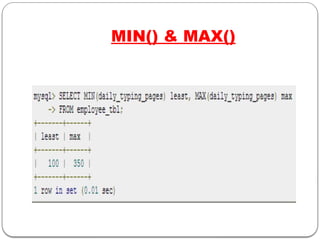
-MIN/MAX: Computes the min/max value in an attribute.
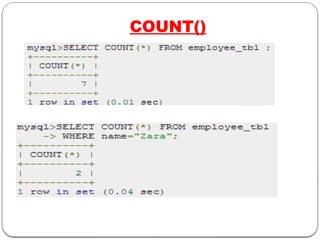
-COUNT: Computes the number of values in an
attribute(including duplicates unless they are explicitly
eliminated with DISTINCT)
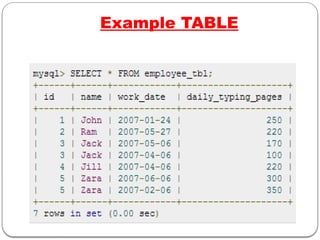
Example TABLE
SUM()
AVG()
MIN() & MAX()
COUNT()
0RDER BY()
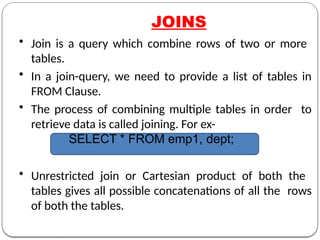
JOINS
• Join is a query which combine rows of two or more
tables.
• In a join-query, we need to provide a list of tables in
FROM Clause.
• The process of combining multiple tables in order to
retrieve data is called joining. For ex-
SELECT * FROM emp1, dept;
• Unrestricted join or Cartesian product of both the
tables gives all possible concatenations of all the rows
of both the tables.
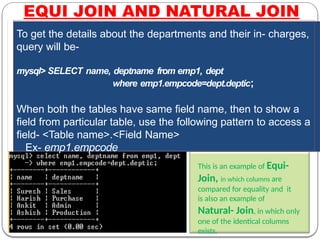
EQUI JOIN AND NATURAL JOIN
To get the details about the departments and their in- charges,
query will be-
mysql> SELECT name, deptname from emp1, dept
where emp1.empcode=dept.deptic;
When both the tables have same field name, then to show a
field from particular table, use the following pattern to access a
field- <Table name>.<Field Name>
Ex- emp1.empcode
This is an example of Equi-
Join, in which columns are
compared for equality and it
is also an example of
Natural- Join, in which only
one of the identical columns
exists.
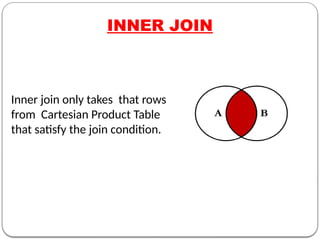
INNER JOIN
Inner join only takes that rows
from Cartesian Product Table
that satisfy the join condition.
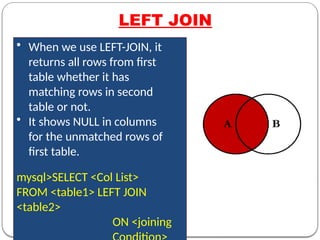
LEFT JOIN
• When we use LEFT-JOIN, it
returns all rows from first
table whether it has
matching rows in second
table or not.
• It shows NULL in columns
for the unmatched rows of
first table.
mysql>SELECT <Col List>
FROM <table1> LEFT JOIN
<table2>
ON <joining
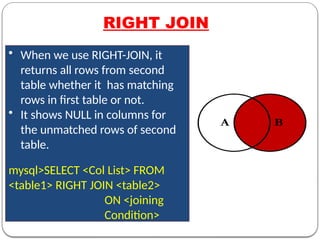
RIGHT JOIN
• When we use RIGHT-JOIN, it
returns all rows from second
table whether it has matching
rows in first table or not.
• It shows NULL in columns for
the unmatched rows of second
table.
mysql>SELECT <Col List> FROM
<table1> RIGHT JOIN <table2>
ON <joining
Condition>
Data Base Management 1 Database Management.pptx

Data Base Management 1 Database Management.pptx

  • 1.
  • 2.
     Database -Collected form of data  Database (management) system - A computer based record keeping system.  Database softwares examples:  MySQL (open Source)  ORACLE Database  MS SQL Server  SQLite (open Source)  MariaDB  PostgreSQL (open Source) INTRODUCTION
  • 3.
    –DBMS is asoftware whose purpose is to store databases, maintaining databases and using databases. –Its prime purpose is to perform operations on databases and to provide data when required. –DBMS reduces Data Redundancy. –It improves data security. -Inconsistency can be avoided. – it stores data in organized and Integrated form. –Data remains error free. –Database follows a standard. AIM OF DBMS
  • 4.
    Data remains inthe form of tables Table : combination of rows and columns which is also known as Relation . Imagine a database has three tables- Suppliers, Items and Shipments : Suppliers (SuppNo., Supp_name, Status, City) Items (ItemNo., Item_name, Price) Shipments (SuppNo., ItemNo., Qty_Supplied Relational Database Model
  • 5.
  • 6.
    Relational Model Terminology –Domain:The pool of values for a column –Tuple : Rows of a table –Attribute : Columns of a table –Degree : Number of attributes or columns –Cardinality : Number of tuples or rows
  • 7.
  • 8.
  • 9.
  • 10.
  • 11.
    Referential Integrity Referential Integrity:A system of rules which is used by a DBMS to ensure that there is a valid relationship between related tables or not. The rules are: 1. You can't delete a record from a primary table if matching records exist in a related table. 2. You can't change a primary key value in the primary table if that record has related records. 3. You can't enter a value in the foreign key field of the related table that doesn't exist in the primary key of the primary table. 4. However, you can enter a Null value in the foreign key, specifying that the records are unrelated..
  • 12.
    MySQL –MySQL is anopen source RDBMS which makes use of SQL for ADDING, DELETING and MODIFYING data from data bases. –MySQL was developed by MySQL AB company which is now a part of Sun Microsystems. – SERVER : which responds to the requests of clients. –CLIENTS : these are the programs which are attached to database server and send requests to server.
  • 13.
    SQL(structured Query Language) Inorder to access data within the MySQL database, all programmers and users must use SQL. SQL is the set of commands that is recognized by all RDBMS. All RDBMS like Mysql,Ms Access,Oracle,and SQL server use sql as a standard database language
  • 14.
  • 15.
  • 16.
    Using Database •Following commandis used to use a Database mysql> USE <database name >; For ex - mysql> USE school; A message will come saying- “database changed” See the Commands carefully
  • 17.
    Table Creation •To createa table in Database, following command is used- mysql> CREATE TABLE <Table Name> (<Col1> <DataType(Size)>, <Col2><DataType(size)>, . . . ); For ex- mysql>create table student (Roll INT(4) Primary Key, Name CHAR(20), (Age INT(2), City CHAR(10) ) ; A message will come saying- “Query OK” Primary key restrict a column to have unique values only.
  • 18.
    Insertion of arecord in Table Syntax to insert a record in a Table is- mysql> INSERT INTO <TableName> (<Col1> <Col2> <Col3> <Col4> VALUES (<val1>,<val2>,<val3>,<val4>,. . .); We can change the order of columns as- Here, we can insert values without specifying column names provided the order of values for columns should be same as in table.
  • 19.
    Dropping a Table •To drop a table in Database, following command is mysql> DROP Table <Table Name>; For ex - mysql>drop table <Student> A message will come saying- “Query OK” now if you want to see the structure of the table you cant see because it has already been deleted.
  • 20.
    Modification in Tablestructure • To modify structure of a table in Database, following command is used- mysql>ALTER TABLE <Table name> ADD/MODIFY(<Col> <type(size)>, . . . .) For ex-mysql> Alter Table Student Add (class INT(2)); A message comes saying “Query OK” . Again run the DESC command- • A new column has been add. • Columns can be added. • Column size can be changed.
  • 21.
    Accessing a Table Here* means all columns and without condition it will displays all records. Here only those records will display where city is Barabanki. Syntax to access Data from a table is- mysql> SELECT <Col Names> FROM <Table Name> WHERE <Condition>
  • 22.
    Here Name andclass of only those records are displayed which are not from Barabanki. Here columns have been rearranged. Accessing a Table Syntax to access Data from a table is- mysql> SELECT <Col Names> FROM <Table Name> WHERE <Condition>
  • 23.
    Updating a recordin Table Syntax to update a record in a Table is- mysql> UPDATE <TableName> SET <ColName>=<NewValue> WHERE <Condition> In this table, age of meera is to be set 6. and city of roll 1004 and 1005 is to be set as Lucknow.
  • 24.
    Deletion of arecord from a Table • Syntax to delete a record from a Table is- mysql>DELETE FROM<TableName>WHERE <Condition> To delete all records from a table, following command will be used- Viewing records after deletion.
  • 25.
    Distinct keyword l citiesin the table. Viewing Tables in a Database Displays all tables in a Databse.
  • 26.
    Table from anotherTable See the example carefully Syntax for creation of a table from another table is - mysql>CREATE TABLE <TableName> AS (SELECT <Cols> FROM <ExistingTable> WHERE <Condition>);
  • 27.
    Pattern Matching With ‘like‘two symbols are to be used ‘%’ and ‘_’. ‘%’represent multiple characters whereas ‘_’ represents one charachetr . In above example all the names starting with ‘S’ are shown. In example given below all the names having ‘u’ as second character are shown.
  • 28.
    Other SQL Commands •Select * from Student where city in (‘Jaipur’,’Ajmer’); • Select * from Student where city Not in(‘Jaipur’,’Ajmer’); • Select * from Student where age between 5 and 7; • Select * from Student Order by name DESC ; • Select 5 * 6 from DUAL ;
  • 29.
    AGGREGATE FUNCTIONS Aggregation isan operation that computes a single value from all the values of an attribute. SQL provides five functions that apply to an attribute of a relation and produce some aggregatation of that column -SUM: computes the sum of values in a column. -AVG: Computes the average of value in an attribute. -MIN/MAX: Computes the min/max value in an attribute. -COUNT: Computes the number of values in an attribute(including duplicates unless they are explicitly eliminated with DISTINCT)
  • 30.
  • 31.
  • 32.
  • 33.
  • 34.
  • 35.
  • 36.
    JOINS • Join isa query which combine rows of two or more tables. • In a join-query, we need to provide a list of tables in FROM Clause. • The process of combining multiple tables in order to retrieve data is called joining. For ex- SELECT * FROM emp1, dept; • Unrestricted join or Cartesian product of both the tables gives all possible concatenations of all the rows of both the tables.
  • 37.
    EQUI JOIN ANDNATURAL JOIN To get the details about the departments and their in- charges, query will be- mysql> SELECT name, deptname from emp1, dept where emp1.empcode=dept.deptic; When both the tables have same field name, then to show a field from particular table, use the following pattern to access a field- <Table name>.<Field Name> Ex- emp1.empcode This is an example of Equi- Join, in which columns are compared for equality and it is also an example of Natural- Join, in which only one of the identical columns exists.
  • 38.
    INNER JOIN Inner joinonly takes that rows from Cartesian Product Table that satisfy the join condition.
  • 39.
    LEFT JOIN • Whenwe use LEFT-JOIN, it returns all rows from first table whether it has matching rows in second table or not. • It shows NULL in columns for the unmatched rows of first table. mysql>SELECT <Col List> FROM <table1> LEFT JOIN <table2> ON <joining
  • 40.
    RIGHT JOIN • Whenwe use RIGHT-JOIN, it returns all rows from second table whether it has matching rows in first table or not. • It shows NULL in columns for the unmatched rows of second table. mysql>SELECT <Col List> FROM <table1> RIGHT JOIN <table2> ON <joining Condition>