Introduction to Database Concepts
 A database is a collection of logically related
information.
 Database Management is the task of maintaining
databases so that information is readily available.
 The software required to perform the task of database
management is called a Database Management
System (DBMS).
Database Management Systems
Database Concepts
Dr. E. F. Codd first described the relational model
in 1970.
Relational model is an attempt to simplify the
database structure.
It represents all data in the database as simple
tables in the row-column format.
RDBMS can be defined as a DBMS where all data
visible to the user is organized strictly as tables of
data values and where all database operations
work on these tables.
Relation Database Management System
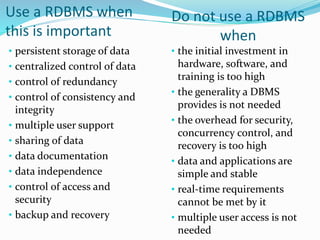
Use a RDBMS when
this is important
• persistent storage of data
• centralized control of data
• control of redundancy
• control of consistency and
integrity
• multiple user support
• sharing of data
• data documentation
• data independence
• control of access and
security
• backup and recovery
Do not use a RDBMS
when
• the initial investment in
hardware, software, and
training is too high
• the generality a DBMS
provides is not needed
• the overhead for security,
concurrency control, and
recovery is too high
• data and applications are
simple and stable
• real-time requirements
cannot be met by it
• multiple user access is not
needed
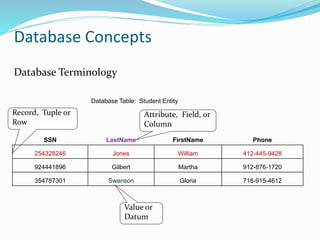
Database Table: Student Entity
SSN LastName FirstName Phone
254328246 Jones William 412-445-9428
924441896 Gilbert Martha 912-876-1720
354787301 Swanson Gloria 718-915-4612
Record, Tuple or
Row
Attribute, Field, or
Column
Value or
Datum
Database Terminology
Database Concepts
Relational Data Structure
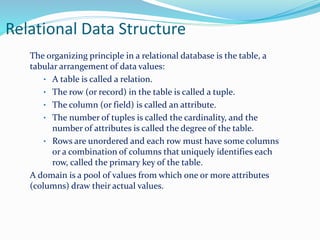
The organizing principle in a relational database is the table, a
tabular arrangement of data values:
• A table is called a relation.
• The row (or record) in the table is called a tuple.
• The column (or field) is called an attribute.
• The number of tuples is called the cardinality, and the
number of attributes is called the degree of the table.
• Rows are unordered and each row must have some columns
or a combination of columns that uniquely identifies each
row, called the primary key of the table.
A domain is a pool of values from which one or more attributes
(columns) draw their actual values.
Relational database and keys
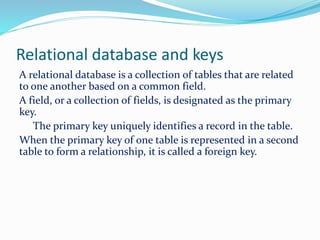
A relational database is a collection of tables that are related
to one another based on a common field.
A field, or a collection of fields, is designated as the primary
key.
The primary key uniquely identifies a record in the table.
When the primary key of one table is represented in a second
table to form a relationship, it is called a foreign key.
SQL
Standard for commercial relational DBs
High-level declarative language interface
User specifies what the result should be
Optimisation and query execution decisions left to DBMS
Based on tuple relational calculus, with some relational
algebra features
Standard version accepted by ANSI / ISO
Current version is SQL3
SQL
Every database has its own version of SQL
Database operations that SQL support are:
 DDL and DML statements
 View definition
 Security and authorisation specification
 Definition of integrity constraints
 Transaction control specification
 Session and system control statements
 Embedding SQL into programming languages
Data definition
Objects
Table
Commands
CREATE
ALTER
DROP
The CREATE TABLE Statement
You must have:
CREATE TABLE privilege
A storage area
You specify:
Table name
Column name, column data type, and column size
CREATE TABLE table
(column datatype [DEFAULT expr][, ...]);
Common Data Types
NOTE: The name of the data types may vary according to the
database
Type Size Description
CHAR[Length] Length bytes A fixed-length field from 0 to
255 characters long.
VARCHAR(Length) String length + 1
bytes
A fixed-length field from 0 to
255 characters long.
INT[Length] 4 bytes Range of -2,147,483,648 to
2,147,483,647 or 0 to
4,294,967,295 unsigned
FLOAT 4 bytes A small number with a floating
decimal point.
DATE 3 bytes In the format YYYY-MM-DD
DATETIME 8 bytes In the format YYYY-MM-DD
HH:MM:SS.
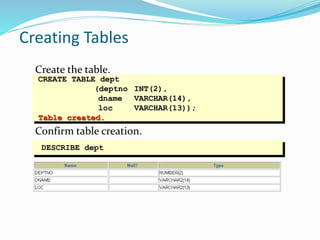
Creating Tables
Create the table.
Confirm table creation.
CREATE TABLE dept
(deptno INT(2),
dname VARCHAR(14),
loc VARCHAR(13));
Table created.
DESCRIBE dept
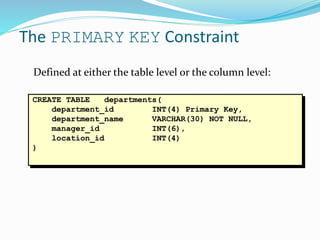
CREATE TABLE departments(
department_id INT(4) Primary Key,
department_name VARCHAR(30) NOT NULL,
manager_id INT(6),
location_id INT(4)
)
The PRIMARY KEY Constraint
Defined at either the table level or the column level:
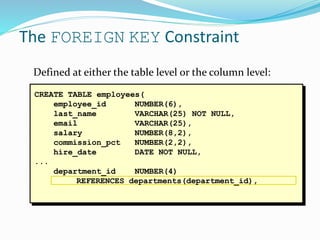
The FOREIGN KEY Constraint
Defined at either the table level or the column level:
CREATE TABLE employees(
employee_id NUMBER(6),
last_name VARCHAR(25) NOT NULL,
email VARCHAR(25),
salary NUMBER(8,2),
commission_pct NUMBER(2,2),
hire_date DATE NOT NULL,
...
department_id NUMBER(4)
REFERENCES departments(department_id),
The ALTER TABLE Statement
Use the ALTER TABLE statement to:
Add a new column
Modify an existing column
Define a default value for the new column
Drop a column
The ALTER TABLE Statement
Use the ALTER TABLE statement to add, modify, or
drop columns.
ALTER TABLE table
ADD (column datatype [DEFAULT expr]
[, column datatype]...);
ALTER TABLE table
MODIFY (column datatype [DEFAULT expr]
[, column datatype]...);
ALTER TABLE table
DROP (column);
Dropping a Table
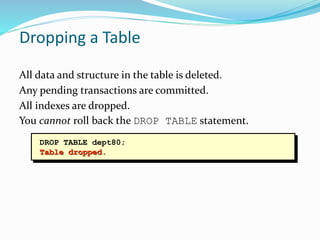
All data and structure in the table is deleted.
Any pending transactions are committed.
All indexes are dropped.
You cannot roll back the DROP TABLE statement.
DROP TABLE dept80;
Table dropped.
Basic SELECT Statement
SELECT identifies what columns
FROM identifies which table
SELECT *|{[DISTINCT] column|expression [alias],...}
FROM table;
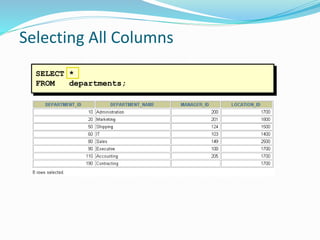
SELECT *
FROM departments;
Selecting All Columns
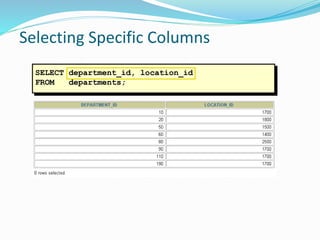
Selecting Specific Columns
SELECT department_id, location_id
FROM departments;
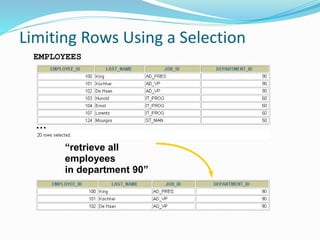
Limiting Rows Using a Selection
“retrieve all
employees
in department 90”
EMPLOYEES
…
Limiting the Rows Selected
Restrict the rows returned by using the WHERE clause.
The WHERE clause follows the FROM clause.
SELECT *|{[DISTINCT] column|expression [alias],...}
FROM table
[WHERE condition(s)];
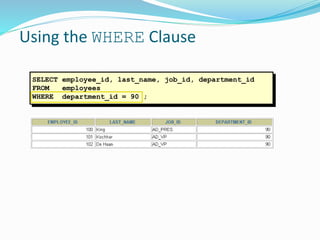
Using the WHERE Clause
SELECT employee_id, last_name, job_id, department_id
FROM employees
WHERE department_id = 90 ;
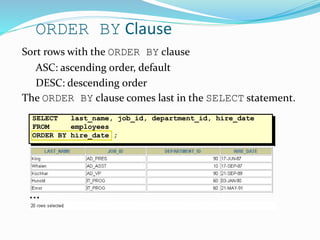
SELECT last_name, job_id, department_id, hire_date
FROM employees
ORDER BY hire_date ;
ORDER BY Clause
Sort rows with the ORDER BY clause
ASC: ascending order, default
DESC: descending order
The ORDER BY clause comes last in the SELECT statement.
…
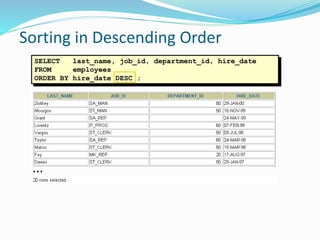
Sorting in Descending Order
SELECT last_name, job_id, department_id, hire_date
FROM employees
ORDER BY hire_date DESC ;
…
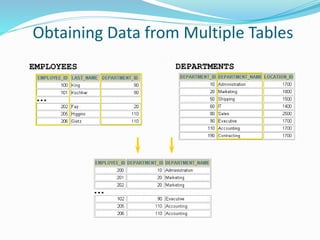
Obtaining Data from Multiple Tables
EMPLOYEES DEPARTMENTS
…
…
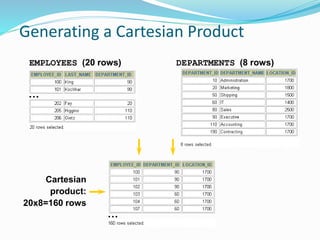
Generating a Cartesian Product
Cartesian
product:
20x8=160 rows
EMPLOYEES (20 rows) DEPARTMENTS (8 rows)
…
…
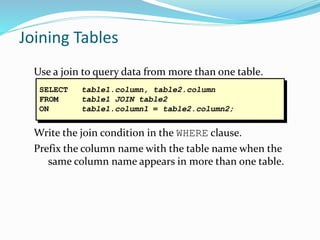
Joining Tables
Use a join to query data from more than one table.
Write the join condition in the WHERE clause.
Prefix the column name with the table name when the
same column name appears in more than one table.
SELECT table1.column, table2.column
FROM table1 JOIN table2
ON table1.column1 = table2.column2;
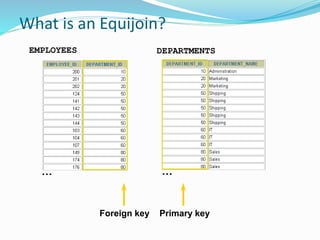
What is an Equijoin?
EMPLOYEES DEPARTMENTS
Foreign key Primary key
… …
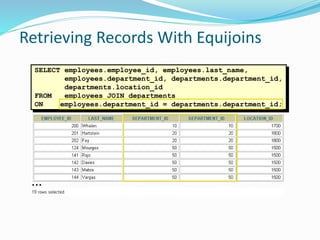
SELECT employees.employee_id, employees.last_name,
employees.department_id, departments.department_id,
departments.location_id
FROM employees JOIN departments
ON employees.department_id = departments.department_id;
Retrieving Records With Equijoins
…
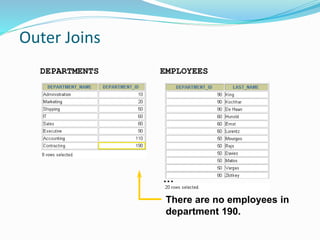
Outer Joins
EMPLOYEESDEPARTMENTS
There are no employees in
department 190.
…
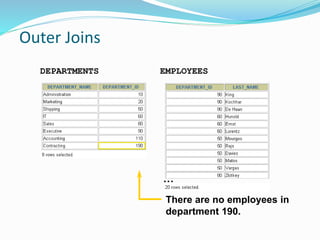
Outer Joins
EMPLOYEESDEPARTMENTS
There are no employees in
department 190.
…
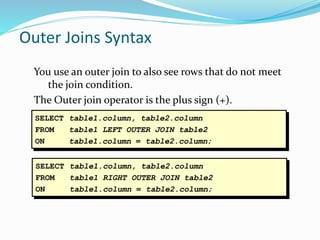
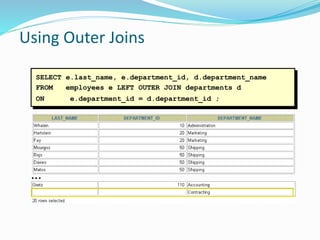
Outer Joins Syntax
You use an outer join to also see rows that do not meet
the join condition.
The Outer join operator is the plus sign (+).
SELECT table1.column, table2.column
FROM table1 LEFT OUTER JOIN table2
ON table1.column = table2.column;
SELECT table1.column, table2.column
FROM table1 RIGHT OUTER JOIN table2
ON table1.column = table2.column;
SELECT e.last_name, e.department_id, d.department_name
FROM employees e LEFT OUTER JOIN departments d
ON e.department_id = d.department_id ;
Using Outer Joins
…
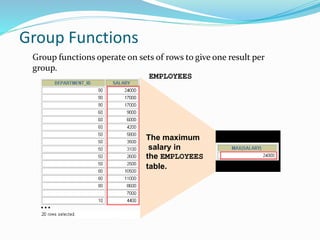
Group Functions
Group functions operate on sets of rows to give one result per
group.
EMPLOYEES
The maximum
salary in
the EMPLOYEES
table.
…
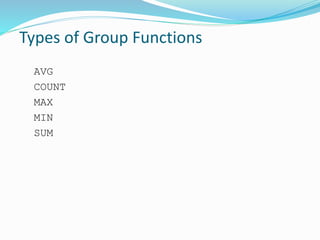
Types of Group Functions
AVG
COUNT
MAX
MIN
SUM
SELECT [column,] group_function(column), ...
FROM table
[WHERE condition]
[GROUP BY column]
[ORDER BY column];
Group Functions Syntax
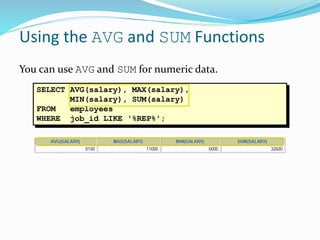
SELECT AVG(salary), MAX(salary),
MIN(salary), SUM(salary)
FROM employees
WHERE job_id LIKE '%REP%';
Using the AVG and SUM Functions
You can use AVG and SUM for numeric data.
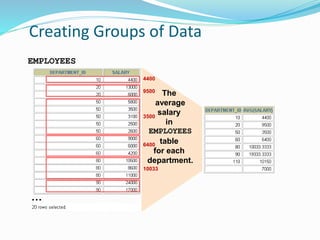
Creating Groups of Data
EMPLOYEES
The
average
salary
in
EMPLOYEES
table
for each
department.
4400
…
9500
3500
6400
10033
SELECT column, group_function(column)
FROM table
[WHERE condition]
[GROUP BY group_by_expression]
[ORDER BY column];
Creating Groups of Data:
The GROUP BY Clause Syntax
Divide rows in a table into smaller groups by using
the GROUP BY clause.
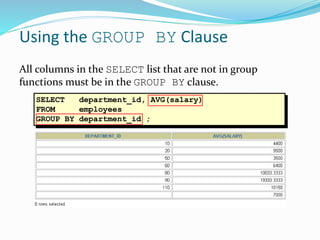
SELECT department_id, AVG(salary)
FROM employees
GROUP BY department_id ;
Using the GROUP BY Clause
All columns in the SELECT list that are not in group
functions must be in the GROUP BY clause.
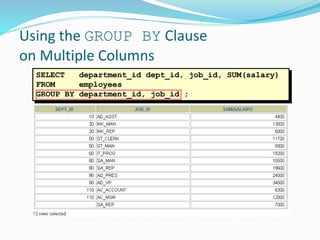
SELECT department_id dept_id, job_id, SUM(salary)
FROM employees
GROUP BY department_id, job_id ;
Using the GROUP BY Clause
on Multiple Columns
SELECT column, group_function
FROM table
[WHERE condition]
[GROUP BY group_by_expression]
[HAVING group_condition]
[ORDER BY column];
Excluding Group Results: The HAVING
Clause
Use the HAVING clause to restrict groups:
1. Rows are grouped.
2. The group function is applied.
3. Groups matching the HAVING clause are displayed.
Data Manipulation Language
A DML statement is executed when you:
Add new rows to a table
Modify existing rows in a table
Remove existing rows from a table
A transaction consists of a collection of DML
statements that form a logical unit of work.
The INSERT Statement Syntax
Add new rows to a table by using the INSERT
statement.
Only one row is inserted at a time with this syntax.
INSERT INTO table [(column [, column...])]
VALUES (value [, value...]);
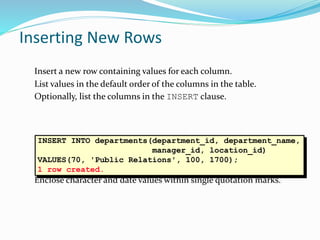
Inserting New Rows
Insert a new row containing values for each column.
List values in the default order of the columns in the table.
Optionally, list the columns in the INSERT clause.
Enclose character and date values within single quotation marks.
INSERT INTO departments(department_id, department_name,
manager_id, location_id)
VALUES(70, 'Public Relations', 100, 1700);
1 row created.
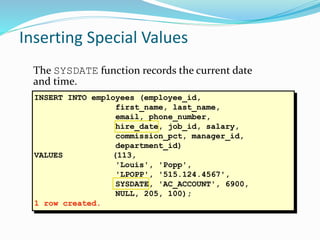
INSERT INTO employees (employee_id,
first_name, last_name,
email, phone_number,
hire_date, job_id, salary,
commission_pct, manager_id,
department_id)
VALUES (113,
'Louis', 'Popp',
'LPOPP', '515.124.4567',
SYSDATE, 'AC_ACCOUNT', 6900,
NULL, 205, 100);
1 row created.
Inserting Special Values
The SYSDATE function records the current date
and time.
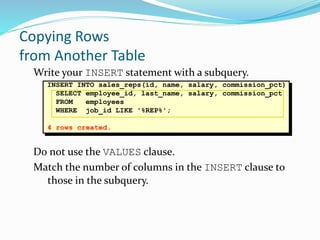
Write your INSERT statement with a subquery.
Do not use the VALUES clause.
Match the number of columns in the INSERT clause to
those in the subquery.
INSERT INTO sales_reps(id, name, salary, commission_pct)
SELECT employee_id, last_name, salary, commission_pct
FROM employees
WHERE job_id LIKE '%REP%';
4 rows created.
Copying Rows
from Another Table
The UPDATE Statement Syntax
Modify existing rows with the UPDATE statement.
Update more than one row at a time, if required.
UPDATE table
SET column = value [, column = value, ...]
[WHERE condition];
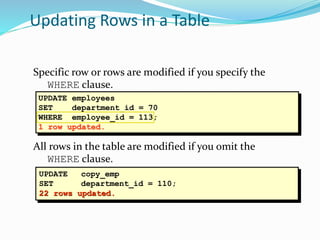
UPDATE employees
SET department_id = 70
WHERE employee_id = 113;
1 row updated.
Specific row or rows are modified if you specify the
WHERE clause.
All rows in the table are modified if you omit the
WHERE clause.
Updating Rows in a Table
UPDATE copy_emp
SET department_id = 110;
22 rows updated.
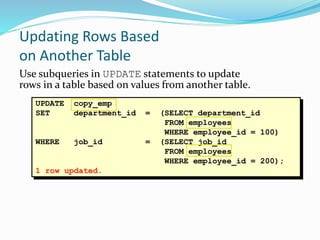
UPDATE copy_emp
SET department_id = (SELECT department_id
FROM employees
WHERE employee_id = 100)
WHERE job_id = (SELECT job_id
FROM employees
WHERE employee_id = 200);
1 row updated.
Updating Rows Based
on Another Table
Use subqueries in UPDATE statements to update
rows in a table based on values from another table.
The DELETE Statement
You can remove existing rows from a table by using
the DELETE statement.
DELETE [FROM] table
[WHERE condition];
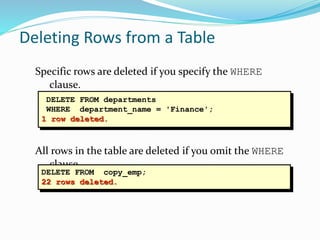
Specific rows are deleted if you specify the WHERE
clause.
All rows in the table are deleted if you omit the WHERE
clause.
Deleting Rows from a Table
DELETE FROM departments
WHERE department_name = 'Finance';
1 row deleted.
DELETE FROM copy_emp;
22 rows deleted.
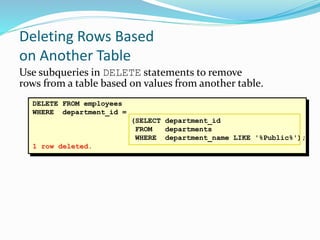
DELETE FROM employees
WHERE department_id =
(SELECT department_id
FROM departments
WHERE department_name LIKE '%Public%');
1 row deleted.
Deleting Rows Based
on Another Table
Use subqueries in DELETE statements to remove
rows from a table based on values from another table.
Locking a Brief Description
Locks are mechanisms that prevent destructive interaction
between transactions accessing the same resource.
General Object Type Affected By Locks:
User objects, such as tables and rows (structures and data)
System objects not visible to users, such as shared data
structures in the memory and data dictionary rows
Lock Modes
Exclusive Lock Mode
Share Lock Mode
Exclusive Lock Mode
Exclusive Lock Mode
Prevents the associates resource from being shared. This lock
mode is obtained to modify data. The first transaction to lock
a resource exclusively is the only transaction that can alter the
resource until the exclusive lock is released.
Share Lock Mode
Allows the associated resource to be shared, depending on
the operations involved. Multiple users reading data can
share the data, holding share locks to prevent concurrent
access by a writer (who needs an exclusive lock). Several
transactions can acquire share locks on the same resource.
Live Example
References
SQL Queries
http://www.dbbm.fiocruz.br/class/Lecture/d17/sql/jhoffman
/sqltut.html
http://www.w3schools.com/sql/default.asp
http://msdn.microsoft.com/en-
us/library/bb264565(v=sql.90).aspx

Dbms sql-final

  • 1.
  • 2.
     A databaseis a collection of logically related information.  Database Management is the task of maintaining databases so that information is readily available.  The software required to perform the task of database management is called a Database Management System (DBMS). Database Management Systems Database Concepts
  • 3.
    Dr. E. F.Codd first described the relational model in 1970. Relational model is an attempt to simplify the database structure. It represents all data in the database as simple tables in the row-column format. RDBMS can be defined as a DBMS where all data visible to the user is organized strictly as tables of data values and where all database operations work on these tables. Relation Database Management System
  • 4.
    Use a RDBMSwhen this is important • persistent storage of data • centralized control of data • control of redundancy • control of consistency and integrity • multiple user support • sharing of data • data documentation • data independence • control of access and security • backup and recovery Do not use a RDBMS when • the initial investment in hardware, software, and training is too high • the generality a DBMS provides is not needed • the overhead for security, concurrency control, and recovery is too high • data and applications are simple and stable • real-time requirements cannot be met by it • multiple user access is not needed
  • 5.
    Database Table: StudentEntity SSN LastName FirstName Phone 254328246 Jones William 412-445-9428 924441896 Gilbert Martha 912-876-1720 354787301 Swanson Gloria 718-915-4612 Record, Tuple or Row Attribute, Field, or Column Value or Datum Database Terminology Database Concepts
  • 6.
    Relational Data Structure Theorganizing principle in a relational database is the table, a tabular arrangement of data values: • A table is called a relation. • The row (or record) in the table is called a tuple. • The column (or field) is called an attribute. • The number of tuples is called the cardinality, and the number of attributes is called the degree of the table. • Rows are unordered and each row must have some columns or a combination of columns that uniquely identifies each row, called the primary key of the table. A domain is a pool of values from which one or more attributes (columns) draw their actual values.
  • 7.
    Relational database andkeys A relational database is a collection of tables that are related to one another based on a common field. A field, or a collection of fields, is designated as the primary key. The primary key uniquely identifies a record in the table. When the primary key of one table is represented in a second table to form a relationship, it is called a foreign key.
  • 8.
    SQL Standard for commercialrelational DBs High-level declarative language interface User specifies what the result should be Optimisation and query execution decisions left to DBMS Based on tuple relational calculus, with some relational algebra features Standard version accepted by ANSI / ISO Current version is SQL3
  • 9.
    SQL Every database hasits own version of SQL Database operations that SQL support are:  DDL and DML statements  View definition  Security and authorisation specification  Definition of integrity constraints  Transaction control specification  Session and system control statements  Embedding SQL into programming languages
  • 10.
  • 11.
    The CREATE TABLEStatement You must have: CREATE TABLE privilege A storage area You specify: Table name Column name, column data type, and column size CREATE TABLE table (column datatype [DEFAULT expr][, ...]);
  • 12.
    Common Data Types NOTE:The name of the data types may vary according to the database Type Size Description CHAR[Length] Length bytes A fixed-length field from 0 to 255 characters long. VARCHAR(Length) String length + 1 bytes A fixed-length field from 0 to 255 characters long. INT[Length] 4 bytes Range of -2,147,483,648 to 2,147,483,647 or 0 to 4,294,967,295 unsigned FLOAT 4 bytes A small number with a floating decimal point. DATE 3 bytes In the format YYYY-MM-DD DATETIME 8 bytes In the format YYYY-MM-DD HH:MM:SS.
  • 13.
    Creating Tables Create thetable. Confirm table creation. CREATE TABLE dept (deptno INT(2), dname VARCHAR(14), loc VARCHAR(13)); Table created. DESCRIBE dept
  • 14.
    CREATE TABLE departments( department_idINT(4) Primary Key, department_name VARCHAR(30) NOT NULL, manager_id INT(6), location_id INT(4) ) The PRIMARY KEY Constraint Defined at either the table level or the column level:
  • 15.
    The FOREIGN KEYConstraint Defined at either the table level or the column level: CREATE TABLE employees( employee_id NUMBER(6), last_name VARCHAR(25) NOT NULL, email VARCHAR(25), salary NUMBER(8,2), commission_pct NUMBER(2,2), hire_date DATE NOT NULL, ... department_id NUMBER(4) REFERENCES departments(department_id),
  • 16.
    The ALTER TABLEStatement Use the ALTER TABLE statement to: Add a new column Modify an existing column Define a default value for the new column Drop a column
  • 17.
    The ALTER TABLEStatement Use the ALTER TABLE statement to add, modify, or drop columns. ALTER TABLE table ADD (column datatype [DEFAULT expr] [, column datatype]...); ALTER TABLE table MODIFY (column datatype [DEFAULT expr] [, column datatype]...); ALTER TABLE table DROP (column);
  • 18.
    Dropping a Table Alldata and structure in the table is deleted. Any pending transactions are committed. All indexes are dropped. You cannot roll back the DROP TABLE statement. DROP TABLE dept80; Table dropped.
  • 20.
    Basic SELECT Statement SELECTidentifies what columns FROM identifies which table SELECT *|{[DISTINCT] column|expression [alias],...} FROM table;
  • 21.
  • 22.
    Selecting Specific Columns SELECTdepartment_id, location_id FROM departments;
  • 23.
    Limiting Rows Usinga Selection “retrieve all employees in department 90” EMPLOYEES …
  • 24.
    Limiting the RowsSelected Restrict the rows returned by using the WHERE clause. The WHERE clause follows the FROM clause. SELECT *|{[DISTINCT] column|expression [alias],...} FROM table [WHERE condition(s)];
  • 25.
    Using the WHEREClause SELECT employee_id, last_name, job_id, department_id FROM employees WHERE department_id = 90 ;
  • 26.
    SELECT last_name, job_id,department_id, hire_date FROM employees ORDER BY hire_date ; ORDER BY Clause Sort rows with the ORDER BY clause ASC: ascending order, default DESC: descending order The ORDER BY clause comes last in the SELECT statement. …
  • 27.
    Sorting in DescendingOrder SELECT last_name, job_id, department_id, hire_date FROM employees ORDER BY hire_date DESC ; …
  • 28.
    Obtaining Data fromMultiple Tables EMPLOYEES DEPARTMENTS … …
  • 29.
    Generating a CartesianProduct Cartesian product: 20x8=160 rows EMPLOYEES (20 rows) DEPARTMENTS (8 rows) … …
  • 30.
    Joining Tables Use ajoin to query data from more than one table. Write the join condition in the WHERE clause. Prefix the column name with the table name when the same column name appears in more than one table. SELECT table1.column, table2.column FROM table1 JOIN table2 ON table1.column1 = table2.column2;
  • 31.
    What is anEquijoin? EMPLOYEES DEPARTMENTS Foreign key Primary key … …
  • 32.
    SELECT employees.employee_id, employees.last_name, employees.department_id,departments.department_id, departments.location_id FROM employees JOIN departments ON employees.department_id = departments.department_id; Retrieving Records With Equijoins …
  • 33.
    Outer Joins EMPLOYEESDEPARTMENTS There areno employees in department 190. …
  • 34.
    Outer Joins EMPLOYEESDEPARTMENTS There areno employees in department 190. …
  • 35.
    Outer Joins Syntax Youuse an outer join to also see rows that do not meet the join condition. The Outer join operator is the plus sign (+). SELECT table1.column, table2.column FROM table1 LEFT OUTER JOIN table2 ON table1.column = table2.column; SELECT table1.column, table2.column FROM table1 RIGHT OUTER JOIN table2 ON table1.column = table2.column;
  • 36.
    SELECT e.last_name, e.department_id,d.department_name FROM employees e LEFT OUTER JOIN departments d ON e.department_id = d.department_id ; Using Outer Joins …
  • 37.
    Group Functions Group functionsoperate on sets of rows to give one result per group. EMPLOYEES The maximum salary in the EMPLOYEES table. …
  • 38.
    Types of GroupFunctions AVG COUNT MAX MIN SUM
  • 39.
    SELECT [column,] group_function(column),... FROM table [WHERE condition] [GROUP BY column] [ORDER BY column]; Group Functions Syntax
  • 40.
    SELECT AVG(salary), MAX(salary), MIN(salary),SUM(salary) FROM employees WHERE job_id LIKE '%REP%'; Using the AVG and SUM Functions You can use AVG and SUM for numeric data.
  • 41.
    Creating Groups ofData EMPLOYEES The average salary in EMPLOYEES table for each department. 4400 … 9500 3500 6400 10033
  • 42.
    SELECT column, group_function(column) FROMtable [WHERE condition] [GROUP BY group_by_expression] [ORDER BY column]; Creating Groups of Data: The GROUP BY Clause Syntax Divide rows in a table into smaller groups by using the GROUP BY clause.
  • 43.
    SELECT department_id, AVG(salary) FROMemployees GROUP BY department_id ; Using the GROUP BY Clause All columns in the SELECT list that are not in group functions must be in the GROUP BY clause.
  • 44.
    SELECT department_id dept_id,job_id, SUM(salary) FROM employees GROUP BY department_id, job_id ; Using the GROUP BY Clause on Multiple Columns
  • 45.
    SELECT column, group_function FROMtable [WHERE condition] [GROUP BY group_by_expression] [HAVING group_condition] [ORDER BY column]; Excluding Group Results: The HAVING Clause Use the HAVING clause to restrict groups: 1. Rows are grouped. 2. The group function is applied. 3. Groups matching the HAVING clause are displayed.
  • 46.
    Data Manipulation Language ADML statement is executed when you: Add new rows to a table Modify existing rows in a table Remove existing rows from a table A transaction consists of a collection of DML statements that form a logical unit of work.
  • 47.
    The INSERT StatementSyntax Add new rows to a table by using the INSERT statement. Only one row is inserted at a time with this syntax. INSERT INTO table [(column [, column...])] VALUES (value [, value...]);
  • 48.
    Inserting New Rows Inserta new row containing values for each column. List values in the default order of the columns in the table. Optionally, list the columns in the INSERT clause. Enclose character and date values within single quotation marks. INSERT INTO departments(department_id, department_name, manager_id, location_id) VALUES(70, 'Public Relations', 100, 1700); 1 row created.
  • 49.
    INSERT INTO employees(employee_id, first_name, last_name, email, phone_number, hire_date, job_id, salary, commission_pct, manager_id, department_id) VALUES (113, 'Louis', 'Popp', 'LPOPP', '515.124.4567', SYSDATE, 'AC_ACCOUNT', 6900, NULL, 205, 100); 1 row created. Inserting Special Values The SYSDATE function records the current date and time.
  • 50.
    Write your INSERTstatement with a subquery. Do not use the VALUES clause. Match the number of columns in the INSERT clause to those in the subquery. INSERT INTO sales_reps(id, name, salary, commission_pct) SELECT employee_id, last_name, salary, commission_pct FROM employees WHERE job_id LIKE '%REP%'; 4 rows created. Copying Rows from Another Table
  • 51.
    The UPDATE StatementSyntax Modify existing rows with the UPDATE statement. Update more than one row at a time, if required. UPDATE table SET column = value [, column = value, ...] [WHERE condition];
  • 52.
    UPDATE employees SET department_id= 70 WHERE employee_id = 113; 1 row updated. Specific row or rows are modified if you specify the WHERE clause. All rows in the table are modified if you omit the WHERE clause. Updating Rows in a Table UPDATE copy_emp SET department_id = 110; 22 rows updated.
  • 53.
    UPDATE copy_emp SET department_id= (SELECT department_id FROM employees WHERE employee_id = 100) WHERE job_id = (SELECT job_id FROM employees WHERE employee_id = 200); 1 row updated. Updating Rows Based on Another Table Use subqueries in UPDATE statements to update rows in a table based on values from another table.
  • 54.
    The DELETE Statement Youcan remove existing rows from a table by using the DELETE statement. DELETE [FROM] table [WHERE condition];
  • 55.
    Specific rows aredeleted if you specify the WHERE clause. All rows in the table are deleted if you omit the WHERE clause. Deleting Rows from a Table DELETE FROM departments WHERE department_name = 'Finance'; 1 row deleted. DELETE FROM copy_emp; 22 rows deleted.
  • 56.
    DELETE FROM employees WHEREdepartment_id = (SELECT department_id FROM departments WHERE department_name LIKE '%Public%'); 1 row deleted. Deleting Rows Based on Another Table Use subqueries in DELETE statements to remove rows from a table based on values from another table.
  • 57.
    Locking a BriefDescription Locks are mechanisms that prevent destructive interaction between transactions accessing the same resource. General Object Type Affected By Locks: User objects, such as tables and rows (structures and data) System objects not visible to users, such as shared data structures in the memory and data dictionary rows
  • 58.
    Lock Modes Exclusive LockMode Share Lock Mode
  • 59.
    Exclusive Lock Mode ExclusiveLock Mode Prevents the associates resource from being shared. This lock mode is obtained to modify data. The first transaction to lock a resource exclusively is the only transaction that can alter the resource until the exclusive lock is released.
  • 60.
    Share Lock Mode Allowsthe associated resource to be shared, depending on the operations involved. Multiple users reading data can share the data, holding share locks to prevent concurrent access by a writer (who needs an exclusive lock). Several transactions can acquire share locks on the same resource.
  • 61.
  • 62.