MySQL Tutorial
Introduction to Database
Learning Objectives
 Read and write Data Definition grammar of SQL
 Read and write data modification statements
 (INSERT, UPDATE, DELETE)
 Read and write basic SELECT FROM WHERE
queries
 Use aggregate functions
Introduction of MySQL
 MySQL is an SQL (Structured Query Language)
based relational database management system
(DBMS)
 MySQL is compatible with standard SQL
 MySQL is frequently used by PHP and Perl
 Commercial version of MySQL is also provided
(including technical support)
Part1: SQL used for Data Definition
 Allows the specification of not only a set of
relations but also information about each
relation, including:
 The schema for each relation
 The domain of values associated with each
attribute
 Integrity constraints
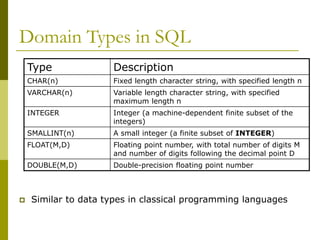
Domain Types in SQL
 Similar to data types in classical programming languages
Type Description
CHAR(n) Fixed length character string, with specified length n
VARCHAR(n) Variable length character string, with specified
maximum length n
INTEGER Integer (a machine-dependent finite subset of the
integers)
SMALLINT(n) A small integer (a finite subset of INTEGER)
FLOAT(M,D) Floating point number, with total number of digits M
and number of digits following the decimal point D
DOUBLE(M,D) Double-precision floating point number
CREATE DATABASE
 An SQL relation is defined using the CREATE
DATABASE command:
 create database [database name]
 Example
 create database mydatabase
CREATE TABLE
 An SQL relation is defined using the CREATE
TABLE command:
 Create table [tablename] (A1 T1,A2 T2, … An Tn,
(integrity-constraint1),
…,
(integrity-constraintk))
 Each Ai is an attribute name in the table
 Each Ti is the data type of values for Ai
 Example
 Create table student
(flashlineID char(9) not null,
name varchar(30),
age integer,
department varchar(20),
primary key (flashlineID) );
Integrity constraint
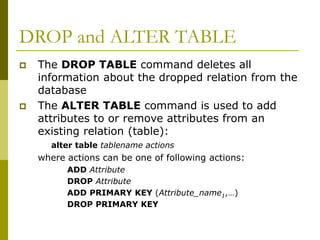
DROP and ALTER TABLE
 The DROP TABLE command deletes all
information about the dropped relation from the
database
 The ALTER TABLE command is used to add
attributes to or remove attributes from an
existing relation (table):
alter table tablename actions
where actions can be one of following actions:
ADD Attribute
DROP Attribute
ADD PRIMARY KEY (Attribute_name1,…)
DROP PRIMARY KEY
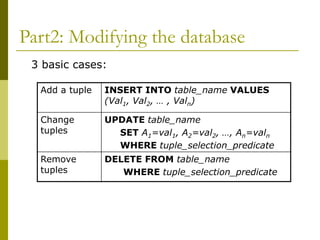
Part2: Modifying the database
3 basic cases:
Add a tuple INSERT INTO table_name VALUES
(Val1, Val2, … , Valn)
Change
tuples
UPDATE table_name
SET A1=val1, A2=val2, …, An=valn
WHERE tuple_selection_predicate
Remove
tuples
DELETE FROM table_name
WHERE tuple_selection_predicate
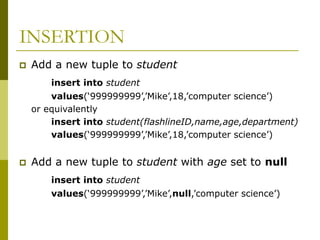
INSERTION
 Add a new tuple to student
insert into student
values(‘999999999’,’Mike’,18,’computer science’)
or equivalently
insert into student(flashlineID,name,age,department)
values(‘999999999’,’Mike’,18,’computer science’)
 Add a new tuple to student with age set to null
insert into student
values(‘999999999’,’Mike’,null,’computer science’)
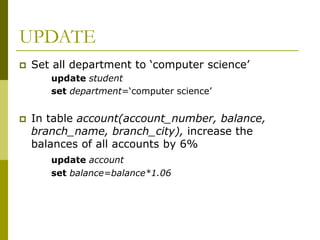
UPDATE
 Set all department to ‘computer science’
update student
set department=‘computer science’
 In table account(account_number, balance,
branch_name, branch_city), increase the
balances of all accounts by 6%
update account
set balance=balance*1.06
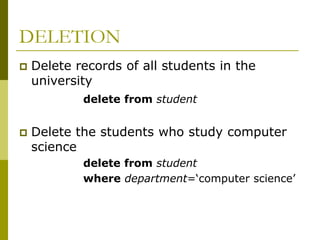
DELETION
 Delete records of all students in the
university
delete from student
 Delete the students who study computer
science
delete from student
where department=‘computer science’
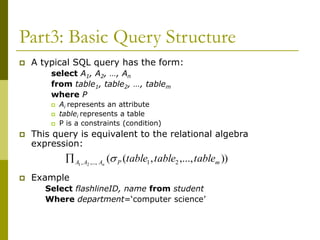
Part3: Basic Query Structure
 A typical SQL query has the form:
select A1, A2, …, An
from table1, table2, …, tablem
where P
 Ai represents an attribute
 tablei represents a table
 P is a constraints (condition)
 This query is equivalent to the relational algebra
expression:
 Example
Select flashlineID, name from student
Where department=‘computer science’
))
,...,
,
(
( 2
1
,...,
, 2
1 m
P
A
A
A table
table
table
n


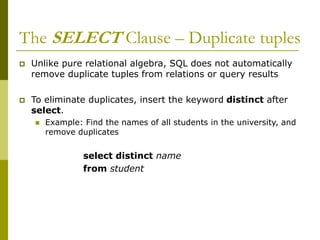
The SELECT Clause – Duplicate tuples
 Unlike pure relational algebra, SQL does not automatically
remove duplicate tuples from relations or query results
 To eliminate duplicates, insert the keyword distinct after
select.
 Example: Find the names of all students in the university, and
remove duplicates
select distinct name
from student
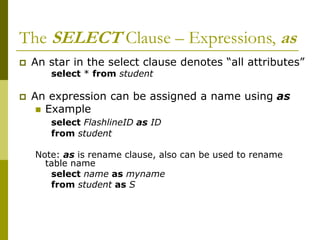
The SELECT Clause – Expressions, as
 An star in the select clause denotes “all attributes”
select * from student
 An expression can be assigned a name using as
 Example
select FlashlineID as ID
from student
Note: as is rename clause, also can be used to rename
table name
select name as myname
from student as S
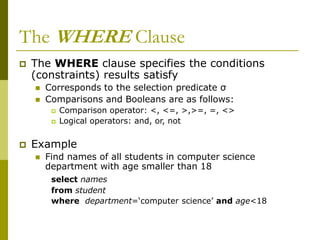
The WHERE Clause
 The WHERE clause specifies the conditions
(constraints) results satisfy
 Corresponds to the selection predicate σ
 Comparisons and Booleans are as follows:
 Comparison operator: <, <=, >,>=, =, <>
 Logical operators: and, or, not
 Example
 Find names of all students in computer science
department with age smaller than 18
select names
from student
where department=‘computer science’ and age<18
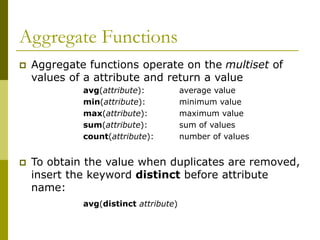
Aggregate Functions
 Aggregate functions operate on the multiset of
values of a attribute and return a value
avg(attribute): average value
min(attribute): minimum value
max(attribute): maximum value
sum(attribute): sum of values
count(attribute): number of values
 To obtain the value when duplicates are removed,
insert the keyword distinct before attribute
name:
avg(distinct attribute)
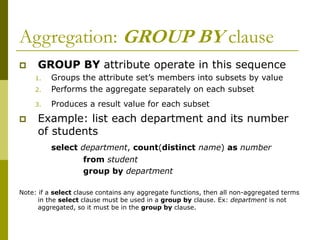
Aggregation: GROUP BY clause
 GROUP BY attribute operate in this sequence
1. Groups the attribute set’s members into subsets by value
2. Performs the aggregate separately on each subset
3. Produces a result value for each subset
 Example: list each department and its number
of students
select department, count(distinct name) as number
from student
group by department
Note: if a select clause contains any aggregate functions, then all non-aggregated terms
in the select clause must be used in a group by clause. Ex: department is not
aggregated, so it must be in the group by clause.
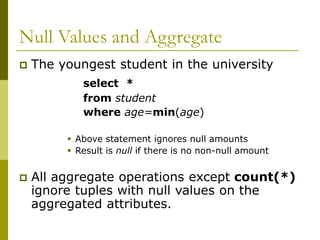
Null Values and Aggregate
 The youngest student in the university
select *
from student
where age=min(age)
 Above statement ignores null amounts
 Result is null if there is no non-null amount
 All aggregate operations except count(*)
ignore tuples with null values on the
aggregated attributes.
Resource
 MySQL and GUI Client can be downloaded
from
http://dev.mysql.com/downloads/
 The SQL script for creating database ‘bank’
can be found at
http://www.cs.kent.edu/~nruan/bank_db.s
ql
http://www.cs.kent.edu/~nruan/bank_dat
a.sql
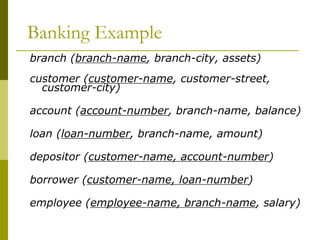
Banking Example
branch (branch-name, branch-city, assets)
customer (customer-name, customer-street,
customer-city)
account (account-number, branch-name, balance)
loan (loan-number, branch-name, amount)
depositor (customer-name, account-number)
borrower (customer-name, loan-number)
employee (employee-name, branch-name, salary)
Command for accessing MySQL
 Access linux server
>ssh hercules.cs.kent.edu
 Access MySQL
>mysql –u [username] –p
>password:[password]

mysql.ppt

  • 1.
  • 2.
    Learning Objectives  Readand write Data Definition grammar of SQL  Read and write data modification statements  (INSERT, UPDATE, DELETE)  Read and write basic SELECT FROM WHERE queries  Use aggregate functions
  • 3.
    Introduction of MySQL MySQL is an SQL (Structured Query Language) based relational database management system (DBMS)  MySQL is compatible with standard SQL  MySQL is frequently used by PHP and Perl  Commercial version of MySQL is also provided (including technical support)
  • 4.
    Part1: SQL usedfor Data Definition  Allows the specification of not only a set of relations but also information about each relation, including:  The schema for each relation  The domain of values associated with each attribute  Integrity constraints
  • 5.
    Domain Types inSQL  Similar to data types in classical programming languages Type Description CHAR(n) Fixed length character string, with specified length n VARCHAR(n) Variable length character string, with specified maximum length n INTEGER Integer (a machine-dependent finite subset of the integers) SMALLINT(n) A small integer (a finite subset of INTEGER) FLOAT(M,D) Floating point number, with total number of digits M and number of digits following the decimal point D DOUBLE(M,D) Double-precision floating point number
  • 6.
    CREATE DATABASE  AnSQL relation is defined using the CREATE DATABASE command:  create database [database name]  Example  create database mydatabase
  • 7.
    CREATE TABLE  AnSQL relation is defined using the CREATE TABLE command:  Create table [tablename] (A1 T1,A2 T2, … An Tn, (integrity-constraint1), …, (integrity-constraintk))  Each Ai is an attribute name in the table  Each Ti is the data type of values for Ai  Example  Create table student (flashlineID char(9) not null, name varchar(30), age integer, department varchar(20), primary key (flashlineID) ); Integrity constraint
  • 8.
    DROP and ALTERTABLE  The DROP TABLE command deletes all information about the dropped relation from the database  The ALTER TABLE command is used to add attributes to or remove attributes from an existing relation (table): alter table tablename actions where actions can be one of following actions: ADD Attribute DROP Attribute ADD PRIMARY KEY (Attribute_name1,…) DROP PRIMARY KEY
  • 9.
    Part2: Modifying thedatabase 3 basic cases: Add a tuple INSERT INTO table_name VALUES (Val1, Val2, … , Valn) Change tuples UPDATE table_name SET A1=val1, A2=val2, …, An=valn WHERE tuple_selection_predicate Remove tuples DELETE FROM table_name WHERE tuple_selection_predicate
  • 10.
    INSERTION  Add anew tuple to student insert into student values(‘999999999’,’Mike’,18,’computer science’) or equivalently insert into student(flashlineID,name,age,department) values(‘999999999’,’Mike’,18,’computer science’)  Add a new tuple to student with age set to null insert into student values(‘999999999’,’Mike’,null,’computer science’)
  • 11.
    UPDATE  Set alldepartment to ‘computer science’ update student set department=‘computer science’  In table account(account_number, balance, branch_name, branch_city), increase the balances of all accounts by 6% update account set balance=balance*1.06
  • 12.
    DELETION  Delete recordsof all students in the university delete from student  Delete the students who study computer science delete from student where department=‘computer science’
  • 13.
    Part3: Basic QueryStructure  A typical SQL query has the form: select A1, A2, …, An from table1, table2, …, tablem where P  Ai represents an attribute  tablei represents a table  P is a constraints (condition)  This query is equivalent to the relational algebra expression:  Example Select flashlineID, name from student Where department=‘computer science’ )) ,..., , ( ( 2 1 ,..., , 2 1 m P A A A table table table n  
  • 14.
    The SELECT Clause– Duplicate tuples  Unlike pure relational algebra, SQL does not automatically remove duplicate tuples from relations or query results  To eliminate duplicates, insert the keyword distinct after select.  Example: Find the names of all students in the university, and remove duplicates select distinct name from student
  • 15.
    The SELECT Clause– Expressions, as  An star in the select clause denotes “all attributes” select * from student  An expression can be assigned a name using as  Example select FlashlineID as ID from student Note: as is rename clause, also can be used to rename table name select name as myname from student as S
  • 16.
    The WHERE Clause The WHERE clause specifies the conditions (constraints) results satisfy  Corresponds to the selection predicate σ  Comparisons and Booleans are as follows:  Comparison operator: <, <=, >,>=, =, <>  Logical operators: and, or, not  Example  Find names of all students in computer science department with age smaller than 18 select names from student where department=‘computer science’ and age<18
  • 17.
    Aggregate Functions  Aggregatefunctions operate on the multiset of values of a attribute and return a value avg(attribute): average value min(attribute): minimum value max(attribute): maximum value sum(attribute): sum of values count(attribute): number of values  To obtain the value when duplicates are removed, insert the keyword distinct before attribute name: avg(distinct attribute)
  • 18.
    Aggregation: GROUP BYclause  GROUP BY attribute operate in this sequence 1. Groups the attribute set’s members into subsets by value 2. Performs the aggregate separately on each subset 3. Produces a result value for each subset  Example: list each department and its number of students select department, count(distinct name) as number from student group by department Note: if a select clause contains any aggregate functions, then all non-aggregated terms in the select clause must be used in a group by clause. Ex: department is not aggregated, so it must be in the group by clause.
  • 19.
    Null Values andAggregate  The youngest student in the university select * from student where age=min(age)  Above statement ignores null amounts  Result is null if there is no non-null amount  All aggregate operations except count(*) ignore tuples with null values on the aggregated attributes.
  • 20.
    Resource  MySQL andGUI Client can be downloaded from http://dev.mysql.com/downloads/  The SQL script for creating database ‘bank’ can be found at http://www.cs.kent.edu/~nruan/bank_db.s ql http://www.cs.kent.edu/~nruan/bank_dat a.sql
  • 21.
    Banking Example branch (branch-name,branch-city, assets) customer (customer-name, customer-street, customer-city) account (account-number, branch-name, balance) loan (loan-number, branch-name, amount) depositor (customer-name, account-number) borrower (customer-name, loan-number) employee (employee-name, branch-name, salary)
  • 22.
    Command for accessingMySQL  Access linux server >ssh hercules.cs.kent.edu  Access MySQL >mysql –u [username] –p >password:[password]