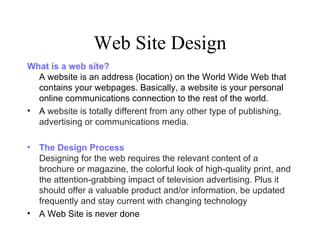
Web Site Design What is a web site? A website is an address (location) on the World Wide Web that contains your webpages. Basically, a website is your personal online communications connection to the rest of the world. A  website is totally different from any other type of publishing, advertising or communications media.  The Design Process Designing for the web requires the relevant content of a brochure or magazine, the colorful look of high-quality print, and the attention-grabbing impact of television advertising. Plus it should offer a valuable product and/or information, be updated frequently and stay current with changing technology A Web Site is never done
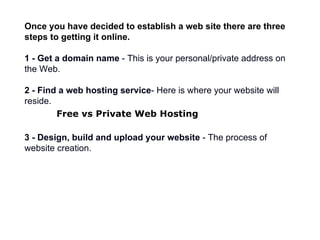
Once you have decided to establish a web site there are three steps to getting it online. 1 - Get a domain name  - This is your personal/private address on the Web. 2 - Find a web hosting service - Here is where your website will reside. Free vs Private Web Hosting   3 - Design, build and upload your website  - The process of website creation.
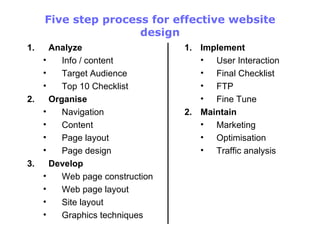
Five step process for effective website design Analyze Info / content Target Audience Top 10 Checklist Organise Navigation Content  Page layout Page design Develop Web page construction Web page layout Site layout Graphics techniques Implement User Interaction Final Checklist FTP Fine Tune Maintain Marketing Optimisation Traffic analysis
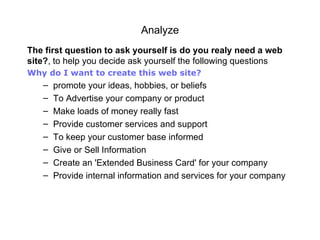
Analyze The first question to ask yourself is do you realy need a web site? , to help you decide ask yourself the following questions Why do I want to create this web site? promote your ideas, hobbies, or beliefs To Advertise your company or product Make loads of money really fast Provide customer services and support To keep your customer base informed Give or Sell Information Create an 'Extended Business Card' for your company Provide internal information and services for your company
Analyse (1) Web Site Content Before you can start deciding what content the site is going to contain you need to determine W ho your target audience is.  What age group are your users? What is there skill level with the Internet? How  can I communicate effectively? you also  need to determine the purpose of your site. what is the site for?  Once you have determined these factors you can start to plan the content your site will have. Remember who your target will be when deciding on content:
Analyze (2) 2 -  Who is my target audience?   What type of visitors do I want my site to attract? What will be their age, sex and education? Will they search out my site because we share a hobby, like the same television shows or are they looking   for specific information?   3 -  How can I communicate effectively? Now that I know who the audience will be, what is the best way to communicate with them?  4 -  What information do I need? If you are designing a  site for a client , you will need to know the answers to the preceeding questions as well as what their vision is for this site. Do they have a logo they want you to use, do they have specific colors in mind, do they want to include phone and fax numbers on their pages? If this is your own business site, these are questions you should answer also. Personal Site
Research WebSite This is a very important part in the creation of a web site, and usually very useful. Spend time looking at other internet sites, particularlly your competitores See if you can get any ideas you can use and improve on Don't be mistaken that the flashest coolest looking web site is the best.  Sites with lots of animation are not always the best. You must also keep in mind that not everyone has a fast Internet connection.
Analyze (3) 5 -  What content (data, graphics, photos, etc.) will be included? This is the ''big'' job...gathering all the content that you want to include on your web site. Are you going to use photos? What kind of graphics do you want? And what information or data are you putting online!   Right now, just make a list of the items you think you will want t o  have  on  your   website Audience analysis Audience analysis is the starting point for any project. You need to figure out your audience's demographics:   how old they are where they work what they earn where they live, anything that's appropriate
Analyze (4) Your content has to have a goal The key thing to remember about  audience analysis  is the goal:  to have a well-defined audience at the end of the process . The only good audience definition is a specific target definition. The better you can pigeon-hole or niche your audience, the more likely your site will succeed
A Check List for type of Content you may wish to include on your website Frequently updated information  Product and Company articles Question and answers  Online purchasing of products  Guest book that your guests to your site can sign and add their own comments  Web site forum or chat room to generate conversation between your web site users  Web site search, very useful for larger sites  Weekly poll, to poll your visitors on a particular question  Quizzes and sweep stakes, with prizes to promote your products  Free offers  News  Unique information  Location maps  Contact and Booking   forms
Top 10 website design tips - checklist Know your audience Keep web   pages short Limit the amount of text Avoid large images Use web safe colors Clearly identify all links Check spelling Use a site map or directory page Update and check all links Include contact information
Website Journal It is  a good idea  that you maintain some sort of journal for your website. Don't confuse a site journal with a site outline. Your journal is a collection of your ideas, your thoughts and whatever you want to remember ,  jot down ideas when they pop into y our  head.  For starters pick out a website that impresses you and examine it; What is the color scheme and layout? How is navigation accomplished? What is the content? How is the content presented?  Write down anything that you  believe  makes this website  g ood and any ideas that you might want to use yourself.
Organisation Next to Analyse, organisation is one of the key tools to website design.  We've discussed who you feel your audience will be and what kind   of information they will be looking for and what questions they will   be asking. Now we need to help them find the information and the answers hopefully, by the shortest route possible.  There are three main elements in the organization of a web site. They are: 1 -  Structure:  The form of your web site and its navigation 2 -  Content:  The substance of your web site 3 -  Layout:  The theme or method of presenting of your web site
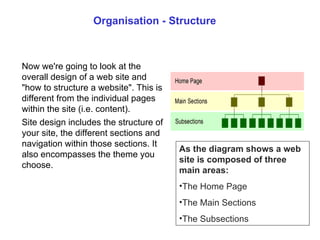
Organisation - Structure Now we're going to look at the overall design of a web site and "how to structure a website". This is different from the individual pages within the site (i.e. content).  Site  design includes the structure of your site, the different sections and navigation within those sections. It also encompasses the theme you choose. As the diagram shows a web site is composed of three main areas: The Home Page The Main Sections Th e  Subsections
Organisation - Structure (1)  HomePage Do’s Visitors first impressions Should tell the visitors what your site is about Answer questions on the 5 Ws Should provide index or table of contents Keep the home page short and to the point Homepage don’ts Should not contain a lot of text Don’t present your users with a huge list of links to every single page
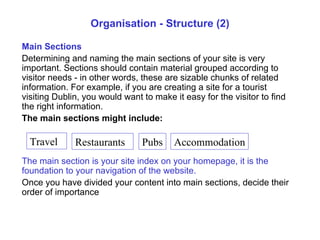
Organisation - Structure (2) Main Sections Determining and naming the main sections of your site is very important. Sections should contain material grouped according to visitor needs - in other words, these are sizable chunks of related information. For example, if you are creating a site for a  tourist visiting Dublin , you would want to make it easy for the visitor to find the right information.  The main sections might include: The main section is your site index on your homepage, it is the foundation to your navigation of the website. Once you have divided your content into main sections, decide their order of importance Travel Restaurants Pubs Accommodation
Organisation  - Structure (2) Subsections   Not all main sections necessarily need to have subsections, but most will require a further breakdown of information. It really depends on the amount of content on your site. When designing a new web site, keep in mind that the content will increase as you update and add information to the site. Build in room to expand as you determine your main and sub sections. Once you  established the home page, main sections and subsections of the web site  and t hey have been organized into order of importance and noted. This is the  basic layout of  your web site.
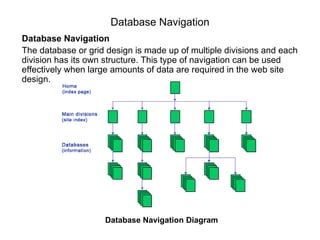
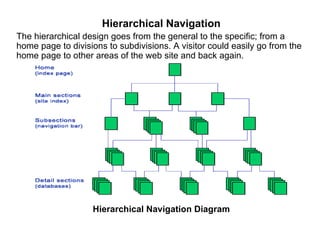
Organisation - Navigation Now we need to help them find the  user find the  information and the answers  to their questions and we  hope  we can do this  by the shortest route possible There are  three different navigation methods.  Linear navigation  - Moving in a straight line.  Database navigation  - Many branches from your main page. Hierarchical navigation  - A completely connected website.
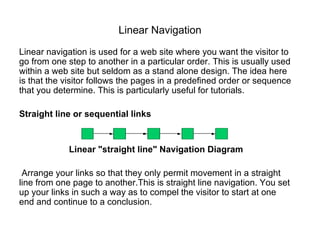
Linear Navigation Linear navigation is used for a web site where you want the visitor to go from one step to another in a particular order. This is   usually used within a web site but seldom as a stand alone design. The idea here is that the visitor follows the pages in a predefined order or sequence that you determine. This is particularly useful for   tutorials . Straight line or sequential links Linear "straight line" Navigation Diagram Arrange your links so that they only permit movement in a straight line from one page to another.This is straight line navigation. You set up your links in such a way as to compel the visitor to start at one end and continue to a conclusion.
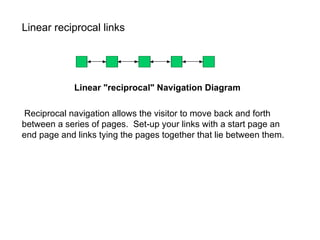
Linear reciprocal links Linear "reciprocal" Navigation Diagram Reciprocal navigation allows the visitor to move back and forth between a series of pages.  S et - up your links with a start   page an end page and links tying the pages together that lie between them.
Database Navigation Database Navigation The database or grid design is made up of multiple divisions and each division has its own structure. This type of navigation   can be used effectively when large amounts of data are required in the web site design. Database Navigation Diagram
Hierarchical Navigation The hierarchical design goes from the general to the specific; from a home page to divisions to subdivisions. A visitor could   easily go from the home page to other areas of the web site and back again. Hierarchical Navigation Diagram

Notes8

  • 1.
    Web Site DesignWhat is a web site? A website is an address (location) on the World Wide Web that contains your webpages. Basically, a website is your personal online communications connection to the rest of the world. A website is totally different from any other type of publishing, advertising or communications media. The Design Process Designing for the web requires the relevant content of a brochure or magazine, the colorful look of high-quality print, and the attention-grabbing impact of television advertising. Plus it should offer a valuable product and/or information, be updated frequently and stay current with changing technology A Web Site is never done
  • 2.
    Once you havedecided to establish a web site there are three steps to getting it online. 1 - Get a domain name - This is your personal/private address on the Web. 2 - Find a web hosting service - Here is where your website will reside. Free vs Private Web Hosting 3 - Design, build and upload your website - The process of website creation.
  • 3.
    Five step processfor effective website design Analyze Info / content Target Audience Top 10 Checklist Organise Navigation Content Page layout Page design Develop Web page construction Web page layout Site layout Graphics techniques Implement User Interaction Final Checklist FTP Fine Tune Maintain Marketing Optimisation Traffic analysis
  • 4.
    Analyze The firstquestion to ask yourself is do you realy need a web site? , to help you decide ask yourself the following questions Why do I want to create this web site? promote your ideas, hobbies, or beliefs To Advertise your company or product Make loads of money really fast Provide customer services and support To keep your customer base informed Give or Sell Information Create an 'Extended Business Card' for your company Provide internal information and services for your company
  • 5.
    Analyse (1) WebSite Content Before you can start deciding what content the site is going to contain you need to determine W ho your target audience is. What age group are your users? What is there skill level with the Internet? How can I communicate effectively? you also need to determine the purpose of your site. what is the site for? Once you have determined these factors you can start to plan the content your site will have. Remember who your target will be when deciding on content:
  • 6.
    Analyze (2) 2- Who is my target audience? What type of visitors do I want my site to attract? What will be their age, sex and education? Will they search out my site because we share a hobby, like the same television shows or are they looking for specific information? 3 - How can I communicate effectively? Now that I know who the audience will be, what is the best way to communicate with them? 4 - What information do I need? If you are designing a site for a client , you will need to know the answers to the preceeding questions as well as what their vision is for this site. Do they have a logo they want you to use, do they have specific colors in mind, do they want to include phone and fax numbers on their pages? If this is your own business site, these are questions you should answer also. Personal Site
  • 7.
    Research WebSite Thisis a very important part in the creation of a web site, and usually very useful. Spend time looking at other internet sites, particularlly your competitores See if you can get any ideas you can use and improve on Don't be mistaken that the flashest coolest looking web site is the best. Sites with lots of animation are not always the best. You must also keep in mind that not everyone has a fast Internet connection.
  • 8.
    Analyze (3) 5- What content (data, graphics, photos, etc.) will be included? This is the ''big'' job...gathering all the content that you want to include on your web site. Are you going to use photos? What kind of graphics do you want? And what information or data are you putting online! Right now, just make a list of the items you think you will want t o have on your website Audience analysis Audience analysis is the starting point for any project. You need to figure out your audience's demographics: how old they are where they work what they earn where they live, anything that's appropriate
  • 9.
    Analyze (4) Yourcontent has to have a goal The key thing to remember about audience analysis is the goal: to have a well-defined audience at the end of the process . The only good audience definition is a specific target definition. The better you can pigeon-hole or niche your audience, the more likely your site will succeed
  • 10.
    A Check Listfor type of Content you may wish to include on your website Frequently updated information Product and Company articles Question and answers Online purchasing of products Guest book that your guests to your site can sign and add their own comments Web site forum or chat room to generate conversation between your web site users Web site search, very useful for larger sites Weekly poll, to poll your visitors on a particular question Quizzes and sweep stakes, with prizes to promote your products Free offers News Unique information Location maps Contact and Booking forms
  • 11.
    Top 10 websitedesign tips - checklist Know your audience Keep web pages short Limit the amount of text Avoid large images Use web safe colors Clearly identify all links Check spelling Use a site map or directory page Update and check all links Include contact information
  • 12.
    Website Journal Itis a good idea that you maintain some sort of journal for your website. Don't confuse a site journal with a site outline. Your journal is a collection of your ideas, your thoughts and whatever you want to remember , jot down ideas when they pop into y our head. For starters pick out a website that impresses you and examine it; What is the color scheme and layout? How is navigation accomplished? What is the content? How is the content presented? Write down anything that you believe makes this website g ood and any ideas that you might want to use yourself.
  • 13.
    Organisation Next toAnalyse, organisation is one of the key tools to website design. We've discussed who you feel your audience will be and what kind of information they will be looking for and what questions they will be asking. Now we need to help them find the information and the answers hopefully, by the shortest route possible. There are three main elements in the organization of a web site. They are: 1 - Structure: The form of your web site and its navigation 2 - Content: The substance of your web site 3 - Layout: The theme or method of presenting of your web site
  • 14.
    Organisation - StructureNow we're going to look at the overall design of a web site and "how to structure a website". This is different from the individual pages within the site (i.e. content). Site design includes the structure of your site, the different sections and navigation within those sections. It also encompasses the theme you choose. As the diagram shows a web site is composed of three main areas: The Home Page The Main Sections Th e Subsections
  • 15.
    Organisation - Structure(1) HomePage Do’s Visitors first impressions Should tell the visitors what your site is about Answer questions on the 5 Ws Should provide index or table of contents Keep the home page short and to the point Homepage don’ts Should not contain a lot of text Don’t present your users with a huge list of links to every single page
  • 16.
    Organisation - Structure(2) Main Sections Determining and naming the main sections of your site is very important. Sections should contain material grouped according to visitor needs - in other words, these are sizable chunks of related information. For example, if you are creating a site for a tourist visiting Dublin , you would want to make it easy for the visitor to find the right information. The main sections might include: The main section is your site index on your homepage, it is the foundation to your navigation of the website. Once you have divided your content into main sections, decide their order of importance Travel Restaurants Pubs Accommodation
  • 17.
    Organisation -Structure (2) Subsections Not all main sections necessarily need to have subsections, but most will require a further breakdown of information. It really depends on the amount of content on your site. When designing a new web site, keep in mind that the content will increase as you update and add information to the site. Build in room to expand as you determine your main and sub sections. Once you established the home page, main sections and subsections of the web site and t hey have been organized into order of importance and noted. This is the basic layout of your web site.
  • 18.
    Organisation - NavigationNow we need to help them find the user find the information and the answers to their questions and we hope we can do this by the shortest route possible There are three different navigation methods. Linear navigation - Moving in a straight line. Database navigation - Many branches from your main page. Hierarchical navigation - A completely connected website.
  • 19.
    Linear Navigation Linearnavigation is used for a web site where you want the visitor to go from one step to another in a particular order. This is usually used within a web site but seldom as a stand alone design. The idea here is that the visitor follows the pages in a predefined order or sequence that you determine. This is particularly useful for tutorials . Straight line or sequential links Linear "straight line" Navigation Diagram Arrange your links so that they only permit movement in a straight line from one page to another.This is straight line navigation. You set up your links in such a way as to compel the visitor to start at one end and continue to a conclusion.
  • 20.
    Linear reciprocal linksLinear "reciprocal" Navigation Diagram Reciprocal navigation allows the visitor to move back and forth between a series of pages. S et - up your links with a start page an end page and links tying the pages together that lie between them.
  • 21.
    Database Navigation DatabaseNavigation The database or grid design is made up of multiple divisions and each division has its own structure. This type of navigation can be used effectively when large amounts of data are required in the web site design. Database Navigation Diagram
  • 22.
    Hierarchical Navigation Thehierarchical design goes from the general to the specific; from a home page to divisions to subdivisions. A visitor could easily go from the home page to other areas of the web site and back again. Hierarchical Navigation Diagram