
1
SOFTWARE ENGINEERING II
Lecture VIII- Part 2
COMSATS Institute of Information Technology Computer Science
Department
Syed Faraz Ahmad,
MS (Computer Science)
CIIT Abbottabad
comsian032@gmail.com
2
UML Defined
• The Unified Modeling Language (UML) is a
general purpose visual modeling language that is
used to specify, visualize, construct, and document
the artifacts of a software system.
Source: Rumbaugh, Jacobson, Booch, Unified Modeling Language Reference Manual (Addison-Wesley, 1999), p.
3
3
UML Defined
• It captures decisions and understanding about
systems that must be constructed.
• It is used to understand, design, browse, configure,
maintain, and control information about systems.
• It is intended to be used with all development
methods, lifecycle stages, application domains,
and media.
Source: Rumbaugh, Jacobson, Booch, Unified Modeling Language Reference Manual (Addison-Wesley, 1999), p.
3
4
Goals of UML
 There were a number of goals behind the development
of UML:
 UML is a general-purpose modeling language that all
modelers can use.
 It is meant to include the concepts of the leading methods so
that it can be used as their modeling language.
 It was intended to be as familiar as possible.
 It is meant to support good practices for design such as
encapsulation, separation of concerns, and capture of the
intent of a model construct.
 It is intended to address current software development
issues, such as large scale, distribution, concurrency,
patterns and team development.
 It was to be as simple as possible while still being capable
of modeling the full range of practical systems that need to
be built.
Source: Rumbaugh, Jacobson, Booch, Unified Modeling Language Reference Manual (Addison-Wesley, 1999), p.
8-9
5
UML Building Blocks
• UML is composed of three building blocks:
– Things
• These are the modeling elements
– Relationships
• These tie things together
– Diagrams
• These are views into UML models
Source: Booch, The Unified Modeling Language User Guide (Addison-Wesley, 1998), p. 2.
6
UML Things
 UML thing may be partitioned into:
 Structural things
 Represent the nouns of a UML model such as class,
component, use case, etc
 Behavioral things
 Represent the verbs of a UML model such as
interactions, states, etc.
 Grouping things
 Represent things that group elements together such as the
package.
 Annotational things
 The note
Source: Arlow and Neustadt, UML and the Unified Process (Addison-Wesley, 2002), p. 9.
Relationships
In UML, object interconnections
(logical or physical), are modeled as relationships.
There are three kinds of relationships in UML:
• Dependencies
• Generalizations
• Associations
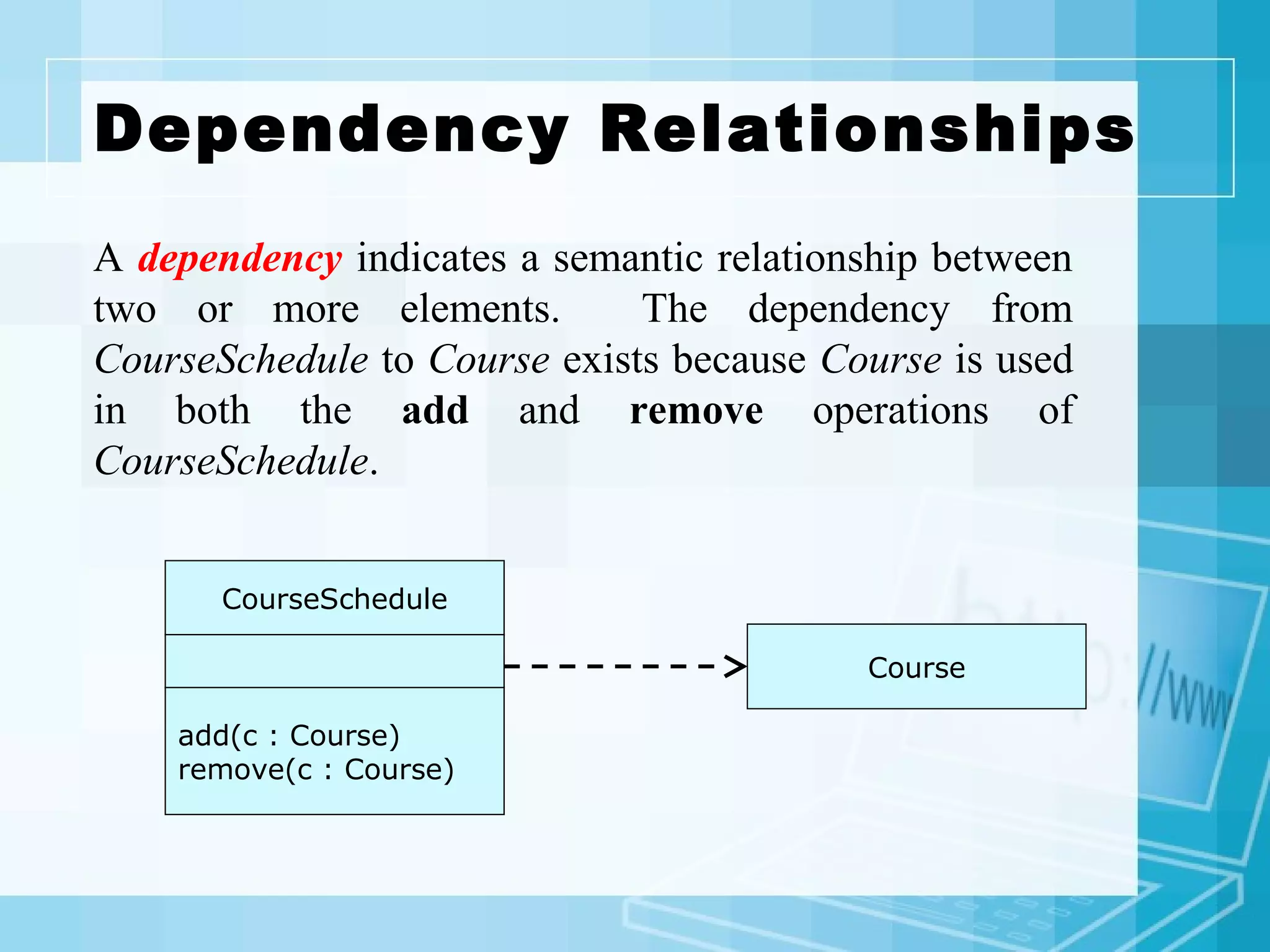
Dependency Relationships
CourseSchedule
add(c : Course)
remove(c : Course)
Course
A dependency indicates a semantic relationship between
two or more elements. The dependency from
CourseSchedule to Course exists because Course is used
in both the add and remove operations of
CourseSchedule.
Generalization
Relationships
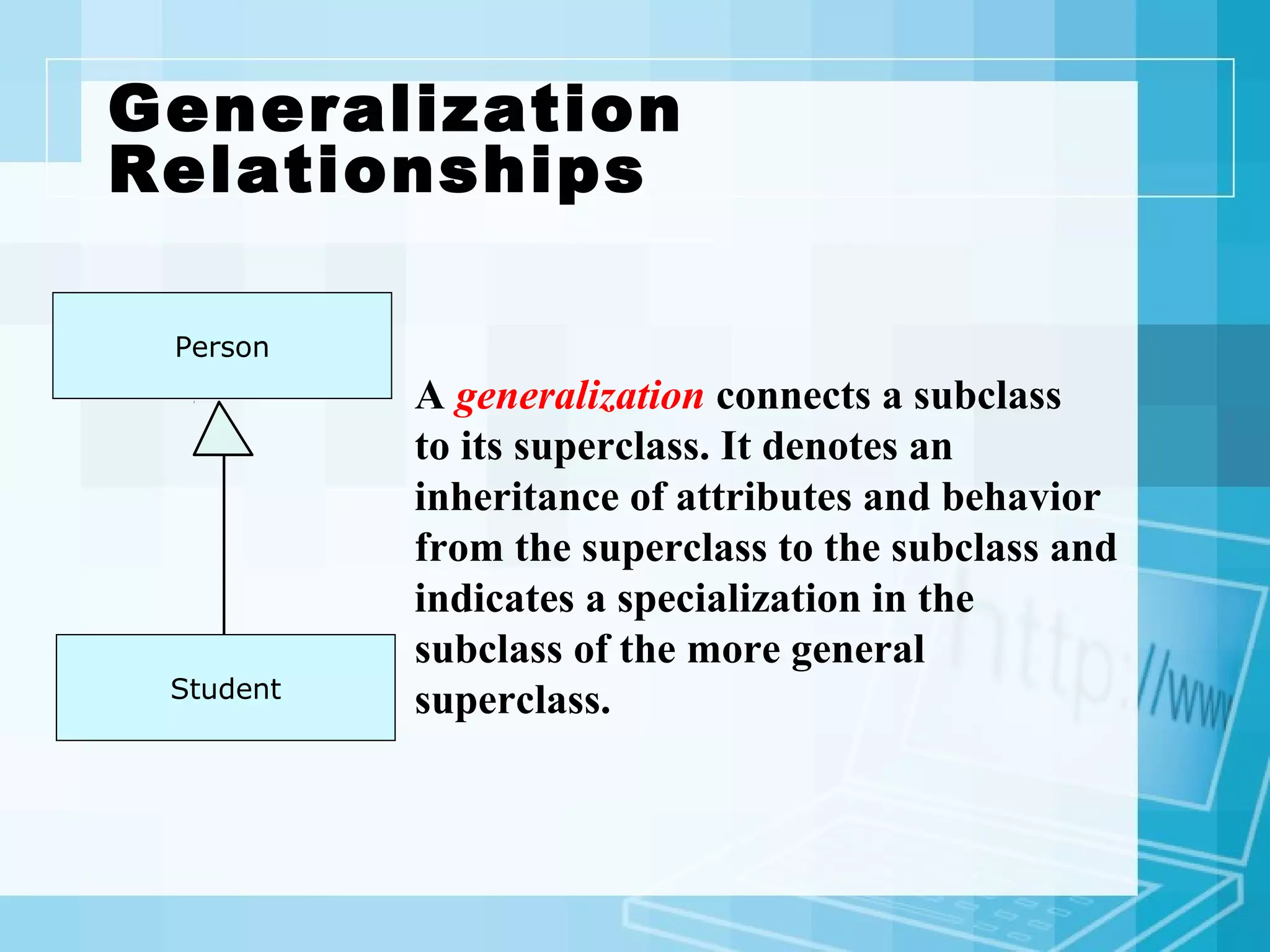
Person
A generalization connects a subclass
to its superclass. It denotes an
inheritance of attributes and behavior
from the superclass to the subclass and
indicates a specialization in the
subclass of the more general
superclass.Student
Generalization Relationships (Cont’d)
Student
UML permits a class to inherit from multiple superclasses,
although some programming languages (e.g., Java) do not
permit multiple inheritance.
TeachingAssistant
Employee
Association Relationships
If two classes in a model need to communicate with each
other, there must be link between them.
An association denotes that link.
StudentInstructor
instructs
Here , an association is instructs.
Association Relationships(Cont’d)
The example indicates that a Student has one or
more Instructors:
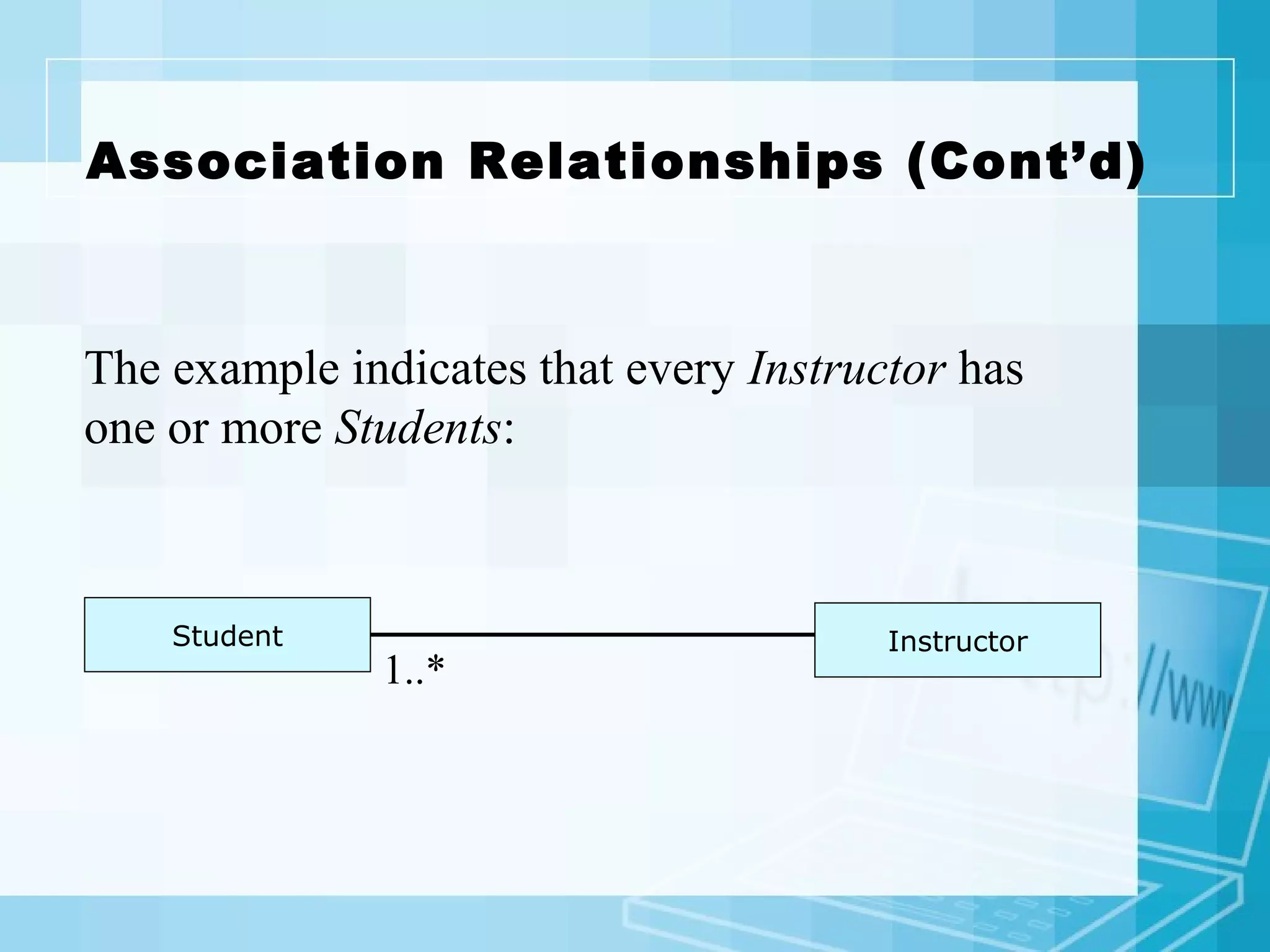
InstructorStudent
1..*
Association Relationships (Cont’d)
The example indicates that every Instructor has
one or more Students:
InstructorStudent
1..*
UML Diagram Types with Examples
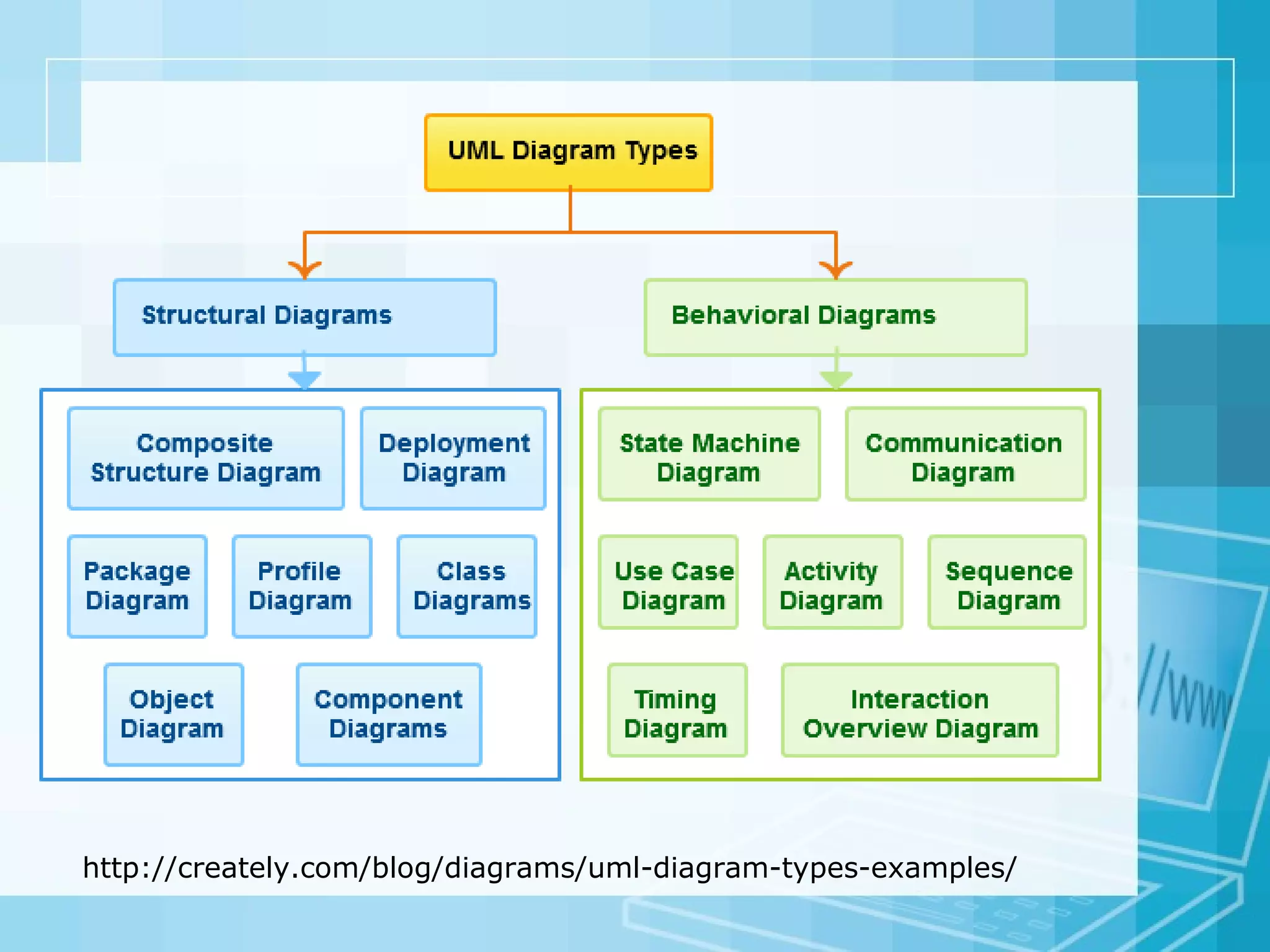
There are 14 UML diagram types to help you model these
behavior. They can be divided into two main categories
structure diagrams and behavioral diagrams
Class Diagram
Component Diagram
Deployment Diagram
Object Diagram
Package Diagram
Profile Diagram
Composite Structure Diagram
Use Case Diagram
Activity Diagram
State Machine Diagram
Sequence Diagram
Communication Diagram
Interaction Overview
Diagram
Timing Diagram
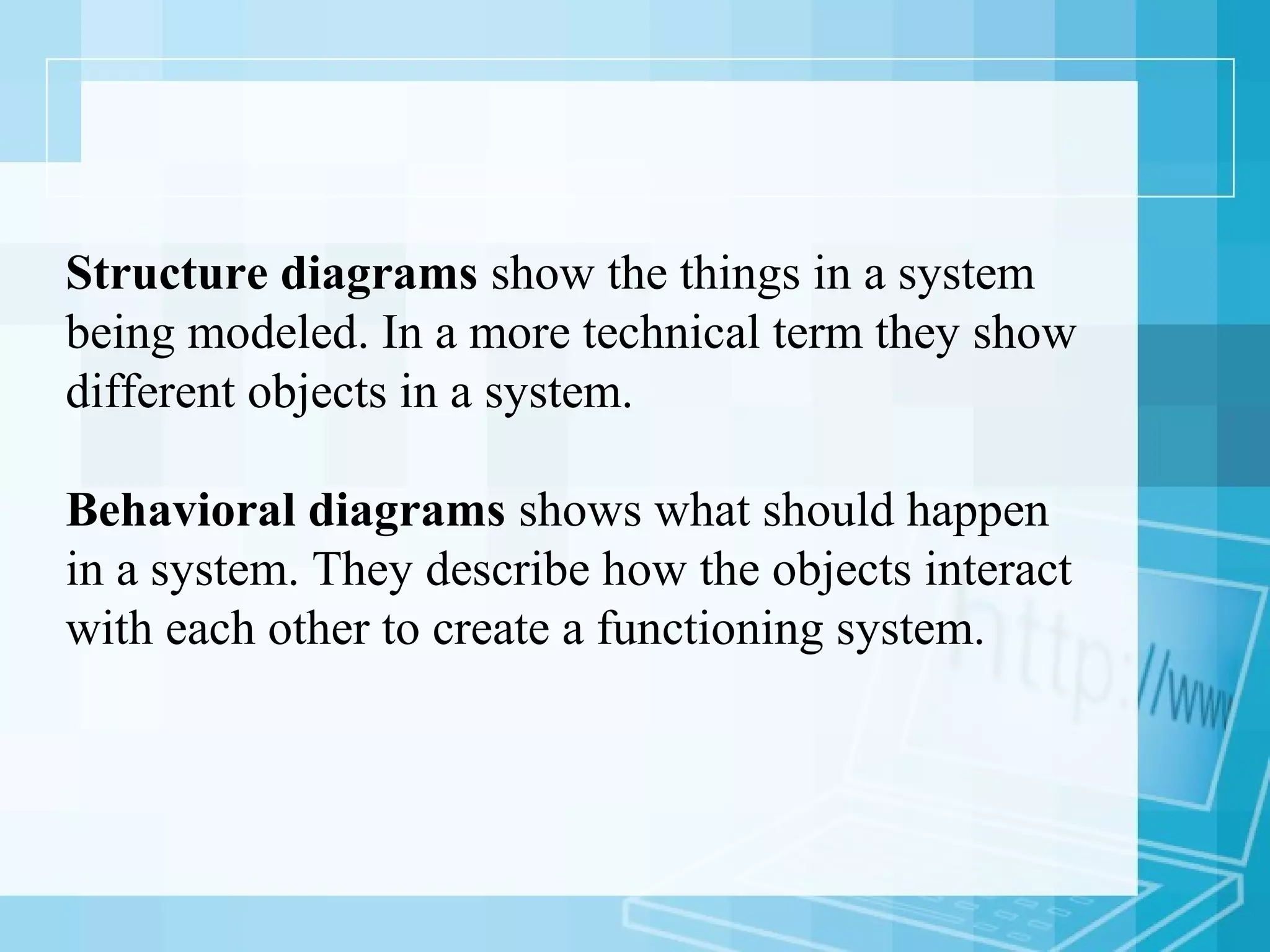
Structure diagrams show the things in a system
being modeled. In a more technical term they show
different objects in a system.
Behavioral diagrams shows what should happen
in a system. They describe how the objects interact
with each other to create a functioning system.
http://creately.com/blog/diagrams/uml-diagram-types-examples/
Class Diagram
Class diagrams are the most used UML diagram type. It is the
main building block of any object oriented solution. It shows
the classes in a system, attributes and operations of each class
and the relationship between each class.
In most modeling tools a class has three parts, name at the
top, attributes in the middle and operations or methods at
the bottom.
In large systems with many related classes, classes are
grouped together to create class diagrams. Different
relationships between classes are shown by different types of
arrows.
Component Diagram
A component diagram displays the structural relationship of
components of a software system.
These are mostly used when working with complex systems
that has many components.
Components communicate with each other using interfaces.
The interfaces are linked using connectors.
Simple Component Diagram with Interfaces
Object Diagram
Object Diagrams, sometimes referred as Instance diagrams
are very similar to class diagrams.
As class diagrams they also show the relationship between
objects but they use real world examples.
They are used to show how a system will look like at a
given time. Because there is data available in the objects
they are often used to explain complex relationships
between objects.
UML Object Diagram Example
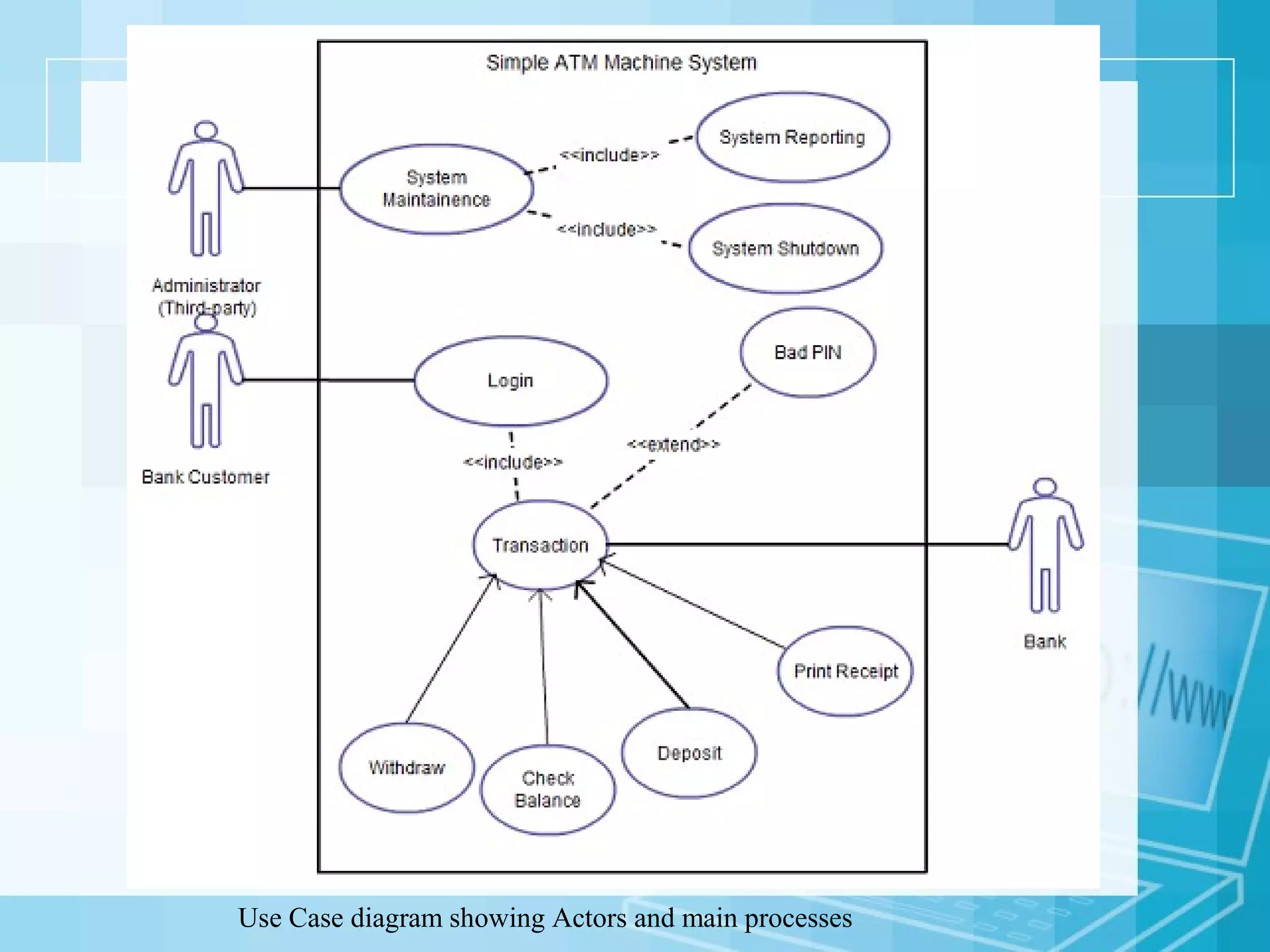
Use Case Diagram
Most known diagram type of the behavioral UML diagrams,
Use case diagrams gives a graphic overview of the actors
involved in a system, different functions needed by those
actors and how these different functions are interacted.
It’s a great starting point for any project discussion because
you can easily identify the main actors involved and the
main processes of the system.
Use Case diagram showing Actors and main processes
Activity Diagram
Activity diagrams represent workflows in an graphical way.
They can be used to describe business workflow or the
operational workflow of any component in a system.
Sometimes activity diagrams are used as an alternative to
State machine diagrams.
Activity Diagrams with start, end, processes and decision points
Sequence Diagram
Sequence diagrams in UML shows how object interact with
each other and the order those interactions occur.
It’s important to note that they show the interactions for a
particular scenario.
The processes are represented vertically and interactions are
show as arrows..
Sequence Diagrams in UML shows the interaction between two processes
Communication Diagram
Communication diagram was called collaboration diagram.
It is similar to sequence diagrams but the focus is on
messages passed between objects.
The same information can be represented using a sequence
diagram and different objects.
Communication Diagram in UML

Uml

  • 1.
    1 SOFTWARE ENGINEERING II LectureVIII- Part 2 COMSATS Institute of Information Technology Computer Science Department Syed Faraz Ahmad, MS (Computer Science) CIIT Abbottabad comsian032@gmail.com
  • 2.
    2 UML Defined • TheUnified Modeling Language (UML) is a general purpose visual modeling language that is used to specify, visualize, construct, and document the artifacts of a software system. Source: Rumbaugh, Jacobson, Booch, Unified Modeling Language Reference Manual (Addison-Wesley, 1999), p. 3
  • 3.
    3 UML Defined • Itcaptures decisions and understanding about systems that must be constructed. • It is used to understand, design, browse, configure, maintain, and control information about systems. • It is intended to be used with all development methods, lifecycle stages, application domains, and media. Source: Rumbaugh, Jacobson, Booch, Unified Modeling Language Reference Manual (Addison-Wesley, 1999), p. 3
  • 4.
    4 Goals of UML There were a number of goals behind the development of UML:  UML is a general-purpose modeling language that all modelers can use.  It is meant to include the concepts of the leading methods so that it can be used as their modeling language.  It was intended to be as familiar as possible.  It is meant to support good practices for design such as encapsulation, separation of concerns, and capture of the intent of a model construct.  It is intended to address current software development issues, such as large scale, distribution, concurrency, patterns and team development.  It was to be as simple as possible while still being capable of modeling the full range of practical systems that need to be built. Source: Rumbaugh, Jacobson, Booch, Unified Modeling Language Reference Manual (Addison-Wesley, 1999), p. 8-9
  • 5.
    5 UML Building Blocks •UML is composed of three building blocks: – Things • These are the modeling elements – Relationships • These tie things together – Diagrams • These are views into UML models Source: Booch, The Unified Modeling Language User Guide (Addison-Wesley, 1998), p. 2.
  • 6.
    6 UML Things  UMLthing may be partitioned into:  Structural things  Represent the nouns of a UML model such as class, component, use case, etc  Behavioral things  Represent the verbs of a UML model such as interactions, states, etc.  Grouping things  Represent things that group elements together such as the package.  Annotational things  The note Source: Arlow and Neustadt, UML and the Unified Process (Addison-Wesley, 2002), p. 9.
  • 7.
    Relationships In UML, objectinterconnections (logical or physical), are modeled as relationships. There are three kinds of relationships in UML: • Dependencies • Generalizations • Associations
  • 8.
    Dependency Relationships CourseSchedule add(c :Course) remove(c : Course) Course A dependency indicates a semantic relationship between two or more elements. The dependency from CourseSchedule to Course exists because Course is used in both the add and remove operations of CourseSchedule.
  • 9.
    Generalization Relationships Person A generalization connectsa subclass to its superclass. It denotes an inheritance of attributes and behavior from the superclass to the subclass and indicates a specialization in the subclass of the more general superclass.Student
  • 10.
    Generalization Relationships (Cont’d) Student UMLpermits a class to inherit from multiple superclasses, although some programming languages (e.g., Java) do not permit multiple inheritance. TeachingAssistant Employee
  • 11.
    Association Relationships If twoclasses in a model need to communicate with each other, there must be link between them. An association denotes that link. StudentInstructor instructs Here , an association is instructs.
  • 12.
    Association Relationships(Cont’d) The exampleindicates that a Student has one or more Instructors: InstructorStudent 1..*
  • 13.
    Association Relationships (Cont’d) Theexample indicates that every Instructor has one or more Students: InstructorStudent 1..*
  • 14.
    UML Diagram Typeswith Examples There are 14 UML diagram types to help you model these behavior. They can be divided into two main categories structure diagrams and behavioral diagrams Class Diagram Component Diagram Deployment Diagram Object Diagram Package Diagram Profile Diagram Composite Structure Diagram Use Case Diagram Activity Diagram State Machine Diagram Sequence Diagram Communication Diagram Interaction Overview Diagram Timing Diagram
  • 15.
    Structure diagrams showthe things in a system being modeled. In a more technical term they show different objects in a system. Behavioral diagrams shows what should happen in a system. They describe how the objects interact with each other to create a functioning system.
  • 16.
  • 17.
    Class Diagram Class diagramsare the most used UML diagram type. It is the main building block of any object oriented solution. It shows the classes in a system, attributes and operations of each class and the relationship between each class. In most modeling tools a class has three parts, name at the top, attributes in the middle and operations or methods at the bottom. In large systems with many related classes, classes are grouped together to create class diagrams. Different relationships between classes are shown by different types of arrows.
  • 19.
    Component Diagram A componentdiagram displays the structural relationship of components of a software system. These are mostly used when working with complex systems that has many components. Components communicate with each other using interfaces. The interfaces are linked using connectors.
  • 20.
    Simple Component Diagramwith Interfaces
  • 21.
    Object Diagram Object Diagrams,sometimes referred as Instance diagrams are very similar to class diagrams. As class diagrams they also show the relationship between objects but they use real world examples. They are used to show how a system will look like at a given time. Because there is data available in the objects they are often used to explain complex relationships between objects.
  • 22.
  • 23.
    Use Case Diagram Mostknown diagram type of the behavioral UML diagrams, Use case diagrams gives a graphic overview of the actors involved in a system, different functions needed by those actors and how these different functions are interacted. It’s a great starting point for any project discussion because you can easily identify the main actors involved and the main processes of the system.
  • 24.
    Use Case diagramshowing Actors and main processes
  • 25.
    Activity Diagram Activity diagramsrepresent workflows in an graphical way. They can be used to describe business workflow or the operational workflow of any component in a system. Sometimes activity diagrams are used as an alternative to State machine diagrams.
  • 26.
    Activity Diagrams withstart, end, processes and decision points
  • 27.
    Sequence Diagram Sequence diagramsin UML shows how object interact with each other and the order those interactions occur. It’s important to note that they show the interactions for a particular scenario. The processes are represented vertically and interactions are show as arrows..
  • 28.
    Sequence Diagrams inUML shows the interaction between two processes
  • 29.
    Communication Diagram Communication diagramwas called collaboration diagram. It is similar to sequence diagrams but the focus is on messages passed between objects. The same information can be represented using a sequence diagram and different objects.
  • 30.