Host Virtualization (& paravirtualization) Xen,  SuSE 9.3 pro, Magic & Mystery Michael Hoesing  cissp, cisa, ccp cia, cpa cma [email_address] (402) 981-7747 Disclaimer, I never said THAT, if you heard THAT, it wasn’t from me.  None of the content of this presentation can be attributed to any of my employers, family members, acquaintances, conference  sponsors past present or future. October 4, 2005
Contents Drivers – why virtualize Practical Applications and History Definitions – virtualization, paravirtualiztion Tools – XEN, VMWare, MS  Installation & Configuration ( Xen) Security & Audit (because it is my speech) ( Xen) SuSE  9.3 pro  Xen “built-in”  Resources  and Demo (Xen) VM  ESX (howto, security, defaults)
Drivers (why are we even talking about this) Reduced TCO 1 (or more) CPU can support many servers 1 Storage Device & KVM  can support many servers less footprint (rent, utilities,..) (generally no memory savings) Cheaper redundancy increasing continuity options Development testing Support Legacy application migration
Practical Applications Testing – run a version in a sandbox before deployment Testing – have multiple OS's and browsers and see how the website looks in different environments Academic – build a cheap network the students can take home on a disk any other cost saving opportunity
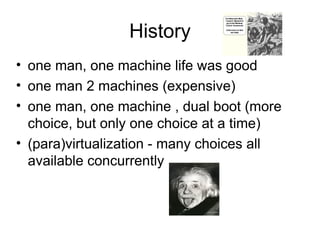
History one man, one machine life was good  one man 2 machines (expensive) one man, one machine , dual boot (more choice, but only one choice at a time) (para)virtualization - many choices all available concurrently
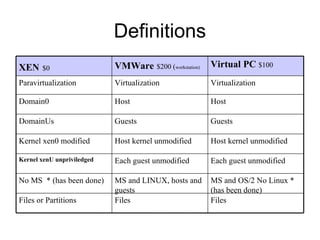
Definitions Files Files Files or Partitions MS and OS/2 No Linux * (has been done) MS and LINUX, hosts and guests No MS  * (has been done) Each guest unmodified Each guest unmodified Kernel xenU unpriviledged Host kernel unmodified Host kernel unmodified Kernel xen0 modified Guests Guests DomainUs Host Host Domain0 Virtualization Virtualization Paravirtualization Virtual PC  $100 VMWare   $200 ( workstation) XEN   $0
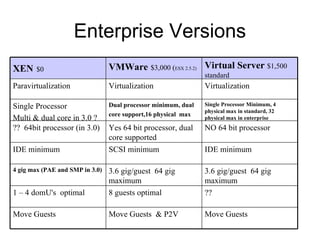
Enterprise Versions Move Guests Move Guests  & P2V Move Guests ?? 8 guests optimal 1 – 4 domU's  optimal 3.6 gig/guest  64 gig maximum 3.6 gig/guest  64 gig maximum 4 gig max (PAE and SMP in 3.0) IDE minimum SCSI minimum IDE minimum NO 64 bit processor Yes 64 bit processor, dual core supported ??  64bit processor (in 3.0) Single Processor Minimum, 4 physical max in standard, 32 physical max in enterprise Dual processor minimum, dual core support,16 physical  max   Single Processor Multi & dual core in 3.0 ? Virtualization Virtualization Paravirtualization Virtual Server  $1,500 standard VMWare   $3,000 ( ESX 2.5.2) XEN   $0
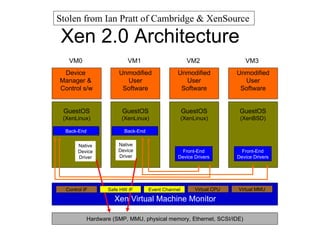
Xen 2.0 Architecture Stolen from Ian Pratt of Cambridge & XenSource Event Channel Virtual MMU Virtual CPU  Control IF Hardware (SMP, MMU, physical memory, Ethernet, SCSI/IDE) Native Device Driver GuestOS (XenLinux) Device  Manager &  Control s/w VM0 Native Device Driver GuestOS (XenLinux) Unmodified User Software VM1 Front-End Device Drivers GuestOS (XenLinux) Unmodified User Software VM2 Front-End Device Drivers GuestOS (XenBSD) Unmodified User Software VM3 Safe HW IF Xen Virtual Machine Monitor Back-End Back-End
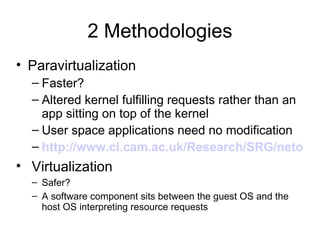
2 Methodologies Paravirtualization Faster? Altered kernel fulfilling requests rather than an app sitting on top of the kernel User space applications need no modification http://www.cl.cam.ac.uk/Research/SRG/netos/papers/2003-xensosp.pdf Virtualization Safer? A software component sits between the guest OS and the host OS interpreting resource requests
Tools VMWare + OS (MS or Linux) MS Virtual PC (runs on MS &OS/2 only)  XEN (runs on Linux & netBSD only) [all can be free] xen-2.0.3 (paravirtualization tool) twisted-1.3.0 (networking framework [whatever that means]) linux -2.6.10 (the kernel I virtualized) bridge-utils (layer 2 protocol free bridging) sysfs-utils  (file system virtualization) Zope-interface, iproute2, libcurl, zlib
XEN Installation www.hpl.hp.com/techreports/2004/HPL-2004-207R1.pdf   (Andreou and Walji sponsored by HP) http://lists.xensource.com/archives/html/xen-devel/2005-01/msg00434.html   (Anthony Liquori ) http://www.fedoraproject.org/wiki/FedoraXenQuickstart (Jeremy Katz) Plan and partition before hand Can use LVM or NFS also Can also live migrate
XEN Configuration Grub – sets xen0 memory, can also boot to unaltered kernel /etc/xen/xend-config.sxp  xen config script /etc/xen/xmdomainname  domain  config script, memory, VIFs /etc/xen/xm commands, create, console, destroy  /var/log/xend.log guess what /etc/xen/scripts  network and vif-bridge scripts
XEN Security Control & Audit RISK  - virtualization  creates a single point of failure (dom0, host) for the guests restrict access to config files  /etc/xen/ restrict access to xend.log files check routes carefully, twisted and bridge-utils are powerful, can send packets anywhere Continuity – copy domains, have an extra machine (probably one of the ones retired)
Security & Audit - cont St_R0nG3r  root password Use SUDO /etc/xen/xend-config-sxp xend-address  ' '  - any host can connect vif-antispoof  - default is “no” Check /etc/xen/auto for authorized domains at startup
Security Control & Audit - xmdomainname memory = xxx  (too small crashes, too big and other domains crash) vif =  define virtual MAC numbers and assign them to bridges, duplicates cause problems disk = where to look for this domain's OS and apps, wrong pointer and things go bad extra =  x  this is the runlevel, why they call it extra beats the snot outta me, avoid “0”
Security & Audit - /etc/xen/scripts network  - builds bridges and VIFs at xend start network-route – sets  /proc/sys/net/ipv4/ip_forward to “1” vif-route – sets interface routes up or down vif-bridge – associates vifs to bridges
SuSE 9.3 Xen “Built-in” Partition the drive first, guests will be installed in in extended partitions hda5, hda6, hda7, in YAST make the mount points data1,2,3 they will be built into fstab in dom0 Disable the autostart of SuSE firewall Xen is on the distribution media, but not part of the standard installation, use YAST2 check the box for Xen Xen-kernel, xen-kernel-nongpl, xen, 2 UML files 3 doc howto files that ……… Re-uses the xen kernel for both dom0 and domU
SuSE 9.3 Xen “Built-in” (2) DO NOT UPGRADE, the guest install can not upgrade. So upgrading on domU will cause an out of sync kernel  Reboot, the normal build will mount mount data1 Yast2, Software, “install into directory for xen” Select /data1 as the guest target directory, do not install “image” Use distribution DVD media Select the 6 xen packages to install in the guest target directory also  (do not select tomcat5) Select other  SW, accept, wait, exit YAST
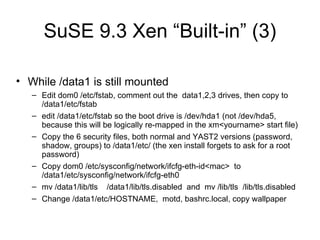
SuSE 9.3 Xen “Built-in” (3) While /data1 is still mounted Edit dom0 /etc/fstab, comment out the  data1,2,3 drives, then copy to /data1/etc/fstab edit /data1/etc/fstab so the boot drive is /dev/hda1 (not /dev/hda5, because this will be logically re-mapped in the xm<yourname> start file) Copy the 6 security files, both normal and YAST2 versions (password, shadow, groups) to /data1/etc/ (the xen install forgets to ask for a root password) Copy dom0 /etc/sysconfig/network/ifcfg-eth-id<mac>  to /data1/etc/sysconfig/network/ifcfg-eth0 mv /data1/lib/tls  /data1/lib/tls.disabled  and  mv /lib/tls  /lib/tls.disabled Change /data1/etc/HOSTNAME,  motd, bashrc.local, copy wallpaper
SuSE 9.3 Xen “Built-in” (4) Edit /boot/grub/menu.lst,  the default gives all memory to dom0, adjust as needed to allow for guest memory usage Create a start file in /etc/xen/xm<yourname> (copy from xmexample1) Change the guest name, nics, dhcp as needed Kernel = “/boot/vmlinuz-xen” Ramdisk = “/boot/initrd-xen” Edit vif(s) to assign a static mac to a virtual bridge Map  real partition to /hda1  disk = [ ‘phy:hda5,hda1,w’ ] Comment out  extra = “4”
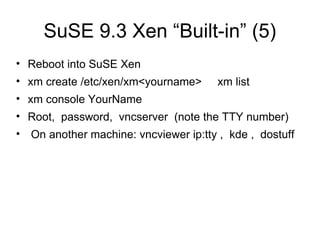
SuSE 9.3 Xen “Built-in” (5) Reboot into SuSE Xen xm create /etc/xen/xm<yourname>  xm list xm console YourName Root,  password,  vncserver  (note the TTY number) On another machine: vncviewer ip:tty ,  kde ,  dostuff
Resources XEN modules and manuals http://www.cl.cam.ac.uk/Research/SRG/netos/xen/   XEN user group archives http://lists.xensource.com/archives/html/xen-users/
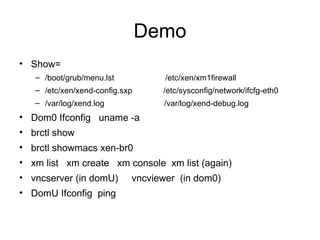
Demo Show=  /boot/grub/menu.lst  /etc/xen/xm1firewall /etc/xen/xend-config.sxp  /etc/sysconfig/network/ifcfg-eth0 /var/log/xend.log /var/log/xend-debug.log Dom0 Ifconfig  uname -a brctl show brctl showmacs xen-br0 xm list  xm create  xm console  xm list (again) vncserver (in domU)  vncviewer  (in dom0) DomU Ifconfig  ping
VM ESX VMWare Security White Paper  http://www.vmware.com/pdf/esx2_security.pdf   No public interfaces  Minimal host installation (apache in default install) Guest isolation (using files) AV & Firewall recommended (but not supplied) Su to root Default non-promiscuous NIC Code was audited (scope & methodology not stated) Use VLANs and place management console on separate vlan Recommends disabling logging of VM messages in guest (?!) Host OS is 100% VM, only drivers are open source Management Console is from Red Hat 7.2 Users & Groups within VM mgmt console, home directory throttle
VM ESX (cont) VMWare ESX Other Logical Access Control Provided at the OS level in addition to MUI users Can overprovision memory , but throttle with wieghts called “shares”  (min host mem 192mg for  8 guests) Watch routing, eth0 DHCP default install /etc/vmware  the goodies  like  hwconfig  and  vm-list VMotion requires a SAN Provide for swap or core dump on a separate partition “ bonded NICs”  teamed interfaces, management access on the guest subnet through vmxnet_console IBM blade: USB CDROM won’t work on RDM installed guests  Bonded NIC failure of both, fix with Net.Zerospeedlinkdown 1
VM ESX (cont 2) VMWARE ESX More Console OS – host operating system Service Console – administers host & guests, do not run X VMWare Management Interface – http browser based controls the host and guests, 509 certificated, SSL, 90 second refresh window possible multi-user conflict,  DOS possible with: /usr/lib/vmware-mui/apache/conf/access.conf vmware_SESSION_LENGTH 0 API – HP Insight, Veritas,  SNMP – feed other tools Remote Console – control the guest, MIME,  Check /proc/vmware for allowed methods .vmx the guest configuration file /root/vmware/ , text editor can alter .vmdk the guest image file VM MUI has a file manager Admin manual suggests “flagship” user that is never on vacation Install manual requires at least one non-root user
VM ESX (cont 3) VMWARE ESX Still More PXE Install – from a stored image, test then lock the image Cannot downgrade from dual processor to single processor LSI Logic SCSI adapter – see 30 pages of howto VMware-console-2.x.x-xxxx.exe check authorized use Reinstall VMware Tools overwrites the power level scripts Move a vm,  check the backup software Dual CPU requires VMWare Virtual SMP Backup from Service Console requires guest shutdown
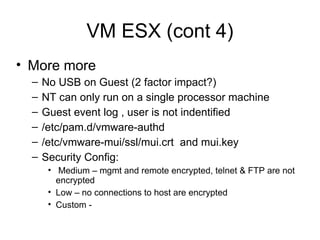
VM ESX (cont 4) More more No USB on Guest (2 factor impact?) NT can only run on a single processor machine Guest event log , user is not indentified /etc/pam.d/vmware-authd  /etc/vmware-mui/ssl/mui.crt  and mui.key Security Config: Medium – mgmt and remote encrypted, telnet & FTP are not encrypted Low – no connections to host are encrypted Custom -
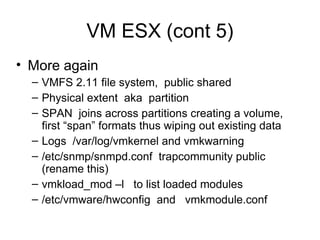
VM ESX (cont 5) More again VMFS 2.11 file system,  public shared Physical extent  aka  partition SPAN  joins across partitions creating a volume, first “span” formats thus wiping out existing data Logs  /var/log/vmkernel and vmkwarning /etc/snmp/snmpd.conf  trapcommunity public (rename this)  vmkload_mod –l  to list loaded modules /etc/vmware/hwconfig  and  vmkmodule.conf
VM ESX (cont 6) More stuff LUN masking, only allow guests to see what they need vmkmultipath -q  where the data goes
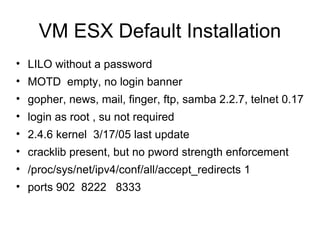
VM ESX Default Installation LILO without a password MOTD  empty, no login banner gopher, news, mail, finger, ftp, samba 2.2.7, telnet 0.17  login as root , su not required 2.4.6 kernel  3/17/05 last update cracklib present, but no pword strength enforcement /proc/sys/net/ipv4/conf/all/accept_redirects 1 ports 902  8222  8333
OTHER Questions ??

OLUG_xen.ppt

  • 1.
    Host Virtualization (&paravirtualization) Xen, SuSE 9.3 pro, Magic & Mystery Michael Hoesing cissp, cisa, ccp cia, cpa cma [email_address] (402) 981-7747 Disclaimer, I never said THAT, if you heard THAT, it wasn’t from me. None of the content of this presentation can be attributed to any of my employers, family members, acquaintances, conference sponsors past present or future. October 4, 2005
  • 2.
    Contents Drivers –why virtualize Practical Applications and History Definitions – virtualization, paravirtualiztion Tools – XEN, VMWare, MS Installation & Configuration ( Xen) Security & Audit (because it is my speech) ( Xen) SuSE 9.3 pro Xen “built-in” Resources and Demo (Xen) VM ESX (howto, security, defaults)
  • 3.
    Drivers (why arewe even talking about this) Reduced TCO 1 (or more) CPU can support many servers 1 Storage Device & KVM can support many servers less footprint (rent, utilities,..) (generally no memory savings) Cheaper redundancy increasing continuity options Development testing Support Legacy application migration
  • 4.
    Practical Applications Testing– run a version in a sandbox before deployment Testing – have multiple OS's and browsers and see how the website looks in different environments Academic – build a cheap network the students can take home on a disk any other cost saving opportunity
  • 5.
    History one man,one machine life was good one man 2 machines (expensive) one man, one machine , dual boot (more choice, but only one choice at a time) (para)virtualization - many choices all available concurrently
  • 6.
    Definitions Files FilesFiles or Partitions MS and OS/2 No Linux * (has been done) MS and LINUX, hosts and guests No MS * (has been done) Each guest unmodified Each guest unmodified Kernel xenU unpriviledged Host kernel unmodified Host kernel unmodified Kernel xen0 modified Guests Guests DomainUs Host Host Domain0 Virtualization Virtualization Paravirtualization Virtual PC $100 VMWare $200 ( workstation) XEN $0
  • 7.
    Enterprise Versions MoveGuests Move Guests & P2V Move Guests ?? 8 guests optimal 1 – 4 domU's optimal 3.6 gig/guest 64 gig maximum 3.6 gig/guest 64 gig maximum 4 gig max (PAE and SMP in 3.0) IDE minimum SCSI minimum IDE minimum NO 64 bit processor Yes 64 bit processor, dual core supported ?? 64bit processor (in 3.0) Single Processor Minimum, 4 physical max in standard, 32 physical max in enterprise Dual processor minimum, dual core support,16 physical max Single Processor Multi & dual core in 3.0 ? Virtualization Virtualization Paravirtualization Virtual Server $1,500 standard VMWare $3,000 ( ESX 2.5.2) XEN $0
  • 8.
    Xen 2.0 ArchitectureStolen from Ian Pratt of Cambridge & XenSource Event Channel Virtual MMU Virtual CPU Control IF Hardware (SMP, MMU, physical memory, Ethernet, SCSI/IDE) Native Device Driver GuestOS (XenLinux) Device Manager & Control s/w VM0 Native Device Driver GuestOS (XenLinux) Unmodified User Software VM1 Front-End Device Drivers GuestOS (XenLinux) Unmodified User Software VM2 Front-End Device Drivers GuestOS (XenBSD) Unmodified User Software VM3 Safe HW IF Xen Virtual Machine Monitor Back-End Back-End
  • 9.
    2 Methodologies ParavirtualizationFaster? Altered kernel fulfilling requests rather than an app sitting on top of the kernel User space applications need no modification http://www.cl.cam.ac.uk/Research/SRG/netos/papers/2003-xensosp.pdf Virtualization Safer? A software component sits between the guest OS and the host OS interpreting resource requests
  • 10.
    Tools VMWare +OS (MS or Linux) MS Virtual PC (runs on MS &OS/2 only) XEN (runs on Linux & netBSD only) [all can be free] xen-2.0.3 (paravirtualization tool) twisted-1.3.0 (networking framework [whatever that means]) linux -2.6.10 (the kernel I virtualized) bridge-utils (layer 2 protocol free bridging) sysfs-utils (file system virtualization) Zope-interface, iproute2, libcurl, zlib
  • 11.
    XEN Installation www.hpl.hp.com/techreports/2004/HPL-2004-207R1.pdf (Andreou and Walji sponsored by HP) http://lists.xensource.com/archives/html/xen-devel/2005-01/msg00434.html (Anthony Liquori ) http://www.fedoraproject.org/wiki/FedoraXenQuickstart (Jeremy Katz) Plan and partition before hand Can use LVM or NFS also Can also live migrate
  • 12.
    XEN Configuration Grub– sets xen0 memory, can also boot to unaltered kernel /etc/xen/xend-config.sxp xen config script /etc/xen/xmdomainname domain config script, memory, VIFs /etc/xen/xm commands, create, console, destroy /var/log/xend.log guess what /etc/xen/scripts network and vif-bridge scripts
  • 13.
    XEN Security Control& Audit RISK - virtualization creates a single point of failure (dom0, host) for the guests restrict access to config files /etc/xen/ restrict access to xend.log files check routes carefully, twisted and bridge-utils are powerful, can send packets anywhere Continuity – copy domains, have an extra machine (probably one of the ones retired)
  • 14.
    Security & Audit- cont St_R0nG3r root password Use SUDO /etc/xen/xend-config-sxp xend-address ' ' - any host can connect vif-antispoof - default is “no” Check /etc/xen/auto for authorized domains at startup
  • 15.
    Security Control &Audit - xmdomainname memory = xxx (too small crashes, too big and other domains crash) vif = define virtual MAC numbers and assign them to bridges, duplicates cause problems disk = where to look for this domain's OS and apps, wrong pointer and things go bad extra = x this is the runlevel, why they call it extra beats the snot outta me, avoid “0”
  • 16.
    Security & Audit- /etc/xen/scripts network - builds bridges and VIFs at xend start network-route – sets /proc/sys/net/ipv4/ip_forward to “1” vif-route – sets interface routes up or down vif-bridge – associates vifs to bridges
  • 17.
    SuSE 9.3 Xen“Built-in” Partition the drive first, guests will be installed in in extended partitions hda5, hda6, hda7, in YAST make the mount points data1,2,3 they will be built into fstab in dom0 Disable the autostart of SuSE firewall Xen is on the distribution media, but not part of the standard installation, use YAST2 check the box for Xen Xen-kernel, xen-kernel-nongpl, xen, 2 UML files 3 doc howto files that ……… Re-uses the xen kernel for both dom0 and domU
  • 18.
    SuSE 9.3 Xen“Built-in” (2) DO NOT UPGRADE, the guest install can not upgrade. So upgrading on domU will cause an out of sync kernel Reboot, the normal build will mount mount data1 Yast2, Software, “install into directory for xen” Select /data1 as the guest target directory, do not install “image” Use distribution DVD media Select the 6 xen packages to install in the guest target directory also (do not select tomcat5) Select other SW, accept, wait, exit YAST
  • 19.
    SuSE 9.3 Xen“Built-in” (3) While /data1 is still mounted Edit dom0 /etc/fstab, comment out the data1,2,3 drives, then copy to /data1/etc/fstab edit /data1/etc/fstab so the boot drive is /dev/hda1 (not /dev/hda5, because this will be logically re-mapped in the xm<yourname> start file) Copy the 6 security files, both normal and YAST2 versions (password, shadow, groups) to /data1/etc/ (the xen install forgets to ask for a root password) Copy dom0 /etc/sysconfig/network/ifcfg-eth-id<mac> to /data1/etc/sysconfig/network/ifcfg-eth0 mv /data1/lib/tls /data1/lib/tls.disabled and mv /lib/tls /lib/tls.disabled Change /data1/etc/HOSTNAME, motd, bashrc.local, copy wallpaper
  • 20.
    SuSE 9.3 Xen“Built-in” (4) Edit /boot/grub/menu.lst, the default gives all memory to dom0, adjust as needed to allow for guest memory usage Create a start file in /etc/xen/xm<yourname> (copy from xmexample1) Change the guest name, nics, dhcp as needed Kernel = “/boot/vmlinuz-xen” Ramdisk = “/boot/initrd-xen” Edit vif(s) to assign a static mac to a virtual bridge Map real partition to /hda1 disk = [ ‘phy:hda5,hda1,w’ ] Comment out extra = “4”
  • 21.
    SuSE 9.3 Xen“Built-in” (5) Reboot into SuSE Xen xm create /etc/xen/xm<yourname> xm list xm console YourName Root, password, vncserver (note the TTY number) On another machine: vncviewer ip:tty , kde , dostuff
  • 22.
    Resources XEN modulesand manuals http://www.cl.cam.ac.uk/Research/SRG/netos/xen/ XEN user group archives http://lists.xensource.com/archives/html/xen-users/
  • 23.
    Demo Show= /boot/grub/menu.lst /etc/xen/xm1firewall /etc/xen/xend-config.sxp /etc/sysconfig/network/ifcfg-eth0 /var/log/xend.log /var/log/xend-debug.log Dom0 Ifconfig uname -a brctl show brctl showmacs xen-br0 xm list xm create xm console xm list (again) vncserver (in domU) vncviewer (in dom0) DomU Ifconfig ping
  • 24.
    VM ESX VMWareSecurity White Paper http://www.vmware.com/pdf/esx2_security.pdf No public interfaces Minimal host installation (apache in default install) Guest isolation (using files) AV & Firewall recommended (but not supplied) Su to root Default non-promiscuous NIC Code was audited (scope & methodology not stated) Use VLANs and place management console on separate vlan Recommends disabling logging of VM messages in guest (?!) Host OS is 100% VM, only drivers are open source Management Console is from Red Hat 7.2 Users & Groups within VM mgmt console, home directory throttle
  • 25.
    VM ESX (cont)VMWare ESX Other Logical Access Control Provided at the OS level in addition to MUI users Can overprovision memory , but throttle with wieghts called “shares” (min host mem 192mg for 8 guests) Watch routing, eth0 DHCP default install /etc/vmware the goodies like hwconfig and vm-list VMotion requires a SAN Provide for swap or core dump on a separate partition “ bonded NICs” teamed interfaces, management access on the guest subnet through vmxnet_console IBM blade: USB CDROM won’t work on RDM installed guests Bonded NIC failure of both, fix with Net.Zerospeedlinkdown 1
  • 26.
    VM ESX (cont2) VMWARE ESX More Console OS – host operating system Service Console – administers host & guests, do not run X VMWare Management Interface – http browser based controls the host and guests, 509 certificated, SSL, 90 second refresh window possible multi-user conflict, DOS possible with: /usr/lib/vmware-mui/apache/conf/access.conf vmware_SESSION_LENGTH 0 API – HP Insight, Veritas, SNMP – feed other tools Remote Console – control the guest, MIME, Check /proc/vmware for allowed methods .vmx the guest configuration file /root/vmware/ , text editor can alter .vmdk the guest image file VM MUI has a file manager Admin manual suggests “flagship” user that is never on vacation Install manual requires at least one non-root user
  • 27.
    VM ESX (cont3) VMWARE ESX Still More PXE Install – from a stored image, test then lock the image Cannot downgrade from dual processor to single processor LSI Logic SCSI adapter – see 30 pages of howto VMware-console-2.x.x-xxxx.exe check authorized use Reinstall VMware Tools overwrites the power level scripts Move a vm, check the backup software Dual CPU requires VMWare Virtual SMP Backup from Service Console requires guest shutdown
  • 28.
    VM ESX (cont4) More more No USB on Guest (2 factor impact?) NT can only run on a single processor machine Guest event log , user is not indentified /etc/pam.d/vmware-authd /etc/vmware-mui/ssl/mui.crt and mui.key Security Config: Medium – mgmt and remote encrypted, telnet & FTP are not encrypted Low – no connections to host are encrypted Custom -
  • 29.
    VM ESX (cont5) More again VMFS 2.11 file system, public shared Physical extent aka partition SPAN joins across partitions creating a volume, first “span” formats thus wiping out existing data Logs /var/log/vmkernel and vmkwarning /etc/snmp/snmpd.conf trapcommunity public (rename this) vmkload_mod –l to list loaded modules /etc/vmware/hwconfig and vmkmodule.conf
  • 30.
    VM ESX (cont6) More stuff LUN masking, only allow guests to see what they need vmkmultipath -q where the data goes
  • 31.
    VM ESX DefaultInstallation LILO without a password MOTD empty, no login banner gopher, news, mail, finger, ftp, samba 2.2.7, telnet 0.17 login as root , su not required 2.4.6 kernel 3/17/05 last update cracklib present, but no pword strength enforcement /proc/sys/net/ipv4/conf/all/accept_redirects 1 ports 902 8222 8333
  • 32.