PODCASTING for library instruction
TYPES OF INSTRUCTION IN ACADEMIC LIBRARIES One shot session Embedded Librarian (several sessions or team teaching) Online only Hybrid  - Online and In person
WHY PODCAST INSTRUCTION? Instruction can be done over a period of weeks rather than in just in one session Students can view at any time even “on the go” Students can review previous instruction sessions Technology more appealing to them
WORLD LITERATURE 2 LIBRARY PODCAST PILOT – SPRING 2008 Library instruction delivered as a Podcast over the course of 8 weeks 1-2 “episodes” per week Students subscribed to Podcast feed through iTunes Formats delivered via Podcast feed: optimized screencasts (mp4), video (mp4), audio (mp3), “enhanced” Podcast (m4a) Short written assignments given to reinforce/verify students’ understanding of material presented Librarians met with students mid-semester to answer questions and assess students’ satisfaction with the delivery medium
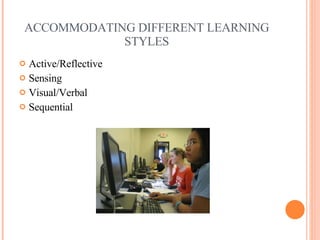
ACCOMMODATING DIFFERENT LEARNING STYLES Active/Reflective Sensing Visual/Verbal Sequential
PRE- AND POST-TESTS What skills and knowledge did students have at the beginning of the semester? What did they learn after the podcast instruction? How did they apply what they learned in the podcast instruction?
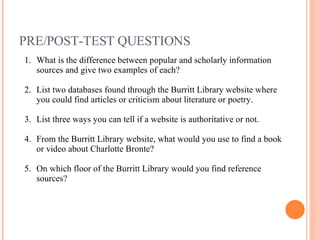
PRE/POST-TEST QUESTIONS What is the difference between popular and scholarly information sources and give two examples of each? List two databases found through the Burritt Library website where you could find articles or criticism about literature or poetry. List three ways you can tell if a website is authoritative or not. From the Burritt Library website, what would you use to find a book or video about Charlotte Bronte? On which floor of the Burritt Library would you find reference sources?
PRE AND POST TEST PERCENTAGE SCORES Pre test – 50 students c=correct, p c=partially correct, w=wrong Post test – 38 students c=correct, p c=partially correct, w=wrong ? C P C  W 1 2% 58% 40% 2 0 28% 70% 3 18% 34% 48% 4 22% 2% 76% 5 26% 0 74% ? C P C W 1 25% 50% 25% 2 53.9% 33.3% 12.8% 3 35% 30.8% 34.2% 4 64.1% 2.6% 33.3% 5 71.8% 0 28.2%
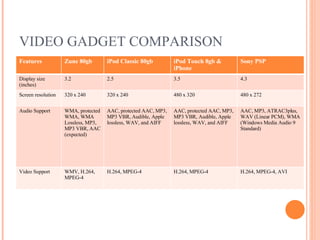
VIDEO GADGET COMPARISON Features Zune 80gb iPod Classic 80gb iPod Touch 8gb & iPhone Sony PSP Display size (inches) 3.2 2.5 3.5 4.3 Screen resolution 320 x 240 320 x 240 480 x 320 480 x 272 Audio Support WMA, protected WMA, WMA Lossless, MP3, MP3 VBR, AAC (expected) AAC, protected AAC, MP3, MP3 VBR, Audible, Apple lossless, WAV, and AIFF  AAC, protected AAC, MP3, MP3 VBR, Audible, Apple lossless, WAV, and AIFF  AAC, MP3, ATRAC3plus, WAV (Linear PCM), WMA (Windows Media Audio 9 Standard) Video Support WMV, H.264, MPEG-4  H.264, MPEG-4 H.264, MPEG-4 H.264, MPEG-4, AVI
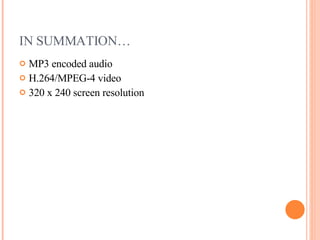
IN SUMMATION… MP3 encoded audio H.264/MPEG-4 video 320 x 240 screen resolution
PRODUCTION SOFTWARE Screencasts Captivate (Adobe, Windows) ,  iShowU  (ShinyWhiteBox, Mac), Camtasia (TechSmith, Windows), Camstudio (Windows, Free), Wink (DebugMode,Windows/Linux, Free), ProfCast (Mac)  Video Conversion Utilities AVS Video Converter, YASA Video Converter,  Moyea SWF to Video Converter Audio Editing Audacity (Windows, free),  GarageBand (Mac) Video Editing FinalCut Pro (Mac),  iMovie (Mac ) , PowerDirector (Windows),  Quicktime Pro  (Mac/Windows) Feed Generation DYI, Podcast blaster feed generator, Feedburner SmartCast,  Dreamweaver,  iWeb (Mac)
FLASH FILE (SWF) TO IPOD IN 3 EASY STEPS
WHAT IS A POD/VID/VODCAST? RSS + MP3 = PODCAST RSS and (MP* or M4*)
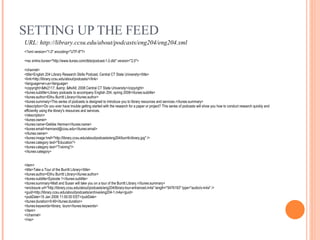
SETTING UP THE FEED <?xml version=&quot;1.0&quot; encoding=&quot;UTF-8&quot;?> <rss xmlns:itunes=&quot;http://www.itunes.com/dtds/podcast-1.0.dtd&quot; version=&quot;2.0&quot;> <channel> <title>English 204 Library Research Skills Podcast, Central CT State University</title> <link>http://library.ccsu.edu/about/podcasts/</link> <language>en-us</language> <copyright>&#x2117; &amp; &#xA9; 2008 Central CT State University</copyright> <itunes:subtitle>Library podcasts to accompany English 204, spring 2008</itunes:subtitle> <itunes:author>Elihu Burritt Library</itunes:author> <itunes:summary>This series of podcasts is designed to introduce you to library resources and services.</itunes:summary> <description>Do you ever have trouble getting started with the research for a paper or project? This series of podcasts will show you how to conduct research quickly and efficiently using the library's resources and services.  </description> <itunes:owner> <itunes:name>Debbie Herman</itunes:name> <itunes:email>hermand@ccsu.edu</itunes:email> </itunes:owner> <itunes:image href=&quot;http://library.ccsu.edu/about/podcasts/eng204/burritt-library.jpg&quot; /> <itunes:category text=&quot;Education&quot;> <itunes:category text=&quot;Training&quot;/> </itunes:category> <item> <title>Take a Tour of the Burritt Library</title> <itunes:author>Elihu Burritt Library</itunes:author> <itunes:subtitle>Episode 1</itunes:subtitle> <itunes:summary>Matt and Susan will take you on a tour of the Burritt Library.</itunes:summary> <enclosure url=&quot;http://library.ccsu.edu/about/podcasts/eng204/library-tour-enhanced.m4a&quot; length=&quot;5476193&quot; type=&quot;audio/x-m4a&quot; /> <guid>http://library.ccsu.edu/about/podcasts/archive/eng204-1.m4a</guid> <pubDate>15 Jan 2008 11:00:00 EST</pubDate> <itunes:duration>9:49</itunes:duration> <itunes:keywords>library, tours</itunes:keywords> </item> </channel> </rss> URL: http://library.ccsu.edu/about/podcasts/eng204/eng204.xml
VIEWING IN ITUNES XML SNIPPET <title>English 204 Library Research Skills Podcast, Central CT State University</title> <link>http://library.ccsu.edu/about/podcasts/</link> <language>en-us</language> <copyright>&#x2117; &amp; &#xA9; 2008 Central CT State University</copyright> <itunes:subtitle>Library podcasts to accompany English 204, spring 2008</itunes:subtitle> <itunes:author>Elihu Burritt Library</itunes:author> <itunes:summary>This series of podcasts is designed to introduce you to library resources and services.</itunes:summary> <description>Do you ever have trouble getting started with the research for a paper or project? This series of podcasts will show you how to conduct research quickly and efficiently using the library's resources and services.  </description> <itunes:owner>
BLOGLINES EXAMPLE
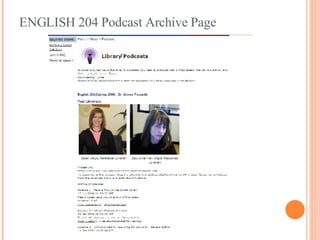
ENGLISH 204 Podcast Archive Page
FOCUS GROUP QUESTIONS How many of you … Loaded the podcasts onto your own iPod? Accessed the podcasts through iTunes on your computer? Accessed the podcasts through the link on the webpage? Accessed the podcasts on the iPod at the library? How did you like the podcasts/tutorials?  What did you like about them? What did you dislike about them?  Do you have any suggestions of how they could have been done differently or better? What kinds of technical problems did you have if any?
FOCUS GROUP QUESTIONS CONTINUED Which podcasts did you like best – video, databases tutorials, audio or a combination? Would you have preferred that they be more interactive (i.e.  trying some of your own searches)? Would you prefer to get this kind of instruction online or in person?  Why? After viewing and listening to these podcasts, how many of you feel more comfortable using the library’s resources? After the podcasts do you feel more comfortable visiting the library and/or asking for help using library resources?
FUTURE PODCAST INSTRUCTION Freshman Learning Communities course in fall 2008 Podcasts/tutorials/video available through Blackboard Vista Make better use of library instruction time if  podcasts are viewed before visit to library
VIDCASTING RESOURCES http://del.icio.us/debbie.herman/vidcasting
THANK YOU! Debbie Herman Digital Resources Librarian Central CT State University [email_address]   Susan Slaga Reference Librarian Central CT State University [email_address]

Podcasting for Library Instruction

  • 1.
  • 2.
    TYPES OF INSTRUCTIONIN ACADEMIC LIBRARIES One shot session Embedded Librarian (several sessions or team teaching) Online only Hybrid - Online and In person
  • 3.
    WHY PODCAST INSTRUCTION?Instruction can be done over a period of weeks rather than in just in one session Students can view at any time even “on the go” Students can review previous instruction sessions Technology more appealing to them
  • 4.
    WORLD LITERATURE 2LIBRARY PODCAST PILOT – SPRING 2008 Library instruction delivered as a Podcast over the course of 8 weeks 1-2 “episodes” per week Students subscribed to Podcast feed through iTunes Formats delivered via Podcast feed: optimized screencasts (mp4), video (mp4), audio (mp3), “enhanced” Podcast (m4a) Short written assignments given to reinforce/verify students’ understanding of material presented Librarians met with students mid-semester to answer questions and assess students’ satisfaction with the delivery medium
  • 5.
    ACCOMMODATING DIFFERENT LEARNINGSTYLES Active/Reflective Sensing Visual/Verbal Sequential
  • 6.
    PRE- AND POST-TESTSWhat skills and knowledge did students have at the beginning of the semester? What did they learn after the podcast instruction? How did they apply what they learned in the podcast instruction?
  • 7.
    PRE/POST-TEST QUESTIONS Whatis the difference between popular and scholarly information sources and give two examples of each? List two databases found through the Burritt Library website where you could find articles or criticism about literature or poetry. List three ways you can tell if a website is authoritative or not. From the Burritt Library website, what would you use to find a book or video about Charlotte Bronte? On which floor of the Burritt Library would you find reference sources?
  • 8.
    PRE AND POSTTEST PERCENTAGE SCORES Pre test – 50 students c=correct, p c=partially correct, w=wrong Post test – 38 students c=correct, p c=partially correct, w=wrong ? C P C W 1 2% 58% 40% 2 0 28% 70% 3 18% 34% 48% 4 22% 2% 76% 5 26% 0 74% ? C P C W 1 25% 50% 25% 2 53.9% 33.3% 12.8% 3 35% 30.8% 34.2% 4 64.1% 2.6% 33.3% 5 71.8% 0 28.2%
  • 9.
    VIDEO GADGET COMPARISONFeatures Zune 80gb iPod Classic 80gb iPod Touch 8gb & iPhone Sony PSP Display size (inches) 3.2 2.5 3.5 4.3 Screen resolution 320 x 240 320 x 240 480 x 320 480 x 272 Audio Support WMA, protected WMA, WMA Lossless, MP3, MP3 VBR, AAC (expected) AAC, protected AAC, MP3, MP3 VBR, Audible, Apple lossless, WAV, and AIFF AAC, protected AAC, MP3, MP3 VBR, Audible, Apple lossless, WAV, and AIFF AAC, MP3, ATRAC3plus, WAV (Linear PCM), WMA (Windows Media Audio 9 Standard) Video Support WMV, H.264, MPEG-4 H.264, MPEG-4 H.264, MPEG-4 H.264, MPEG-4, AVI
  • 10.
    IN SUMMATION… MP3encoded audio H.264/MPEG-4 video 320 x 240 screen resolution
  • 11.
    PRODUCTION SOFTWARE ScreencastsCaptivate (Adobe, Windows) , iShowU (ShinyWhiteBox, Mac), Camtasia (TechSmith, Windows), Camstudio (Windows, Free), Wink (DebugMode,Windows/Linux, Free), ProfCast (Mac) Video Conversion Utilities AVS Video Converter, YASA Video Converter, Moyea SWF to Video Converter Audio Editing Audacity (Windows, free), GarageBand (Mac) Video Editing FinalCut Pro (Mac), iMovie (Mac ) , PowerDirector (Windows), Quicktime Pro (Mac/Windows) Feed Generation DYI, Podcast blaster feed generator, Feedburner SmartCast, Dreamweaver, iWeb (Mac)
  • 12.
    FLASH FILE (SWF)TO IPOD IN 3 EASY STEPS
  • 13.
    WHAT IS APOD/VID/VODCAST? RSS + MP3 = PODCAST RSS and (MP* or M4*)
  • 14.
    SETTING UP THEFEED <?xml version=&quot;1.0&quot; encoding=&quot;UTF-8&quot;?> <rss xmlns:itunes=&quot;http://www.itunes.com/dtds/podcast-1.0.dtd&quot; version=&quot;2.0&quot;> <channel> <title>English 204 Library Research Skills Podcast, Central CT State University</title> <link>http://library.ccsu.edu/about/podcasts/</link> <language>en-us</language> <copyright>&#x2117; &amp; &#xA9; 2008 Central CT State University</copyright> <itunes:subtitle>Library podcasts to accompany English 204, spring 2008</itunes:subtitle> <itunes:author>Elihu Burritt Library</itunes:author> <itunes:summary>This series of podcasts is designed to introduce you to library resources and services.</itunes:summary> <description>Do you ever have trouble getting started with the research for a paper or project? This series of podcasts will show you how to conduct research quickly and efficiently using the library's resources and services. </description> <itunes:owner> <itunes:name>Debbie Herman</itunes:name> <itunes:email>hermand@ccsu.edu</itunes:email> </itunes:owner> <itunes:image href=&quot;http://library.ccsu.edu/about/podcasts/eng204/burritt-library.jpg&quot; /> <itunes:category text=&quot;Education&quot;> <itunes:category text=&quot;Training&quot;/> </itunes:category> <item> <title>Take a Tour of the Burritt Library</title> <itunes:author>Elihu Burritt Library</itunes:author> <itunes:subtitle>Episode 1</itunes:subtitle> <itunes:summary>Matt and Susan will take you on a tour of the Burritt Library.</itunes:summary> <enclosure url=&quot;http://library.ccsu.edu/about/podcasts/eng204/library-tour-enhanced.m4a&quot; length=&quot;5476193&quot; type=&quot;audio/x-m4a&quot; /> <guid>http://library.ccsu.edu/about/podcasts/archive/eng204-1.m4a</guid> <pubDate>15 Jan 2008 11:00:00 EST</pubDate> <itunes:duration>9:49</itunes:duration> <itunes:keywords>library, tours</itunes:keywords> </item> </channel> </rss> URL: http://library.ccsu.edu/about/podcasts/eng204/eng204.xml
  • 15.
    VIEWING IN ITUNESXML SNIPPET <title>English 204 Library Research Skills Podcast, Central CT State University</title> <link>http://library.ccsu.edu/about/podcasts/</link> <language>en-us</language> <copyright>&#x2117; &amp; &#xA9; 2008 Central CT State University</copyright> <itunes:subtitle>Library podcasts to accompany English 204, spring 2008</itunes:subtitle> <itunes:author>Elihu Burritt Library</itunes:author> <itunes:summary>This series of podcasts is designed to introduce you to library resources and services.</itunes:summary> <description>Do you ever have trouble getting started with the research for a paper or project? This series of podcasts will show you how to conduct research quickly and efficiently using the library's resources and services. </description> <itunes:owner>
  • 16.
  • 17.
    ENGLISH 204 PodcastArchive Page
  • 18.
    FOCUS GROUP QUESTIONSHow many of you … Loaded the podcasts onto your own iPod? Accessed the podcasts through iTunes on your computer? Accessed the podcasts through the link on the webpage? Accessed the podcasts on the iPod at the library? How did you like the podcasts/tutorials? What did you like about them? What did you dislike about them? Do you have any suggestions of how they could have been done differently or better? What kinds of technical problems did you have if any?
  • 19.
    FOCUS GROUP QUESTIONSCONTINUED Which podcasts did you like best – video, databases tutorials, audio or a combination? Would you have preferred that they be more interactive (i.e. trying some of your own searches)? Would you prefer to get this kind of instruction online or in person? Why? After viewing and listening to these podcasts, how many of you feel more comfortable using the library’s resources? After the podcasts do you feel more comfortable visiting the library and/or asking for help using library resources?
  • 20.
    FUTURE PODCAST INSTRUCTIONFreshman Learning Communities course in fall 2008 Podcasts/tutorials/video available through Blackboard Vista Make better use of library instruction time if podcasts are viewed before visit to library
  • 21.
  • 22.
    THANK YOU! DebbieHerman Digital Resources Librarian Central CT State University [email_address] Susan Slaga Reference Librarian Central CT State University [email_address]