1 of 26
DarshanVithani
ME CSE Department,
Parul Institute Of Engineering and Technology
4 October 2013
Optical Multi-touch Technology
2 of 26Optical Multi-Touch Technology
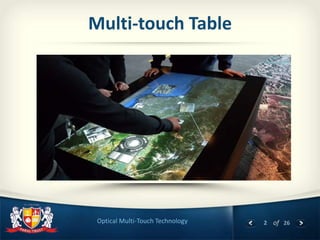
Multi-touch Table
3 of 26Optical Multi-Touch Technology
Contents
Introduction to Multi–Touch Technology
Description of MT Devices
Various Sub System
H/W & S/W Required
Usage of Multi-Touch devices
4 of 26Optical Multi-Touch Technology
Introduction
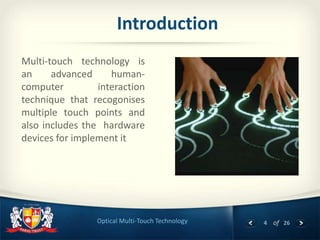
Multi-touch technology is
an advanced human-
computer interaction
technique that recogonises
multiple touch points and
also includes the hardware
devices for implement it
5 of 26Optical Multi-Touch Technology
Description
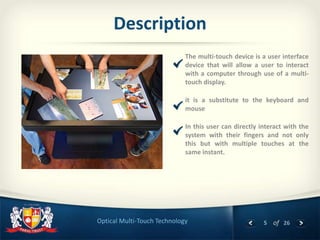
The multi-touch device is a user interface
device that will allow a user to interact
with a computer through use of a multi-
touch display.
it is a substitute to the keyboard and
mouse
In this user can directly interact with the
system with their fingers and not only
this but with multiple touches at the
same instant.
6 of 26Optical Multi-Touch Technology
How Does a Touchscreen Work?
A basic touch-screen has
three main components:
Touch sensor;
Controller;
Software driver.
The touch-screen is an
input device, so it needs to
be combined with a display
and a PC or other device to
make a complete touch
input system.
7 of 26Optical Multi-Touch Technology
Touchscreen Technology
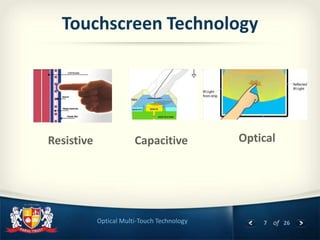
Resistive Capacitive Optical
8 of 26Optical Multi-Touch Technology
TERMINOLOGY
 Diffuser: Screen surface for projection.
 IR Lasers: Laser emitting IR Beam.
 IR Led: Led emitting IR.
 Blob - A bright luminescent object
 Blob tracking - Assigning each blob an ID (identifier).
 TUIO - A protocol used for communicating the position, size, and
relative velocity of blobs. (Tangible User Interface Object)
 CCV: An open source software for blob tracking. (Community Core
Vision)
 MT: Multitouch
9 of 26Optical Multi-Touch Technology
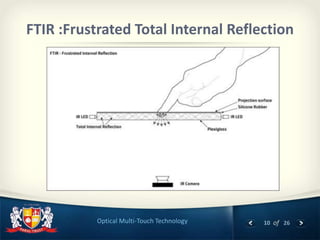
 FTIR :Frustrated Total Internal Reflection
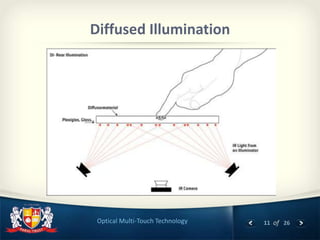
 DI: Diffused Illumination
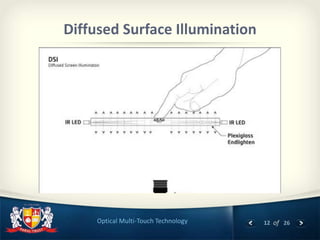
 DSI: Diffused Surface Illumination
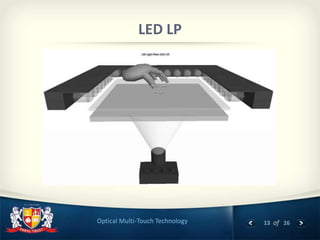
 LED LP: Led Laser Plane
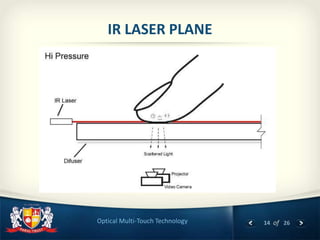
 LLP: Laser Light Plane
TECHNIQUES
10 of 26Optical Multi-Touch Technology
FTIR :Frustrated Total Internal Reflection
11 of 26Optical Multi-Touch Technology
Diffused Illumination
12 of 26Optical Multi-Touch Technology
Diffused Surface Illumination
13 of 26Optical Multi-Touch Technology
LED LP
14 of 26Optical Multi-Touch Technology
IR LASER PLANE
15 of 26Optical Multi-Touch Technology
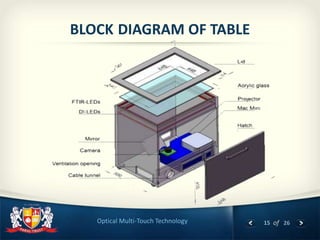
BLOCK DIAGRAM OF TABLE
16 of 26Optical Multi-Touch Technology
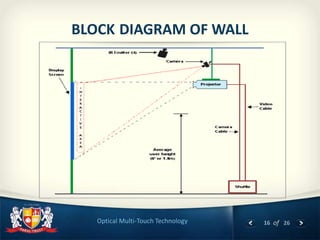
BLOCK DIAGRAM OF WALL
17 of 26Optical Multi-Touch Technology
Implementation on Wall
18 of 26Optical Multi-Touch Technology
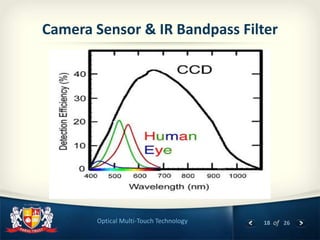
Camera Sensor & IR Bandpass Filter
19 of 26Optical Multi-Touch Technology
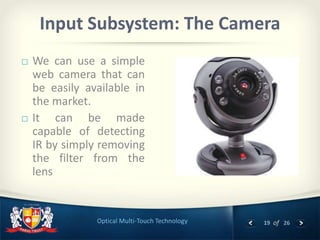
Input Subsystem: The Camera
 We can use a simple
web camera that can
be easily available in
the market.
 It can be made
capable of detecting
IR by simply removing
the filter from the
lens
20 of 26Optical Multi-Touch Technology
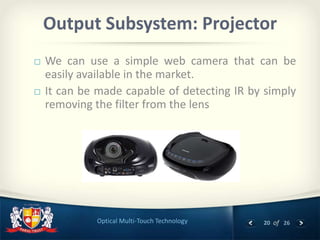
Output Subsystem: Projector
 We can use a simple web camera that can be
easily available in the market.
 It can be made capable of detecting IR by simply
removing the filter from the lens
21 of 26Optical Multi-Touch Technology
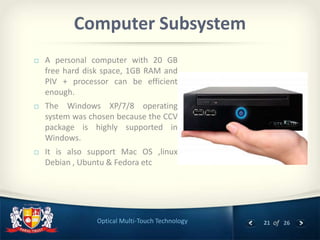
Computer Subsystem
 A personal computer with 20 GB
free hard disk space, 1GB RAM and
PIV + processor can be efficient
enough.
 The Windows XP/7/8 operating
system was chosen because the CCV
package is highly supported in
Windows.
 It is also support Mac OS ,linux
Debian , Ubuntu & Fedora etc
22 of 26Optical Multi-Touch Technology
Application Development
 Adobe Flash / Flex / Air
 Browser & Web (HTML/CSS/Javascript)
 C/C++ (CCV/OpenCV/OpenGL/OpenFrameworks)
 Java (Android/Processing.org)
 C# (.NET/Silverlight/WPF)
 Objective-C (Cocoa/iPhone)
23 of 26Optical Multi-Touch Technology
APPLICATIONS
 Personal Computing
 Advertising
 Graphics
 Audio Mixing
 Video Playing
 Computer Gaming
 Slide Presentations
……and many more!
24 of 26Optical Multi-Touch Technology
CONCLUSION
 Multi-touch technologies have a long history. Mostly multi Touch devices
have limited resolution, are relatively complex, and don't easily and
inexpensively scale up to large dimensions.
 Optical Multi-touch technology use FTIR technique that is simple and easy
to implement . It provides any resolution displays supported with high
graphics.
 In this research , it requires a significant amount of space behind the
interaction surface. Instead of this we can use Raspberry Pi & its
introduction covered by Pranav Pathak.
25 of 26Optical Multi-Touch Technology
REFERENCES
[1] Low-Cost Multi-Touch Sensing through FTIR by Jefferson Y. Han
[2] Buxton, W., Hill, R., and Rowley, P. 1985. Issues and Techniques in
[3] Touch-Sensitive Tablet Input
[4] Donald Hearn ,M Pauline Baker, Computer Graphics C version, 2/E
[5] Pearson Education ,2003
[6] Buxton, Bill. 2008. Multi-Touch Systems that I Have Known and Loved.
[7] URL: http://www.billbuxton.com/multitouchOverview.html
[8] How to build a multi touch by Harry Vaan Der
[9] Opensource,MultitouchDisplay,http://www.technologyreview.com/Infotec
[10] OpenCV on the Raspberry Pi
, http://www.raspberrypi.org/phpBB3/viewtopic.php?f=37&t=6354
26 of 26
Thank You
Darshan Vithani, 4 October 2013

Optical Multi Touch Technology

  • 1.
    1 of 26 DarshanVithani MECSE Department, Parul Institute Of Engineering and Technology 4 October 2013 Optical Multi-touch Technology
  • 2.
    2 of 26OpticalMulti-Touch Technology Multi-touch Table
  • 3.
    3 of 26OpticalMulti-Touch Technology Contents Introduction to Multi–Touch Technology Description of MT Devices Various Sub System H/W & S/W Required Usage of Multi-Touch devices
  • 4.
    4 of 26OpticalMulti-Touch Technology Introduction Multi-touch technology is an advanced human- computer interaction technique that recogonises multiple touch points and also includes the hardware devices for implement it
  • 5.
    5 of 26OpticalMulti-Touch Technology Description The multi-touch device is a user interface device that will allow a user to interact with a computer through use of a multi- touch display. it is a substitute to the keyboard and mouse In this user can directly interact with the system with their fingers and not only this but with multiple touches at the same instant.
  • 6.
    6 of 26OpticalMulti-Touch Technology How Does a Touchscreen Work? A basic touch-screen has three main components: Touch sensor; Controller; Software driver. The touch-screen is an input device, so it needs to be combined with a display and a PC or other device to make a complete touch input system.
  • 7.
    7 of 26OpticalMulti-Touch Technology Touchscreen Technology Resistive Capacitive Optical
  • 8.
    8 of 26OpticalMulti-Touch Technology TERMINOLOGY  Diffuser: Screen surface for projection.  IR Lasers: Laser emitting IR Beam.  IR Led: Led emitting IR.  Blob - A bright luminescent object  Blob tracking - Assigning each blob an ID (identifier).  TUIO - A protocol used for communicating the position, size, and relative velocity of blobs. (Tangible User Interface Object)  CCV: An open source software for blob tracking. (Community Core Vision)  MT: Multitouch
  • 9.
    9 of 26OpticalMulti-Touch Technology  FTIR :Frustrated Total Internal Reflection  DI: Diffused Illumination  DSI: Diffused Surface Illumination  LED LP: Led Laser Plane  LLP: Laser Light Plane TECHNIQUES
  • 10.
    10 of 26OpticalMulti-Touch Technology FTIR :Frustrated Total Internal Reflection
  • 11.
    11 of 26OpticalMulti-Touch Technology Diffused Illumination
  • 12.
    12 of 26OpticalMulti-Touch Technology Diffused Surface Illumination
  • 13.
    13 of 26OpticalMulti-Touch Technology LED LP
  • 14.
    14 of 26OpticalMulti-Touch Technology IR LASER PLANE
  • 15.
    15 of 26OpticalMulti-Touch Technology BLOCK DIAGRAM OF TABLE
  • 16.
    16 of 26OpticalMulti-Touch Technology BLOCK DIAGRAM OF WALL
  • 17.
    17 of 26OpticalMulti-Touch Technology Implementation on Wall
  • 18.
    18 of 26OpticalMulti-Touch Technology Camera Sensor & IR Bandpass Filter
  • 19.
    19 of 26OpticalMulti-Touch Technology Input Subsystem: The Camera  We can use a simple web camera that can be easily available in the market.  It can be made capable of detecting IR by simply removing the filter from the lens
  • 20.
    20 of 26OpticalMulti-Touch Technology Output Subsystem: Projector  We can use a simple web camera that can be easily available in the market.  It can be made capable of detecting IR by simply removing the filter from the lens
  • 21.
    21 of 26OpticalMulti-Touch Technology Computer Subsystem  A personal computer with 20 GB free hard disk space, 1GB RAM and PIV + processor can be efficient enough.  The Windows XP/7/8 operating system was chosen because the CCV package is highly supported in Windows.  It is also support Mac OS ,linux Debian , Ubuntu & Fedora etc
  • 22.
    22 of 26OpticalMulti-Touch Technology Application Development  Adobe Flash / Flex / Air  Browser & Web (HTML/CSS/Javascript)  C/C++ (CCV/OpenCV/OpenGL/OpenFrameworks)  Java (Android/Processing.org)  C# (.NET/Silverlight/WPF)  Objective-C (Cocoa/iPhone)
  • 23.
    23 of 26OpticalMulti-Touch Technology APPLICATIONS  Personal Computing  Advertising  Graphics  Audio Mixing  Video Playing  Computer Gaming  Slide Presentations ……and many more!
  • 24.
    24 of 26OpticalMulti-Touch Technology CONCLUSION  Multi-touch technologies have a long history. Mostly multi Touch devices have limited resolution, are relatively complex, and don't easily and inexpensively scale up to large dimensions.  Optical Multi-touch technology use FTIR technique that is simple and easy to implement . It provides any resolution displays supported with high graphics.  In this research , it requires a significant amount of space behind the interaction surface. Instead of this we can use Raspberry Pi & its introduction covered by Pranav Pathak.
  • 25.
    25 of 26OpticalMulti-Touch Technology REFERENCES [1] Low-Cost Multi-Touch Sensing through FTIR by Jefferson Y. Han [2] Buxton, W., Hill, R., and Rowley, P. 1985. Issues and Techniques in [3] Touch-Sensitive Tablet Input [4] Donald Hearn ,M Pauline Baker, Computer Graphics C version, 2/E [5] Pearson Education ,2003 [6] Buxton, Bill. 2008. Multi-Touch Systems that I Have Known and Loved. [7] URL: http://www.billbuxton.com/multitouchOverview.html [8] How to build a multi touch by Harry Vaan Der [9] Opensource,MultitouchDisplay,http://www.technologyreview.com/Infotec [10] OpenCV on the Raspberry Pi , http://www.raspberrypi.org/phpBB3/viewtopic.php?f=37&t=6354
  • 26.
    26 of 26 ThankYou Darshan Vithani, 4 October 2013