AirBar Sensor
Presented by-
Sukhbeer Singh
1
CONTENTS
1. Introduction
2. How to use?
3. How does it work?
4. Z-Force technology
• Basic idea
• Working
• Advantages
5. System requirements and specifications
6. Conclusion
References 2
INTRODUCTION
 Developed in Dec 2015 by Neonode, a Sweedish company patented
in optical touch technology.
 A device that enables touch functionality on non-touch PCs running
Windows or Chrome OS operating system
 Transforming non-touch screen Laptops into Touch Interactive
Devices.
 This is a sensor working with your PC. You can unplug it when you
want to.
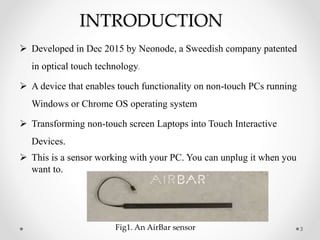
3Fig1. An AirBar sensor
HOW TO USE?
• Very simple, just plug and touch.
• Familiar touch actions like swiping, pinching, zooming and
scrolling.
• Works whether you're using your bare finger, gloves, or any
other object.
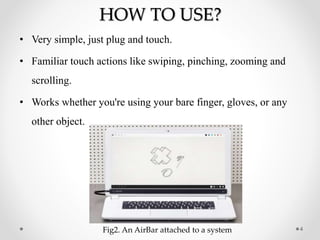
4Fig2. An AirBar attached to a system
5
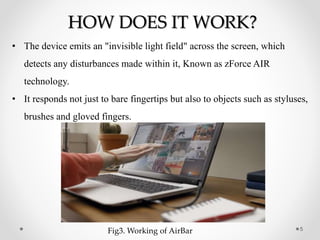
HOW DOES IT WORK?
• The device emits an "invisible light field" across the screen, which
detects any disturbances made within it, Known as zForce AIR
technology.
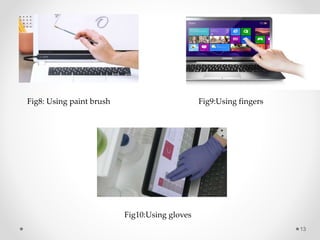
• It responds not just to bare fingertips but also to objects such as styluses,
brushes and gloved fingers.
Fig3. Working of AirBar
Z-FORCE TECHNOLOGY
• zForce means zero force.
• zForce is an award-winning optical touch technology. Based on
optical infrared light.
• With zForce, any type of screen or display can be used. In fact,
zForce works with any surface – flat, round or any other shape.
6
Fig4: Anytouch
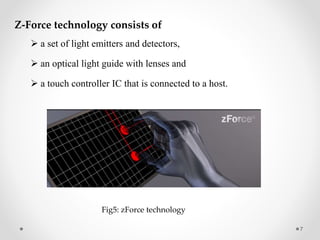
Z-Force technology consists of
 a set of light emitters and detectors,
 an optical light guide with lenses and
 a touch controller IC that is connected to a host.
7
Fig5: zForce technology
Basic idea
 The emitters pulse infrared light just above the touch
surface
 A change in detected light indicates an object’s touch
 By combining the measured value from more than one
detector, the touch position and object size are calculated
 The output from zForce can be used to identify actions
such as gestures and sweeps.
8
9
Working
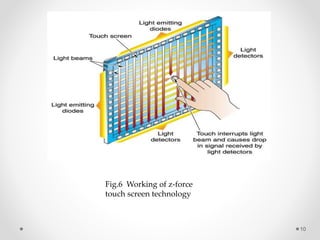
• Light emitters send out short pulses of light just above the touch
surface.
• The touch controller continuously monitor the light that is collected
by the detectors.
• The size and position of the touch object (i.e. a finger) is reported
back to the host.
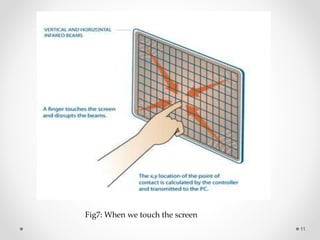
• By combining the measured value from a number of detectors, the
touch position and object size are calculated.
10
Fig.6 Working of z-force
touch screen technology
11
Fig7: When we touch the screen
Advantages
• There is no requirement for a layered glass or plastic film that
overlay the display surface.
• zForce technology almost is immune to electrical noise and other
electrical conducted interferences.
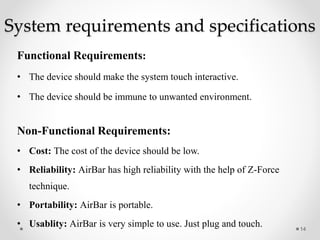
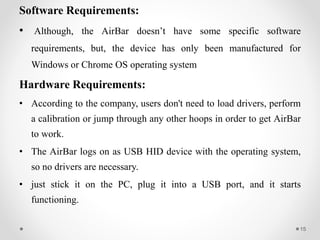
• zForce products work with any type of touch object such as a finger,
a stylus, a fingernail, a glove or an ordinary pen.
• Compensations are made for dust and other small particles on the
surface as well as for variation in component quality and ambient
light conditions
12
13
Fig8: Using paint brush Fig9:Using fingers
Fig10:Using gloves
System requirements and specifications
Functional Requirements:
• The device should make the system touch interactive.
• The device should be immune to unwanted environment.
Non-Functional Requirements:
• Cost: The cost of the device should be low.
• Reliability: AirBar has high reliability with the help of Z-Force
technique.
• Portability: AirBar is portable.
• Usablity: AirBar is very simple to use. Just plug and touch. 14
Software Requirements:
• Although, the AirBar doesn’t have some specific software
requirements, but, the device has only been manufactured for
Windows or Chrome OS operating system
Hardware Requirements:
• According to the company, users don't need to load drivers, perform
a calibration or jump through any other hoops in order to get AirBar
to work.
• The AirBar logs on as USB HID device with the operating system,
so no drivers are necessary.
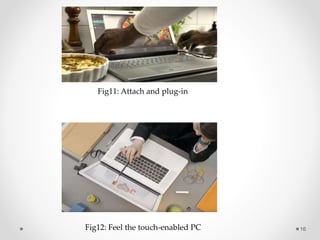
• just stick it on the PC, plug it into a USB port, and it starts
functioning.
15
16
Fig11: Attach and plug-in
Fig12: Feel the touch-enabled PC
Conclusion
• Neonode’s optical infrared touch technology, zForce, can be
integrated into consumer and industrial electronics to enable touch
controls.
• Imagine taking a non-touch PC, and within seconds making it a
touch interactive device. AirBar will help you in doing so.
• Just plug it in whenever you want the touch to be enabled on your
laptop and you are on.
• AirBar is cost-effective and comes in different sizes.
17
References
[1] http://www.air.bar/
[2] http://www.neonode.com/
[3] en.wikipedia.org/wiki/Neonode
[4] K Aishwarya; A. Kashyap; D. Patel; S. Jayalalitha “Precise Control
of Objects with Touch Screen” IEEE Conference Publications 2013.
18
19

AirBar Sensor

  • 1.
  • 2.
    CONTENTS 1. Introduction 2. Howto use? 3. How does it work? 4. Z-Force technology • Basic idea • Working • Advantages 5. System requirements and specifications 6. Conclusion References 2
  • 3.
    INTRODUCTION  Developed inDec 2015 by Neonode, a Sweedish company patented in optical touch technology.  A device that enables touch functionality on non-touch PCs running Windows or Chrome OS operating system  Transforming non-touch screen Laptops into Touch Interactive Devices.  This is a sensor working with your PC. You can unplug it when you want to. 3Fig1. An AirBar sensor
  • 4.
    HOW TO USE? •Very simple, just plug and touch. • Familiar touch actions like swiping, pinching, zooming and scrolling. • Works whether you're using your bare finger, gloves, or any other object. 4Fig2. An AirBar attached to a system
  • 5.
    5 HOW DOES ITWORK? • The device emits an "invisible light field" across the screen, which detects any disturbances made within it, Known as zForce AIR technology. • It responds not just to bare fingertips but also to objects such as styluses, brushes and gloved fingers. Fig3. Working of AirBar
  • 6.
    Z-FORCE TECHNOLOGY • zForcemeans zero force. • zForce is an award-winning optical touch technology. Based on optical infrared light. • With zForce, any type of screen or display can be used. In fact, zForce works with any surface – flat, round or any other shape. 6 Fig4: Anytouch
  • 7.
    Z-Force technology consistsof  a set of light emitters and detectors,  an optical light guide with lenses and  a touch controller IC that is connected to a host. 7 Fig5: zForce technology
  • 8.
    Basic idea  Theemitters pulse infrared light just above the touch surface  A change in detected light indicates an object’s touch  By combining the measured value from more than one detector, the touch position and object size are calculated  The output from zForce can be used to identify actions such as gestures and sweeps. 8
  • 9.
    9 Working • Light emitterssend out short pulses of light just above the touch surface. • The touch controller continuously monitor the light that is collected by the detectors. • The size and position of the touch object (i.e. a finger) is reported back to the host. • By combining the measured value from a number of detectors, the touch position and object size are calculated.
  • 10.
    10 Fig.6 Working ofz-force touch screen technology
  • 11.
    11 Fig7: When wetouch the screen
  • 12.
    Advantages • There isno requirement for a layered glass or plastic film that overlay the display surface. • zForce technology almost is immune to electrical noise and other electrical conducted interferences. • zForce products work with any type of touch object such as a finger, a stylus, a fingernail, a glove or an ordinary pen. • Compensations are made for dust and other small particles on the surface as well as for variation in component quality and ambient light conditions 12
  • 13.
    13 Fig8: Using paintbrush Fig9:Using fingers Fig10:Using gloves
  • 14.
    System requirements andspecifications Functional Requirements: • The device should make the system touch interactive. • The device should be immune to unwanted environment. Non-Functional Requirements: • Cost: The cost of the device should be low. • Reliability: AirBar has high reliability with the help of Z-Force technique. • Portability: AirBar is portable. • Usablity: AirBar is very simple to use. Just plug and touch. 14
  • 15.
    Software Requirements: • Although,the AirBar doesn’t have some specific software requirements, but, the device has only been manufactured for Windows or Chrome OS operating system Hardware Requirements: • According to the company, users don't need to load drivers, perform a calibration or jump through any other hoops in order to get AirBar to work. • The AirBar logs on as USB HID device with the operating system, so no drivers are necessary. • just stick it on the PC, plug it into a USB port, and it starts functioning. 15
  • 16.
    16 Fig11: Attach andplug-in Fig12: Feel the touch-enabled PC
  • 17.
    Conclusion • Neonode’s opticalinfrared touch technology, zForce, can be integrated into consumer and industrial electronics to enable touch controls. • Imagine taking a non-touch PC, and within seconds making it a touch interactive device. AirBar will help you in doing so. • Just plug it in whenever you want the touch to be enabled on your laptop and you are on. • AirBar is cost-effective and comes in different sizes. 17
  • 18.
    References [1] http://www.air.bar/ [2] http://www.neonode.com/ [3]en.wikipedia.org/wiki/Neonode [4] K Aishwarya; A. Kashyap; D. Patel; S. Jayalalitha “Precise Control of Objects with Touch Screen” IEEE Conference Publications 2013. 18
  • 19.