Multi-touch development in Flash and Flex
About Me


    Senthil kumar .S

           Senior RIA Engineer

            http://sensaran.wordpress.com
Agenda

 Flow of Input from user to Run Time
 Supported Platform and Hardware
 Touch Events vs gestures
 The API for handling user interaction
 New Flex Touch Events
 New Flex Gesture Events
 Code
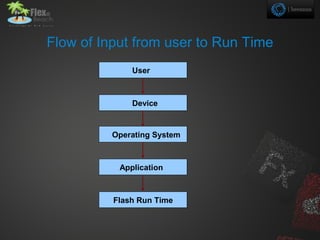
Flow of Input from user to Run Time
              User


              Device


          Operating System


           Application


          Flash Run Time
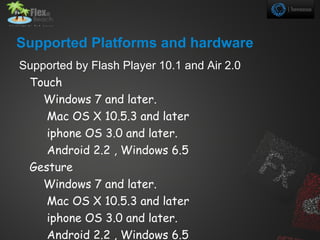
Supported Platforms and hardware
Supported by Flash Player 10.1 and Air 2.0
 Touch
    Windows 7 and later.
    Mac OS X 10.5.3 and later
    iphone OS 3.0 and later.
    Android 2.2 , Windows 6.5
 Gesture
    Windows 7 and later.
    Mac OS X 10.5.3 and later
    iphone OS 3.0 and later.
    Android 2.2 , Windows 6.5
What is New For MultiTouch?
Touch events vs gestures


• Touch events       Input with a single point
                     device
• Gesture events     One or more touch
                   for eg,user rotates
                   the rectangle using
                   two fingers or zoom
Important concepts and terms In Touch

  Discovery API.
  Touch event .
  Touch point.
  Multi touch event.
  Gesture event.
  Phases.
  Stylus.
  Press-and-tap .
• Touch Events
TouchEvent class


 •   TouchEvent.TOUCH_BEGIN
 •   TouchEvent.TOUCH_END
 •   TouchEvent.TOUCH_MOVE
 •   TouchEvent.TOUCH_OUT
 •   TouchEvent.TOUCH_OVER
 •   TouchEvent.TOUCH_ROLL_OUT
 •   TouchEvent.TOUCH_ROLL_OVER
 •   TouchEvent.TOUCH_TAP
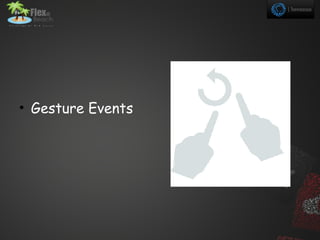
• Gesture Events
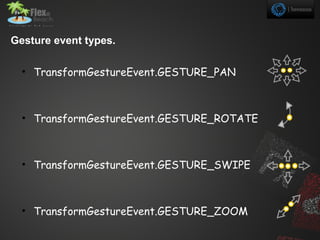
Gesture event types.

  • TransformGestureEvent.GESTURE_PAN


  • TransformGestureEvent.GESTURE_ROTATE


  • TransformGestureEvent.GESTURE_SWIPE


  • TransformGestureEvent.GESTURE_ZOOM
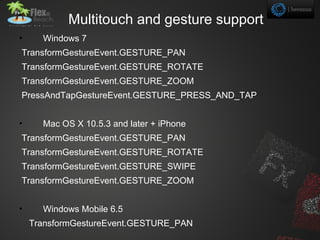
Multitouch and gesture support
•     Windows 7
TransformGestureEvent.GESTURE_PAN
TransformGestureEvent.GESTURE_ROTATE
TransformGestureEvent.GESTURE_ZOOM
PressAndTapGestureEvent.GESTURE_PRESS_AND_TAP


•     Mac OS X 10.5.3 and later + iPhone
TransformGestureEvent.GESTURE_PAN
TransformGestureEvent.GESTURE_ROTATE
TransformGestureEvent.GESTURE_SWIPE
TransformGestureEvent.GESTURE_ZOOM


•     Windows Mobile 6.5
    TransformGestureEvent.GESTURE_PAN
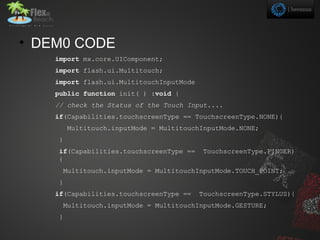
• DEM0 CODE
    import mx.core.UIComponent;
    import flash.ui.Multitouch;
    import flash.ui.MultitouchInputMode
    public function init( ) :void {
    // check the Status of the Touch Input....
    if(Capabilities.touchscreenType == TouchscreenType.NONE){
        Multitouch.inputMode = MultitouchInputMode.NONE;
    }
    if(Capabilities.touchscreenType ==     TouchscreenType.FINGER)
    {
     Multitouch.inputMode = MultitouchInputMode.TOUCH_POINT;
    }
    if(Capabilities.touchscreenType ==    TouchscreenType.STYLUS){
     Multitouch.inputMode = MultitouchInputMode.GESTURE;
    }
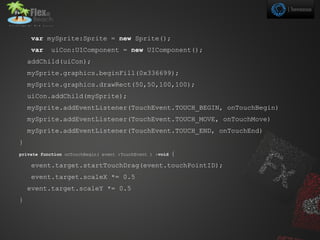
var mySprite:Sprite = new Sprite();
    var    uiCon:UIComponent = new UIComponent();
    addChild(uiCon);
    mySprite.graphics.beginFill(0x336699);
    mySprite.graphics.drawRect(50,50,100,100);
    uiCon.addChild(mySprite);
    mySprite.addEventListener(TouchEvent.TOUCH_BEGIN, onTouchBegin)
    mySprite.addEventListener(TouchEvent.TOUCH_MOVE, onTouchMove)
    mySprite.addEventListener(TouchEvent.TOUCH_END, onTouchEnd)
}
private function onTouchBegin( event :TouchEvent ) :void   {
    event.target.startTouchDrag(event.touchPointID);
    event.target.scaleX *= 0.5
    event.target.scaleY *= 0.5
}
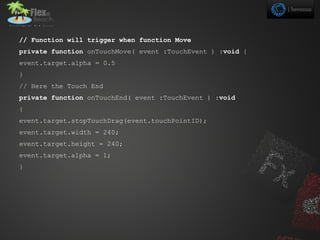
// Function will trigger when function Move
private function onTouchMove( event :TouchEvent ) :void {
event.target.alpha = 0.5
}
// Here the Touch End
private function onTouchEnd( event :TouchEvent ) :void
{
event.target.stopTouchDrag(event.touchPointID);
event.target.width = 240;
event.target.height = 240;
event.target.alpha = 1;
}
Multi Touch presentation

  • 1.
  • 2.
    About Me Senthil kumar .S Senior RIA Engineer http://sensaran.wordpress.com
  • 3.
    Agenda Flow ofInput from user to Run Time Supported Platform and Hardware Touch Events vs gestures The API for handling user interaction New Flex Touch Events New Flex Gesture Events Code
  • 4.
    Flow of Inputfrom user to Run Time User Device Operating System Application Flash Run Time
  • 5.
    Supported Platforms andhardware Supported by Flash Player 10.1 and Air 2.0 Touch Windows 7 and later. Mac OS X 10.5.3 and later iphone OS 3.0 and later. Android 2.2 , Windows 6.5 Gesture Windows 7 and later. Mac OS X 10.5.3 and later iphone OS 3.0 and later. Android 2.2 , Windows 6.5
  • 6.
    What is NewFor MultiTouch?
  • 7.
    Touch events vsgestures • Touch events Input with a single point device • Gesture events One or more touch for eg,user rotates the rectangle using two fingers or zoom
  • 8.
    Important concepts andterms In Touch Discovery API. Touch event . Touch point. Multi touch event. Gesture event. Phases. Stylus. Press-and-tap .
  • 9.
  • 10.
    TouchEvent class • TouchEvent.TOUCH_BEGIN • TouchEvent.TOUCH_END • TouchEvent.TOUCH_MOVE • TouchEvent.TOUCH_OUT • TouchEvent.TOUCH_OVER • TouchEvent.TOUCH_ROLL_OUT • TouchEvent.TOUCH_ROLL_OVER • TouchEvent.TOUCH_TAP
  • 11.
  • 12.
    Gesture event types. • TransformGestureEvent.GESTURE_PAN • TransformGestureEvent.GESTURE_ROTATE • TransformGestureEvent.GESTURE_SWIPE • TransformGestureEvent.GESTURE_ZOOM
  • 13.
    Multitouch and gesturesupport • Windows 7 TransformGestureEvent.GESTURE_PAN TransformGestureEvent.GESTURE_ROTATE TransformGestureEvent.GESTURE_ZOOM PressAndTapGestureEvent.GESTURE_PRESS_AND_TAP • Mac OS X 10.5.3 and later + iPhone TransformGestureEvent.GESTURE_PAN TransformGestureEvent.GESTURE_ROTATE TransformGestureEvent.GESTURE_SWIPE TransformGestureEvent.GESTURE_ZOOM • Windows Mobile 6.5 TransformGestureEvent.GESTURE_PAN
  • 14.
    • DEM0 CODE import mx.core.UIComponent; import flash.ui.Multitouch; import flash.ui.MultitouchInputMode public function init( ) :void { // check the Status of the Touch Input.... if(Capabilities.touchscreenType == TouchscreenType.NONE){ Multitouch.inputMode = MultitouchInputMode.NONE; } if(Capabilities.touchscreenType == TouchscreenType.FINGER) { Multitouch.inputMode = MultitouchInputMode.TOUCH_POINT; } if(Capabilities.touchscreenType == TouchscreenType.STYLUS){ Multitouch.inputMode = MultitouchInputMode.GESTURE; }
  • 15.
    var mySprite:Sprite =new Sprite(); var uiCon:UIComponent = new UIComponent(); addChild(uiCon); mySprite.graphics.beginFill(0x336699); mySprite.graphics.drawRect(50,50,100,100); uiCon.addChild(mySprite); mySprite.addEventListener(TouchEvent.TOUCH_BEGIN, onTouchBegin) mySprite.addEventListener(TouchEvent.TOUCH_MOVE, onTouchMove) mySprite.addEventListener(TouchEvent.TOUCH_END, onTouchEnd) } private function onTouchBegin( event :TouchEvent ) :void { event.target.startTouchDrag(event.touchPointID); event.target.scaleX *= 0.5 event.target.scaleY *= 0.5 }
  • 16.
    // Function willtrigger when function Move private function onTouchMove( event :TouchEvent ) :void { event.target.alpha = 0.5 } // Here the Touch End private function onTouchEnd( event :TouchEvent ) :void { event.target.stopTouchDrag(event.touchPointID); event.target.width = 240; event.target.height = 240; event.target.alpha = 1; }