Advanced Graphics Workshop - Prabindh Sundareson, Texas Instruments GFX2011 Dec 3 rd  2011 Bangalore Note: This slide set is a public version of the actual slides presented at the workshop
GFX2011 8.30 AM [Registration and Introduction, Equipment setup] 9.00 AM Why Graphics ? Present and Future  – Prof. Vijay Natarajan, Assistant Professor, Department of Computer Science and Automation, IISc, Bangalore 9.45 AM Introduction to the OpenGL/ES Rendering pipeline, and algorithms Detailed walkthrough of the OpenGL ES2.0 spec and APIs – Part 1 1.00 PM [Lunch] Detailed walkthrough of the OpenGL ES2.0 spec and APIs – Part 2 - Break - Framework and platform integration - EGL, Android (SurfaceFlinger) Tools for performance benchmarking, and Graphics Development Q&A, Certificate presentation to participants – Networking
Detailed Agenda Inaugural Talk – Dr. Vijay Natarajan – “Graphics – Present and Future” - Break GPU HW Architectures, and the GL API The CFF APIs Lab 1 Texturing objects Lab 94 – Rectangle wall  Vertices and Transformations Lab 913 –  Eyeing the eyes Lunch Break Real-life modeling and loading 3D models Lab 9 – Review .obj file loading method Shaders – Vertex and Fragment Lab 96 – Squishing the slices - Break Rendering targets Lab 910 – 3D in a 2D world Creating special effects EGL – and Platform Integration Overview of GLES2.0 usage in Android/ iOS *This PPT is to be used in conjunction with the labs at  http://www.gpupowered.org
GPU HW Architectures CPUs are programmed with sequential code Typical C program – linear code Well defined Pre-fetch architectures, cache mechanisms Problem ? Limited by how fast “a” processor can execute, read, write GPUs are parallel Small & same code, multiple data Don’t care - control dependencies If used, drastically reduces throughput “ Output” is a result of a matrix operation (n x n) Graphics output – color pixels Computational output – matrix values
GPU integrated SOCs The A5 chipset CPU size  ~= GPU size
Integrated GPU architectures (Samsung SRP) From – Khronos presentation
Vivante GPU Architecture GPUs vary in  Unified vs separate shader HW architecture internal cache size Bus size rendering blocks Separated 2D and 3D blocks From -  http://www.socip.org/socip/speech/pdf/2-Vivante-SoCIP%202011%20Presentation.pdf   Spec evolution
OpenGL specification evolution Reading the spec
A note on reading the GLES specifications It must be clear that GLES specification is a derivative of the GL specification It is recommended to read the OpenGL 2.0 specification first Then read the OpenGL ES2.0 specification Similarly, for shading language It is recommended to read the OpenGL SL specification first Then read the OpenGL ES SL specification Extensions
What are Extensions ? Extension types OES – Conformance tested by Khronos EXT – Extension supported by >1 IP vendor Proprietary (vendor_ prefix) – Extension from 1 IP vendor How to check for extensions ? getSupportedExtensions (WebGL), getExtension() glGetString (openGL ES) Number of extensions OpenGL    400 + OpenGL ES    100+ Dependencies
OpenGL Dependencies OpenGL depends on a number of external systems to run A Windowing system (abstracted by EGL/ WGL/ XGL …) External inputs – texture files, 3D modelling tools, shaders, sounds, … OpenGL is directly used by OS/ Driver developers (ofcourse!) HW IP designers Game studios (optimisation) Researchers (Modelling, Realism, ) … Tools developers Application developers do not generally program on OpenGL, but rather do it on an Android API binding, or Java binding GL vs ES
OpenGL 2.0 vs OpenGL ES2 All Fixed function functionality is removed Specific drawing calls like Fog etc Matrix setup Replaced with programmable entities, GLES SL is ~= GL SL Compatibility issues GL    GLES Shaders GLSL does not enable fixed function state to be available ex, gl_TexCoord To enable compatibility, Architecture Review Board (ARB) extension – “ GL_ARB_ES2_compatibility”   http://www.opengl.org/registry/specs/ARB/ES2_compatibility.txt   Good reference http://developer.amd.com/gpu_assets/GDC06-GLES_Tutorial_Day-Munshi-OpenGLES_Overview.pdf GLES API
The OpenGL ES API From the Khronos OpenGL ES Reference Card “ OpenGL ®  ES  is a software interface to graphics hardware.  The interface consists of a set of procedures and functions that allow a programmer to  specify the objects and operations involved  in producing high-quality graphical images, specifically color images of three-dimensional objects” Keep this document handy for API reference http://www.khronos.org/opengles/sdk/docs/reference_cards/OpenGL-ES-2_0-Reference-card.pdf Client server
The GL Client – Server Model Client (application on host), server (OpenGL on GPU) Server can have multiple rendering contexts, but has a global state Client will connect to one of the contexts at any point of time Client can set the states of the server by sending commands Further API calls will thus be affected by the previous states set by the client Server expects not-to-be interrupted by the client during operation Inherent nature of the parallel processor GL,SL, EGL spec versions
OpenGL  Specifications OPENGL Full version ES version Common Common-Lite GLSL companion GLSL-ES companion What we miss in ES compared to desktop version: Polygons, Display lists, Accumulation buffers,… Currently in 4.0+ Currently in 2.0 Currently in 1.0.16 Currently in 1.20 EGL Currently in 1.3 Core GL Spec Shader Spec Platform Integration EGL Currently in 1.3 Programming Flow
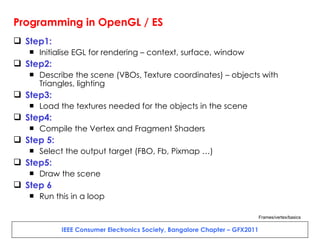
Programming in OpenGL / ES Step1: Initialise EGL for rendering – context, surface, window Step2: Describe the scene (VBOs, Texture coordinates) – objects with Triangles, lighting Step3: Load the textures needed for the objects in the scene Step4: Compile the Vertex and Fragment Shaders Step 5: Select the output target (FBO, Fb, Pixmap …) Step5: Draw the scene Step 6 Run this in a loop Frames/vertex/basics
Preliminaries Pixel Throughput Memory bandwidth for a 1080P display @ 60 fps Did we forget Overdraw ? Vertex Throughput Vertex throughput for a 100k triangle scene Tearing Frame switch (Uniform) Driver frame draw (non-uniform) Real frame switch  happens here Triangles
Why Triangles ? Connectivity, Simplicity, Cost + + ??? pipeline
ES2.0 Pipeline What do the APIs look like ? …
The GLES API – Overall view Global Platform  Management Vertex  Operations Texture  Operations Shader  Operations Rendering  Operations VBOs Attaching attributes Attaching textures Loading texture data Mipmaps Loading, compiling, Linking to program Binary shaders Rendering to Framebuffer Rendering to FBO RTT State  Management CFF Front/Back facing Enable/Disable (culling, ..) Get/ Set uniforms egl, wgl, glx .. Antialiasing,  Configuration Context Management Surface - window Threading models Context sharing EGL GL
Starting on the GPU
Flush, and Finish Several types of rendering methods adopted by GPUs Immediate rendering Deferred rendering Tiled rendering (ex, QCOM_tiled_rendering) Immediate rendering – everyone is happy  Except the memory bus! Deferred – the GPU applies its “intelligence” to do/not do certain draw calls/ portions of draw calls Used most commonly in embedded GPUs Flush() – The call ensures pending operations are kicked off, returns Finish() – The call ensures pending operations are kicked off,  “waits for completion” , returns
A note on WebGL In native code, need to handle Surface, context For example, refer to  this native code eglGetDisplay eglInitialize – for this display eglBindAPI – bind to GLES/ VG context eglChooseConfig – configure surface type, GLES1/2/VG, Depth/Stencil buffer size eglCreateWindowSurface / eglCreatePixmapSurface  eglCreateContext  eglMakeCurrent Platform initialisation in WebGL is handled by browser Only configurations are – stencil, depth, AA, Alpha, preserve No EGL calls in JS application code No multi-threading issues (not yet, but “workers” are coming) The hands on labs will focus on GL, not EGL Note : - GL context gets lost, when user account is locked/screen saver mode etc – Restart browser as required.
Programming  ClearColor Clear – clears with color specified earlier Flush/ Finish “ setup”, “vertex”, “fragment”, “animate” functions in class Will be called by framework Clear web cache first time Login Open “Default Lab #1” - Copy Open “My labs” #1 – Paste code Change code in setupFunc() Save, Run again Lab #1 Below link contains introductory video for starting the labs: http://www.youtube.com/watch?v=TM6t2ev9MHk
Texturing
A note on Binding, Buffer Objects What is “Binding” ? Binding a server to a client – ex, VBO to a texture All objects are associated with a context state Binding an object is ~ copying the object state    context Removes client  server movement everytime “ Xfer-once-to-server, keep the token, Use-multipletimes-later” Good practice to “unbind” after operations– set binding to 0/null to avoid rogue programs changing state of bound object Buffer-Objects Allows data to be stored on the “server” ie, the GPU memory, rather than client memory (via pointer) GPU can decide where to place it for the fastest performance
Correct approach of data transfers Generate Object  (ex,  glGenBuffers, glGenTextures ) Bind Object to an ID “xyz” ( glBindBuffer(xyz), .. ) Transfer data to Object ( glBufferData, glTexImage2D ) Unbind ( glBindBuffer(0) )    After this point, the data remains bound to “xyz” and is managed by GPU.  Can be accessed later by referencing “xyz”    Applies to VBOs, Textures, … Note the implicit “no atomicity” – needs locking
Texturing basics Texture Formats available RGB* formats, Luminance only formats Relevance of YUV Texture Filtering Maps texture coordinates to object coordinates – think of wrapping cloth over object Mipmaps Local optimisation – use pre-determined “reduced” size images, if object is far away from viewer – as compared to filtering full image Objective is to reduce bandwidth, not necessarily higher quality Application can generate and pass through TexImage2D() GPU can generate using GenerateMipMap()  Occupies more memory Uv mapping
Texturing 3D objects Mapping from a bitmap to a 3D object involves matching the texture coordinates to the object surface Texture coordinates are calculated along with the vertex coordinates 3D tools output Texture coordinates along with vertex information, for the scene Lab 12 (Sphere), Lab 13 compression
Texture Compression types GLES spec supports RGBA textures, Luminance … To reduce memory bandwidth, compression used Texture Compression major types PVRTC ETC1 Others Android primarily supports ETC1  iOS supports PVRTC (and no other) Extension support queryable using GL API queries How to store this information in an uniform manner ? Texture file formats PVRTC (using Textool converter from IMG) commonly used KTX file format KTX
Khronos KTX file format To render a texture, steps to be used today: Application needs apriori knowledge of texture type, format, storage type, mipmap levels, and filename or the buffer data itself Then load into server using TexImage2D() Proprietary formats exist to separate this application+texture dependency –  ex, PVRT from IMG KTX file format from Khronos is a standard way to store texture information, and the texture itself See next slide for structure of the file
KTX format … Passing coords
Texture coordinates to GPU Texture coordinates are passed to GPU as “Attributes” along with the vertices Gen-bind-bufferdata, then bindAttrib WebGL/Textures
Note on WebGL and Textures Because of the way file loads work on browsers (asynchronous), texture loading may not happen before the actual draw Expect black screen for a very short-while till the Texture image loads from the website On native applications, due to the synchronous nature of loading the texture this issue will not be present Programming
Programming with Textures bindTexture pixelStorei (webGL only) UNPACK_FLIP_Y_WEBGL texImage2D texParameteri TEXTURE_MAG_FILTER TEXTURE_MIN_FILTER Note: WebGL “null” binding instead of “0” Lab #2 (why not square ?) Lab #94 – The wall
Note on the lab hints Each session ends with a lab. The lab sessions online intentionally have errors that the reader has to debug to show the rendered object on screen. Keys are provided for each such lab at the end of the section in this PPT
Lab 94 – Texturing (Keys to remove errors) var indexArray = new Uint16Array([0, 1, 2,  2 , 1, 3]); var texCoordArray = new Float32Array([0,0,  10 ,0, 0, 10, 10,10]); context.enableVertexAttribArray( 1 ); context.vertexAttribPointer(1,  2 , context.FLOAT, context.FALSE, 0, 0);
Vertices, Transformations
What are vertices ? Vertices –  Points defined in a specific coordinate axes, to represent 3D geometry Atleast 3 vertices are used to define a Triangle – one of the primitives supported by GLES
Vertex operations Where do vertices come from ? Output of Modelling tools Mesh rendering / transforms – optimisations For 2D operations (ex Window systems), just 2 triangles Attributes
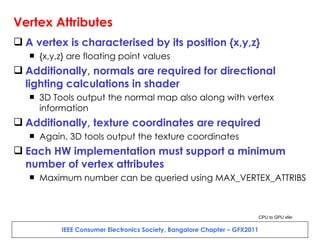
Vertex Attributes A vertex is characterised by its position {x,y,z} {x,y,z} are floating point values Additionally, normals are required for directional lighting calculations in shader 3D Tools output the normal map also along with vertex information Additionally, texture coordinates are required Again, 3D tools output the texture coordinates Each HW implementation must support a minimum number of vertex attributes Maximum number can be queried using MAX_VERTEX_ATTRIBS CPU to GPU xfer
Vertices – CPU to GPU Optimising Vertex operations A 3D object will have a lot of “common” vertices Ex – Cube has 6*2 triangles, (6*2)*3 vertices, but only 8 “points” So rather than passing vertices, pass 8 vertices, and 36 indices to the vertices to reduce Bandwidth Indices can be 16bit, so reduce BW by ~50% GL_ELEMENT_ARRAY_BUFFER and GL_ARRAY_BUFFER STATIC_DRAW, DYNAMIC_DRAW Not uploading again and again but re-use What are Vertex Buffer Objects ? genBuffers (createBuffer in WebGL), binding, bufferData/offset and usage Usage of Index Buffers (ELEMENT_ARRAY_BUFFER) Cartesian
Translation matrix1.translate(X,0.0,0); X  = 0 X = 0.4    Translation applied to all objects (effect is not dependent on depth of object)
Rotation x y z Rotation    Observe effect of x offset! Refresh M,V,P after every rotate -0 Lookat
Getting the eye to see the object “ Model” Matrix made the object “look” right Now make the object visible to the “eye” – The “View” Eye is always at the origin {0,0,0} So using matrices, move the current object to the eye “ LookAt” is implemented in many standard toolkits The LookAt transformation is defined by Viewpoint - from where the view ray starts (eye) A Reference point (where the view ray ends) – in middle of scene (center) A look-”up” direction (up) ex – gluLookAt Utility function Significant contributor of grey-hair Viewport
Viewport Transformation Convert from the rendering to the final screen size  ie physical screen Define the viewport using glViewport() Viewport can be an area anywhere within the physical screen This takes care of aspect ratio Ex, square becomes rectangle in laptop After the transformation, successful triangles get to the rasterisation HW, and then to the Fragment shader HW optimisations
Summary - The Transformation Sequence Translation example mathematical step - w
HW Optimisations Not all triangles are visible HW can reject based on depth coverage Front-facing or back-facing (Culling) Culling is disabled by default per specification However, most HW do this optimisation by default to save on bandwidth/ later pixel processing Programming
Programming ! Recall the Bandwidth needs for the vertex transfers / frame Passing Vertices Create Buffer Object bindBuffer bufferData Indices are passed as type ELEMENT_ARRAY Passing Attributes bindAttribLocation enableVertexAttribArray vertexAttribPointer matrix.getAsArray() Lab #913 – Eyeing the eyes
Lab 913 – Keys for “Eyeing the eyes”  var totalArcs =  36 ; //shadervertexsetup_tunnel texCoords.push( 10 *numArcs / totalArcs); texCoords.push( 10 *zslice / numZSlices); matrix1.scale(1.0, 1.0,  1.0 ); //not 15.0
Real life 3D models
Real-life modelling of objects 3D models are stored in a combination of Vertices Indices / Faces * Normals Texture coordinates Ex, .OBJ, 3DS, STL, FBX … f, v, v//norm, v/t, o Export of vertices => scaling to 1.0-1.0 Vertex normals vs face normals Materials (mtl), animations Problem of multiple indices not allowed in openGL Tools and Models Blender, Maya, … http://assimp.sourceforge.net/  - tool for importing multiple types http://www.blendswap.com/  - Blender models Tessellation of meshes can be aided by HW in GPUs
Programming Loading 3D models is an application functionality No new APIs from OpenGLES are needed A parser is required to parse the model files, and extract the vertex, attribute, normal, texture coordinate information Look through objdata.js in  Lab #9
Shaders
Vertices, Fragments - Revisited Vertices –  Points defined in a specific coordinate axes, to represent 3D geometry Atleast 3 vertices are used to define a Triangle – one of the primitives supported by GLES Fragments The primitives are “rasterised” to convert the “area” under the primitive to a set of color pixels that are then placed in the output buffer Shader characteristics
Shader characteristics Uniforms – uniform for all shader passes Can be updated at run time from application Attributes – changes per shader pass Varying – Passed between vertex and fragment shaders Ex, written by Vertex shader, and used by Fragment shader gl_Position Programs Why do we need multiple programs in an application  for offscreen animation, different effects MAX VARYING VECTORS – enum Inputs to shader
Inputs to the Shaders Vertex Shader Vertices, attributes,  Uniforms Fragment Shader Rasterised fragments (ie, after rasteriser fixed function HW) Varyings from vertex shader Uniforms Shader types
Fragment Shaders A fragment is – a pixel belonging to an area of the target render screen (on-screen or off-screen) Primitives are rasterised, after clipping  Fragment shader is responsible for the output colour, just before the post-processing operations A Fragment shader can operate on “1” fragment at a time Minimum number of “TEXTURE UNITS” is 8 Calculation of colors Colors are interpolated across vertices automatically (Ref Lab 6 in the hands-on session) – ie, “varyings” are interpolated in Fragment shaders during rendering Colors can be generated from a texture “sampler” Each HW has a specific number of “Texture Units” that need to be activated, and textures assigned to it for operation in the shader Additional information from vertex shader through “varyings” Outputs  gl_FragColor Sample Frag shader
Program Each program consists of 1 fragment shader, and 1 vertex shader Within a program, all uniforms share a single global space Precision
Advanced Shaders Animation Environment Mapping Per-Pixel Lighting (As opposed to textured lighting) Bump Mapping Ray Tracers Procedural Textures CSS – shaders (HTML5 – coming up)
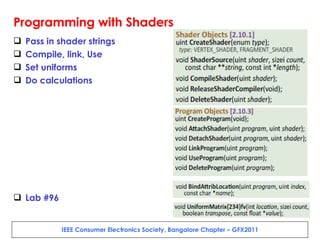
Programming with Shaders Pass in shader strings Compile, link, Use Set uniforms Do calculations Lab #96
Lab 96 – Keys for “Squishing the slice” uniform mediump float skyline; vec4 tempPos; tempPos = MVPMatrix * inVertex; tempPos.y=min(skyline, tempPos.y); //or, try below – one of the 2 tempPos.y=min(sin(inVertex.x*5.0)+cos(inVertex.y*2.0), tempPos.y); gl_Position = tempPos; var skylineLoc =  context.getUniformLocation(sprogram,"skyline"); context.uniform1f(skylineLoc, -0.1); context.drawArrays(context.TRIANGLES, 0, vertexparams[1 ] /3 );
Rendering Targets
Rendering Targets A rendering context is required before drawing a scene. And a correponding Framebuffer Recall bindFramebuffer() It can be Window system Framebuffer (Fb) Offscreen buffer (Implemented in a Frame Buffer Object) FBO is not a memory area – it is information about the actual color buffer in memory, depth/ stencil buffers By default, rendering happens to the Window system framebuffer (ID ‘0’) Need
Need for offscreen rendering Special effects Refer the fire effect specified earlier (Multiple passes) Interfacing to “non-display” use-cases Ex, passing video through GPU, perform 3D effects, then re-encode back to compressed format Edge detection/ computation – output is sent to a memory buffer for use by other (non-GL) engines FBO
FrameBuffer Object A Frame Buffer Object Can be just a color buffer (ex, a buffer of size 1920x1080x 4) Typically also has depth/ stencil buffer By default – FBO – ID “0” is never assigned to new FBO It is assigned to Window system provided Frame Buffer (onscreen) Renderbuffers and Textures can be “attached” to FBO For RB – application has to allocate storage For FBO, the GL server will allocate the storage rtt
Render-To-Texture By binding a Texture to a FBO, the FBO can be used as Stage 1 – target of a rendering operation Stage 2 – used as a texture to another draw This is “Render-To-Texture” (RTT) This allows the flexibility of “discreetly” using the server to do 3D operations (not visible onscreen), then use this output as texture input to a visible object If not for RTT, we have to render to regular Framebuffer then do CopyTexImage2D() or readPixels() which are inefficient Offscreen rendering is needed for dynamic-reflections APIs
Post-processing operations Blending with Framebuffer - enables nice effects (Ref Lab #6) Standard Alpha-Blending glEnable ( GL_BLEND ); glBlendFunc ( GL_SRC_ALPHA, GL_ONE );  Is a “bad” way of creating effects Reads back previous framebuffer contents, then blend Makes application memory bound, specially at larger resolutions Stalls parallel operations within the GPU Recommended way is to perform Render-To-Texture, and blending where necessary in the shader But needed for medical image viewing – ex Ultrasound images, > 128 slices blending programming
Programming FBO and back to Fb glGenFramebuffers glBindFramebuffer Makes this FBO used glFramebufferTexture2D(id) Indicate ‘id’ is to be used for rendering to TEXTURE, so storage is different glDeleteFramebuffers Then, create separate object to texture with TEXTURE ‘id’ Then, use previous textureID id as input to texImage2D next Switching to FB Change binding to screen FB Load different set of vertices as needed, different program as needed Set texture binding to FBO texture drawn previously DrawElements call FBOs are used to do post-processing effects
Programming Draw a textured rectangle to a FBO Using this FBO as texture, render another rectangle on-screen CheckFramebufferStatus very important Lab #910
Lab 910 – Keys for “Render to Texture” lab Location, location, location  ! Also note that readpixels doesn’t show anything! // context.clearColor(1.0, 0.0, 0.0, 1.0); // context.clear(context.COLOR_BUFFER_BIT | context.DEPTH_BUFFER_BIT); // context.flush();
Platform Integration
Setting up the platform - EGL Context, Window, Surface OpenGL ES –  EGL_SWAP_BEHAVIOR  == “EGL_BUFFER_PRESERVED” Reduces performance Anti-aliasing configurations EGL_SAMPLES (4 to 16 typically, 4 on embedded platforms) WebGL - preserveDrawingBuffer – attribute Optimisations done if it is known that app is clearing the buffer – no dirty region check and whole scene is drawn efficiently Dirty region check made in some systems Android
Android Integration Details Android composition uses GLES2.0 mostly as a pixel processor, not a vertex processor Uninteresting rectangular windows, treated as a texture 6 vertices Blending of translucent screens/ buttons/ text 3D (GLES2.0) is natively integrated 3D Live wallpaper backgrounds Video morphing during conferencing (?) Use the NDK Surfaceflinger
Android SurfaceFlinger architecture Introduction to OpenGL interface on Android http://code.google.com/p/gdc2011-android-opengl/wiki/TalkTranscript HW acceleration on Android 3.0 / 4.0 http://android-developers.blogspot.com/2011/11/android-40-graphics-and-animations.html   composition
Optimising OpenGL / ES applications Graphics performance is closely tied to a specific HW  Size of interface to memory, cache lines HW shared with CPU – ex, dedicated memory banks Power vs Raw performance Intelligent Discarding of vertices/ objects (!) Performance is typically limited by Memory throughput GPU pixel operations per GPU clock CPU throughput for operations involving vertices Load balancing of units – within the GPU GPUs that are integrated into SOCs are more closely tied to the CPU for operations, than separate GPUs Ex, GPU drivers offload some operations to CPU debugging
Debugging OpenGL Vanishing vertices, Holes Improper lighting Missing objects in complex scenes Windows Tools Perfkit/ GLExpert  / gDEBugger Intel GPA Linux Tools PVRTune (IMG) GDebugger Standard kernel tools Intel GPA Pixel vs Vertex throughput, CPU loading, FPS, Memory limited – tuning knobs
References Specs -  http://khronos.org/opengles   CanvasMatrix.js https://github.com/toji/gl-matrix   Tools -  http://www.iquilezles.org/apps/shadertoy/ http://www.inka3d.com/  (from Maya) http://assimp.sourceforge.net/  - Asset importer  ARM – Mali – Architecture Recommendations http://infocenter.arm.com/help/index.jsp?topic=/com.arm.doc.dui0363d/CJAFCCDE.html Optimising games – simple tips http://glenncorpes.blogspot.com/2011/09/topia-optimising-for-opengles20.html
Appendix: Video and Graphics Graphics is computed creation Video is recorded as-is Graphics is object – based Video (today) is not Graphics is computed every frame fully Video is mostly delta sequences Motion-detection, construction, compensation But extensions like swap_region (Nokia) exist
Q & A, Feedback Feedback http://ewh.ieee.org/r10/bangalore/ces/gfx2011.html

Advanced Graphics Workshop - GFX2011

  • 1.
    Advanced Graphics Workshop- Prabindh Sundareson, Texas Instruments GFX2011 Dec 3 rd 2011 Bangalore Note: This slide set is a public version of the actual slides presented at the workshop
  • 2.
    GFX2011 8.30 AM[Registration and Introduction, Equipment setup] 9.00 AM Why Graphics ? Present and Future – Prof. Vijay Natarajan, Assistant Professor, Department of Computer Science and Automation, IISc, Bangalore 9.45 AM Introduction to the OpenGL/ES Rendering pipeline, and algorithms Detailed walkthrough of the OpenGL ES2.0 spec and APIs – Part 1 1.00 PM [Lunch] Detailed walkthrough of the OpenGL ES2.0 spec and APIs – Part 2 - Break - Framework and platform integration - EGL, Android (SurfaceFlinger) Tools for performance benchmarking, and Graphics Development Q&A, Certificate presentation to participants – Networking
  • 3.
    Detailed Agenda InauguralTalk – Dr. Vijay Natarajan – “Graphics – Present and Future” - Break GPU HW Architectures, and the GL API The CFF APIs Lab 1 Texturing objects Lab 94 – Rectangle wall Vertices and Transformations Lab 913 – Eyeing the eyes Lunch Break Real-life modeling and loading 3D models Lab 9 – Review .obj file loading method Shaders – Vertex and Fragment Lab 96 – Squishing the slices - Break Rendering targets Lab 910 – 3D in a 2D world Creating special effects EGL – and Platform Integration Overview of GLES2.0 usage in Android/ iOS *This PPT is to be used in conjunction with the labs at http://www.gpupowered.org
  • 4.
    GPU HW ArchitecturesCPUs are programmed with sequential code Typical C program – linear code Well defined Pre-fetch architectures, cache mechanisms Problem ? Limited by how fast “a” processor can execute, read, write GPUs are parallel Small & same code, multiple data Don’t care - control dependencies If used, drastically reduces throughput “ Output” is a result of a matrix operation (n x n) Graphics output – color pixels Computational output – matrix values
  • 5.
    GPU integrated SOCsThe A5 chipset CPU size ~= GPU size
  • 6.
    Integrated GPU architectures(Samsung SRP) From – Khronos presentation
  • 7.
    Vivante GPU ArchitectureGPUs vary in Unified vs separate shader HW architecture internal cache size Bus size rendering blocks Separated 2D and 3D blocks From - http://www.socip.org/socip/speech/pdf/2-Vivante-SoCIP%202011%20Presentation.pdf Spec evolution
  • 8.
  • 9.
    A note onreading the GLES specifications It must be clear that GLES specification is a derivative of the GL specification It is recommended to read the OpenGL 2.0 specification first Then read the OpenGL ES2.0 specification Similarly, for shading language It is recommended to read the OpenGL SL specification first Then read the OpenGL ES SL specification Extensions
  • 10.
    What are Extensions? Extension types OES – Conformance tested by Khronos EXT – Extension supported by >1 IP vendor Proprietary (vendor_ prefix) – Extension from 1 IP vendor How to check for extensions ? getSupportedExtensions (WebGL), getExtension() glGetString (openGL ES) Number of extensions OpenGL  400 + OpenGL ES  100+ Dependencies
  • 11.
    OpenGL Dependencies OpenGLdepends on a number of external systems to run A Windowing system (abstracted by EGL/ WGL/ XGL …) External inputs – texture files, 3D modelling tools, shaders, sounds, … OpenGL is directly used by OS/ Driver developers (ofcourse!) HW IP designers Game studios (optimisation) Researchers (Modelling, Realism, ) … Tools developers Application developers do not generally program on OpenGL, but rather do it on an Android API binding, or Java binding GL vs ES
  • 12.
    OpenGL 2.0 vsOpenGL ES2 All Fixed function functionality is removed Specific drawing calls like Fog etc Matrix setup Replaced with programmable entities, GLES SL is ~= GL SL Compatibility issues GL  GLES Shaders GLSL does not enable fixed function state to be available ex, gl_TexCoord To enable compatibility, Architecture Review Board (ARB) extension – “ GL_ARB_ES2_compatibility” http://www.opengl.org/registry/specs/ARB/ES2_compatibility.txt Good reference http://developer.amd.com/gpu_assets/GDC06-GLES_Tutorial_Day-Munshi-OpenGLES_Overview.pdf GLES API
  • 13.
    The OpenGL ESAPI From the Khronos OpenGL ES Reference Card “ OpenGL ® ES is a software interface to graphics hardware. The interface consists of a set of procedures and functions that allow a programmer to specify the objects and operations involved in producing high-quality graphical images, specifically color images of three-dimensional objects” Keep this document handy for API reference http://www.khronos.org/opengles/sdk/docs/reference_cards/OpenGL-ES-2_0-Reference-card.pdf Client server
  • 14.
    The GL Client– Server Model Client (application on host), server (OpenGL on GPU) Server can have multiple rendering contexts, but has a global state Client will connect to one of the contexts at any point of time Client can set the states of the server by sending commands Further API calls will thus be affected by the previous states set by the client Server expects not-to-be interrupted by the client during operation Inherent nature of the parallel processor GL,SL, EGL spec versions
  • 15.
    OpenGL SpecificationsOPENGL Full version ES version Common Common-Lite GLSL companion GLSL-ES companion What we miss in ES compared to desktop version: Polygons, Display lists, Accumulation buffers,… Currently in 4.0+ Currently in 2.0 Currently in 1.0.16 Currently in 1.20 EGL Currently in 1.3 Core GL Spec Shader Spec Platform Integration EGL Currently in 1.3 Programming Flow
  • 16.
    Programming in OpenGL/ ES Step1: Initialise EGL for rendering – context, surface, window Step2: Describe the scene (VBOs, Texture coordinates) – objects with Triangles, lighting Step3: Load the textures needed for the objects in the scene Step4: Compile the Vertex and Fragment Shaders Step 5: Select the output target (FBO, Fb, Pixmap …) Step5: Draw the scene Step 6 Run this in a loop Frames/vertex/basics
  • 17.
    Preliminaries Pixel ThroughputMemory bandwidth for a 1080P display @ 60 fps Did we forget Overdraw ? Vertex Throughput Vertex throughput for a 100k triangle scene Tearing Frame switch (Uniform) Driver frame draw (non-uniform) Real frame switch happens here Triangles
  • 18.
    Why Triangles ?Connectivity, Simplicity, Cost + + ??? pipeline
  • 19.
    ES2.0 Pipeline Whatdo the APIs look like ? …
  • 20.
    The GLES API– Overall view Global Platform Management Vertex Operations Texture Operations Shader Operations Rendering Operations VBOs Attaching attributes Attaching textures Loading texture data Mipmaps Loading, compiling, Linking to program Binary shaders Rendering to Framebuffer Rendering to FBO RTT State Management CFF Front/Back facing Enable/Disable (culling, ..) Get/ Set uniforms egl, wgl, glx .. Antialiasing, Configuration Context Management Surface - window Threading models Context sharing EGL GL
  • 21.
  • 22.
    Flush, and FinishSeveral types of rendering methods adopted by GPUs Immediate rendering Deferred rendering Tiled rendering (ex, QCOM_tiled_rendering) Immediate rendering – everyone is happy Except the memory bus! Deferred – the GPU applies its “intelligence” to do/not do certain draw calls/ portions of draw calls Used most commonly in embedded GPUs Flush() – The call ensures pending operations are kicked off, returns Finish() – The call ensures pending operations are kicked off, “waits for completion” , returns
  • 23.
    A note onWebGL In native code, need to handle Surface, context For example, refer to this native code eglGetDisplay eglInitialize – for this display eglBindAPI – bind to GLES/ VG context eglChooseConfig – configure surface type, GLES1/2/VG, Depth/Stencil buffer size eglCreateWindowSurface / eglCreatePixmapSurface eglCreateContext eglMakeCurrent Platform initialisation in WebGL is handled by browser Only configurations are – stencil, depth, AA, Alpha, preserve No EGL calls in JS application code No multi-threading issues (not yet, but “workers” are coming) The hands on labs will focus on GL, not EGL Note : - GL context gets lost, when user account is locked/screen saver mode etc – Restart browser as required.
  • 24.
    Programming ClearColorClear – clears with color specified earlier Flush/ Finish “ setup”, “vertex”, “fragment”, “animate” functions in class Will be called by framework Clear web cache first time Login Open “Default Lab #1” - Copy Open “My labs” #1 – Paste code Change code in setupFunc() Save, Run again Lab #1 Below link contains introductory video for starting the labs: http://www.youtube.com/watch?v=TM6t2ev9MHk
  • 25.
  • 26.
    A note onBinding, Buffer Objects What is “Binding” ? Binding a server to a client – ex, VBO to a texture All objects are associated with a context state Binding an object is ~ copying the object state  context Removes client  server movement everytime “ Xfer-once-to-server, keep the token, Use-multipletimes-later” Good practice to “unbind” after operations– set binding to 0/null to avoid rogue programs changing state of bound object Buffer-Objects Allows data to be stored on the “server” ie, the GPU memory, rather than client memory (via pointer) GPU can decide where to place it for the fastest performance
  • 27.
    Correct approach ofdata transfers Generate Object (ex, glGenBuffers, glGenTextures ) Bind Object to an ID “xyz” ( glBindBuffer(xyz), .. ) Transfer data to Object ( glBufferData, glTexImage2D ) Unbind ( glBindBuffer(0) )  After this point, the data remains bound to “xyz” and is managed by GPU. Can be accessed later by referencing “xyz”  Applies to VBOs, Textures, … Note the implicit “no atomicity” – needs locking
  • 28.
    Texturing basics TextureFormats available RGB* formats, Luminance only formats Relevance of YUV Texture Filtering Maps texture coordinates to object coordinates – think of wrapping cloth over object Mipmaps Local optimisation – use pre-determined “reduced” size images, if object is far away from viewer – as compared to filtering full image Objective is to reduce bandwidth, not necessarily higher quality Application can generate and pass through TexImage2D() GPU can generate using GenerateMipMap() Occupies more memory Uv mapping
  • 29.
    Texturing 3D objectsMapping from a bitmap to a 3D object involves matching the texture coordinates to the object surface Texture coordinates are calculated along with the vertex coordinates 3D tools output Texture coordinates along with vertex information, for the scene Lab 12 (Sphere), Lab 13 compression
  • 30.
    Texture Compression typesGLES spec supports RGBA textures, Luminance … To reduce memory bandwidth, compression used Texture Compression major types PVRTC ETC1 Others Android primarily supports ETC1 iOS supports PVRTC (and no other) Extension support queryable using GL API queries How to store this information in an uniform manner ? Texture file formats PVRTC (using Textool converter from IMG) commonly used KTX file format KTX
  • 31.
    Khronos KTX fileformat To render a texture, steps to be used today: Application needs apriori knowledge of texture type, format, storage type, mipmap levels, and filename or the buffer data itself Then load into server using TexImage2D() Proprietary formats exist to separate this application+texture dependency – ex, PVRT from IMG KTX file format from Khronos is a standard way to store texture information, and the texture itself See next slide for structure of the file
  • 32.
    KTX format …Passing coords
  • 33.
    Texture coordinates toGPU Texture coordinates are passed to GPU as “Attributes” along with the vertices Gen-bind-bufferdata, then bindAttrib WebGL/Textures
  • 34.
    Note on WebGLand Textures Because of the way file loads work on browsers (asynchronous), texture loading may not happen before the actual draw Expect black screen for a very short-while till the Texture image loads from the website On native applications, due to the synchronous nature of loading the texture this issue will not be present Programming
  • 35.
    Programming with TexturesbindTexture pixelStorei (webGL only) UNPACK_FLIP_Y_WEBGL texImage2D texParameteri TEXTURE_MAG_FILTER TEXTURE_MIN_FILTER Note: WebGL “null” binding instead of “0” Lab #2 (why not square ?) Lab #94 – The wall
  • 36.
    Note on thelab hints Each session ends with a lab. The lab sessions online intentionally have errors that the reader has to debug to show the rendered object on screen. Keys are provided for each such lab at the end of the section in this PPT
  • 37.
    Lab 94 –Texturing (Keys to remove errors) var indexArray = new Uint16Array([0, 1, 2, 2 , 1, 3]); var texCoordArray = new Float32Array([0,0, 10 ,0, 0, 10, 10,10]); context.enableVertexAttribArray( 1 ); context.vertexAttribPointer(1, 2 , context.FLOAT, context.FALSE, 0, 0);
  • 38.
  • 39.
    What are vertices? Vertices – Points defined in a specific coordinate axes, to represent 3D geometry Atleast 3 vertices are used to define a Triangle – one of the primitives supported by GLES
  • 40.
    Vertex operations Wheredo vertices come from ? Output of Modelling tools Mesh rendering / transforms – optimisations For 2D operations (ex Window systems), just 2 triangles Attributes
  • 41.
    Vertex Attributes Avertex is characterised by its position {x,y,z} {x,y,z} are floating point values Additionally, normals are required for directional lighting calculations in shader 3D Tools output the normal map also along with vertex information Additionally, texture coordinates are required Again, 3D tools output the texture coordinates Each HW implementation must support a minimum number of vertex attributes Maximum number can be queried using MAX_VERTEX_ATTRIBS CPU to GPU xfer
  • 42.
    Vertices – CPUto GPU Optimising Vertex operations A 3D object will have a lot of “common” vertices Ex – Cube has 6*2 triangles, (6*2)*3 vertices, but only 8 “points” So rather than passing vertices, pass 8 vertices, and 36 indices to the vertices to reduce Bandwidth Indices can be 16bit, so reduce BW by ~50% GL_ELEMENT_ARRAY_BUFFER and GL_ARRAY_BUFFER STATIC_DRAW, DYNAMIC_DRAW Not uploading again and again but re-use What are Vertex Buffer Objects ? genBuffers (createBuffer in WebGL), binding, bufferData/offset and usage Usage of Index Buffers (ELEMENT_ARRAY_BUFFER) Cartesian
  • 43.
    Translation matrix1.translate(X,0.0,0); X = 0 X = 0.4  Translation applied to all objects (effect is not dependent on depth of object)
  • 44.
    Rotation x yz Rotation  Observe effect of x offset! Refresh M,V,P after every rotate -0 Lookat
  • 45.
    Getting the eyeto see the object “ Model” Matrix made the object “look” right Now make the object visible to the “eye” – The “View” Eye is always at the origin {0,0,0} So using matrices, move the current object to the eye “ LookAt” is implemented in many standard toolkits The LookAt transformation is defined by Viewpoint - from where the view ray starts (eye) A Reference point (where the view ray ends) – in middle of scene (center) A look-”up” direction (up) ex – gluLookAt Utility function Significant contributor of grey-hair Viewport
  • 46.
    Viewport Transformation Convertfrom the rendering to the final screen size ie physical screen Define the viewport using glViewport() Viewport can be an area anywhere within the physical screen This takes care of aspect ratio Ex, square becomes rectangle in laptop After the transformation, successful triangles get to the rasterisation HW, and then to the Fragment shader HW optimisations
  • 47.
    Summary - TheTransformation Sequence Translation example mathematical step - w
  • 48.
    HW Optimisations Notall triangles are visible HW can reject based on depth coverage Front-facing or back-facing (Culling) Culling is disabled by default per specification However, most HW do this optimisation by default to save on bandwidth/ later pixel processing Programming
  • 49.
    Programming ! Recallthe Bandwidth needs for the vertex transfers / frame Passing Vertices Create Buffer Object bindBuffer bufferData Indices are passed as type ELEMENT_ARRAY Passing Attributes bindAttribLocation enableVertexAttribArray vertexAttribPointer matrix.getAsArray() Lab #913 – Eyeing the eyes
  • 50.
    Lab 913 –Keys for “Eyeing the eyes” var totalArcs = 36 ; //shadervertexsetup_tunnel texCoords.push( 10 *numArcs / totalArcs); texCoords.push( 10 *zslice / numZSlices); matrix1.scale(1.0, 1.0, 1.0 ); //not 15.0
  • 51.
  • 52.
    Real-life modelling ofobjects 3D models are stored in a combination of Vertices Indices / Faces * Normals Texture coordinates Ex, .OBJ, 3DS, STL, FBX … f, v, v//norm, v/t, o Export of vertices => scaling to 1.0-1.0 Vertex normals vs face normals Materials (mtl), animations Problem of multiple indices not allowed in openGL Tools and Models Blender, Maya, … http://assimp.sourceforge.net/ - tool for importing multiple types http://www.blendswap.com/ - Blender models Tessellation of meshes can be aided by HW in GPUs
  • 53.
    Programming Loading 3Dmodels is an application functionality No new APIs from OpenGLES are needed A parser is required to parse the model files, and extract the vertex, attribute, normal, texture coordinate information Look through objdata.js in Lab #9
  • 54.
  • 55.
    Vertices, Fragments -Revisited Vertices – Points defined in a specific coordinate axes, to represent 3D geometry Atleast 3 vertices are used to define a Triangle – one of the primitives supported by GLES Fragments The primitives are “rasterised” to convert the “area” under the primitive to a set of color pixels that are then placed in the output buffer Shader characteristics
  • 56.
    Shader characteristics Uniforms– uniform for all shader passes Can be updated at run time from application Attributes – changes per shader pass Varying – Passed between vertex and fragment shaders Ex, written by Vertex shader, and used by Fragment shader gl_Position Programs Why do we need multiple programs in an application for offscreen animation, different effects MAX VARYING VECTORS – enum Inputs to shader
  • 57.
    Inputs to theShaders Vertex Shader Vertices, attributes, Uniforms Fragment Shader Rasterised fragments (ie, after rasteriser fixed function HW) Varyings from vertex shader Uniforms Shader types
  • 58.
    Fragment Shaders Afragment is – a pixel belonging to an area of the target render screen (on-screen or off-screen) Primitives are rasterised, after clipping Fragment shader is responsible for the output colour, just before the post-processing operations A Fragment shader can operate on “1” fragment at a time Minimum number of “TEXTURE UNITS” is 8 Calculation of colors Colors are interpolated across vertices automatically (Ref Lab 6 in the hands-on session) – ie, “varyings” are interpolated in Fragment shaders during rendering Colors can be generated from a texture “sampler” Each HW has a specific number of “Texture Units” that need to be activated, and textures assigned to it for operation in the shader Additional information from vertex shader through “varyings” Outputs gl_FragColor Sample Frag shader
  • 59.
    Program Each programconsists of 1 fragment shader, and 1 vertex shader Within a program, all uniforms share a single global space Precision
  • 60.
    Advanced Shaders AnimationEnvironment Mapping Per-Pixel Lighting (As opposed to textured lighting) Bump Mapping Ray Tracers Procedural Textures CSS – shaders (HTML5 – coming up)
  • 61.
    Programming with ShadersPass in shader strings Compile, link, Use Set uniforms Do calculations Lab #96
  • 62.
    Lab 96 –Keys for “Squishing the slice” uniform mediump float skyline; vec4 tempPos; tempPos = MVPMatrix * inVertex; tempPos.y=min(skyline, tempPos.y); //or, try below – one of the 2 tempPos.y=min(sin(inVertex.x*5.0)+cos(inVertex.y*2.0), tempPos.y); gl_Position = tempPos; var skylineLoc = context.getUniformLocation(sprogram,"skyline"); context.uniform1f(skylineLoc, -0.1); context.drawArrays(context.TRIANGLES, 0, vertexparams[1 ] /3 );
  • 63.
  • 64.
    Rendering Targets Arendering context is required before drawing a scene. And a correponding Framebuffer Recall bindFramebuffer() It can be Window system Framebuffer (Fb) Offscreen buffer (Implemented in a Frame Buffer Object) FBO is not a memory area – it is information about the actual color buffer in memory, depth/ stencil buffers By default, rendering happens to the Window system framebuffer (ID ‘0’) Need
  • 65.
    Need for offscreenrendering Special effects Refer the fire effect specified earlier (Multiple passes) Interfacing to “non-display” use-cases Ex, passing video through GPU, perform 3D effects, then re-encode back to compressed format Edge detection/ computation – output is sent to a memory buffer for use by other (non-GL) engines FBO
  • 66.
    FrameBuffer Object AFrame Buffer Object Can be just a color buffer (ex, a buffer of size 1920x1080x 4) Typically also has depth/ stencil buffer By default – FBO – ID “0” is never assigned to new FBO It is assigned to Window system provided Frame Buffer (onscreen) Renderbuffers and Textures can be “attached” to FBO For RB – application has to allocate storage For FBO, the GL server will allocate the storage rtt
  • 67.
    Render-To-Texture By bindinga Texture to a FBO, the FBO can be used as Stage 1 – target of a rendering operation Stage 2 – used as a texture to another draw This is “Render-To-Texture” (RTT) This allows the flexibility of “discreetly” using the server to do 3D operations (not visible onscreen), then use this output as texture input to a visible object If not for RTT, we have to render to regular Framebuffer then do CopyTexImage2D() or readPixels() which are inefficient Offscreen rendering is needed for dynamic-reflections APIs
  • 68.
    Post-processing operations Blendingwith Framebuffer - enables nice effects (Ref Lab #6) Standard Alpha-Blending glEnable ( GL_BLEND ); glBlendFunc ( GL_SRC_ALPHA, GL_ONE ); Is a “bad” way of creating effects Reads back previous framebuffer contents, then blend Makes application memory bound, specially at larger resolutions Stalls parallel operations within the GPU Recommended way is to perform Render-To-Texture, and blending where necessary in the shader But needed for medical image viewing – ex Ultrasound images, > 128 slices blending programming
  • 69.
    Programming FBO andback to Fb glGenFramebuffers glBindFramebuffer Makes this FBO used glFramebufferTexture2D(id) Indicate ‘id’ is to be used for rendering to TEXTURE, so storage is different glDeleteFramebuffers Then, create separate object to texture with TEXTURE ‘id’ Then, use previous textureID id as input to texImage2D next Switching to FB Change binding to screen FB Load different set of vertices as needed, different program as needed Set texture binding to FBO texture drawn previously DrawElements call FBOs are used to do post-processing effects
  • 70.
    Programming Draw atextured rectangle to a FBO Using this FBO as texture, render another rectangle on-screen CheckFramebufferStatus very important Lab #910
  • 71.
    Lab 910 –Keys for “Render to Texture” lab Location, location, location ! Also note that readpixels doesn’t show anything! // context.clearColor(1.0, 0.0, 0.0, 1.0); // context.clear(context.COLOR_BUFFER_BIT | context.DEPTH_BUFFER_BIT); // context.flush();
  • 72.
  • 73.
    Setting up theplatform - EGL Context, Window, Surface OpenGL ES – EGL_SWAP_BEHAVIOR == “EGL_BUFFER_PRESERVED” Reduces performance Anti-aliasing configurations EGL_SAMPLES (4 to 16 typically, 4 on embedded platforms) WebGL - preserveDrawingBuffer – attribute Optimisations done if it is known that app is clearing the buffer – no dirty region check and whole scene is drawn efficiently Dirty region check made in some systems Android
  • 74.
    Android Integration DetailsAndroid composition uses GLES2.0 mostly as a pixel processor, not a vertex processor Uninteresting rectangular windows, treated as a texture 6 vertices Blending of translucent screens/ buttons/ text 3D (GLES2.0) is natively integrated 3D Live wallpaper backgrounds Video morphing during conferencing (?) Use the NDK Surfaceflinger
  • 75.
    Android SurfaceFlinger architectureIntroduction to OpenGL interface on Android http://code.google.com/p/gdc2011-android-opengl/wiki/TalkTranscript HW acceleration on Android 3.0 / 4.0 http://android-developers.blogspot.com/2011/11/android-40-graphics-and-animations.html composition
  • 76.
    Optimising OpenGL /ES applications Graphics performance is closely tied to a specific HW Size of interface to memory, cache lines HW shared with CPU – ex, dedicated memory banks Power vs Raw performance Intelligent Discarding of vertices/ objects (!) Performance is typically limited by Memory throughput GPU pixel operations per GPU clock CPU throughput for operations involving vertices Load balancing of units – within the GPU GPUs that are integrated into SOCs are more closely tied to the CPU for operations, than separate GPUs Ex, GPU drivers offload some operations to CPU debugging
  • 77.
    Debugging OpenGL Vanishingvertices, Holes Improper lighting Missing objects in complex scenes Windows Tools Perfkit/ GLExpert / gDEBugger Intel GPA Linux Tools PVRTune (IMG) GDebugger Standard kernel tools Intel GPA Pixel vs Vertex throughput, CPU loading, FPS, Memory limited – tuning knobs
  • 78.
    References Specs - http://khronos.org/opengles CanvasMatrix.js https://github.com/toji/gl-matrix Tools - http://www.iquilezles.org/apps/shadertoy/ http://www.inka3d.com/ (from Maya) http://assimp.sourceforge.net/ - Asset importer ARM – Mali – Architecture Recommendations http://infocenter.arm.com/help/index.jsp?topic=/com.arm.doc.dui0363d/CJAFCCDE.html Optimising games – simple tips http://glenncorpes.blogspot.com/2011/09/topia-optimising-for-opengles20.html
  • 79.
    Appendix: Video andGraphics Graphics is computed creation Video is recorded as-is Graphics is object – based Video (today) is not Graphics is computed every frame fully Video is mostly delta sequences Motion-detection, construction, compensation But extensions like swap_region (Nokia) exist
  • 80.
    Q & A,Feedback Feedback http://ewh.ieee.org/r10/bangalore/ces/gfx2011.html