© 2007 Cisco Systems, Inc. All rights reserved. ICND2 v1.0—1
Interconnecting Cisco
Networking Devices
Part 2 (ICND2 v1.0)
© 2007 Cisco Systems, Inc. All rights reserved. ICND2 v1.0—2
Course Lab Guide
© 2007 Cisco Systems, Inc. All rights reserved. ICND2 v1.0—3
Visual Objective: How You Access the
Remote Labs
© 2007 Cisco Systems, Inc. All rights reserved. ICND2 v1.0—4
Visual Objective 1-1: Implementing a
Small Network Review Lab
WG Switch Router
fa0/0
A 10.1.1.10 10.1.1.11
B 10.1.1.20 10.1.1.21
C 10.1.1.30 10.1.1.31
D 10.1.1.40 10.1.1.41
E 10.1.1.50 10.1.1.51
F 10.1.1.60 10.1.1.61
G 10.1.1.70 10.1.1.71
H 10.1.1.80 10.1.1.81
© 2007 Cisco Systems, Inc. All rights reserved. ICND2 v1.0—5
Visual Objective 2-1: Configuring
Expanded Switched Networks
Subnet VLAN Devices
10.1.1.0 1 Core Switches, CoreRouter, SwitchX
10.2.2.0 2 CoreRouter, RouterA
10.3.3.0 3 CoreRouter, RouterB
10.4.4.0 4 CoreRouter, RouterC
10.5.5.0 5 CoreRouter, RouterD
10.6.6.0 6 CoreRouter, RouterE
10.7.7.0 7 CoreRouter, RouterF
10.8.8.0 8 CoreRouter, RouterG
10.9.9.0 9 CoreRouter, RouterH
© 2007 Cisco Systems, Inc. All rights reserved. ICND2 v1.0—6
Visual Objective 2-2:
Troubleshooting Switched Networks
WG Switch Router
fa0/0
A 10.1.1.10 10.2.2.12
B 10.1.1.20 10.3.3.12
C 10.1.1.30 10.4.4.12
D 10.1.1.40 10.5.5.12
E 10.1.1.50 10.6.6.12
F 10.1.1.60 10.7.7.12
G 10.1.1.70 10.8.8.12
H 10.1.1.80 10.9.9.12
© 2007 Cisco Systems, Inc. All rights reserved. ICND2 v1.0—7
Visual Objective 2-2:
Troubleshooting Switched Networks
Lab Activity Job Aid
Command to
Gather Symptoms
Isolate the problem
Comand to correct
the problem
ping 172.16.2.2 fails —
show ip interface brief
Interface fa0/1 is administratively
down
no shutdown
ping 172.16.2.2 still fails —
show interface fa0/1 has correct IP address ip address 192.168.1.2
ping 172.16.2.2 succeeds
© 2007 Cisco Systems, Inc. All rights reserved. ICND2 v1.0—8
Visual Objective 4-1: Implementing OSPF
© 2007 Cisco Systems, Inc. All rights reserved. ICND2 v1.0—9
Visual Objective 4-2:
Troubleshooting OSPF
© 2007 Cisco Systems, Inc. All rights reserved. ICND2 v1.0—10
Visual Objective 5-1:
Implementing EIGRP
© 2007 Cisco Systems, Inc. All rights reserved. ICND2 v1.0—11
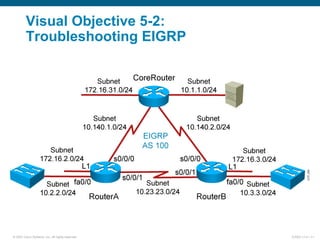
Visual Objective 5-2:
Troubleshooting EIGRP
© 2007 Cisco Systems, Inc. All rights reserved. ICND2 v1.0—12
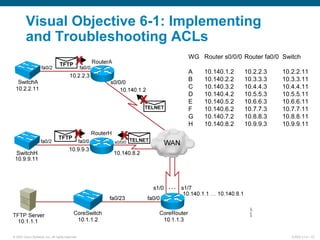
Visual Objective 6-1: Implementing
and Troubleshooting ACLs
WG Router s0/0/0 Router fa0/0 Switch
A 10.140.1.2 10.2.2.3 10.2.2.11
B 10.140.2.2 10.3.3.3 10.3.3.11
C 10.140.3.2 10.4.4.3 10.4.4.11
D 10.140.4.2 10.5.5.3 10.5.5.11
E 10.140.5.2 10.6.6.3 10.6.6.11
F 10.140.6.2 10.7.7.3 10.7.7.11
G 10.140.7.2 10.8.8.3 10.8.8.11
H 10.140.8.2 10.9.9.3 10.9.9.11
SwitchH
© 2007 Cisco Systems, Inc. All rights reserved. ICND2 v1.0—13
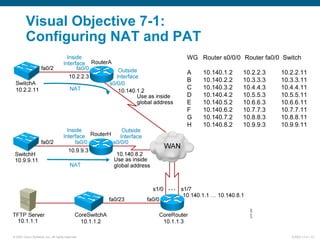
Visual Objective 7-1:
Configuring NAT and PAT
WG Router s0/0/0 Router fa0/0 Switch
A 10.140.1.2 10.2.2.3 10.2.2.11
B 10.140.2.2 10.3.3.3 10.3.3.11
C 10.140.3.2 10.4.4.3 10.4.4.11
D 10.140.4.2 10.5.5.3 10.5.5.11
E 10.140.5.2 10.6.6.3 10.6.6.11
F 10.140.6.2 10.7.7.3 10.7.7.11
G 10.140.7.2 10.8.8.3 10.8.8.11
H 10.140.8.2 10.9.9.3 10.9.9.11
© 2007 Cisco Systems, Inc. All rights reserved. ICND2 v1.0—14
Visual Objective 7-2: Implementing IPv6
© 2007 Cisco Systems, Inc. All rights reserved. ICND2 v1.0—15
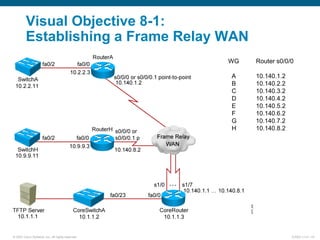
Visual Objective 8-1:
Establishing a Frame Relay WAN
WG Router s0/0/0
A 10.140.1.2
B 10.140.2.2
C 10.140.3.2
D 10.140.4.2
E 10.140.5.2
F 10.140.6.2
G 10.140.7.2
H 10.140.8.2
© 2007 Cisco Systems, Inc. All rights reserved. ICND2 v1.0—16
Visual Objective 8-2:
Troubleshooting Frame Relay WANs
WG Router s0/0/0
A 10.140.1.2
B 10.140.2.2
C 10.140.3.2
D 10.140.4.2
E 10.140.5.2
F 10.140.6.2
G 10.140.7.2
H 10.140.8.2
© 2007 Cisco Systems, Inc. All rights reserved. ICND2 v1.0—17

Icnd210 lg

  • 1.
    © 2007 CiscoSystems, Inc. All rights reserved. ICND2 v1.0—1 Interconnecting Cisco Networking Devices Part 2 (ICND2 v1.0)
  • 2.
    © 2007 CiscoSystems, Inc. All rights reserved. ICND2 v1.0—2 Course Lab Guide
  • 3.
    © 2007 CiscoSystems, Inc. All rights reserved. ICND2 v1.0—3 Visual Objective: How You Access the Remote Labs
  • 4.
    © 2007 CiscoSystems, Inc. All rights reserved. ICND2 v1.0—4 Visual Objective 1-1: Implementing a Small Network Review Lab WG Switch Router fa0/0 A 10.1.1.10 10.1.1.11 B 10.1.1.20 10.1.1.21 C 10.1.1.30 10.1.1.31 D 10.1.1.40 10.1.1.41 E 10.1.1.50 10.1.1.51 F 10.1.1.60 10.1.1.61 G 10.1.1.70 10.1.1.71 H 10.1.1.80 10.1.1.81
  • 5.
    © 2007 CiscoSystems, Inc. All rights reserved. ICND2 v1.0—5 Visual Objective 2-1: Configuring Expanded Switched Networks Subnet VLAN Devices 10.1.1.0 1 Core Switches, CoreRouter, SwitchX 10.2.2.0 2 CoreRouter, RouterA 10.3.3.0 3 CoreRouter, RouterB 10.4.4.0 4 CoreRouter, RouterC 10.5.5.0 5 CoreRouter, RouterD 10.6.6.0 6 CoreRouter, RouterE 10.7.7.0 7 CoreRouter, RouterF 10.8.8.0 8 CoreRouter, RouterG 10.9.9.0 9 CoreRouter, RouterH
  • 6.
    © 2007 CiscoSystems, Inc. All rights reserved. ICND2 v1.0—6 Visual Objective 2-2: Troubleshooting Switched Networks WG Switch Router fa0/0 A 10.1.1.10 10.2.2.12 B 10.1.1.20 10.3.3.12 C 10.1.1.30 10.4.4.12 D 10.1.1.40 10.5.5.12 E 10.1.1.50 10.6.6.12 F 10.1.1.60 10.7.7.12 G 10.1.1.70 10.8.8.12 H 10.1.1.80 10.9.9.12
  • 7.
    © 2007 CiscoSystems, Inc. All rights reserved. ICND2 v1.0—7 Visual Objective 2-2: Troubleshooting Switched Networks Lab Activity Job Aid Command to Gather Symptoms Isolate the problem Comand to correct the problem ping 172.16.2.2 fails — show ip interface brief Interface fa0/1 is administratively down no shutdown ping 172.16.2.2 still fails — show interface fa0/1 has correct IP address ip address 192.168.1.2 ping 172.16.2.2 succeeds
  • 8.
    © 2007 CiscoSystems, Inc. All rights reserved. ICND2 v1.0—8 Visual Objective 4-1: Implementing OSPF
  • 9.
    © 2007 CiscoSystems, Inc. All rights reserved. ICND2 v1.0—9 Visual Objective 4-2: Troubleshooting OSPF
  • 10.
    © 2007 CiscoSystems, Inc. All rights reserved. ICND2 v1.0—10 Visual Objective 5-1: Implementing EIGRP
  • 11.
    © 2007 CiscoSystems, Inc. All rights reserved. ICND2 v1.0—11 Visual Objective 5-2: Troubleshooting EIGRP
  • 12.
    © 2007 CiscoSystems, Inc. All rights reserved. ICND2 v1.0—12 Visual Objective 6-1: Implementing and Troubleshooting ACLs WG Router s0/0/0 Router fa0/0 Switch A 10.140.1.2 10.2.2.3 10.2.2.11 B 10.140.2.2 10.3.3.3 10.3.3.11 C 10.140.3.2 10.4.4.3 10.4.4.11 D 10.140.4.2 10.5.5.3 10.5.5.11 E 10.140.5.2 10.6.6.3 10.6.6.11 F 10.140.6.2 10.7.7.3 10.7.7.11 G 10.140.7.2 10.8.8.3 10.8.8.11 H 10.140.8.2 10.9.9.3 10.9.9.11 SwitchH
  • 13.
    © 2007 CiscoSystems, Inc. All rights reserved. ICND2 v1.0—13 Visual Objective 7-1: Configuring NAT and PAT WG Router s0/0/0 Router fa0/0 Switch A 10.140.1.2 10.2.2.3 10.2.2.11 B 10.140.2.2 10.3.3.3 10.3.3.11 C 10.140.3.2 10.4.4.3 10.4.4.11 D 10.140.4.2 10.5.5.3 10.5.5.11 E 10.140.5.2 10.6.6.3 10.6.6.11 F 10.140.6.2 10.7.7.3 10.7.7.11 G 10.140.7.2 10.8.8.3 10.8.8.11 H 10.140.8.2 10.9.9.3 10.9.9.11
  • 14.
    © 2007 CiscoSystems, Inc. All rights reserved. ICND2 v1.0—14 Visual Objective 7-2: Implementing IPv6
  • 15.
    © 2007 CiscoSystems, Inc. All rights reserved. ICND2 v1.0—15 Visual Objective 8-1: Establishing a Frame Relay WAN WG Router s0/0/0 A 10.140.1.2 B 10.140.2.2 C 10.140.3.2 D 10.140.4.2 E 10.140.5.2 F 10.140.6.2 G 10.140.7.2 H 10.140.8.2
  • 16.
    © 2007 CiscoSystems, Inc. All rights reserved. ICND2 v1.0—16 Visual Objective 8-2: Troubleshooting Frame Relay WANs WG Router s0/0/0 A 10.140.1.2 B 10.140.2.2 C 10.140.3.2 D 10.140.4.2 E 10.140.5.2 F 10.140.6.2 G 10.140.7.2 H 10.140.8.2
  • 17.
    © 2007 CiscoSystems, Inc. All rights reserved. ICND2 v1.0—17

Editor's Notes

  • #5 Lab ? Missing link core_ro ------core_sw_a. Fixed, kcm.
  • #6 Lab 7 and 8? changed port assignments wg switches added core_ro to vlan 1, added core addresses Added VLAN info and wg routers. Objectives: Students will see how the core router will interconnect separate VLANs. Purpose: To interconnect networks. Laboratory Instructions: This laboratory exercise is more of a demonstration, as the instructor is responsible for setting up the router on a stick. Refer to the lab setup guide.
  • #7 Lab ? Missing link core_ro ------core_sw_a. Fixed, kcm.
  • #8 Lab ? Missing link core_ro ------core_sw_a. Fixed, kcm.
  • #9 Lab 10 amended pod b and pod I addresses move core_ro address closer to interface same with s0 pod L Objectives: Enable the IGRP dynamic routing protocol so your router can learn about nonconnected networks. Purpose: Teach students how to enable IGRP. Laboratory Instructions: Refer to the lab setup guide.
  • #10 Lab 10 amended pod b and pod I addresses move core_ro address closer to interface same with s0 pod L Objectives: Enable the IGRP dynamic routing protocol so your router can learn about nonconnected networks. Purpose: Teach students how to enable IGRP. Laboratory Instructions: Refer to the lab setup guide.
  • #11 Lab 10 amended pod b and pod I addresses move core_ro address closer to interface same with s0 pod L Objectives: Enable the IGRP dynamic routing protocol so your router can learn about nonconnected networks. Purpose: Teach students how to enable IGRP. Laboratory Instructions: Refer to the lab setup guide.
  • #12 Lab 10 amended pod b and pod I addresses move core_ro address closer to interface same with s0 pod L Objectives: Enable the IGRP dynamic routing protocol so your router can learn about nonconnected networks. Purpose: Teach students how to enable IGRP. Laboratory Instructions: Refer to the lab setup guide.
  • #13 Lab 13 ACL Note: Refer to the lab setup guide for lab instructions.
  • #14 Lab 13 ACL Note: Refer to the lab setup guide for lab instructions.
  • #15 Lab 13 ACL Note: Refer to the lab setup guide for lab instructions.
  • #16 Lab 16 Frame Relay Objectives: Enable the Frame Relay on a serial link. Purpose: Teach students how to enable Frame Relay. Laboratory Instructions: Refer to the lab setup guide.
  • #17 Lab 16 Frame Relay Objectives: Enable the Frame Relay on a serial link. Purpose: Teach students how to enable Frame Relay. Laboratory Instructions: Refer to the lab setup guide.