
SECURITY CONTEXT ON ASA
FIREWALL
www.netprotocolxpert.in
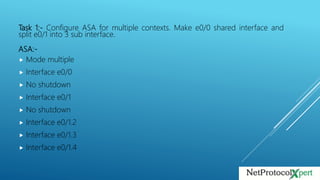
Task 1:- Configure ASA for multiple contexts. Make e0/0 shared interface and
split e0/1 into 3 sub interface.
ASA:-
 Mode multiple
 Interface e0/0
 No shutdown
 Interface e0/1
 No shutdown
 Interface e0/1.2
 Interface e0/1.3
 Interface e0/1.4
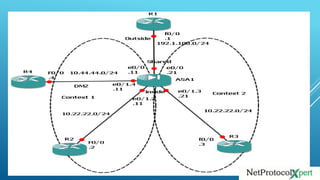
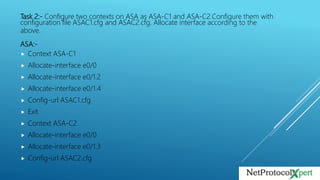
Task 2:- Configure two contexts on ASA as ASA-C1 and ASA-C2.Configure them with
configuration file ASAC1.cfg and ASAC2.cfg. Allocate interface according to the
above.
ASA:-
 Context ASA-C1
 Allocate-interface e0/0
 Allocate-interface e0/1.2
 Allocate-interface e0/1.4
 Config-url ASAC1.cfg
 Exit
 Context ASA-C2
 Allocate-interface e0/0
 Allocate-interface e0/1.3
 Config-url ASAC2.cfg
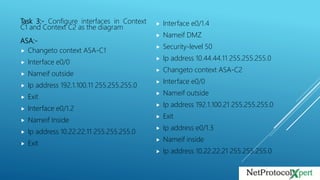
Task 3:- Configure interfaces in Context
C1 and Context C2 as the diagram
ASA:-
 Changeto context ASA-C1
 Interface e0/0
 Nameif outside
 Ip address 192.1.100.11 255.255.255.0
 Exit
 Interface e0/1.2
 Nameif Inside
 Ip address 10.22.22.11 255.255.255.0
 Exit
 Interface e0/1.4
 Nameif DMZ
 Security-level 50
 Ip address 10.44.44.11 255.255.255.0
 Changeto context ASA-C2
 Interface e0/0
 Nameif outside
 Ip address 192.1.100.21 255.255.255.0
 Exit
 Ip address e0/1.3
 Nameif inside
 Ip address 10.22.22.21 255.255.255.0
Task 4:-Configure ASA-C1 to allow inside network to access outside network using dynamic
NAT with a pool 192.1.100.51 – 192.1.100.69.Bachup with PAT using ip address 192.1.100.70.R2
should be seen as 192.1.100.2.
ASA:-
 Changeto Context ASA-C1
 Nat-control
 Exit
 Global (outside) 1 192.1.100.51-192.1.100.69
 Global (outside) 1 192.1.100.70
 Exit
 Nat (inside) 1 10.22.22.0 255.255.255.0
 Static (inside, outside) 192.1.100.2 10.22.22.2
Task 5:- Configure ASA-C2 to allow inside network to access outside network using
dynamic pool with a pool 192.1.100.71-192.1.100.8.Backup with PAT using ip address
 192.1.100.90.R3 should be seen as 192.1.100.3.
ASA:-
 Changeto context ASA-C2
 Global (outside) 1 192.1.100.71-192.1.100.89
 Global (outside) 1 192.1.100.90
 Exit
 Nat (inside) 1 10.22.22.0 255.255.255.0
 Exit
 Static (inside, outside) 192.1.100.3 10.22.22.3
Task 6:-Configure Static route on ASA-C1 and ASA-C2 to R2 and R3 network. Configure a
default route on ASA-C1 and ASA-C2 towards R1.
ASA:-
 Changeto context ASA-C1
 Route inside 10.2.2.0 255.255.255.0 10.22.22.2
 Route outside 0 0 192.1.100.1
 Exit
 Changeto context ASA-C2
 Route inside 10.3.3.0 255.255.255.0 10.22.22.3
 Route outside 0 0 192.1.100.1

Security context on asa firewall

  • 1.
    SECURITY CONTEXT ONASA FIREWALL www.netprotocolxpert.in
  • 3.
    Task 1:- ConfigureASA for multiple contexts. Make e0/0 shared interface and split e0/1 into 3 sub interface. ASA:-  Mode multiple  Interface e0/0  No shutdown  Interface e0/1  No shutdown  Interface e0/1.2  Interface e0/1.3  Interface e0/1.4
  • 4.
    Task 2:- Configuretwo contexts on ASA as ASA-C1 and ASA-C2.Configure them with configuration file ASAC1.cfg and ASAC2.cfg. Allocate interface according to the above. ASA:-  Context ASA-C1  Allocate-interface e0/0  Allocate-interface e0/1.2  Allocate-interface e0/1.4  Config-url ASAC1.cfg  Exit  Context ASA-C2  Allocate-interface e0/0  Allocate-interface e0/1.3  Config-url ASAC2.cfg
  • 5.
    Task 3:- Configureinterfaces in Context C1 and Context C2 as the diagram ASA:-  Changeto context ASA-C1  Interface e0/0  Nameif outside  Ip address 192.1.100.11 255.255.255.0  Exit  Interface e0/1.2  Nameif Inside  Ip address 10.22.22.11 255.255.255.0  Exit  Interface e0/1.4  Nameif DMZ  Security-level 50  Ip address 10.44.44.11 255.255.255.0  Changeto context ASA-C2  Interface e0/0  Nameif outside  Ip address 192.1.100.21 255.255.255.0  Exit  Ip address e0/1.3  Nameif inside  Ip address 10.22.22.21 255.255.255.0
  • 6.
    Task 4:-Configure ASA-C1to allow inside network to access outside network using dynamic NAT with a pool 192.1.100.51 – 192.1.100.69.Bachup with PAT using ip address 192.1.100.70.R2 should be seen as 192.1.100.2. ASA:-  Changeto Context ASA-C1  Nat-control  Exit  Global (outside) 1 192.1.100.51-192.1.100.69  Global (outside) 1 192.1.100.70  Exit  Nat (inside) 1 10.22.22.0 255.255.255.0  Static (inside, outside) 192.1.100.2 10.22.22.2
  • 7.
    Task 5:- ConfigureASA-C2 to allow inside network to access outside network using dynamic pool with a pool 192.1.100.71-192.1.100.8.Backup with PAT using ip address  192.1.100.90.R3 should be seen as 192.1.100.3. ASA:-  Changeto context ASA-C2  Global (outside) 1 192.1.100.71-192.1.100.89  Global (outside) 1 192.1.100.90  Exit  Nat (inside) 1 10.22.22.0 255.255.255.0  Exit  Static (inside, outside) 192.1.100.3 10.22.22.3
  • 8.
    Task 6:-Configure Staticroute on ASA-C1 and ASA-C2 to R2 and R3 network. Configure a default route on ASA-C1 and ASA-C2 towards R1. ASA:-  Changeto context ASA-C1  Route inside 10.2.2.0 255.255.255.0 10.22.22.2  Route outside 0 0 192.1.100.1  Exit  Changeto context ASA-C2  Route inside 10.3.3.0 255.255.255.0 10.22.22.3  Route outside 0 0 192.1.100.1