Library Instruction:
Nursing Undergraduate Students
By: Maletta Payne,
Emerging Technologies Librarian/
Nursing Library Liaison
Email: maletta_payne@subr.edu
Telephone: (225)771-2604
 LibGuides & Nursing Students
 Accessing LibGuides
 Off-Campus Access
 Research Queries & Strategies
 Electronic & Print Books
 Library Services for SU Nursing Students
Agenda
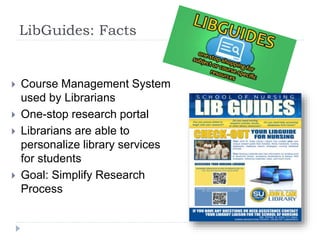
LibGuides: Facts
 Course Management System
used by Librarians
 One-stop research portal
 Librarians are able to
personalize library services
for students
 Goal: Simplify Research
Process
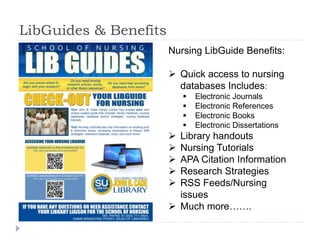
LibGuides & Benefits
Nursing LibGuide Benefits:
 Quick access to nursing
databases Includes:
 Electronic Journals
 Electronic References
 Electronic Books
 Electronic Dissertations
 Library handouts
 Nursing Tutorials
 APA Citation Information
 Research Strategies
 RSS Feeds/Nursing
issues
 Much more…….
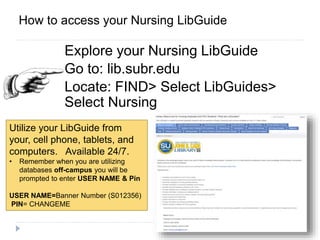
ACCESSExplore your Nursing LibGuide
Go to: lib.subr.edu
Locate: FIND> Select LibGuides>
Select Nursing
How to access your Nursing LibGuide
Utilize your LibGuide from
your, cell phone, tablets, and
computers. Available 24/7.
• Remember when you are utilizing
databases off-campus you will be
prompted to enter USER NAME & Pin
USER NAME=Banner Number (S012356)
PIN= CHANGEME
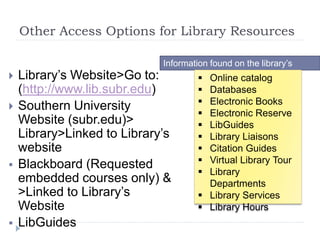
Other Access Options for Library Resources
 Library’s Website>Go to:
(http://www.lib.subr.edu)
 Southern University
Website (subr.edu)>
Library>Linked to Library’s
website
 Blackboard (Requested
embedded courses only) &
>Linked to Library’s
Website
 LibGuides
Information found on the library’s
website  Online catalog
 Databases
 Electronic Books
 Electronic Reserve
 LibGuides
 Library Liaisons
 Citation Guides
 Virtual Library Tour
 Library
Departments
 Library Services
 Library Hours
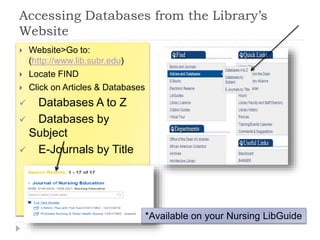
Accessing Databases from the Library’s
Website
 Website>Go to:
(http://www.lib.subr.edu)
 Locate FIND
 Click on Articles & Databases
 Databases A to Z
 Databases by
Subject
 E-Journals by Title
*Available on your Nursing LibGuide
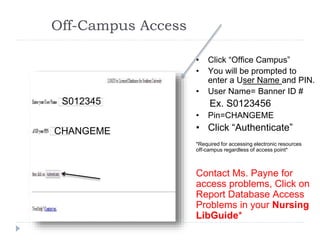
Off-Campus Access
S01234567
CHANGEME
• Click “Office Campus”
• You will be prompted to
enter a User Name and PIN.
• User Name= Banner ID #
Ex. S0123456
• Pin=CHANGEME
• Click “Authenticate”
*Required for accessing electronic resources
off-campus regardless of access point*
Contact Ms. Payne for
access problems, Click on
Report Database Access
Problems in your Nursing
LibGuide*
S012345
CHANGEME
Identifying Nursing Databases
 Ebsco Discovery Service
 Academic Search Complete
 Abstracts in Social Gerontology
 AHFS Consumer Medication
Information
 *Alt HealthWatch
 *CINAHL Plus
 Credo Reference
 *Dissertation Abstracts Online
 E-Book Collection
 *Health Source
 Lexis Nexis
 *Medline
 Mental Measurement Yearbook
 Newspaper Source
 *Ovid Nursing Collection
 *ProQuest Nursing & Allied Health
Source
 Psychology & Behavioral Sciences
Collection
 Psych Info
 Science Direct
 WorldCat
**Denotes Core Nursing Databases
Accessible from LibGuide, and the Library’s website**
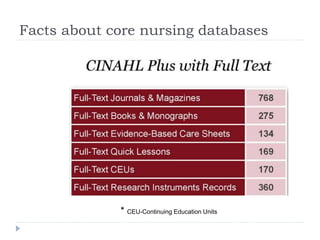
Facts about core nursing databases
* CEU-Continuing Education Units
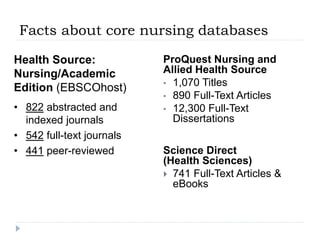
Facts about core nursing databases
Health Source:
Nursing/Academic
Edition (EBSCOhost)
• 822 abstracted and
indexed journals
• 542 full-text journals
• 441 peer-reviewed
ProQuest Nursing and
Allied Health Source
• 1,070 Titles
• 890 Full-Text Articles
• 12,300 Full-Text
Dissertations
Science Direct
(Health Sciences)
 741 Full-Text Articles &
eBooks
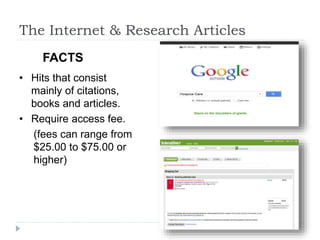
The Internet & Research Articles
• Hits that consist
mainly of citations,
books and articles.
• Require access fee.
(fees can range from
$25.00 to $75.00 or
higher)
FACTS
Benefits of using
John B. Cade Library for Articles
• Journal articles are free.
• You have more control over the type/amount of
information you need.
• You will save time & money.
• There are databases geared toward your area
of study.
Boolean Operators
Combine using OR/AND/NOT
(Boolean Operators)
Boolean logic refers to the logical relationship
among search terms (keywords).
Use Boolean Logic to narrow, broaden, or exclude
search results. Boolean logic consists of three
logical operators: AND/OR/NOT
AND/NOT>>>>>>>>> (Decrease results)
OR>>>>>>>>>>>>>> (Increase results)
Boolean Operators
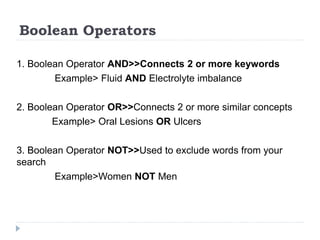
1. Boolean Operator AND>>Connects 2 or more keywords
Example> Fluid AND Electrolyte imbalance
2. Boolean Operator OR>>Connects 2 or more similar concepts
Example> Oral Lesions OR Ulcers
3. Boolean Operator NOT>>Used to exclude words from your
search
Example>Women NOT Men
Advanced Search Techniques “Truncation”
What is Truncation?
Truncation, also called stemming, is a
technique that allows you to search for various
word endings and spellings simultaneously.
Advanced Search Techniques “Truncation”
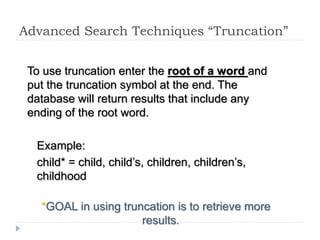
To use truncation enter the root of a word and
put the truncation symbol at the end. The
database will return results that include any
ending of the root word.
Example:
child* = child, child’s, children, children’s,
childhood
*GOAL in using truncation is to retrieve more
results.
Advanced Search Techniques
“Truncation”
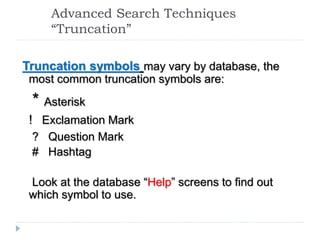
Truncation symbols may vary by database, the
most common truncation symbols are:
* Asterisk
! Exclamation Mark
? Question Mark
# Hashtag
Look at the database “Help” screens to find out
which symbol to use.
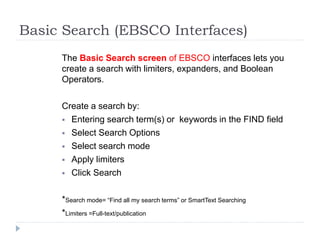
Basic Search (EBSCO Interfaces)
The Basic Search screen of EBSCO interfaces lets you
create a search with limiters, expanders, and Boolean
Operators.
Create a search by:
 Entering search term(s) or keywords in the FIND field
 Select Search Options
 Select search mode
 Apply limiters
 Click Search
*Search mode= “Find all my search terms” or SmartText Searching
*Limiters =Full-text/publication
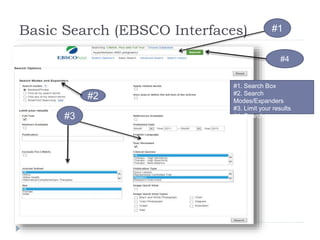
Basic Search (EBSCO Interfaces)
Find Field
#1
#2
#3
#1. Search Box
#2. Search
Modes/Expanders
#3. Limit your results
#4. Search
#4
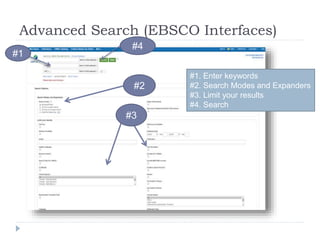
Advanced Search (EBSCO Interfaces)
#1
#2
#3
#1. Enter keywords
#2. Search Modes and Expanders
#3. Limit your results
#4. Search
#4
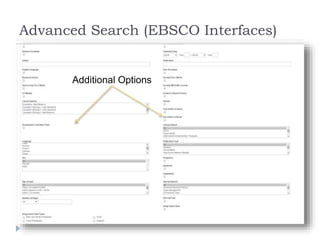
Advanced Search (EBSCO Interfaces)
Additional Options
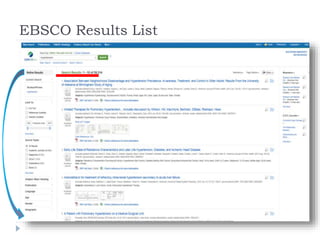
EBSCO Results List
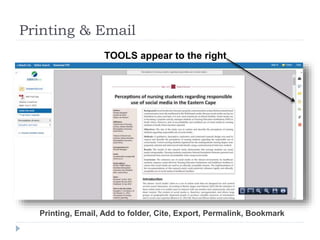
Printing & Email
Printing, Email, Add to folder, Cite, Export, Permalink, Bookmark
After clicking the PDF, HTML or Abstract,
TOOLS appear to the right
Subject Headings
Databases: Subject Heading
When you begin to look for information on a topic
in nursing databases (CINAHL, Health Source
Complete, Medline), etc., it is often not obvious
which word or words to use for your topic.
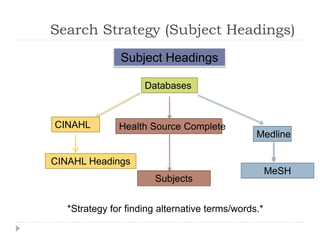
 Subject Headings is a strategy for finding alternative
terms/words.
 Works like a Thesaurus
 Subject Headings names varies according to the
database
Search Strategy (Subject Headings)
Subject Headings
Databases
CINAHL Health Source Complete
Medline
*Strategy for finding alternative terms/words.*
=
MeSH
CINAHL Headings
Subjects
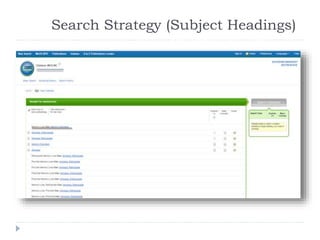
Search Strategy (Subject Headings)
DATABASE: MEDLINE
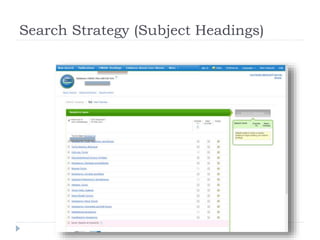
Search Strategy (Subject Headings)
DATABASE: CINAHL PLUS with Full Text
Search Strategies
(Putting it all together)
http://youtu.be/tZEhOBj921o
Finding Dissertations
Dissertations
 Comprehensive collection of
Dissertations and Theses from around the
world.
 Coverage 1861-Present
 Full-text coverage 1997-present
 SU Dissertations/Theses 2009-present
 Access Dissertations Abstracts Online via the
Library’s A to Z List, your Nursing LibGuide
http://www.youtube.com/watch?v=bQ_8DJdLm2Q&featur
e=youtube_gdata
Dissertation Abstracts Online (ProQuest)
* SU print Dissertations/Theses are available from 1987-2009.
Electronic Book Collection
EBSCOhost E-Book Collection Facts
 Contains over 65,000 electronic books covering
multiple disciplines.
 E-Books can be accessed on campus/remotely.
 You cannot print the entire book, 60 page limit.
 4718 E-Books on Health and Medicine.
 Available through Databases A to Z.
Finding Print Books
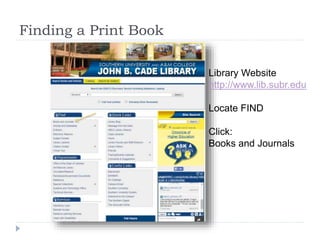
Finding a Print Book
Library Website
http://www.lib.subr.edu
Locate FIND
Click:
Books and Journals
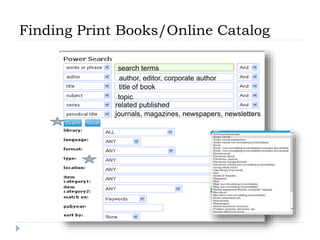
Finding Print Books/Online Catalog
search terms
author, editor, corporate author
title of book
topic
related published works
journals, magazines, newspapers, newsletters
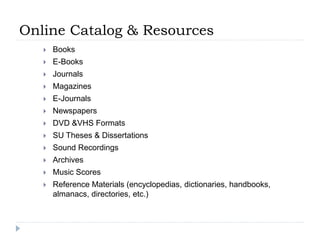
Online Catalog & Resources
 Books
 E-Books
 Journals
 Magazines
 E-Journals
 Newspapers
 DVD &VHS Formats
 SU Theses & Dissertations
 Sound Recordings
 Archives
 Music Scores
 Reference Materials (encyclopedias, dictionaries, handbooks,
almanacs, directories, etc.)
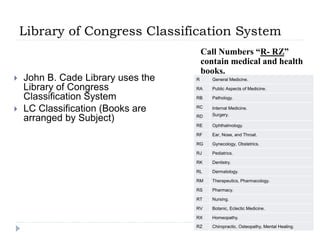
Library of Congress Classification System
 John B. Cade Library uses the
Library of Congress
Classification System
 LC Classification (Books are
arranged by Subject)
Call Numbers “R- RZ”
contain medical and health
books.
R General Medicine.
RA Public Aspects of Medicine.
RB Pathology.
RC Internal Medicine.
Surgery.RD
RE Ophthalmology.
RF Ear, Nose, and Throat.
RG Gynecology, Obstetrics.
RJ Pediatrics.
RK Dentistry.
RL Dermatology.
RM Therapeutics, Pharmacology.
RS Pharmacy.
RT Nursing.
RV Botanic, Eclectic Medicine.
RX Homeopathy.
RZ Chiropractic, Osteopathy, Mental Healing.
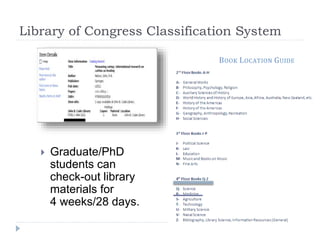
Library of Congress Classification System
 Graduate/PhD
students can
check-out library
materials for
4 weeks/28 days.
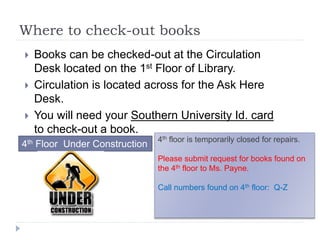
Where to check-out books
 Books can be checked-out at the Circulation
Desk located on the 1st Floor of Library.
 Circulation is located across for the Ask Here
Desk.
 You will need your Southern University Id. card
to check-out a book.
4th Floor Under Construction
4th floor is temporarily closed for repairs.
Please submit request for books found on
the 4th floor to Ms. Payne.
Call numbers found on 4th floor: Q-Z
Library Services for Nursing Students
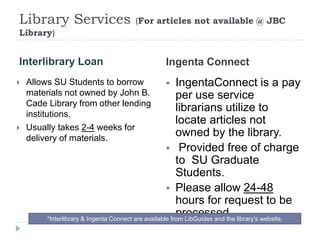
Library Services (For articles not available @ JBC
Library)
Interlibrary Loan Ingenta Connect
 Allows SU Students to borrow
materials not owned by John B.
Cade Library from other lending
institutions.
 Usually takes 2-4 weeks for
delivery of materials.
 IngentaConnect is a pay
per use service
librarians utilize to
locate articles not
owned by the library.
 Provided free of charge
to SU Graduate
Students.
 Please allow 24-48
hours for request to be
processed.*Interlibrary & Ingenta Connect are available from LibGuides and the library’s website.
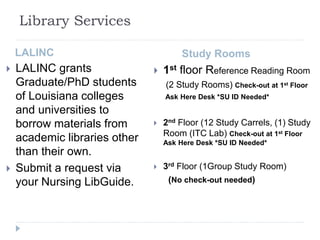
Library Services
LALINC
 LALINC grants
Graduate/PhD students
of Louisiana colleges
and universities to
borrow materials from
academic libraries other
than their own.
 Submit a request via
your Nursing LibGuide.
Study Rooms
 1st floor Reference Reading Room
(2 Study Rooms) Check-out at 1st Floor
Ask Here Desk *SU ID Needed*
 2nd Floor (12 Study Carrels, (1) Study
Room (ITC Lab) Check-out at 1st Floor
Ask Here Desk *SU ID Needed*
 3rd Floor (1Group Study Room)
(No check-out needed)
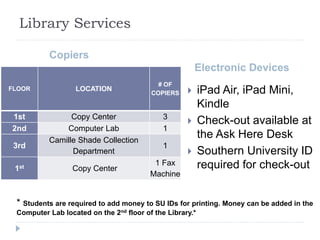
Library Services
Copiers
Electronic Devices
 iPad Air, iPad Mini,
Kindle
 Check-out available at
the Ask Here Desk
 Southern University ID
required for check-out
FLOOR LOCATION
# OF
COPIERS
1st Copy Center 3
2nd Computer Lab 1
3rd
Camille Shade Collection
Department
1
1st Copy Center
1 Fax
Machine
* Students are required to add money to SU IDs for printing. Money can be added in the
Computer Lab located on the 2nd floor of the Library.*
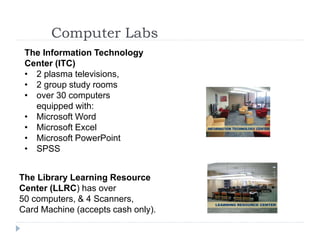
Computer Labs
2 computer labs are located on the 2nd floor of the library.
The Information Technology
Center (ITC)
• 2 plasma televisions,
• 2 group study rooms
• over 30 computers
equipped with:
• Microsoft Word
• Microsoft Excel
• Microsoft PowerPoint
• SPSS
The Library Learning Resource
Center (LLRC) has over
50 computers, & 4 Scanners,
Card Machine (accepts cash only).
Need help with your research?
Ms. Payne
School of Nursing Library Liaison
Phone: (225) 771-2604
Email: maletta_payne@subr.edu
Consultation: Schedule an appointment
Library Hours
(Fall/Spring)
7:30 am-12 midnight (M-
Thur.)
7:30 am-5:00 pm (Friday)
1:00 pm-5:00 pm (Saturday)
2:00 pm-12 midnight
(Sunday)
Main Library Hours
Emma Bradford Perry
Dean of Libraries
2015

Nursing undergraduate spring 2016

  • 1.
    Library Instruction: Nursing UndergraduateStudents By: Maletta Payne, Emerging Technologies Librarian/ Nursing Library Liaison Email: maletta_payne@subr.edu Telephone: (225)771-2604
  • 2.
     LibGuides &Nursing Students  Accessing LibGuides  Off-Campus Access  Research Queries & Strategies  Electronic & Print Books  Library Services for SU Nursing Students Agenda
  • 3.
    LibGuides: Facts  CourseManagement System used by Librarians  One-stop research portal  Librarians are able to personalize library services for students  Goal: Simplify Research Process
  • 4.
    LibGuides & Benefits NursingLibGuide Benefits:  Quick access to nursing databases Includes:  Electronic Journals  Electronic References  Electronic Books  Electronic Dissertations  Library handouts  Nursing Tutorials  APA Citation Information  Research Strategies  RSS Feeds/Nursing issues  Much more…….
  • 5.
    ACCESSExplore your NursingLibGuide Go to: lib.subr.edu Locate: FIND> Select LibGuides> Select Nursing How to access your Nursing LibGuide Utilize your LibGuide from your, cell phone, tablets, and computers. Available 24/7. • Remember when you are utilizing databases off-campus you will be prompted to enter USER NAME & Pin USER NAME=Banner Number (S012356) PIN= CHANGEME
  • 6.
    Other Access Optionsfor Library Resources  Library’s Website>Go to: (http://www.lib.subr.edu)  Southern University Website (subr.edu)> Library>Linked to Library’s website  Blackboard (Requested embedded courses only) & >Linked to Library’s Website  LibGuides Information found on the library’s website  Online catalog  Databases  Electronic Books  Electronic Reserve  LibGuides  Library Liaisons  Citation Guides  Virtual Library Tour  Library Departments  Library Services  Library Hours
  • 7.
    Accessing Databases fromthe Library’s Website  Website>Go to: (http://www.lib.subr.edu)  Locate FIND  Click on Articles & Databases  Databases A to Z  Databases by Subject  E-Journals by Title *Available on your Nursing LibGuide
  • 8.
    Off-Campus Access S01234567 CHANGEME • Click“Office Campus” • You will be prompted to enter a User Name and PIN. • User Name= Banner ID # Ex. S0123456 • Pin=CHANGEME • Click “Authenticate” *Required for accessing electronic resources off-campus regardless of access point* Contact Ms. Payne for access problems, Click on Report Database Access Problems in your Nursing LibGuide* S012345 CHANGEME
  • 9.
    Identifying Nursing Databases Ebsco Discovery Service  Academic Search Complete  Abstracts in Social Gerontology  AHFS Consumer Medication Information  *Alt HealthWatch  *CINAHL Plus  Credo Reference  *Dissertation Abstracts Online  E-Book Collection  *Health Source  Lexis Nexis  *Medline  Mental Measurement Yearbook  Newspaper Source  *Ovid Nursing Collection  *ProQuest Nursing & Allied Health Source  Psychology & Behavioral Sciences Collection  Psych Info  Science Direct  WorldCat **Denotes Core Nursing Databases Accessible from LibGuide, and the Library’s website**
  • 10.
    Facts about corenursing databases * CEU-Continuing Education Units
  • 11.
    Facts about corenursing databases Health Source: Nursing/Academic Edition (EBSCOhost) • 822 abstracted and indexed journals • 542 full-text journals • 441 peer-reviewed ProQuest Nursing and Allied Health Source • 1,070 Titles • 890 Full-Text Articles • 12,300 Full-Text Dissertations Science Direct (Health Sciences)  741 Full-Text Articles & eBooks
  • 12.
    The Internet &Research Articles • Hits that consist mainly of citations, books and articles. • Require access fee. (fees can range from $25.00 to $75.00 or higher) FACTS
  • 13.
    Benefits of using JohnB. Cade Library for Articles • Journal articles are free. • You have more control over the type/amount of information you need. • You will save time & money. • There are databases geared toward your area of study.
  • 14.
  • 15.
    Combine using OR/AND/NOT (BooleanOperators) Boolean logic refers to the logical relationship among search terms (keywords). Use Boolean Logic to narrow, broaden, or exclude search results. Boolean logic consists of three logical operators: AND/OR/NOT AND/NOT>>>>>>>>> (Decrease results) OR>>>>>>>>>>>>>> (Increase results)
  • 16.
    Boolean Operators 1. BooleanOperator AND>>Connects 2 or more keywords Example> Fluid AND Electrolyte imbalance 2. Boolean Operator OR>>Connects 2 or more similar concepts Example> Oral Lesions OR Ulcers 3. Boolean Operator NOT>>Used to exclude words from your search Example>Women NOT Men
  • 17.
    Advanced Search Techniques“Truncation” What is Truncation? Truncation, also called stemming, is a technique that allows you to search for various word endings and spellings simultaneously.
  • 18.
    Advanced Search Techniques“Truncation” To use truncation enter the root of a word and put the truncation symbol at the end. The database will return results that include any ending of the root word. Example: child* = child, child’s, children, children’s, childhood *GOAL in using truncation is to retrieve more results.
  • 19.
    Advanced Search Techniques “Truncation” Truncationsymbols may vary by database, the most common truncation symbols are: * Asterisk ! Exclamation Mark ? Question Mark # Hashtag Look at the database “Help” screens to find out which symbol to use.
  • 20.
    Basic Search (EBSCOInterfaces) The Basic Search screen of EBSCO interfaces lets you create a search with limiters, expanders, and Boolean Operators. Create a search by:  Entering search term(s) or keywords in the FIND field  Select Search Options  Select search mode  Apply limiters  Click Search *Search mode= “Find all my search terms” or SmartText Searching *Limiters =Full-text/publication
  • 21.
    Basic Search (EBSCOInterfaces) Find Field #1 #2 #3 #1. Search Box #2. Search Modes/Expanders #3. Limit your results #4. Search #4
  • 22.
    Advanced Search (EBSCOInterfaces) #1 #2 #3 #1. Enter keywords #2. Search Modes and Expanders #3. Limit your results #4. Search #4
  • 23.
    Advanced Search (EBSCOInterfaces) Additional Options
  • 24.
  • 25.
    Printing & Email Printing,Email, Add to folder, Cite, Export, Permalink, Bookmark After clicking the PDF, HTML or Abstract, TOOLS appear to the right
  • 26.
  • 27.
    Databases: Subject Heading Whenyou begin to look for information on a topic in nursing databases (CINAHL, Health Source Complete, Medline), etc., it is often not obvious which word or words to use for your topic.  Subject Headings is a strategy for finding alternative terms/words.  Works like a Thesaurus  Subject Headings names varies according to the database
  • 28.
    Search Strategy (SubjectHeadings) Subject Headings Databases CINAHL Health Source Complete Medline *Strategy for finding alternative terms/words.* = MeSH CINAHL Headings Subjects
  • 29.
    Search Strategy (SubjectHeadings) DATABASE: MEDLINE
  • 30.
    Search Strategy (SubjectHeadings) DATABASE: CINAHL PLUS with Full Text
  • 31.
    Search Strategies (Putting itall together) http://youtu.be/tZEhOBj921o
  • 32.
  • 33.
    Dissertations  Comprehensive collectionof Dissertations and Theses from around the world.  Coverage 1861-Present  Full-text coverage 1997-present  SU Dissertations/Theses 2009-present  Access Dissertations Abstracts Online via the Library’s A to Z List, your Nursing LibGuide http://www.youtube.com/watch?v=bQ_8DJdLm2Q&featur e=youtube_gdata Dissertation Abstracts Online (ProQuest) * SU print Dissertations/Theses are available from 1987-2009.
  • 34.
  • 35.
    Electronic Book Collection EBSCOhostE-Book Collection Facts  Contains over 65,000 electronic books covering multiple disciplines.  E-Books can be accessed on campus/remotely.  You cannot print the entire book, 60 page limit.  4718 E-Books on Health and Medicine.  Available through Databases A to Z.
  • 36.
  • 37.
    Finding a PrintBook Library Website http://www.lib.subr.edu Locate FIND Click: Books and Journals
  • 38.
    Finding Print Books/OnlineCatalog search terms author, editor, corporate author title of book topic related published works journals, magazines, newspapers, newsletters
  • 39.
    Online Catalog &Resources  Books  E-Books  Journals  Magazines  E-Journals  Newspapers  DVD &VHS Formats  SU Theses & Dissertations  Sound Recordings  Archives  Music Scores  Reference Materials (encyclopedias, dictionaries, handbooks, almanacs, directories, etc.)
  • 40.
    Library of CongressClassification System  John B. Cade Library uses the Library of Congress Classification System  LC Classification (Books are arranged by Subject) Call Numbers “R- RZ” contain medical and health books. R General Medicine. RA Public Aspects of Medicine. RB Pathology. RC Internal Medicine. Surgery.RD RE Ophthalmology. RF Ear, Nose, and Throat. RG Gynecology, Obstetrics. RJ Pediatrics. RK Dentistry. RL Dermatology. RM Therapeutics, Pharmacology. RS Pharmacy. RT Nursing. RV Botanic, Eclectic Medicine. RX Homeopathy. RZ Chiropractic, Osteopathy, Mental Healing.
  • 41.
    Library of CongressClassification System  Graduate/PhD students can check-out library materials for 4 weeks/28 days.
  • 42.
    Where to check-outbooks  Books can be checked-out at the Circulation Desk located on the 1st Floor of Library.  Circulation is located across for the Ask Here Desk.  You will need your Southern University Id. card to check-out a book. 4th Floor Under Construction 4th floor is temporarily closed for repairs. Please submit request for books found on the 4th floor to Ms. Payne. Call numbers found on 4th floor: Q-Z
  • 43.
    Library Services forNursing Students
  • 44.
    Library Services (Forarticles not available @ JBC Library) Interlibrary Loan Ingenta Connect  Allows SU Students to borrow materials not owned by John B. Cade Library from other lending institutions.  Usually takes 2-4 weeks for delivery of materials.  IngentaConnect is a pay per use service librarians utilize to locate articles not owned by the library.  Provided free of charge to SU Graduate Students.  Please allow 24-48 hours for request to be processed.*Interlibrary & Ingenta Connect are available from LibGuides and the library’s website.
  • 45.
    Library Services LALINC  LALINCgrants Graduate/PhD students of Louisiana colleges and universities to borrow materials from academic libraries other than their own.  Submit a request via your Nursing LibGuide. Study Rooms  1st floor Reference Reading Room (2 Study Rooms) Check-out at 1st Floor Ask Here Desk *SU ID Needed*  2nd Floor (12 Study Carrels, (1) Study Room (ITC Lab) Check-out at 1st Floor Ask Here Desk *SU ID Needed*  3rd Floor (1Group Study Room) (No check-out needed)
  • 46.
    Library Services Copiers Electronic Devices iPad Air, iPad Mini, Kindle  Check-out available at the Ask Here Desk  Southern University ID required for check-out FLOOR LOCATION # OF COPIERS 1st Copy Center 3 2nd Computer Lab 1 3rd Camille Shade Collection Department 1 1st Copy Center 1 Fax Machine * Students are required to add money to SU IDs for printing. Money can be added in the Computer Lab located on the 2nd floor of the Library.*
  • 47.
    Computer Labs 2 computerlabs are located on the 2nd floor of the library. The Information Technology Center (ITC) • 2 plasma televisions, • 2 group study rooms • over 30 computers equipped with: • Microsoft Word • Microsoft Excel • Microsoft PowerPoint • SPSS The Library Learning Resource Center (LLRC) has over 50 computers, & 4 Scanners, Card Machine (accepts cash only).
  • 48.
    Need help withyour research? Ms. Payne School of Nursing Library Liaison Phone: (225) 771-2604 Email: maletta_payne@subr.edu Consultation: Schedule an appointment
  • 49.
    Library Hours (Fall/Spring) 7:30 am-12midnight (M- Thur.) 7:30 am-5:00 pm (Friday) 1:00 pm-5:00 pm (Saturday) 2:00 pm-12 midnight (Sunday) Main Library Hours
  • 50.
    Emma Bradford Perry Deanof Libraries 2015