HONORS WRITING SEMINAR: 
RESEARCH STRATEGIES USING 
LIBRARY RESOURCES 
Professor Jenny Donley 
Cataloging and Knowledge Architect Librarian 
Heterick Memorial Library
WELCOME TO THE LIBRARY 
 Professor Jenny Donley, j-donley.1@onu.edu 
 Reference Email, reference@onu.edu 
 Librarians on duty: 
 Monday – Thursday 
 8:00 AM – 4:30 PM 
 6:00 PM – 9:00 PM 
 Friday 
 8:00 AM – 4:30 PM
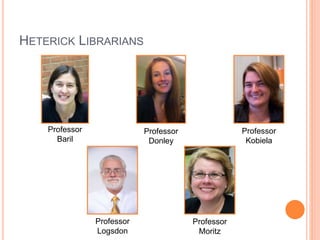
HETERICK LIBRARIANS 
Professor 
Baril 
Professor 
Donley 
Professor 
Kobiela 
Professor 
Logsdon 
Professor 
Moritz
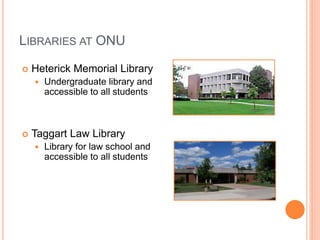
LIBRARIES AT ONU 
 Heterick Memorial Library 
 Undergraduate library and 
accessible to all students 
 Taggart Law Library 
 Library for law school and 
accessible to all students
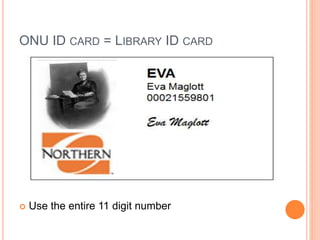
ONU ID CARD = LIBRARY ID CARD 
 Use the entire 11 digit number
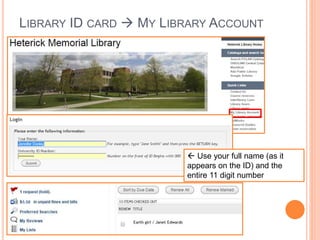
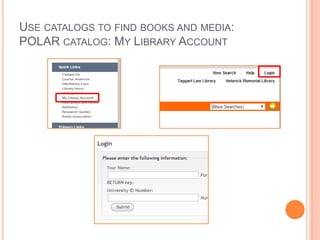
LIBRARY ID CARD  MY LIBRARY ACCOUNT 
 Use your full name (as it 
appears on the ID) and the 
entire 11 digit number
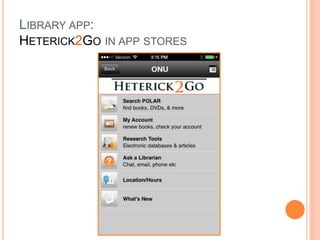
LIBRARY APP: 
HETERICK2GO IN APP STORES
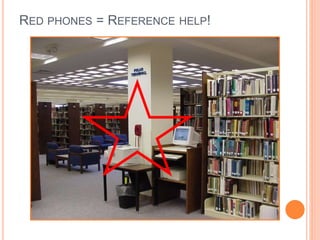
RED PHONES = REFERENCE HELP!
WHAT THE LIBRARY OFFERS: 
 ~400,000 items in POLAR, the ONU library catalog 
 ~20,000,000 items in OhioLink 
 260 Databases 
 400+ print periodicals 
 Tens of thousands of electronic journal titles 
 Juvenile, Young Adult, and Graphic Novel 
collections 
 DVDs, CDs, streaming audiovisuals, and streaming 
music
WHAT THESE SESSIONS ARE ALL ABOUT: 
 Learning about library research guides 
 How to construct and develop a research strategy 
 Using concept maps to explore your topic 
 How to Evaluating web resources 
 How to identify and locate print resources 
 How to navigate databases 
 Interlibrary Loans (ILL): the “last resort” option
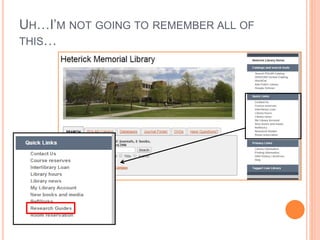
UH…I’M NOT GOING TO REMEMBER ALL OF 
THIS…
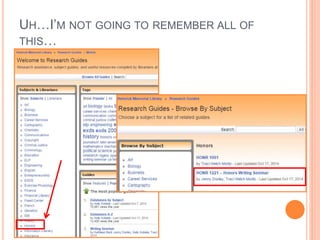
UH…I’M NOT GOING TO REMEMBER ALL OF 
THIS…
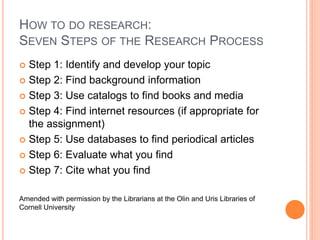
HOW TO DO RESEARCH: 
SEVEN STEPS OF THE RESEARCH PROCESS 
 Step 1: Identify and develop your topic 
 Step 2: Find background information 
 Step 3: Use catalogs to find books and media 
 Step 4: Find internet resources (if appropriate for 
the assignment) 
 Step 5: Use databases to find periodical articles 
 Step 6: Evaluate what you find 
 Step 7: Cite what you find 
Amended with permission by the Librarians at the Olin and Uris Libraries of 
Cornell University
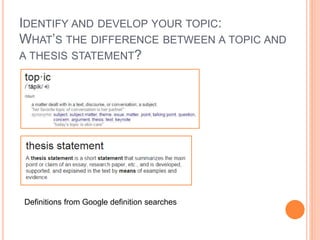
IDENTIFY AND DEVELOP YOUR TOPIC: 
WHAT’S THE DIFFERENCE BETWEEN A TOPIC AND 
A THESIS STATEMENT? 
Definitions from Google definition searches
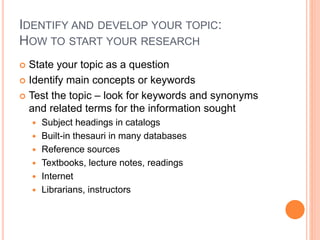
IDENTIFY AND DEVELOP YOUR TOPIC: 
HOW TO START YOUR RESEARCH 
 State your topic as a question 
 Identify main concepts or keywords 
 Test the topic – look for keywords and synonyms 
and related terms for the information sought 
 Subject headings in catalogs 
 Built-in thesauri in many databases 
 Reference sources 
 Textbooks, lecture notes, readings 
 Internet 
 Librarians, instructors
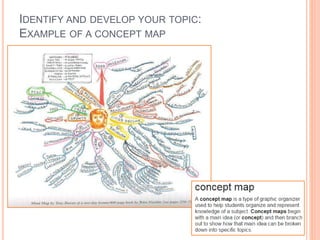
IDENTIFY AND DEVELOP YOUR TOPIC: 
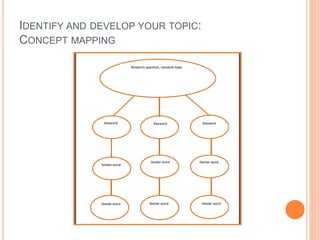
EXAMPLE OF A CONCEPT MAP
IDENTIFY AND DEVELOP YOUR TOPIC: 
CONCEPT MAPPING
FIND BACKGROUND INFORMATION: 
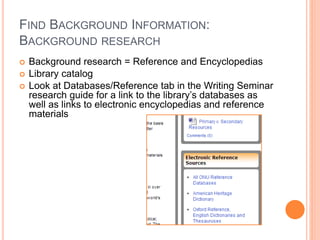
BACKGROUND RESEARCH 
 Background research = Reference and Encyclopedias 
 Library catalog 
 Look at Databases/Reference tab in the Writing Seminar 
research guide for a link to the library’s databases as 
well as links to electronic encyclopedias and reference 
materials
USE CATALOGS TO FIND BOOKS AND MEDIA: 
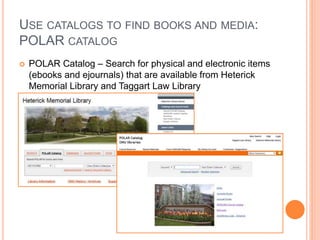
POLAR CATALOG 
 POLAR Catalog – Search for physical and electronic items 
(ebooks and ejournals) that are available from Heterick 
Memorial Library and Taggart Law Library
USE CATALOGS TO FIND BOOKS AND MEDIA: 
POLAR CATALOG: KEYWORD SEARCH 
 Looks in several locations 
 Subject 
 Article title 
 Abstracts 
 Table of contents 
 Does not require an exact match 
 Generates comparatively large number of hits 
 Good if you are not familiar with terminology 
 Good for a beginning search
USE CATALOGS TO FIND BOOKS AND MEDIA: 
POLAR CATALOG: SUBJECT SEARCH 
 Looks at the subject headings in the records 
 Requires an exact match 
 Provides a results list with related headings to use 
for broader and narrower searches 
 Generates comparatively smaller number of hits 
 Good if you are familiar with terminology 
 Good for a next step after a keyword search
USE CATALOGS TO FIND BOOKS AND MEDIA: 
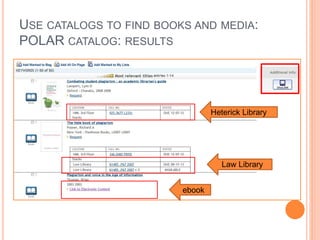
POLAR CATALOG: RESULTS 
ebook 
Heterick Library 
Law Library
USE CATALOGS TO FIND BOOKS AND MEDIA: 
POLAR CATALOG: MY LIBRARY ACCOUNT
USE CATALOGS TO FIND BOOKS AND MEDIA: 
OHIOLINK CATALOG 
 Materials owned by 92 other libraries in Ohio: 
colleges, universities, public libraries 
 Can submit request for an item to be delivered to 
Heterick Memorial Library 
 Most requests arrive in 2-3 working days 
 No charge to request items (unless they become 
overdue) 
 Maximum of 25 requests at a time 
 Items can usually be renewed
USE CATALOGS TO FIND BOOKS AND MEDIA: 
OHIOLINK CATALOG 
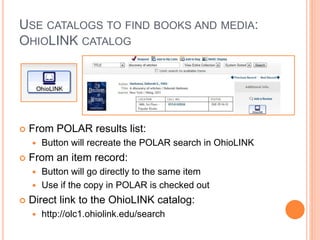
 From POLAR results list: 
 Button will recreate the POLAR search in OhioLINK 
 From an item record: 
 Button will go directly to the same item 
 Use if the copy in POLAR is checked out 
 Direct link to the OhioLINK catalog: 
 http://olc1.ohiolink.edu/search
USE CATALOGS TO FIND BOOKS AND MEDIA: OHIOLINK 
CATALOG 
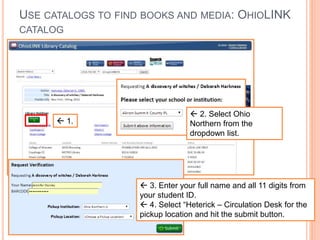
 1. 
 2. Select Ohio 
Northern from the 
dropdown list. 
 3. Enter your full name and all 11 digits from 
your student ID. 
 4. Select “Heterick – Circulation Desk for the 
pickup location and hit the submit button.
USE CATALOGS TO FIND BOOKS AND MEDIA: 
SEARCH OHIO CATALOG 
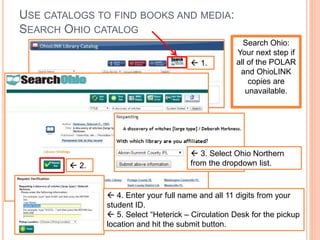
 1. 
Search Ohio: 
Your next step if 
all of the POLAR 
and OhioLINK 
copies are 
unavailable. 
 2. 
 3. Select Ohio Northern 
from the dropdown list. 
 4. Enter your full name and all 11 digits from your 
student ID. 
 5. Select “Heterick – Circulation Desk for the pickup 
location and hit the submit button.
FINDING INTERNET RESOURCES 
(IF APPROPRIATE FOR THE ASSIGNMENT) 
 Helpful for identifying additional keywords and 
subjects for your concept map 
 Google 
 Wikipedia 
 Does the information located satisfy the research 
need? 
 Is the information factual and unbiased? 
 Refer to Critically Analyzing Web Sources/CRAAP 
Test
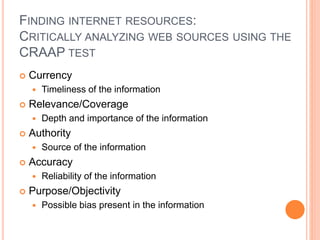
FINDING INTERNET RESOURCES: 
CRITICALLY ANALYZING WEB SOURCES USING THE 
CRAAP TEST 
 Currency 
 Timeliness of the information 
 Relevance/Coverage 
 Depth and importance of the information 
 Authority 
 Source of the information 
 Accuracy 
 Reliability of the information 
 Purpose/Objectivity 
 Possible bias present in the information
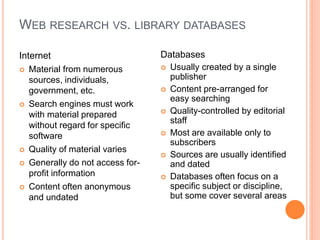
WEB RESEARCH VS. LIBRARY DATABASES 
Internet 
 Material from numerous 
sources, individuals, 
government, etc. 
 Search engines must work 
with material prepared 
without regard for specific 
software 
 Quality of material varies 
 Generally do not access for-profit 
information 
 Content often anonymous 
and undated 
Databases 
 Usually created by a single 
publisher 
 Content pre-arranged for 
easy searching 
 Quality-controlled by editorial 
staff 
 Most are available only to 
subscribers 
 Sources are usually identified 
and dated 
 Databases often focus on a 
specific subject or discipline, 
but some cover several areas
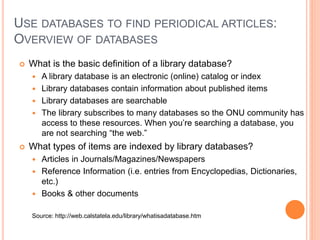
USE DATABASES TO FIND PERIODICAL ARTICLES: 
OVERVIEW OF DATABASES 
 What is the basic definition of a library database? 
 A library database is an electronic (online) catalog or index 
 Library databases contain information about published items 
 Library databases are searchable 
 The library subscribes to many databases so the ONU community has 
access to these resources. When you’re searching a database, you 
are not searching “the web.” 
 What types of items are indexed by library databases? 
 Articles in Journals/Magazines/Newspapers 
 Reference Information (i.e. entries from Encyclopedias, Dictionaries, 
etc.) 
 Books & other documents 
Source: http://web.calstatela.edu/library/whatisadatabase.htm
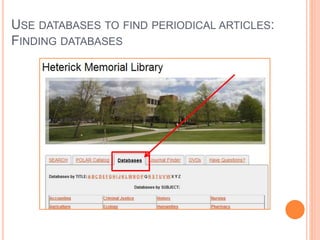
USE DATABASES TO FIND PERIODICAL ARTICLES: 
FINDING DATABASES
USE DATABASES TO FIND PERIODICAL ARTICLES: 
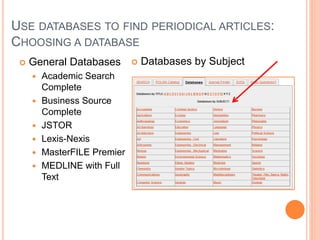
CHOOSING A DATABASE 
 General Databases 
 Academic Search 
Complete 
 Business Source 
Complete 
 JSTOR 
 Lexis-Nexis 
 MasterFILE Premier 
 MEDLINE with Full 
Text 
 Databases by Subject
USE DATABASES TO FIND PERIODICAL ARTICLES: 
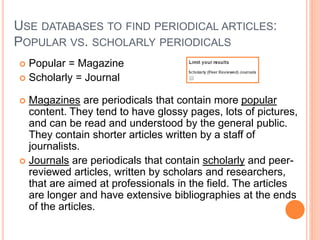
POPULAR VS. SCHOLARLY PERIODICALS 
 Popular = Magazine 
 Scholarly = Journal 
 Magazines are periodicals that contain more popular 
content. They tend to have glossy pages, lots of pictures, 
and can be read and understood by the general public. 
They contain shorter articles written by a staff of 
journalists. 
 Journals are periodicals that contain scholarly and peer-reviewed 
articles, written by scholars and researchers, 
that are aimed at professionals in the field. The articles 
are longer and have extensive bibliographies at the ends 
of the articles.
USE DATABASES TO FIND PERIODICAL ARTICLES: 
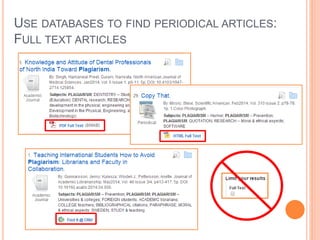
FULL TEXT ARTICLES
USE DATABASES TO FIND PERIODICAL ARTICLES: 
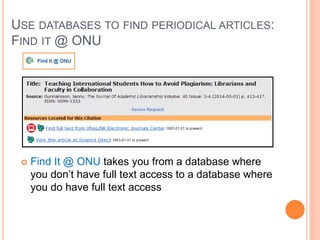
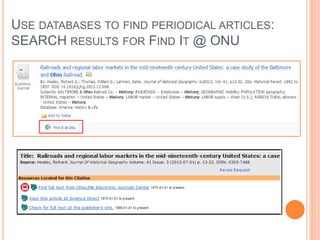
FIND IT @ ONU 
 Find It @ ONU takes you from a database where 
you don’t have full text access to a database where 
you do have full text access
USE DATABASES TO FIND PERIODICAL ARTICLES: 
SEARCH DISCOVERY LAYER 
 What it is: 
 A discovery layer sits on top of the majority of the library 
resources and allows users to access most of the information 
available on one topic with one search 
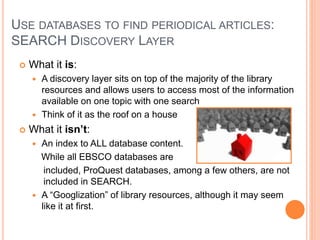
 Think of it as the roof on a house 
 What it isn’t: 
 An index to ALL database content. 
While all EBSCO databases are 
included, ProQuest databases, among a few others, are not 
included in SEARCH. 
 A “Googlization” of library resources, although it may seem 
like it at first.
USE DATABASES TO FIND PERIODICAL ARTICLES: 
SEARCH DISCOVERY LAYER 
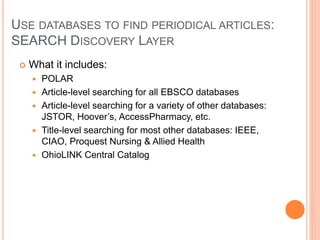
 What it includes: 
 POLAR 
 Article-level searching for all EBSCO databases 
 Article-level searching for a variety of other databases: 
JSTOR, Hoover’s, AccessPharmacy, etc. 
 Title-level searching for most other databases: IEEE, 
CIAO, Proquest Nursing & Allied Health 
 OhioLINK Central Catalog
USE DATABASES TO FIND PERIODICAL ARTICLES: 
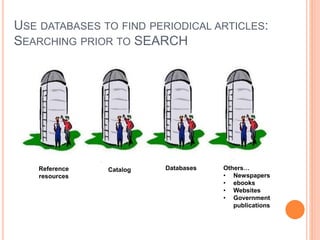
SEARCHING PRIOR TO SEARCH 
Reference 
resources 
Databases Others… 
• Newspapers 
• ebooks 
• Websites 
• Government 
publications 
Catalog
USE DATABASES TO FIND PERIODICAL ARTICLES: 
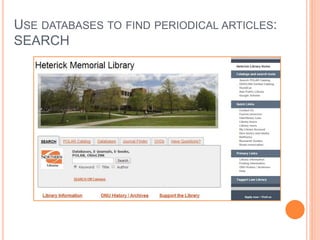
SEARCH
USE DATABASES TO FIND PERIODICAL ARTICLES: 
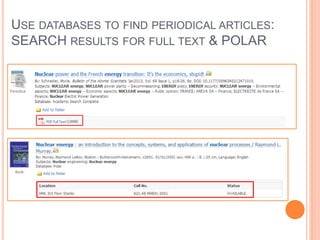
SEARCH RESULTS FOR FULL TEXT & POLAR
USE DATABASES TO FIND PERIODICAL ARTICLES: 
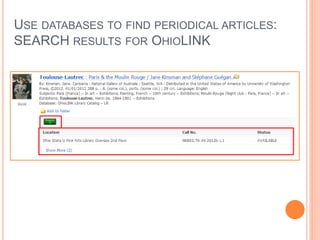
SEARCH RESULTS FOR OHIOLINK
USE DATABASES TO FIND PERIODICAL ARTICLES: 
SEARCH RESULTS FOR FIND IT @ ONU
USE DATABASES TO FIND PERIODICAL ARTICLES: 
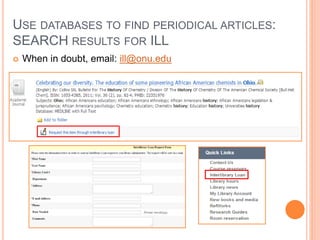
SEARCH RESULTS FOR ILL 
 When in doubt, email: ill@onu.edu
USE DATABASES TO FIND PERIODICAL ARTICLES: 
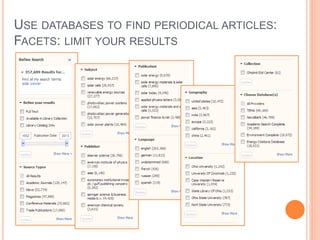
FACETS: LIMIT YOUR RESULTS
EVALUATE WHAT YOU FIND: 
REVIEW YOU FINDINGS 
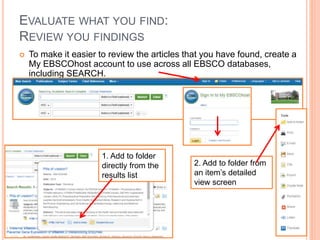
 To make it easier to review the articles that you have found, create a 
My EBSCOhost account to use across all EBSCO databases, 
including SEARCH. 
1. Add to folder 
directly from the 
results list 
2. Add to folder from 
an item’s detailed 
view screen
EVALUATE WHAT YOU FIND: 
ANNOTATED BIBLIOGRAPHY 
 An annotated bibliography is a list of sources that 
includes a summary and/or evaluation of the source 
 What an annotated bibliography does: 
 Allows you to see what is out there 
 Helps you narrow your topic and discard any irrelevant 
materials 
 Aids in developing the thesis 
 Makes you a better scholar
CITE WHAT YOU FIND: 
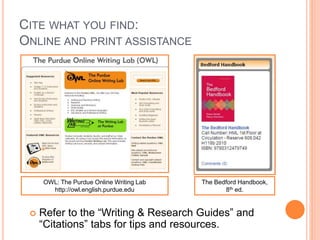
ONLINE AND PRINT ASSISTANCE 
OWL: The Purdue Online Writing Lab 
http://owl.english.purdue.edu 
The Bedford Handbook, 
8th ed. 
 Refer to the “Writing & Research Guides” and 
“Citations” tabs for tips and resources.
AND FINALLY…DON’T FORGET THAT THE 
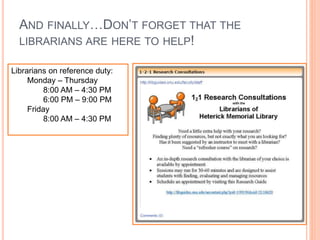
LIBRARIANS ARE HERE TO HELP! 
Librarians on reference duty: 
Monday – Thursday 
8:00 AM – 4:30 PM 
6:00 PM – 9:00 PM 
Friday 
8:00 AM – 4:30 PM

Honors English - Surface

  • 1.
    HONORS WRITING SEMINAR: RESEARCH STRATEGIES USING LIBRARY RESOURCES Professor Jenny Donley Cataloging and Knowledge Architect Librarian Heterick Memorial Library
  • 2.
    WELCOME TO THELIBRARY  Professor Jenny Donley, j-donley.1@onu.edu  Reference Email, reference@onu.edu  Librarians on duty:  Monday – Thursday  8:00 AM – 4:30 PM  6:00 PM – 9:00 PM  Friday  8:00 AM – 4:30 PM
  • 3.
    HETERICK LIBRARIANS Professor Baril Professor Donley Professor Kobiela Professor Logsdon Professor Moritz
  • 4.
    LIBRARIES AT ONU  Heterick Memorial Library  Undergraduate library and accessible to all students  Taggart Law Library  Library for law school and accessible to all students
  • 5.
    ONU ID CARD= LIBRARY ID CARD  Use the entire 11 digit number
  • 6.
    LIBRARY ID CARD MY LIBRARY ACCOUNT  Use your full name (as it appears on the ID) and the entire 11 digit number
  • 7.
  • 8.
    RED PHONES =REFERENCE HELP!
  • 9.
    WHAT THE LIBRARYOFFERS:  ~400,000 items in POLAR, the ONU library catalog  ~20,000,000 items in OhioLink  260 Databases  400+ print periodicals  Tens of thousands of electronic journal titles  Juvenile, Young Adult, and Graphic Novel collections  DVDs, CDs, streaming audiovisuals, and streaming music
  • 10.
    WHAT THESE SESSIONSARE ALL ABOUT:  Learning about library research guides  How to construct and develop a research strategy  Using concept maps to explore your topic  How to Evaluating web resources  How to identify and locate print resources  How to navigate databases  Interlibrary Loans (ILL): the “last resort” option
  • 11.
    UH…I’M NOT GOINGTO REMEMBER ALL OF THIS…
  • 12.
    UH…I’M NOT GOINGTO REMEMBER ALL OF THIS…
  • 13.
    HOW TO DORESEARCH: SEVEN STEPS OF THE RESEARCH PROCESS  Step 1: Identify and develop your topic  Step 2: Find background information  Step 3: Use catalogs to find books and media  Step 4: Find internet resources (if appropriate for the assignment)  Step 5: Use databases to find periodical articles  Step 6: Evaluate what you find  Step 7: Cite what you find Amended with permission by the Librarians at the Olin and Uris Libraries of Cornell University
  • 14.
    IDENTIFY AND DEVELOPYOUR TOPIC: WHAT’S THE DIFFERENCE BETWEEN A TOPIC AND A THESIS STATEMENT? Definitions from Google definition searches
  • 15.
    IDENTIFY AND DEVELOPYOUR TOPIC: HOW TO START YOUR RESEARCH  State your topic as a question  Identify main concepts or keywords  Test the topic – look for keywords and synonyms and related terms for the information sought  Subject headings in catalogs  Built-in thesauri in many databases  Reference sources  Textbooks, lecture notes, readings  Internet  Librarians, instructors
  • 16.
    IDENTIFY AND DEVELOPYOUR TOPIC: EXAMPLE OF A CONCEPT MAP
  • 17.
    IDENTIFY AND DEVELOPYOUR TOPIC: CONCEPT MAPPING
  • 18.
    FIND BACKGROUND INFORMATION: BACKGROUND RESEARCH  Background research = Reference and Encyclopedias  Library catalog  Look at Databases/Reference tab in the Writing Seminar research guide for a link to the library’s databases as well as links to electronic encyclopedias and reference materials
  • 19.
    USE CATALOGS TOFIND BOOKS AND MEDIA: POLAR CATALOG  POLAR Catalog – Search for physical and electronic items (ebooks and ejournals) that are available from Heterick Memorial Library and Taggart Law Library
  • 20.
    USE CATALOGS TOFIND BOOKS AND MEDIA: POLAR CATALOG: KEYWORD SEARCH  Looks in several locations  Subject  Article title  Abstracts  Table of contents  Does not require an exact match  Generates comparatively large number of hits  Good if you are not familiar with terminology  Good for a beginning search
  • 21.
    USE CATALOGS TOFIND BOOKS AND MEDIA: POLAR CATALOG: SUBJECT SEARCH  Looks at the subject headings in the records  Requires an exact match  Provides a results list with related headings to use for broader and narrower searches  Generates comparatively smaller number of hits  Good if you are familiar with terminology  Good for a next step after a keyword search
  • 22.
    USE CATALOGS TOFIND BOOKS AND MEDIA: POLAR CATALOG: RESULTS ebook Heterick Library Law Library
  • 23.
    USE CATALOGS TOFIND BOOKS AND MEDIA: POLAR CATALOG: MY LIBRARY ACCOUNT
  • 24.
    USE CATALOGS TOFIND BOOKS AND MEDIA: OHIOLINK CATALOG  Materials owned by 92 other libraries in Ohio: colleges, universities, public libraries  Can submit request for an item to be delivered to Heterick Memorial Library  Most requests arrive in 2-3 working days  No charge to request items (unless they become overdue)  Maximum of 25 requests at a time  Items can usually be renewed
  • 25.
    USE CATALOGS TOFIND BOOKS AND MEDIA: OHIOLINK CATALOG  From POLAR results list:  Button will recreate the POLAR search in OhioLINK  From an item record:  Button will go directly to the same item  Use if the copy in POLAR is checked out  Direct link to the OhioLINK catalog:  http://olc1.ohiolink.edu/search
  • 26.
    USE CATALOGS TOFIND BOOKS AND MEDIA: OHIOLINK CATALOG  1.  2. Select Ohio Northern from the dropdown list.  3. Enter your full name and all 11 digits from your student ID.  4. Select “Heterick – Circulation Desk for the pickup location and hit the submit button.
  • 27.
    USE CATALOGS TOFIND BOOKS AND MEDIA: SEARCH OHIO CATALOG  1. Search Ohio: Your next step if all of the POLAR and OhioLINK copies are unavailable.  2.  3. Select Ohio Northern from the dropdown list.  4. Enter your full name and all 11 digits from your student ID.  5. Select “Heterick – Circulation Desk for the pickup location and hit the submit button.
  • 28.
    FINDING INTERNET RESOURCES (IF APPROPRIATE FOR THE ASSIGNMENT)  Helpful for identifying additional keywords and subjects for your concept map  Google  Wikipedia  Does the information located satisfy the research need?  Is the information factual and unbiased?  Refer to Critically Analyzing Web Sources/CRAAP Test
  • 29.
    FINDING INTERNET RESOURCES: CRITICALLY ANALYZING WEB SOURCES USING THE CRAAP TEST  Currency  Timeliness of the information  Relevance/Coverage  Depth and importance of the information  Authority  Source of the information  Accuracy  Reliability of the information  Purpose/Objectivity  Possible bias present in the information
  • 30.
    WEB RESEARCH VS.LIBRARY DATABASES Internet  Material from numerous sources, individuals, government, etc.  Search engines must work with material prepared without regard for specific software  Quality of material varies  Generally do not access for-profit information  Content often anonymous and undated Databases  Usually created by a single publisher  Content pre-arranged for easy searching  Quality-controlled by editorial staff  Most are available only to subscribers  Sources are usually identified and dated  Databases often focus on a specific subject or discipline, but some cover several areas
  • 31.
    USE DATABASES TOFIND PERIODICAL ARTICLES: OVERVIEW OF DATABASES  What is the basic definition of a library database?  A library database is an electronic (online) catalog or index  Library databases contain information about published items  Library databases are searchable  The library subscribes to many databases so the ONU community has access to these resources. When you’re searching a database, you are not searching “the web.”  What types of items are indexed by library databases?  Articles in Journals/Magazines/Newspapers  Reference Information (i.e. entries from Encyclopedias, Dictionaries, etc.)  Books & other documents Source: http://web.calstatela.edu/library/whatisadatabase.htm
  • 32.
    USE DATABASES TOFIND PERIODICAL ARTICLES: FINDING DATABASES
  • 33.
    USE DATABASES TOFIND PERIODICAL ARTICLES: CHOOSING A DATABASE  General Databases  Academic Search Complete  Business Source Complete  JSTOR  Lexis-Nexis  MasterFILE Premier  MEDLINE with Full Text  Databases by Subject
  • 34.
    USE DATABASES TOFIND PERIODICAL ARTICLES: POPULAR VS. SCHOLARLY PERIODICALS  Popular = Magazine  Scholarly = Journal  Magazines are periodicals that contain more popular content. They tend to have glossy pages, lots of pictures, and can be read and understood by the general public. They contain shorter articles written by a staff of journalists.  Journals are periodicals that contain scholarly and peer-reviewed articles, written by scholars and researchers, that are aimed at professionals in the field. The articles are longer and have extensive bibliographies at the ends of the articles.
  • 35.
    USE DATABASES TOFIND PERIODICAL ARTICLES: FULL TEXT ARTICLES
  • 36.
    USE DATABASES TOFIND PERIODICAL ARTICLES: FIND IT @ ONU  Find It @ ONU takes you from a database where you don’t have full text access to a database where you do have full text access
  • 37.
    USE DATABASES TOFIND PERIODICAL ARTICLES: SEARCH DISCOVERY LAYER  What it is:  A discovery layer sits on top of the majority of the library resources and allows users to access most of the information available on one topic with one search  Think of it as the roof on a house  What it isn’t:  An index to ALL database content. While all EBSCO databases are included, ProQuest databases, among a few others, are not included in SEARCH.  A “Googlization” of library resources, although it may seem like it at first.
  • 38.
    USE DATABASES TOFIND PERIODICAL ARTICLES: SEARCH DISCOVERY LAYER  What it includes:  POLAR  Article-level searching for all EBSCO databases  Article-level searching for a variety of other databases: JSTOR, Hoover’s, AccessPharmacy, etc.  Title-level searching for most other databases: IEEE, CIAO, Proquest Nursing & Allied Health  OhioLINK Central Catalog
  • 39.
    USE DATABASES TOFIND PERIODICAL ARTICLES: SEARCHING PRIOR TO SEARCH Reference resources Databases Others… • Newspapers • ebooks • Websites • Government publications Catalog
  • 40.
    USE DATABASES TOFIND PERIODICAL ARTICLES: SEARCH
  • 41.
    USE DATABASES TOFIND PERIODICAL ARTICLES: SEARCH RESULTS FOR FULL TEXT & POLAR
  • 42.
    USE DATABASES TOFIND PERIODICAL ARTICLES: SEARCH RESULTS FOR OHIOLINK
  • 43.
    USE DATABASES TOFIND PERIODICAL ARTICLES: SEARCH RESULTS FOR FIND IT @ ONU
  • 44.
    USE DATABASES TOFIND PERIODICAL ARTICLES: SEARCH RESULTS FOR ILL  When in doubt, email: ill@onu.edu
  • 45.
    USE DATABASES TOFIND PERIODICAL ARTICLES: FACETS: LIMIT YOUR RESULTS
  • 46.
    EVALUATE WHAT YOUFIND: REVIEW YOU FINDINGS  To make it easier to review the articles that you have found, create a My EBSCOhost account to use across all EBSCO databases, including SEARCH. 1. Add to folder directly from the results list 2. Add to folder from an item’s detailed view screen
  • 47.
    EVALUATE WHAT YOUFIND: ANNOTATED BIBLIOGRAPHY  An annotated bibliography is a list of sources that includes a summary and/or evaluation of the source  What an annotated bibliography does:  Allows you to see what is out there  Helps you narrow your topic and discard any irrelevant materials  Aids in developing the thesis  Makes you a better scholar
  • 48.
    CITE WHAT YOUFIND: ONLINE AND PRINT ASSISTANCE OWL: The Purdue Online Writing Lab http://owl.english.purdue.edu The Bedford Handbook, 8th ed.  Refer to the “Writing & Research Guides” and “Citations” tabs for tips and resources.
  • 49.
    AND FINALLY…DON’T FORGETTHAT THE LIBRARIANS ARE HERE TO HELP! Librarians on reference duty: Monday – Thursday 8:00 AM – 4:30 PM 6:00 PM – 9:00 PM Friday 8:00 AM – 4:30 PM