Seminar: Computer Science
Dr. Lynn Jackson
Session conducted by: Maletta Payne, M.L.I.S
Emerging Technologies/ Reference Librarian
John B. Cade Library
Website: www.subr.edu/library
INFORMATION LITERACY INSTRUCTION
Agenda
• How to access the library’s website
• How to access electronic resources remotely
• Computer Science Databases
• Database Search Strategies
• How to search the e-book collections
• Interlibrary Loan & Reprints Desk
Librarian
Ms. Payne
Emerging Technologies/Reference Librarian
Office Number: (225)771-2604
Email: maletta_payne@subr.edu
Schedule a Virtual Consultation Session
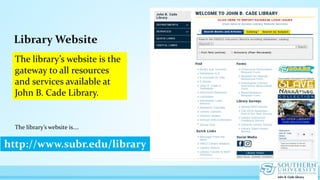
Library Website
http://www.subr.edu/library
The library’s website is the
gateway to all resources
and services available at
John B. Cade Library.
The library’s website is….
How to access the library’s databases
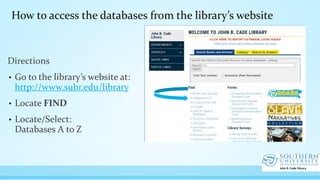
Directions
• Go to the library’s website at:
http://www.subr.edu/library
• Locate FIND
• Locate/Select:
Databases A to Z
How to access the databases from the library’s website
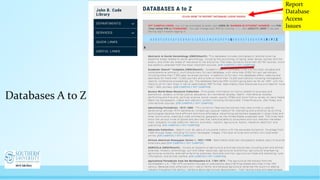
Databases A to Z
Report
Database
Access
Issues
page 8
Off-campus access & electronic resources
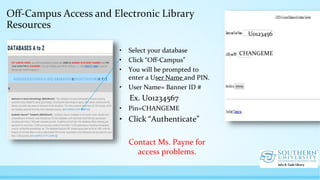
Off-Campus Access and Electronic Library
Resources
• Select your database
• Click “Off-Campus”
• You will be prompted to
enter a User Name and PIN.
• User Name= Banner ID #
Ex. U01234567
• Pin=CHANGEME
• Click “Authenticate”
Contact Ms. Payne for
access problems.
U0123456
CHANGEME
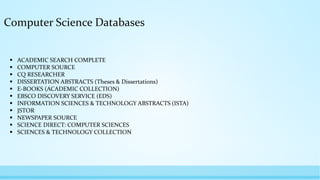
Computer Science Databases
 ACADEMIC SEARCH COMPLETE
 COMPUTER SOURCE
 CQ RESEARCHER
 DISSERTATION ABSTRACTS (Theses & Dissertations)
 E-BOOKS (ACADEMIC COLLECTION)
 EBSCO DISCOVERY SERVICE (EDS)
 INFORMATION SCIENCES & TECHNOLOGY ABSTRACTS (ISTA)
 JSTOR
 NEWSPAPER SOURCE
 SCIENCE DIRECT: COMPUTER SCIENCES
 SCIENCES & TECHNOLOGY COLLECTION
Research Question:
What is the impact of blockchain technology in education?
Scenario:
Your Professor asked that you find scholarly
research articles, magazines and other credible
resources on the research topic below.
Database Search Strategies
It’s always a good
idea to plan your
research.
Planning your
research will save
you time and will
allow you to focus
your research
question.
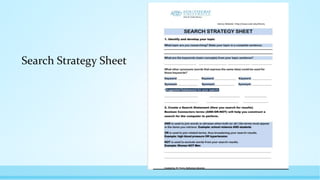
Search Strategy Sheet
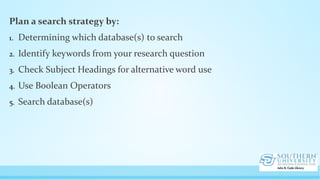
Plan a search strategy by:
1. Determining which database(s) to search
2. Identify keywords from your research question
3. Check Subject Headings for alternative word use
4. Use Boolean Operators
5. Search database(s)
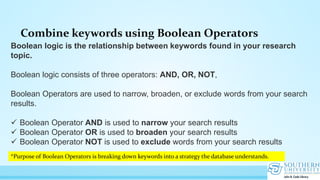
Combine keywords using Boolean Operators
Boolean logic is the relationship between keywords found in your research
topic.
Boolean logic consists of three operators: AND, OR, NOT,
Boolean Operators are used to narrow, broaden, or exclude words from your search
results.
 Boolean Operator AND is used to narrow your search results
 Boolean Operator OR is used to broaden your search results
 Boolean Operator NOT is used to exclude words from your search results
*Purpose of Boolean Operators is breaking down keywords into a strategy the database understands.
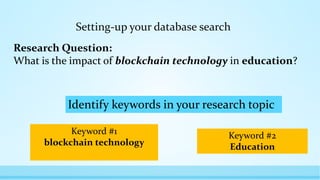
Setting-up your database search
Research Question:
What is the impact of blockchain technology in education?
Keyword #1
blockchain technology
Keyword #2
Education
Identify keywords in your research topic
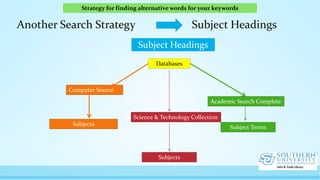
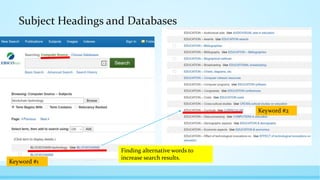
Another Search Strategy Subject Headings
Subject Headings
Databases
Computer Source
Science & Technology Collection
Academic Search Complete
=
Subject Terms
Subjects
Subjects
Strategy for finding alternative words for your keywords
Subject Headings and Databases
Finding alternative words to
increase search results.
Keyword #1
Keyword #2
Database Search Strategies
• Blockchain technology AND education
• Blockchain technology education
• Blockchains OR Blockchain technology AND education
• Blockchains AND higher education NOT primary education
• Blockchain technology AND curriculum
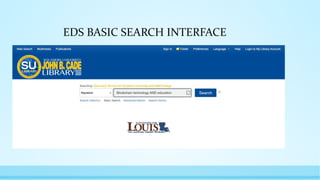
Setting-up a database search in Ebsco Discovery Service (EDS)
EBSCO DISCOVERY SERVICE FACTS
One Interface to search
Appears on the library’s website page,
Databases A to Z, LibGuide page
Sources include: journals, magazines,
newspapers, books, and more from
the library’s entire collection.
Based on your results, resources
needed for your research can be
checked from the Source Types List.
EDS BASIC SEARCH INTERFACE
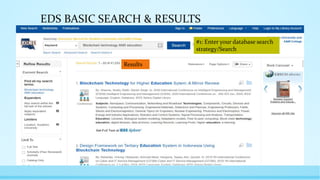
EDS BASIC SEARCH & RESULTS
#1: Enter your database search
strategy/Search
Results
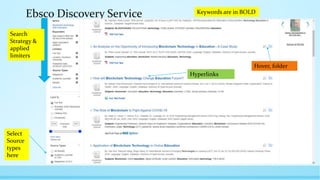
Ebsco Discovery Service
Select
Source
types
here
Keywords are in BOLD
Search
Strategy &
applied
limiters
Hyperlinks
Hover, folder
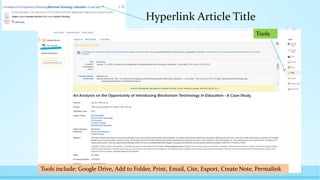
Hyperlink Article Title
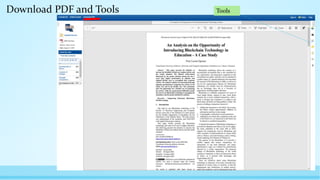
Tools
Tools include: Google Drive, Add to Folder, Print, Email, Cite, Export, Create Note, Permalink
Download PDF and Tools Tools
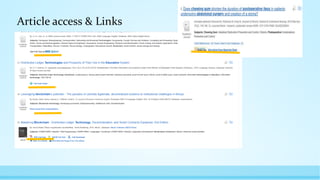
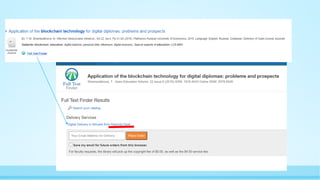
Article access & Links
ABOUT REPRINT DESKS
• Access to 2500+ Springer journals
including highly-accessed titles
• Access to 100+ Nature journals including the
flagship title Nature
Reprint Desk & Ebsco Databases
• Reprints Desk allows the library to access journal
articles and deliver to users within 2 hours to 24
hours.
• On-demand access
• Provide access to articles that are not available via
the library’s databases and subscriptions.
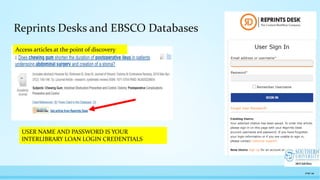
*You must complete the Interlibrary Loan Registration
to have access to Reprints Desk. Reprints Desk is
embedded in Ebsco Discovery Service (EDS) Database
and other Ebsco Databases.
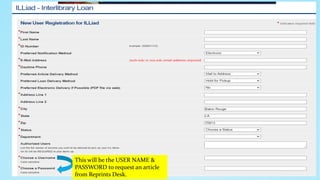
This will be the USER NAME &
PASSWORD to request an article
from Reprints Desk.
Reprints Desks and EBSCO Databases
page 34
Access articles at the point of discovery
USER NAME AND PASSWORD IS YOUR
INTERLIBRARY LOAN LOGIN CREDENTIALS
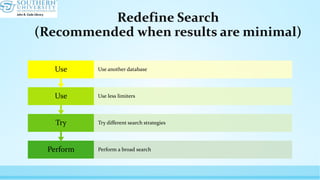
Redefine Search
(Recommended when results are minimal)
Perform Perform a broad search
Try Try different search strategies
Use Use less limiters
Use Use another database
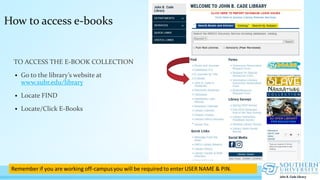
How to access e-books
TO ACCESS THE E-BOOK COLLECTION
 Go to the library’s website at
www.subr.edu/library
 Locate FIND
 Locate/Click E-Books
Electronic
Book
Collection
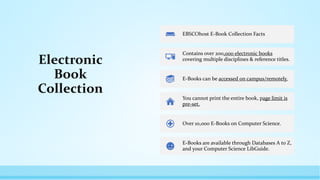
EBSCOhost E-Book Collection Facts
Contains over 200,000 electronic books
covering multiple disciplines & reference titles.
E-Books can be accessed on campus/remotely.
You cannot print the entire book, page limit is
pre-set.
Over 10,000 E-Books on Computer Science.
E-Books are available through Databases A to Z,
and your Computer Science LibGuide.
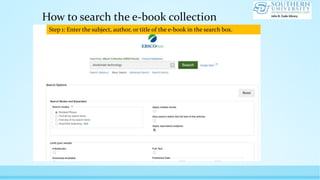
How to search the e-book collection
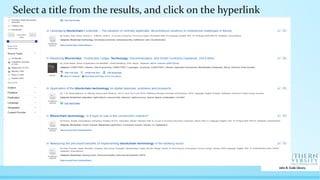
Step 1: Enter the subject, author, or title of the e-book in the search box.
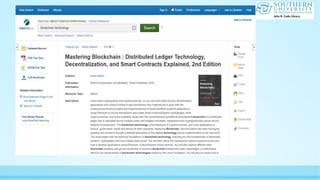
Select a title from the results, and click on the hyperlink
Interlibrary
Loan Service
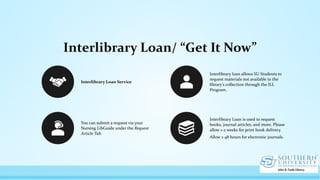
Interlibrary Loan/ “Get It Now”
Interlibrary Loan Service
Interlibrary loan allows SU Students to
request materials not available in the
library’s collection through the ILL
Program.
You can submit a request via your
Nursing LibGuide under the Request
Article Tab.
Interlibrary Loan is used to request
books, journal articles, and more. Please
allow 1-2 weeks for print book delivery.
Allow 1-48 hours for electronic journals.
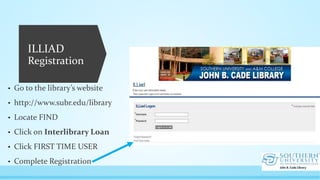
ILLIAD
Registration
• Go to the library’s website
• http://www.subr.edu/library
• Locate FIND
• Click on Interlibrary Loan
• Click FIRST TIME USER
• Complete Registration
Questions
Thank You
Maletta Payne,MLIS
+1 225-771-2604
Maletta_payne@subr.edu
www.subr.edu/library
page 45

computer science seminar

  • 1.
    Seminar: Computer Science Dr.Lynn Jackson Session conducted by: Maletta Payne, M.L.I.S Emerging Technologies/ Reference Librarian John B. Cade Library Website: www.subr.edu/library INFORMATION LITERACY INSTRUCTION
  • 2.
    Agenda • How toaccess the library’s website • How to access electronic resources remotely • Computer Science Databases • Database Search Strategies • How to search the e-book collections • Interlibrary Loan & Reprints Desk
  • 3.
    Librarian Ms. Payne Emerging Technologies/ReferenceLibrarian Office Number: (225)771-2604 Email: maletta_payne@subr.edu Schedule a Virtual Consultation Session
  • 4.
    Library Website http://www.subr.edu/library The library’swebsite is the gateway to all resources and services available at John B. Cade Library. The library’s website is….
  • 5.
    How to accessthe library’s databases
  • 6.
    Directions • Go tothe library’s website at: http://www.subr.edu/library • Locate FIND • Locate/Select: Databases A to Z How to access the databases from the library’s website
  • 7.
    Databases A toZ Report Database Access Issues
  • 8.
    page 8 Off-campus access& electronic resources
  • 9.
    Off-Campus Access andElectronic Library Resources • Select your database • Click “Off-Campus” • You will be prompted to enter a User Name and PIN. • User Name= Banner ID # Ex. U01234567 • Pin=CHANGEME • Click “Authenticate” Contact Ms. Payne for access problems. U0123456 CHANGEME
  • 10.
    Computer Science Databases ACADEMIC SEARCH COMPLETE  COMPUTER SOURCE  CQ RESEARCHER  DISSERTATION ABSTRACTS (Theses & Dissertations)  E-BOOKS (ACADEMIC COLLECTION)  EBSCO DISCOVERY SERVICE (EDS)  INFORMATION SCIENCES & TECHNOLOGY ABSTRACTS (ISTA)  JSTOR  NEWSPAPER SOURCE  SCIENCE DIRECT: COMPUTER SCIENCES  SCIENCES & TECHNOLOGY COLLECTION
  • 12.
    Research Question: What isthe impact of blockchain technology in education? Scenario: Your Professor asked that you find scholarly research articles, magazines and other credible resources on the research topic below.
  • 14.
  • 15.
    It’s always agood idea to plan your research. Planning your research will save you time and will allow you to focus your research question.
  • 16.
  • 17.
    Plan a searchstrategy by: 1. Determining which database(s) to search 2. Identify keywords from your research question 3. Check Subject Headings for alternative word use 4. Use Boolean Operators 5. Search database(s)
  • 18.
    Combine keywords usingBoolean Operators Boolean logic is the relationship between keywords found in your research topic. Boolean logic consists of three operators: AND, OR, NOT, Boolean Operators are used to narrow, broaden, or exclude words from your search results.  Boolean Operator AND is used to narrow your search results  Boolean Operator OR is used to broaden your search results  Boolean Operator NOT is used to exclude words from your search results *Purpose of Boolean Operators is breaking down keywords into a strategy the database understands.
  • 19.
    Setting-up your databasesearch Research Question: What is the impact of blockchain technology in education? Keyword #1 blockchain technology Keyword #2 Education Identify keywords in your research topic
  • 20.
    Another Search StrategySubject Headings Subject Headings Databases Computer Source Science & Technology Collection Academic Search Complete = Subject Terms Subjects Subjects Strategy for finding alternative words for your keywords
  • 21.
    Subject Headings andDatabases Finding alternative words to increase search results. Keyword #1 Keyword #2
  • 22.
    Database Search Strategies •Blockchain technology AND education • Blockchain technology education • Blockchains OR Blockchain technology AND education • Blockchains AND higher education NOT primary education • Blockchain technology AND curriculum
  • 23.
    Setting-up a databasesearch in Ebsco Discovery Service (EDS)
  • 24.
    EBSCO DISCOVERY SERVICEFACTS One Interface to search Appears on the library’s website page, Databases A to Z, LibGuide page Sources include: journals, magazines, newspapers, books, and more from the library’s entire collection. Based on your results, resources needed for your research can be checked from the Source Types List.
  • 25.
  • 26.
    EDS BASIC SEARCH& RESULTS #1: Enter your database search strategy/Search Results
  • 27.
    Ebsco Discovery Service Select Source types here Keywordsare in BOLD Search Strategy & applied limiters Hyperlinks Hover, folder
  • 28.
    Hyperlink Article Title Tools Toolsinclude: Google Drive, Add to Folder, Print, Email, Cite, Export, Create Note, Permalink
  • 29.
    Download PDF andTools Tools
  • 30.
  • 32.
    ABOUT REPRINT DESKS •Access to 2500+ Springer journals including highly-accessed titles • Access to 100+ Nature journals including the flagship title Nature Reprint Desk & Ebsco Databases • Reprints Desk allows the library to access journal articles and deliver to users within 2 hours to 24 hours. • On-demand access • Provide access to articles that are not available via the library’s databases and subscriptions. *You must complete the Interlibrary Loan Registration to have access to Reprints Desk. Reprints Desk is embedded in Ebsco Discovery Service (EDS) Database and other Ebsco Databases.
  • 33.
    This will bethe USER NAME & PASSWORD to request an article from Reprints Desk.
  • 34.
    Reprints Desks andEBSCO Databases page 34 Access articles at the point of discovery USER NAME AND PASSWORD IS YOUR INTERLIBRARY LOAN LOGIN CREDENTIALS
  • 35.
    Redefine Search (Recommended whenresults are minimal) Perform Perform a broad search Try Try different search strategies Use Use less limiters Use Use another database
  • 36.
    How to accesse-books TO ACCESS THE E-BOOK COLLECTION  Go to the library’s website at www.subr.edu/library  Locate FIND  Locate/Click E-Books
  • 37.
    Electronic Book Collection EBSCOhost E-Book CollectionFacts Contains over 200,000 electronic books covering multiple disciplines & reference titles. E-Books can be accessed on campus/remotely. You cannot print the entire book, page limit is pre-set. Over 10,000 E-Books on Computer Science. E-Books are available through Databases A to Z, and your Computer Science LibGuide.
  • 38.
    How to searchthe e-book collection Step 1: Enter the subject, author, or title of the e-book in the search box.
  • 39.
    Select a titlefrom the results, and click on the hyperlink
  • 41.
  • 42.
    Interlibrary Loan/ “GetIt Now” Interlibrary Loan Service Interlibrary loan allows SU Students to request materials not available in the library’s collection through the ILL Program. You can submit a request via your Nursing LibGuide under the Request Article Tab. Interlibrary Loan is used to request books, journal articles, and more. Please allow 1-2 weeks for print book delivery. Allow 1-48 hours for electronic journals.
  • 43.
    ILLIAD Registration • Go tothe library’s website • http://www.subr.edu/library • Locate FIND • Click on Interlibrary Loan • Click FIRST TIME USER • Complete Registration
  • 44.
  • 45.
    Thank You Maletta Payne,MLIS +1225-771-2604 Maletta_payne@subr.edu www.subr.edu/library page 45