Accessing Research Material

  Contents
  Slide 2-15 Introduction to Library World
  Navigation and Research Material

  Slide 16-24 Using Mdconsult and Pubmed,
  and Google Scholar

  Slide 25-28 Boolean Searching, Research Tips,
  Research specifics
Welcome to the Five Branches
 University Library

● The library has grown quickly over the years and serves as an
  important research and reference source.
● It is our hope that this presentation helps to explain all the
  resources available at the Five Branches University libraries.
● Students are welcome to study between classes and to use
  laptop computers in the library. Please keep your voices down
  as to not disturb students studies.
● Computers are available to use for students and faculty. We
  ask you limit your time to ten minutes on the computer, unless
  there is no one waiting in which case you may use it for as long
  as you like.
Library World
● Library Worlds is a program that helps users interface with the
  library system. It is especially useful for organizing and locating
  where books are in the specific shelves using call numbers.
● This program is available to students as well as the librarians.
  Although students are not able to check out materials in
  circulation without the help of a librarian, you are able to search
  for materials, look up call numbers, and determine which library
  has the books you are looking for.
● Many books are available as resources for classes at FBU and
  also for personal interests as a student of TCM. Please do not
  take books not checked out to you, it disturbs the organization of
  the library and disrupts the learning of FBU students.
Library Resources
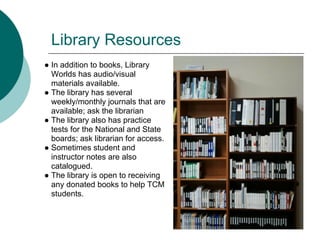
● In addition to books, Library
  Worlds has audio/visual
  materials available.
● The library has several
  weekly/monthly journals that are
  available; ask the librarian
● The library also has practice
  tests for the National and State
  boards; ask librarian for access.
● Sometimes student and
  instructor notes are also
  catalogued.
● The library is open to receiving
  any donated books to help TCM
  students.
Library World- Call Numbers

● The Call number is established by the Library of
  Congress or NLM and is labeled on the spine of every
  book in the library. Usually themes are organized
  together.
● Use Library Worlds to find the call number of a book.
  Then, use the call number to determine which shelf
  the book is located. Each shelf is labeled at the top to
  show the first letter of the call number.
● If you need help locating a book, let the librarian know
  and they will assist you in finding it.
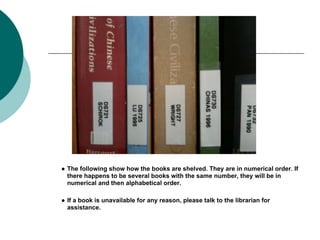
● The following show how the books are shelved. They are in numerical order. If
  there happens to be several books with the same number, they will be in
  numerical and then alphabetical order.

● If a book is unavailable for any reason, please talk to the librarian for
  assistance.
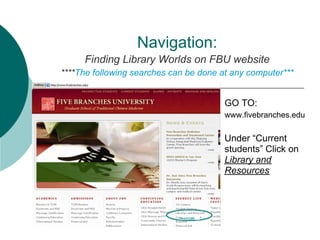
Navigation:
     Finding Library Worlds on FBU website
****The following searches can be done at any computer***


                                        GO TO:
                                        www.fivebranches.edu

                                        Under “Current
                                        students” Click on
                                        Library and
                                        Resources
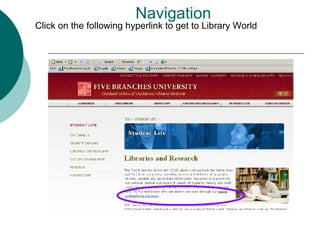
Navigation
Click on the following hyperlink to get to Library World
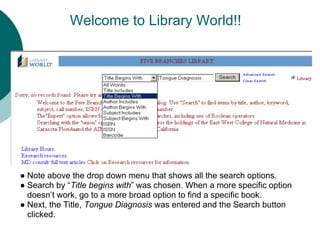
Welcome to Library World!!


● Note above the drop down menu that shows all the search options.
● Search by “Title begins with” was chosen. When a more specific option
  doesn’t work, go to a more broad option to find a specific book.
● Next, the Title, Tongue Diagnosis was entered and the Search button
  clicked.
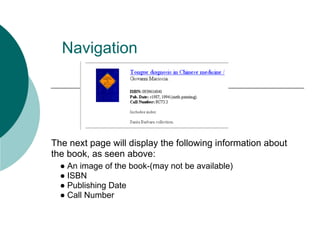
Navigation


The next page will display the following information about
the book, as seen above:
  ● An image of the book-(may not be available)
  ● ISBN
  ● Publishing Date
  ● Call Number
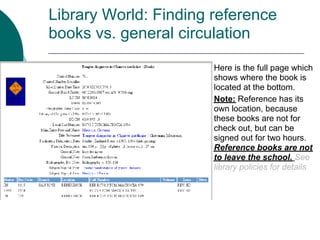
Library World: Finding reference
books vs. general circulation

                       Here is the full page which
                       shows where the book is
                       located at the bottom.
                       Note: Reference has its
                       own location, because
                       these books are not for
                       check out, but can be
                       signed out for two hours.
                       Reference books are not
                       to leave the school. See
                       library policies for details
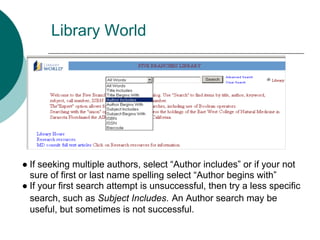
Library World


● If seeking multiple authors, select “Author includes” or if your not
  sure of first or last name spelling select “Author begins with”
● If your first search attempt is unsuccessful, then try a less specific
  search, such as Subject Includes. An Author search may be
  useful, but sometimes is not successful.
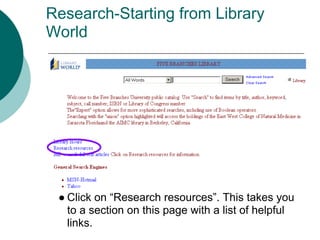
Research-Starting from Library
World


 ● Click on “Research resources”. This takes you
   to a section on this page with a list of helpful
   links.
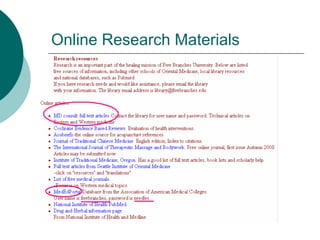
Online Research Materials
Finding Journals Online
● The National Library of Medicine (NLM) offers
  links to full text articles through PubMed
   ○ www.pubmed.gov

● MD Consult also has available journal articles
   ○ http://www.mdconsult.com/php/162313978-
     2/homepage

● Google Scholar has a wide variety of free
  journals to look at
   ○ http://scholar.goole.com/
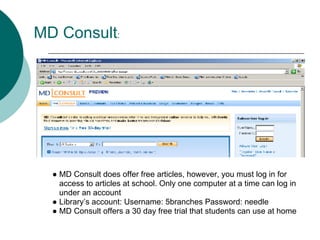
MD Consult:


  ● MD Consult does offer free articles, however, you must log in for
    access to articles at school. Only one computer at a time can log in
    under an account
  ● Library’s account: Username: 5branches Password: needle
  ● MD Consult offers a 30 day free trial that students can use at home
PubMed
PubMed:
Free digital archives of biomedical and life
sciences, no log in necessary.
Publishers offer free or pay-per-view access to
articles on their websites.

If students are unable to find a free source, the
library can provide most articles for students with a
research project. Continue on the next few slides
for instructions.
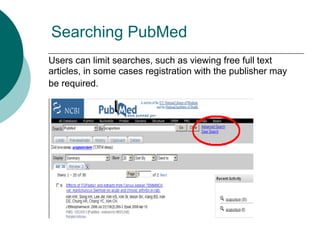
Searching PubMed
Users can limit searches, such as viewing free full text
articles, in some cases registration with the publisher may
be required.
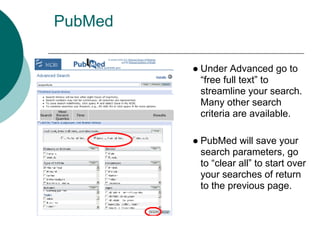
PubMed

         ● Under Advanced go to
           “free full text” to
           streamline your search.
           Many other search
           criteria are available.

         ● PubMed will save your
           search parameters, go
           to “clear all” to start over
           your searches of return
           to the previous page.
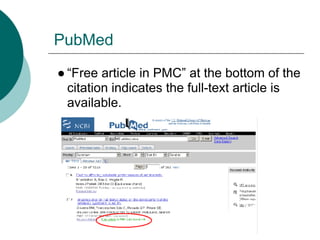
PubMed

● “Free article in PMC” at the bottom of the
  citation indicates the full-text article is
  available.
PubMed
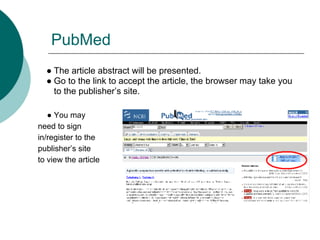
  ● The article abstract will be presented.
  ● Go to the link to accept the article, the browser may take you
    to the publisher’s site.

   ● You may
need to sign
in/register to the
publisher’s site
to view the article
Pubmed: accessing articles not listed
  as free
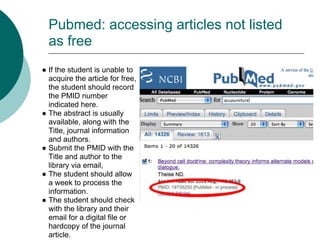
● If the student is unable to
  acquire the article for free,
  the student should record
  the PMID number
  indicated here.
● The abstract is usually
  available, along with the
  Title, journal information
  and authors.
● Submit the PMID with the
  Title and author to the
  library via email,
● The student should allow
  a week to process the
  information.
● The student should check
  with the library and their
  email for a digital file or
  hardcopy of the journal
  article.
Google Scholar

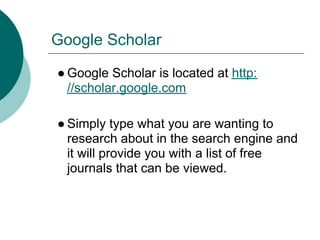
● Google Scholar is located at http:
  //scholar.google.com

● Simply type what you are wanting to
  research about in the search engine and
  it will provide you with a list of free
  journals that can be viewed.
Boolean Searching
Research suggestions
● Find articles that are reliable and recent,
  published within the last three years, and peer
  reviewed.

● Use bibliographies to broaden your literary
  review and to give a context to you topic.

● Don’t rely on weekly/monthly newsletters,
  unless it is an article cited in a scholarly
  journal.
Research:Help your Profession

● Find out from your fellow students about
  research that has already been done
  and try to expand on such subjects or
  get new information on a subject not
  researched.
● Help students, faculty and patients to
  add to the pool of research and reviews
  concerning TCM. This provides further
  support for TCM in the mainstream
Contact the library

Don’t forget to use your community library
for help
If you have any questions please contact
the FBU library at:

San Jose: (408) 260-0208
Santa Cruz: (831) 476-9424 x65
Email: library@fivebranches.edu

Accesssing researching material_2012

  • 1.
    Accessing Research Material Contents Slide 2-15 Introduction to Library World Navigation and Research Material Slide 16-24 Using Mdconsult and Pubmed, and Google Scholar Slide 25-28 Boolean Searching, Research Tips, Research specifics
  • 2.
    Welcome to theFive Branches University Library ● The library has grown quickly over the years and serves as an important research and reference source. ● It is our hope that this presentation helps to explain all the resources available at the Five Branches University libraries. ● Students are welcome to study between classes and to use laptop computers in the library. Please keep your voices down as to not disturb students studies. ● Computers are available to use for students and faculty. We ask you limit your time to ten minutes on the computer, unless there is no one waiting in which case you may use it for as long as you like.
  • 3.
    Library World ● LibraryWorlds is a program that helps users interface with the library system. It is especially useful for organizing and locating where books are in the specific shelves using call numbers. ● This program is available to students as well as the librarians. Although students are not able to check out materials in circulation without the help of a librarian, you are able to search for materials, look up call numbers, and determine which library has the books you are looking for. ● Many books are available as resources for classes at FBU and also for personal interests as a student of TCM. Please do not take books not checked out to you, it disturbs the organization of the library and disrupts the learning of FBU students.
  • 4.
    Library Resources ● Inaddition to books, Library Worlds has audio/visual materials available. ● The library has several weekly/monthly journals that are available; ask the librarian ● The library also has practice tests for the National and State boards; ask librarian for access. ● Sometimes student and instructor notes are also catalogued. ● The library is open to receiving any donated books to help TCM students.
  • 5.
    Library World- CallNumbers ● The Call number is established by the Library of Congress or NLM and is labeled on the spine of every book in the library. Usually themes are organized together. ● Use Library Worlds to find the call number of a book. Then, use the call number to determine which shelf the book is located. Each shelf is labeled at the top to show the first letter of the call number. ● If you need help locating a book, let the librarian know and they will assist you in finding it.
  • 6.
    ● The followingshow how the books are shelved. They are in numerical order. If there happens to be several books with the same number, they will be in numerical and then alphabetical order. ● If a book is unavailable for any reason, please talk to the librarian for assistance.
  • 7.
    Navigation: Finding Library Worlds on FBU website ****The following searches can be done at any computer*** GO TO: www.fivebranches.edu Under “Current students” Click on Library and Resources
  • 8.
    Navigation Click on thefollowing hyperlink to get to Library World
  • 9.
    Welcome to LibraryWorld!! ● Note above the drop down menu that shows all the search options. ● Search by “Title begins with” was chosen. When a more specific option doesn’t work, go to a more broad option to find a specific book. ● Next, the Title, Tongue Diagnosis was entered and the Search button clicked.
  • 10.
    Navigation The next pagewill display the following information about the book, as seen above: ● An image of the book-(may not be available) ● ISBN ● Publishing Date ● Call Number
  • 11.
    Library World: Findingreference books vs. general circulation Here is the full page which shows where the book is located at the bottom. Note: Reference has its own location, because these books are not for check out, but can be signed out for two hours. Reference books are not to leave the school. See library policies for details
  • 12.
    Library World ● Ifseeking multiple authors, select “Author includes” or if your not sure of first or last name spelling select “Author begins with” ● If your first search attempt is unsuccessful, then try a less specific search, such as Subject Includes. An Author search may be useful, but sometimes is not successful.
  • 13.
    Research-Starting from Library World ● Click on “Research resources”. This takes you to a section on this page with a list of helpful links.
  • 14.
  • 15.
    Finding Journals Online ●The National Library of Medicine (NLM) offers links to full text articles through PubMed ○ www.pubmed.gov ● MD Consult also has available journal articles ○ http://www.mdconsult.com/php/162313978- 2/homepage ● Google Scholar has a wide variety of free journals to look at ○ http://scholar.goole.com/
  • 16.
    MD Consult: ● MD Consult does offer free articles, however, you must log in for access to articles at school. Only one computer at a time can log in under an account ● Library’s account: Username: 5branches Password: needle ● MD Consult offers a 30 day free trial that students can use at home
  • 17.
    PubMed PubMed: Free digital archivesof biomedical and life sciences, no log in necessary. Publishers offer free or pay-per-view access to articles on their websites. If students are unable to find a free source, the library can provide most articles for students with a research project. Continue on the next few slides for instructions.
  • 18.
    Searching PubMed Users canlimit searches, such as viewing free full text articles, in some cases registration with the publisher may be required.
  • 19.
    PubMed ● Under Advanced go to “free full text” to streamline your search. Many other search criteria are available. ● PubMed will save your search parameters, go to “clear all” to start over your searches of return to the previous page.
  • 20.
    PubMed ● “Free articlein PMC” at the bottom of the citation indicates the full-text article is available.
  • 21.
    PubMed ●The article abstract will be presented. ● Go to the link to accept the article, the browser may take you to the publisher’s site. ● You may need to sign in/register to the publisher’s site to view the article
  • 22.
    Pubmed: accessing articlesnot listed as free ● If the student is unable to acquire the article for free, the student should record the PMID number indicated here. ● The abstract is usually available, along with the Title, journal information and authors. ● Submit the PMID with the Title and author to the library via email, ● The student should allow a week to process the information. ● The student should check with the library and their email for a digital file or hardcopy of the journal article.
  • 23.
    Google Scholar ● GoogleScholar is located at http: //scholar.google.com ● Simply type what you are wanting to research about in the search engine and it will provide you with a list of free journals that can be viewed.
  • 24.
  • 25.
    Research suggestions ● Findarticles that are reliable and recent, published within the last three years, and peer reviewed. ● Use bibliographies to broaden your literary review and to give a context to you topic. ● Don’t rely on weekly/monthly newsletters, unless it is an article cited in a scholarly journal.
  • 26.
    Research:Help your Profession ●Find out from your fellow students about research that has already been done and try to expand on such subjects or get new information on a subject not researched. ● Help students, faculty and patients to add to the pool of research and reviews concerning TCM. This provides further support for TCM in the mainstream
  • 27.
    Contact the library Don’tforget to use your community library for help If you have any questions please contact the FBU library at: San Jose: (408) 260-0208 Santa Cruz: (831) 476-9424 x65 Email: library@fivebranches.edu