ADVANCE SERACH &
REFERENCING
TOOLS
Dr. (Prof) Settepalli. Jasmin Debora, Professor cum
HOD Medical surgical Nursing,
Faculty of Nursing ,
SGT University
Objectives
Terminologies
Advanced Search Engines
Healthcare Databases
Acquire skill in Advance Search Techniques
Aware of the Common Pitfalls
Understand Reference management Tools
Utilization of tools for managing literature
AI Tools for managing literature , Academic writing.
Hands on Training of advance search and referencing tools
Terminologies
Search Engines: A computer program that retrieves documents or
files or data from a database or from a computer network (especially
from the internet) world web dictionary
SO. . . search engine is a website that searches the Internet for pages
and documents relevant to the search terms given. Search engines use
robots to 'crawl' the web for new content to add to the possibilities for
search results.
Data base: A database is an organized collection of structured information, or
data, typically stored electronically in a computer system.
A database is usually controlled by a database management system (DBMS).
Together, the data and the DBMS, along with the applications that are associated
with them, are referred to as a database system, often shortened to just database.
Repositories : a central location in which data is stored and managed.
Strings: A search string is the combination of text, numbers and sometimes
special characters that a user enters into an application's search form to find
specific types of information.
Terminologies
Advanced search Engines
• Google Advanced Search
• Kindle Advanced Search
• Twitter Advanced Search
• Kickstarter
• YouTube Advanced Search
• Creative Commons Advanced Search
• Bing Advanced Search
• Facebook Advanced Search
• Amazon Advanced Search
• eBay Advanced Search
Healthcare Databases
Allied and Complementary Medicine (AMED) 1985-Covers occupational therapy,
physiotherapy, rehabilitation, plus alternative and complementary medicine
acupuncture, chiropractic, homeopathy, yoga, hypnosis.
British Nursing Index (BNI)1994-This UK focused database covers general nursing as
well as the specific nursing areas covering AE, neonatal, breast cancer, theatres and
orthopaedics.
Cumulative Index of Nursing Allied Health(CINAHL) 1982- A US database covering all
aspects of nursing and allied health. Subjects covered include optometry, radiologic
technology, speech and language pathology, nutrition. Contains journals, theses and
pamphlets.
Healthcare Databases
EMBASE 1974- With particular emphasis on European sources, this database
covers the whole field of medicine. Drugs, pharmacology and substance abuse
are particularly well covered.
HMIC Health Management Information Consortium 1979-This compiles data
from both the Department of Health Library and Information Services and Kings
Fund Information and Library Service.
MEDLINE 1950- This is a large US source of medical information. Other subjects
include dentistry, veterinary medicine, medical psychology, genetics and
advanced nursing practice.
Healthcare Databases
PsycINFO 1806-Includes international coverage of literature on Psychology and
allied fields
MEDLINE is the primary component of PubMed, a literature database developed and
maintained by the NLM National Center for Biotechnology Information (NCBI). MEDLINE is
the online counterpart to the MEDical Literature Analysis and Retrieval System (MEDLARS)
that originated in 1964 (see MEDLINE history
ProQuest: As the official repository of the Library of Congress, PQDT Global provides
researchers with quality and equitable search results across all institutions, as well as rich
citation data that delivers insights into the connections building around the world.
EBSCO is the leading provider of research databases, e-journals, magazine subscriptions,
ebooks and discovery service for academic libraries, public libraries, corporations
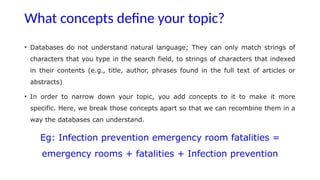
What concepts define your topic?
• Databases do not understand natural language; They can only match strings of
characters that you type in the search field, to strings of characters that indexed
in their contents (e.g., title, author, phrases found in the full text of articles or
abstracts)
• In order to narrow down your topic, you add concepts to it to make it more
specific. Here, we break those concepts apart so that we can recombine them in a
way the databases can understand.
Eg: Infection prevention emergency room fatalities =
emergency rooms + fatalities + Infection prevention
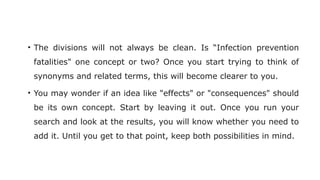
• The divisions will not always be clean. Is “Infection prevention
fatalities" one concept or two? Once you start trying to think of
synonyms and related terms, this will become clearer to you.
• You may wonder if an idea like "effects" or "consequences" should
be its own concept. Start by leaving it out. Once you run your
search and look at the results, you will know whether you need to
add it. Until you get to that point, keep both possibilities in mind.
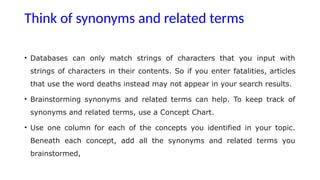
Think of synonyms and related terms
• Databases can only match strings of characters that you input with
strings of characters in their contents. So if you enter fatalities, articles
that use the word deaths instead may not appear in your search results.
• Brainstorming synonyms and related terms can help. To keep track of
synonyms and related terms, use a Concept Chart.
• Use one column for each of the concepts you identified in your topic.
Beneath each concept, add all the synonyms and related terms you
brainstormed,
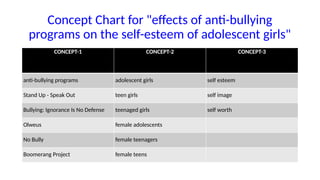
Concept Chart for "effects of anti-bullying
programs on the self-esteem of adolescent girls"
CONCEPT-1 CONCEPT-2 CONCEPT-3
anti-bullying programs adolescent girls self esteem
Stand Up - Speak Out teen girls self image
Bullying: Ignorance Is No Defense teenaged girls self worth
Olweus female adolescents
No Bully female teenagers
Boomerang Project female teens
• Notice there are different ways to think of synonyms and related
terms: actual synonyms and near synonyms, like girl and female
• related but not exactly the same ideas like self esteem and self-image
• specific examples like Olweus, which is one anti-bullying program.
• You may not be sure of the best combination of search terms until
you have tried them all. Ambiguity and uncertainty are normal (and
can even be good). Research, particularly searching, usually involves
trial and error.
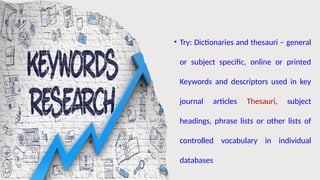
• Try: Dictionaries and thesauri – general
or subject specific, online or printed
Keywords and descriptors used in key
journal articles Thesauri, subject
headings, phrase lists or other lists of
controlled vocabulary in individual
databases
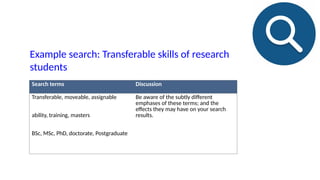
Search terms Discussion
Transferable, moveable, assignable
ability, training, masters
BSc, MSc, PhD, doctorate, Postgraduate
Be aware of the subtly different
emphases of these terms; and the
effects they may have on your search
results.
Example search: Transferable skills of research
students
Use Boolean operators to create precise searches
• While databases cannot understand natural language, database searches can be
made very precise using Boolean operators.
• Boolean operators tell databases exactly how you want your search terms
combined for the optimal results.
• There are only five Boolean operators and all library databases understand them.
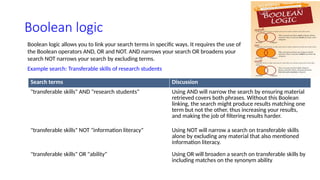
Boolean logic
Boolean logic allows you to link your search terms in specific ways. It requires the use of
the Boolean operators AND, OR and NOT. AND narrows your search OR broadens your
search NOT narrows your search by excluding terms.
Example search: Transferable skills of research students
Search terms Discussion
"transferable skills" AND "research students" Using AND will narrow the search by ensuring material
retrieved covers both phrases. Without this Boolean
linking, the search might produce results matching one
term but not the other, thus increasing your results,
and making the job of filtering results harder.
"transferable skills" NOT "information literacy" Using NOT will narrow a search on transferable skills
alone by excluding any material that also mentioned
information literacy.
"transferable skills" OR "ability" Using OR will broaden a search on transferable skills by
including matches on the synonym ability
Broadening search
If your search returns No records , you might have more success if you can think of alternative
search terms
This include:
• Other terms related to your topic
• Synonyms(Words with same meaning)
• Different word endings(Singular or Plural forms)
• Different Spellings(UK/US)
• To Search for records that return one or more of your search terms link them together with OR
operator.
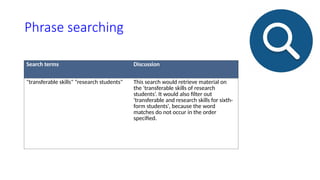
Phrase searching
Search terms Discussion
"transferable skills" "research students" This search would retrieve material on
the 'transferable skills of research
students’. It would also filter out
'transferable and research skills for sixth-
form students', because the word
matches do not occur in the order
specified.
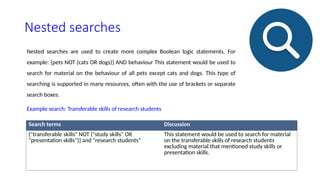
Nested searches
Nested searches are used to create more complex Boolean logic statements. For
example: {pets NOT (cats OR dogs)} AND behaviour This statement would be used to
search for material on the behaviour of all pets except cats and dogs. This type of
searching is supported in many resources, often with the use of brackets or separate
search boxes.
Example search: Transferable skills of research students
Search terms Discussion
{"transferable skills" NOT ("study skills" OR
"presentation skills")} and "research students"
This statement would be used to search for material
on the transferable skills of research students
excluding material that mentioned study skills or
presentation skills.
Proximity
Some databases allow searching for words in the same sentence,
or within a defined number of words of one another. This type of
relevance searching is based on the premise that words or
phrases which are near to each other will be related in some way.
Proximity is particularly useful when searching full text databases.
Example search: Transferable skills of research student
Search terms Discussion
"transferable skills" SAME "research
students"
Using SAME will search for “transferable
skills” in the same sentence as “research
students”
"transferable skills" w3 "research
students"
Using w3 will search for "transferable
skills" within 3 words of "research
students"
"transferable skills" NEAR "research
students"
Using NEAR will search for "transferable
skills" within the database’s definition of
‘NEAR’ to "research students"
Truncation This is useful when searching for the
singular and plural form of a word as well as for
terms that can be reduced to a common stem.
Often the asterisk (*) is used but other characters
can also be inserted, including the exclamation
mark (!).
Example search: A search for skill*
Search terms Discussion
Skill* This would retrieve skill, skills, skilling, skilled,
etc.
Syntax
• Syntax used for truncation varies amongst databases
• Eg: Sometimes next is used rather than Near-you should check the
databases help pages to find out if and how proximity can be used
Search terms Discussion
Transfer?able This would retrieve transferable and transferrable
Wildcard allows variation in a character in the middle of the word,
useful for taking into account variations in spellings wild cards are much
neater,You may be able to replace none, one or more letters within a word by
using a character, often a question mark (?) or an asterisk (*).
Example search: A search for Transfer?able
Saved searches
• In many databases you can save a
search to run at a later date. This is
particularly useful if your search
statement is complex and lengthy
to enter.
Combine Boolean operators for more complex searches
• It is feasible that you may have such a complex search to perform that you might
require the use of all six of the Boolean operators to get optimal search results.
• For example, let us say that you are looking for medicines or other medical
interventions for seizure disorders other than epilepsy.
• This search, using all of the Boolean operators, might look like this:
• medic* AND (seizures OR "seizure disorders" OR "convulsive disorders" OR
convulsions) NOT epilepsy
Refining Results by Date, Peer Review and Document Type
Getting Manageable, Relevant Search Results
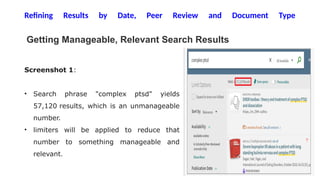
Screenshot 1:
• Search phrase "complex ptsd" yields
57,120 results, which is an unmanageable
number.
• limiters will be applied to reduce that
number to something manageable and
relevant.
Refining Results by Date, Peer Review and Document Type
Limiting by Publication Date
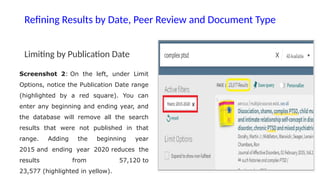
Screenshot 2: On the left, under Limit
Options, notice the Publication Date range
(highlighted by a red square). You can
enter any beginning and ending year, and
the database will remove all the search
results that were not published in that
range. Adding the beginning year
2015 and ending year 2020 reduces the
results from 57,120 to
23,577 (highlighted in yellow).
• Limiting to Scholarly (Peer Reviewed)
Refining Results by Date, Peer Review and Document Type
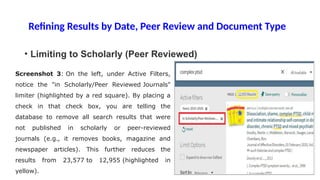
Screenshot 3: On the left, under Active Filters,
notice the "in Scholarly/Peer Reviewed Journals"
limiter (highlighted by a red square). By placing a
check in that check box, you are telling the
database to remove all search results that were
not published in scholarly or peer-reviewed
journals (e.g., it removes books, magazine and
newspaper articles). This further reduces the
results from 23,577 to 12,955 (highlighted in
yellow).
Refining Results by Date, Peer Review and Document Type
Limiting by Document Type
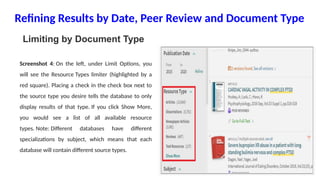
Screenshot 4: On the left, under Limit Options, you
will see the Resource Types limiter (highlighted by a
red square). Placing a check in the check box next to
the source type you desire tells the database to only
display results of that type. If you click Show More,
you would see a list of all available resource
types. Note: Different databases have different
specializations by subject, which means that each
database will contain different source types.
Advanced Searching
• Publications Search
• Subject Terms
• Advanced Searching By Author and Title
• Advanced Searching with descriptors
• Descriptor chaining
• Citation chaining
Critical appraisal tools
• After an Optimal Search select specific references and display, email or
save the results.
• Then Critically appraise the article
• These tools can be used for Appraisal
Critical Appraisal Toolkits from Oxford
University
Canadian Centre for Health Evidence User Guides
to the Medical Literature
How to read a paper- Patricia Greenhalgh
Common Pitfalls
• Be aware of variations in British and American spelling.
• Make sure you don't restrict yourself to items held in online databases.
• Some online databases go back as far as the 1980s, but others do not
even go that far.
• There may be important publications that were published before that,
and you will need to search elsewhere for these.
• Authors' first names and initials are often indexed inconsistently in
databases.
• Some journal issues are also published as books.
• Be aware that not all important research is published in English.
• Foreign languages may be transliterated in different ways, such as the
German ü, which can be replaced with u or ue.
• Some foreign journals have translations published much later, and with
different dates and page numbers
Hands on Training
• https://search.proquest.com/healthcomplete
LITERATURE MANAGEMENT TOOLS
What are this Tools ?
• These are the means of qualitative and quantitative organization and
compilation of references and citations.
Why they are needed?
• Easy referencing: organization and compilation
• Saves time over manual management of references
• Avoids rejection : Save time, effort and rejection
A huge plethora of databases
literature management by two major tools
•Mendeley
•Endnote
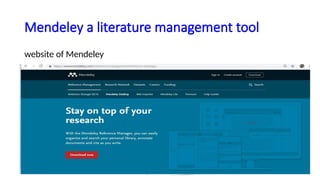
Mendeley a literature management tool
website of Mendeley
References style
• APA
• MLA
• Chicago
• Vancouver
• Harvard
website states that it helps you to stay on the
top of your research
Cite as you write
Annotate as you read
Import references easily
Access your library anywhere
Searching publications/authors by Mendeley
Exporting literature from Mendeley Library
Importing literature from Mendeley
Cite as you write
• With the Mendeley the reference manager you can easily organize and search
your personal library, documents and cite as you write. When you move, scroll
down the website down, the first thing the Mendeley does for you as you write it
generates citations and bibliographies in a whole range of journal styles with just
a few clicks. For your convenience the Mendeley have made Mendeley citation
plugin and it is compatible with word including word format and library office.
Mendeley also supports Bibtex export for use with latex.
Annotate as you read
• Mendeley annotate as you read. It easily adds your thoughts on
documents in your own library, even from mobile devices. For ease of
collaboration you can also share document with group of colleagues
and annotate them together.
Import references easily
• Now the next function of Mendeley is imports references easily.
Mendeley import papers and other documents from your desktop
your existing libraries or websites quickly and easily. Mendeley
automatically captures author, title, and publisher information.
Access your library anywhere
• The next function is that it provides access your library anywhere. You
can securely access mendeley on any computer through the desktop
cline, web browser or using your mobile app. Your library is backed up in
the cloud when you sync and is always available to you. Go to the
Mendeley desktop or you can see the reference manager beta is
available. Mendeley reference manager beta, you can download it freely.
Searching publications/authors by Mendeley
• If you want to search a particular author, a particular researcher, type
his or her name in the search bar. You will find the names. Say for
example: for this surname: Loftsson, we have two author profiles.
These are the similar kinds of author profiles which we have studied
in case of google scholar, and Scopus, or Web of Science.
Importing literature from Mendeley
• For example we open the word file for using this reference in the article, we clicked to references
and then insert citations, manage sources. We will browse locate that particular file which we
saved in the desktop again and you can say we imported these references and you can add newer/
more references also. You can select them, copy them and then they can be imported to your file
• Now we start inserting the citations one by one you can insert the citations into the word files by
selecting it from the list and we can group them into a single group within the parentheses from
the list. So individual or group way, both the way we can select. We can select the bibliography and
then the references can be prepared depending on the style. Now we can update the citations also
depending upon our requirements.
Exporting literature from Mendeley Library
• we have prepared a folder of SANS 2016 indicating the research articles Stroke
rehabilitation related. The green color indicates that we have read it and the PDF is
there for this particular article. So we have the three radicals in this folder and on
the small angle scattering we can click them. Add, remove or export to MS Word
function is there. We can click the article and export to MS Word by clicking it. We
just saved it into a particular location for example we saved it in the desktop, this xml
file which is generated, and this is gone to the desktop, this is saved to the desktop.
So, it is all about using the Mendeley, importing.
It is all about Mendeley exporting the references from the Mendeley to
the library and importing the references from library to your document
or manuscript and managing it.
Advantages of using AI Tools
• Significant time saver
• New insight into Data analysis
• Devising future research directions
• Elaborate limitations of research
Things to keep in mind before using AI
Tools
• AI can do mistakes
• Sometimes inaccurate
• Answers can be generic and not specific
• Consider it as a tool
• Apply your own understanding before using it in the work
• Check plagiarism percentage before submitting
AI Tools
1.Elicit
2. Semantic Scholar
3. Sci space
4. Connected papers
5. Research Rabbit
6. Chat GPT
Take Away
Do Advance search using above all techniques
and use tools to manage the literature make high
quality research
Further reading
• Comparison of reference management software,
https://en.wikipedia.org/wiki/Comparison_of_reference_management_software
• Importing Documents into your Library (Mendeley Minute), https://www.youtube.com/watch?
v=qRiAIaqdAOg
• Organizing Your Library (Mendeley Minute), https://www.youtube.com/watch?v=VD1z0boSpQY
• Generating Citations with the MS Word and OpenOffice Plug-ins,
https://www.youtube.com/watch?v=zkrVbBSrK_w
• https://clarivate.libguides.com/endnote_training
• About Endnote, http://clarivate.libguides.com/endnote_training/home
References
• This video covers the basics of starting a research project. It includes information on properly
forming a research question, using keywords and synonyms, and creating a search statement using
Boolean operators and phrase searching:
https://library.weber.edu/researchandteaching/lib1704/Videos/
• ResearchBasics This video covers the basic search techniques covered in this section, including
wildcard symbols, truncation, parentheses and quotation marks:https
://library.weber.edu/researchandteaching/lib1704/Videos/SearchTechniques
• This video covers the basics of Boolean Operators:
https://library.weber.edu/researchandteaching/lib1704/Videos/BooleanOperator
• https://www.mendeley.com/reference-management/reference-manager
ADVANCE SERACH ^L0 REFERENCING TOOLS - Copy final.pptx

ADVANCE SERACH ^L0 REFERENCING TOOLS - Copy final.pptx

  • 1.
    ADVANCE SERACH & REFERENCING TOOLS Dr.(Prof) Settepalli. Jasmin Debora, Professor cum HOD Medical surgical Nursing, Faculty of Nursing , SGT University
  • 2.
    Objectives Terminologies Advanced Search Engines HealthcareDatabases Acquire skill in Advance Search Techniques Aware of the Common Pitfalls Understand Reference management Tools Utilization of tools for managing literature AI Tools for managing literature , Academic writing. Hands on Training of advance search and referencing tools
  • 3.
    Terminologies Search Engines: Acomputer program that retrieves documents or files or data from a database or from a computer network (especially from the internet) world web dictionary SO. . . search engine is a website that searches the Internet for pages and documents relevant to the search terms given. Search engines use robots to 'crawl' the web for new content to add to the possibilities for search results.
  • 4.
    Data base: Adatabase is an organized collection of structured information, or data, typically stored electronically in a computer system. A database is usually controlled by a database management system (DBMS). Together, the data and the DBMS, along with the applications that are associated with them, are referred to as a database system, often shortened to just database. Repositories : a central location in which data is stored and managed. Strings: A search string is the combination of text, numbers and sometimes special characters that a user enters into an application's search form to find specific types of information. Terminologies
  • 5.
    Advanced search Engines •Google Advanced Search • Kindle Advanced Search • Twitter Advanced Search • Kickstarter • YouTube Advanced Search • Creative Commons Advanced Search • Bing Advanced Search • Facebook Advanced Search • Amazon Advanced Search • eBay Advanced Search
  • 6.
    Healthcare Databases Allied andComplementary Medicine (AMED) 1985-Covers occupational therapy, physiotherapy, rehabilitation, plus alternative and complementary medicine acupuncture, chiropractic, homeopathy, yoga, hypnosis. British Nursing Index (BNI)1994-This UK focused database covers general nursing as well as the specific nursing areas covering AE, neonatal, breast cancer, theatres and orthopaedics. Cumulative Index of Nursing Allied Health(CINAHL) 1982- A US database covering all aspects of nursing and allied health. Subjects covered include optometry, radiologic technology, speech and language pathology, nutrition. Contains journals, theses and pamphlets.
  • 7.
    Healthcare Databases EMBASE 1974-With particular emphasis on European sources, this database covers the whole field of medicine. Drugs, pharmacology and substance abuse are particularly well covered. HMIC Health Management Information Consortium 1979-This compiles data from both the Department of Health Library and Information Services and Kings Fund Information and Library Service. MEDLINE 1950- This is a large US source of medical information. Other subjects include dentistry, veterinary medicine, medical psychology, genetics and advanced nursing practice.
  • 8.
    Healthcare Databases PsycINFO 1806-Includesinternational coverage of literature on Psychology and allied fields MEDLINE is the primary component of PubMed, a literature database developed and maintained by the NLM National Center for Biotechnology Information (NCBI). MEDLINE is the online counterpart to the MEDical Literature Analysis and Retrieval System (MEDLARS) that originated in 1964 (see MEDLINE history ProQuest: As the official repository of the Library of Congress, PQDT Global provides researchers with quality and equitable search results across all institutions, as well as rich citation data that delivers insights into the connections building around the world. EBSCO is the leading provider of research databases, e-journals, magazine subscriptions, ebooks and discovery service for academic libraries, public libraries, corporations
  • 9.
    What concepts defineyour topic? • Databases do not understand natural language; They can only match strings of characters that you type in the search field, to strings of characters that indexed in their contents (e.g., title, author, phrases found in the full text of articles or abstracts) • In order to narrow down your topic, you add concepts to it to make it more specific. Here, we break those concepts apart so that we can recombine them in a way the databases can understand. Eg: Infection prevention emergency room fatalities = emergency rooms + fatalities + Infection prevention
  • 10.
    • The divisionswill not always be clean. Is “Infection prevention fatalities" one concept or two? Once you start trying to think of synonyms and related terms, this will become clearer to you. • You may wonder if an idea like "effects" or "consequences" should be its own concept. Start by leaving it out. Once you run your search and look at the results, you will know whether you need to add it. Until you get to that point, keep both possibilities in mind.
  • 11.
    Think of synonymsand related terms • Databases can only match strings of characters that you input with strings of characters in their contents. So if you enter fatalities, articles that use the word deaths instead may not appear in your search results. • Brainstorming synonyms and related terms can help. To keep track of synonyms and related terms, use a Concept Chart. • Use one column for each of the concepts you identified in your topic. Beneath each concept, add all the synonyms and related terms you brainstormed,
  • 12.
    Concept Chart for"effects of anti-bullying programs on the self-esteem of adolescent girls" CONCEPT-1 CONCEPT-2 CONCEPT-3 anti-bullying programs adolescent girls self esteem Stand Up - Speak Out teen girls self image Bullying: Ignorance Is No Defense teenaged girls self worth Olweus female adolescents No Bully female teenagers Boomerang Project female teens
  • 13.
    • Notice thereare different ways to think of synonyms and related terms: actual synonyms and near synonyms, like girl and female • related but not exactly the same ideas like self esteem and self-image • specific examples like Olweus, which is one anti-bullying program. • You may not be sure of the best combination of search terms until you have tried them all. Ambiguity and uncertainty are normal (and can even be good). Research, particularly searching, usually involves trial and error.
  • 14.
    • Try: Dictionariesand thesauri – general or subject specific, online or printed Keywords and descriptors used in key journal articles Thesauri, subject headings, phrase lists or other lists of controlled vocabulary in individual databases
  • 15.
    Search terms Discussion Transferable,moveable, assignable ability, training, masters BSc, MSc, PhD, doctorate, Postgraduate Be aware of the subtly different emphases of these terms; and the effects they may have on your search results. Example search: Transferable skills of research students
  • 16.
    Use Boolean operatorsto create precise searches • While databases cannot understand natural language, database searches can be made very precise using Boolean operators. • Boolean operators tell databases exactly how you want your search terms combined for the optimal results. • There are only five Boolean operators and all library databases understand them.
  • 17.
    Boolean logic Boolean logicallows you to link your search terms in specific ways. It requires the use of the Boolean operators AND, OR and NOT. AND narrows your search OR broadens your search NOT narrows your search by excluding terms. Example search: Transferable skills of research students Search terms Discussion "transferable skills" AND "research students" Using AND will narrow the search by ensuring material retrieved covers both phrases. Without this Boolean linking, the search might produce results matching one term but not the other, thus increasing your results, and making the job of filtering results harder. "transferable skills" NOT "information literacy" Using NOT will narrow a search on transferable skills alone by excluding any material that also mentioned information literacy. "transferable skills" OR "ability" Using OR will broaden a search on transferable skills by including matches on the synonym ability
  • 18.
    Broadening search If yoursearch returns No records , you might have more success if you can think of alternative search terms This include: • Other terms related to your topic • Synonyms(Words with same meaning) • Different word endings(Singular or Plural forms) • Different Spellings(UK/US) • To Search for records that return one or more of your search terms link them together with OR operator.
  • 19.
    Phrase searching Search termsDiscussion "transferable skills" "research students" This search would retrieve material on the 'transferable skills of research students’. It would also filter out 'transferable and research skills for sixth- form students', because the word matches do not occur in the order specified.
  • 20.
    Nested searches Nested searchesare used to create more complex Boolean logic statements. For example: {pets NOT (cats OR dogs)} AND behaviour This statement would be used to search for material on the behaviour of all pets except cats and dogs. This type of searching is supported in many resources, often with the use of brackets or separate search boxes. Example search: Transferable skills of research students Search terms Discussion {"transferable skills" NOT ("study skills" OR "presentation skills")} and "research students" This statement would be used to search for material on the transferable skills of research students excluding material that mentioned study skills or presentation skills.
  • 21.
    Proximity Some databases allowsearching for words in the same sentence, or within a defined number of words of one another. This type of relevance searching is based on the premise that words or phrases which are near to each other will be related in some way. Proximity is particularly useful when searching full text databases.
  • 22.
    Example search: Transferableskills of research student Search terms Discussion "transferable skills" SAME "research students" Using SAME will search for “transferable skills” in the same sentence as “research students” "transferable skills" w3 "research students" Using w3 will search for "transferable skills" within 3 words of "research students" "transferable skills" NEAR "research students" Using NEAR will search for "transferable skills" within the database’s definition of ‘NEAR’ to "research students"
  • 23.
    Truncation This isuseful when searching for the singular and plural form of a word as well as for terms that can be reduced to a common stem. Often the asterisk (*) is used but other characters can also be inserted, including the exclamation mark (!). Example search: A search for skill* Search terms Discussion Skill* This would retrieve skill, skills, skilling, skilled, etc.
  • 24.
    Syntax • Syntax usedfor truncation varies amongst databases • Eg: Sometimes next is used rather than Near-you should check the databases help pages to find out if and how proximity can be used
  • 25.
    Search terms Discussion Transfer?ableThis would retrieve transferable and transferrable Wildcard allows variation in a character in the middle of the word, useful for taking into account variations in spellings wild cards are much neater,You may be able to replace none, one or more letters within a word by using a character, often a question mark (?) or an asterisk (*). Example search: A search for Transfer?able
  • 26.
    Saved searches • Inmany databases you can save a search to run at a later date. This is particularly useful if your search statement is complex and lengthy to enter.
  • 27.
    Combine Boolean operatorsfor more complex searches • It is feasible that you may have such a complex search to perform that you might require the use of all six of the Boolean operators to get optimal search results. • For example, let us say that you are looking for medicines or other medical interventions for seizure disorders other than epilepsy. • This search, using all of the Boolean operators, might look like this: • medic* AND (seizures OR "seizure disorders" OR "convulsive disorders" OR convulsions) NOT epilepsy
  • 28.
    Refining Results byDate, Peer Review and Document Type Getting Manageable, Relevant Search Results Screenshot 1: • Search phrase "complex ptsd" yields 57,120 results, which is an unmanageable number. • limiters will be applied to reduce that number to something manageable and relevant.
  • 29.
    Refining Results byDate, Peer Review and Document Type Limiting by Publication Date Screenshot 2: On the left, under Limit Options, notice the Publication Date range (highlighted by a red square). You can enter any beginning and ending year, and the database will remove all the search results that were not published in that range. Adding the beginning year 2015 and ending year 2020 reduces the results from 57,120 to 23,577 (highlighted in yellow).
  • 30.
    • Limiting toScholarly (Peer Reviewed) Refining Results by Date, Peer Review and Document Type Screenshot 3: On the left, under Active Filters, notice the "in Scholarly/Peer Reviewed Journals" limiter (highlighted by a red square). By placing a check in that check box, you are telling the database to remove all search results that were not published in scholarly or peer-reviewed journals (e.g., it removes books, magazine and newspaper articles). This further reduces the results from 23,577 to 12,955 (highlighted in yellow).
  • 31.
    Refining Results byDate, Peer Review and Document Type Limiting by Document Type Screenshot 4: On the left, under Limit Options, you will see the Resource Types limiter (highlighted by a red square). Placing a check in the check box next to the source type you desire tells the database to only display results of that type. If you click Show More, you would see a list of all available resource types. Note: Different databases have different specializations by subject, which means that each database will contain different source types.
  • 32.
    Advanced Searching • PublicationsSearch • Subject Terms • Advanced Searching By Author and Title • Advanced Searching with descriptors • Descriptor chaining • Citation chaining
  • 33.
    Critical appraisal tools •After an Optimal Search select specific references and display, email or save the results. • Then Critically appraise the article • These tools can be used for Appraisal Critical Appraisal Toolkits from Oxford University Canadian Centre for Health Evidence User Guides to the Medical Literature How to read a paper- Patricia Greenhalgh
  • 34.
    Common Pitfalls • Beaware of variations in British and American spelling. • Make sure you don't restrict yourself to items held in online databases. • Some online databases go back as far as the 1980s, but others do not even go that far. • There may be important publications that were published before that, and you will need to search elsewhere for these. • Authors' first names and initials are often indexed inconsistently in databases. • Some journal issues are also published as books. • Be aware that not all important research is published in English. • Foreign languages may be transliterated in different ways, such as the German ü, which can be replaced with u or ue. • Some foreign journals have translations published much later, and with different dates and page numbers
  • 35.
    Hands on Training •https://search.proquest.com/healthcomplete
  • 36.
    LITERATURE MANAGEMENT TOOLS Whatare this Tools ? • These are the means of qualitative and quantitative organization and compilation of references and citations. Why they are needed? • Easy referencing: organization and compilation • Saves time over manual management of references • Avoids rejection : Save time, effort and rejection
  • 37.
    A huge plethoraof databases
  • 38.
    literature management bytwo major tools •Mendeley •Endnote
  • 39.
    Mendeley a literaturemanagement tool website of Mendeley
  • 40.
    References style • APA •MLA • Chicago • Vancouver • Harvard
  • 41.
    website states thatit helps you to stay on the top of your research Cite as you write Annotate as you read Import references easily Access your library anywhere Searching publications/authors by Mendeley Exporting literature from Mendeley Library Importing literature from Mendeley
  • 42.
    Cite as youwrite • With the Mendeley the reference manager you can easily organize and search your personal library, documents and cite as you write. When you move, scroll down the website down, the first thing the Mendeley does for you as you write it generates citations and bibliographies in a whole range of journal styles with just a few clicks. For your convenience the Mendeley have made Mendeley citation plugin and it is compatible with word including word format and library office. Mendeley also supports Bibtex export for use with latex.
  • 43.
    Annotate as youread • Mendeley annotate as you read. It easily adds your thoughts on documents in your own library, even from mobile devices. For ease of collaboration you can also share document with group of colleagues and annotate them together.
  • 44.
    Import references easily •Now the next function of Mendeley is imports references easily. Mendeley import papers and other documents from your desktop your existing libraries or websites quickly and easily. Mendeley automatically captures author, title, and publisher information.
  • 45.
    Access your libraryanywhere • The next function is that it provides access your library anywhere. You can securely access mendeley on any computer through the desktop cline, web browser or using your mobile app. Your library is backed up in the cloud when you sync and is always available to you. Go to the Mendeley desktop or you can see the reference manager beta is available. Mendeley reference manager beta, you can download it freely.
  • 46.
    Searching publications/authors byMendeley • If you want to search a particular author, a particular researcher, type his or her name in the search bar. You will find the names. Say for example: for this surname: Loftsson, we have two author profiles. These are the similar kinds of author profiles which we have studied in case of google scholar, and Scopus, or Web of Science.
  • 47.
    Importing literature fromMendeley • For example we open the word file for using this reference in the article, we clicked to references and then insert citations, manage sources. We will browse locate that particular file which we saved in the desktop again and you can say we imported these references and you can add newer/ more references also. You can select them, copy them and then they can be imported to your file • Now we start inserting the citations one by one you can insert the citations into the word files by selecting it from the list and we can group them into a single group within the parentheses from the list. So individual or group way, both the way we can select. We can select the bibliography and then the references can be prepared depending on the style. Now we can update the citations also depending upon our requirements.
  • 48.
    Exporting literature fromMendeley Library • we have prepared a folder of SANS 2016 indicating the research articles Stroke rehabilitation related. The green color indicates that we have read it and the PDF is there for this particular article. So we have the three radicals in this folder and on the small angle scattering we can click them. Add, remove or export to MS Word function is there. We can click the article and export to MS Word by clicking it. We just saved it into a particular location for example we saved it in the desktop, this xml file which is generated, and this is gone to the desktop, this is saved to the desktop.
  • 49.
    So, it isall about using the Mendeley, importing. It is all about Mendeley exporting the references from the Mendeley to the library and importing the references from library to your document or manuscript and managing it.
  • 50.
    Advantages of usingAI Tools • Significant time saver • New insight into Data analysis • Devising future research directions • Elaborate limitations of research
  • 51.
    Things to keepin mind before using AI Tools • AI can do mistakes • Sometimes inaccurate • Answers can be generic and not specific • Consider it as a tool • Apply your own understanding before using it in the work • Check plagiarism percentage before submitting
  • 52.
    AI Tools 1.Elicit 2. SemanticScholar 3. Sci space 4. Connected papers 5. Research Rabbit 6. Chat GPT
  • 53.
    Take Away Do Advancesearch using above all techniques and use tools to manage the literature make high quality research
  • 54.
    Further reading • Comparisonof reference management software, https://en.wikipedia.org/wiki/Comparison_of_reference_management_software • Importing Documents into your Library (Mendeley Minute), https://www.youtube.com/watch? v=qRiAIaqdAOg • Organizing Your Library (Mendeley Minute), https://www.youtube.com/watch?v=VD1z0boSpQY • Generating Citations with the MS Word and OpenOffice Plug-ins, https://www.youtube.com/watch?v=zkrVbBSrK_w • https://clarivate.libguides.com/endnote_training • About Endnote, http://clarivate.libguides.com/endnote_training/home
  • 55.
    References • This videocovers the basics of starting a research project. It includes information on properly forming a research question, using keywords and synonyms, and creating a search statement using Boolean operators and phrase searching: https://library.weber.edu/researchandteaching/lib1704/Videos/ • ResearchBasics This video covers the basic search techniques covered in this section, including wildcard symbols, truncation, parentheses and quotation marks:https ://library.weber.edu/researchandteaching/lib1704/Videos/SearchTechniques • This video covers the basics of Boolean Operators: https://library.weber.edu/researchandteaching/lib1704/Videos/BooleanOperator • https://www.mendeley.com/reference-management/reference-manager