Nonprojected Visuals The most common type of visuals found in a classroom
Nonprojected Visuals These visual supporters are not very technological but are the very basic stuff that has been used in classrooms for years.  They include real objects, models, exhibits, printed material, graphics and photographs.
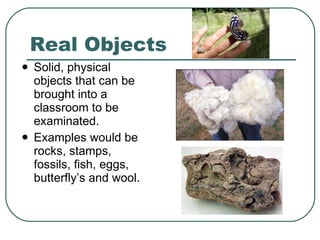
Real Objects Solid, physical objects that can be brought into a classroom to be examinated.  Examples would be rocks, stamps, fossils, fish, eggs, butterfly’s and wool.
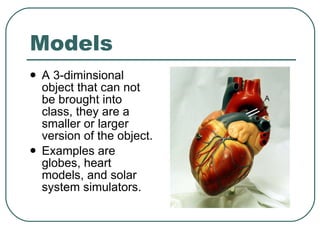
Models A 3-diminsional object that can not be brought into class, they are a smaller or larger version of the object.  Examples are globes, heart models, and solar system simulators.
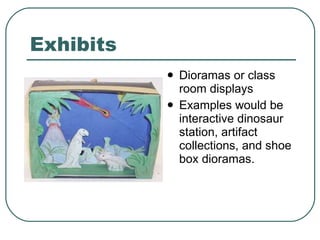
Exhibits Dioramas or class room displays Examples would be interactive dinosaur station, artifact collections, and shoe box dioramas.
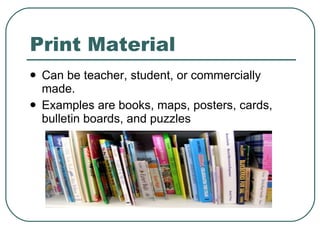
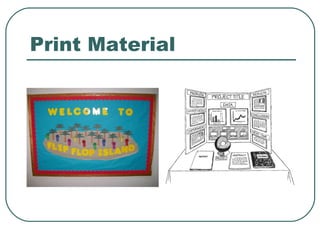
Print Material Can be teacher, student, or commercially made. Examples are books, maps, posters, cards, bulletin boards, and puzzles
Print Material
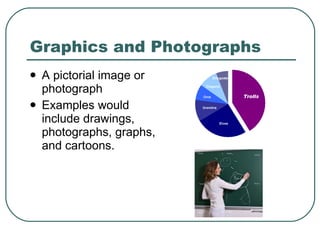
Graphics and Photographs A pictorial image or photograph Examples would include drawings, photographs, graphs, and cartoons.
In My Classroom I could use this visual support in my classroom by helping the students to learn better. I could use any of these nonprojected visuals as homework, projects, informing, or just plain old teaching the students about something. I like that these are the basic visuals and has worked so well for others in the past.
Resources Wool on slide 3 http://en.wikivisual.com/images/a/a4/Wool.www.usda.gov.jpg Butterfly picture on slide 3 http://media-cdn.tripadvisor.com/media/photo-s/01/31/ac/87/niagara-falls.jpg Fossil on slide 3 http://www.usoe.k12.ut.us/curr/science/core/4th/4thsciber/fossils/images/Fossils.jpg Model of heart on slide 4 http://upload.wikimedia.org/wikipedia/commons/5/57/Heart_frontally_PDA.jpg Shoe box on slide 5 http://www.stormthecastle.com/blogimages/dinosaur-diorama.jpg Books on slide 6 http://www.readysetmom.com/.a/6a00d83451c9bc69e201156f2cd719970c-800wi Bulletin Board on slide 7 http://www.houstonpark.org/Bulletin%20Boards/101_0251.JPG Poster Board on slide 7 http://www.luthersem.edu/mhess/CE1515/fair.gif Blackboard on slide 8 http://static-p3.fotolia.com/jpg/00/12/57/86/400_F_12578646_hVDp9R2AEi1a4SopUgTEXD Op3y eRjruH.jpg Pie Chart on slide 8 http://peltiertech.com/WordPress/wp-content/img200807/godinpie.png All the writing I made my own and got the information from the Teaching and Learning with Technology book.  Pages 329 through 330.

Nonprojected Visuals

  • 1.
    Nonprojected Visuals Themost common type of visuals found in a classroom
  • 2.
    Nonprojected Visuals Thesevisual supporters are not very technological but are the very basic stuff that has been used in classrooms for years. They include real objects, models, exhibits, printed material, graphics and photographs.
  • 3.
    Real Objects Solid,physical objects that can be brought into a classroom to be examinated. Examples would be rocks, stamps, fossils, fish, eggs, butterfly’s and wool.
  • 4.
    Models A 3-diminsionalobject that can not be brought into class, they are a smaller or larger version of the object. Examples are globes, heart models, and solar system simulators.
  • 5.
    Exhibits Dioramas orclass room displays Examples would be interactive dinosaur station, artifact collections, and shoe box dioramas.
  • 6.
    Print Material Canbe teacher, student, or commercially made. Examples are books, maps, posters, cards, bulletin boards, and puzzles
  • 7.
  • 8.
    Graphics and PhotographsA pictorial image or photograph Examples would include drawings, photographs, graphs, and cartoons.
  • 9.
    In My ClassroomI could use this visual support in my classroom by helping the students to learn better. I could use any of these nonprojected visuals as homework, projects, informing, or just plain old teaching the students about something. I like that these are the basic visuals and has worked so well for others in the past.
  • 10.
    Resources Wool onslide 3 http://en.wikivisual.com/images/a/a4/Wool.www.usda.gov.jpg Butterfly picture on slide 3 http://media-cdn.tripadvisor.com/media/photo-s/01/31/ac/87/niagara-falls.jpg Fossil on slide 3 http://www.usoe.k12.ut.us/curr/science/core/4th/4thsciber/fossils/images/Fossils.jpg Model of heart on slide 4 http://upload.wikimedia.org/wikipedia/commons/5/57/Heart_frontally_PDA.jpg Shoe box on slide 5 http://www.stormthecastle.com/blogimages/dinosaur-diorama.jpg Books on slide 6 http://www.readysetmom.com/.a/6a00d83451c9bc69e201156f2cd719970c-800wi Bulletin Board on slide 7 http://www.houstonpark.org/Bulletin%20Boards/101_0251.JPG Poster Board on slide 7 http://www.luthersem.edu/mhess/CE1515/fair.gif Blackboard on slide 8 http://static-p3.fotolia.com/jpg/00/12/57/86/400_F_12578646_hVDp9R2AEi1a4SopUgTEXD Op3y eRjruH.jpg Pie Chart on slide 8 http://peltiertech.com/WordPress/wp-content/img200807/godinpie.png All the writing I made my own and got the information from the Teaching and Learning with Technology book. Pages 329 through 330.