NETWORKS AND
TELECOMMUNICATION
IT Networks
 IT network is a co-ordinated group of IT components
(computers linked with equipment and systems) that support
many people working together by using and sharing
data/info.. IT networks therefore consists of combinations of
PC’s, storage devices and communication equipment.
 IT networks vary according to:
– Span of control: centralised, distributed.
– Ownerships: Private Network (for an organizational use
only) or Public Network (no restrictions and use of its
resources).
– Geographical location: LAN (Local Area Network), MAN
(Metropolitan Area Network) , WAN (Wide Area Network)
2
Centralised and Distributed IT Network systems

Centralized IT network
 Usually have a central/one computing processing, storage
and communication device centre.
 It usually support single tasks at a time. All terminals and
interfaces are centralized or in one area and have only one
operating system.
 The main advantage is that they are easy to maintain.
 But when part of the system breaks down, the whole
system is affected. e.g. 3-in-1 machines like printer, fax,
scanner.
 It may not support additional devices.

3
Centralised and distributed IT network systems

Distributed network systems
– Spread over wider areas
– multi-user systems. They

– Support multiple Operating systems
communication links and processing systems.
– A mainframe computer is an example connected
with several workstations.
4
Types of networks
LAN:

– Is an IT network system that serves users within a confined
geographical area or a “local area”. It spans a distance of about
1km, an office, a building or groups of buildings in one location.
– They connect nearby IT devices usually with visible direct and
short cables.
– Owned and operated by individuals or organizations.
– Economy and flexibility.

– when part of the system breaks down, the whole system is
affected.
– They may be client-server or peer-to-peer.

5
Types of networks
MAN
– Networks that link office buildings within a city or a metropolis.
It may span several kilometers.
– Involve the use of invisible cables, radio waves or satellite dishes
to link the various IT devices.
– Normally own by organizations.
– When a part of the system breaks down, the others system may
not be affected.
– Cost and the administration of MAN may be high and difficult.
6
Types of networks
 WAN:
– is an IT network that span wide geographical area for example a
whole country.
– They are the largest type of network available. eg the Internet is
the largest WAN in the world.
– Owned by multinational companies, with worldwide branches.
– Uses radio or microwave links as well as satellite dishes to connect
the various IT systems usually servers.
– The initial cost may be expensive, but the long cost is shared by the
users.
Network topology
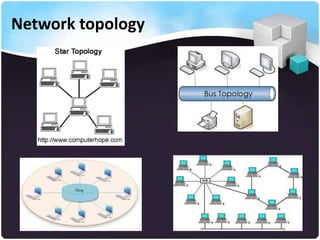
The physical arrangement or layout of IT
networks.
Network architecture-describes how IT networks
are configured and the strategies employed to
optimize its use or resources.
Types of topology:
– Star – connected to a central hub.
– Ring -connected in a continuous loop.
– Bus – connected to a common channel
– Hybrid – combination of star, bus and ring.
Micky

8
Network topology
Advantages of Networks
Sharing of peripheral devices
Better communication - email
Security of information –through
administrator
Access to databases – private and
organizational
Sharing of program and data
– (Hutchinson and Sawyer, 2000)
10
Services on IT networks
Fax messages
Voice mail
Electronic mail
Video conferencing
Electronic data exchange – exchange of standard
business documents.
Virtual office – offices devoid of physical
structures
Intranets and extranets
Telecommuting – work b/n office and home
(Hutchinson and Sawyer, 2000).

Micky

11
Telecommunications
Basic Concepts:
– Telecommunications or communications in IT refers to
the electronic transfer of data/information across
distances or from one location to another (Hutchinson
& Sawyer, 2000).
– Communication systems are electronic systems that
transmit data/info. from one location to another.
– The elements of communication systems therefore
include – sending and receiving devices,
communication channels, connecting devices, and
transmission specifications (O’Leary & O’Leary, 2004).
Micky

12
Telecommunications
Sending and receiving devices – theses include all
devices can be used to send and/or receive
data/info./instructions on IT networks. These are the
source & receiver devices included but not limited to
computers, mobile phones, TV, radio set, etc.
Communication channels – these are the actual
connecting or transmission medium, devices or links
which can be physical (wired - cable) or non-physical
(wireless connections).These include telephone lines,
coaxial cables and fiber-optic cable; and infrared,
broadcast radio, microwave and satellite (O’Leary &
O’Leary, 2004).
Micky

13
Telecommunications
 Connecting devices – these devices
– act as an interface/link between the sending and receiving devices and
the communication channel
– convert incoming and/or outgoing messages/signals into a form and
format so that they can travel across the communication channel (O’Leary
& O’Leary, 2004). e.g. Modem a device that converts digital signals into
analog (modulation) and then from analog to digital (demodulation) form
for transmission over telephone lines (Hutchinson & Sawyer, 2001).

 Data transmission specifications (protocols) – these are rules and
procedures that coordinate the sending and receiving devices by
precisely defining the how the messages/signals will be sent
across the communication channel. eg email, fax, text messages,
etc.
 NB: Above all you need a comm. s/w to bring IT networks to life. 14
Micky
Factors affecting communication on IT networks
Direction of transmission
Data flow
Transmission rate
Protocols
Transmission mode
– Simplex : where data can travel in only one direction,
without a return signal). Eg from TV transmitter to
antennae, POS devices, seismograph measures
earthquakes, etc).
– Half duplex : where data travels in both directions but only
in one direction at a time, eg marine radio, linking PC’s by
telephones.
– Full duplex : data is transmitted back and forth at the same
time. Its thus considered the fastest and the most efficient
form of two way communication. Used for mainframe
communications.
Micky

16
(Serial and parallel) – data on IT network is
transmitted either serially or parallel.
– Serial data transmission: data signals or bits are
transmitted sequentially on IT networks. They are usually
“single lane” data transmission devices. Can transmit data
over long distances, but can be very slow. eg telephone
lines, modems, mouse, etc.
– Parallel data transmission – data signals or bits travels in
separate lines simultaneously. They are faster but limited
to short distances (to abt 15 meters). Commonly used to
transmit data from systems unit to printer, (O’Leary &
O’Leary, 2004; Hutchinson and Sawyer, 2001).
Micky

17
This refers to the frequency and bandwidth of the data.
 Frequency :
– is a measure of the amount of data that can be transmitted on a channel per second.
It describes the wave frequency or the no. of cycle of waves per second. It is
measured in hertz ( 1cycle/1 second). The more the cycles per second the more data
that can be transferred.

 Bandwidth :
– is a measure of the difference between the highest and the lowest frequencies ( the
range of frequencies). Data may be sent on several frequencies within a bandwidth.
The greater the bandwidth, the more frequencies and the more data can be sent
through the channel. It is usually measured in bits per second (bps; klbs; mbps)
(Hutchinson and Sawyer, 2001). There are three categories of bandwidth• Voice band (used for standard telephone lines, good for text transmission but not
high quality video/voice),
• Medium band (special leased lines typically used to connect PC’s and mainframe
and for long distance data transmissions. Mostly used by organizations).
• Broadband (used for high capacity transmissions. Pc’s with cable, satellite and
high speed connecting devices use it. Good for high quality audio and video
transmission) (O’Leary & O’Leary, 2004).
Micky
18
It is a set of conventions or communication rules governing the the exchange of data
between hardware and/or software components in a communication network.
Protocols are built into the h/w and s/w. The standard protocol used now by most
developers is the OSI (Open System Interconnection) , which defines 7-layers of
protocols for worldwide communications (namely physical, data link, network,
transport, session, presentation, and application) (Hutchinson and Sawyer, 2001).
The standard protocol for the Internet - TCP/IP(transmission control
protocol/Internet protocol). It identifies the sending and recipients devices using IP
addresses and DNS domain name servers, and reformatting information for
transmission across the Internet.
– Other protocols include
• HTTP (hypertext transfer protocol) -connect to websites and download
web pages.
• HTTPS (hypertext transfer protocol secure)- supports secured web
communications
• FTP (file transfer protocol) supports uploading and downloading of files
from the Internet)
• WAP (wireless application protocol) – supports wireless access to the
Internet. (O’Leary & O’Leary, 2004).
19
:
There are two main modes of data transmission on IT networks-the
asynchronous and synchronous.

 Asynchronous:
– data is sent one byte or character at a time. Each string of bits making
up a byte is marked off with special control bits; the “start” bit to
indicate the beginning of a character and the “stop” bit to indicate its
end. This makes it slow and unable to handle large volumes of data.
Advantage is sending data at the convenience of the sender.

Synchronous:
– data is sent in blocks of characters (a block of character or words )
rather than as byte (character). Though they are also characterized by
start and stop bits, these are used to synchronize internal clocks of the
receiving and sending devices so that they are in time with each other.
It is complicated and expensive but good for large networks for large
Micky
20
data transmission and also faster.
Communication channel/links/media
A communication channel is the path or the physical
medium over which data travels in a telecommunications
system from its source to its destination. The types include:
The wired namely
• Twisted pair wire
• Coaxial cable
• Fiber optic cable

The wireless
• Radio/Microwave systems
• Satellite systems
• Infra red

21
Communication channel/links/media
Twisted pair cable
– consists of two strands of insulated copper wire twisted around
each other. Each strand is made up of hundreds of copper wires.
They are then covered in another layer of plastic insulation. A
single twisted pair usually culminate in a wall jack into which
you can plug your phone and computer.
– There are two types namely UTP (unshielded twisted pair) and
the STP (shielded twisted pair). Its currently the most common
cable used in the world, and its ideal for both data and voice
transmission, on LAN or for short distances. They are being
phased out by reliable cables. It can be slow and does not
protect well against electrical interference (noise).
Micky

22
Communication channel/links/media
Coaxial cable
– it’s a high-frequency transmission cable, replaces the multiple
wires of the twisted pair cable with a single solid-copper core.
Thus, it consist of an insulated copper wire wrapped in a solid or
braided metal shield, then in an external cover.
– The extra insulation makes coaxial cables much more resistant to
electrical interferences than the twisted pair wires. Used mostly
for cable television and to connect parts of a LAN over long
distances.
– In terms of the number of connections, a coaxial cable has over
80 times the transmission capacity of twisted pair. It can also
transmits both data and voice at faster rates than twisted pair
Micky wires.
23
Communication channel/links/media
Fiber optic cable
– transmit data as pulses of light instead of electrical
pulses, through tiny tubes of fiber optic glass. In terms
of the number of connections, it can support over
26,000 times the transmission capacity of twisted pair
wires, eg can support a quarter to a half-million voice
conversations at the same time.
– They are not affected by electrical interferences, are
lighter, and more durable than twisted and coaxial
cables. The disadvantage is, however, cost and inability
to bend around tight corners, making it suitable for
short distances data transmissions.
Micky

24
Communication channel/links/media
 Micro wave
– This communication media uses high frequency radio waves to
provide line of sight communication since the microwaves
travels in straight lines.
– They waves cannot bend around the curvatures of the earth,
hence they can only transmit over short distances eg between
buildings within sights.
– For longer distance microwave dishes or antennae are installed
on top of buildings, mountains and towers so that signals can be
beamed over uneven terrain. Transmits both voce and data.
– Note that the airwaves are getting saturated prompting a shift
to satellite systems.
Micky
25
Communication channel/links/media
 Satellites :
– These are microwaves relay stations in orbit around the earth. They
orbit about 22,000 miles above the earth, rotating at precise speeds,
usually at the speed of the earth, and they amplify and relay
– microwave signals from one transmitter on the ground to another.
They are can handle (send and receive large volumes of data). Uplink
is the term that refers to the sending of data to satellites and down
link – the receiving data from satellites.
– They are, however, affected by weather instability. One of the
application of satellite communication is GPS (Global Positioning
System) – where sets of devices are used to determine the unique
geographical positions of objects
( O’Leary & O’Leary, 2004).
Micky

26
Communication channel/links/media
Infrared
– uses infrared light waves to communicate over short
distances (line of sight communication). This is because
light waves can only travel in straight lines, hence the
sending and the receiving device must be in clear view
of one another without any obstruction.
– It is common with new PC’s and laptops, and also
infrared mouse, printers, etc. Eliminates cabling but
limited by distance and affected by obstructions.
Transfers both data and voice files.
Micky

27
The Internet is a global network connecting millions of computers.
The World Wide Web (WWW) is a system of Internet servers that
support specially formatted documents.
Most formatted documents on the web are formatted in HTML –
HyperText Markup Language) that supports links to other
documents, as well as graphics, audio, and video files.
A group of documents accessed from the same web address is
known as a website (ACCA Business Information System, 2005).

Micky

28
Uses of the Internet
• Dissemination of information
• Product/service development
• Recruitment and job search
• Entertainment
• Transaction processing – B2B, B2C
• Relationship enhancement (ACCA Business
Information System, 2005).
Other issues to be covered:
Services on the Internet
Problems with the Internet
E-commerce
Intranet, Extranet, Internet
Micky

30
– The Internet in actual fact is just a technology that allows any
computer with a telecoms links to send and receive information
from another equipped computer system.
– TCP/IP – Transmission Control Protocol/ Internet Protocol: is a
standardized set of computer protocols that allow different
computers on different networks, using different operating
systems, to communicate with each other (Hutchinson and
Sawyer, 2000). It breaks messages into packets and sends them
via the shortest possible route (1,500 characters each).

Micky

– Browsers – are the programs used to access/view the Internet.

31
Internet Address
 are used to identify an individual or resource on the Internet. The
Internet’s address scheme is called the Domain Name System
(DNS).
 Web addresses:
– to access a web site, you need to specify an address or a URL (Uniform
Resource Locator): eg.

Micky

32
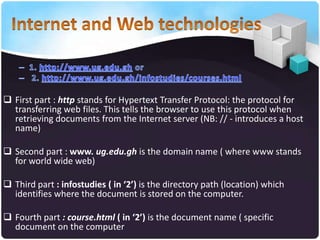
 First part : http stands for Hypertext Transfer Protocol: the protocol for
transferring web files. This tells the browser to use this protocol when
retrieving documents from the Internet server (NB: // - introduces a host
name)
 Second part : www. ug.edu.gh is the domain name ( where www stands
for world wide web)
 Third part : infostudies ( in ‘2’) is the directory path (location) which
identifies where the document is stored on the computer.
 Fourth part : course.html ( in ‘2’) is the document name ( specific
document on the computer

Networs and telecommunication - DE L200

  • 1.
  • 2.
    IT Networks  ITnetwork is a co-ordinated group of IT components (computers linked with equipment and systems) that support many people working together by using and sharing data/info.. IT networks therefore consists of combinations of PC’s, storage devices and communication equipment.  IT networks vary according to: – Span of control: centralised, distributed. – Ownerships: Private Network (for an organizational use only) or Public Network (no restrictions and use of its resources). – Geographical location: LAN (Local Area Network), MAN (Metropolitan Area Network) , WAN (Wide Area Network) 2
  • 3.
    Centralised and DistributedIT Network systems Centralized IT network  Usually have a central/one computing processing, storage and communication device centre.  It usually support single tasks at a time. All terminals and interfaces are centralized or in one area and have only one operating system.  The main advantage is that they are easy to maintain.  But when part of the system breaks down, the whole system is affected. e.g. 3-in-1 machines like printer, fax, scanner.  It may not support additional devices. 3
  • 4.
    Centralised and distributedIT network systems Distributed network systems – Spread over wider areas – multi-user systems. They – Support multiple Operating systems communication links and processing systems. – A mainframe computer is an example connected with several workstations. 4
  • 5.
    Types of networks LAN: –Is an IT network system that serves users within a confined geographical area or a “local area”. It spans a distance of about 1km, an office, a building or groups of buildings in one location. – They connect nearby IT devices usually with visible direct and short cables. – Owned and operated by individuals or organizations. – Economy and flexibility. – when part of the system breaks down, the whole system is affected. – They may be client-server or peer-to-peer. 5
  • 6.
    Types of networks MAN –Networks that link office buildings within a city or a metropolis. It may span several kilometers. – Involve the use of invisible cables, radio waves or satellite dishes to link the various IT devices. – Normally own by organizations. – When a part of the system breaks down, the others system may not be affected. – Cost and the administration of MAN may be high and difficult. 6
  • 7.
    Types of networks WAN: – is an IT network that span wide geographical area for example a whole country. – They are the largest type of network available. eg the Internet is the largest WAN in the world. – Owned by multinational companies, with worldwide branches. – Uses radio or microwave links as well as satellite dishes to connect the various IT systems usually servers. – The initial cost may be expensive, but the long cost is shared by the users.
  • 8.
    Network topology The physicalarrangement or layout of IT networks. Network architecture-describes how IT networks are configured and the strategies employed to optimize its use or resources. Types of topology: – Star – connected to a central hub. – Ring -connected in a continuous loop. – Bus – connected to a common channel – Hybrid – combination of star, bus and ring. Micky 8
  • 9.
  • 10.
    Advantages of Networks Sharingof peripheral devices Better communication - email Security of information –through administrator Access to databases – private and organizational Sharing of program and data – (Hutchinson and Sawyer, 2000) 10
  • 11.
    Services on ITnetworks Fax messages Voice mail Electronic mail Video conferencing Electronic data exchange – exchange of standard business documents. Virtual office – offices devoid of physical structures Intranets and extranets Telecommuting – work b/n office and home (Hutchinson and Sawyer, 2000). Micky 11
  • 12.
    Telecommunications Basic Concepts: – Telecommunicationsor communications in IT refers to the electronic transfer of data/information across distances or from one location to another (Hutchinson & Sawyer, 2000). – Communication systems are electronic systems that transmit data/info. from one location to another. – The elements of communication systems therefore include – sending and receiving devices, communication channels, connecting devices, and transmission specifications (O’Leary & O’Leary, 2004). Micky 12
  • 13.
    Telecommunications Sending and receivingdevices – theses include all devices can be used to send and/or receive data/info./instructions on IT networks. These are the source & receiver devices included but not limited to computers, mobile phones, TV, radio set, etc. Communication channels – these are the actual connecting or transmission medium, devices or links which can be physical (wired - cable) or non-physical (wireless connections).These include telephone lines, coaxial cables and fiber-optic cable; and infrared, broadcast radio, microwave and satellite (O’Leary & O’Leary, 2004). Micky 13
  • 14.
    Telecommunications  Connecting devices– these devices – act as an interface/link between the sending and receiving devices and the communication channel – convert incoming and/or outgoing messages/signals into a form and format so that they can travel across the communication channel (O’Leary & O’Leary, 2004). e.g. Modem a device that converts digital signals into analog (modulation) and then from analog to digital (demodulation) form for transmission over telephone lines (Hutchinson & Sawyer, 2001).  Data transmission specifications (protocols) – these are rules and procedures that coordinate the sending and receiving devices by precisely defining the how the messages/signals will be sent across the communication channel. eg email, fax, text messages, etc.  NB: Above all you need a comm. s/w to bring IT networks to life. 14 Micky
  • 15.
    Factors affecting communicationon IT networks Direction of transmission Data flow Transmission rate Protocols Transmission mode
  • 16.
    – Simplex :where data can travel in only one direction, without a return signal). Eg from TV transmitter to antennae, POS devices, seismograph measures earthquakes, etc). – Half duplex : where data travels in both directions but only in one direction at a time, eg marine radio, linking PC’s by telephones. – Full duplex : data is transmitted back and forth at the same time. Its thus considered the fastest and the most efficient form of two way communication. Used for mainframe communications. Micky 16
  • 17.
    (Serial and parallel)– data on IT network is transmitted either serially or parallel. – Serial data transmission: data signals or bits are transmitted sequentially on IT networks. They are usually “single lane” data transmission devices. Can transmit data over long distances, but can be very slow. eg telephone lines, modems, mouse, etc. – Parallel data transmission – data signals or bits travels in separate lines simultaneously. They are faster but limited to short distances (to abt 15 meters). Commonly used to transmit data from systems unit to printer, (O’Leary & O’Leary, 2004; Hutchinson and Sawyer, 2001). Micky 17
  • 18.
    This refers tothe frequency and bandwidth of the data.  Frequency : – is a measure of the amount of data that can be transmitted on a channel per second. It describes the wave frequency or the no. of cycle of waves per second. It is measured in hertz ( 1cycle/1 second). The more the cycles per second the more data that can be transferred.  Bandwidth : – is a measure of the difference between the highest and the lowest frequencies ( the range of frequencies). Data may be sent on several frequencies within a bandwidth. The greater the bandwidth, the more frequencies and the more data can be sent through the channel. It is usually measured in bits per second (bps; klbs; mbps) (Hutchinson and Sawyer, 2001). There are three categories of bandwidth• Voice band (used for standard telephone lines, good for text transmission but not high quality video/voice), • Medium band (special leased lines typically used to connect PC’s and mainframe and for long distance data transmissions. Mostly used by organizations). • Broadband (used for high capacity transmissions. Pc’s with cable, satellite and high speed connecting devices use it. Good for high quality audio and video transmission) (O’Leary & O’Leary, 2004). Micky 18
  • 19.
    It is aset of conventions or communication rules governing the the exchange of data between hardware and/or software components in a communication network. Protocols are built into the h/w and s/w. The standard protocol used now by most developers is the OSI (Open System Interconnection) , which defines 7-layers of protocols for worldwide communications (namely physical, data link, network, transport, session, presentation, and application) (Hutchinson and Sawyer, 2001). The standard protocol for the Internet - TCP/IP(transmission control protocol/Internet protocol). It identifies the sending and recipients devices using IP addresses and DNS domain name servers, and reformatting information for transmission across the Internet. – Other protocols include • HTTP (hypertext transfer protocol) -connect to websites and download web pages. • HTTPS (hypertext transfer protocol secure)- supports secured web communications • FTP (file transfer protocol) supports uploading and downloading of files from the Internet) • WAP (wireless application protocol) – supports wireless access to the Internet. (O’Leary & O’Leary, 2004). 19
  • 20.
    : There are twomain modes of data transmission on IT networks-the asynchronous and synchronous.  Asynchronous: – data is sent one byte or character at a time. Each string of bits making up a byte is marked off with special control bits; the “start” bit to indicate the beginning of a character and the “stop” bit to indicate its end. This makes it slow and unable to handle large volumes of data. Advantage is sending data at the convenience of the sender. Synchronous: – data is sent in blocks of characters (a block of character or words ) rather than as byte (character). Though they are also characterized by start and stop bits, these are used to synchronize internal clocks of the receiving and sending devices so that they are in time with each other. It is complicated and expensive but good for large networks for large Micky 20 data transmission and also faster.
  • 21.
    Communication channel/links/media A communicationchannel is the path or the physical medium over which data travels in a telecommunications system from its source to its destination. The types include: The wired namely • Twisted pair wire • Coaxial cable • Fiber optic cable The wireless • Radio/Microwave systems • Satellite systems • Infra red 21
  • 22.
    Communication channel/links/media Twisted paircable – consists of two strands of insulated copper wire twisted around each other. Each strand is made up of hundreds of copper wires. They are then covered in another layer of plastic insulation. A single twisted pair usually culminate in a wall jack into which you can plug your phone and computer. – There are two types namely UTP (unshielded twisted pair) and the STP (shielded twisted pair). Its currently the most common cable used in the world, and its ideal for both data and voice transmission, on LAN or for short distances. They are being phased out by reliable cables. It can be slow and does not protect well against electrical interference (noise). Micky 22
  • 23.
    Communication channel/links/media Coaxial cable –it’s a high-frequency transmission cable, replaces the multiple wires of the twisted pair cable with a single solid-copper core. Thus, it consist of an insulated copper wire wrapped in a solid or braided metal shield, then in an external cover. – The extra insulation makes coaxial cables much more resistant to electrical interferences than the twisted pair wires. Used mostly for cable television and to connect parts of a LAN over long distances. – In terms of the number of connections, a coaxial cable has over 80 times the transmission capacity of twisted pair. It can also transmits both data and voice at faster rates than twisted pair Micky wires. 23
  • 24.
    Communication channel/links/media Fiber opticcable – transmit data as pulses of light instead of electrical pulses, through tiny tubes of fiber optic glass. In terms of the number of connections, it can support over 26,000 times the transmission capacity of twisted pair wires, eg can support a quarter to a half-million voice conversations at the same time. – They are not affected by electrical interferences, are lighter, and more durable than twisted and coaxial cables. The disadvantage is, however, cost and inability to bend around tight corners, making it suitable for short distances data transmissions. Micky 24
  • 25.
    Communication channel/links/media  Microwave – This communication media uses high frequency radio waves to provide line of sight communication since the microwaves travels in straight lines. – They waves cannot bend around the curvatures of the earth, hence they can only transmit over short distances eg between buildings within sights. – For longer distance microwave dishes or antennae are installed on top of buildings, mountains and towers so that signals can be beamed over uneven terrain. Transmits both voce and data. – Note that the airwaves are getting saturated prompting a shift to satellite systems. Micky 25
  • 26.
    Communication channel/links/media  Satellites: – These are microwaves relay stations in orbit around the earth. They orbit about 22,000 miles above the earth, rotating at precise speeds, usually at the speed of the earth, and they amplify and relay – microwave signals from one transmitter on the ground to another. They are can handle (send and receive large volumes of data). Uplink is the term that refers to the sending of data to satellites and down link – the receiving data from satellites. – They are, however, affected by weather instability. One of the application of satellite communication is GPS (Global Positioning System) – where sets of devices are used to determine the unique geographical positions of objects ( O’Leary & O’Leary, 2004). Micky 26
  • 27.
    Communication channel/links/media Infrared – usesinfrared light waves to communicate over short distances (line of sight communication). This is because light waves can only travel in straight lines, hence the sending and the receiving device must be in clear view of one another without any obstruction. – It is common with new PC’s and laptops, and also infrared mouse, printers, etc. Eliminates cabling but limited by distance and affected by obstructions. Transfers both data and voice files. Micky 27
  • 28.
    The Internet isa global network connecting millions of computers. The World Wide Web (WWW) is a system of Internet servers that support specially formatted documents. Most formatted documents on the web are formatted in HTML – HyperText Markup Language) that supports links to other documents, as well as graphics, audio, and video files. A group of documents accessed from the same web address is known as a website (ACCA Business Information System, 2005). Micky 28
  • 29.
    Uses of theInternet • Dissemination of information • Product/service development • Recruitment and job search • Entertainment • Transaction processing – B2B, B2C • Relationship enhancement (ACCA Business Information System, 2005).
  • 30.
    Other issues tobe covered: Services on the Internet Problems with the Internet E-commerce Intranet, Extranet, Internet Micky 30
  • 31.
    – The Internetin actual fact is just a technology that allows any computer with a telecoms links to send and receive information from another equipped computer system. – TCP/IP – Transmission Control Protocol/ Internet Protocol: is a standardized set of computer protocols that allow different computers on different networks, using different operating systems, to communicate with each other (Hutchinson and Sawyer, 2000). It breaks messages into packets and sends them via the shortest possible route (1,500 characters each). Micky – Browsers – are the programs used to access/view the Internet. 31
  • 32.
    Internet Address  areused to identify an individual or resource on the Internet. The Internet’s address scheme is called the Domain Name System (DNS).  Web addresses: – to access a web site, you need to specify an address or a URL (Uniform Resource Locator): eg. Micky 32
  • 33.
     First part: http stands for Hypertext Transfer Protocol: the protocol for transferring web files. This tells the browser to use this protocol when retrieving documents from the Internet server (NB: // - introduces a host name)  Second part : www. ug.edu.gh is the domain name ( where www stands for world wide web)  Third part : infostudies ( in ‘2’) is the directory path (location) which identifies where the document is stored on the computer.  Fourth part : course.html ( in ‘2’) is the document name ( specific document on the computer