Information Systems,
Tenth Edition
Chapter 6
Telecommunications and Networks
Information Systems, Tenth Edition
Principles and Learning Objectives
• A telecommunications system consists of several
fundamental components
– Identify and describe the fundamental components
of a telecommunications system
– Discuss two broad categories of telecommunications
media and their associated characteristics
– Briefly describe several options for short-range,
medium-range, and long-range communications
Information Systems, Tenth Edition
Principles and Learning Objectives
(continued)
• Networks are an essential component of an
organization’s information technology infrastructure
– Identify the benefits of using a network
– Describe three distributed processing alternatives
and discuss their basic features
– Identify several telecommunications hardware
devices and discuss their functions
Principles and Learning Objectives
(continued)
• Network applications are essential to organizational
success
– List and describe several network applications that
organizations benefit from today
Information Systems, Tenth Edition
Why Learn About Telecommunications
and Networks?
• Effective communication:
– Essential to the success of every major human
undertaking
• Regardless of your chosen career field:
– You will need the communications capabilities
provided by telecommunications and networks
Information Systems, Tenth Edition
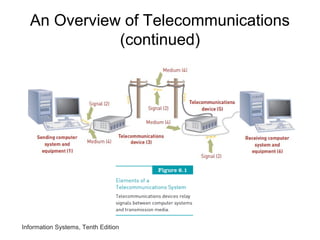
An Overview of Telecommunications
• Telecommunications:
– Electronic transmission of signals for
communications
• Telecommunications medium:
– Any material substance that carries an electronic
signal to support communications between a
sending and receiving device
• Networking protocol:
– Set of rules, algorithms, messages, and other
mechanisms that enable software and hardware in
networked devices to communicate effectively
Information Systems, Tenth Edition
An Overview of Telecommunications
(continued)
Information Systems, Tenth Edition
An Overview of Telecommunications
(continued)
• Synchronous communications:
– Receiver gets message instantaneously
• Asynchronous communications:
– Receiver gets message after some delay
Information Systems, Tenth Edition
Basic Telecommunications Channel
Characteristics
• Simplex channel:
– Transmits data in only one direction
• Half-duplex channel:
– Transmits data in either direction, but not
simultaneously
• Full-duplex channel:
– Permits data transmission in both directions at the
same time
Information Systems, Tenth Edition
Basic Telecommunications Channel
Characteristics (continued)
• Channel bandwidth:
– Rate at which data is exchanged
• Circuit switching network:
– Sets up a circuit between the sender and receiver
before any communications can occur
• Packet switching network:
– No fixed path is created between the communicating
devices
• Telecommunications media
– Categories: guided transmission media and wireless
Information Systems, Tenth Edition
Basic Telecommunications Channel
Characteristics (continued)
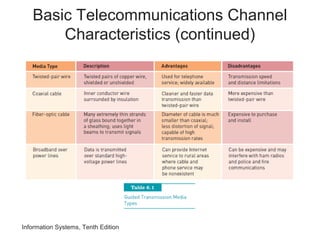
• Guided transmission media types:
– Available in many types
• Twisted-pair wire:
– Classified by category: category 2, 3, 5, 5E, and 6
• Coaxial cable:
– Offers cleaner and crisper data transmission (less
noise) than twisted-pair wire
• Fiber-optic cable:
– Transmits signals with light beams
Information Systems, Tenth Edition
Basic Telecommunications Channel
Characteristics (continued)
Basic Telecommunications Channel
Characteristics (continued)
• Broadband over power lines:
– Potential problem: transmitting data over unshielded
power lines can interfere with both amateur (ham)
radio broadcasts and police and fire radios
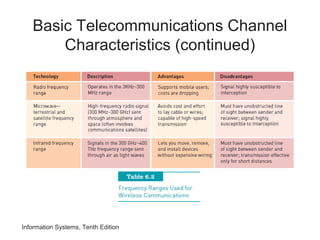
• Wireless communications options:
– Wireless transmission involves the broadcast of
communications in one of three frequency ranges
• Radio, microwave, or infrared frequencies
Information Systems, Tenth Edition
Basic Telecommunications Channel
Characteristics (continued)
Information Systems, Tenth Edition
Short Range Wireless Options
• Near field communication (NFC)
– Short-range wireless connectivity technology
designed for cell phones and credit cards
• Bluetooth
– Wireless communications specification that
describes how cell phones, computers, personal
digital assistants, etc., can be interconnected
• Ultra wideband (UWB)
– Short-range communications that employs extremely
short electromagnetic pulses lasting just 50 to 1,000
picoseconds
Information Systems, Tenth Edition
Short Range Wireless Options
(continued)
• Infrared transmission
– Sends signals at a frequency of 300 GHz and above
• Zigbee
– Form of wireless communications frequently used in
security systems and heating and cooling control
systems
Information Systems, Tenth Edition
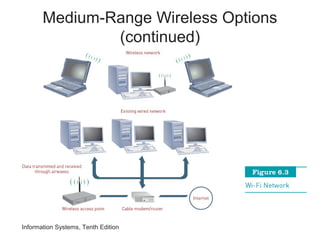
Medium-Range Wireless Options
• Wi-Fi:
– Wireless telecommunications technology brand
owned by the Wi-Fi Alliance
• Wireless access point:
– Consists of a transmitter with an antenna
– Receives the signal and decodes it
• Wi-Fi access points:
– Have maximum range of about 300 feet outdoors
and 100 feet within a dry-walled building
Information Systems, Tenth Edition
Medium-Range Wireless Options
(continued)
Information Systems, Tenth Edition
Wide Area Wireless Network Types
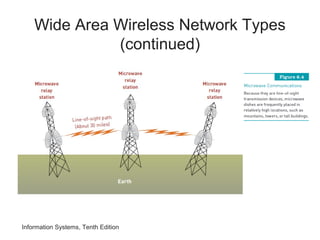
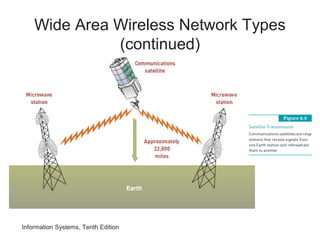
• Microwave transmission:
– High-frequency (300 MHz–300 GHz) signal sent
through the air
– Common forms of satellite communications:
• Geostationary satellite
• Low-earth orbit (LEO) satellite
• Very small aperture terminal (VSAT)
• Wireless mesh:
– Uses multiple Wi-Fi access points to link a series of
interconnected local area networks
Wide Area Wireless Network Types
(continued)
Information Systems, Tenth Edition
Wide Area Wireless Network Types
(continued)
Information Systems, Tenth Edition
Wide Area Wireless Network Options
(continued)
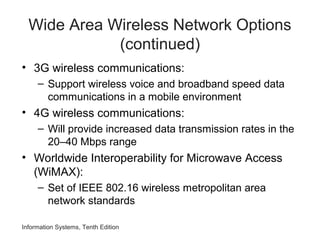
• 3G wireless communications:
– Support wireless voice and broadband speed data
communications in a mobile environment
• 4G wireless communications:
– Will provide increased data transmission rates in the
20–40 Mbps range
• Worldwide Interoperability for Microwave Access
(WiMAX):
– Set of IEEE 802.16 wireless metropolitan area
network standards
Information Systems, Tenth Edition
Networks and Distributed Processing
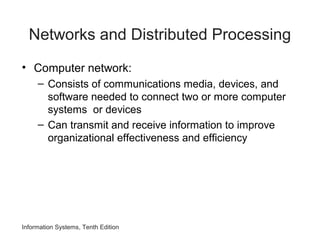
• Computer network:
– Consists of communications media, devices, and
software needed to connect two or more computer
systems or devices
– Can transmit and receive information to improve
organizational effectiveness and efficiency
Information Systems, Tenth Edition
Network Types
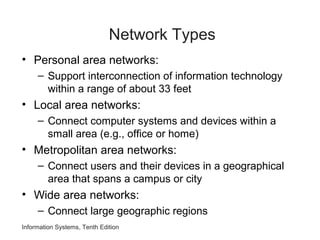
• Personal area networks:
– Support interconnection of information technology
within a range of about 33 feet
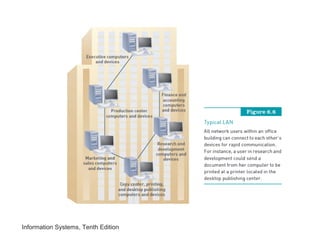
• Local area networks:
– Connect computer systems and devices within a
small area (e.g., office or home)
• Metropolitan area networks:
– Connect users and their devices in a geographical
area that spans a campus or city
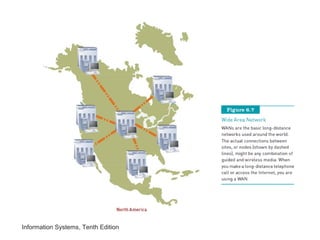
• Wide area networks:
– Connect large geographic regions
Information Systems, Tenth Edition
Basic Processing Alternatives
• Centralized processing:
– All processing occurs in a single location or facility
• Decentralized processing:
– Processing devices are placed at various remote
locations
• Distributed processing:
– Processing devices are placed at remote locations
but are connected to each other via a network
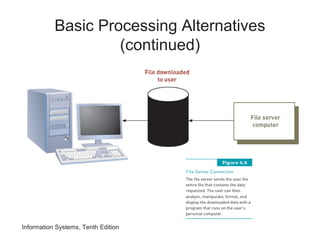
• File server systems:
– Users can share data through file server computing
Information Systems, Tenth Edition
Basic Processing Alternatives
(continued)
Information Systems, Tenth Edition
Client/Server Systems
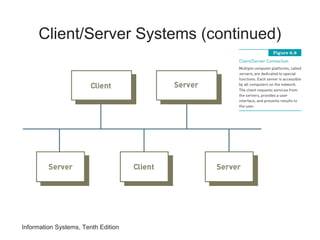
• Client/server architecture:
– Multiple computer platforms are dedicated to special
functions
• Client:
– Any computer that sends messages requesting
services from the servers on the network
• Database server:
– Sends only the data that satisfies a specific query,
not the entire file
Information Systems, Tenth Edition
Client/Server Systems (continued)
Information Systems, Tenth Edition
Client/Server Systems (continued)
Information Systems, Tenth Edition
Telecommunications Hardware
• Smartphones
– Combine the functionality of a mobile phone,
camera, Web browser, e-mail tool, MP3 player, and
other devices
– Have their own software operating systems
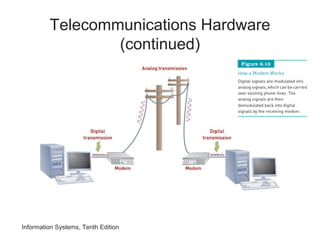
• Modems
– Modulation/demodulation devices
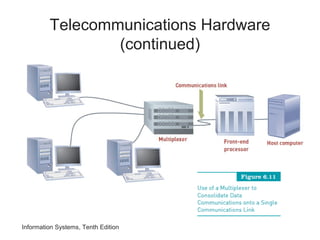
• Multiplexers
– Combine data from multiple data sources into a
single output signal that carries multiple channels
Telecommunications Hardware
(continued)
Information Systems, Tenth Edition
Telecommunications Hardware
(continued)
Information Systems, Tenth Edition
Telecommunications Hardware
(continued)
• Front-end processors
– Special-purpose computers that manage
communications to and from a computer system
• Private branch exchange (PBX)
– Telephone switching exchange that serves a single
organization
Information Systems, Tenth Edition
Telecommunications Hardware
(continued)
• Switches, bridges, routers, and gateways
– Switch: uses the physical device address in each
incoming message on the network
– Bridge: connects two LANs together using the same
telecommunications protocol
– Router: forwards data packets across two or more
distinct networks toward their destinations
– Gateway: serves as an entrance to another network
Information Systems, Tenth Edition
Telecommunications Software
• Network operating system (NOS):
– Systems software that controls the computer
systems and devices on a network
• Network management software:
– Protects software from being copied, modified, or
downloaded illegally
– Locates telecommunications errors and potential
network problems
Information Systems, Tenth Edition
Securing Data Transmission
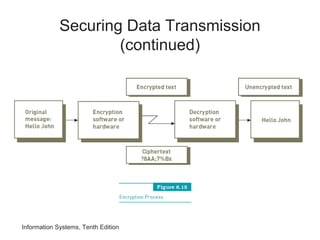
• Encryption:
– Converting an original message into a form that can
only be understood by the intended receiver
• Encryption key:
– Variable value that is applied (using an algorithm) to
a set of unencrypted text to produce encrypted text
or to decrypt encrypted text
Information Systems, Tenth Edition
Securing Data Transmission
(continued)
Information Systems, Tenth Edition
Securing Data Transmission
(continued)
• Securing wireless networks:
– Wired equivalent privacy (WEP):
• Used encryption based on 64-bit key, which has been
upgraded to a 128-bit key
– Wi-Fi Protected Access (WPA):
• Security protocol that offers significantly improved
protection over WEP
– War driving:
• Involves hackers driving around with a laptop and
antenna trying to detect insecure wireless access
points
Information Systems, Tenth Edition
Virtual Private Network (VPN)
• Private network that uses a public network (usually
the Internet) to connect multiple remote locations
• Provides network connectivity over a potentially
long physical distance
• Supports secure, encrypted connections between a
company’s private network and remote users
Information Systems, Tenth Edition
Telecommunications Services and
Network Applications
• Cellular phone services:
– Cellular phones:
• Operate using radio waves to provide two-way
communications
• May be linked to a cordless phone via a Bluetooth
connection
– Picocell:
• Miniature cellular base station designed to serve a
very small area such as part of a floor inside a building
Information Systems, Tenth Edition
Cellular Phone Services
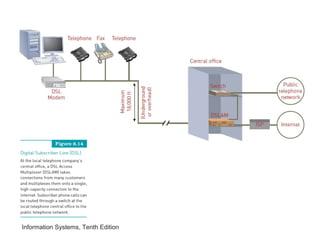
• Digital subscriber line (DSL) service:
– Telecommunications service that delivers high-
speed Internet access
– Asymmetric DSL (ADSL) line:
• Designed to provide download speed that is three to
four times faster than upload speed
– Symmetric DSL (SDSL):
• Used mainly by small businesses
• Does not allow you to use the phone at the same time
• The speed of receiving and sending data is the same
Information Systems, Tenth Edition
Linking Personal Computers to
Mainframes and Networks
• Basic way that telecommunications connect users
to information systems:
– Connecting personal computers to mainframe
computers so that data can be downloaded or
uploaded
• Unattended systems:
– Perform functions automatically, without user
intervention
Information Systems, Tenth Edition
Voice Mail
• Users can send, receive, and store verbal
messages for and from other people around the
world
• Voice mail-to-text services
– Capture voice mail messages, convert them to text,
and send them to an e-mail account
• Reverse 911 service
– Delivers emergency notifications to users in a
selected geographical area
Information Systems, Tenth Edition
Home and Small Business Networks
• DSL modem:
– Enables each computer in the network to access the
Internet
• Firewall:
– Filters the information coming from the Internet into
your network
• Router:
– Encrypts all wireless communications to keep your
network secure
Information Systems, Tenth Edition
Electronic Document Distribution
• Lets you send and receive documents in a digital
form without printing them
• Much faster to distribute electronic documents via
networks than to mail printed forms
• Viewing documents on screen instead of printing
– Saves paper and document storage space
Information Systems, Tenth Edition
Call Centers
• Location where an organization handles customer
and other telephone calls
• Used by:
– Customer service organizations
– Telemarketing companies
– Computer product help desks
– Charitable and political campaign organizations
Information Systems, Tenth Edition
Telecommuting and Virtual Workers
and Workgroups
• Telecommuting:
– Use of computing devices and networks so that
employees can work effectively away from the office
• Telecommuters:
– Need to be strongly self-motivated, organized,
focused on their tasks with minimal supervision
• Jobs unsuitable for telecommuting:
– Those that require frequent face-to-face interaction,
need much supervision, and have many short-term
deadlines
Electronic Meetings
• Videoconferencing:
– Enables people at multiple locations to communicate
using simultaneous two-way video and audio
transmissions
– Reduces travel expenses and time
– Increases managerial effectiveness through:
• Faster response to problems, access to more people,
and less duplication of effort
Information Systems, Tenth Edition
Electronic Data Interchange
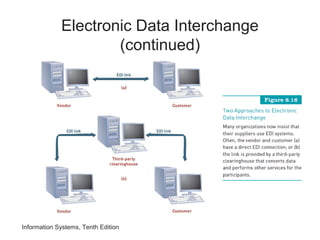
• Idea behind EDI:
– Connecting corporate computers among
organizations
• EDI:
– Can link the computers of customers,
manufacturers, and suppliers
– Eliminates the need for paper documents and
substantially cuts down on costly errors
Information Systems, Tenth Edition
Electronic Data Interchange
(continued)
Electronic Data Interchange
(continued)
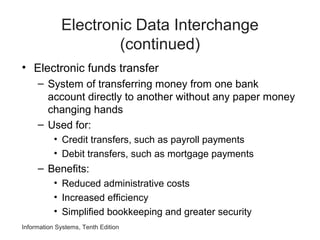
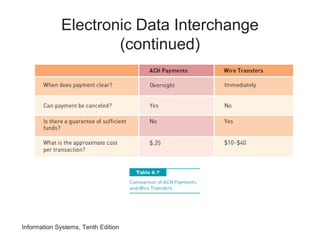
• Electronic funds transfer
– System of transferring money from one bank
account directly to another without any paper money
changing hands
– Used for:
• Credit transfers, such as payroll payments
• Debit transfers, such as mortgage payments
– Benefits:
• Reduced administrative costs
• Increased efficiency
• Simplified bookkeeping and greater security
Information Systems, Tenth Edition
Electronic Data Interchange
(continued)
Information Systems, Tenth Edition
Unified Communications
• Provides a simple and consistent user experience
across all types of communications
• Presence:
– Knowing where one’s desired communication
participants are and if they are available at this
instant
– Goal:
• To reduce the time required to make decisions and
communicate results
Global Positioning System
Applications
• Global navigation satellite system that uses two
dozen satellites roughly 11,000 miles above the
earth
• GPS receivers:
– Have become as small as a cell phone and are
relatively inexpensive
– Are commonly found in automobiles, boats, planes,
laptop computers, and cell phones
• GPS tracking technology:
– Has become the standard by which fleet managers
monitor the movement of their cars
Information Systems, Tenth Edition
Summary
• Networking protocol:
– Defines the set of rules that govern the exchange of
information over a telecommunications channel
• Channel bandwidth:
– Refers to the rate at which data is exchanged,
usually expressed in bits per second
• Geographic area covered by a network:
– Determines whether it is called PAN, LAN, WAN
Information Systems, Tenth Edition
Summary (continued)
• Telecommunications and networks:
– Creating profound changes in business because
they remove the barriers of time and distance
• Networks:
– Let users share hardware, programs, and databases
across the organization
– Can transmit and receive information to improve
organizational effectiveness and efficiency
Information Systems, Tenth Edition

Is ch06

  • 1.
    Information Systems, Tenth Edition Chapter6 Telecommunications and Networks
  • 2.
    Information Systems, TenthEdition Principles and Learning Objectives • A telecommunications system consists of several fundamental components – Identify and describe the fundamental components of a telecommunications system – Discuss two broad categories of telecommunications media and their associated characteristics – Briefly describe several options for short-range, medium-range, and long-range communications
  • 3.
    Information Systems, TenthEdition Principles and Learning Objectives (continued) • Networks are an essential component of an organization’s information technology infrastructure – Identify the benefits of using a network – Describe three distributed processing alternatives and discuss their basic features – Identify several telecommunications hardware devices and discuss their functions
  • 4.
    Principles and LearningObjectives (continued) • Network applications are essential to organizational success – List and describe several network applications that organizations benefit from today Information Systems, Tenth Edition
  • 5.
    Why Learn AboutTelecommunications and Networks? • Effective communication: – Essential to the success of every major human undertaking • Regardless of your chosen career field: – You will need the communications capabilities provided by telecommunications and networks Information Systems, Tenth Edition
  • 6.
    Information Systems, TenthEdition An Overview of Telecommunications • Telecommunications: – Electronic transmission of signals for communications • Telecommunications medium: – Any material substance that carries an electronic signal to support communications between a sending and receiving device • Networking protocol: – Set of rules, algorithms, messages, and other mechanisms that enable software and hardware in networked devices to communicate effectively
  • 7.
    Information Systems, TenthEdition An Overview of Telecommunications (continued)
  • 8.
    Information Systems, TenthEdition An Overview of Telecommunications (continued) • Synchronous communications: – Receiver gets message instantaneously • Asynchronous communications: – Receiver gets message after some delay
  • 9.
    Information Systems, TenthEdition Basic Telecommunications Channel Characteristics • Simplex channel: – Transmits data in only one direction • Half-duplex channel: – Transmits data in either direction, but not simultaneously • Full-duplex channel: – Permits data transmission in both directions at the same time
  • 10.
    Information Systems, TenthEdition Basic Telecommunications Channel Characteristics (continued) • Channel bandwidth: – Rate at which data is exchanged • Circuit switching network: – Sets up a circuit between the sender and receiver before any communications can occur • Packet switching network: – No fixed path is created between the communicating devices • Telecommunications media – Categories: guided transmission media and wireless
  • 11.
    Information Systems, TenthEdition Basic Telecommunications Channel Characteristics (continued) • Guided transmission media types: – Available in many types • Twisted-pair wire: – Classified by category: category 2, 3, 5, 5E, and 6 • Coaxial cable: – Offers cleaner and crisper data transmission (less noise) than twisted-pair wire • Fiber-optic cable: – Transmits signals with light beams
  • 12.
    Information Systems, TenthEdition Basic Telecommunications Channel Characteristics (continued)
  • 13.
    Basic Telecommunications Channel Characteristics(continued) • Broadband over power lines: – Potential problem: transmitting data over unshielded power lines can interfere with both amateur (ham) radio broadcasts and police and fire radios • Wireless communications options: – Wireless transmission involves the broadcast of communications in one of three frequency ranges • Radio, microwave, or infrared frequencies Information Systems, Tenth Edition
  • 14.
    Information Systems, TenthEdition Basic Telecommunications Channel Characteristics (continued)
  • 15.
    Information Systems, TenthEdition Short Range Wireless Options • Near field communication (NFC) – Short-range wireless connectivity technology designed for cell phones and credit cards • Bluetooth – Wireless communications specification that describes how cell phones, computers, personal digital assistants, etc., can be interconnected • Ultra wideband (UWB) – Short-range communications that employs extremely short electromagnetic pulses lasting just 50 to 1,000 picoseconds
  • 16.
    Information Systems, TenthEdition Short Range Wireless Options (continued) • Infrared transmission – Sends signals at a frequency of 300 GHz and above • Zigbee – Form of wireless communications frequently used in security systems and heating and cooling control systems
  • 17.
    Information Systems, TenthEdition Medium-Range Wireless Options • Wi-Fi: – Wireless telecommunications technology brand owned by the Wi-Fi Alliance • Wireless access point: – Consists of a transmitter with an antenna – Receives the signal and decodes it • Wi-Fi access points: – Have maximum range of about 300 feet outdoors and 100 feet within a dry-walled building
  • 18.
    Information Systems, TenthEdition Medium-Range Wireless Options (continued)
  • 19.
    Information Systems, TenthEdition Wide Area Wireless Network Types • Microwave transmission: – High-frequency (300 MHz–300 GHz) signal sent through the air – Common forms of satellite communications: • Geostationary satellite • Low-earth orbit (LEO) satellite • Very small aperture terminal (VSAT) • Wireless mesh: – Uses multiple Wi-Fi access points to link a series of interconnected local area networks
  • 20.
    Wide Area WirelessNetwork Types (continued) Information Systems, Tenth Edition
  • 21.
    Wide Area WirelessNetwork Types (continued) Information Systems, Tenth Edition
  • 22.
    Information Systems, TenthEdition Wide Area Wireless Network Options (continued) • 3G wireless communications: – Support wireless voice and broadband speed data communications in a mobile environment • 4G wireless communications: – Will provide increased data transmission rates in the 20–40 Mbps range • Worldwide Interoperability for Microwave Access (WiMAX): – Set of IEEE 802.16 wireless metropolitan area network standards
  • 23.
    Information Systems, TenthEdition Networks and Distributed Processing • Computer network: – Consists of communications media, devices, and software needed to connect two or more computer systems or devices – Can transmit and receive information to improve organizational effectiveness and efficiency
  • 24.
    Information Systems, TenthEdition Network Types • Personal area networks: – Support interconnection of information technology within a range of about 33 feet • Local area networks: – Connect computer systems and devices within a small area (e.g., office or home) • Metropolitan area networks: – Connect users and their devices in a geographical area that spans a campus or city • Wide area networks: – Connect large geographic regions
  • 25.
  • 26.
  • 27.
    Information Systems, TenthEdition Basic Processing Alternatives • Centralized processing: – All processing occurs in a single location or facility • Decentralized processing: – Processing devices are placed at various remote locations • Distributed processing: – Processing devices are placed at remote locations but are connected to each other via a network • File server systems: – Users can share data through file server computing
  • 28.
    Information Systems, TenthEdition Basic Processing Alternatives (continued)
  • 29.
    Information Systems, TenthEdition Client/Server Systems • Client/server architecture: – Multiple computer platforms are dedicated to special functions • Client: – Any computer that sends messages requesting services from the servers on the network • Database server: – Sends only the data that satisfies a specific query, not the entire file
  • 30.
    Information Systems, TenthEdition Client/Server Systems (continued)
  • 31.
    Information Systems, TenthEdition Client/Server Systems (continued)
  • 32.
    Information Systems, TenthEdition Telecommunications Hardware • Smartphones – Combine the functionality of a mobile phone, camera, Web browser, e-mail tool, MP3 player, and other devices – Have their own software operating systems • Modems – Modulation/demodulation devices • Multiplexers – Combine data from multiple data sources into a single output signal that carries multiple channels
  • 33.
  • 34.
  • 35.
    Telecommunications Hardware (continued) • Front-endprocessors – Special-purpose computers that manage communications to and from a computer system • Private branch exchange (PBX) – Telephone switching exchange that serves a single organization Information Systems, Tenth Edition
  • 36.
    Telecommunications Hardware (continued) • Switches,bridges, routers, and gateways – Switch: uses the physical device address in each incoming message on the network – Bridge: connects two LANs together using the same telecommunications protocol – Router: forwards data packets across two or more distinct networks toward their destinations – Gateway: serves as an entrance to another network Information Systems, Tenth Edition
  • 37.
    Information Systems, TenthEdition Telecommunications Software • Network operating system (NOS): – Systems software that controls the computer systems and devices on a network • Network management software: – Protects software from being copied, modified, or downloaded illegally – Locates telecommunications errors and potential network problems
  • 38.
    Information Systems, TenthEdition Securing Data Transmission • Encryption: – Converting an original message into a form that can only be understood by the intended receiver • Encryption key: – Variable value that is applied (using an algorithm) to a set of unencrypted text to produce encrypted text or to decrypt encrypted text
  • 39.
    Information Systems, TenthEdition Securing Data Transmission (continued)
  • 40.
    Information Systems, TenthEdition Securing Data Transmission (continued) • Securing wireless networks: – Wired equivalent privacy (WEP): • Used encryption based on 64-bit key, which has been upgraded to a 128-bit key – Wi-Fi Protected Access (WPA): • Security protocol that offers significantly improved protection over WEP – War driving: • Involves hackers driving around with a laptop and antenna trying to detect insecure wireless access points
  • 41.
    Information Systems, TenthEdition Virtual Private Network (VPN) • Private network that uses a public network (usually the Internet) to connect multiple remote locations • Provides network connectivity over a potentially long physical distance • Supports secure, encrypted connections between a company’s private network and remote users
  • 42.
    Information Systems, TenthEdition Telecommunications Services and Network Applications • Cellular phone services: – Cellular phones: • Operate using radio waves to provide two-way communications • May be linked to a cordless phone via a Bluetooth connection – Picocell: • Miniature cellular base station designed to serve a very small area such as part of a floor inside a building
  • 43.
    Information Systems, TenthEdition Cellular Phone Services • Digital subscriber line (DSL) service: – Telecommunications service that delivers high- speed Internet access – Asymmetric DSL (ADSL) line: • Designed to provide download speed that is three to four times faster than upload speed – Symmetric DSL (SDSL): • Used mainly by small businesses • Does not allow you to use the phone at the same time • The speed of receiving and sending data is the same
  • 44.
  • 45.
    Information Systems, TenthEdition Linking Personal Computers to Mainframes and Networks • Basic way that telecommunications connect users to information systems: – Connecting personal computers to mainframe computers so that data can be downloaded or uploaded • Unattended systems: – Perform functions automatically, without user intervention
  • 46.
    Information Systems, TenthEdition Voice Mail • Users can send, receive, and store verbal messages for and from other people around the world • Voice mail-to-text services – Capture voice mail messages, convert them to text, and send them to an e-mail account • Reverse 911 service – Delivers emergency notifications to users in a selected geographical area
  • 47.
    Information Systems, TenthEdition Home and Small Business Networks • DSL modem: – Enables each computer in the network to access the Internet • Firewall: – Filters the information coming from the Internet into your network • Router: – Encrypts all wireless communications to keep your network secure
  • 48.
    Information Systems, TenthEdition Electronic Document Distribution • Lets you send and receive documents in a digital form without printing them • Much faster to distribute electronic documents via networks than to mail printed forms • Viewing documents on screen instead of printing – Saves paper and document storage space
  • 49.
    Information Systems, TenthEdition Call Centers • Location where an organization handles customer and other telephone calls • Used by: – Customer service organizations – Telemarketing companies – Computer product help desks – Charitable and political campaign organizations
  • 50.
    Information Systems, TenthEdition Telecommuting and Virtual Workers and Workgroups • Telecommuting: – Use of computing devices and networks so that employees can work effectively away from the office • Telecommuters: – Need to be strongly self-motivated, organized, focused on their tasks with minimal supervision • Jobs unsuitable for telecommuting: – Those that require frequent face-to-face interaction, need much supervision, and have many short-term deadlines
  • 51.
    Electronic Meetings • Videoconferencing: –Enables people at multiple locations to communicate using simultaneous two-way video and audio transmissions – Reduces travel expenses and time – Increases managerial effectiveness through: • Faster response to problems, access to more people, and less duplication of effort Information Systems, Tenth Edition
  • 52.
    Information Systems, TenthEdition Electronic Data Interchange • Idea behind EDI: – Connecting corporate computers among organizations • EDI: – Can link the computers of customers, manufacturers, and suppliers – Eliminates the need for paper documents and substantially cuts down on costly errors
  • 53.
    Information Systems, TenthEdition Electronic Data Interchange (continued)
  • 54.
    Electronic Data Interchange (continued) •Electronic funds transfer – System of transferring money from one bank account directly to another without any paper money changing hands – Used for: • Credit transfers, such as payroll payments • Debit transfers, such as mortgage payments – Benefits: • Reduced administrative costs • Increased efficiency • Simplified bookkeeping and greater security Information Systems, Tenth Edition
  • 55.
  • 56.
    Information Systems, TenthEdition Unified Communications • Provides a simple and consistent user experience across all types of communications • Presence: – Knowing where one’s desired communication participants are and if they are available at this instant – Goal: • To reduce the time required to make decisions and communicate results
  • 57.
    Global Positioning System Applications •Global navigation satellite system that uses two dozen satellites roughly 11,000 miles above the earth • GPS receivers: – Have become as small as a cell phone and are relatively inexpensive – Are commonly found in automobiles, boats, planes, laptop computers, and cell phones • GPS tracking technology: – Has become the standard by which fleet managers monitor the movement of their cars Information Systems, Tenth Edition
  • 58.
    Summary • Networking protocol: –Defines the set of rules that govern the exchange of information over a telecommunications channel • Channel bandwidth: – Refers to the rate at which data is exchanged, usually expressed in bits per second • Geographic area covered by a network: – Determines whether it is called PAN, LAN, WAN Information Systems, Tenth Edition
  • 59.
    Summary (continued) • Telecommunicationsand networks: – Creating profound changes in business because they remove the barriers of time and distance • Networks: – Let users share hardware, programs, and databases across the organization – Can transmit and receive information to improve organizational effectiveness and efficiency Information Systems, Tenth Edition