Marc	
  Cluet	
  –	
  Lynx	
  Consultants	


What we’ll cover?
¡  Understand	
  how	
  networking	
  works	
  
¡  Understand	
  all	
  the	
  basic	
  networking	
  protocols	
  
¡  Understand	
  how	
  DNS	
  works	
  
¡  Be	
  more	
  awesome!	
  
Lynx	
  Consultants	
  ©	
  2013	
  
What is a Network?
¡  A	
  computer	
  network,	
  or	
  simply	
  a	
  network,	
  is	
  a	
  collection	
  of	
  
computers	
  and	
  other	
  hardware	
  interconnected	
  by	
  communication	
  
channels	
  that	
  allow	
  sharing	
  of	
  resources	
  and	
  information.[1]	
  
Where	
  at	
  least	
  one	
  process	
  in	
  one	
  device	
  is	
  able	
  to	
  send/receive	
  
data	
  to/from	
  at	
  least	
  one	
  process	
  residing	
  in	
  a	
  remote	
  device,	
  then	
  
the	
  two	
  devices	
  are	
  said	
  to	
  be	
  in	
  a	
  network.	
  A	
  network	
  is	
  a	
  group	
  of	
  
devices	
  connected	
  to	
  each	
  other.	
  Networks	
  may	
  be	
  classified	
  into	
  
a	
  wide	
  variety	
  of	
  characteristics,	
  such	
  as	
  the	
  medium	
  used	
  to	
  
transport	
  the	
  data,	
  communications	
  protocol	
  used,	
  scale,	
  
topology,	
  benefit,	
  and	
  organizational	
  scope.	
  (gotta	
  love	
  Wikipedia)	
  
Lynx	
  Consultants	
  ©	
  2013	
  
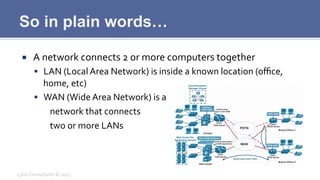
So in plain words…
¡  A	
  network	
  connects	
  2	
  or	
  more	
  computers	
  together	
  
§  LAN	
  (Local	
  Area	
  Network)	
  is	
  inside	
  a	
  known	
  location	
  (office,	
  
home,	
  etc)	
  
§  WAN	
  (Wide	
  Area	
  Network)	
  is	
  a	
  
	
  network	
  that	
  connects	


  two	
  or	
  more	
  LANs	
  
Lynx	
  Consultants	
  ©	
  2013	
  
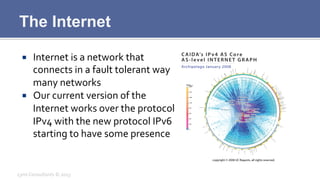
The Internet
¡  Internet	
  is	
  a	
  network	
  that	
  
connects	
  in	
  a	
  fault	
  tolerant	
  way	
  
many	
  networks	
  
¡  Our	
  current	
  version	
  of	
  the	
  
Internet	
  works	
  over	
  the	
  protocol	
  
IPv4	
  with	
  the	
  new	
  protocol	
  IPv6	
  
starting	
  to	
  have	
  some	
  presence	
  
Lynx	
  Consultants	
  ©	
  2013	
  
Internet IPv4
¡  The	
  most	
  common	
  protocol	
  in	
  Internet	
  is	
  right	
  now	
  IPv4	
  
¡  IPv4	
  has	
  been	
  the	
  Internet	
  protocol	
  since	
  1980	
  (RFC	
  760)	
  
¡  IPv4	
  uses	
  32	
  bit	
  addresses,	
  having	
  a	
  total	
  space	
  of	
  
4,294,967,296	
  unique	
  IPs	
  
Lynx	
  Consultants	
  ©	
  2013	
  
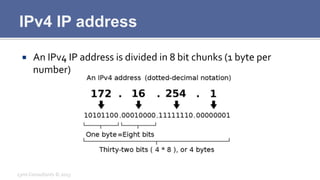
IPv4 IP address
¡  An	
  IPv4	
  IP	
  address	
  is	
  divided	
  in	
  8	
  bit	
  chunks	
  (1	
  byte	
  per	
  
number)	
  
Lynx	
  Consultants	
  ©	
  2013	
  
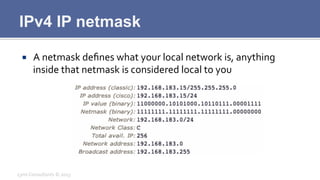
IPv4 IP netmask
¡  A	
  netmask	
  defines	
  what	
  your	
  local	
  network	
  is,	
  anything	
  
inside	
  that	
  netmask	
  is	
  considered	
  local	
  to	
  you	
  
Lynx	
  Consultants	
  ©	
  2013	
  
IPv4 Problems
¡  IPv4	
  is	
  running	
  out	
  of	
  IP	
  addresses	
  (last	
  /8	
  delivered	
  this	
  year)	
  
¡  IPv4	
  is	
  not	
  secure	
  for	
  most	
  uses	
  
¡  IPv4	
  was	
  designed	
  in	
  the	
  70ies	
  so	
  its	
  up	
  for	
  a	
  review	
  
Lynx	
  Consultants	
  ©	
  2013	
  
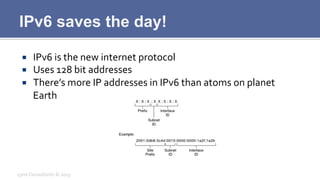
IPv6 saves the day!
¡  IPv6	
  is	
  the	
  new	
  internet	
  protocol	
  
¡  Uses	
  128	
  bit	
  addresses	
  
¡  There’s	
  more	
  IP	
  addresses	
  in	
  IPv6	
  than	
  atoms	
  on	
  planet	
  
Earth	
  
Lynx	
  Consultants	
  ©	
  2013	
  
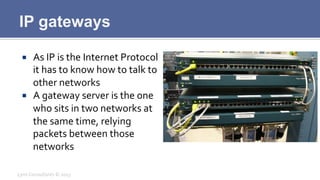
IP gateways
¡  As	
  IP	
  is	
  the	
  Internet	
  Protocol	
  
it	
  has	
  to	
  know	
  how	
  to	
  talk	
  to	
  
other	
  networks	
  
¡  A	
  gateway	
  server	
  is	
  the	
  one	
  
who	
  sits	
  in	
  two	
  networks	
  at	
  
the	
  same	
  time,	
  relying	
  
packets	
  between	
  those	
  
networks	
  
Lynx	
  Consultants	
  ©	
  2013	
  
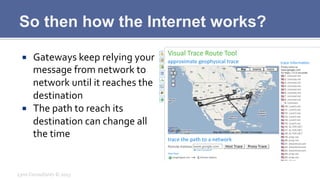
So then how the Internet works?
¡  Gateways	
  keep	
  relying	
  your	
  
message	
  from	
  network	
  to	
  
network	
  until	
  it	
  reaches	
  the	
  
destination	
  
¡  The	
  path	
  to	
  reach	
  its	
  
destination	
  can	
  change	
  all	
  
the	
  time	
  
Lynx	
  Consultants	
  ©	
  2013	
  
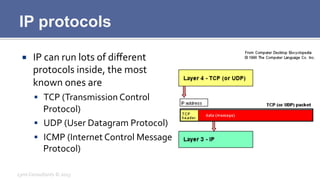
IP protocols
¡  IP	
  can	
  run	
  lots	
  of	
  different	
  
protocols	
  inside,	
  the	
  most	
  
known	
  ones	
  are	
  
§  TCP	
  (Transmission	
  Control	
  
Protocol)	
  
§  UDP	
  (User	
  Datagram	
  Protocol)	
  
§  ICMP	
  (Internet	
  Control	
  Message	
  
Protocol)	
  
Lynx	
  Consultants	
  ©	
  2013	
  
IP protocol definitions
¡  TCP	
  sends	
  packets	
  with	
  complete	
  assurance	
  that	
  they’ll	
  
reach	
  their	
  destination	
  
¡  UDP	
  sends	
  packets	
  without	
  any	
  kind	
  of	
  assurance	
  that	
  they’ll	
  
reach	
  their	
  destination	
  
¡  ICMP	
  sends	
  control	
  messages	
  auxiliary	
  to	
  the	
  IP	
  protocol	
  
(like	
  ping,	
  traceroute,	
  etc)	
  
Lynx	
  Consultants	
  ©	
  2013	
  
TCP Protocol
¡  Keeps	
  track	
  of	
  all	
  the	
  packets	
  it	
  sends	
  (serial	
  
num)	
  
¡  Destination	
  acknowledges	
  (ACK)	
  every	
  
packet	
  received	
  
¡  Packets	
  can	
  arrive	
  in	
  any	
  order	
  and	
  they’ll	
  be	
  
reordered	
  at	
  destination	
  
Lynx	
  Consultants	
  ©	
  2013	
  
TCP Ports
¡  TCP	
  can	
  listen	
  or	
  talk	
  in	
  several	
  “channels”	
  at	
  the	
  same	
  time	
  
¡  Ports	
  are	
  the	
  channels	
  where	
  TCP	
  (and	
  UDP)	
  talk,	
  there’s	
  a	
  
total	
  of	
  65,536	
  channels	
  
¡  Most	
  common	
  Ports	
  
§  80	
  http	
  
§  443	
  https	
  
§  25	
  smtp	
  
§  110	
  pop3	
  
§  143	
  imap	
  
Lynx	
  Consultants	
  ©	
  2013	
  
UDP Protocol
¡  UDP	
  sends	
  packets	
  as	
  TCP	
  to	
  ports,	
  but	
  there’s	
  no	
  guarantee	
  
that	
  the	
  packets	
  will	
  reach	
  its	
  destination.	
  
¡  This	
  is	
  ideal	
  for	
  any	
  kind	
  of	
  protocol	
  that	
  doesn’t	
  need	
  all	
  its	
  
packets	
  
§  Video	
  Streaming	
  
§  Radio	
  Streaming	
  
Lynx	
  Consultants	
  ©	
  2013	
  
ICMP Protocol
¡  ICMP	
  sends	
  auxiliary	
  messages	
  that	
  help	
  Internet	
  routing	
  
¡  Used	
  in	
  all	
  of	
  our	
  common	
  diagnostic	
  tools	
  
§  PING	
  (icmp	
  echo)	
  
§  TRACEROUTE	
  (icmp	
  route)	
  
Lynx	
  Consultants	
  ©	
  2013	
  
ICMP - Ping
¡  Ping	
  sends	
  a	
  packet	
  to	
  a	
  destination	
  and	
  reads	
  the	
  reply	
  
¡  Bases	
  itself	
  on	
  ICMP	
  echo	
  
¡  Can	
  be	
  filtered	
  by	
  routers	
  and	
  inbetween	
  policy	
  filters	
  
Lynx	
  Consultants	
  ©	
  2013	
  
ICMP - Traceroute
¡  Traceroute	
  sends	
  requests	
  to	
  every	
  single	
  hop	
  between	
  us	
  
and	
  a	
  destination	
  
¡  This	
  is	
  based	
  on	
  one	
  special	
  type	
  of	
  ICMP	
  packet	
  
¡  Some	
  routers	
  can	
  decide	
  to	
  filter	
  traceroute,	
  in	
  that	
  case	
  *	
  
will	
  appear	
  instead	
  of	
  the	
  TTL	
  
Lynx	
  Consultants	
  ©	
  2013	
  
What is DNS?
¡  The	
  Internet	
  works	
  with	
  IP	
  addresses	
  
¡  How	
  can	
  we	
  remember	
  always	
  that	
  google	
  is	
  173.194.67.103?	
  
¡  It’s	
  humanly	
  impossible!	
  
Lynx	
  Consultants	
  ©	
  2013	
  
DNS saves the day
¡  DNS	
  is	
  a	
  service	
  (listens	
  on	
  UDP	
  port	
  53)	
  
¡  DNS	
  will	
  give	
  you	
  the	
  IP	
  address	
  of	
  any	
  name	
  you	
  want	
  
¡  It	
  can	
  give	
  you	
  more	
  than	
  one	
  address	
  for	
  extra	
  redundancy	
  
Lynx	
  Consultants	
  ©	
  2013	
  
DNS Servers
¡  DNS	
  is	
  also	
  a	
  security	
  risk,	
  you	
  don’t	
  want	
  everyone	
  to	
  know	
  
your	
  full	
  DNS	
  structure	
  
¡  Big	
  companies	
  will	
  show	
  you	
  a	
  different	
  DNS	
  “view”	
  based	
  
on	
  where	
  you	
  are	
  
Lynx	
  Consultants	
  ©	
  2013	
  
DNS Geo Balanced
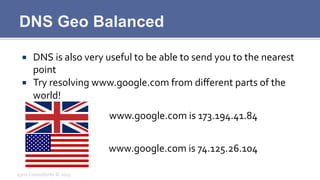
¡  DNS	
  is	
  also	
  very	
  useful	
  to	
  be	
  able	
  to	
  send	
  you	
  to	
  the	
  nearest	
  
point	
  
¡  Try	
  resolving	
  www.google.com	
  from	
  different	
  parts	
  of	
  the	
  
world!	
  
Lynx	
  Consultants	
  ©	
  2013	
  
www.google.com	
  is	
  173.194.41.84	
  
www.google.com	
  is	
  74.125.26.104	
  
Questions?
Lynx	
  Consultants	
  ©	
  2013	
  

Networking & dns 101

  • 1.
    Marc  Cluet  –  Lynx  Consultants    
  • 2.
    What we’ll cover? ¡ Understand  how  networking  works   ¡  Understand  all  the  basic  networking  protocols   ¡  Understand  how  DNS  works   ¡  Be  more  awesome!   Lynx  Consultants  ©  2013  
  • 3.
    What is aNetwork? ¡  A  computer  network,  or  simply  a  network,  is  a  collection  of   computers  and  other  hardware  interconnected  by  communication   channels  that  allow  sharing  of  resources  and  information.[1]   Where  at  least  one  process  in  one  device  is  able  to  send/receive   data  to/from  at  least  one  process  residing  in  a  remote  device,  then   the  two  devices  are  said  to  be  in  a  network.  A  network  is  a  group  of   devices  connected  to  each  other.  Networks  may  be  classified  into   a  wide  variety  of  characteristics,  such  as  the  medium  used  to   transport  the  data,  communications  protocol  used,  scale,   topology,  benefit,  and  organizational  scope.  (gotta  love  Wikipedia)   Lynx  Consultants  ©  2013  
  • 4.
    So in plainwords… ¡  A  network  connects  2  or  more  computers  together   §  LAN  (Local  Area  Network)  is  inside  a  known  location  (office,   home,  etc)   §  WAN  (Wide  Area  Network)  is  a    network  that  connects      two  or  more  LANs   Lynx  Consultants  ©  2013  
  • 5.
    The Internet ¡  Internet  is  a  network  that   connects  in  a  fault  tolerant  way   many  networks   ¡  Our  current  version  of  the   Internet  works  over  the  protocol   IPv4  with  the  new  protocol  IPv6   starting  to  have  some  presence   Lynx  Consultants  ©  2013  
  • 6.
    Internet IPv4 ¡  The  most  common  protocol  in  Internet  is  right  now  IPv4   ¡  IPv4  has  been  the  Internet  protocol  since  1980  (RFC  760)   ¡  IPv4  uses  32  bit  addresses,  having  a  total  space  of   4,294,967,296  unique  IPs   Lynx  Consultants  ©  2013  
  • 7.
    IPv4 IP address ¡ An  IPv4  IP  address  is  divided  in  8  bit  chunks  (1  byte  per   number)   Lynx  Consultants  ©  2013  
  • 8.
    IPv4 IP netmask ¡ A  netmask  defines  what  your  local  network  is,  anything   inside  that  netmask  is  considered  local  to  you   Lynx  Consultants  ©  2013  
  • 9.
    IPv4 Problems ¡  IPv4  is  running  out  of  IP  addresses  (last  /8  delivered  this  year)   ¡  IPv4  is  not  secure  for  most  uses   ¡  IPv4  was  designed  in  the  70ies  so  its  up  for  a  review   Lynx  Consultants  ©  2013  
  • 10.
    IPv6 saves theday! ¡  IPv6  is  the  new  internet  protocol   ¡  Uses  128  bit  addresses   ¡  There’s  more  IP  addresses  in  IPv6  than  atoms  on  planet   Earth   Lynx  Consultants  ©  2013  
  • 11.
    IP gateways ¡  As  IP  is  the  Internet  Protocol   it  has  to  know  how  to  talk  to   other  networks   ¡  A  gateway  server  is  the  one   who  sits  in  two  networks  at   the  same  time,  relying   packets  between  those   networks   Lynx  Consultants  ©  2013  
  • 12.
    So then howthe Internet works? ¡  Gateways  keep  relying  your   message  from  network  to   network  until  it  reaches  the   destination   ¡  The  path  to  reach  its   destination  can  change  all   the  time   Lynx  Consultants  ©  2013  
  • 13.
    IP protocols ¡  IP  can  run  lots  of  different   protocols  inside,  the  most   known  ones  are   §  TCP  (Transmission  Control   Protocol)   §  UDP  (User  Datagram  Protocol)   §  ICMP  (Internet  Control  Message   Protocol)   Lynx  Consultants  ©  2013  
  • 14.
    IP protocol definitions ¡ TCP  sends  packets  with  complete  assurance  that  they’ll   reach  their  destination   ¡  UDP  sends  packets  without  any  kind  of  assurance  that  they’ll   reach  their  destination   ¡  ICMP  sends  control  messages  auxiliary  to  the  IP  protocol   (like  ping,  traceroute,  etc)   Lynx  Consultants  ©  2013  
  • 15.
    TCP Protocol ¡  Keeps  track  of  all  the  packets  it  sends  (serial   num)   ¡  Destination  acknowledges  (ACK)  every   packet  received   ¡  Packets  can  arrive  in  any  order  and  they’ll  be   reordered  at  destination   Lynx  Consultants  ©  2013  
  • 16.
    TCP Ports ¡  TCP  can  listen  or  talk  in  several  “channels”  at  the  same  time   ¡  Ports  are  the  channels  where  TCP  (and  UDP)  talk,  there’s  a   total  of  65,536  channels   ¡  Most  common  Ports   §  80  http   §  443  https   §  25  smtp   §  110  pop3   §  143  imap   Lynx  Consultants  ©  2013  
  • 17.
    UDP Protocol ¡  UDP  sends  packets  as  TCP  to  ports,  but  there’s  no  guarantee   that  the  packets  will  reach  its  destination.   ¡  This  is  ideal  for  any  kind  of  protocol  that  doesn’t  need  all  its   packets   §  Video  Streaming   §  Radio  Streaming   Lynx  Consultants  ©  2013  
  • 18.
    ICMP Protocol ¡  ICMP  sends  auxiliary  messages  that  help  Internet  routing   ¡  Used  in  all  of  our  common  diagnostic  tools   §  PING  (icmp  echo)   §  TRACEROUTE  (icmp  route)   Lynx  Consultants  ©  2013  
  • 19.
    ICMP - Ping ¡ Ping  sends  a  packet  to  a  destination  and  reads  the  reply   ¡  Bases  itself  on  ICMP  echo   ¡  Can  be  filtered  by  routers  and  inbetween  policy  filters   Lynx  Consultants  ©  2013  
  • 20.
    ICMP - Traceroute ¡ Traceroute  sends  requests  to  every  single  hop  between  us   and  a  destination   ¡  This  is  based  on  one  special  type  of  ICMP  packet   ¡  Some  routers  can  decide  to  filter  traceroute,  in  that  case  *   will  appear  instead  of  the  TTL   Lynx  Consultants  ©  2013  
  • 21.
    What is DNS? ¡ The  Internet  works  with  IP  addresses   ¡  How  can  we  remember  always  that  google  is  173.194.67.103?   ¡  It’s  humanly  impossible!   Lynx  Consultants  ©  2013  
  • 22.
    DNS saves theday ¡  DNS  is  a  service  (listens  on  UDP  port  53)   ¡  DNS  will  give  you  the  IP  address  of  any  name  you  want   ¡  It  can  give  you  more  than  one  address  for  extra  redundancy   Lynx  Consultants  ©  2013  
  • 23.
    DNS Servers ¡  DNS  is  also  a  security  risk,  you  don’t  want  everyone  to  know   your  full  DNS  structure   ¡  Big  companies  will  show  you  a  different  DNS  “view”  based   on  where  you  are   Lynx  Consultants  ©  2013  
  • 24.
    DNS Geo Balanced ¡ DNS  is  also  very  useful  to  be  able  to  send  you  to  the  nearest   point   ¡  Try  resolving  www.google.com  from  different  parts  of  the   world!   Lynx  Consultants  ©  2013   www.google.com  is  173.194.41.84   www.google.com  is  74.125.26.104  
  • 25.