Introduction to Protocols
A protocol is a set of rules for the exchange
of data between two computer or more
than two computers.
In internet various type of protocol uses for
transfer of different types of data for
example SMTP uses for mail transfer , FTP
uses for file transfer etc
OSI Model TCP/IP
Provides information about how and where
 data should be delivered
 Sub protocol that enables TCP/IP to
internetwork
 To internetwork is to traverse more than one LAN segment and more than one type of
 network through a router
 In an internetwork, the individual networks that are joined together are called
subnetworks
 IP is an unreliable, connectionless protocol, which means it does not guarantee delivery
of data
 Allows protocol to service a request without requesting verified session and without
guaranteeing delivery of data
Internet Protocol (IP)
Transport Control Protocol (TCP)
TCP
 Provides reliable data delivery services
 Connection-oriented sub protocol
 Requires establishment of connection between
 communicating nodes before protocol will transmit data
TCP segment
Holds TCP data fields
Becomes encapsulated by IP datagram
TCP/IP Application Layer Protocols
Telnet
 Used to log on to remote hosts using TCP/IP protocol
suite
File Transfer Protocol (FTP)
 Used to send and receive files via TCP/IP
Simple Mail Transfer Protocol (SMTP)
 Responsible for moving messages from one e-mail server
to another, using the Internet and other TCP/IP-based
networks
Simple Network Management Protocol (SNMP)
 Manages devices on a TCP/IP network
Addressing in TCP/IP
IP Address Logical address used in TCP/IP networking Unique 32-bit number
Divided into four groups of octets (8-bit bytes) that are separated by
periods
IP addresses are assigned and used according to very specific parameters
Static IP address IP address manually assigned to a device. It can not be
changed
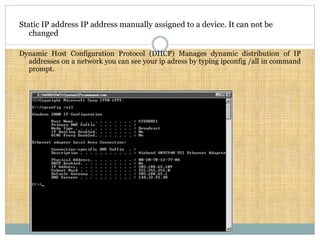
Dynamic Host Configuration Protocol (DHCP) Manages dynamic distribution of IP
addresses on a network you can see your ip adress by typing ipconfig /all in command
prompt.
This all about TCP/IP
Follow our next slide for more information
Thank you

Network protocols

  • 1.
    Introduction to Protocols Aprotocol is a set of rules for the exchange of data between two computer or more than two computers. In internet various type of protocol uses for transfer of different types of data for example SMTP uses for mail transfer , FTP uses for file transfer etc
  • 2.
  • 3.
    Provides information abouthow and where  data should be delivered  Sub protocol that enables TCP/IP to internetwork  To internetwork is to traverse more than one LAN segment and more than one type of  network through a router  In an internetwork, the individual networks that are joined together are called subnetworks  IP is an unreliable, connectionless protocol, which means it does not guarantee delivery of data  Allows protocol to service a request without requesting verified session and without guaranteeing delivery of data Internet Protocol (IP)
  • 4.
    Transport Control Protocol(TCP) TCP  Provides reliable data delivery services  Connection-oriented sub protocol  Requires establishment of connection between  communicating nodes before protocol will transmit data TCP segment Holds TCP data fields Becomes encapsulated by IP datagram
  • 5.
    TCP/IP Application LayerProtocols Telnet  Used to log on to remote hosts using TCP/IP protocol suite File Transfer Protocol (FTP)  Used to send and receive files via TCP/IP Simple Mail Transfer Protocol (SMTP)  Responsible for moving messages from one e-mail server to another, using the Internet and other TCP/IP-based networks Simple Network Management Protocol (SNMP)  Manages devices on a TCP/IP network
  • 6.
    Addressing in TCP/IP IPAddress Logical address used in TCP/IP networking Unique 32-bit number Divided into four groups of octets (8-bit bytes) that are separated by periods IP addresses are assigned and used according to very specific parameters
  • 7.
    Static IP addressIP address manually assigned to a device. It can not be changed Dynamic Host Configuration Protocol (DHCP) Manages dynamic distribution of IP addresses on a network you can see your ip adress by typing ipconfig /all in command prompt.
  • 8.
    This all aboutTCP/IP Follow our next slide for more information Thank you