Remote Server
Rijosh.vk
Ssm poly tirur
Roll no:19
Topics
l1..Remote Server
l2..Accessing Remote server
l3..File Sharing
A server that is dedicated to handling users that are not
on a lan but need remote access to it.The remote access
server allows users to gain access to file andprint
services on the lan from remote location.
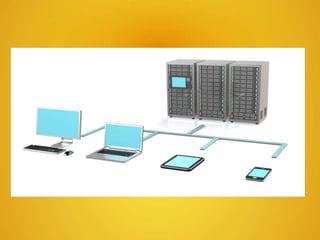
What is Remote Server
lThe remote access server allows users to gain access to
files and print services on the LAN from a remote location.
lFor example, a user who dials into a network from home
using an analog modem or an ISDN connection will dial into
a remote access server. Once the user is authenticated he
can access shared drives and printers as if he were
physically connected to the office LAN.
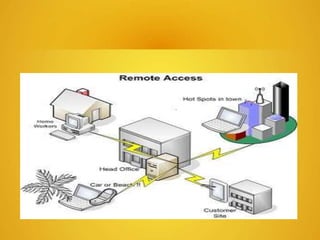
Remote Access
lRemote access is the ability to get access to a computer or
a network from a remote distance.In corporations, people at
branch offices, telecommuters, and people who are
traveling may need access to the corporation's network.
What is Remote Access
lThe ability to get accesses to a computer or a
network from a remote distance
lUsed for telecommuters accessing to the corporations’
network, home users accessing Internet
lDial – up connection over regular telephone line is the
common method
lDedicated line between a computer and a remote LAN,
is more expensive and less flexible, but is faster
lISDN combines dial-up connection with a faster data
transfer
lMethods of Remote Access
lDial-up connection through desktop, notebook, or hand held
computer modem over regular telephone lines is a common
method of remote access
lRemote access is also possible using a dedicated line
between a computer or a remote local area network and the
"central" or main corporate local area network.
lA dedicated line is more expensive and less flexible but
offers faster data rates.
lIntegrated Services Digital Network (ISDN) is a common
method of remote access from branch offices since it
combines dial-up with faster data rates.
lWireless, cable modem, and Digital Subscriber Line (DSL)
technologies offer other possibilities for remote access.
lA remote access server is the computer and associated
software that is set up to handle users seeking access to
network remotely.
lSometimes called a communication server, a remote
access server usually includes or is associated with a
firewall server to ensure security and a router that can
forward the remote access request to another part of the
corporate network.
lA remote access server may include or work with a modem
pool manager so that a small group of modems can be
shared among a large number of intermittently present
remote access users.
lA remote access server may also be used as part of a virtual
private network (VPN).
File Sharing
File sharing is the public or private sharing of computer data or
space in a network with various levels of access privilege.
While files can easily be shared outside a network (for example,
simply by handing or mailing someone your file on a diskette), the
term file sharing almost always means sharing files in a network,
even if in a small local area network. File sharing allows a number of
people to use the same file or file by some combination of being able
to read or view it, write to or modify it, copy it, or print it.
lFile servers make files available to other hosts on the
network.
lFile service clients obtain file systems from file servers
lFile service peers are (both) servers and clients.
lNetwork file sharing employs Remote Procedure Calls
(RPC’s).
lNetwork File Sharing
lNetwork File Systems allow the users files to “migrate” from
workstation to workstation with them.
lNetwork File Systems simplify life for the user, but generally
make system administration more complicated (due to the
setup costs).
lIn Lab 6 we will setup the Sun Network File System (NFS)
services on the lab machines.
lNFS has two components: The server side software, and the
client side software. Each component is actually a suite of
programs which implement the sockets required to provide
network based filesystems.
lNFS is stateless.
lNetwork File Sharing
lClient Side
lbiod - client side caching daemon
lmount must understand the hostname:directory
convention.
lFilesystem entries in /etc/[v]fstab tell the client what
filesystems to mount.
lNetwork File Sharing
lAFS
lWhen you install AFS, the installation procedure creates some new
directories:
l/usr/afsws - contains the binaries for the AFS suite: fs, tokens, pts
l/usr/vice - contains the AFS administrative files:
lcache files (/usr/vice/cache)
l administrative information about this AFS client
(/usr/vice/etc).
lThe package software is also installed. Package is a utility for
updating system files upon reboot.
lWhat is a P2P network?
lAll machines are connected as equal
lEach user is a Peer
lPeers can act as both a server and a client
lWhat does this mean?
lEach user can send and receive files from other
users
lTo understand the importance, must look at
the other ways of transmitting data
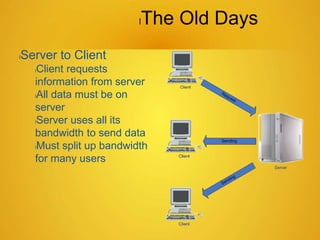
lThe Old Days
lServer to Client
lClient requests
information from server
lAll data must be on
server
lServer uses all its
bandwidth to send data
lMust split up bandwidth
for many users
lBenefits of P2P
lDistributed
lData can be distributed across the entire
network
lBandwidth is distributed across each machine
with the data
lSearch processing is distributed
lRedundancy within the network
Thanks

Remote server

  • 1.
  • 2.
  • 3.
    A server thatis dedicated to handling users that are not on a lan but need remote access to it.The remote access server allows users to gain access to file andprint services on the lan from remote location. What is Remote Server
  • 4.
    lThe remote accessserver allows users to gain access to files and print services on the LAN from a remote location. lFor example, a user who dials into a network from home using an analog modem or an ISDN connection will dial into a remote access server. Once the user is authenticated he can access shared drives and printers as if he were physically connected to the office LAN.
  • 6.
    Remote Access lRemote accessis the ability to get access to a computer or a network from a remote distance.In corporations, people at branch offices, telecommuters, and people who are traveling may need access to the corporation's network.
  • 7.
    What is RemoteAccess lThe ability to get accesses to a computer or a network from a remote distance lUsed for telecommuters accessing to the corporations’ network, home users accessing Internet
  • 8.
    lDial – upconnection over regular telephone line is the common method lDedicated line between a computer and a remote LAN, is more expensive and less flexible, but is faster lISDN combines dial-up connection with a faster data transfer lMethods of Remote Access
  • 10.
    lDial-up connection throughdesktop, notebook, or hand held computer modem over regular telephone lines is a common method of remote access lRemote access is also possible using a dedicated line between a computer or a remote local area network and the "central" or main corporate local area network. lA dedicated line is more expensive and less flexible but offers faster data rates. lIntegrated Services Digital Network (ISDN) is a common method of remote access from branch offices since it combines dial-up with faster data rates.
  • 11.
    lWireless, cable modem,and Digital Subscriber Line (DSL) technologies offer other possibilities for remote access. lA remote access server is the computer and associated software that is set up to handle users seeking access to network remotely. lSometimes called a communication server, a remote access server usually includes or is associated with a firewall server to ensure security and a router that can forward the remote access request to another part of the corporate network.
  • 12.
    lA remote accessserver may include or work with a modem pool manager so that a small group of modems can be shared among a large number of intermittently present remote access users. lA remote access server may also be used as part of a virtual private network (VPN).
  • 13.
    File Sharing File sharingis the public or private sharing of computer data or space in a network with various levels of access privilege. While files can easily be shared outside a network (for example, simply by handing or mailing someone your file on a diskette), the term file sharing almost always means sharing files in a network, even if in a small local area network. File sharing allows a number of people to use the same file or file by some combination of being able to read or view it, write to or modify it, copy it, or print it.
  • 14.
    lFile servers makefiles available to other hosts on the network. lFile service clients obtain file systems from file servers lFile service peers are (both) servers and clients. lNetwork file sharing employs Remote Procedure Calls (RPC’s).
  • 15.
    lNetwork File Sharing lNetworkFile Systems allow the users files to “migrate” from workstation to workstation with them. lNetwork File Systems simplify life for the user, but generally make system administration more complicated (due to the setup costs). lIn Lab 6 we will setup the Sun Network File System (NFS) services on the lab machines. lNFS has two components: The server side software, and the client side software. Each component is actually a suite of programs which implement the sockets required to provide network based filesystems. lNFS is stateless.
  • 16.
    lNetwork File Sharing lClientSide lbiod - client side caching daemon lmount must understand the hostname:directory convention. lFilesystem entries in /etc/[v]fstab tell the client what filesystems to mount.
  • 17.
    lNetwork File Sharing lAFS lWhenyou install AFS, the installation procedure creates some new directories: l/usr/afsws - contains the binaries for the AFS suite: fs, tokens, pts l/usr/vice - contains the AFS administrative files: lcache files (/usr/vice/cache) l administrative information about this AFS client (/usr/vice/etc). lThe package software is also installed. Package is a utility for updating system files upon reboot.
  • 18.
    lWhat is aP2P network? lAll machines are connected as equal lEach user is a Peer lPeers can act as both a server and a client lWhat does this mean? lEach user can send and receive files from other users lTo understand the importance, must look at the other ways of transmitting data
  • 19.
    lThe Old Days lServerto Client lClient requests information from server lAll data must be on server lServer uses all its bandwidth to send data lMust split up bandwidth for many users
  • 20.
    lBenefits of P2P lDistributed lDatacan be distributed across the entire network lBandwidth is distributed across each machine with the data lSearch processing is distributed lRedundancy within the network
  • 21.