NETWORKING SHARDUL GOSAWI
www.pskitservices.com
HISTORY OF NETWORK &
NETWORKING
1. Network is a Group of connected devices such as computer ,
desktop or laptop, network switch, router, modem. Printers
NIC-card etc.
2. Networking Means Communication Between Connected
Devices. Exchange data information.
DOD & ARPA (ADVANCE RESEARCH
PROJECTS AGENCY )
• In the mid of 1960s mainframe computers in research organization were stand alone devices .
• Computer from different manufacturer were unable to communicate with each others.
• The ARPA was interested to find way to connect computers together .
• So companies and some organizations funded to ARPA.
• In 1967 ARPA Give the Presentation about the Network Called ARPANET in front of Association
for computing machinery
• A small network of connected computer
• The idea was that each host computer would be attach a specialize computer called IMP
(interface Message Processor)
• In 1969 ARPANET was in reality.
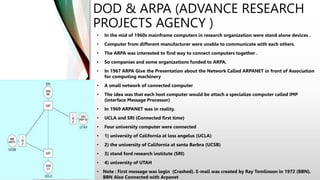
• UCLA and SRI (Connected first time)
• Four university computer were connected
• 1) university of California at loss angelus (UCLA)
• 2) the university of California at santa Barbra (UCSB)
• 3) stand ford research institute (SRI)
• 4) university of UTAH
• Note : First message was login (Crashed). E-mail was created by Ray Tomlinson in 1972 (BBN).
BBN Also Connected with Arpanet
DOD & ARPA (ADVANCE RESEARCH
PROJECTS AGENCY )
• ARPANET extended to connect DOD with US universities carrying out
defense related research.
• University college of London (UK) and Royal radar network (Norway)
connected to the ARPANET and a network of network was formed
(internetwork) internet form
• The term internet was coined by Vinton cerf, Yogen Dalal and carl
sunshine of standford university to describe this network of networks
• They also developed transmission control protocol (TCP)
• Telenet was the first commercial adaptation of ARPANET (internet by
isp)
• Introduced in 1974
• Concept of internet service provider (ISP) was also introduced
• Main function of ISP is to provide uninterrupted internet connection to
its customers at affordable rates.
WWW
• Developed in the 1980s by Tim Berners Lee at CERN, Switzerland
• Complex web of websites and web pages connected together through hypertexts
• Hypertext is a word or group of words linking to another web
• Page of the same or different website.
• Evolution from ARPANET to WWW was possible due to many new
• Achievements by researchers and computer scientists all over the world
• 1957Advance research project agency formed by US
• 1969 ARPANET become functional
• 1970 ARPANET connected to BBN
• 1972 Ray Tomlinson develops network messaging email symbol @ comes to mean “At”
• 1973 ARPANET connected to royal radar network of Norway
• 1974 Term internet coined ( telenet is approved)
• 1982 TCP /IP introduced as standard protocol on ARPANET
• 1983 DNS introduced
• 1986 many people connected (teaching)
• 1990 ARPANET decommissioned (stopped services ) html developed
NETWORK CONCEPT
• Interconnection of two or more devices is called
network.
NETWORKING CONCEPT
• The communication between two or more
interconnected devices is called networking.
INTERNETWORK & INTERNETWORKING
• Internetwork means connections of two or more
deferent networks.
• Internetworking means communications between
two or more connected networks.
INTERNETWORK & INTERNETWORKING
• Internetwork means connections of two or more
deferent networks.
• Internetworking means communications between
two or more connected networks.
TYPES OF NETWORKS
WHAT IS NETWORK ?
• A computer network is a group of computers
linked to each other that enables the computer to
communicate with another computer and share
their resources, data, and applications.
A computer network can be categorized by their
size.
• A computer network is mainly of Three types
a) LAN
b) MAN
c) WAN
LAN
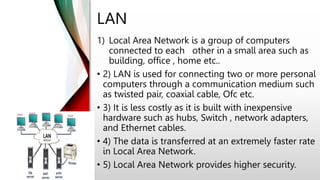
1) Local Area Network is a group of computers
connected to each other in a small area such as
building, office , home etc..
• 2) LAN is used for connecting two or more personal
computers through a communication medium such
as twisted pair, coaxial cable, Ofc etc.
• 3) It is less costly as it is built with inexpensive
hardware such as hubs, Switch , network adapters,
and Ethernet cables.
• 4) The data is transferred at an extremely faster rate
in Local Area Network.
• 5) Local Area Network provides higher security.
MAN
• A metropolitan area network is a network that
covers a larger geographic area by interconnecting
a different LAN to form a larger network.
• Government agencies use MAN to connect to the
citizens and private industries.
• In MAN, various LANs are connected to each other
through a telephone exchange line.
• The most widely used protocols in MAN are RS-232,
Frame Relay, ATM, ISDN, OC-3, ADSL, etc.
• 3) It has a higher range than Local Area
Network(LAN).
•
WAN
• A Wide Area Network is a network that extends
over a large geographical area such as city to city ,
states or countries.
• A Wide Area Network is quite bigger network than
the LAN.
• A Wide Area Network is not limited to a single
location, but it spans over a large geographical area
through a telephone line, fiber optic cable or
satellite links.
• The internet is one of the biggest WAN in the
world.
• A Wide Area Network is widely used in the field of
Business, government, and education.
BASIC REQUIREMENT TO FORM A
NETWORK
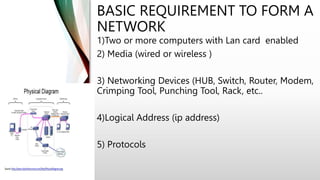
1)Two or more computers with Lan card enabled
2) Media (wired or wireless )
3) Networking Devices (HUB, Switch, Router, Modem,
Crimping Tool, Punching Tool, Rack, etc..
4)Logical Address (ip address)
5) Protocols
NETWORK / NETWORKING DEVICES
• Network or Networking Devices are called node they are used
to configure ,connect network
• Example :
1) Hub
2) Switch
3) Router
4) Modem
5) Crimping tool
6) Punching tool
7) Cable tester
8) Rack
9) Patch panel
10)Io box
11)NIC Lan-card
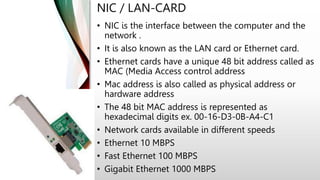
NIC / LAN-CARD
• NIC is the interface between the computer and the
network .
• It is also known as the LAN card or Ethernet card.
• Ethernet cards have a unique 48 bit address called as
MAC (Media Access control address
• Mac address is also called as physical address or
hardware address
• The 48 bit MAC address is represented as
hexadecimal digits ex. 00-16-D3-0B-A4-C1
• Network cards available in different speeds
• Ethernet 10 MBPS
• Fast Ethernet 100 MBPS
• Gigabit Ethernet 1000 MBPS
NIC / LAN-CARD
• NIC is the interface between the computer and the
network .
• It is also known as the LAN card or Ethernet card.
• Ethernet cards have a unique 48 bit address called as
MAC (Media Access control address
• Mac address is also called as physical address or
hardware address
• The 48 bit MAC address is represented as
hexadecimal digits ex. 00-16-D3-0B-A4-C1
• Network cards available in different speeds
• Ethernet 10 MBPS
• Fast Ethernet 100 MBPS
• Gigabit Ethernet 1000 MBPS
IP ADDRESSING
• IP address is a logical address.
• It is use to identify computer and devices in network.
• It is network layer address (OSI Layer 3rd is a network layer)
IP ADDRESSING
IANA
The IP address space is managed globally by
the Internet Assigned Numbers Authority
(IANA), and by five regional Internet registries
(RIRs) responsible in their designated
territories for assignment to local Internet
registries, such as Internet service providers,
and other end users
RIR
An RIR is an organization that manages and
controls Internet addresses in a specific
region, usually a country and sometimes an
entire continent. RIRs control assigning and
distributing IP addresses and domain
registrations.
TYPES OF IP ADDRESS -
• IPV4 –
32 bits address in the form of binary 0, 1
• IPV6 –
128 bits address in the form of hexadecimal 0
to 9 and A to F
IPV4 -
• Bit is represented by 0 & 1 binary
• IP address in binary form
(010101010101010101010101010010101)
• 32 bits are divided in 4 Octets
• 01010101 . 01010101 . 010101010 . 01010101
• IP address is in decimal form (192.168.10.1)
• IP V4 0 . 0 . 0 . 0 (1 Zero Represent 8 bits 8
zeros )
• IPV4 255.255.255.255 (actual Decimal Value)
IP ADDRESS RANGE
• IP address divided into 5 classes:
1. Class A –
0 to 127 (1 to 126 valid)
2. Class B –
128 to 191
3. Class C –
192 to 223
4. Class D –
224 to 239
5. Class E –
240 to 255
These classes used in
LAN and WAN
Used for multicasting
Used for R&D
CLASS A RANGE VALID 1 TO 126
DEFAULT MASK 255.0.0.0
1.0.0.1
255.0.0.0
1.0.0.5
255.0.0.0
1.0.0.6
255.0.0.0
1.0.0.254
255.0.0.0
1.0.0.3
255.0.0.0
1.0.0.2
255.0.0.0
1.0.0.4
255.0.0.0
CLASS B RANGE VALID 128 TO 191
DEFAULT MASK 255.255.0.0
128.0.0.1
255.255.0.0
128.0.0.5
255.255.0.0
128.0.0.6
255.255.0.0
128.0.0.254
255.255.0.0
128.0.0.3
255.255.0.0
128.0.0.2
255.255.0.0
128.0.0.4
255.255.0.0
CLASS B RANGE VALID 128 TO 191
DEFAULT MASK 255.255.0.0
192.0.0.1
255.255.255.0
192.0.0.5
255.255.255.0
192.0.0.6
255.255.255.0
192.0.0.254
255.255.255.0
192.0.0.3
255.255.255.0
192.0.0.2
255.255.255.0
192.0.0.4
255.255.255.0
PRIVATE IP ADDRESS
A private IP address is the address of your device connected on
the home or business network. If you have a few different
devices connected to one ISP (Internet Service Provider), then all
your devices will have a unique private IP address. This IP
address cannot be accessed from devices outside your home or
business network.
For example: 192.168.1.1
Private IP addresses are not unique because there are limited
number of devices on your network.
You can find out the private IP address of your device using a
few techniques. If you are a Windows user, then simply go to the
command prompt and enter the command ipconfig
PRIVATE IP ADDRESS
Private IP address range -
• Class A 10.0.0.1 to 10.255.255.254
• Class B 172.16.0.1 to 172.31.255.254
• Class C 192.168.0.1 to 192.168.255.254
PUBLIC IP ADDRESS
Your public IP address is the main IP address
to which your home or business network is
connected. This IP address connects you to
the world, and it’s unique for all users.
To find out your public IP address, simply go
to SupportAlly site in your browser, and it will
display the public IP, and other browser
information.
PUBLIC IP ADDRESS
Public IP address range -
• Class A 1.0.0.1 to 9.255.255.254 and
11.0.0.1 to 126.255.255.254
• Class B 128.0.0.1 to 172.15.255.254 and
172.32.0.1 to 191.255.255.254
• Class C 192.0.0.1 to 192.167.255.254 and
192.169.0.1 to 223.255.255.254
IP ADDRESSES CAN BE ASSIGNED
IN TWO WAYS
1. Manually
2. Automatically
APIPA RANGE
Automatic Private IP Addressing (APIPA) is a
feature in operating systems (such as
Windows) that enables computers to
automatically self-configure an IP address and
subnet mask when their DHCP server isn't
reachable.
The IP address range for APIPA –
169.254. 0.1 to 169.254.255.254 of 255.255.
0.0
Any queries??
Any doubts??
Thank you!!
www.pskitservices.com

IP ADDRESSING.pptx

  • 1.
  • 2.
    HISTORY OF NETWORK& NETWORKING 1. Network is a Group of connected devices such as computer , desktop or laptop, network switch, router, modem. Printers NIC-card etc. 2. Networking Means Communication Between Connected Devices. Exchange data information.
  • 3.
    DOD & ARPA(ADVANCE RESEARCH PROJECTS AGENCY ) • In the mid of 1960s mainframe computers in research organization were stand alone devices . • Computer from different manufacturer were unable to communicate with each others. • The ARPA was interested to find way to connect computers together . • So companies and some organizations funded to ARPA. • In 1967 ARPA Give the Presentation about the Network Called ARPANET in front of Association for computing machinery • A small network of connected computer • The idea was that each host computer would be attach a specialize computer called IMP (interface Message Processor) • In 1969 ARPANET was in reality. • UCLA and SRI (Connected first time) • Four university computer were connected • 1) university of California at loss angelus (UCLA) • 2) the university of California at santa Barbra (UCSB) • 3) stand ford research institute (SRI) • 4) university of UTAH • Note : First message was login (Crashed). E-mail was created by Ray Tomlinson in 1972 (BBN). BBN Also Connected with Arpanet
  • 4.
    DOD & ARPA(ADVANCE RESEARCH PROJECTS AGENCY ) • ARPANET extended to connect DOD with US universities carrying out defense related research. • University college of London (UK) and Royal radar network (Norway) connected to the ARPANET and a network of network was formed (internetwork) internet form • The term internet was coined by Vinton cerf, Yogen Dalal and carl sunshine of standford university to describe this network of networks • They also developed transmission control protocol (TCP) • Telenet was the first commercial adaptation of ARPANET (internet by isp) • Introduced in 1974 • Concept of internet service provider (ISP) was also introduced • Main function of ISP is to provide uninterrupted internet connection to its customers at affordable rates.
  • 5.
    WWW • Developed inthe 1980s by Tim Berners Lee at CERN, Switzerland • Complex web of websites and web pages connected together through hypertexts • Hypertext is a word or group of words linking to another web • Page of the same or different website. • Evolution from ARPANET to WWW was possible due to many new • Achievements by researchers and computer scientists all over the world • 1957Advance research project agency formed by US • 1969 ARPANET become functional • 1970 ARPANET connected to BBN • 1972 Ray Tomlinson develops network messaging email symbol @ comes to mean “At” • 1973 ARPANET connected to royal radar network of Norway • 1974 Term internet coined ( telenet is approved) • 1982 TCP /IP introduced as standard protocol on ARPANET • 1983 DNS introduced • 1986 many people connected (teaching) • 1990 ARPANET decommissioned (stopped services ) html developed
  • 6.
    NETWORK CONCEPT • Interconnectionof two or more devices is called network.
  • 7.
    NETWORKING CONCEPT • Thecommunication between two or more interconnected devices is called networking.
  • 8.
    INTERNETWORK & INTERNETWORKING •Internetwork means connections of two or more deferent networks. • Internetworking means communications between two or more connected networks.
  • 9.
    INTERNETWORK & INTERNETWORKING •Internetwork means connections of two or more deferent networks. • Internetworking means communications between two or more connected networks.
  • 10.
  • 11.
    WHAT IS NETWORK? • A computer network is a group of computers linked to each other that enables the computer to communicate with another computer and share their resources, data, and applications. A computer network can be categorized by their size. • A computer network is mainly of Three types a) LAN b) MAN c) WAN
  • 12.
    LAN 1) Local AreaNetwork is a group of computers connected to each other in a small area such as building, office , home etc.. • 2) LAN is used for connecting two or more personal computers through a communication medium such as twisted pair, coaxial cable, Ofc etc. • 3) It is less costly as it is built with inexpensive hardware such as hubs, Switch , network adapters, and Ethernet cables. • 4) The data is transferred at an extremely faster rate in Local Area Network. • 5) Local Area Network provides higher security.
  • 13.
    MAN • A metropolitanarea network is a network that covers a larger geographic area by interconnecting a different LAN to form a larger network. • Government agencies use MAN to connect to the citizens and private industries. • In MAN, various LANs are connected to each other through a telephone exchange line. • The most widely used protocols in MAN are RS-232, Frame Relay, ATM, ISDN, OC-3, ADSL, etc. • 3) It has a higher range than Local Area Network(LAN). •
  • 14.
    WAN • A WideArea Network is a network that extends over a large geographical area such as city to city , states or countries. • A Wide Area Network is quite bigger network than the LAN. • A Wide Area Network is not limited to a single location, but it spans over a large geographical area through a telephone line, fiber optic cable or satellite links. • The internet is one of the biggest WAN in the world. • A Wide Area Network is widely used in the field of Business, government, and education.
  • 15.
    BASIC REQUIREMENT TOFORM A NETWORK 1)Two or more computers with Lan card enabled 2) Media (wired or wireless ) 3) Networking Devices (HUB, Switch, Router, Modem, Crimping Tool, Punching Tool, Rack, etc.. 4)Logical Address (ip address) 5) Protocols
  • 16.
  • 17.
    • Network orNetworking Devices are called node they are used to configure ,connect network • Example : 1) Hub 2) Switch 3) Router 4) Modem 5) Crimping tool 6) Punching tool 7) Cable tester 8) Rack 9) Patch panel 10)Io box 11)NIC Lan-card
  • 18.
    NIC / LAN-CARD •NIC is the interface between the computer and the network . • It is also known as the LAN card or Ethernet card. • Ethernet cards have a unique 48 bit address called as MAC (Media Access control address • Mac address is also called as physical address or hardware address • The 48 bit MAC address is represented as hexadecimal digits ex. 00-16-D3-0B-A4-C1 • Network cards available in different speeds • Ethernet 10 MBPS • Fast Ethernet 100 MBPS • Gigabit Ethernet 1000 MBPS
  • 19.
    NIC / LAN-CARD •NIC is the interface between the computer and the network . • It is also known as the LAN card or Ethernet card. • Ethernet cards have a unique 48 bit address called as MAC (Media Access control address • Mac address is also called as physical address or hardware address • The 48 bit MAC address is represented as hexadecimal digits ex. 00-16-D3-0B-A4-C1 • Network cards available in different speeds • Ethernet 10 MBPS • Fast Ethernet 100 MBPS • Gigabit Ethernet 1000 MBPS
  • 20.
    IP ADDRESSING • IPaddress is a logical address. • It is use to identify computer and devices in network. • It is network layer address (OSI Layer 3rd is a network layer)
  • 21.
  • 22.
    IANA The IP addressspace is managed globally by the Internet Assigned Numbers Authority (IANA), and by five regional Internet registries (RIRs) responsible in their designated territories for assignment to local Internet registries, such as Internet service providers, and other end users
  • 23.
    RIR An RIR isan organization that manages and controls Internet addresses in a specific region, usually a country and sometimes an entire continent. RIRs control assigning and distributing IP addresses and domain registrations.
  • 24.
    TYPES OF IPADDRESS - • IPV4 – 32 bits address in the form of binary 0, 1 • IPV6 – 128 bits address in the form of hexadecimal 0 to 9 and A to F
  • 25.
    IPV4 - • Bitis represented by 0 & 1 binary • IP address in binary form (010101010101010101010101010010101) • 32 bits are divided in 4 Octets • 01010101 . 01010101 . 010101010 . 01010101 • IP address is in decimal form (192.168.10.1) • IP V4 0 . 0 . 0 . 0 (1 Zero Represent 8 bits 8 zeros ) • IPV4 255.255.255.255 (actual Decimal Value)
  • 26.
    IP ADDRESS RANGE •IP address divided into 5 classes: 1. Class A – 0 to 127 (1 to 126 valid) 2. Class B – 128 to 191 3. Class C – 192 to 223 4. Class D – 224 to 239 5. Class E – 240 to 255 These classes used in LAN and WAN Used for multicasting Used for R&D
  • 27.
    CLASS A RANGEVALID 1 TO 126 DEFAULT MASK 255.0.0.0 1.0.0.1 255.0.0.0 1.0.0.5 255.0.0.0 1.0.0.6 255.0.0.0 1.0.0.254 255.0.0.0 1.0.0.3 255.0.0.0 1.0.0.2 255.0.0.0 1.0.0.4 255.0.0.0
  • 28.
    CLASS B RANGEVALID 128 TO 191 DEFAULT MASK 255.255.0.0 128.0.0.1 255.255.0.0 128.0.0.5 255.255.0.0 128.0.0.6 255.255.0.0 128.0.0.254 255.255.0.0 128.0.0.3 255.255.0.0 128.0.0.2 255.255.0.0 128.0.0.4 255.255.0.0
  • 29.
    CLASS B RANGEVALID 128 TO 191 DEFAULT MASK 255.255.0.0 192.0.0.1 255.255.255.0 192.0.0.5 255.255.255.0 192.0.0.6 255.255.255.0 192.0.0.254 255.255.255.0 192.0.0.3 255.255.255.0 192.0.0.2 255.255.255.0 192.0.0.4 255.255.255.0
  • 30.
    PRIVATE IP ADDRESS Aprivate IP address is the address of your device connected on the home or business network. If you have a few different devices connected to one ISP (Internet Service Provider), then all your devices will have a unique private IP address. This IP address cannot be accessed from devices outside your home or business network. For example: 192.168.1.1 Private IP addresses are not unique because there are limited number of devices on your network. You can find out the private IP address of your device using a few techniques. If you are a Windows user, then simply go to the command prompt and enter the command ipconfig
  • 31.
    PRIVATE IP ADDRESS PrivateIP address range - • Class A 10.0.0.1 to 10.255.255.254 • Class B 172.16.0.1 to 172.31.255.254 • Class C 192.168.0.1 to 192.168.255.254
  • 32.
    PUBLIC IP ADDRESS Yourpublic IP address is the main IP address to which your home or business network is connected. This IP address connects you to the world, and it’s unique for all users. To find out your public IP address, simply go to SupportAlly site in your browser, and it will display the public IP, and other browser information.
  • 33.
    PUBLIC IP ADDRESS PublicIP address range - • Class A 1.0.0.1 to 9.255.255.254 and 11.0.0.1 to 126.255.255.254 • Class B 128.0.0.1 to 172.15.255.254 and 172.32.0.1 to 191.255.255.254 • Class C 192.0.0.1 to 192.167.255.254 and 192.169.0.1 to 223.255.255.254
  • 34.
    IP ADDRESSES CANBE ASSIGNED IN TWO WAYS 1. Manually 2. Automatically
  • 35.
    APIPA RANGE Automatic PrivateIP Addressing (APIPA) is a feature in operating systems (such as Windows) that enables computers to automatically self-configure an IP address and subnet mask when their DHCP server isn't reachable. The IP address range for APIPA – 169.254. 0.1 to 169.254.255.254 of 255.255. 0.0
  • 36.
  • 37.