LAN Chat server BY:  VIPUL GUPTA VIKESH SINGH SUKHDEEP SINGH
INTRODUCTION Common mode of communication – “ CELLULAR PHONES” High service rates – Not ECONOMICAL!!!. SOLUTION  ????   LAN CHAT SERVER
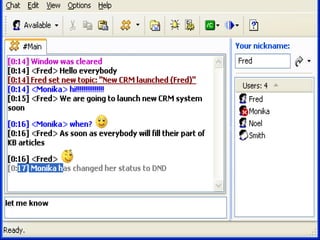
FEATURES Chatting Voice Chat File Transfer Bulletin Board Display of friend list
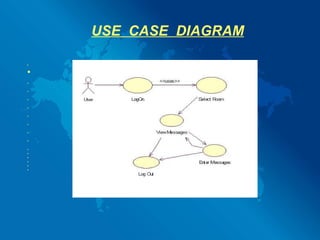
USE  CASE  DIAGRAM                  
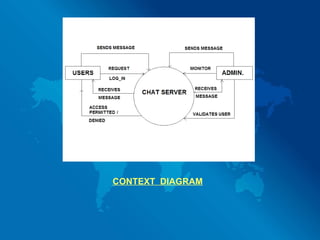
    CONTEXT  DIAGRAM
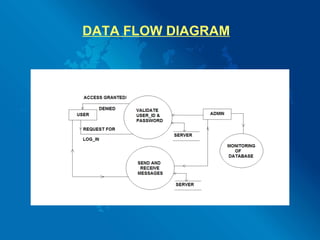
DATA FLOW DIAGRAM
 
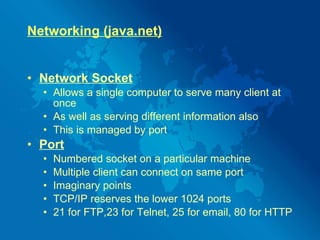
Networking (java.net) Network Socket Allows a single computer to serve many client at once As well as serving different information also This is managed by port Port   Numbered socket on a particular machine Multiple client can connect on same port Imaginary points TCP/IP reserves the lower 1024 ports  21 for FTP,23 for Telnet, 25 for email, 80 for HTTP
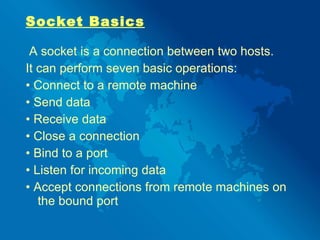
Socket Basics A socket is a connection between two hosts.  It can perform seven basic operations: •  Connect to a remote machine •  Send data •  Receive data •  Close a connection •  Bind to a port •  Listen for incoming data •  Accept connections from remote machines on the bound port
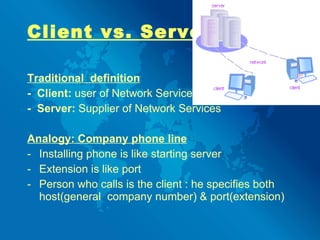
Client vs. Server Traditional  definition -  Client:  user of Network Services -  Server:  Supplier of Network Services   Analogy: Company phone line Installing   phone is like starting server Extension is like port Person who calls is the client : he specifies both host(general  company number) & port(extension)
 
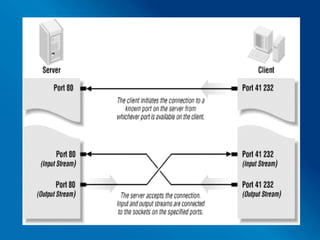
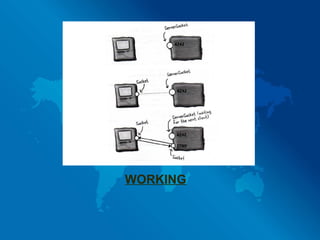
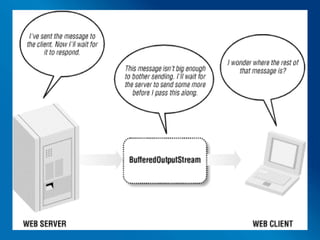
Working : Formation of socket to make a connection with the server Server will forward the request to specific client  by making a socket connection with client For voice transfer client side data will be stored in rm format for 2-3 seconds Then it will be forwarded towards receiving client where it will be played This process of voice transfer will continue in a loop Using streams we can transfer any type of data
  WORKING
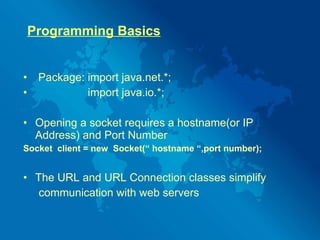
Programming Basics Package: import java.net.*; import java.io.*; Opening a socket requires a hostname(or IP Address) and Port Number Socket  client = new  Socket(“ hostname “,port number); The URL and URL Connection classes simplify communication with web servers
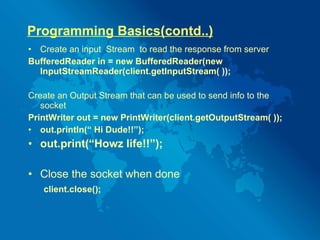
Programming Basics(contd..) Create an input  Stream  to read the response from server BufferedReader in = new BufferedReader(new InputStreamReader(client.getInputStream( )); Create an Output Stream that can be used to send info to the socket PrintWriter out = new PrintWriter(client.getOutputStream( )); out.println(“ Hi Dude!!”); out.print(“Howz life!!”); Close the socket when done client.close();
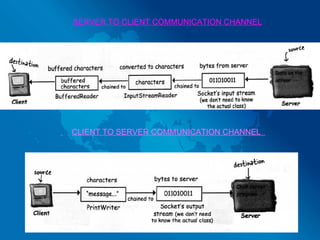
SERVER TO CLIENT COMMUNICATION CHANNEL CLIENT TO SERVER COMMUNICATION CHANNEL
 
 
USES : To efficiently communicate in a Company Institution Hostel LIMITATIONS Delay of 2-3 seconds in voice transfer Server fails whole system fails
FUTURE EXPECTS Integration of video chat using web cam. Making it more secure. Recovery  management system.
THANKS…… QUERIES?????

Lan chat system

  • 1.
    LAN Chat serverBY: VIPUL GUPTA VIKESH SINGH SUKHDEEP SINGH
  • 2.
    INTRODUCTION Common modeof communication – “ CELLULAR PHONES” High service rates – Not ECONOMICAL!!!. SOLUTION ???? LAN CHAT SERVER
  • 3.
    FEATURES Chatting VoiceChat File Transfer Bulletin Board Display of friend list
  • 4.
    USE CASE DIAGRAM                  
  • 5.
    CONTEXT DIAGRAM
  • 6.
  • 7.
  • 8.
    Networking (java.net) NetworkSocket Allows a single computer to serve many client at once As well as serving different information also This is managed by port Port Numbered socket on a particular machine Multiple client can connect on same port Imaginary points TCP/IP reserves the lower 1024 ports 21 for FTP,23 for Telnet, 25 for email, 80 for HTTP
  • 9.
    Socket Basics Asocket is a connection between two hosts. It can perform seven basic operations: • Connect to a remote machine • Send data • Receive data • Close a connection • Bind to a port • Listen for incoming data • Accept connections from remote machines on the bound port
  • 10.
    Client vs. ServerTraditional definition - Client: user of Network Services - Server: Supplier of Network Services Analogy: Company phone line Installing phone is like starting server Extension is like port Person who calls is the client : he specifies both host(general company number) & port(extension)
  • 11.
  • 12.
    Working : Formationof socket to make a connection with the server Server will forward the request to specific client by making a socket connection with client For voice transfer client side data will be stored in rm format for 2-3 seconds Then it will be forwarded towards receiving client where it will be played This process of voice transfer will continue in a loop Using streams we can transfer any type of data
  • 13.
  • 14.
    Programming Basics Package:import java.net.*; import java.io.*; Opening a socket requires a hostname(or IP Address) and Port Number Socket client = new Socket(“ hostname “,port number); The URL and URL Connection classes simplify communication with web servers
  • 15.
    Programming Basics(contd..) Createan input Stream to read the response from server BufferedReader in = new BufferedReader(new InputStreamReader(client.getInputStream( )); Create an Output Stream that can be used to send info to the socket PrintWriter out = new PrintWriter(client.getOutputStream( )); out.println(“ Hi Dude!!”); out.print(“Howz life!!”); Close the socket when done client.close();
  • 16.
    SERVER TO CLIENTCOMMUNICATION CHANNEL CLIENT TO SERVER COMMUNICATION CHANNEL
  • 17.
  • 18.
  • 19.
    USES : Toefficiently communicate in a Company Institution Hostel LIMITATIONS Delay of 2-3 seconds in voice transfer Server fails whole system fails
  • 20.
    FUTURE EXPECTS Integrationof video chat using web cam. Making it more secure. Recovery management system.
  • 21.