1/3/2023
1
FACULTY DEVELOPMENT
PROGRAM on
CS432-WEB TECHNOLOGY
 Session 1:
 Basic Web Concepts, Internet Principles -
TCP/IP Protocols and Applications
 By N.S. Gowri Ganesh, SL/CSE/SSNCE
1/3/2023
2
Internet
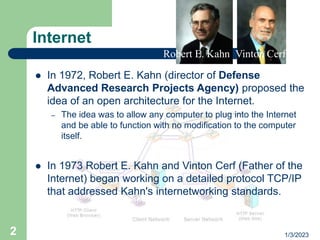
 In 1972, Robert E. Kahn (director of Defense
Advanced Research Projects Agency) proposed the
idea of an open architecture for the Internet.
– The idea was to allow any computer to plug into the Internet
and be able to function with no modification to the computer
itself.
 In 1973 Robert E. Kahn and Vinton Cerf (Father of the
Internet) began working on a detailed protocol TCP/IP
that addressed Kahn's internetworking standards.
Robert E. Kahn Vinton Cerf
1/3/2023
3
Internet - Objectives
 The Internet had to be able to connect multiple
independent networks of arbitrary design.
 The architecture had to be open. Nodes had to be
easily added and removed with no retooling on the part
of the local networks.
 The Internet protocol had to be one of packet-switching
driven network communications.
 Communications had to be able to travel through any
available channel, be it satellite, wire, or radio
transmissions.
 Computers had to operate as peers. There would be
no centralized control of the network operations
1/3/2023
4
Goals of TCP
 Small sub-sections of the whole network would be able
to talk to each other through a specialized computer
than only forwarded packets (first called a gateway,
and now called a router).
 No portion of the network would be the single point of
failure, or would be able to control the whole network.
 Each piece of information sent through the network
would be a given a sequence number, to ensure that
they were dealt with in the right order at the destination
computer, and to detect the loss of any of them.
 A computer which sent information to another
computer would know that it was successfully received
when the destination computer sent back a special
packet, called an acknowledgement, for that particular
piece of information.
1/3/2023
5
Goals of TCP
 If information sent from one computer to another was
lost, the information would be retransmitted, after the
loss was detected by a timeout, which would recognize
that the expected acknowledgement had not been
received.
 Each piece of information sent through the network
would be accompanied by a checksum, calculated by
the original sender, and checked by the ultimate
receiver, to ensure that it was not damaged in any way
en route.
1/3/2023
6
TCP/IP
 Initially developed as a part of research work in US by
DARPA(Defense Advanced Research Project Agency)
replaced TCP/IP for NCP.
 formally documented in RFC 675, Specification of
Internet Transmission Control Program, December
1974.
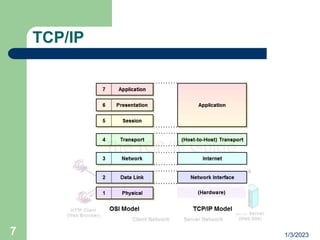
 The Internet Protocol (IP)is the primary OSI network
layer (layer three) protocol that provides addressing,
datagram routing and other functions in an
internetwork.
 The Transmission Control Protocol (TCP)is the primary
transport layer (layer four) protocol, and is responsible
for connection establishment and management and
reliable data transport between software processes.
1/3/2023
7
TCP/IP
1/3/2023
8
TCP/IP
 Different names DOD model, DARPA model and
TCP/IP
 Serial Line Interface Protocol (SLIP) and the Point-to-
Point Protocol (PPP), serve to fill the gap between the
network layer and the physical layer.
 Internet Protocol (IP), arguably the heart of TCP/IP, as
well as support protocols such as ICMP and the routing
protocols (RIP, OSFP, BGP, etc.)
 TCP facilitate end-to-end communication - in charge of
allowing logical connections to be made between
devices to allow data to be sent either unreliably or
reliably
1/3/2023
9
•TCP/IP Addressing:
• The central concept of networking is Addressing
• Addresses have defined format and all network devices
must have a unique identifier
• IP address is Four Byte (32 bit) and quantities in dotted
decimal notation
• Example: 192.168.50.36
•Each 8 bit piece is named as Octet and the value must be
between 0 & 255
• Understanding Binary form of an IP address is important
•Eg: 192.168.50.36=>11000000 10101000 00110010 00100100
• Each Address has two components - Network & Host
TCP/IP Addressing
1/3/2023
10
• IP Addresses are divided into Five classes named as A , B , C , D & E
• Split into the classes according to the first few bits of the address
• Class A : 1 - 126
• Class B : 128 - 191
• Class C : 192 - 223
• Class D : 224 - 239
• Used for Multicast
• Class E : 240 - 254
• Used for Experimental
Classes of IP Address
1/3/2023
11
Domain Name Servers
 Domain name servers translate domain names to IP
addresses.
– There are many billions of DNS requests made every day. A
single person can easily make a hundred or more DNS
requests a day, and there are hundreds of millions of people
and machines using the Internet daily.
– Domain names and IP addresses change daily.
– New domain names get created daily.
– The DNS system is a database
– Together with Jon Postel , Paul Mockapetris invented the DNS
in 1983
1/3/2023
12
Why DNS?
 Originally, each computer on the network retrieved a
file called HOSTS.TXT which mapped an address (ex.
192.168.0.1) to a name (ex. www.yourdomain.com.)
 Limitation: the obvious requirement that every time a
given computer's address changed, every computer
that wanted to communicate with it would need an
update to its Hosts file.
 scalable system: one which recorded a change in a
host's address in one place only. Other hosts would
learn about the change dynamically though a
notification system
1/3/2023
13
Players of DNS
 The DNS resolver, a DNS client program which runs
on a user's computer and generates DNS requests on
behalf of software programs;
 The recursive DNS server, which searches through
the DNS in response to queries from resolvers and
returns answers to those resolvers;
 The authoritative DNS server which hands out
answers to queries from recursors, either in the form of
an answer, or in the form of a delegation
 Domain name consists of top-level domain, subdomain
and hostname eg. En.wikepedia.org
1/3/2023
14
DNS
 Domain name is owned by the Network Information
Centre (NIC), or domain name registry.
 The Internet Corporation for Assigned Names and
Numbers(ICANN) oversees the domain name industry
 The whois system originated as a method that system
administrators could look up information to contact
other IP address or domain name administrators.
1/3/2023
15
World Wide Web
 The Web can be traced back to a project at the
European Organization for Nuclear Research
(CERN) in 1989 when Tim Berners-Lee and
Robert Cailliau (inventors of www) built
ENQUIRE
 Motivation: to access library information that
was scattered on several different servers at
CERN.
 Tim Berners-Lee published a more formal
proposal for the actual World Wide Web on
November 12, 1990
Tim BernersLee
1/3/2023
16
WWW (Contd..)
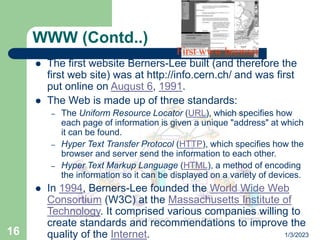
 The first website Berners-Lee built (and therefore the
first web site) was at http://info.cern.ch/ and was first
put online on August 6, 1991.
 The Web is made up of three standards:
– The Uniform Resource Locator (URL), which specifies how
each page of information is given a unique "address" at which
it can be found.
– Hyper Text Transfer Protocol (HTTP), which specifies how the
browser and server send the information to each other.
– Hyper Text Markup Language (HTML), a method of encoding
the information so it can be displayed on a variety of devices.
 In 1994, Berners-Lee founded the World Wide Web
Consortium (W3C) at the Massachusetts Institute of
Technology. It comprised various companies willing to
create standards and recommendations to improve the
quality of the Internet.
First www browser
1/3/2023
17
WWW (Contd..)
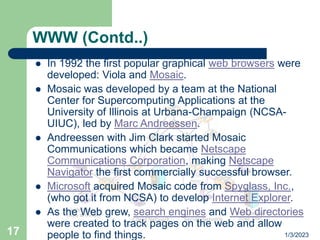
 In 1992 the first popular graphical web browsers were
developed: Viola and Mosaic.
 Mosaic was developed by a team at the National
Center for Supercomputing Applications at the
University of Illinois at Urbana-Champaign (NCSA-
UIUC), led by Marc Andreessen.
 Andreessen with Jim Clark started Mosaic
Communications which became Netscape
Communications Corporation, making Netscape
Navigator the first commercially successful browser.
 Microsoft acquired Mosaic code from Spyglass, Inc.,
(who got it from NCSA) to develop Internet Explorer.
 As the Web grew, search engines and Web directories
were created to track pages on the web and allow
people to find things.
1/3/2023
18
How Web Server
Works
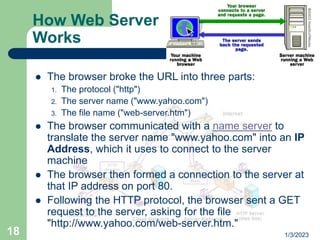
 The browser broke the URL into three parts:
1. The protocol ("http")
2. The server name ("www.yahoo.com")
3. The file name ("web-server.htm")
 The browser communicated with a name server to
translate the server name "www.yahoo.com" into an IP
Address, which it uses to connect to the server
machine
 The browser then formed a connection to the server at
that IP address on port 80.
 Following the HTTP protocol, the browser sent a GET
request to the server, asking for the file
"http://www.yahoo.com/web-server.htm."
1/3/2023
19
How Web Server
Works
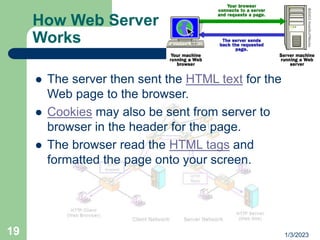
 The server then sent the HTML text for the
Web page to the browser.
 Cookies may also be sent from server to
browser in the header for the page.
 The browser read the HTML tags and
formatted the page onto your screen.
1/3/2023
20
Web Servers
 Apache HTTP Server from the Apache Software
Foundation.
 Internet Information Services (IIS) from Microsoft.
 Zeus Web Server from Zeus Technology.
 Sun ONE from Sun Microsystems (formerly Netscape's
iPlanet née Enterprise).
 Netscape Enterprise Server
 [Jakarta Tomcat]
 Cherokee HTTP Server a fast and flexible web server.
It's Free Software.
 Xerver, a free, open-source web server licensed under
the GPL. IBM Lotus Domino. MyServer
 SimpleW is a very simple and free Web Server and
JSP engine.
1/3/2023
21
What is the web?
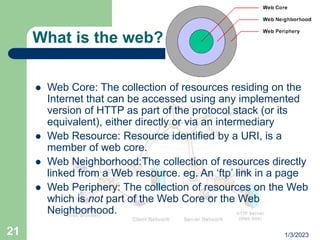
 Web Core: The collection of resources residing on the
Internet that can be accessed using any implemented
version of HTTP as part of the protocol stack (or its
equivalent), either directly or via an intermediary
 Web Resource: Resource identified by a URI, is a
member of web core.
 Web Neighborhood:The collection of resources directly
linked from a Web resource. eg. An ‘ftp’ link in a page
 Web Periphery: The collection of resources on the Web
which is not part of the Web Core or the Web
Neighborhood.
1/3/2023
22
What is a web? (Contd..)
 Web Client: A client that is capable of accessing Web
resources by issuing requests and render responses
containing Web resource manifestations. Eg. Web
browser
 Web Request: A Web request is a request issued by a
Web Client.It may be Explicit-web-request, Implicit-
web-request, Embedded-web-request and User-Input-
web-request.
 Web-request-header
 Web-request-body
 User Session and Episode
1/3/2023
23
What is a web? (Contd..)
 Web Server: A server that provides access to Web
resources and which supplies Web resource
manifestations to the requestor.
 Web Response: A Web response is a response issued
by a Web server.
 Server session:A collection of user clicks to a single
Web server during a user session. Also called a visit.
 Cookie:Data sent by a Web server to a Web client, to
be stored locally by the client and sent back to the
server on subsequent requests.
1/3/2023
24
What is a web? (Contd..)
 Web Page:A collection of information, consisting of
one or more Web resources, intended to be rendered
simultaneously, and identified by a single URI.
 Page View:Visual rendering of a Web page in a
specific client environment at a specific point in time.
Eg. Page view in IE, NS
 Host Page:A Web page identified by a URI containing
an <authority> component but where the <path>
component is either empty or simply consists of a
single "/" only.eg:http://www.w3.org
 Web Site: A collection of interlinked Web pages,
including a host page, residing at the same network
location. eg:http://www.w3.org to
http://www.w3.org/WCA/, and http://www.w3.org/WCA/
to http://www.w3.org/WCA/1998/12/aut_char.html
1/3/2023
25
HTTP(Hypertext Transfer Protocol )
 HTTP is an application-level protocol for distributed,
collaborative, hypermedia information systems.
 Used in www from 1990
 The first version of HTTP, referred to as HTTP/0.9, was
a simple protocol for raw data transfer across the
Internet.
 HTTP/1.0, as defined by RFC 1945, improved the
protocol by allowing messages to be in the format of
MIME-like messages, containing metainformation
about the data transferred and modifiers on the
request/response semantics.
1/3/2023
26
HTTP (contd..)
 HTTP uses a "<major>.<minor>" numbering
scheme to indicate versions of the protocol.
 HTTP/2.4 is a lower version than HTTP/2.13,
which in turn is lower than HTTP/12.3.
 The latest is HTTP 1.1 defined in RFC 2616
 HTTP is a stateless and connectionless
protocol
1/3/2023
27
HTTP-Request methods
 GET By far the most common, for statically requesting
a resource by specifying a URL.
 POST Similar to GET, except that a message body,
typically containing key-value pairs from an HTML form
submission, is included in the request.
 PUT Used for uploading files to a specified URI on a
web-server.
 DELETE Rarely implemented, and self-explanatory.
 HEAD Identical to GET, except that the page content is
not returned; just the headers are. Useful for retrieving
meta-information.
1/3/2023
28
HTTP-Request Methods (Contd..)
 TRACE Echoes back the received request, so
that a client can see what intermediate servers
are adding or changing in the request.
 OPTIONS Returns the HTTP methods that the
server supports. This can be used to check the
functionality for a web server.
 CONNECT Rarely implemented, for use with a
proxy that can change to being an SSL tunnel.
1/3/2023
29
HTTP (Sample request and
response)
GET / HTTP/1.1 Host:
www.example.com
HTTP/1.1 200 OK Date: Mon, 23 May
2005 22:38:34 GMT Server:
Apache/1.3.27 (Unix) (Red-Hat/Linux)
Last-Modified: Wed, 08 Jan 2003
23:11:55 GMT Etag: "3f80f-1b6-
3e1cb03b" Accept-Ranges: bytes
Content-Length: 438 Connection: close
Content-Type: text/html
1/3/2023
30
E-mail
 The first step toward making the Internet a popular
medium for general communications was the
development of e-mail.
 The first e-mail was sent by Ray Tomlinson of
ARPANET in 1971.
 The basic Internet e-mail transmission protocol, SMTP,
supports only 7-bit ASCII characters
 MIME (Multipurpose Internet Mail Extensions) defines
mechanisms for sending other than ASCII as well as 8-
bit binary content such as files containing images,
sounds, movies, and computer programs.
1/3/2023
31
E-mail
 Simple Mail Transfer Protocol (SMTP) is the de facto
standard for email transmission across the Internet
 SMTP uses TCP port 25
 To determine the SMTP server for a given domain
name, the MX (Mail eXchange) DNS record is used.
 Sendmail was one of the first (if not the first) mail
transfer agents to implement SMTP
 SMTP is a "push" protocol that does not allow one to
"pull" messages from a remote server on demand. To
do this a mail client must use POP3 or IMAP
1/3/2023
32
E-mail
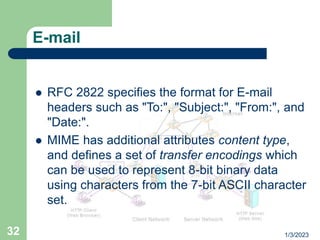
 RFC 2822 specifies the format for E-mail
headers such as "To:", "Subject:", "From:", and
"Date:".
 MIME has additional attributes content type,
and defines a set of transfer encodings which
can be used to represent 8-bit binary data
using characters from the 7-bit ASCII character
set.

basic web concepts.ppt

  • 1.
    1/3/2023 1 FACULTY DEVELOPMENT PROGRAM on CS432-WEBTECHNOLOGY  Session 1:  Basic Web Concepts, Internet Principles - TCP/IP Protocols and Applications  By N.S. Gowri Ganesh, SL/CSE/SSNCE
  • 2.
    1/3/2023 2 Internet  In 1972,Robert E. Kahn (director of Defense Advanced Research Projects Agency) proposed the idea of an open architecture for the Internet. – The idea was to allow any computer to plug into the Internet and be able to function with no modification to the computer itself.  In 1973 Robert E. Kahn and Vinton Cerf (Father of the Internet) began working on a detailed protocol TCP/IP that addressed Kahn's internetworking standards. Robert E. Kahn Vinton Cerf
  • 3.
    1/3/2023 3 Internet - Objectives The Internet had to be able to connect multiple independent networks of arbitrary design.  The architecture had to be open. Nodes had to be easily added and removed with no retooling on the part of the local networks.  The Internet protocol had to be one of packet-switching driven network communications.  Communications had to be able to travel through any available channel, be it satellite, wire, or radio transmissions.  Computers had to operate as peers. There would be no centralized control of the network operations
  • 4.
    1/3/2023 4 Goals of TCP Small sub-sections of the whole network would be able to talk to each other through a specialized computer than only forwarded packets (first called a gateway, and now called a router).  No portion of the network would be the single point of failure, or would be able to control the whole network.  Each piece of information sent through the network would be a given a sequence number, to ensure that they were dealt with in the right order at the destination computer, and to detect the loss of any of them.  A computer which sent information to another computer would know that it was successfully received when the destination computer sent back a special packet, called an acknowledgement, for that particular piece of information.
  • 5.
    1/3/2023 5 Goals of TCP If information sent from one computer to another was lost, the information would be retransmitted, after the loss was detected by a timeout, which would recognize that the expected acknowledgement had not been received.  Each piece of information sent through the network would be accompanied by a checksum, calculated by the original sender, and checked by the ultimate receiver, to ensure that it was not damaged in any way en route.
  • 6.
    1/3/2023 6 TCP/IP  Initially developedas a part of research work in US by DARPA(Defense Advanced Research Project Agency) replaced TCP/IP for NCP.  formally documented in RFC 675, Specification of Internet Transmission Control Program, December 1974.  The Internet Protocol (IP)is the primary OSI network layer (layer three) protocol that provides addressing, datagram routing and other functions in an internetwork.  The Transmission Control Protocol (TCP)is the primary transport layer (layer four) protocol, and is responsible for connection establishment and management and reliable data transport between software processes.
  • 7.
  • 8.
    1/3/2023 8 TCP/IP  Different namesDOD model, DARPA model and TCP/IP  Serial Line Interface Protocol (SLIP) and the Point-to- Point Protocol (PPP), serve to fill the gap between the network layer and the physical layer.  Internet Protocol (IP), arguably the heart of TCP/IP, as well as support protocols such as ICMP and the routing protocols (RIP, OSFP, BGP, etc.)  TCP facilitate end-to-end communication - in charge of allowing logical connections to be made between devices to allow data to be sent either unreliably or reliably
  • 9.
    1/3/2023 9 •TCP/IP Addressing: • Thecentral concept of networking is Addressing • Addresses have defined format and all network devices must have a unique identifier • IP address is Four Byte (32 bit) and quantities in dotted decimal notation • Example: 192.168.50.36 •Each 8 bit piece is named as Octet and the value must be between 0 & 255 • Understanding Binary form of an IP address is important •Eg: 192.168.50.36=>11000000 10101000 00110010 00100100 • Each Address has two components - Network & Host TCP/IP Addressing
  • 10.
    1/3/2023 10 • IP Addressesare divided into Five classes named as A , B , C , D & E • Split into the classes according to the first few bits of the address • Class A : 1 - 126 • Class B : 128 - 191 • Class C : 192 - 223 • Class D : 224 - 239 • Used for Multicast • Class E : 240 - 254 • Used for Experimental Classes of IP Address
  • 11.
    1/3/2023 11 Domain Name Servers Domain name servers translate domain names to IP addresses. – There are many billions of DNS requests made every day. A single person can easily make a hundred or more DNS requests a day, and there are hundreds of millions of people and machines using the Internet daily. – Domain names and IP addresses change daily. – New domain names get created daily. – The DNS system is a database – Together with Jon Postel , Paul Mockapetris invented the DNS in 1983
  • 12.
    1/3/2023 12 Why DNS?  Originally,each computer on the network retrieved a file called HOSTS.TXT which mapped an address (ex. 192.168.0.1) to a name (ex. www.yourdomain.com.)  Limitation: the obvious requirement that every time a given computer's address changed, every computer that wanted to communicate with it would need an update to its Hosts file.  scalable system: one which recorded a change in a host's address in one place only. Other hosts would learn about the change dynamically though a notification system
  • 13.
    1/3/2023 13 Players of DNS The DNS resolver, a DNS client program which runs on a user's computer and generates DNS requests on behalf of software programs;  The recursive DNS server, which searches through the DNS in response to queries from resolvers and returns answers to those resolvers;  The authoritative DNS server which hands out answers to queries from recursors, either in the form of an answer, or in the form of a delegation  Domain name consists of top-level domain, subdomain and hostname eg. En.wikepedia.org
  • 14.
    1/3/2023 14 DNS  Domain nameis owned by the Network Information Centre (NIC), or domain name registry.  The Internet Corporation for Assigned Names and Numbers(ICANN) oversees the domain name industry  The whois system originated as a method that system administrators could look up information to contact other IP address or domain name administrators.
  • 15.
    1/3/2023 15 World Wide Web The Web can be traced back to a project at the European Organization for Nuclear Research (CERN) in 1989 when Tim Berners-Lee and Robert Cailliau (inventors of www) built ENQUIRE  Motivation: to access library information that was scattered on several different servers at CERN.  Tim Berners-Lee published a more formal proposal for the actual World Wide Web on November 12, 1990 Tim BernersLee
  • 16.
    1/3/2023 16 WWW (Contd..)  Thefirst website Berners-Lee built (and therefore the first web site) was at http://info.cern.ch/ and was first put online on August 6, 1991.  The Web is made up of three standards: – The Uniform Resource Locator (URL), which specifies how each page of information is given a unique "address" at which it can be found. – Hyper Text Transfer Protocol (HTTP), which specifies how the browser and server send the information to each other. – Hyper Text Markup Language (HTML), a method of encoding the information so it can be displayed on a variety of devices.  In 1994, Berners-Lee founded the World Wide Web Consortium (W3C) at the Massachusetts Institute of Technology. It comprised various companies willing to create standards and recommendations to improve the quality of the Internet. First www browser
  • 17.
    1/3/2023 17 WWW (Contd..)  In1992 the first popular graphical web browsers were developed: Viola and Mosaic.  Mosaic was developed by a team at the National Center for Supercomputing Applications at the University of Illinois at Urbana-Champaign (NCSA- UIUC), led by Marc Andreessen.  Andreessen with Jim Clark started Mosaic Communications which became Netscape Communications Corporation, making Netscape Navigator the first commercially successful browser.  Microsoft acquired Mosaic code from Spyglass, Inc., (who got it from NCSA) to develop Internet Explorer.  As the Web grew, search engines and Web directories were created to track pages on the web and allow people to find things.
  • 18.
    1/3/2023 18 How Web Server Works The browser broke the URL into three parts: 1. The protocol ("http") 2. The server name ("www.yahoo.com") 3. The file name ("web-server.htm")  The browser communicated with a name server to translate the server name "www.yahoo.com" into an IP Address, which it uses to connect to the server machine  The browser then formed a connection to the server at that IP address on port 80.  Following the HTTP protocol, the browser sent a GET request to the server, asking for the file "http://www.yahoo.com/web-server.htm."
  • 19.
    1/3/2023 19 How Web Server Works The server then sent the HTML text for the Web page to the browser.  Cookies may also be sent from server to browser in the header for the page.  The browser read the HTML tags and formatted the page onto your screen.
  • 20.
    1/3/2023 20 Web Servers  ApacheHTTP Server from the Apache Software Foundation.  Internet Information Services (IIS) from Microsoft.  Zeus Web Server from Zeus Technology.  Sun ONE from Sun Microsystems (formerly Netscape's iPlanet née Enterprise).  Netscape Enterprise Server  [Jakarta Tomcat]  Cherokee HTTP Server a fast and flexible web server. It's Free Software.  Xerver, a free, open-source web server licensed under the GPL. IBM Lotus Domino. MyServer  SimpleW is a very simple and free Web Server and JSP engine.
  • 21.
    1/3/2023 21 What is theweb?  Web Core: The collection of resources residing on the Internet that can be accessed using any implemented version of HTTP as part of the protocol stack (or its equivalent), either directly or via an intermediary  Web Resource: Resource identified by a URI, is a member of web core.  Web Neighborhood:The collection of resources directly linked from a Web resource. eg. An ‘ftp’ link in a page  Web Periphery: The collection of resources on the Web which is not part of the Web Core or the Web Neighborhood.
  • 22.
    1/3/2023 22 What is aweb? (Contd..)  Web Client: A client that is capable of accessing Web resources by issuing requests and render responses containing Web resource manifestations. Eg. Web browser  Web Request: A Web request is a request issued by a Web Client.It may be Explicit-web-request, Implicit- web-request, Embedded-web-request and User-Input- web-request.  Web-request-header  Web-request-body  User Session and Episode
  • 23.
    1/3/2023 23 What is aweb? (Contd..)  Web Server: A server that provides access to Web resources and which supplies Web resource manifestations to the requestor.  Web Response: A Web response is a response issued by a Web server.  Server session:A collection of user clicks to a single Web server during a user session. Also called a visit.  Cookie:Data sent by a Web server to a Web client, to be stored locally by the client and sent back to the server on subsequent requests.
  • 24.
    1/3/2023 24 What is aweb? (Contd..)  Web Page:A collection of information, consisting of one or more Web resources, intended to be rendered simultaneously, and identified by a single URI.  Page View:Visual rendering of a Web page in a specific client environment at a specific point in time. Eg. Page view in IE, NS  Host Page:A Web page identified by a URI containing an <authority> component but where the <path> component is either empty or simply consists of a single "/" only.eg:http://www.w3.org  Web Site: A collection of interlinked Web pages, including a host page, residing at the same network location. eg:http://www.w3.org to http://www.w3.org/WCA/, and http://www.w3.org/WCA/ to http://www.w3.org/WCA/1998/12/aut_char.html
  • 25.
    1/3/2023 25 HTTP(Hypertext Transfer Protocol)  HTTP is an application-level protocol for distributed, collaborative, hypermedia information systems.  Used in www from 1990  The first version of HTTP, referred to as HTTP/0.9, was a simple protocol for raw data transfer across the Internet.  HTTP/1.0, as defined by RFC 1945, improved the protocol by allowing messages to be in the format of MIME-like messages, containing metainformation about the data transferred and modifiers on the request/response semantics.
  • 26.
    1/3/2023 26 HTTP (contd..)  HTTPuses a "<major>.<minor>" numbering scheme to indicate versions of the protocol.  HTTP/2.4 is a lower version than HTTP/2.13, which in turn is lower than HTTP/12.3.  The latest is HTTP 1.1 defined in RFC 2616  HTTP is a stateless and connectionless protocol
  • 27.
    1/3/2023 27 HTTP-Request methods  GETBy far the most common, for statically requesting a resource by specifying a URL.  POST Similar to GET, except that a message body, typically containing key-value pairs from an HTML form submission, is included in the request.  PUT Used for uploading files to a specified URI on a web-server.  DELETE Rarely implemented, and self-explanatory.  HEAD Identical to GET, except that the page content is not returned; just the headers are. Useful for retrieving meta-information.
  • 28.
    1/3/2023 28 HTTP-Request Methods (Contd..) TRACE Echoes back the received request, so that a client can see what intermediate servers are adding or changing in the request.  OPTIONS Returns the HTTP methods that the server supports. This can be used to check the functionality for a web server.  CONNECT Rarely implemented, for use with a proxy that can change to being an SSL tunnel.
  • 29.
    1/3/2023 29 HTTP (Sample requestand response) GET / HTTP/1.1 Host: www.example.com HTTP/1.1 200 OK Date: Mon, 23 May 2005 22:38:34 GMT Server: Apache/1.3.27 (Unix) (Red-Hat/Linux) Last-Modified: Wed, 08 Jan 2003 23:11:55 GMT Etag: "3f80f-1b6- 3e1cb03b" Accept-Ranges: bytes Content-Length: 438 Connection: close Content-Type: text/html
  • 30.
    1/3/2023 30 E-mail  The firststep toward making the Internet a popular medium for general communications was the development of e-mail.  The first e-mail was sent by Ray Tomlinson of ARPANET in 1971.  The basic Internet e-mail transmission protocol, SMTP, supports only 7-bit ASCII characters  MIME (Multipurpose Internet Mail Extensions) defines mechanisms for sending other than ASCII as well as 8- bit binary content such as files containing images, sounds, movies, and computer programs.
  • 31.
    1/3/2023 31 E-mail  Simple MailTransfer Protocol (SMTP) is the de facto standard for email transmission across the Internet  SMTP uses TCP port 25  To determine the SMTP server for a given domain name, the MX (Mail eXchange) DNS record is used.  Sendmail was one of the first (if not the first) mail transfer agents to implement SMTP  SMTP is a "push" protocol that does not allow one to "pull" messages from a remote server on demand. To do this a mail client must use POP3 or IMAP
  • 32.
    1/3/2023 32 E-mail  RFC 2822specifies the format for E-mail headers such as "To:", "Subject:", "From:", and "Date:".  MIME has additional attributes content type, and defines a set of transfer encodings which can be used to represent 8-bit binary data using characters from the 7-bit ASCII character set.