Networking or the Alphabet Soup Harrow Computer Club – Wed, 9 Feb 2011 Bob Watson  MA CMath MIMA MBCS
Introduction Networking is complicated ... too complicated Problems can occur in local PC hardware, modem/router, software, cabling, remote systems, ... I am NOT going to teach you how to cure all possible network problems I WILL try to explain some of the basics to give you a better understanding
The Alphabet Soup Probably more abbreviations than any other area of computing Networks  –  LAN, WAN, WiFi, ADSL, ... Protocols  –  TCP, IP, UDP, HTTP, FTP, POP3, SMTP, DNS, DHCP, ...
High-Level Protocols You have all heard of at least one of these HTTP  –  Hyper-Text Transfer Protocol FTP  –  File Transfer Protocol These are “ high-level” protocols visible to end-users (in Web URLs for example) They rely on and make use of several lower level protocols
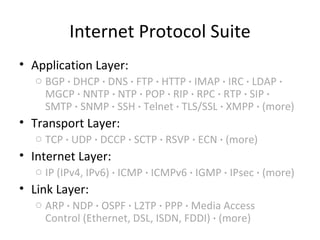
Internet Protocol Suite Application Layer: BGP  ·  DHCP  ·  DNS  ·  FTP  ·  HTTP  ·  IMAP  ·  IRC  ·  LDAP  ·  MGCP  ·  NNTP  ·  NTP  ·  POP  ·  RIP  ·  RPC  ·  RTP  ·  SIP  ·  SMTP  ·  SNMP  ·  SSH  ·  Telnet  ·  TLS/SSL  ·  XMPP  ·  (more) Transport Layer: TCP  ·  UDP  ·  DCCP  ·  SCTP  ·  RSVP  ·  ECN  ·  (more) Internet Layer: IP (IPv4, IPv6)  ·  ICMP  ·  ICMPv6  ·  IGMP  ·  IPsec  ·  (more) Link Layer: ARP  ·  NDP  ·  OSPF  ·  L2TP  ·  PPP  ·  Media Access Control (Ethernet, DSL, ISDN, FDDI)  ·  (more)
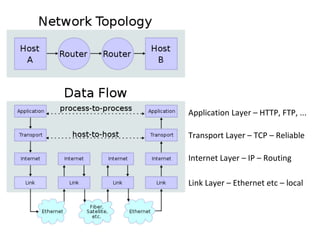
Application Layer – HTTP, FTP, ... Transport Layer – TCP – Reliable Internet Layer – IP – Routing Link Layer – Ethernet etc – local
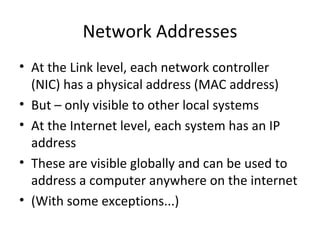
Network Addresses At the Link level, each network controller (NIC) has a physical address (MAC address) But – only visible to other local systems At the Internet level, each system has an IP address These are visible globally and can be used to address a computer anywhere on the internet (With some exceptions...)
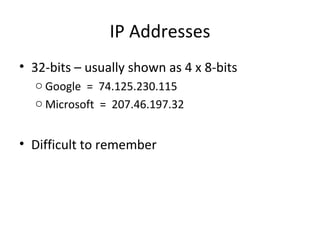
IP Addresses 32-bits – usually shown as 4 x 8-bits Google  =  74.125.230.115 Microsoft  =  207.46.197.32 Difficult to remember
DNS – Domain Name System Hosts assigned structured names: www.microsoft.com www.google.co.uk Each system has a name that can be looked up by DNS and translated to an IP address Hierarchical, distributed system
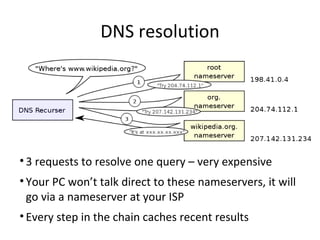
DNS resolution 3 requests to resolve one query – very expensive Your PC won’t talk direct to these nameservers, it will go via a nameserver at your ISP Every step in the chain caches recent results
Subnets The universe of IP addresses is sub-divided into ranges of various sizes Each company that wants to run its own network is assigned one (or more) of those ranges Eg: Google: 74.125.0.0 – 74.125.255.255 Plus.net: 195.166.130.0 – 195.166.130.255
Subnet Masks Each separate range of IP addresses is called a “subnet” identified by base address and mask Eg: 74.125.0.0 – 74.125.255.255 Base address = 74.125.0.0 Mask = 255.255.0.0  (FF.FF.00.00 in hex) Or: 195.166.130.0 – 195.166.130.255 Base address = 195.166.130.0 Mask = 255.255.255.0  (FF.FF.FF.00 in hex)
Private Subnets Some IP address ranges are reserved for special uses 192.168.x.x  =  private networks, non-routable Your PC probably has an address in this range Private to the local LAN Cannot be addressed from outside Multiple private LANs can use the same addresses safely
Gateways Machines in one subnet can communicate with each other directly To talk to a system in a different subnet you need a “gateway” to forward messages Your broadband router does this job
DHCP – Dynamic Host Configuration IP addresses can be assigned statically but need good admin system Can be assigned automatically using DHCP Your router probably acts as a DHCP server When your PC boots it broadcasts a message on the local LAN requesting an address The router responds with address, subnet mask, gateway, DNS server address, etc...
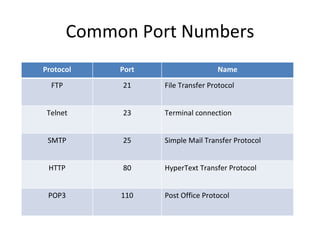
Servers and Port Numbers An IP address identifies a host but how do you address a particular service on a host? For example, one machine may be running a web server (HTTP), an FTP server and an Email server (POP3, SMTP) High level protocols use Port Numbers Eg: HTTP is usually on port 80
Common Port Numbers Protocol Port Name FTP 21 File Transfer Protocol Telnet 23 Terminal connection SMTP 25 Simple Mail Transfer Protocol HTTP 80 HyperText Transfer Protocol POP3 110 Post Office Protocol
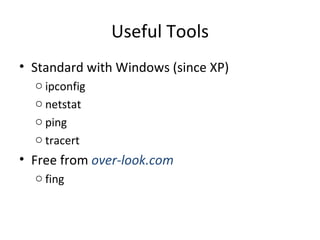
Useful Tools Standard with Windows (since XP) ipconfig netstat ping tracert Free from  over-look.com fing

Networking

  • 1.
    Networking or theAlphabet Soup Harrow Computer Club – Wed, 9 Feb 2011 Bob Watson MA CMath MIMA MBCS
  • 2.
    Introduction Networking iscomplicated ... too complicated Problems can occur in local PC hardware, modem/router, software, cabling, remote systems, ... I am NOT going to teach you how to cure all possible network problems I WILL try to explain some of the basics to give you a better understanding
  • 3.
    The Alphabet SoupProbably more abbreviations than any other area of computing Networks – LAN, WAN, WiFi, ADSL, ... Protocols – TCP, IP, UDP, HTTP, FTP, POP3, SMTP, DNS, DHCP, ...
  • 4.
    High-Level Protocols Youhave all heard of at least one of these HTTP – Hyper-Text Transfer Protocol FTP – File Transfer Protocol These are “ high-level” protocols visible to end-users (in Web URLs for example) They rely on and make use of several lower level protocols
  • 5.
    Internet Protocol SuiteApplication Layer: BGP  · DHCP  · DNS  · FTP  · HTTP  · IMAP  · IRC  · LDAP  · MGCP  · NNTP  · NTP  · POP  · RIP  · RPC  · RTP  · SIP  · SMTP  · SNMP  · SSH  · Telnet  · TLS/SSL  · XMPP  · (more) Transport Layer: TCP  · UDP  · DCCP  · SCTP  · RSVP  · ECN  · (more) Internet Layer: IP (IPv4, IPv6)  · ICMP  · ICMPv6  · IGMP  · IPsec  · (more) Link Layer: ARP · NDP  · OSPF  · L2TP  · PPP  · Media Access Control (Ethernet, DSL, ISDN, FDDI)  · (more)
  • 6.
    Application Layer –HTTP, FTP, ... Transport Layer – TCP – Reliable Internet Layer – IP – Routing Link Layer – Ethernet etc – local
  • 7.
    Network Addresses Atthe Link level, each network controller (NIC) has a physical address (MAC address) But – only visible to other local systems At the Internet level, each system has an IP address These are visible globally and can be used to address a computer anywhere on the internet (With some exceptions...)
  • 8.
    IP Addresses 32-bits– usually shown as 4 x 8-bits Google = 74.125.230.115 Microsoft = 207.46.197.32 Difficult to remember
  • 9.
    DNS – DomainName System Hosts assigned structured names: www.microsoft.com www.google.co.uk Each system has a name that can be looked up by DNS and translated to an IP address Hierarchical, distributed system
  • 10.
    DNS resolution 3requests to resolve one query – very expensive Your PC won’t talk direct to these nameservers, it will go via a nameserver at your ISP Every step in the chain caches recent results
  • 11.
    Subnets The universeof IP addresses is sub-divided into ranges of various sizes Each company that wants to run its own network is assigned one (or more) of those ranges Eg: Google: 74.125.0.0 – 74.125.255.255 Plus.net: 195.166.130.0 – 195.166.130.255
  • 12.
    Subnet Masks Eachseparate range of IP addresses is called a “subnet” identified by base address and mask Eg: 74.125.0.0 – 74.125.255.255 Base address = 74.125.0.0 Mask = 255.255.0.0 (FF.FF.00.00 in hex) Or: 195.166.130.0 – 195.166.130.255 Base address = 195.166.130.0 Mask = 255.255.255.0 (FF.FF.FF.00 in hex)
  • 13.
    Private Subnets SomeIP address ranges are reserved for special uses 192.168.x.x = private networks, non-routable Your PC probably has an address in this range Private to the local LAN Cannot be addressed from outside Multiple private LANs can use the same addresses safely
  • 14.
    Gateways Machines inone subnet can communicate with each other directly To talk to a system in a different subnet you need a “gateway” to forward messages Your broadband router does this job
  • 15.
    DHCP – DynamicHost Configuration IP addresses can be assigned statically but need good admin system Can be assigned automatically using DHCP Your router probably acts as a DHCP server When your PC boots it broadcasts a message on the local LAN requesting an address The router responds with address, subnet mask, gateway, DNS server address, etc...
  • 16.
    Servers and PortNumbers An IP address identifies a host but how do you address a particular service on a host? For example, one machine may be running a web server (HTTP), an FTP server and an Email server (POP3, SMTP) High level protocols use Port Numbers Eg: HTTP is usually on port 80
  • 17.
    Common Port NumbersProtocol Port Name FTP 21 File Transfer Protocol Telnet 23 Terminal connection SMTP 25 Simple Mail Transfer Protocol HTTP 80 HyperText Transfer Protocol POP3 110 Post Office Protocol
  • 18.
    Useful Tools Standardwith Windows (since XP) ipconfig netstat ping tracert Free from over-look.com fing