Teaching Basic Modeling Skills Using Real Data Steven Gordon Senior Director of Education  and Client Services [email_address]
Goals of the Session Overview of statistical methods that can be used to build a model Sources of real data to test hypotheses about statistical relationships Example exercise(s) and techniques for downloading and extracting data, testing statistical relationships, and building a model based on the results
Measuring the Strength of a Relationship Correlation Statistical relationship between two variables Goes between -1.0 and 1.0 Zero means no relationship http://argyll.epsb.ca/jreed/math9/strand4/scatterPlot.htm
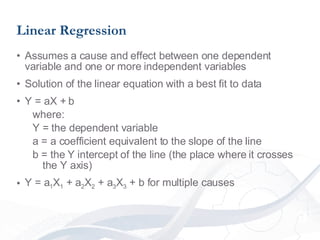
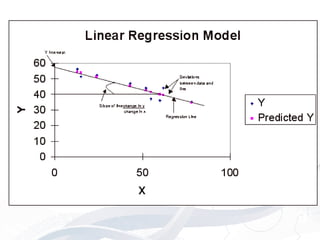
Linear Regression Assumes a cause and effect between one dependent variable and one or more independent variables Solution of the linear equation with a best fit to data Y = aX + b  where:  Y = the dependent variable a = a coefficient equivalent to the slope of the line b = the Y intercept of the line (the place where it crosses the Y axis) Y = a 1 X 1  + a 2 X 2  + a 3 X 3  + b for multiple causes
 
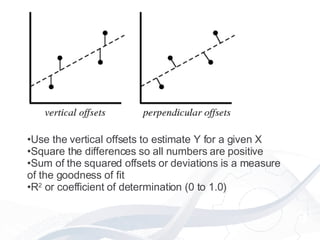
Use the vertical offsets to estimate Y for a given X Square the differences so all numbers are positive Sum of the squared offsets or deviations is a measure of the goodness of fit R 2  or coefficient of determination (0 to 1.0)
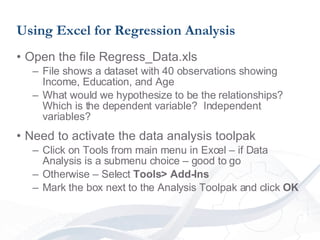
Using Excel for Regression Analysis Open the file Regress_Data.xls File shows a dataset with 40 observations showing Income, Education, and Age What would we hypothesize to be the relationships?  Which is the dependent variable?  Independent variables? Need to activate the data analysis toolpak Click on Tools from main menu in Excel – if Data Analysis is a submenu choice – good to go Otherwise – Select  Tools> Add-Ins Mark the box next to the Analysis Toolpak and click  OK
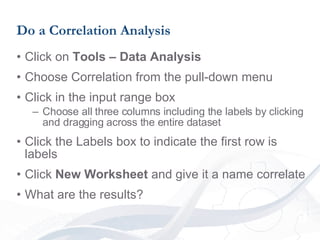
Do a Correlation Analysis Click on  Tools – Data Analysis Choose Correlation from the pull-down menu Click in the input range box Choose all three columns including the labels by clicking and dragging across the entire dataset Click the Labels box to indicate the first row is labels Click  New Worksheet  and give it a name correlate What are the results?
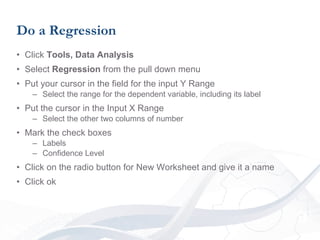
Do a Regression Click  Tools, Data Analysis Select  Regression  from the pull down menu Put your cursor in the field for the input Y Range Select the range for the dependent variable, including its label Put the cursor in the Input X Range Select the other two columns of number Mark the check boxes Labels Confidence Level Click on the radio button for New Worksheet and give it a name Click ok
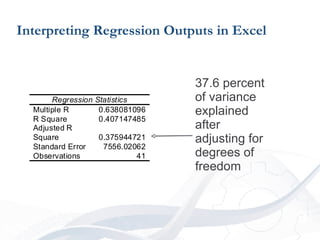
Interpreting Regression Outputs in Excel 37.6 percent of variance explained after adjusting for degrees of freedom
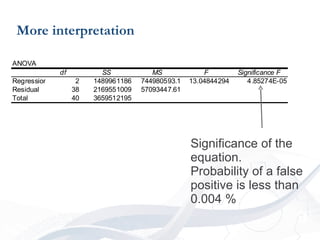
More interpretation Significance of the equation.  Probability of a false positive is less than 0.004 %
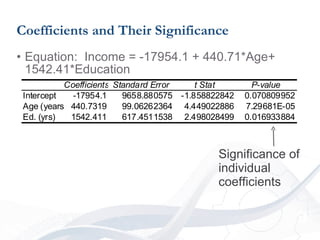
Coefficients and Their Significance Equation:  Income = -17954.1 + 440.71*Age+ 1542.41*Education Significance of individual coefficients
Fitting Non-Linear Data Same principle and measurement of the deviations Choice of curve to fit not automatic Individual choice with possibility of error Real relationship may not be fully represented by experimental data
Potential Errors Chose the wrong function for non-linear data Experiments did not measure all possible circumstances Behavior may change in areas outside the sample data E.G. physical limitations of system lead to failure Variables may be highly correlated and have strong relationship in regression but one is not the cause of the other
Exercise Using Real Data

Gordoncorr

  • 1.
    Teaching Basic ModelingSkills Using Real Data Steven Gordon Senior Director of Education and Client Services [email_address]
  • 2.
    Goals of theSession Overview of statistical methods that can be used to build a model Sources of real data to test hypotheses about statistical relationships Example exercise(s) and techniques for downloading and extracting data, testing statistical relationships, and building a model based on the results
  • 3.
    Measuring the Strengthof a Relationship Correlation Statistical relationship between two variables Goes between -1.0 and 1.0 Zero means no relationship http://argyll.epsb.ca/jreed/math9/strand4/scatterPlot.htm
  • 4.
    Linear Regression Assumesa cause and effect between one dependent variable and one or more independent variables Solution of the linear equation with a best fit to data Y = aX + b  where:  Y = the dependent variable a = a coefficient equivalent to the slope of the line b = the Y intercept of the line (the place where it crosses the Y axis) Y = a 1 X 1 + a 2 X 2 + a 3 X 3 + b for multiple causes
  • 5.
  • 6.
    Use the verticaloffsets to estimate Y for a given X Square the differences so all numbers are positive Sum of the squared offsets or deviations is a measure of the goodness of fit R 2 or coefficient of determination (0 to 1.0)
  • 7.
    Using Excel forRegression Analysis Open the file Regress_Data.xls File shows a dataset with 40 observations showing Income, Education, and Age What would we hypothesize to be the relationships? Which is the dependent variable? Independent variables? Need to activate the data analysis toolpak Click on Tools from main menu in Excel – if Data Analysis is a submenu choice – good to go Otherwise – Select Tools> Add-Ins Mark the box next to the Analysis Toolpak and click OK
  • 8.
    Do a CorrelationAnalysis Click on Tools – Data Analysis Choose Correlation from the pull-down menu Click in the input range box Choose all three columns including the labels by clicking and dragging across the entire dataset Click the Labels box to indicate the first row is labels Click New Worksheet and give it a name correlate What are the results?
  • 9.
    Do a RegressionClick Tools, Data Analysis Select Regression from the pull down menu Put your cursor in the field for the input Y Range Select the range for the dependent variable, including its label Put the cursor in the Input X Range Select the other two columns of number Mark the check boxes Labels Confidence Level Click on the radio button for New Worksheet and give it a name Click ok
  • 10.
    Interpreting Regression Outputsin Excel 37.6 percent of variance explained after adjusting for degrees of freedom
  • 11.
    More interpretation Significanceof the equation. Probability of a false positive is less than 0.004 %
  • 12.
    Coefficients and TheirSignificance Equation: Income = -17954.1 + 440.71*Age+ 1542.41*Education Significance of individual coefficients
  • 13.
    Fitting Non-Linear DataSame principle and measurement of the deviations Choice of curve to fit not automatic Individual choice with possibility of error Real relationship may not be fully represented by experimental data
  • 14.
    Potential Errors Chosethe wrong function for non-linear data Experiments did not measure all possible circumstances Behavior may change in areas outside the sample data E.G. physical limitations of system lead to failure Variables may be highly correlated and have strong relationship in regression but one is not the cause of the other
  • 15.