MS Excel
Hitendrasinh Zala
Roadmap
Introduction to Excel VLOOKUP
Overview of excel HLOOKUP
Office Buttons Shortcut Keys
Conditional Formatting
SumIF Function
IF Function
Introduction to Excel
Excel is a computer program used to create electronic
spreadsheets
Within excel user can organize data ,create chart and
perform calculations
Excel is a convenient program because it allow user to
create large spreadsheets, reference information, and it
allows for better storage of information
Overview of Excel
Microsoft excel consists of workbooks. Within each workbook, there is
an infinite number of worksheets
Each worksheet contains Columns and Rows
Where a column and a row intersect is called a cell
The tabs at the bottom of the screen represent different worksheets
within a workbook. You can use the scrolling buttons on the left to
bring other worksheets into view.
Office Buttons
CTRL+N = To open new workbook
CTRL+O = To open existing workbook
CTRL+S = To save document
F12 = Save as to save copy document
CTRL+P = To print the document
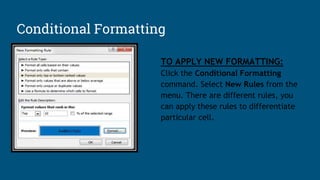
TO APPLY NEW FORMATTING:
Click the Conditional Formatting
command. Select New Rules from the
menu. There are different rules, you
can apply these rules to differentiate
particular cell.
Conditional Formatting
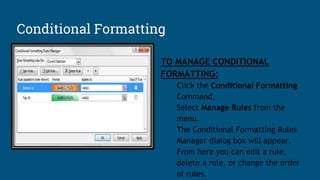
TO MANAGE CONDITIONAL
FORMATTING:
Click the Conditional Formatting
Command.
Select Manage Rules from the
menu.
The Conditional Formatting Rules
Manager dialog box will appear.
From here you can edit a rule,
delete a rule, or change the order
of rules.
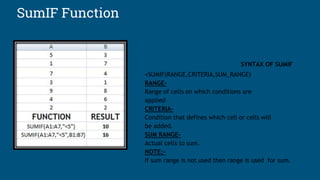
SumIF Function
SYNTAX OF SUMIF
=SUMIF(RANGE,CRITERIA,SUM_RANGE)
RANGE-
Range of cells on which conditions are
applied
CRITERIA-
Condition that defines which cell or cells will
be added.
SUM RANGE-
Actual cells to sum.
NOTE:-
If sum range is not used then range is used for sum.
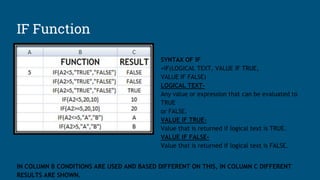
IF Function
SYNTAX OF IF
=IF(LOGICAL TEXT, VALUE IF TRUE,
VALUE IF FALSE)
LOGICAL TEXT-
Any value or expression that can be evaluated to
TRUE
or FALSE.
VALUE IF TRUE-
Value that is returned if logical text is TRUE.
VALUE IF FALSE-
Value that is returned if logical text is FALSE.
IN COLUMN B CONDITIONS ARE USED AND BASED DIFFERENT ON THIS, IN COLUMN C DIFFERENT
RESULTS ARE SHOWN.
VLOOKUP
This function allows you to look up values in the table that are listed in the column format
Syntax of VLOOKUP
•VLOOKUP(which_value_to_search, in_which_range_to_search, column_num, [is_it_a_range_lookup])
•The function have 4 parameters
•which_value_to_search: This is the value you want to search in another table, it could be a value or a cell reference
•in_which_range_to_search : This is the range of that table in which you want the value to be searched
•column_num : This is the column number which contains the value you want to be returned if the required value found
•[is_it_a_range_lookup]: This is the final & optional parameter, which indicates that if it is true (range of values) else if false VLOOKUP will look
for (exact value)
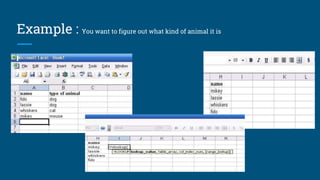
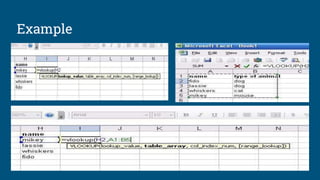
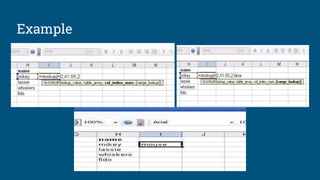
Example : You want to figure out what kind of animal it is
Example
Example
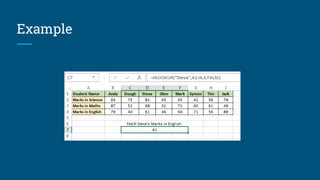
HLOOKUP
This function retrieves data from the table horizontally
Syntax
HLOOKUP(lookup_value, table_array, row_index_num, [range_lookup])
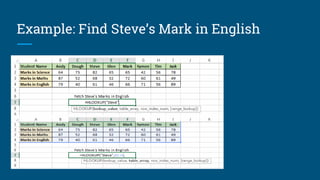
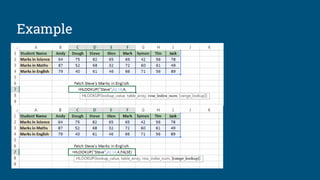
Example: Find Steve’s Mark in English
Example
Example
Shortcut Keys
PARTICULARS KEYS
EDIT THE ACTIVE CELL
CREATE A CHART
INSERT CELL COMMENT
FUNCTION DIALOGUE BOX
INSERT A NEW WORKSHEET
NAME MANAGER DIALOGUE BOX
VISUAL BASIC EDITOR
MACRO DIALOGUE BOX
HIDE THE SELECTED COLUMNS
UNHIDE THE COLUMNS
HIDE THE SELECTED ROWS
UNHIDE THE ROWS
SELECT ALL CELLS WITH COMMENT
F2
F11
SHIFT + F2
SHIFT + F3
SHIFT + F11
CTRL + F3
ALT + F11
ALT + F8
CTRL + 0
CTRL + SHIFT + 0
CTRL + 9
CTRL + SHIFT + 9
CTRL + SHIFT + O
Questions
OK NOW,
I AM LISTING

Ms excel

  • 1.
  • 2.
    Roadmap Introduction to ExcelVLOOKUP Overview of excel HLOOKUP Office Buttons Shortcut Keys Conditional Formatting SumIF Function IF Function
  • 3.
    Introduction to Excel Excelis a computer program used to create electronic spreadsheets Within excel user can organize data ,create chart and perform calculations Excel is a convenient program because it allow user to create large spreadsheets, reference information, and it allows for better storage of information
  • 4.
    Overview of Excel Microsoftexcel consists of workbooks. Within each workbook, there is an infinite number of worksheets Each worksheet contains Columns and Rows Where a column and a row intersect is called a cell The tabs at the bottom of the screen represent different worksheets within a workbook. You can use the scrolling buttons on the left to bring other worksheets into view.
  • 5.
    Office Buttons CTRL+N =To open new workbook CTRL+O = To open existing workbook CTRL+S = To save document F12 = Save as to save copy document CTRL+P = To print the document
  • 6.
    TO APPLY NEWFORMATTING: Click the Conditional Formatting command. Select New Rules from the menu. There are different rules, you can apply these rules to differentiate particular cell. Conditional Formatting
  • 7.
    Conditional Formatting TO MANAGECONDITIONAL FORMATTING: Click the Conditional Formatting Command. Select Manage Rules from the menu. The Conditional Formatting Rules Manager dialog box will appear. From here you can edit a rule, delete a rule, or change the order of rules.
  • 8.
    SumIF Function SYNTAX OFSUMIF =SUMIF(RANGE,CRITERIA,SUM_RANGE) RANGE- Range of cells on which conditions are applied CRITERIA- Condition that defines which cell or cells will be added. SUM RANGE- Actual cells to sum. NOTE:- If sum range is not used then range is used for sum.
  • 9.
    IF Function SYNTAX OFIF =IF(LOGICAL TEXT, VALUE IF TRUE, VALUE IF FALSE) LOGICAL TEXT- Any value or expression that can be evaluated to TRUE or FALSE. VALUE IF TRUE- Value that is returned if logical text is TRUE. VALUE IF FALSE- Value that is returned if logical text is FALSE. IN COLUMN B CONDITIONS ARE USED AND BASED DIFFERENT ON THIS, IN COLUMN C DIFFERENT RESULTS ARE SHOWN.
  • 10.
    VLOOKUP This function allowsyou to look up values in the table that are listed in the column format
  • 11.
    Syntax of VLOOKUP •VLOOKUP(which_value_to_search,in_which_range_to_search, column_num, [is_it_a_range_lookup]) •The function have 4 parameters •which_value_to_search: This is the value you want to search in another table, it could be a value or a cell reference •in_which_range_to_search : This is the range of that table in which you want the value to be searched •column_num : This is the column number which contains the value you want to be returned if the required value found •[is_it_a_range_lookup]: This is the final & optional parameter, which indicates that if it is true (range of values) else if false VLOOKUP will look for (exact value)
  • 12.
    Example : Youwant to figure out what kind of animal it is
  • 13.
  • 14.
  • 15.
    HLOOKUP This function retrievesdata from the table horizontally Syntax HLOOKUP(lookup_value, table_array, row_index_num, [range_lookup])
  • 16.
    Example: Find Steve’sMark in English
  • 17.
  • 18.
  • 19.
    Shortcut Keys PARTICULARS KEYS EDITTHE ACTIVE CELL CREATE A CHART INSERT CELL COMMENT FUNCTION DIALOGUE BOX INSERT A NEW WORKSHEET NAME MANAGER DIALOGUE BOX VISUAL BASIC EDITOR MACRO DIALOGUE BOX HIDE THE SELECTED COLUMNS UNHIDE THE COLUMNS HIDE THE SELECTED ROWS UNHIDE THE ROWS SELECT ALL CELLS WITH COMMENT F2 F11 SHIFT + F2 SHIFT + F3 SHIFT + F11 CTRL + F3 ALT + F11 ALT + F8 CTRL + 0 CTRL + SHIFT + 0 CTRL + 9 CTRL + SHIFT + 9 CTRL + SHIFT + O
  • 20.