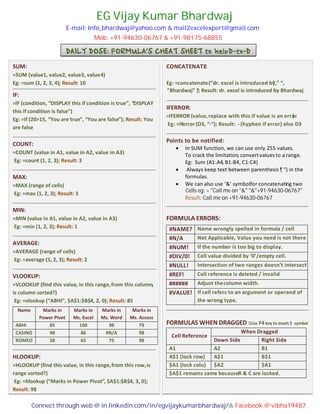
DAILY DOSE: FORMULA’S CHEAT SHEET to helpD-to-D
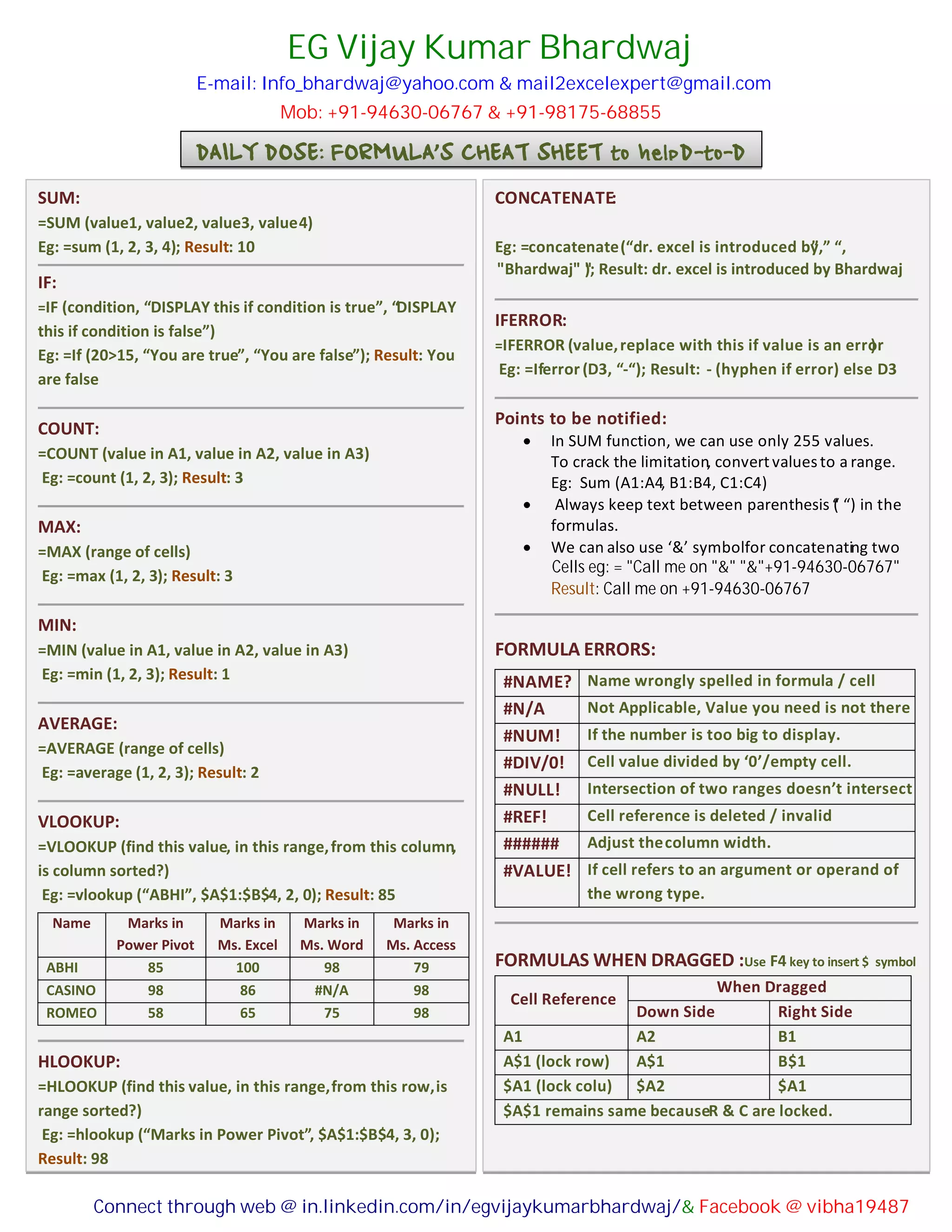
SUM:
=SUM (value1, value2, value3, value4)
Eg: =sum (1, 2, 3, 4); Result: 10
IF:
=IF (condition, “DISPLAY this if condition is true”, “DISPLAY
this if condition is false”)
Eg: =If (20>15, “You are true”, “You are false”); Result: You
are false
COUNT:
=COUNT (value in A1, value in A2, value in A3)
Eg: =count (1, 2, 3); Result: 3
MAX:
=MAX (range of cells)
Eg: =max (1, 2, 3); Result: 3
MIN:
=MIN (value in A1, value in A2, value in A3)
Eg: =min (1, 2, 3); Result: 1
AVERAGE:
=AVERAGE (range of cells)
Eg: =average (1, 2, 3); Result: 2
VLOOKUP:
=VLOOKUP (find this value, in this range,from this column,
is column sorted?)
Eg: =vlookup (“ABHI”, $A$1:$B$4, 2, 0); Result: 85
Name Marks in
Power Pivot
Marks in
Ms. Excel
Marks in
Ms. Word
Marks in
Ms. Access
ABHI 85 100 98 79
CASINO 98 86 #N/A 98
ROMEO 58 65 75 98
HLOOKUP:
=HLOOKUP (find this value, in this range,from this row,is
range sorted?)
Eg: =hlookup (“Marks in Power Pivot”, $A$1:$B$4, 3, 0);
Result: 98
CONCATENATE:
=CONCATENATE (text1, text2)
Eg: =concatenate(“dr. excel is introduced by”,” “,
IFERROR:
=IFERROR (value,replace with this if value is an error)
Eg: =Iferror (D3, “-“); Result: - (hyphen if error) else D3
Points to be notified:
 In SUM function, we can use only 255 values.
To crack the limitation, convertvaluesto a range.
Eg: Sum (A1:A4, B1:B4, C1:C4)
 Always keep text between parenthesis (“ “) in the
formulas.
 We can also use ‘&’ symbolfor concatenating two
FORMULA ERRORS:
#NAME? Name wrongly spelled in formula / cell
#N/A Not Applicable, Value you need is not there
#NUM! If the number is too big to display.
#DIV/0! Cell value divided by ‘0’/empty cell.
#NULL! Intersection of two ranges doesn’t intersect
#REF! Cell reference is deleted / invalid
###### Adjust thecolumn width.
#VALUE! If cell refers to an argument or operand of
the wrong type.
FORMULAS WHEN DRAGGED :Use F4 key to insert $ symbol
Cell Reference
When Dragged
Down Side Right Side
A1 A2 B1
A$1 (lock row) A$1 B$1
$A1 (lock colu) $A2 $A1
$A$1 remains same becauseR & C are locked.
E-mail: Info_bhardwaj@yahoo.com & mail2excelexpert@gmail.com
Mob: +91-94630-06767 & +91-98175-68855
EG Vijay Kumar Bhardwaj
"" Bhardwaj""" "); Result: dr. excel is introduced by Bhardwaj
Cells eg: = "Call me on "&" "&"+91-94630-06767"
Result: Call me on +91-94630-06767
Connect through web @ in.linkedin.com/in/egvijaykumarbhardwaj/& Facebook @ vibha19487

Formulas Cheat Sheet

  • 1.
    DAILY DOSE: FORMULA’SCHEAT SHEET to helpD-to-D SUM: =SUM (value1, value2, value3, value4) Eg: =sum (1, 2, 3, 4); Result: 10 IF: =IF (condition, “DISPLAY this if condition is true”, “DISPLAY this if condition is false”) Eg: =If (20>15, “You are true”, “You are false”); Result: You are false COUNT: =COUNT (value in A1, value in A2, value in A3) Eg: =count (1, 2, 3); Result: 3 MAX: =MAX (range of cells) Eg: =max (1, 2, 3); Result: 3 MIN: =MIN (value in A1, value in A2, value in A3) Eg: =min (1, 2, 3); Result: 1 AVERAGE: =AVERAGE (range of cells) Eg: =average (1, 2, 3); Result: 2 VLOOKUP: =VLOOKUP (find this value, in this range,from this column, is column sorted?) Eg: =vlookup (“ABHI”, $A$1:$B$4, 2, 0); Result: 85 Name Marks in Power Pivot Marks in Ms. Excel Marks in Ms. Word Marks in Ms. Access ABHI 85 100 98 79 CASINO 98 86 #N/A 98 ROMEO 58 65 75 98 HLOOKUP: =HLOOKUP (find this value, in this range,from this row,is range sorted?) Eg: =hlookup (“Marks in Power Pivot”, $A$1:$B$4, 3, 0); Result: 98 CONCATENATE: =CONCATENATE (text1, text2) Eg: =concatenate(“dr. excel is introduced by”,” “, IFERROR: =IFERROR (value,replace with this if value is an error) Eg: =Iferror (D3, “-“); Result: - (hyphen if error) else D3 Points to be notified:  In SUM function, we can use only 255 values. To crack the limitation, convertvaluesto a range. Eg: Sum (A1:A4, B1:B4, C1:C4)  Always keep text between parenthesis (“ “) in the formulas.  We can also use ‘&’ symbolfor concatenating two FORMULA ERRORS: #NAME? Name wrongly spelled in formula / cell #N/A Not Applicable, Value you need is not there #NUM! If the number is too big to display. #DIV/0! Cell value divided by ‘0’/empty cell. #NULL! Intersection of two ranges doesn’t intersect #REF! Cell reference is deleted / invalid ###### Adjust thecolumn width. #VALUE! If cell refers to an argument or operand of the wrong type. FORMULAS WHEN DRAGGED :Use F4 key to insert $ symbol Cell Reference When Dragged Down Side Right Side A1 A2 B1 A$1 (lock row) A$1 B$1 $A1 (lock colu) $A2 $A1 $A$1 remains same becauseR & C are locked. E-mail: Info_bhardwaj@yahoo.com & mail2excelexpert@gmail.com Mob: +91-94630-06767 & +91-98175-68855 EG Vijay Kumar Bhardwaj "" Bhardwaj""" "); Result: dr. excel is introduced by Bhardwaj Cells eg: = "Call me on "&" "&"+91-94630-06767" Result: Call me on +91-94630-06767 Connect through web @ in.linkedin.com/in/egvijaykumarbhardwaj/& Facebook @ vibha19487