Multimedia Information Systems

Mobile interactions
David Lamas, ULP, 2010


Part 1
Context
David Lamas, ULP, 2010


Common sense

 The best camera is the one you
  have with you when something
  interesting happens
David Lamas, ULP, 2010


Jakob Nielsen

 The best computer is the one
  you have with you when you
  want something done. This will
  often be your phone or tablet
David Lamas, ULP, 2010


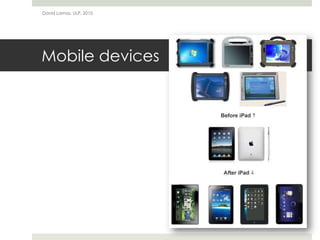
Mobile devices

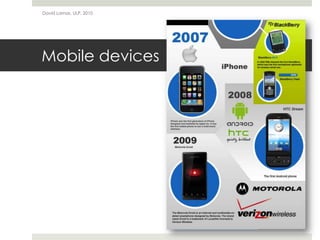
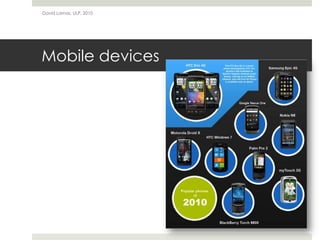
 Mobile devices have become pervasive

 Most people carry one, have them turned on almost
  continuously and use them in different contexts
David Lamas, ULP, 2010


Mobile devices
David Lamas, ULP, 2010


Mobile devices
David Lamas, ULP, 2010


Mobile devices
David Lamas, ULP, 2010


Mobile devices

 The design is dominated by the screen

 Multi-touch based interactions

 The device becomes the content

 Always on, always connected
David Lamas, ULP, 2010


Mobile devices

 Attend to…
     Informational needs
     Geographical needs
     Personal information management needs
David Lamas, ULP, 2010


Mobile devices

 Informational needs are focused on the goal of obtaining
  information about a topic
     “Is the Arsenal game on TV tonight?”
David Lamas, ULP, 2010


Mobile devices

 Geographical needs are focused on the goal of finding
  an answer to a question

 The expected answer is dependent on location in some
  form
     “Nearest Pennies or Dunnes Stores”
     “Where do I get coffee?”
     “Direction from Belfast to Randaldstown”
David Lamas, ULP, 2010


Mobile devices

 Personal information management needs are focused on
  finding out something private relating to the individual

 Personal information management needs encompass
  personal items, friend requests, scheduling tasks and to-
  do list items
     “What are my airline loyalty pin codes?”
David Lamas, ULP, 2010


Mobile devices

 The mobile phone and other personal mobile devices
  have gained a new role

 A gateway to data and applications which are stored on
  the network
David Lamas, ULP, 2010


Part 2
Interaction design
David Lamas, ULP, 2010


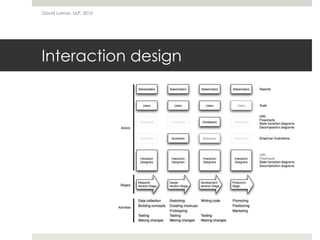
Interaction design
David Lamas, ULP, 2010


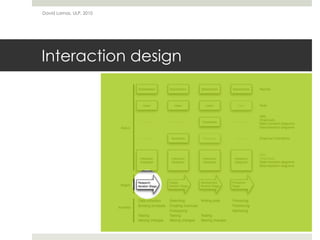
Interaction design
David Lamas, ULP, 2010


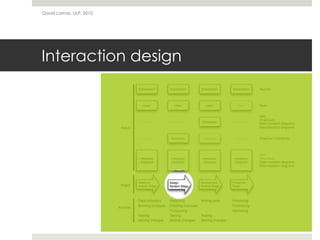
Interaction design
David Lamas, ULP, 2010


Interaction design

 So, what to consider when designing mobile
  applications?
David Lamas, ULP, 2010


Interaction design

 Native, web application or both?
     Native applications
          Provide a richer experience
          Integrate with various operating system features
          Need to be approved in the App Store
     Web applications
          Can be used on a multitude of platforms
          Don’t need to be approved in the App Store
          Functionality is limited, because they only work in the browser
David Lamas, ULP, 2010


Interaction design

 What features of the mobile device does your
  application need to use?

 Does it need to work offline?

 How are people going to use your app?

 How much will it cost?

 Do you need to support various screen sizes?
David Lamas, ULP, 2010


Interaction design

 In any case…
     Following UI conventions
          Human interface guidelines
          Don't break existing patterns
          Design for touch interaction
David Lamas, ULP, 2010


Part 3
Developing a concept
David Lamas, ULP, 2010


Developing a concept

 The application concept
     What does your application do?
     Who is your target audience?
     How will people use your application?
     How much will the application cost?
David Lamas, ULP, 2010


Developing a concept

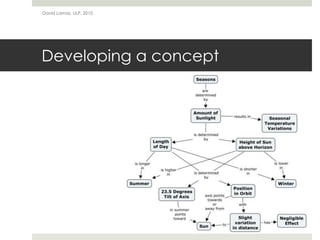
 And how do we describe a concept?
     Using a concept map!

 But, what is a concept map?
     A diagram showing relationships between concepts
     Represents relationships between ideas
     Makes it easier to communicate ideas in teams
     Surfaces strengths and weaknesses of ideas
     Basically, just boxes and arrows
David Lamas, ULP, 2010


Developing a concept
David Lamas, ULP, 2010


Developing a concept

 And how do we build a concept map?
     Identify a focus question
     Identify 10 to 20 concepts that are related to the focus question
     Begin to build your map by placing the most inclusive, most
        general concept(s) at the top
     Select two, three, or four sub-concepts to place under each
        general concept
     Connect the concepts by arrows
     Label the lines with or a few linking words
     Look for crosslinks between concepts in different sections of the
        map and label these connections
David Lamas, ULP, 2010


Part 4
iRadio,
David Lamas, ULP, 2010


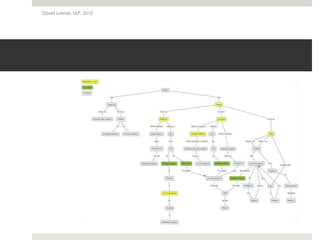
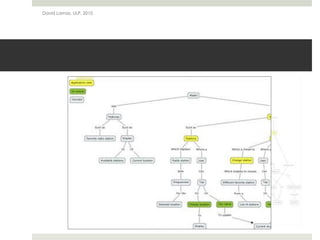
iRadio

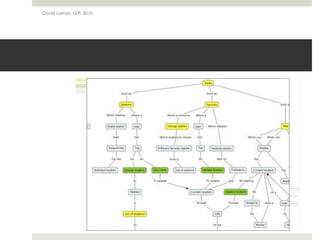
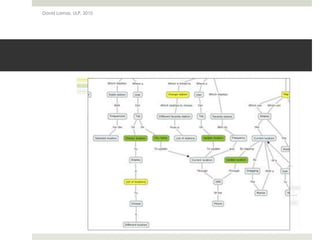
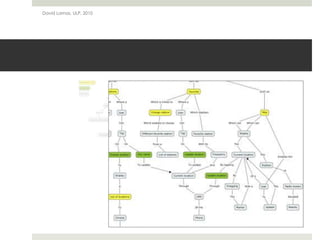
 An application to find frequencies of favorite radio
  stations on the go
David Lamas, ULP, 2010

Mobile Interactions

  • 1.
  • 2.
    David Lamas, ULP,2010 Part 1 Context
  • 3.
    David Lamas, ULP,2010 Common sense  The best camera is the one you have with you when something interesting happens
  • 4.
    David Lamas, ULP,2010 Jakob Nielsen  The best computer is the one you have with you when you want something done. This will often be your phone or tablet
  • 5.
    David Lamas, ULP,2010 Mobile devices  Mobile devices have become pervasive  Most people carry one, have them turned on almost continuously and use them in different contexts
  • 6.
    David Lamas, ULP,2010 Mobile devices
  • 7.
    David Lamas, ULP,2010 Mobile devices
  • 8.
    David Lamas, ULP,2010 Mobile devices
  • 9.
    David Lamas, ULP,2010 Mobile devices  The design is dominated by the screen  Multi-touch based interactions  The device becomes the content  Always on, always connected
  • 10.
    David Lamas, ULP,2010 Mobile devices  Attend to… Informational needs Geographical needs Personal information management needs
  • 11.
    David Lamas, ULP,2010 Mobile devices  Informational needs are focused on the goal of obtaining information about a topic “Is the Arsenal game on TV tonight?”
  • 12.
    David Lamas, ULP,2010 Mobile devices  Geographical needs are focused on the goal of finding an answer to a question  The expected answer is dependent on location in some form “Nearest Pennies or Dunnes Stores” “Where do I get coffee?” “Direction from Belfast to Randaldstown”
  • 13.
    David Lamas, ULP,2010 Mobile devices  Personal information management needs are focused on finding out something private relating to the individual  Personal information management needs encompass personal items, friend requests, scheduling tasks and to- do list items “What are my airline loyalty pin codes?”
  • 14.
    David Lamas, ULP,2010 Mobile devices  The mobile phone and other personal mobile devices have gained a new role  A gateway to data and applications which are stored on the network
  • 15.
    David Lamas, ULP,2010 Part 2 Interaction design
  • 16.
    David Lamas, ULP,2010 Interaction design
  • 17.
    David Lamas, ULP,2010 Interaction design
  • 18.
    David Lamas, ULP,2010 Interaction design
  • 19.
    David Lamas, ULP,2010 Interaction design  So, what to consider when designing mobile applications?
  • 20.
    David Lamas, ULP,2010 Interaction design  Native, web application or both? Native applications Provide a richer experience Integrate with various operating system features Need to be approved in the App Store Web applications Can be used on a multitude of platforms Don’t need to be approved in the App Store Functionality is limited, because they only work in the browser
  • 21.
    David Lamas, ULP,2010 Interaction design  What features of the mobile device does your application need to use?  Does it need to work offline?  How are people going to use your app?  How much will it cost?  Do you need to support various screen sizes?
  • 22.
    David Lamas, ULP,2010 Interaction design  In any case… Following UI conventions Human interface guidelines Don't break existing patterns Design for touch interaction
  • 23.
    David Lamas, ULP,2010 Part 3 Developing a concept
  • 24.
    David Lamas, ULP,2010 Developing a concept  The application concept What does your application do? Who is your target audience? How will people use your application? How much will the application cost?
  • 25.
    David Lamas, ULP,2010 Developing a concept  And how do we describe a concept? Using a concept map!  But, what is a concept map? A diagram showing relationships between concepts Represents relationships between ideas Makes it easier to communicate ideas in teams Surfaces strengths and weaknesses of ideas Basically, just boxes and arrows
  • 26.
    David Lamas, ULP,2010 Developing a concept
  • 27.
    David Lamas, ULP,2010 Developing a concept  And how do we build a concept map? Identify a focus question Identify 10 to 20 concepts that are related to the focus question Begin to build your map by placing the most inclusive, most general concept(s) at the top Select two, three, or four sub-concepts to place under each general concept Connect the concepts by arrows Label the lines with or a few linking words Look for crosslinks between concepts in different sections of the map and label these connections
  • 28.
    David Lamas, ULP,2010 Part 4 iRadio,
  • 29.
    David Lamas, ULP,2010 iRadio  An application to find frequencies of favorite radio stations on the go
  • 30.
  • 31.
  • 32.
  • 33.
  • 34.