Concepting


1
What is…

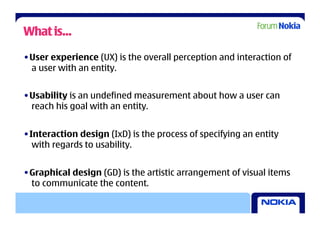
• User experience (UX) is the overall perception and interaction of
  a user with an entity.


• Usability is an undefined measurement about how a user can
  reach his goal with an entity.


• Interaction design (IxD) is the process of specifying an entity
   with regards to usability.


• Graphical design (GD) is the artistic arrangement of visual items
  to communicate the content.
What is…
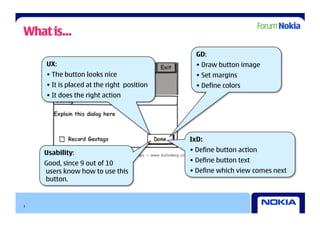
                                              GD:
    UX:                                       •  Draw button image
    •  The button looks nice                  •  Set margins
    •  It is placed at the right position     •  Define colors
    •  It does the right action


                                            IxD:

    Usability:                              •  Define button action

    Good, since 9 out of 10                 •  Define button text
    users know how to use this              •  Define which view comes next
    button.


3
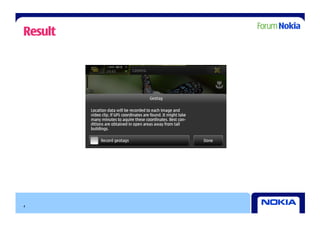
Result


4
How Much Does User Experience Cost?


    Mean amount of time: 6% of total project time

    Ideal amount of time: 10% of total project time


    (For professionals)


5
                                  (Nielsen 1993)
What Does it Return?

• Ideally:
   • Reduces development time
   • Saves money to the author and the user

• Usually:
   • Prevents from major usability problems
   • Reduces the user’s time to reach a goal
   • Increases the reputation of your work by users and other authors

• Unfortunately:
   • Time savings and resulting cost savings are hard to measure
   • The same holds for reputation
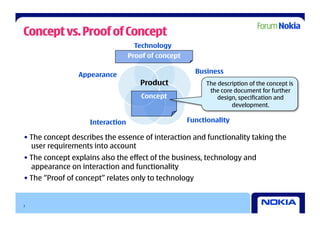
Concept vs. Proof of Concept
                                  Technology
                                 Proof of concept

                                                      Business
                Appearance
                                    Product              The description of the concept is
                                                          the core document for further
                                     Concept                 design, specification and
                                                                  development.

                   Interaction                      Functionality

• The concept describes the essence of interaction and functionality taking the
  user requirements into account
• The concept explains also the effect of the business, technology and
  appearance on interaction and functionality
• The ”Proof of concept” relates only to technology


7
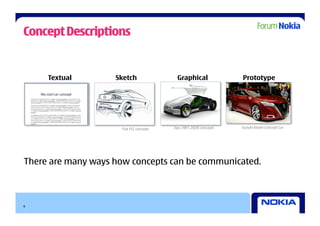
Concept Descriptions


     Textual        Sketch               Graphical                Prototype


                     Fiat FCC concept   Ego, VW's 2028 concepts   Suzuki Kiashi Concept Car


There are many ways how concepts can be communicated.


8
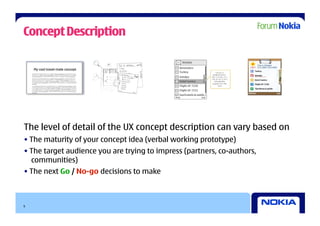
Concept Description

    My cool travel-mate concept


The level of detail of the UX concept description can vary based on
• The maturity of your concept idea (verbal working prototype)
• The target audience you are trying to impress (partners, co-authors,
  communities)
• The next Go / No-go decisions to make


9
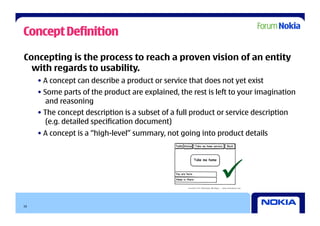
Concept Definition

Concepting is the process to reach a proven vision of an entity
  with regards to usability.
     • A concept can describe a product or service that does not yet exist
     • Some parts of the product are explained, the rest is left to your imagination
        and reasoning
     • The concept description is a subset of a full product or service description
        (e.g. detailed specification document)
     • A concept is a “high-level” summary, not going into product details


                                                             
10
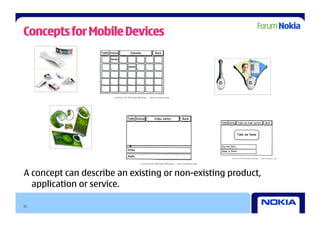
Concepts for Mobile Devices


A concept can describe an existing or non-existing product,
  application or service.

11
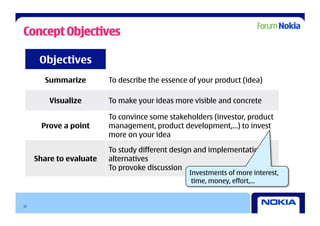
Concept Objectives

      Objectives
       Summarize         To describe the essence of your product (idea)

         Visualize       To make your ideas more visible and concrete

                         To convince some stakeholders (investor, product
      Prove a point      management, product development,…) to invest
                         more on your idea

                         To study different design and implementation
     Share to evaluate   alternatives
                         To provoke discussion
                                                 Investments of more interest,
                                                  time, money, effort,…


12
Exercise


     How would you describe the concept of your application or service?


13
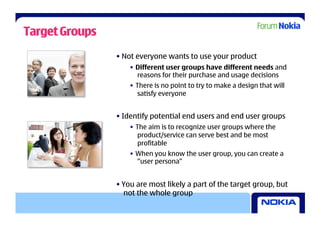
Target Groups
                • Not everyone wants to use your product
                    •  Different user groups have different needs and
                       reasons for their purchase and usage decisions
                    •  There is no point to try to make a design that will
                        satisfy everyone


                • Identify potential end users and end user groups
                    •  The aim is to recognize user groups where the
                        product/service can serve best and be most
                        profitable
                    •  When you know the user group, you can create a
                       “user persona”


                • You are most likely a part of the target group, but
                  not the whole group
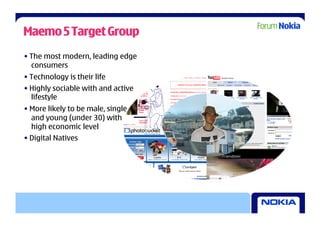
Maemo 5 Target Group
• The most modern, leading edge
  consumers
• Technology is their life
• Highly sociable with and active
  lifestyle
• More likely to be male, single
  and young (under 30) with
  high economic level
• Digital Natives
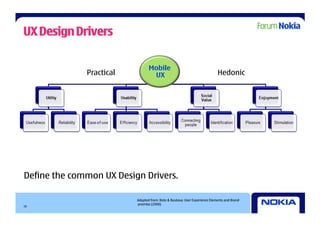
UX Design Drivers

                                 Mobile
              Practical           UX                                        Hedonic


Define the common UX Design Drivers.

                          Adapted from: Roto & Rautava: User Experience Elements and Brand
                          promise (2008)
16
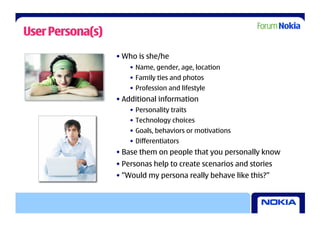
User Persona(s)
                  • Who is she/he
                      •  Name, gender, age, location
                      •  Family ties and photos
                      •  Profession and lifestyle
                  • Additional information
                      •  Personality traits
                      •  Technology choices
                      •  Goals, behaviors or motivations
                      •  Differentiators
                  • Base them on people that you personally know
                  • Personas help to create scenarios and stories
                  • ”Would my persona really behave like this?”
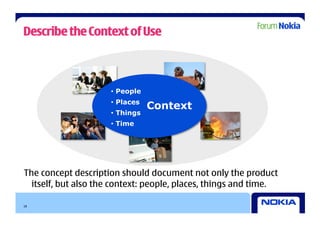
Describe the Context of Use


                     •  People
                     •  Places
                                 Context
                     •  Things
                     •  Time


The concept description should document not only the product
  itself, but also the context: people, places, things and time.

18
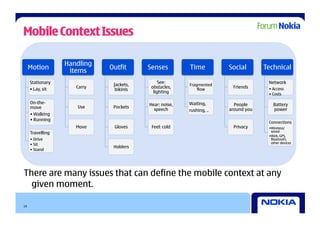
Mobile Context Issues

                  Handling
     Motion                  Outfit      Senses         Time          Social       Technical
                   items
     Stationary                               See:                                  Network
                              Jackets,                  Fragmented
     • Lay, sit      Carry                obstacles,                   Friends      •  Access
                               bikinis                      flow
                                           lighting                                 •  Costs

     On-the-                             Hear: noise,   Waiting,        People        Battery
     move            Use      Pockets
                                           speech       rushing, ..   around you      power
     • Walking
     • Running
                                                                                    Connections
                     Move     Gloves      Feel: cold                   Privacy      • Wireless/
     Travelling                                                                       wired
                                                                                    • Web, GPS,
     •  Drive                                                                         Bluetooth,
                                                                                      other devices
     •  Sit
                              Holders
     •  Stand


There are many issues that can define the mobile context at any
  given moment.

19
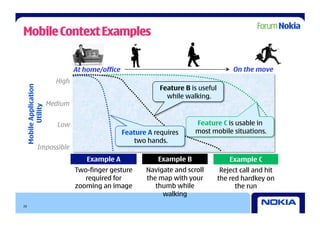
Mobile Context Examples


                               At home/office                                          On the move
                        High
                                                            Feature B is useful
 Mobile Application


                                                              while walking.
                      Medium
       Utility


                        Low                                            Feature C is usable in
                                                Feature A requires     most mobile situations.
                                                   two hands.
             Impossible
                                  Example A                Example B                  Example C
                               Two-finger gesture      Navigate and scroll         Reject call and hit
                                  required for         the map with your          the red hardkey on
                               zooming an image           thumb while                   the run
                                                            walking
20
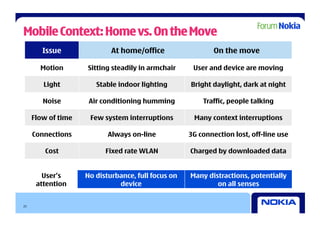
Mobile Context: Home vs. On the Move
        Issue               At home/office                  On the move

       Motion       Sitting steadily in armchair     User and device are moving

        Light          Stable indoor lighting       Bright daylight, dark at night

        Noise        Air conditioning humming           Traffic, people talking

     Flow of time    Few system interruptions        Many context interruptions

     Connections           Always on-line           3G connection lost, off-line use

         Cost             Fixed rate WLAN           Charged by downloaded data


        User’s      No disturbance, full focus on   Many distractions, potentially
      attention               device                        on all senses


21
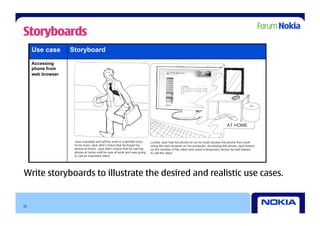
Storyboards
     Use case      Storyboard
     Accessing
     phone from
     web browser


Write storyboards to illustrate the desired and realistic use cases.


22
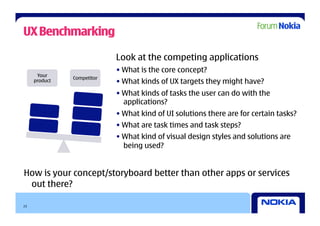
UX Benchmarking

                            Look at the competing applications
                            • What is the core concept?
      Your
               Competitor
     product                • What kinds of UX targets they might have?
                            • What kinds of tasks the user can do with the
                              applications?
                            • What kind of UI solutions there are for certain tasks?
                            • What are task times and task steps?
                            • What kind of visual design styles and solutions are
                              being used?


How is your concept/storyboard better than other apps or services
 out there?

23
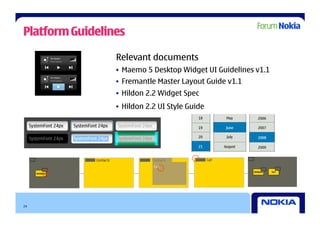
Platform Guidelines

                 Relevant documents
                 •  Maemo 5 Desktop Widget UI Guidelines v1.1
                 •  Fremantle Master Layout Guide v1.1
                 •  Hildon 2.2 Widget Spec
                 •  Hildon 2.2 UI Style Guide


24
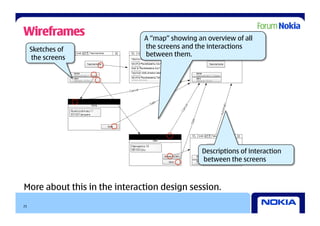
Wireframes                    A “map” showing an overview of all
     Sketches of              the screens and the interactions
     the screens              between them.


                                                Descriptions of interaction
                                                between the screens


More about this in the interaction design session.
25
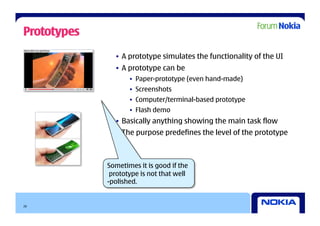
Prototypes
               •  A prototype simulates the functionality of the UI
               •  A prototype can be
                    •  Paper-prototype (even hand-made)
                    •  Screenshots
                    •  Computer/terminal-based prototype
                    •  Flash demo
               •  Basically anything showing the main task flow
               •  The purpose predefines the level of the prototype


             Sometimes it is good if the
              prototype is not that well
             -polished.


26
Exercise


      Write a storyboard for your own application or service.


27
Transfer the Vision to a Document
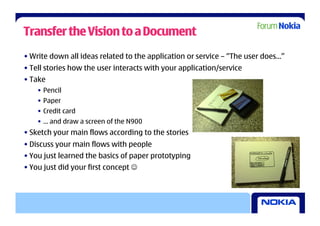
• Write down all ideas related to the application or service – “The user does…”
• Tell stories how the user interacts with your application/service
• Take
    •  Pencil
    •  Paper
    •  Credit card
    •  … and draw a screen of the N900
• Sketch your main flows according to the stories
• Discuss your main flows with people
• You just learned the basics of paper prototyping
• You just did your first concept 
Move Towards Interaction Design
• Concepting usually requires many iterations before the concept is “proven”
• The concept contains only the major use cases
• The concept may also contain
    •  Short description of the main views
    •  Short description of possible gestures for the main views
    •  Evaluation of portrait vs. landscape orientation
• After that interaction design takes care of the details
    •  Minor use cases
    •  Exceptions
    •  Etc.
    •  More about this in the interaction design session
Take Home Messages

                •  Write down the vision of your
                   application or service and try it out
                   with others.


                •  The better the user experience, the
                   higher the recognition and
                   appreciation of your work.


                •  You are not the target group of your
                    application or service.


30
Creative Commons - Disclaimer


            UX Driven Development For Mobile SW Developers
                            by Forum Nokia
                           is licensed under a
       Creative Commons Attribution-Noncommercial-Share Alike 3.0
                          United States License


31
forum.nokia.com/ux


32
 32

Ux Meets Code Concepting

  • 1.
  • 2.
    What is… • User experience(UX) is the overall perception and interaction of a user with an entity. • Usability is an undefined measurement about how a user can reach his goal with an entity. • Interaction design (IxD) is the process of specifying an entity with regards to usability. • Graphical design (GD) is the artistic arrangement of visual items to communicate the content.
  • 3.
    What is… GD: UX: •  Draw button image •  The button looks nice •  Set margins •  It is placed at the right position •  Define colors •  It does the right action IxD: Usability: •  Define button action Good, since 9 out of 10 •  Define button text users know how to use this •  Define which view comes next button. 3
  • 4.
  • 5.
    How Much DoesUser Experience Cost? Mean amount of time: 6% of total project time Ideal amount of time: 10% of total project time (For professionals) 5 (Nielsen 1993)
  • 6.
    What Does itReturn? • Ideally: • Reduces development time • Saves money to the author and the user • Usually: • Prevents from major usability problems • Reduces the user’s time to reach a goal • Increases the reputation of your work by users and other authors • Unfortunately: • Time savings and resulting cost savings are hard to measure • The same holds for reputation
  • 7.
    Concept vs. Proofof Concept Technology Proof of concept Business Appearance Product The description of the concept is the core document for further Concept design, specification and development. Interaction Functionality • The concept describes the essence of interaction and functionality taking the user requirements into account • The concept explains also the effect of the business, technology and appearance on interaction and functionality • The ”Proof of concept” relates only to technology 7
  • 8.
    Concept Descriptions Textual Sketch Graphical Prototype Fiat FCC concept Ego, VW's 2028 concepts Suzuki Kiashi Concept Car There are many ways how concepts can be communicated. 8
  • 9.
    Concept Description My cool travel-mate concept The level of detail of the UX concept description can vary based on • The maturity of your concept idea (verbal working prototype) • The target audience you are trying to impress (partners, co-authors, communities) • The next Go / No-go decisions to make 9
  • 10.
    Concept Definition Concepting isthe process to reach a proven vision of an entity with regards to usability. • A concept can describe a product or service that does not yet exist • Some parts of the product are explained, the rest is left to your imagination and reasoning • The concept description is a subset of a full product or service description (e.g. detailed specification document) • A concept is a “high-level” summary, not going into product details  10
  • 11.
    Concepts for MobileDevices A concept can describe an existing or non-existing product, application or service. 11
  • 12.
    Concept Objectives Objectives Summarize To describe the essence of your product (idea) Visualize To make your ideas more visible and concrete To convince some stakeholders (investor, product Prove a point management, product development,…) to invest more on your idea To study different design and implementation Share to evaluate alternatives To provoke discussion Investments of more interest, time, money, effort,… 12
  • 13.
    Exercise How would you describe the concept of your application or service? 13
  • 14.
    Target Groups • Not everyone wants to use your product •  Different user groups have different needs and reasons for their purchase and usage decisions •  There is no point to try to make a design that will satisfy everyone • Identify potential end users and end user groups •  The aim is to recognize user groups where the product/service can serve best and be most profitable •  When you know the user group, you can create a “user persona” • You are most likely a part of the target group, but not the whole group
  • 15.
    Maemo 5 TargetGroup • The most modern, leading edge consumers • Technology is their life • Highly sociable with and active lifestyle • More likely to be male, single and young (under 30) with high economic level • Digital Natives
  • 16.
    UX Design Drivers Mobile Practical UX Hedonic Define the common UX Design Drivers. Adapted from: Roto & Rautava: User Experience Elements and Brand promise (2008) 16
  • 17.
    User Persona(s) • Who is she/he •  Name, gender, age, location •  Family ties and photos •  Profession and lifestyle • Additional information •  Personality traits •  Technology choices •  Goals, behaviors or motivations •  Differentiators • Base them on people that you personally know • Personas help to create scenarios and stories • ”Would my persona really behave like this?”
  • 18.
    Describe the Contextof Use •  People •  Places Context •  Things •  Time The concept description should document not only the product itself, but also the context: people, places, things and time. 18
  • 19.
    Mobile Context Issues Handling Motion Outfit Senses Time Social Technical items Stationary See: Network Jackets, Fragmented • Lay, sit Carry obstacles, Friends •  Access bikinis flow lighting •  Costs On-the- Hear: noise, Waiting, People Battery move Use Pockets speech rushing, .. around you power • Walking • Running Connections Move Gloves Feel: cold Privacy • Wireless/ Travelling wired • Web, GPS, •  Drive Bluetooth, other devices •  Sit Holders •  Stand There are many issues that can define the mobile context at any given moment. 19
  • 20.
    Mobile Context Examples At home/office On the move High Feature B is useful Mobile Application while walking. Medium Utility Low Feature C is usable in Feature A requires most mobile situations. two hands. Impossible Example A Example B Example C Two-finger gesture Navigate and scroll Reject call and hit required for the map with your the red hardkey on zooming an image thumb while the run walking 20
  • 21.
    Mobile Context: Homevs. On the Move Issue At home/office On the move Motion Sitting steadily in armchair User and device are moving Light Stable indoor lighting Bright daylight, dark at night Noise Air conditioning humming Traffic, people talking Flow of time Few system interruptions Many context interruptions Connections Always on-line 3G connection lost, off-line use Cost Fixed rate WLAN Charged by downloaded data User’s No disturbance, full focus on Many distractions, potentially attention device on all senses 21
  • 22.
    Storyboards Use case Storyboard Accessing phone from web browser Write storyboards to illustrate the desired and realistic use cases. 22
  • 23.
    UX Benchmarking Look at the competing applications • What is the core concept? Your Competitor product • What kinds of UX targets they might have? • What kinds of tasks the user can do with the applications? • What kind of UI solutions there are for certain tasks? • What are task times and task steps? • What kind of visual design styles and solutions are being used? How is your concept/storyboard better than other apps or services out there? 23
  • 24.
    Platform Guidelines Relevant documents •  Maemo 5 Desktop Widget UI Guidelines v1.1 •  Fremantle Master Layout Guide v1.1 •  Hildon 2.2 Widget Spec •  Hildon 2.2 UI Style Guide 24
  • 25.
    Wireframes A “map” showing an overview of all Sketches of the screens and the interactions the screens between them. Descriptions of interaction between the screens More about this in the interaction design session. 25
  • 26.
    Prototypes •  A prototype simulates the functionality of the UI •  A prototype can be •  Paper-prototype (even hand-made) •  Screenshots •  Computer/terminal-based prototype •  Flash demo •  Basically anything showing the main task flow •  The purpose predefines the level of the prototype Sometimes it is good if the prototype is not that well -polished. 26
  • 27.
    Exercise Write a storyboard for your own application or service. 27
  • 28.
    Transfer the Visionto a Document • Write down all ideas related to the application or service – “The user does…” • Tell stories how the user interacts with your application/service • Take •  Pencil •  Paper •  Credit card •  … and draw a screen of the N900 • Sketch your main flows according to the stories • Discuss your main flows with people • You just learned the basics of paper prototyping • You just did your first concept 
  • 29.
    Move Towards InteractionDesign • Concepting usually requires many iterations before the concept is “proven” • The concept contains only the major use cases • The concept may also contain •  Short description of the main views •  Short description of possible gestures for the main views •  Evaluation of portrait vs. landscape orientation • After that interaction design takes care of the details •  Minor use cases •  Exceptions •  Etc. •  More about this in the interaction design session
  • 30.
    Take Home Messages •  Write down the vision of your application or service and try it out with others. •  The better the user experience, the higher the recognition and appreciation of your work. •  You are not the target group of your application or service. 30
  • 31.
    Creative Commons -Disclaimer UX Driven Development For Mobile SW Developers by Forum Nokia is licensed under a Creative Commons Attribution-Noncommercial-Share Alike 3.0 United States License 31
  • 32.