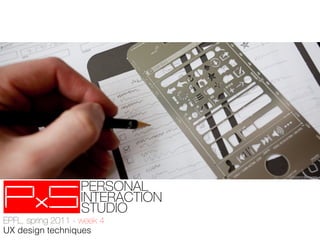
uistencils.com


EPFL, spring 2012 - week 4!
UX design techniques
overview
➝  assumptions  about interviews
➝  first feedback (best questions, topics, surprises)
➝  UX design
   ➝  situating
   ➝  motivation
   ➝  concepts

➝  UX   techniques
   ➝  personas
                             ✱This lecture is partly
                                            based on Forum
   ➝  scenarios
                            Nokia's course on UX
                                            concepting and a
   ➝  storyboards
                          Hogeschool van
                                            Amsterdam class
assumptions about interviews
first feedback from interviews
➝  best questions
➝  best topics for elicitating
➝  big surprises
uistencils.com


EPFL, spring 2011 - week 4!
UX design techniques
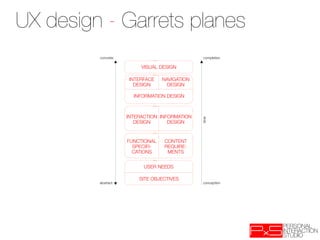
UX design - Garrets planes
         concrete
                              completion

                          VISUAL DESIGN

                     INTERFACE    NAVIGATION
                       DESIGN
      DESIGN

                       INFORMATION DESIGN


                     INTERACTION INFORMATION


                                               time
                        DESIGN
     DESIGN


                     FUNCTIONAL   CONTENT
                       SPECIFI-   REQUIRE-
                       CATIONS
    MENTS


                           USER NEEDS

                         SITE OBJECTIVES
         abstract
                              conception
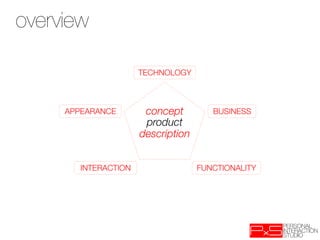
overview
topics
 Concept

                       TECHNOLOGY


     APPEARANCE
        concept
         BUSINESS
                        product
                       description


        INTERACTION
                  FUNCTIONALITY
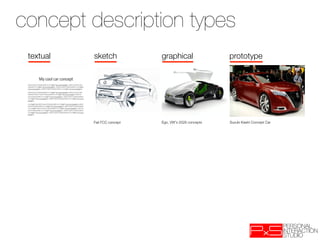
concept description types
 textual   sketch              graphical                  prototype


           Fiat FCC concept
   Ego, VW's 2028 concepts
   Suzuki Kiashi Concept Car
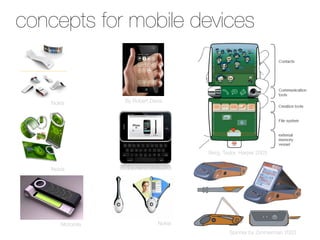
concepts for Mobile Devices
 Concepts for mobile devices


    Nokia
         By Robert Davis


                                         Berg, Taylor, Harper 2003


    Nokia
          By Aaron Besson


       Motorola
                Nokia
                                                  Spinner by Zimmerman 2003
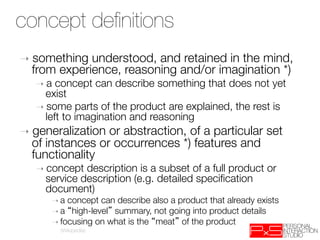
concept definitions
 Concept definition
➝  something understood, and retained in the mind,
  from experience, reasoning and/or imagination *) 
   ➝  a concept can describe something that does not yet
     exist
   ➝  some parts of the product are explained, the rest is
     left to imagination and reasoning
➝  generalizationor abstraction, of a particular set
  of instances or occurrences *) features and
  functionality
   ➝  concept description is a subset of a full product or
     service description (e.g. detailed specification
     document)‫
‏‬
      ➝  a concept can describe also a product that already exists
      ➝  a high-level summary, not going into product details
      ➝  focusing on what is the meat of the product
          (Wikipedia)
Concepting as risk
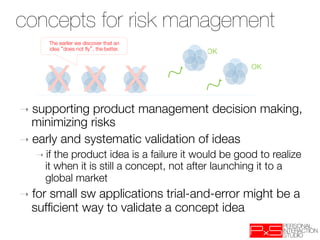
concepts for risk management
 management
         The earlier we discover that an
         idea does not fly , the better.
                                           OK


         XX X
                                                      OK


➝  supporting  product management decision making,
   minimizing risks
➝  early and systematic validation of ideas
   ➝  if the product idea is a failure it would be good to realize
      it when it is still a concept, not after launching it to a
      global market
➝  for
     small sw applications trial-and-error might be a
  sufficient way to validate a concept idea
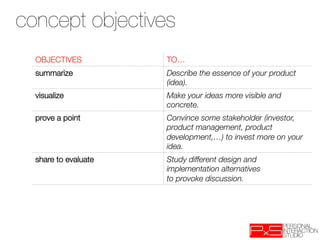
concept objectives
 Concept objectives
  OBJECTIVES
          TO…
  summarize
           Describe the essence of your product
                       (idea).
  visualize
           Make your ideas more visible and
                       concrete.
  prove a point
       Convince some stakeholder (investor,
                       product management, product
                       development,…) to invest more on your
                       idea.
  share to evaluate
   Study different design and
                       implementation alternatives
                       to provoke discussion.
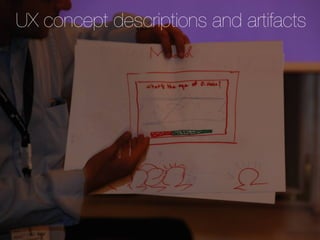
UX concept descriptions and artifacts
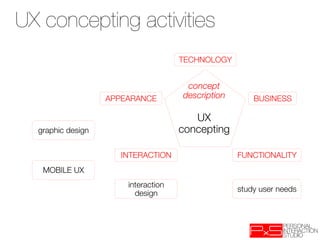
UX concepting activities
                                      TECHNOLOGY


                                       concept
                    APPEARANCE
       description
       BUSINESS
                                          
                                         UX
  graphic design
                     concepting

                       INTERACTION
                  FUNCTIONALITY
   MOBILE UX
                        interaction
                                                     study user needs
                          design
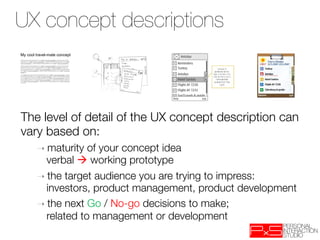
UX concept descriptions
My cool travel-mate concept


The level of detail of the UX concept description can
vary based on:
        ➝  maturity of your concept idea "
          verbal  working prototype
        ➝  the target audience you are trying to impress: "
          investors, product management, product development
        ➝  the next Go / No-go decisions to make; "
          related to management or development
exercise
 Let s say you are handed a very detailed concept description that you
 need to start to further design and develop. What are the potential…

  DRAW-BACKS
                         BENEFITS
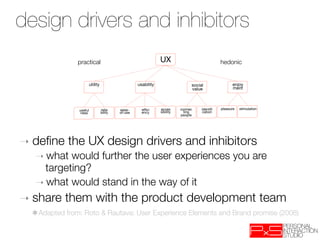
design drivers and inhibitors
 UX Design Drivers

               practical
                                      UX
                                  hedonic


                      utility
                    usability
                     social                    enjoy
                          
                          
                           value
                    ment


                useful
       relia
    ease-       effici
     acces
      connec
       identifi
   pleasure
       stimulation
                 ness
        bility
   of-use
     ency
      sibility
    ting          cation
                  
                                  
                     people


➝  define     the UX design drivers and inhibitors
   ➝  what would further the user experiences you are
     targeting?
   ➝  what would stand in the way of it

➝  share    them with the product development team
  ✱Adapted from: Roto & Rautava: User Experience Elements and Brand promise (2008)
user segments
 User Segments
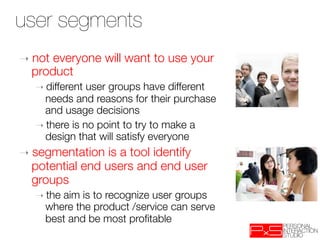
➝  noteveryone will want to use your
  product
   ➝  different user groups have different
     needs and reasons for their purchase
     and usage decisions 
   ➝  there is no point to try to make a
     design that will satisfy everyone
➝  segmentation  is a tool identify
  potential end users and end user
  groups
   ➝  the
        aim is to recognize user groups
     where the product /service can serve
     best and be most profitable
user segments example
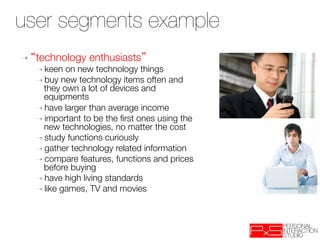
➝    technology enthusiasts 
     ➝  keen  on new technology things
     ➝  buy new technology items often and
       they own a lot of devices and
       equipments
     ➝  have larger than average income 
     ➝  important to be the first ones using the
       new technologies, no matter the cost
     ➝  study functions curiously
     ➝  gather technology related information
     ➝  compare features, functions and prices
       before buying
     ➝  have high living standards
     ➝  like games, TV and movies
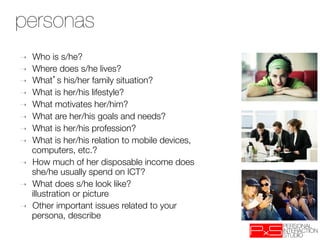
personas
  User persona(s)‫‏‬
➝    Who is s/he?
➝    Where does s/he lives?
➝    What s his/her family situation?
➝    What is her/his lifestyle?
➝    What motivates her/him? 
➝    What are her/his goals and needs?
➝    What is her/his profession?
➝    What is her/his relation to mobile devices,
     computers, etc.?
➝    How much of her disposable income does
     she/he usually spend on ICT?
➝    What does s/he look like? "
     illustration or picture
➝    Other important issues related to your
     persona, describe
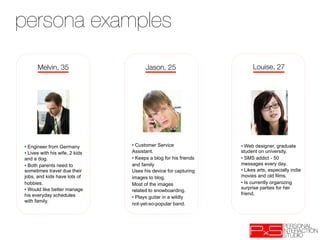
persona examples
      Melvin, 35
                      Jason, 25
                        Louise, 27


•  Engineer from Germany         •  Customer Service               •  Web designer, graduate
•  Lives with his wife, 2 kids   Assistant.                        student on university.

and a dog.                       •  Keeps a blog for his friends   •  SMS addict - 50
•  Both parents need to          and family                        messages every day.
sometimes travel due their       Uses his device for capturing     •  Likes arts, especially indie
jobs, and kids have lots of      images to blog.                   movies and old films.
hobbies.                         Most of the images                •  Is currently organizing
•  Would like better manage                                        surprise parties for her
                                 related to snowboarding.
his everyday schedules                                             friend.
                                 •  Plays guitar in a wildly
with family.
                                 not-yet-so-popular band.
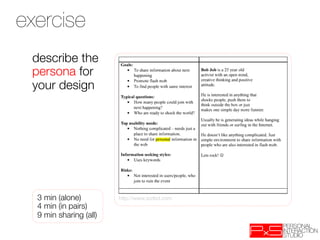
exercise
 describe the
 persona for
 your design


  3 min (alone)
         http://www.scribd.com
  4 min (in pairs)
  9 min sharing (all)
scenarios
➝  persona-based     scenario = concise narrative
   description of how persona interacts with system
   to achieve goals
➝  context-based scenario = how product can serve
   needs of persona
➝  scenarios focus on illustrate requirements (the
   WHAT), top-down decomposition leads to
   functionality (the HOW)
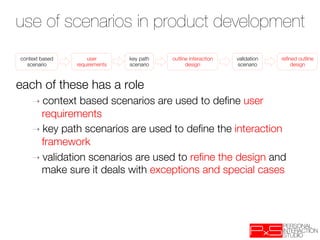
use of scenarios in product development
context based        user        key path    outline interaction   validation   refined outline
  scenario
      requirements
   scenario
         design
         scenario
        design


each of these has a role
    ➝  context  based scenarios are used to define user
      requirements
    ➝  key path scenarios are used to define the interaction
      framework
    ➝  validation scenarios are used to refine the design and
      make sure it deals with exceptions and special cases
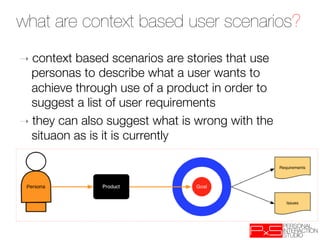
what are context based user scenarios?
➝  context based scenarios are stories that use
   personas to describe what a user wants to
   achieve through use of a product in order to
   suggest a list of user requirements
➝  they can also suggest what is wrong with the
   situaon as is it is currently
why persona based?
➝  they are archetypes of the various users of a product (or
   people with a particular problem)
➝  they have goals and behaviours – "
   they want to achieve certain things and will behave in
   particular ways to achieve them 
➝  they allow us to construct a story of an ideal usage
   scenario to help us to 
    ➝  see how the UX can be improved 
    ➝  develop (or change) products that allow users to
       achieve their goals 
➝  personas keep us at the level of goals rather than tasks in
   initial development
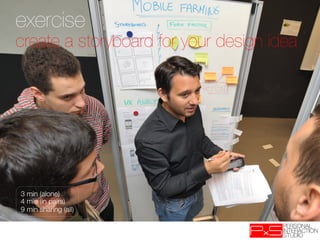
exercise
create a storyboard for your design idea


3 min (alone)
4 min (in pairs)
9 min sharing (all)
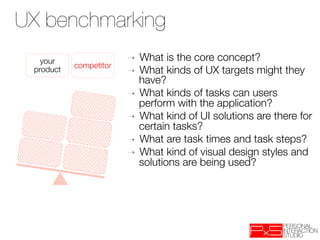
UX benchmarking
   your 
                 ➝  What is the core concept?
            competitor
 product
                 ➝  What kinds of UX targets might they
                             have?
                          ➝  What kinds of tasks can users
                             perform with the application?
                          ➝  What kind of UI solutions are there for
                             certain tasks? 
                          ➝  What are task times and task steps? 
                          ➝  What kind of visual design styles and
                             solutions are being used?
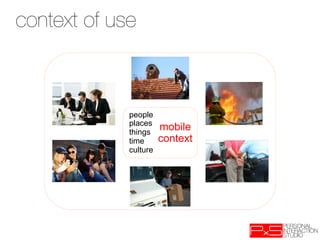
context ofthe context of use
 Describe use


              people
              places
              things
                        mobile
              time      context
              culture
wireframes
Wireframes
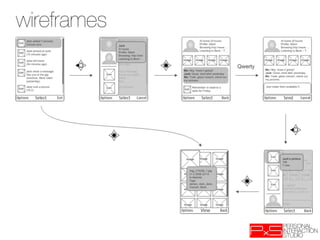
wireframes
Wireframes
prototypes and simulations
  Prototypes and simulations
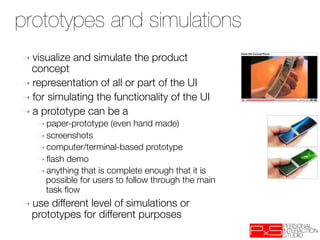
➝  visualize   and simulate the product
  concept
➝  representation of all or part of the UI
➝  for simulating the functionality of the UI
➝  a prototype can be a
   ➝  paper-prototype   (even hand made)‫
‏‬
   ➝  screenshots
   ➝  computer/terminal-based   prototype    

   ➝  flash demo
   ➝  anything that is complete enough that it is
     possible for users to follow through the main
     task flow 
➝  usedifferent level of simulations or
  prototypes for different purposes
why wireframing?
➝  fast
➝  lightweight
➝  early sense of UX
➝  spot potential problems early
➝  helps clients focus "
   (no graphical design distraction)
➝  teaches you about the client (preferences/dislikes)
free tools
➝  paper  
➝  mockingbird (web based)
➝  cacoo (web based)
➝  lumzy (web based)
➝  website wireframe
➝  pencil project
➝  balsamiq
➝  denim 
➝  for storyboarding: www.toondoo.com
tips and hints
 Tips and hints
➝  the bigger the risks related to your
  product the more effort you need to
  put to UX concepting
➝  use UX artefacts that are useful in the
  later stages of product development
   ➝  usefulas input
   ➝  reusable 

➝  consider  carefully the appropriate level
  of detail of your concept description
   ➝  do it only to the level necessary for the
     next management decision
   ➝  the more effort you put into the concept
         ➝  the more impressive it will be
         ➝  the more disappointing it will be if rejected
studio
 hints
 Tips and
studio
 Tips i
➝  qualitative
             analysis
➝  affinity mapping
➝  advice on first review presentations
well motivated idea
       ➝  idea   1
          ➝  use   data on phone to ease data entry
          
          ➝  “…so     if my friend wanted to meet, she
              would probably send an SMS and I would
              put it in my calendar…”
well motivated idea
       ➝  idea   1
          ➝  use   data on phone to ease data entry
          
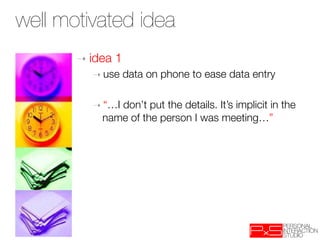
          ➝  “…I don’t put the details. It’s implicit in the
              name of the person I was meeting…”
mock up – nice and effective
task flow


                      Invitation!


   Idea => people not answering!
thought outside the box


       Smaalkoppel 24a
       22113 Oststeinbek

PxS’12 - week 4 - UX design techniques

  • 1.
    uistencils.com EPFL, spring 2012- week 4! UX design techniques
  • 2.
    overview ➝  assumptions about interviews ➝  first feedback (best questions, topics, surprises) ➝  UX design ➝  situating ➝  motivation ➝  concepts ➝  UX techniques ➝  personas ✱This lecture is partly based on Forum ➝  scenarios Nokia's course on UX concepting and a ➝  storyboards Hogeschool van Amsterdam class
  • 3.
  • 4.
    first feedback frominterviews ➝  best questions ➝  best topics for elicitating ➝  big surprises
  • 5.
    uistencils.com EPFL, spring 2011- week 4! UX design techniques
  • 6.
    UX design -Garrets planes concrete completion VISUAL DESIGN INTERFACE NAVIGATION DESIGN DESIGN INFORMATION DESIGN INTERACTION INFORMATION time DESIGN DESIGN FUNCTIONAL CONTENT SPECIFI- REQUIRE- CATIONS MENTS USER NEEDS SITE OBJECTIVES abstract conception
  • 7.
    overview topics Concept TECHNOLOGY APPEARANCE concept BUSINESS product description INTERACTION FUNCTIONALITY
  • 8.
    concept description types textual sketch graphical prototype Fiat FCC concept Ego, VW's 2028 concepts Suzuki Kiashi Concept Car
  • 9.
    concepts for MobileDevices Concepts for mobile devices Nokia By Robert Davis Berg, Taylor, Harper 2003 Nokia By Aaron Besson Motorola Nokia Spinner by Zimmerman 2003
  • 10.
    concept definitions Conceptdefinition ➝  something understood, and retained in the mind, from experience, reasoning and/or imagination *) ➝  a concept can describe something that does not yet exist ➝  some parts of the product are explained, the rest is left to imagination and reasoning ➝  generalizationor abstraction, of a particular set of instances or occurrences *) features and functionality ➝  concept description is a subset of a full product or service description (e.g. detailed specification document)‫ ‏‬ ➝  a concept can describe also a product that already exists ➝  a high-level summary, not going into product details ➝  focusing on what is the meat of the product (Wikipedia)
  • 11.
    Concepting as risk conceptsfor risk management management The earlier we discover that an idea does not fly , the better. OK XX X OK ➝  supporting product management decision making, minimizing risks ➝  early and systematic validation of ideas ➝  if the product idea is a failure it would be good to realize it when it is still a concept, not after launching it to a global market ➝  for small sw applications trial-and-error might be a sufficient way to validate a concept idea
  • 12.
    concept objectives Conceptobjectives OBJECTIVES TO… summarize Describe the essence of your product (idea). visualize Make your ideas more visible and concrete. prove a point Convince some stakeholder (investor, product management, product development,…) to invest more on your idea. share to evaluate Study different design and implementation alternatives to provoke discussion.
  • 13.
  • 14.
    UX concepting activities UXconcepting activities TECHNOLOGY concept APPEARANCE description BUSINESS UX graphic design concepting INTERACTION FUNCTIONALITY MOBILE UX interaction study user needs design
  • 15.
    UX concept descriptions Mycool travel-mate concept The level of detail of the UX concept description can vary based on: ➝  maturity of your concept idea " verbal  working prototype ➝  the target audience you are trying to impress: " investors, product management, product development ➝  the next Go / No-go decisions to make; " related to management or development
  • 16.
    exercise Let ssay you are handed a very detailed concept description that you need to start to further design and develop. What are the potential… DRAW-BACKS BENEFITS
  • 17.
    design drivers andinhibitors UX Design Drivers practical UX hedonic utility usability social enjoy value ment useful relia ease- effici acces connec identifi pleasure stimulation ness bility of-use ency sibility ting cation people ➝  define the UX design drivers and inhibitors ➝  what would further the user experiences you are targeting? ➝  what would stand in the way of it ➝  share them with the product development team ✱Adapted from: Roto & Rautava: User Experience Elements and Brand promise (2008)
  • 18.
    user segments UserSegments ➝  noteveryone will want to use your product ➝  different user groups have different needs and reasons for their purchase and usage decisions ➝  there is no point to try to make a design that will satisfy everyone ➝  segmentation is a tool identify potential end users and end user groups ➝  the aim is to recognize user groups where the product /service can serve best and be most profitable
  • 19.
    user segments example ➝  technology enthusiasts ➝  keen on new technology things ➝  buy new technology items often and they own a lot of devices and equipments ➝  have larger than average income ➝  important to be the first ones using the new technologies, no matter the cost ➝  study functions curiously ➝  gather technology related information ➝  compare features, functions and prices before buying ➝  have high living standards ➝  like games, TV and movies
  • 20.
    personas Userpersona(s)‫‏‬ ➝  Who is s/he? ➝  Where does s/he lives? ➝  What s his/her family situation? ➝  What is her/his lifestyle? ➝  What motivates her/him? ➝  What are her/his goals and needs? ➝  What is her/his profession? ➝  What is her/his relation to mobile devices, computers, etc.? ➝  How much of her disposable income does she/he usually spend on ICT? ➝  What does s/he look like? " illustration or picture ➝  Other important issues related to your persona, describe
  • 21.
    persona examples Melvin, 35 Jason, 25 Louise, 27 •  Engineer from Germany •  Customer Service •  Web designer, graduate •  Lives with his wife, 2 kids Assistant. student on university. and a dog. •  Keeps a blog for his friends •  SMS addict - 50 •  Both parents need to and family messages every day. sometimes travel due their Uses his device for capturing •  Likes arts, especially indie jobs, and kids have lots of images to blog. movies and old films. hobbies. Most of the images •  Is currently organizing •  Would like better manage surprise parties for her related to snowboarding. his everyday schedules friend. •  Plays guitar in a wildly with family. not-yet-so-popular band.
  • 22.
    exercise describe the persona for your design 3 min (alone) http://www.scribd.com 4 min (in pairs) 9 min sharing (all)
  • 23.
    scenarios ➝  persona-based scenario = concise narrative description of how persona interacts with system to achieve goals ➝  context-based scenario = how product can serve needs of persona ➝  scenarios focus on illustrate requirements (the WHAT), top-down decomposition leads to functionality (the HOW)
  • 24.
    use of scenariosin product development context based user key path outline interaction validation refined outline scenario requirements scenario design scenario design each of these has a role ➝  context based scenarios are used to define user requirements ➝  key path scenarios are used to define the interaction framework ➝  validation scenarios are used to refine the design and make sure it deals with exceptions and special cases
  • 25.
    what are contextbased user scenarios? ➝  context based scenarios are stories that use personas to describe what a user wants to achieve through use of a product in order to suggest a list of user requirements ➝  they can also suggest what is wrong with the situaon as is it is currently
  • 26.
    why persona based? ➝ they are archetypes of the various users of a product (or people with a particular problem) ➝  they have goals and behaviours – " they want to achieve certain things and will behave in particular ways to achieve them ➝  they allow us to construct a story of an ideal usage scenario to help us to ➝  see how the UX can be improved ➝  develop (or change) products that allow users to achieve their goals ➝  personas keep us at the level of goals rather than tasks in initial development
  • 27.
    exercise create a storyboardfor your design idea 3 min (alone) 4 min (in pairs) 9 min sharing (all)
  • 28.
    UX benchmarking your ➝  What is the core concept? competitor product ➝  What kinds of UX targets might they have? ➝  What kinds of tasks can users perform with the application? ➝  What kind of UI solutions are there for certain tasks? ➝  What are task times and task steps? ➝  What kind of visual design styles and solutions are being used?
  • 29.
    context ofthe contextof use Describe use people places things mobile time context culture
  • 30.
  • 31.
  • 32.
    prototypes and simulations Prototypes and simulations ➝  visualize and simulate the product concept ➝  representation of all or part of the UI ➝  for simulating the functionality of the UI ➝  a prototype can be a ➝  paper-prototype (even hand made)‫ ‏‬ ➝  screenshots ➝  computer/terminal-based prototype ➝  flash demo ➝  anything that is complete enough that it is possible for users to follow through the main task flow ➝  usedifferent level of simulations or prototypes for different purposes
  • 33.
    why wireframing? ➝  fast ➝ lightweight ➝  early sense of UX ➝  spot potential problems early ➝  helps clients focus " (no graphical design distraction) ➝  teaches you about the client (preferences/dislikes)
  • 34.
    free tools ➝  paper ➝  mockingbird (web based) ➝  cacoo (web based) ➝  lumzy (web based) ➝  website wireframe ➝  pencil project ➝  balsamiq ➝  denim ➝  for storyboarding: www.toondoo.com
  • 35.
    tips and hints Tips and hints ➝  the bigger the risks related to your product the more effort you need to put to UX concepting ➝  use UX artefacts that are useful in the later stages of product development ➝  usefulas input ➝  reusable ➝  consider carefully the appropriate level of detail of your concept description ➝  do it only to the level necessary for the next management decision ➝  the more effort you put into the concept ➝  the more impressive it will be ➝  the more disappointing it will be if rejected
  • 36.
  • 37.
    studio Tips i ➝ qualitative analysis ➝  affinity mapping ➝  advice on first review presentations
  • 38.
    well motivated idea ➝  idea 1 ➝  use data on phone to ease data entry ➝  “…so if my friend wanted to meet, she would probably send an SMS and I would put it in my calendar…”
  • 39.
    well motivated idea ➝  idea 1 ➝  use data on phone to ease data entry ➝  “…I don’t put the details. It’s implicit in the name of the person I was meeting…”
  • 40.
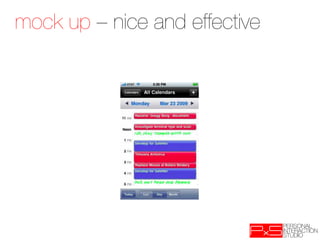
    mock up –nice and effective
  • 41.
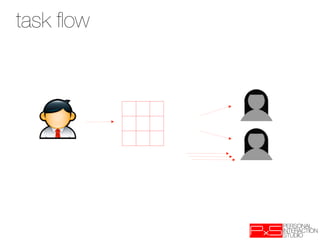
    task flow Invitation! Idea => people not answering!
  • 42.
    thought outside thebox Smaalkoppel 24a 22113 Oststeinbek